1
.::::::::::::::::::::::::::::::::::::::::::::::
.::::::::::::::
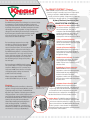
“Built-In” Cascading
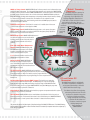
DHWP w/ Pump Control- SMART SYSTEM allows for direct connection to an indirect tank to meet
potable hot water requirements. The indirect tank thermostat will send a signal to the SMART SYSTEM
Sequencer
indicating a call for domestic hot water. SMART SYSTEM will then override the outdoor air reset and start
An internal sequencer is standard on
the DHWP pump to flow boiler water to the coil in the indirect tank. SMART SYSTEM drives both the
each KNIGHT and allows for lead/lag
firing rate and boiler discharge water temperature to the setting determined by the installer, allowing
sequencing of up to eight boilers. The
for a fast recovery of domestic hot water loads. The installer can also adjust the amount
lead/lag configuration rotates the lead
of time the boiler operates in an override setting, and the time the DHWP pump is allowed to
boiler after a 24 hour time period to ensure
operate after demand is satisfied.
equal runtime for all boilers. Since the
sequencer is built into the KNIGHT, there is no
Contacts on Any Failure- This allows for connection of an audible alarm in the event
need for an
of a boiler fault or will send an alarm signal to a BMS.
expensive
System Pump Control- SMART SYSTEM will supply power to, and operate, the system
third party
pump as needed. The installer can vary the amount of time the system pump is allowed to
sequencing
operate after a call for heat has been satisfied.
control.
Boiler Pump Control- SMART SYSTEM will start and
stop the boiler pump as needed and allows the
installer to set the amount of time the pump is
allowed to operate after the call for heat is
satisfied.
Inlet and Outlet Water Temperature
Sensors- SMART SYSTEM will display inlet
and outlet water temperatures, and allow the
installer to determine which sensor will be
used to control the boiler set point.
F or C- Allows the installer to set the unit to
display degrees Fahrenheit or Celsius.
Boiler Set Point- SMART SYSTEM allows
the boiler set point to be adjusted by the
user. The installer can program the minimum
and maximum set point parameters that the user
will be allowed to adjust.
Off Time Limiting- SMART SYSTEM allows the installer to
determine, in time, how long the unit must remain off prior to allowing
a new firing sequence to begin. The installer may also program the limit to
override if the water temperature drops significantly prior to the completion of the
limiting time.
Building Management System (BMS) Control- The installer can program the
control to accept a 0-10 VDC external signal. The BMS settings are: set point at low/high
input, low/high input range, BMS power setting at low/high range and the BMS differential
temperature setting. In order to program SMART SYSTEM to accept the BMS signal, setup must
be performed with the optional PC software kit.
PC and Pocket PC
Connection
The KNIGHT Heating Boiler is available with
PC software and hardware to troubleshoot
and program all functionality or Pocket PC
software with infrared technology.
Night Setback- SMART SYSTEM allows the installer to program a temperature setback for any time
in a 24 hour day, for each day of the week.
The software also allows for easy plotting
and trending of historical data. The data
can be used to determine many points
Service Mode- SMART SYSTEM includes a masked button that allows the boiler to be put into a
of reference including approximate
temporary service mode. This button allows manual control of the blower speed. SMART SYSTEM will
energy consumption. It is necessary
automatically return to normal operation after a timeout if no buttons have been pushed.
to purchase the PC software and
hardware to install and program
Building Management
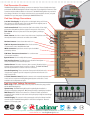
The previous list gives a brief description of the functionality of the SMART SYSTEM control. The KNIGHT Heating
System features into
Boiler Installation and Operation or Service manual should be consulted for complete instruction to adjust any of
SMART SYSTEM.
these settings and features.
:::::::.
::::::::::::::::::::::::::::::::::::::::::::::::::::::