1
CMX-5000, CU-V160
7.1.1.3 How to enter the test mode of the
player, and the function that can
confirm with the test mode
(1) How to enter the test mode
Mode 3
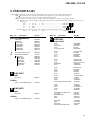
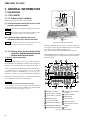
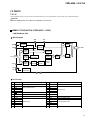
Enter the test mode when the power is on while pressing the
PLAYER SELECT A and B buttons of monitor section of the player.
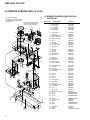
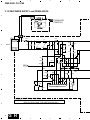
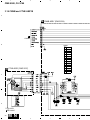
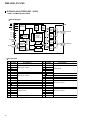
Connect the remote control unit (RU-V101) for service to JA1009
(A PLAYER) or JA1010 (B PLAYER) of the TRMB Assy.
TRMB ASSY
PLA
JA1009 PLB
JA1010
or
REJECT
PAUSE
AUDIO
SPEED
OPEN
PLAY
STILL/STEP
– MULTI-SPEED +
SCAN
CLEAR
REJECT
PAUSE
PLAY
STILL/STEP E
STILL/STEP e
MULTI-SPEED +
MULTI-SPEED –
SCAN ¡
SCAN 1
CLEAR
FRAME
TIME
CHAPTER
SEARCH
10 key
DISPLAY (FUNC + 1)
STILL
(FUNC + 2)
C-MODE
(FUNC + 3)
VIDEO
(FUNC + 4)
STOP.M
(FUNC + 5)
START
(FUNC + 6)
(FUNC + 7)
(FUNC + 8)
(FUNC + 9)
: stop
: Pause
: Play
: 1 track FWD jump
: 1 track REV jump
: Multi FWD jump
: Multi REV jump
: Not used
: Not used
: Clear
: Not used
: Time set
: Track set
: Search
: Numerical input
: Not used
: Not used
: RF Level Adjustment
: Not used
: Not used
: Search for first piece of
music and pause
: Track search
: Tempo
: Disc eject
FUNC
7
8
9
AUDIO
SPEED
OPEN
4
5
6
VIDEO
STOP.M
START
1
2
3
DISPLAY
0
STILL
C-MODE
FRAME
TIME
CHAPTER
A
B
C
SEARCH
Remote control unit
for service
(RU-V101)
CR
Fig. 3 Connection of the remote control unit for service
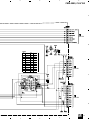
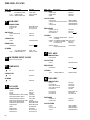
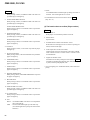
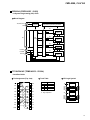
Function of the remote control unit for service
(RU-V101)
REJECT
PAUSE
PLAY
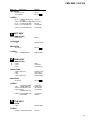
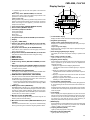
(2) The function that can confirm (Player section)
Note: • ON side of DIGITAL OUT select switch on the Rear Panel
is normal speed, and OFF side is fourfold speed.
• Show explanation about operation content of the remote
control unit (RU-V101) for service and a state of the player.
1. Insert a DISC, and enter the play mode when pressing the PLAY
button of the remote control unit in the state that there is a loading
mechanism at the clamp position. (Both normal and fourfold
speeds can confirm a sound.)
STILL/STEP
– MULTI-SPEED +
SCAN
CLEAR
FUNC
7
8
9
AUDIO
SPEED
OPEN
4
5
6
VIDEO
STOP.M
START
1
2
3
DISPLAY
0
STILL
FRAME
TIME
CHAPTER
A
B
C
C-MODE
SEARCH
CR
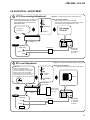
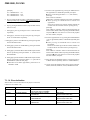
2. Search TRk No. when pressing the Trk (number) = FUNC =
AUDIO button sequentially, and output a sound. (Both normal
and fourfold speeds can confirm a sound.)
¶ Only operation of steps 3 and 4 can perform when this
operation was done.
¶ When the operation after step 5 is done, eject a disc and insert
it again.
3. When pressing the FUNC = OPEN button sequentially, eject
the DISC.
4. When pressing the ∗ ∗ ∗ (number three columns of input) =
SPEED button sequentially, tempo will be able to change. (only
fourfold speed)
100-place is 0 : - (minus) or
1 : Specify + ( plus)
Set the tempo by rest of two columns. (until ±16%)
69