1
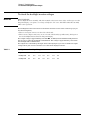
The Agilent Technologies Infiniium Oscilloscope Model 54853/4/5A at a Glance
Ease of use with high performance
The Agilent Technologies Infiniium oscilloscopes
combine unprecedented ease-of-use with highperformance digitizing oscilloscope functionality
to simplify your design and analysis measurement
tasks.
• Traditional oscilloscope front-panel interface
provides direct access to the controls needed
for most troubleshooting tasks
• Graphical user interface with menus,
windows, dialogs, and toolbars provides easy
access to dozens of configuration and
analysis tools, ensuring you can set up and
make the most complex measurements
• Agilent 54853A offers 4 channels, 20 GSa/s
sampling rate on all four channels, 2.5 GHz
bandwidth
• Agilent 54854A offers 4 channels, 20 GSa/s
sampling rate on all four channels, 4 GHz
bandwidth
• Agilent 54855A offers 4 channels, 20 GSa/s
sampling rate on all four channels, 6 GHz
bandwidth
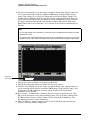
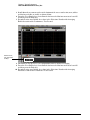
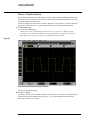
Display shows waveforms and graphical user
interface
• Graphical interface allows direct interaction
with waveforms, including drag-and-drop
positioning and instant waveform zoom
• Waveforms displayed in color, making
correlation easy
• Current configuration parameters displayed
near the waveform display and are colorcoded to make identification easy
• Graphical interface menus and toolbars
simplify complex measurement setups
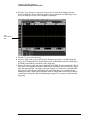
Horizontal controls set sweep speed and position
• Main sweep speeds from 5 ps/div to 20 s/div
(54855A/54854A) or 10 ps/div to 20 s/div
(54853A)
• Delayed sweep speeds from 1 ps/div to main
time base setting
• Intensified waveforms on main sweep
window make it easy to see what will appear
in delayed sweep window
ii
Acquisition and general controls start and stop
the scope and do basic setup
• Run and stop controls for continuous or
single-shot acquisitions
• Clear display before one or more acquisitions
• Default setup and Autoscale set initial
configuration
Hard disk drive and floppy disk drive for saving
and restoring setups and measurement results
• Store measurement displays for inclusion in
reports and test setup guides
• Store oscilloscope setups to repeat tests
another time
• Hard disk stores oscilloscope operating
system
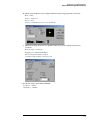
Trigger setup controls set mode and basic
parameters
• Select Edge, Glitch, or Advanced Modes
• Choose input source and slope
• Use graphical user interface to simplify
configuration of pattern, state, delay, and
violation
• Use auxiliary trigger to increase triggering
flexibility
Vertical controls set attenuation, and position
• Input attenuation adjustable from 1 mV/div to
1 V/div
• Color-coded knobs make it easy to find the
controls that affect each waveform
Marker and quick measurements help measure
waveform parameters
• Waveform markers A and B to check voltage
or ∆−time at any point on the displayed
waveform
• Quick Meas executes up to four predefined
measurements instantly
Service Policy
The service policy of this instrument requires
replacing defective assemblies. Some
assemblies can be replaced on an exchange
basis.