1
HP NonStop SQL/MX
Quick Start
Abstract
Providing the basic techniques for using HP NonStop™ SQL/MX, this Quick Start is
designed to enable you to get immediate access to your database without extensive
preparation.
Product Version
NonStop SQL/MX Release 2.0
Supported Release Version Updates (RVUs)
This publication supports G06.23 and all subsequent G-series RVUs until otherwise
indicated by its replacement publication.
Part Number
Published
523724-002
August 2004
Document History
Part Number
Product Version
Published
424297-001
NonStop SQL/MX Release 1.0
March 2001
429989-001
NonStop SQL/MX Release 1.5
November 2001
523399-001
NonStop SQL/MX Release 1.8
November 2002
523724-001
NonStop SQL/MX Release 2.0
April 2004
523724-002
NonStop SQL/MX Release 2.0
August 2004
HP NonStop SQL/MX Quick
Start
Index
What’s New in This Manual v
Manual Information v
New and Changed Information
v
About This Manual vii
Audience vii
Related Documentation vii
Notation Conventions x
1. Welcome to Quick Start
What Is MXCI? 1-1
Using MXCI 1-1
Starting MXCI 1-1
Entering a Command 1-2
Stopping MXCI 1-2
The Sample Database 1-2
PARTS Table 1-3
ORDERS Table 1-3
ODETAIL Table 1-3
EMPLOYEE Table 1-4
DEPT Table 1-4
Installing the setmxdb Script 1-4
Installing or Removing the Sample Database 1-5
Using a SQL/MX Release 1.8 setmxdb Script in the SQL/MX Release 2.0
Environment 1-8
2. Selecting Information From a Table
Working With SQL/MP Tables 2-1
Selecting All the Data From a Table 2-1
Displaying Selected Columns. 2-2
Displaying Selected Rows 2-2
Displaying Calculated Values 2-3
Displaying Descriptions of Columns 2-4
Hewlett-Packard Company—523724-002
i
3. Stating Conditions for Selecting Data
Contents
Selecting Distinct Rows 2-5
Displaying Information in an Ordered Sequence
2-6
3. Stating Conditions for Selecting Data
Using Predicates to Select Data 3-1
Using the LIKE Predicate 3-2
Specifying More Than One Condition 3-3
Using AND or OR 3-3
Specifying What Not to Select 3-4
4. Displaying Information About Groups of Rows
Selecting Values by Using Aggregate Functions
Grouping and Ordering Rows 4-2
Counting Rows 4-4
Computing Averages for Groups 4-5
4-1
5. Selecting Data From More Than One Table
Joining Tables 5-1
Qualifying Ambiguous Column Names
Using Correlation Names 5-3
5-2
6. Changing Information in a Table
Inserting a Row Into a Table 6-1
Updating an Existing Row 6-2
Deleting Rows From a Table 6-3
7. Using the Same SELECT Statement Repeatedly
Preparing to Execute a Statement Repeatedly
Providing the Parameter Values 7-2
7-1
8. Protecting Database Integrity
Starting a Transaction 8-1
Ending a Transaction 8-2
HP NonStop SQL/MX Quick Start—523724-002
ii
9. Creating Database Objects
Contents
9. Creating Database Objects
Starting MXCI 9-1
Creating a Catalog 9-1
Creating a Table 9-2
Creating a View 9-3
Dropping Objects 9-4
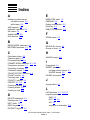
Index
HP NonStop SQL/MX Quick Start—523724-002
iii
Contents
HP NonStop SQL/MX Quick Start—523724-002
iv
What’s New in This Manual
Manual Information
HP NonStop SQL/MX Quick Start
Abstract
Providing the basic techniques for using HP NonStop™ SQL/MX, this Quick Start is
designed to enable you to get immediate access to your database without extensive
preparation.
Product Version
NonStop SQL/MX Release 2.0
Supported Release Version Updates (RVUs)
This publication supports G06.23 and all subsequent G-series RVUs until otherwise
indicated by its replacement publication.
Part Number
Published
523724-002
August 2004
Document History
Part Number
Product Version
Published
424297-001
NonStop SQL/MX Release 1.0
March 2001
429989-001
NonStop SQL/MX Release 1.5
November 2001
523399-001
NonStop SQL/MX Release 1.8
November 2002
523724-001
NonStop SQL/MX Release 2.0
April 2004
523724-002
NonStop SQL/MX Release 2.0
August 2004
New and Changed Information
•
•
Added a new subsection, “Working with SQL/MP Tables,” to Selecting Information
From a Table on page 2-1.
Updated examples in Creating Database Objects on page 9-1.
HP NonStop SQL/MX Quick Start—523724-002
v
New and Changed Information
What’s New in This Manual
HP NonStop SQL/MX Quick Start—523724-002
vi
About This Manual
This Quick Start is designed to help you learn some basic techniques for using
SQL/MX and to allow you to get immediate access to your database without extensive
preparation.
Audience
The Quick Start is useful if:
•
•
•
You plan to be a user of MXCI (SQL/MX conversational interface).
You want a quick introduction to using SQL.
You want to use MXCI to retrieve information from your database or to add or
modify data.
Related Documentation
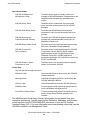
This manual is part of the SQL/MX library of manuals, which includes:
Introductory Guides
SQL/MX Comparison Guide
for SQL/MP Users
Describes SQL differences between SQL/MP and
SQL/MX.
SQL/MX Quick Start
Describes basic techniques for using SQL in the
SQL/MX conversational interface (MXCI). Includes
information about installing the sample database.
Reference Manuals
SQL/MX Reference Manual
Describes the syntax of SQL/MX statements, MXCI
commands, functions, and other SQL/MX language
elements.
SQL/MX Connectivity
Service Administrative
Command Reference
Describes the SQL/MX administrative command
library (MACL) available with the SQL/MX
conversational interface (MXCI).
DataLoader/MX Reference
Manual
Describes the features and functions of the
DataLoader/MX product, a tool to load SQL/MX
databases.
SQL/MX Messages Manual
Describes SQL/MX messages.
SQL/MX Glossary
Defines SQL/MX terminology.
Programming Manuals
SQL/MX Programming
Manual for C and COBOL
Describes how to embed SQL/MX statements in
ANSI C and COBOL programs.
SQL/MX Programming
Manual for Java
Describes how to embed SQL/MX statements in
Java programs according to the SQLJ standard.
HP NonStop SQL/MX Quick Start—523724-002
vii
Related Documentation
About This Manual
Specialized Guides
SQL/MX Installation and
Management Guide
Describes how to plan for, install, create, and
manage an SQL/MX database. Explains how to use
installation and management commands and
utilities.
SQL/MX Query Guide
Describes how to understand query execution
plans and write optimal queries for an SQL/MX
database.
SQL/MX Data Mining Guide
Describes the SQL/MX data structures and
operations to carry out the knowledge-discovery
process.
SQL/MX Queuing and
Publish/Subscribe Services
Describes how SQL/MX integrates transactional
queuing and publish/subscribe services into its
database infrastructure.
SQL/MX Report Writer Guide
Describes how to produce formatted reports using
data from a NonStop SQL/MX database.
SQL/MX Connectivity
Service Manual
Describes how to install and manage the SQL/MX
Connectivity Service (MXCS), which enables
applications developed for the Microsoft Open
Database Connectivity (ODBC) application
programming interface (API) and other connectivity
APIs to use SQL/MX.
SQL/MX Guide to Stored
Procedures in Java
Describes how to use stored procedures that are
written in Java within SQL/MX.
Online Help
The SQL/MX Online Help consists of:
Reference Help
Overview and reference entries from the SQL/MX
Reference Manual.
Messages Help
Individual messages grouped by source from the
SQL/MX Messages Manual.
Glossary Help
Terms and definitions from the SQL/MX Glossary.
NSM/web Help
Context-sensitive help topics that describe how to
use the NSM/web management tool.
Visual Query Planner Help
Context-sensitive help topics that describe how to
use the Visual Query Planner graphical user
interface.
The NSM/web and Visual Query Planner help systems are accessible from their
respective applications. You can download the Reference, Messages, and Glossary
online help from the $SYSTEM.ZMXHELP subvolume or from the HP NonStop
Technical Library (NTL). For more information about downloading online help, see the
SQL/MX Installation and Management Guide.
HP NonStop SQL/MX Quick Start—523724-002
viii
Related Documentation
About This Manual
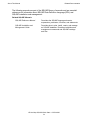
The following manuals are part of the SQL/MP library of manuals and are essential
references for information about SQL/MP Data Definition Language (DDL) and
SQL/MP installation and management:
Related SQL/MP Manuals
SQL/MP Reference Manual
Describes the SQL/MP language elements,
expressions, predicates, functions, and statements.
SQL/MP Installation and
Management Guide
Describes how to plan, install, create, and manage
an SQL/MP database. Describes installation and
management commands and SQL/MP catalogs
and files.
HP NonStop SQL/MX Quick Start—523724-002
ix
Notation Conventions
About This Manual
This figure shows the manuals in the SQL/MX library:
Programming Manuals
Introductory Guides
SQL/MX
Comparison
Guide for
SQL/MP
Users
SQL/MX
Programming
Manual for C
and COBOL
SQL/MX
Quick Start
SQL/MX
Programming
Manual for
Java
Reference Manuals
SQL/MX
Reference
Manual
SQL/MX
Messages
Manual
SQL/MX
Connectivity
Service
Administrative
Command
Reference
SQL/MX
Glossary
DataLoader/MX
Reference
Manual
Specialized Guides
SQL/MX
Installation
and
Management
Guide
SQL/MX
Query Guide
SQL/MX
Data Mining
Guide
SQL/MX
Queuing
and Publish/
Subscribe
Services
SQL/MX
Report
Writer
Guide
SQL/MX
Connectivity
Service
Manual
SQL/MX Online Help
SQL/MX
Guide to
Stored
Procedures
in Java
Reference
Help
Messages
Help
Glossary
Help
NSM/web
Help
Visual Query
Planner Help
vst001.vsd
Notation Conventions
Hypertext Links
Blue underline is used to indicate a hypertext link within text. By clicking a passage of
text with a blue underline, you are taken to the location described. For example:
HP NonStop SQL/MX Quick Start—523724-002
x
General Syntax Notation
About This Manual
This requirement is described under Backup DAM Volumes and Physical Disk
Drives on page 3-2.
General Syntax Notation
This list summarizes the notation conventions for syntax presentation in this manual.
UPPERCASE LETTERS. Uppercase letters indicate keywords and reserved words. Type
these items exactly as shown. Items not enclosed in brackets are required. For
example:
MAXATTACH
lowercase italic letters. Lowercase italic letters indicate variable items that you supply.
Items not enclosed in brackets are required. For example:
file-name
computer type. Computer type letters within text indicate C and Open System Services
(OSS) keywords and reserved words. Type these items exactly as shown. Items not
enclosed in brackets are required. For example:
myfile.c
italic computer type. Italic computer type letters within text indicate C and Open
System Services (OSS) variable items that you supply. Items not enclosed in brackets
are required. For example:
pathname
[ ] Brackets. Brackets enclose optional syntax items. For example:
TERM [\system-name.]$terminal-name
INT[ERRUPTS]
A group of items enclosed in brackets is a list from which you can choose one item or
none. The items in the list can be arranged either vertically, with aligned brackets on
each side of the list, or horizontally, enclosed in a pair of brackets and separated by
vertical lines. For example:
FC [ num ]
[ -num ]
[ text ]
K [ X | D ] address
{ } Braces. A group of items enclosed in braces is a list from which you are required to
choose one item. The items in the list can be arranged either vertically, with aligned
HP NonStop SQL/MX Quick Start—523724-002
xi
General Syntax Notation
About This Manual
braces on each side of the list, or horizontally, enclosed in a pair of braces and
separated by vertical lines. For example:
LISTOPENS PROCESS { $appl-mgr-name }
{ $process-name }
ALLOWSU { ON | OFF }
| Vertical Line. A vertical line separates alternatives in a horizontal list that is enclosed in
brackets or braces. For example:
INSPECT { OFF | ON | SAVEABEND }
… Ellipsis. An ellipsis immediately following a pair of brackets or braces indicates that you
can repeat the enclosed sequence of syntax items any number of times. For example:
M address [ , new-value ]…
[ - ] {0|1|2|3|4|5|6|7|8|9}…
An ellipsis immediately following a single syntax item indicates that you can repeat that
syntax item any number of times. For example:
"s-char…"
Punctuation. Parentheses, commas, semicolons, and other symbols not previously
described must be typed as shown. For example:
error := NEXTFILENAME ( file-name ) ;
LISTOPENS SU $process-name.#su-name
Quotation marks around a symbol such as a bracket or brace indicate the symbol is a
required character that you must type as shown. For example:
"[" repetition-constant-list "]"
Item Spacing. Spaces shown between items are required unless one of the items is a
punctuation symbol such as a parenthesis or a comma. For example:
CALL STEPMOM ( process-id ) ;
If there is no space between two items, spaces are not permitted. In this example, no
spaces are permitted between the period and any other items:
$process-name.#su-name
Line Spacing. If the syntax of a command is too long to fit on a single line, each
continuation line is indented three spaces and is separated from the preceding line by
a blank line. This spacing distinguishes items in a continuation line from items in a
vertical list of selections. For example:
ALTER [ / OUT file-spec / ] LINE
[ , attribute-spec ]…
HP NonStop SQL/MX Quick Start—523724-002
xii
1
Welcome to Quick Start
This section provides information about how to use MXCI and how to install the sample
database that is used in the Quick Start tutorial.
What Is MXCI?
MXCI is the conversational interface to the SQL/MX relational database management
system. Use MXCI to perform data manipulation operations without any programming.
Use SQL (the structured query language) within MXCI to display and modify
information in your database.
Using MXCI
Data Manipulation Language (DML) statements are used to access SQL/MP and
SQL/MX tables. For more information about using DML statements, see the SQL/MX
Reference Manual.
Starting MXCI
MXCI runs as an HP NonStop Kernel Open System Services (OSS) process and must
be started from within the OSS environment:
1. Log on to the server by using your user ID and password.
2. To set the default directory, set the TACL HOME parameter to specify the location
for your home directory. Note that the OSS environment is case-sensitive.
For example, to set your home directory to /usr/yourname, insert this line in
your TACLCSTM file:
PARAM HOME /usr/yourname
3. Start the OSS shell by entering the osh command at the TACL prompt:
>osh
You are now in the OSS environment.
4. Start MXCI by entering the mxci command at the OSS prompt:
>mxci
/G/SYSTEM/SYSTEM: mxci
Hewlett-Packard NonStop(TM) SQL/MX Conversational Interface
2.0 (c) Copyright 2003 Hewlett-Packard Development Company,
LP.
>>
You have started an MXCI session.
HP NonStop SQL/MX Quick Start—523724-002
1 -1
Entering a Command
Welcome to Quick Start
Entering a Command
To enter commands at the MXCI prompt (>>), you must indicate the end of an MXCI
command by typing a semicolon (;). If you press Enter without typing a semicolon,
MXCI displays the command continuation prompt (+>). You can either continue the
command or type a semicolon and press Enter to execute the command:
>>BEGIN WORK
+>;
--- SQL operation complete.
>>
Stopping MXCI
To end your MXCI session, type this command and press Enter:
>>exit;
End of MXCI Session
You are now back in the OSS environment.
The Sample Database
You will be accessing tables in the sample database for SQL/MX as you work through
the examples in this tutorial. A table consists of rows and columns. MXCI displays rows
horizontally and columns vertically. Columns have names, rows do not. Stored data is
retrieved and displayed in rows and columns.
•
•
Each row contains pieces of related data, such as the number of a part, its
description, price, and the quantity available.
Each column contains data of the same type, such as all part numbers.
Use the sample database to follow each lesson and perform the operations shown in
the examples. The results of your work should be similar to the results shown in the
examples.
The sample database consists of a catalog and three schemas:
SAMDBCAT
Sample database catalog.
PERSNL
Contains the EMPLOYEE, JOB, DEPT, and PROJECT tables, which
are used to store personnel data.
SALES
Contains the CUSTOMER, ORDERS, ODETAIL and PARTS tables,
which are used to store order data.
INVENT
Contains the SUPPLIER, PARTSUPP, and PARTLOC tables, which
are used to store inventory data.
•
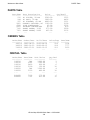
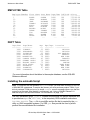
The Quick Start examples use these tables in the sample database: PARTS Table,
ORDERS Table, ODETAIL Table, EMPLOYEE Table, and DEPT Table.
HP NonStop SQL/MX Quick Start—523724-002
1 -2
PARTS Table
Welcome to Quick Start
PARTS Table
Part/Num
-------212
244
255
2001
6500
6603
7102
7301
...
Part Description
-----------------PC SILVER, 20 MB
PC GOLD, 30 MB
PC DIAMOND, 60 MB
GRAPHIC PRINTER, M1
DISK CONTROLLER
PRINTER CONTROLLER
SMART MODEM, 1200
SMART MODEM, 2400
...
Price
--------2500.00
3000.00
4000.00
1100.00
95.00
45.00
275.00
425.00
...
Qty/Avail
----------3525
4426
3321
2100
2532
430
2200
2332
...
ORDERS Table
Order/Num
--------100210
100250
110220
...
Order/Date
---------2003-04-10
2003-01-23
2003-07-21
...
Deliv/Date
---------2003-04-10
2003-06-15
2003-12-15
...
Sales/Rep
--------220
220
221
...
ODETAIL Table
Order/Num
--------100210
100210
100210
100210
100250
100250
...
800660
800660
Part/Num
-------244
2001
2403
5100
244
5103
...
Unit/Price
---------3000.00
1100.00
620.00
150.00
3500.00
400.00
...
Qty/Ord
------3
3
6
10
4
10
...
7102
7301
275.00
425.00
6
12
HP NonStop SQL/MX Quick Start—523724-002
1 -3
Cust/Num
-------1234
7777
5635
...
EMPLOYEE Table
Welcome to Quick Start
EMPLOYEE Table
Employee/Number
--------------1
23
29
32
39
43
65
72
75
87
89
...
First Name
---------ROGER
JERRY
JANE
THOMAS
KLAUS
PAUL
RACHEL
GLENN
TIM
ERIC
PETER
...
Last Name
--------GREEN
HOWARD
RAYMOND
RUDLOFF
SAFFERT
WINTER
MCKAY
THOMAS
WALKER
BROWN
SMITH
...
Dept/Num
-------9000
1000
3000
2000
3200
3100
4000
3300
3000
4100
3300
...
Job/Code
-------100
100
100
100
100
100
100
100
300
400
300
...
Salary
--------175500.00
137000.10
136000.00
138000.40
75000.00
90000.00
118000.00
80000.00
32000.00
89000.00
37000.40
...
DEPT Table
Dept/Num
-------1000
1500
2000
2500
3000
3100
3200
3300
3500
4000
4100
9000
Dept/Name
--------FINANCE
PERSONNEL
INVENTORY
SHIPPING
MARKETING
CANADA SALES
GERMNY SALES
ENGLND SALES
ASIA SALES
RESEARCH
PLANNING
CORPORATE
Mgr
--23
213
32
234
29
43
39
72
111
65
87
1
Rpt/Dept
-------9000
1000
9000
2000
9000
3000
3000
3000
3000
9000
4000
9000
Location
------------CHICAGO
CHICAGO
LOS ANGELES
PHOENIX
NEW YORK
TORONTO
FRANKFURT
LONDON
HONG KONG
NEW YORK
NEW YORK
CHICAGO
For more information about the tables in the sample database, see the SQL/MX
Reference Manual.
Installing the setmxdb Script
Note. To install the SQL/MX Release 2.0 setmxdb script, you must have a license for the use
of SQL/MX DDL statements. To acquire the license, you must purchase product T0394. If you
did not purchase T0394 and you try to install setmxdb, an error message informs you that the
system is not licensed. If the system is not licensed, see “Using a SQL/MX Release 1.8
setmxdb Script in the SQL/MX Release 2.0 Environment” on page 1-10.
The OSS installation script, setmxdb, creates and populates the sample database and
is provided as a pax file, T0517PAX, in the temporary OSS installation subvolume
$SYSTEM.ZOSSUTL. The pax file is a multifile archive file that is created by the pax
utility on UNIX-compatible systems. For OSS, pax files provide the form by which
product files are distributed for installation.
HP NonStop SQL/MX Quick Start—523724-002
1 -4
Installing or Removing the Sample Database
Welcome to Quick Start
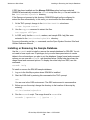
If OSS has been installed and the Manage OSS files option has been selected,
DSM/SCM automatically extracts the setmxdb script from the pax file and installs it in
the /usr/tandem/sqlmx/bin directory.
If the files are not present in this directory, DSM/SCM might not be configured to
extract the files automatically. In this case, you must extract the files manually:
1. At the TACL prompt, change to the $SYSTEM.ZOSSUTL subvolume:
volume $system.zossutl
2. Use the copyoss command to extract the files:
run copyoss t0517pax
3. In OSS, verify that the setmxdb, readme, and sample SQLJ.sqlj files were
extracted to the /usr/tandem/sqlmx/bin directory.
For more information on the pax command, see the Open System Services Shell and
Utilities Reference Manual.
Installing or Removing the Sample Database
Use the setmxdb script to install or remove the sample database for SQL/MX. You do
not need to have super user ID privileges, but you must have permissions to create
tables in the volume where you plan to put the database. Usage format and command
options you can use with setmxdb are described below. Online help also shows the
usage format and command options. To display the online help from OSS, use this
command:
setmxdb -help
To install or remove the SQL/MX sample database:
1. Log on to the NonStop system where SQL/MX is installed.
2. Start the OSS shell by entering this command at the TACL prompt:
osh
You are now in the OSS environment. The OSS environment is case-sensitive.
3. Before you run the script, change the directory to the location of the script by
entering:
cd /usr/tandem/sqlmx/bin
4. Run the setmxdb script. The usage format for setmxdb is:
setmxdb [ operation ...] [option ... ]
HP NonStop SQL/MX Quick Start—523724-002
1 -5
Installing or Removing the Sample Database
Welcome to Quick Start
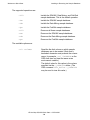
The supported operations are:
-iall
Installs the SQL/MX, Data Mining, and Pub/Sub
sample databases. This is the default operation.
-imx
Installs the SQL/MX sample database.
-idm
Installs the Data Mining sample database.
-ips
Installs the Pub/Sub sample database.
-rall
Removes all three sample databases.
-rmx
Removes the SQL/MX sample database.
-rdm
Removes the Data Mining sample database.
-rps
Removes the Pub/Sub sample database.
The available options are:
-vol <volume>
Specifies the disk volume on which sample
databases are to be created. (Note that a
backslash character must precede the volume
name, for example, -vol \$MYMXDB, so the
OSS shell does not treat the name as an
environment variable.)
The default value for this option is the volume
specified via the =_DEFAULTS define. (The
OSS command info_define =_DEFAULTS
may be used to view this value.)
HP NonStop SQL/MX Quick Start—523724-002
1 -6
Installing or Removing the Sample Database
Welcome to Quick Start
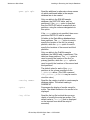
-part <p1> <p2>
Specifies additional or alternate volume names
on which partitioned tables in the sample
database are to be created.
Only one table in the SQL/MX sample
database, the PARTLOC table, may be
partitioned. If the -part option is specified,
then the PARTLOC table is created with two
partitions, using the volumes designated via
this option.
If the -part option is not specified, then a nonpartitioned PARTLOC table is created.
All tables in the Data Mining database have
three partitions. The -vol option is used to
specify the location of the first (or primary)
partition, while the -part option is used to
specify the locations of the second and third
partitions.
Only one table in the Pub/Sub sample
database, the INBOX table, is partitioned. This
table has three partitions. The -vol option is
used to specify the location of the first (or
primary) partition, while the -part option is
used to specify the locations of the second and
third partitions.
The default value for each of the -part
partitions is the volume specified via the
=_DEFAULTS define. (The OSS command
info_define =_DEFAULTS may be used to
view this value.)
-catalog <name>
Specifies the catalog in which to create sample
database tables. The default catalog is
SAMDBCAT.
-quiet
Suppresses the display of results except for
errors. The default behavior is for results to be
displayed.
-log <file>
Specifies the log file to which the non-error
results of running the script are written. The
default value is /dev/tty (that is, displayed
on the terminal from which the script is
executed).
HP NonStop SQL/MX Quick Start—523724-002
1 -7
Using a SQL/MX Release 1.8 setmxdb Script in the
SQL/MX Release 2.0 Environment
Welcome to Quick Start
Extra help options:
•
-v
Prints the version and date of the script.
-mult
Prints advice on creating multiple sample
databases.
If you use the -v option, setmxdb displays a message with its version and date:
Version 2.0, February 11, 2004
•
•
To create multiple sample databases on the same system, use one of these
approaches:
°
To install another copy of the sample database on another volume, rerun
setmxdb by using the -vol option to specify the other volume.
°
To install another copy of the sample database on the same volume, use the
-catalog option to provide a new catalog name. The ANSI names will be
unique because the catalog name has changed.
When you run the setmxdb script, a temporary text file name mxdblog is created
and stored in the /tmp directory. The file shows:
°
°
°
The SQL statements that are executed to add or drop sample database objects
Execution results for the SQL statements
Status messages
If setmxdb fails to run as expected, check this file for an indication of what went
wrong. If the file is already present when you run setmxdb, setmxdb overwrites it.
You can remove this file if you want, but do not try to remove it while the script is
running.
Using a SQL/MX Release 1.8 setmxdb Script in the SQL/MX
Release 2.0 Environment
If you migrated a node from SQL/MX Release 1.8 and retained a copy of the setmxdb
installation script, as described in the SQL/MX Installation and Management Guide,
read these considerations before running the Release 1.8 setmxdb.
•
•
The SQL/MX Release 1.8 setmxdb script generates SQL/MP tables, while the
SQL/MX Release 2.0 setmxdb script generates SQL/MX tables. (A sample
database provided with the SQL/MP product also generates SQL/MP tables. For
more information, see the SQL/MP Reference Manual.)
SQL/MX Release 1.8 and SQL/MX Release 2.0 sample databases can coexist in a
SQL/MX Release 2.0 environment. However, you must ensure that they use
different catalogs. (The default catalog for both sample databases is SAMDBCAT.)
To change the catalog:
°
Use the -acat option when running the SQL/MX Release 1.8 setmxdb.
HP NonStop SQL/MX Quick Start—523724-002
1 -8
Welcome to Quick Start
•
°
Using a SQL/MX Release 1.8 setmxdb Script in the
SQL/MX Release 2.0 Environment
Use the -catalog option when running the SQL/MX Release 2.0 setmxdb.
Before running the SQL/MX Release 1.8 setmxdb in a SQL/MX Release 2.0
environment, you must create the catalog and schemas required by the script.
(The default schemas are PERSNL, SALES, and INVENT.) Otherwise, the script
will generate an error. Creating the catalog and schemas in advance is NOT
required when running the SQL/MX Release 2.0 setmxdb.
Alternately, you can run the SQL/MX Release 1.8 setmxdb and use the -noansi
option. This method does not require you to create the catalog and schemas in
advance, but it uses Guardian names for the tables. No SQL/MP aliases are
created.
•
You can run the SQL/MX Release 1.8 setmxdb script from any directory. For more
information about running the SQL/MX Release 1.8 setmxdb script, see the
SQL/MX Quick Start provided for any of these RVUs: G06.18, G06.19, G06.20,
G06.21, or G06.22.
HP NonStop SQL/MX Quick Start—523724-002
1 -9
Welcome to Quick Start
Using a SQL/MX Release 1.8 setmxdb Script in the
SQL/MX Release 2.0 Environment
HP NonStop SQL/MX Quick Start—523724-002
1- 10
2
Selecting Information From a Table
This section provides information about how to select specific rows and columns and
how to use the INVOKE command.
Working With SQL/MP Tables
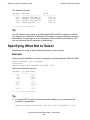
SQL/MX supports DML operations on SQL/MP tables as well as SQL/MX tables. At the
beginning of each new MXCI session, specify if you will use three-part logical names or
Guardian physical file names to refer to SQL/MP tables. (You must use logical names
to refer to SQL/MX tables.)
To use logical names, at the MXCI prompt, type:
SET NAMETYPE ANSI;
To use Guardian physical file names, at the MXCI prompt, type:
SET NAMETYPE NSK;
The NAMETYPE attribute value you specify with SET NAMETYPE remains in effect until
the end of the session or until you execute another SET NAMETYPE statement. You
can use logical names if you have created aliases using the CREATE SQLMP ALIAS
statement.
For more information about the SET NAMETYPE command or the CREATE SQLMP
ALIAS statement, see the SQL/MX Reference Manual.
Selecting All the Data From a Table
The simplest operation you can perform is to retrieve all the data from a single table.
Typically, it is not practical to display all rows in a table. However, the number of rows
in the sample database is small.
Example
To retrieve information from tables, use the SELECT statement. Enter this SELECT
statement to display all rows and columns in the PARTS table:
SELECT * FROM PARTS;
Some selected rows are:
Part/Num
-------186
212
244
...
Part Description
---------------186 MegaByte Disk
PC SILVER, 20 MB
PC GOLD, 30 MB
...
Price
-----------186186.86
2500.00
3000.00
...
HP NonStop SQL/MX Quick Start—523724-002
2 -1
Qty/Avail
---------186
3525
4426
...
Displaying Selected Columns.
Selecting Information From a Table
Tip
•
•
•
Using SELECT * is a short way of specifying all the columns in a table.
The result of SET SCHEMA stays in effect until the end of your session or until you
execute another SET SCHEMA.
The FROM clause is always required in the SELECT statement.
Displaying Selected Columns.
You can display a specific set of columns and rows of data by providing additional
information in the SELECT statement. Select columns by specifying the column
names.
Example
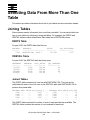
Display only the part number and quantity available in the PARTS table:
SELECT PARTNUM, QTY_AVAILABLE FROM PARTS;
Some selected rows are:
Part/Num
-------186
212
244
...
Qty/Avail
----------186
3525
4426
...
Tip
You can list column names in any order, but they must follow the keyword SELECT
and precede the keyword FROM. The columns appear in the order you specify.
Displaying Selected Rows
In a typical query, you retrieve selected rows that satisfy some criteria. To select
particular rows of data, specify the condition for selecting the data in a WHERE clause.
Example
Display the parts where the quantity available is less than 500:
SELECT PARTNUM, PARTDESC, QTY_AVAILABLE FROM PARTS
WHERE QTY_AVAILABLE < 500;
The selected rows are:
Part/Num
-------186
Part Description
-----------------186 Megabyte Disk
Qty/Avail
----------186
HP NonStop SQL/MX Quick Start—523724-002
2 -2
Displaying Calculated Values
Selecting Information From a Table
6603
PRINTER CONTROLLER
430
--- 2 row(s) selected.Example
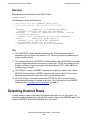
Display the parts where part description is ”PRINTER CONTROLLER”:
SELECT PARTNUM, QTY_AVAILABLE FROM PARTS
WHERE PARTDESC = 'PRINTER CONTROLLER';
The selected row is:
Part/Num
-------6603
Qty/Avail
----------430
--- 1 row(s) selected.
Tip
•
To continue a long statement or command on the next line, press Enter. MXCI
displays a continuation prompt (+>), and you can continue your statement. To end
the statement, use the semicolon:
>>SELECT PARTNUM, PARTDESC, QTY_AVAILABLE FROM PARTS
+>WHERE QTY_AVAILABLE < 500;
•
•
If a column contains text (character data), enclose its value in single quotes and
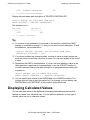
enter the value to match the value that is stored. You can omit spaces at the end of
a value.
Remember that OSS is case-sensitive. If you are not sure whether a value in the
table appears in uppercase or lowercase letters, use the UPSHIFT function to
convert lowercase letters in the part description to uppercase before making the
comparison:
SELECT PARTNUM, QTY_AVAILABLE FROM PARTS
WHERE UPSHIFT (PARTDESC) = 'PRINTER CONTROLLER';
•
You can specify any column of the FROM table in the WHERE condition. The
column does not have to be in the select list. For example, you can display only
PARTNUM but use PARTDESC in the condition that selects rows
Displaying Calculated Values
You can calculate values to be displayed by including arithmetic expressions that
operate on values from individual rows. You can perform arithmetic on any type of
numeric value but not on character values.
HP NonStop SQL/MX Quick Start—523724-002
2 -3
Displaying Descriptions of Columns
Selecting Information From a Table
Example
Using the data in the ODETAIL table, calculate the total price for the number of units of
each part in an order. Select parts from order number 100210:
SELECT ORDERNUM, PARTNUM, QTY_ORDERED*UNIT_PRICE
FROM ODETAIL
WHERE ORDERNUM = 100210;
The selected rows are:
Order/Num
---------100210
100210
100210
100210
Part/Num
-------244
2001
2403
5100
(EXPR)
--------------------10500.00
3300.00
3720.00
1500.00
--- 4 row(s) selected.
Tip
•
If an item in the select list is an expression, the heading of the column is (EXPR).
You can customize the name of the column in the select list by using the AS
clause:
QTY_ORDERED * UNIT_PRICE AS TOTAL_PRICE
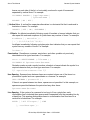
If you use this AS clause, TOTAL_PRICE is the heading for the calculated value
instead of (EXPR).
•
•
You can use these arithmetic operators in expressions:
+
Addition
–
Subtraction
*
Multiplication
/
Division
**
Exponentiation
You can use parentheses to clarify the meaning of an expression:
QTY_ORDERED * (UNIT_PRICE + 1.5)
•
You can also use an expression as part of a condition in a WHERE clause:
WHERE (QTY_ORDERED * UNIT_PRICE) < 2000
Displaying Descriptions of Columns
To determine the names of the columns in a table, the types of data, and the maximum
number of characters allowed, use the INVOKE command. The INVOKE command
displays the definition of the columns.
HP NonStop SQL/MX Quick Start—523724-002
2 -4
Selecting Information From a Table
Selecting Distinct Rows
Example
Display the column definitions of the PARTS table:
INVOKE PARTS;
The displayed column definitions are:
-- Definition of table SAMDBCAT.SALES.PARTS
-- Definition current Thu Jul 10 15:03:29 2003
(
PARTNUM
NUMERIC(4, 0) UNSIGNED NO DEFAULT
HEADING 'Part/Num' NOT NULL NOT DROPPABLE
, PARTDESC
CHAR(18) CHARACTER SET ISO88591 COLLATE
DEFAULT NO DEFAULT
HEADING 'Part Description' NOT NULL NOT DROPPABLE
, PRICE
NUMERIC(8, 2) NO DEFAULT
HEADING 'Price' NOT NULL NOT DROPPABLE
, QTY_AVAILABLE NUMERIC(5, 0) DEFAULT 0
HEADING 'Qty/Avail' NOT NULL NOT DROPPABLE
)
Tip
•
•
•
•
The PARTDESC column contains character data. The maximum number of
characters you can enter in the column is 18. You must enclose the characters in
single quotation marks.
The columns other than PARTDESC contain numeric data. PARTNUM can contain
at most 4 digits and cannot have a plus or minus sign. PRICE can contain at most
8 digits, including 2 digits to the right of the decimal point. QTY_AVAILABLE can
contain at most 5 digits.
NO DEFAULT means an INSERT statement must specify a value for the column.
DEFAULT 0 means that an INSERT statement can omit a value for the column
because the system will assign the 0 (zero) as the default value.
All of the columns have been defined with NOT NULL, which means that the
columns cannot accept null values at any time. For a description of the INSERT
statement, see Inserting a Row Into a Table on page 6-1.
Selecting Distinct Rows
In some cases, a value in the select list appears more than once in your result. For
example, a sales representative typically has several orders in the ORDERS table. The
keyword DISTINCT eliminates duplicates from your result.
HP NonStop SQL/MX Quick Start—523724-002
2 -5
Selecting Information From a Table
Displaying Information in an Ordered Sequence
Example
Determine which sales representatives have orders in the ORDERS table and display
each identification number only once:
SELECT DISTINCT SALESREP FROM ORDERS;
The selected rows are:
SALESREP
-------220
221
222
223
226
227
229
231
568
--- 9 row(s) selected.
Displaying Information in an Ordered
Sequence
To display the selected rows in a sorted order, include the ORDER BY clause in the
SELECT statement. You can specify more than one column to determine the sequence
of the rows.
HP NonStop SQL/MX Quick Start—523724-002
2 -6
Displaying Information in an Ordered Sequence
Selecting Information From a Table
Example
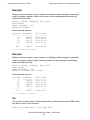
Display customer numbers, order numbers, and delivery dates arranged in ascending
order by customer number. Select only orders of sales representatives identified by
numbers less than 300:
SELECT CUSTNUM, ORDERNUM, DELIV_DATE
FROM ORDERS
WHERE SALESREP < 300
ORDER BY CUSTNUM;
Some selected rows are:
Cust/Num ORDERNUM
------- ---------30
200378
111
200562
131
300756
156
700694
...
...
7562
100171
DELIV_DATE
---------2003-08-22
2003-10-12
2003-12-20
2004-01-14
...
2004-02-03
--- 12 row(s) selected.
Example
Display customer numbers, order numbers, and delivery dates arranged in ascending
order by customer number. Each customer’s orders are also arranged in ascending
order by the delivery date:
SELECT CUSTNUM, ORDERNUM, DELIV_DATE
FROM ORDERS
WHERE SALESREP < 300
ORDER BY CUSTNUM, DELIV_DATE;
Some selected rows are:
Cust/Num ORDERNUM
------- ---------21
200320
123
300380
123
200490
143
700510
...
...
7777
100250
DELIV_DATE
---------2003-11-20
2003-12-12
2004-01-04
2004-01-12
...
2004-02-02
--- 12 row(s) selected.
Tip
You can also arrange values in descending order by including the keyword DESC after
the name of one or more columns:
ORDER BY CUSTNUM DESC, DELIV_DATE DESC;
HP NonStop SQL/MX Quick Start—523724-002
2 -7
Selecting Information From a Table
Displaying Information in an Ordered Sequence
HP NonStop SQL/MX Quick Start—523724-002
2 -8
3
Stating Conditions for Selecting
Data
This section provides information about how to use predicates in a WHERE clause.
Using Predicates to Select Data
In some of the previous examples, one value is compared to another value by using a
comparison operator: for example, the equal sign (=). A comparison operator is one
type of SQL predicate.
Examples that illustrate predicates are:
Predicate
Example
Meaning
=
PARTNUM = 4130
Part number equal to 4130
<
ORDERNUM < 200000
Order number less than 200,000
<=
QTY_AVAILABLE <= 5
Quantity available less than or equal
to 5
>
DELIV_DATE >
DATE '2003-12-31'
Delivery date later than
2003-12-31
>=
ORDER_DATE >=
DATE '2003-01-01'
Order date later than or equal to
2003-01-01
<>
PARTNUM <> 4130
Part number not equal to 4130
IS NULL
PARTDESC IS NULL
Part description is null
IS NOT NULL
PARTDESC IS NOT NULL
Part description is not null
BETWEEN
PARTNUM BETWEEN 3000
AND 4000
Part number is between 3000 and
4000 and includes 3000 and 4000
IN
PARTNUM IN (4130, 6603, 212)
Part number is one of 4130, 6603, or
212
LIKE
PARTDESC LIKE
'%PRINTER%'
Part description has the text string
PRINTER
HP NonStop SQL/MX Quick Start—523724-002
3 -1
Stating Conditions for Selecting Data
Using the LIKE Predicate
Using the LIKE Predicate
Sometimes you want to select data that you are not able to specify completely. For
example, suppose you want to know something about a particular printer, but you
cannot remember the exact description of the printer.
Example
You do not know the exact name for a printer, but need to find its part number:
SELECT PARTNUM, PARTDESC
FROM PARTS
WHERE PARTDESC LIKE '%PRINTER%'
ORDER BY PARTNUM;
The selected rows are:
PARTNUM
------2001
2002
2003
2402
2403
2405
3103
6603
PARTDESC
-----------------GRAPHIC PRINTER,M1
GRAPHIC PRINTER,M2
GRAPHIC PRINTER,M3
LASER PRINTER, T1
LASER PRINTER, T2
LASER PRINTER, T3
LASER PRINTER, X1
PRINTER CONTROLLER
--- 8 row(s) selected.
Tip
•
•
A percent sign (%) indicates zero or more characters are acceptable. An
underscore (_) indicates any single character is acceptable. For example,
'_RINTER' locates 'PRINTER' but not 'LINE PRINTER CONT.' The special
characters % and _ are called wild-card characters.
If you are not sure whether a value appears in uppercase or lowercase letters, use
the UPSHIFT function to convert lowercase letters in the part description to
uppercase before making the comparison:
SELECT PARTNUM, PARTDESC
FROM PARTS
WHERE UPSHIFT(PARTDESC) LIKE '%PRINTER%';
If it exists in the database, this row is selected:
8672
Laser printer
HP NonStop SQL/MX Quick Start—523724-002
3 -2
Specifying More Than One Condition
Stating Conditions for Selecting Data
Specifying More Than One Condition
You can use the logical operators AND and OR to connect two conditions. Notice that
the AND operator is more restrictive because both conditions must be true. The OR
operator requires that only one condition be true.
Operator
Example
Meaning
AND
PARTDESC LIKE '%PRINTER%' AND PRICE
< 500
If values in a row satisfy
both of the conditions, the
row appears in the result.
OR
PARTNUM < 3000 OR PARTNUM = 7102
If values in a row satisfy
either of the conditions, the
row appears in the result.
Using AND or OR
Suppose you want to specify more than one condition in the WHERE clause. For
example, you might want to limit the selection of rows, depending on conditions, for
two or more columns.
Example
Display rows satisfying two conditions. The part description is a printer, and the price is
less than $500:
SELECT PARTNUM, PARTDESC, PRICE
FROM PARTS
WHERE PARTDESC LIKE '%PRINTER%' AND PRICE < 500;
The selected rows are:
PARTNUM
------2402
6603
PARTDESC
-----------------LASER PRINTER,T1
PRINTER CONTROLLER
PRICE
-----------350.00
45.00
--- 2 row(s) selected.
Example
Display rows where the part description is either a laser printer or a graphic printer, and
the price is less than 4500:
SELECT PARTNUM, PARTDESC, PRICE
FROM PARTS
WHERE (PARTDESC LIKE '%LASER%'
OR PARTDESC LIKE '%GRAPHIC P%')
AND PRICE < 4500;
HP NonStop SQL/MX Quick Start—523724-002
3 -3
Specifying What Not to Select
Stating Conditions for Selecting Data
The selected rows are:
PARTNUM
------2001
2002
2003
3103
PARTDESC
-----------------GRAPHIC PRINTER,M1
GRAPHIC PRINTER,M2
GRAPHIC PRINTER,M3
LASER PRINTER, X1
PRICE
-----------1100.00
1500.00
2000.00
4200.00
--- 4 row(s) selected.
Tip
You can combine any number of conditions with AND and OR to express conditions.
The sequence of evaluation is AND before OR unless you specify otherwise by using
parentheses. To ensure a row is first compared to two conditions connected by OR,
you must enclose the OR conditions in parentheses.
Specifying What Not to Select
Sometimes it is easier to specify what information you do not want.
Example
Display quantity available of all parts except parts numbered between 3000 and 5999:
SELECT PARTNUM, QTY_AVAILABLE
FROM PARTS
WHERE PARTNUM NOT BETWEEN 3000 AND 5999;
Some of the selected rows are:
PARTNUM
------186
212
244
...
2405
6201
...
7301
QTY_AVAILABLE
------------186
3525
4426
...
2712
2306
...
2332
--- 18 row(s) selected.
Tip
•
If you want NOT to apply to an entire search condition, you must enclose the
condition in parentheses:
WHERE NOT(PARTNUM BETWEEN 3000 AND 5999 OR PARTNUM = 2001)
HP NonStop SQL/MX Quick Start—523724-002
3 -4
Stating Conditions for Selecting Data
Specifying What Not to Select
Rows with part numbers between 3000 and 5999 and the row with part number
2001 are not selected. In this example, AND is part of the BETWEEN predicate. It
does not connect two search conditions.
•
You can specify NOT BETWEEN, NOT IN, and NOT LIKE, but you cannot specify
NOT with a comparison operator. For example, you must use <> to indicate not
equal.
HP NonStop SQL/MX Quick Start—523724-002
3 -5
Stating Conditions for Selecting Data
HP NonStop SQL/MX Quick Start—523724-002
3 -6
Specifying What Not to Select
4
Displaying Information About
Groups of Rows
This section provides information about aggregate functions and how to group rows.
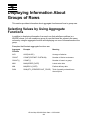
Selecting Values by Using Aggregate
Functions
In addition to displaying information from each row that satisfies conditions in a
WHERE clause, you can combine a group of rows that have like values in the same
column by using an aggregate function and displaying one row of information about the
group.
Examples that illustrate aggregate functions are:
Aggregate
Function
Example
Meaning
AVG
AVG(SALARY)
Average of salaries
COUNT
COUNT(DISTINCT CUSTNUM)
Number of distinct customers
COUNT(*)
COUNT(*)
Number of rows in a group
MAX
MAX(ORDER_DATE)
Latest order date
MIN
MIN(DELIV_DATE)
Earliest delivery date
SUM
SUM(QTY_ORDERED*UNIT_PRICE)
Total of quantity ordered times
the unit price
HP NonStop SQL/MX Quick Start—523724-002
4 -1
Displaying Information About Groups of Rows
Grouping and Ordering Rows
Grouping and Ordering Rows
Sometimes you want to display information about ordered groups of rows. For
example, you might want to display group information ordered by the result of an
aggregate function.
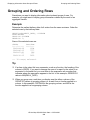
Example
Determine the earliest delivery date of all orders from the same customer. Order the
selected rows by that delivery date:
SELECT MIN(DELIV_DATE), CUSTNUM
FROM ORDERS
GROUP BY CUSTNUM
ORDER BY 1;
Some of the selected rows are:
(EXPR)
----------2003-04-10
2003-06-15
2003-07-01
...
2003-12-15
Cust/Num
-------1234
7777
926
...
5635
--- 12 row(s) selected.
Tip
•
•
If an item in the select list is an expression, such as a function, the heading of the
column is (EXPR). If you want to arrange the rows of a report by the value of an
expression in the select list, you must refer to the expression as a number that
indicates where the expression appears in the list. In this example, ORDER BY 1
refers to MIN(DELIV_DATE).
When you group rows, each item you display must be either a column of the
GROUP BY clause (a grouping column) or a result from a function applied to a
column. In this example, CUSTNUM is the grouping column, and MIN is the
function applied to a nongrouping column.
HP NonStop SQL/MX Quick Start—523724-002
4 -2
Grouping and Ordering Rows
Displaying Information About Groups of Rows
Example
Find the earliest delivery date for the complete set of customers. If you do not specify a
GROUP BY clause, all rows belong to the same group (the entire table). In this case,
you must also omit CUSTNUM from the select list because there is no single customer
for the entire table:
SELECT MIN(DELIV_DATE)
FROM ORDERS;
The selected value is:
(EXPR)
----------2003-01-10
--- 1 row(s) selected.
Example
Find out more about the order or orders with the earliest delivery date:
SELECT * FROM ORDERS
WHERE DELIV_DATE = DATE '2003-04-10';
The selected value is:
Order/Num
---------100210
Order/Date
---------2003-04-10
Deliv/Date
---------2004-04-10
Sales/Rep
-------220
--- 1 row(s) selected.
HP NonStop SQL/MX Quick Start—523724-002
4 -3
Cust/Num
-------1234
Displaying Information About Groups of Rows
Counting Rows
Counting Rows
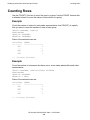
Use the COUNT(*) function to count the rows in a group. Use the COUNT function with
a selected column to count the values of that column in a group.
Example
Count the number of orders for each sales representative. Use COUNT(*) to specify
that you want to count the number of rows in each group:
SELECT SALESREP, COUNT(*)
FROM ORDERS
GROUP BY SALESREP
ORDER BY SALESREP;
Some of the selected rows are:
Sales/Rep
--------220
...
226
...
568
(EXPR)
-----------------3
...
3
...
1
--- 9 row(s) selected.
Example
Count the number of customers who have one or more orders placed with each sales
representative:
SELECT SALESREP, COUNT(DISTINCT CUSTNUM)
FROM ORDERS
GROUP BY SALESREP
ORDER BY 2 DESC;
Some of the selected rows are:
Sales/Rep
-------220
...
226
...
568
(EXPR)
-----------------3
...
2
...
1
--- 9 row(s) selected.
HP NonStop SQL/MX Quick Start—523724-002
4 -4
Displaying Information About Groups of Rows
Computing Averages for Groups
Tip
The keyword DISTINCT causes each unique customer number for a particular sales
representative to be counted only once. Sales representative 226 has three orders, but
two of the orders are from the same customer.
Computing Averages for Groups
For some queries, you might want to get information about one or two specific groups.
The next example uses the ODETAIL table to illustrate this technique.
Example
Display part numbers for which the average quantity ordered is greater than 100.
Specify the conditions for selecting the groups in the HAVING clause:
SELECT PARTNUM, AVG(QTY_ORDERED)
FROM ODETAIL
GROUP BY PARTNUM
HAVING AVG(QTY_ORDERED) > 100;
The selected row is:
Part/Num
-------4102
(EXPR)
--------------130
--- 1 row(s) selected.
Tip
A HAVING clause is similar to a WHERE clause, but the HAVING clause is applied to
the result of the GROUP BY clause. A column that you specify in a condition of the
HAVING clause is typically a grouping column.
To include a column that is not a grouping column, use the column as an argument of
an aggregate function. In the preceding example, QTY_ORDERED is not a grouping
column, but you can include it in the HAVING clause because it is the argument of the
AVG function.
HP NonStop SQL/MX Quick Start—523724-002
4 -5
Displaying Information About Groups of Rows
Computing Averages for Groups
HP NonStop SQL/MX Quick Start—523724-002
4 -6
5
Selecting Data From More Than One
Table
This section provides information about how to join tables and use correlation names.
Joining Tables
Some queries require information from more than one table. You can select data from
two or more tables by effectively joining the tables. For example, the PARTS and
ODETAIL tables contain related data. Each table has a PARTNUM column.
PARTS Table
For part 5100, the PARTS table has this row,
PARTNUM
------5100
PARTDESC
-------------------MONITOR BW, TYPE 1
PRICE
--------150.00
QTY_AVAILABLE
------------3237
ODETAIL Table
For part 5100, the ODETAIL table has these rows,
ORDERNUM
-------100210
300350
600480
800660
PARTNUM
------5100
5100
5100
5100
UNIT_PRICE
---------150.00
150.00
135.00
150.00
QTY_ORDERED
----------10
12
60
5
Joined Tables
The PARTS table contains only one row with PARTNUM 5100. This row can be
combined with each of the four rows in the ODETAIL table with PARTNUM 5100 to
produce this joined table:
PARTNUM
5100
5100
5100
5100
...
DESC PRICE QTY_AVAIL | ... PARTNUM UNIT_PRICE QTY_ORD
...
...
3237
...
5100
...
10
...
...
3237
...
5100
...
5
...
...
3237
...
5100
...
60
...
...
3237
...
5100
...
12
...
...
...
...
...
...
...
The PARTS table contains the number of units of each part that are available. The
ODETAIL table contains the number of units ordered for each part.
HP NonStop SQL/MX Quick Start—523724-002
5 -1
Qualifying Ambiguous Column Names
Selecting Data From More Than One Table
Qualifying Ambiguous Column Names
Because the PARTNUM column has the same name in both the PARTS and ODETAIL
tables, always qualify PARTNUM with a table name or a correlation name. For
example, PARTS.PARTNUM uses the table name.
Example
Compare the quantity available of part number 5100 with the quantity ordered. Specify
in the WHERE clause that you want rows from the PARTS table joined to rows in the
ODETAIL table that have the same part number value in the PARTNUM column:
SELECT PARTS.PARTNUM, QTY_AVAILABLE, QTY_ORDERED
FROM PARTS, ODETAIL
WHERE PARTS.PARTNUM = ODETAIL.PARTNUM
AND PARTS.PARTNUM = 5100;
The selected rows are:
Part/Num
-------5100
5100
5100
5100
Qty/Avail
-----------3237
3237
3237
3237
Qty/Ord
----------10
5
60
12
--- 4 row(s) selected.
Tip
Only rows with PARTNUM 5100 are joined. The PARTS table contains only one row
with PARTNUM 5100. This row is combined with each of the four rows in the ODETAIL
table. The PARTNUM and QTY_AVAILABLE information is the same. You can improve
this SELECT statement by using a GROUP BY clause and the SUM function.
HP NonStop SQL/MX Quick Start—523724-002
5 -2
Using Correlation Names
Selecting Data From More Than One Table
Using Correlation Names
You can define explicit correlation names for the PARTS and ODETAIL tables. For
example, use the letter P for PARTS and the letter O for ODETAIL. Using correlation
names shortens the length of the text you type.
Example
Compute the sum of the quantity ordered for each part number in the PARTS table.
Group by the columns in the PARTS table:
SELECT P.PARTNUM, QTY_AVAILABLE, SUM(QTY_ORDERED)
FROM PARTS P, ODETAIL O
WHERE P.PARTNUM = O.PARTNUM
GROUP BY P.PARTNUM, QTY_AVAILABLE;
Some of the selected rows are:
Part/Num
-------244
2001
2403
5100
...
Qty/Avail
-----------4426
2100
3312
3237
...
(EXPR)
------------------47
155
64
87
...
--- 27 row(s) selected.
Tip
Each group consists of rows with equal values for both part number and quantity
available.
Example
As a sales representative, you can verify the unit price you charged a particular
customer for a particular part by combining data from the ORDERS and ODETAIL
tables. These tables both contain an ORDERNUM column:
SELECT CUSTNUM, PARTNUM, UNIT_PRICE
FROM ORDERS ORD, ODETAIL ODE
WHERE ORD.ORDERNUM = ODE.ORDERNUM
AND CUSTNUM = 5635 AND PARTNUM = 5103;
The selected row is:
Cust/Num
-------5635
Part/Num
-------5103
Unit/Price
-----------400.00
--- 1 row(s) selected.
HP NonStop SQL/MX Quick Start—523724-002
5 -3
Selecting Data From More Than One Table
HP NonStop SQL/MX Quick Start—523724-002
5 -4
Using Correlation Names
6
Changing Information in a Table
This section provides information about how to insert, update, and delete table rows.
Inserting a Row Into a Table
To insert rows in a table, use the INSERT statement.
Example
In the PARTS table, insert a row that describes a data modem with part number 9999:
INSERT INTO PARTS (PARTNUM, PARTDESC, PRICE)
VALUES (9999, 'DATA MODEM', 200.00);
--- 1 row(s) inserted.
Tip
The definition of the PARTS table specifies a default value of zero for the
QTY_AVAILABLE column. If you do not know the quantity available when you insert
the row, you do not have to provide a value for that column. SQL/MX provides a value
of zero.
Example
Insert another row into PARTS. This time supply the quantity available:
INSERT INTO PARTS
VALUES (9998, '300 BD DATA MODEM', 120.00, 3);
--- 1 row(s) inserted.
Tip
Because you are supplying a value for each column, you can omit the list of column
names. In this form of the INSERT statement, you must specify the values in the order
in which a SELECT * statement or an INVOKE command would display them.
HP NonStop SQL/MX Quick Start—523724-002
6 -1
Changing Information in a Table
Updating an Existing Row
Updating an Existing Row
To change values in one or more columns and one or more rows, use the UPDATE
statement.
Example
In the PARTS table, you have inserted a row that describes a data modem with part
number 9999. Suppose you determine that the quantity available of part number 9999
is 12 units. You also want to enter a more specific description of the data modem:
UPDATE PARTS
SET PARTDESC = '1200 BD DATA MODEM', QTY_AVAILABLE = 12
WHERE PARTNUM = 9999;
--- 1 row(s) updated.
Example
If you want to update all rows, omit the WHERE clause. Double the price of every part:
UPDATE PARTS SET PRICE = PRICE * 2;
--- 31 row(s) updated.
Example
If you actually changed your sample database by executing the previous UPDATE
statement, execute this statement to return the PRICE column to its previous values:
UPDATE PARTS SET PRICE = PRICE * .5;
--- 31 row(s) updated.
Tip
•
•
The value you specify for a column of the SET list can be an expression, but the
expression cannot include any aggregate functions, such as AVG. The expression
can refer to any column in the row you are updating.
A table can have a primary key consisting of one or more columns that uniquely
identify each row in the table. You cannot update the value of a column that is part
of the primary key. Instead, you must delete the row with the old primary key and
then insert the row with the new primary key.
HP NonStop SQL/MX Quick Start—523724-002
6 -2
Deleting Rows From a Table
Changing Information in a Table
Deleting Rows From a Table
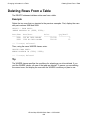
The DELETE statement deletes entire rows from a table.
Example
Delete the two rows that you inserted in the previous examples. First, display the rows
with part numbers 9998 and 9999:
SELECT * FROM PARTS
WHERE PARTNUM IN (9998, 9999);
Part/Num
-------9998
9999
Part/Desc
-----------------300 BD DATA MODEM
1200 BD DATA MODEM
Price
-----------120.00
200.00
Qty/Avail
----------3
12
--- 2 row(s) selected.
Then, using the same WHERE clause, enter:
DELETE FROM PARTS
WHERE PARTNUM IN (9998, 9999);
--- 2 row(s) deleted.
Tip
The WHERE clause specifies the conditions for selecting a row to be deleted. If you
omit the WHERE clause, all rows of the table are deleted. To ensure you are deleting
the correct rows, first display the rows with the WHERE condition you plan to use.
HP NonStop SQL/MX Quick Start—523724-002
6 -3
Changing Information in a Table
HP NonStop SQL/MX Quick Start—523724-002
6 -4
Deleting Rows From a Table
7
Using the Same SELECT Statement
Repeatedly
This section provides information about how to prepare and execute statements and
use parameter values.
Preparing to Execute a Statement Repeatedly
You can prepare a statement (assigning a name to it) and execute it repeatedly during
your MXCI session. When you end your session, however, the prepared statement is
no longer available.
Prepared statements are most useful if they contain parameters. A parameter is a
name preceded by a question mark. You provide values for these parameters before
you execute the statement by using the SET PARAM command.
Example
Suppose you have a stack of handwritten orders, and you want to verify that the
information about certain parts is correct in the database. In this example, the
statement is prepared and assigned the name CKO. The parameters are ?order and
?part:
PREPARE CKO FROM
SELECT * FROM ODETAIL
WHERE ORDERNUM = ?order AND PARTNUM = ?part;
--- SQL command prepared.
HP NonStop SQL/MX Quick Start—523724-002
7 -1
Providing the Parameter Values
Using the Same SELECT Statement Repeatedly
Providing the Parameter Values
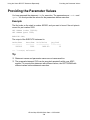
You have prepared the statement CKO for execution. The parameters are ?order and
?part. You must provide the values for the parameters before execution.
Example
The first order on the stack is number 200300, and you want to know if the unit price is
correct for part number 2002:
SET PARAM ?order 200300;
SET PARAM ?part 2002;
EXECUTE CKO;
The output of the EXECUTE statement is:
Order/Num
--------200300
Part/Num
-------2002
Unit/Price
-----------1400.00
Qty/Ord
--------10
--- 1 row(s) selected.
Tip
•
•
Statement names and parameter names are not case-sensitive.
The prepared statement CKO can be executed repeatedly within your MXCI
session. To execute this statement with different values, use SET PARAM with
different values before statement execution.
HP NonStop SQL/MX Quick Start—523724-002
7 -2
8
Protecting Database Integrity
This section provides information about how to begin and end a transaction.
Starting a Transaction
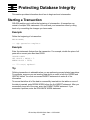
SQL/MX enables you to define the beginning of a transaction. A transaction can
consist of multiple SQL statements. You must end your transaction either by rolling
back or by committing the changes you have made.
Example
Define the beginning of a transaction:
BEGIN WORK;
--- SQL operation complete.
Example
Enter the statements that perform the transaction. For example, double the price of all
parts with a current price less than $2000:
UPDATE PARTS
SET PRICE = PRICE * 2
WHERE PRICE < 2000;
--- 23 row(s) updated.
Tip
Defining transactions is advisable when you are performing several related operations.
For example, suppose you are inserting data about an order in both the ORDER and
ODETAIL tables. You must use several INSERT statements to enter all of the
information.
To ensure that either all of the data is successfully inserted into the tables or none of
the data is inserted, enter BEGIN WORK before the first INSERT statement. After you
successfully insert all of the rows, enter the COMMIT WORK statement. If you
encounter a problem, enter the ROLLBACK WORK statement.
HP NonStop SQL/MX Quick Start—523724-002
8 -1
Ending a Transaction
Protecting Database Integrity
Ending a Transaction
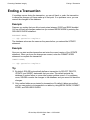
If a problem occurs during the transaction, you can roll back, or undo, the transaction
to cancel the changes you have made up to that point. If no problems occur, you can
commit the changes to the database.
Example
Suppose you realize that you did not want prices between $1000 and $2000 doubled.
You can roll back all changes made since you entered BEGIN WORK by entering the
ROLLBACK WORK statement:
ROLLBACK WORK;
--- SQL operation complete.
The database values are the same as they were before you entered the UPDATE
statement.
Example
Now you can start another transaction and enter the correct version of the UPDATE
statement. When you know the changes are correct, enter the COMMIT WORK
statement to complete the transaction:
COMMIT WORK;
--- SQL operation complete.
Tip
•
•
By default, SQL/MX automatically defines a transaction for SELECT, DELETE,
UPDATE, and INSERT statements that you enter. This default protects the
database if system failure or some other system problem occurs. If no problems
occur, SQL/MX commits the changes to the database, and you cannot roll back the
changes.
Only audited tables are protected by transactions. By default, tables are audited,
and you can protect your transactions on tables by using BEGIN WORK, COMMIT
WORK, and ROLLBACK WORK.
HP NonStop SQL/MX Quick Start—523724-002
8 -2
9
Creating Database Objects
This section provides information about how to create and drop objects in your
database.
Database objects are created by issuing the Data Definition Language (DDL)
statements of SQL/MX. For more information on DDL statements, see the SQL/MX
Reference Manual.
Starting MXCI
You can create database objects by using MXCI, the SQL/MX conversational interface.
MXCI runs as an OSS process and must be started from within the OSS environment.
1. Log on to the server by using your user ID and password.
2. Start the OSS shell by entering the osh command at the TACL prompt.
3. Start MXCI by entering the mxci command at the TACL prompt:
>mxci
/G/SYSTEM/SYSTEM: mxci
Hewlett-Packard NonStop(TM) SQL/MX Conversational Interface
2.0 (c) Copyright 2003 Hewlett-Packard Development Company,
LP.
>>
You have started an MXCI session.
Creating a Catalog
Before you can create an SQL/MX table, you must first create a catalog and a schema
in which to store the definition of the table.
Example
Create a catalog named MYCAT on the current node and volume. At the MXCI prompt,
enter:
CREATE CATALOG MYCAT;
--- SQL operation complete.
SET CATALOG MYCAT;
--- SQL operation complete.
CREATE SCHEMA MYSCH;
--- SQL operation complete.
SET SCHEMA MYSCH;
--- SQL operation complete.
HP NonStop SQL/MX Quick Start—523724-002
9 -1
Creating a Table
Creating Database Objects
Creating a Table
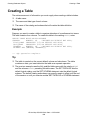
The minimum amount of information you must supply when creating a table includes:
•
•
•
A table name
The name and data type of each column
The name of the catalog and schema that will contain the table definition
Example
Suppose you want to create a table to organize attendees of a conference into teams.
The table contains four columns. To create this table in the catalog MYCAT, enter:
CREATE TABLE
(EMPNUM
FIRST_NAME
LAST_NAME
TEAMNUM
PRIMARY KEY
MYCAT.MYSCH.MYTABLE
NUMERIC (4)
UNSIGNED NO DEFAULT NOT NULL,
CHARACTER (15) NO DEFAULT NOT NULL,
CHARACTER (20) NO DEFAULT NOT NULL,
NUMERIC (4)
UNSIGNED NO DEFAULT NOT NULL,
(EMPNUM, TEAMNUM));
--- SQL operation complete.
Tip
•
•
The table is created on the current default volume and subvolume. The table
contains no data, you insert data into the table as a separate operation.
The previous example uses the fully qualified table name with the catalog MYCAT
and the schema MYSCH preceding the table name. The SET CATALOG sets the
default logical catalog, and the SET SCHEMA statement sets the default logical
schema. The default catalog and schema you specify remain in effect until the end
of the session or until you execute another SET CATALOG or SCHEMA statement.
HP NonStop SQL/MX Quick Start—523724-002
9 -2
Creating a View
Creating Database Objects
Creating a View
A view provides an alternate way of looking at data in one or more tables. A view does
not store the data separately but retrieves it from the underlying tables. You must have
SELECT privileges on the underlying tables
Create a view and then select data from the view by using a SELECT statement:
Example
Suppose you often want to know the names of department managers. You can create
a view that includes this information. At the MXCI prompt, enter:
CREATE VIEW MYCAT.MYSCH.MGRLIST
(FIRST_NAME, LAST_NAME, DEPTNAME)
AS SELECT FIRST_NAME, LAST_NAME, DEPTNAME
FROM MYCAT.PERSNL.EMPLOYEE, MYCAT.PERSNL.DEPT
WHERE EMPLOYEE.EMPNUM = DEPT.MANAGER;
---SQL operation complete.
Now you can select from the view you created. At the MXCI prompt, enter:
SELECT FIRST_NAME, LAST_NAME FROM MGRLIST
WHERE DEPTNAME='PERSONNEL';
The selected row is:
FIRST_NAME
--------------ROBERT
LAST_NAME
-------------------WHITE
--- 1 row(s) selected.
Tip
•
•
To define a view, specify a SELECT statement after the beginning CREATE VIEW
MYVIEW AS. This SELECT statement is part of the definition. At any time, the view
consists of the rows that would result if the SELECT statement were executed.
This SELECT statement selects data from more than one table. The predicate
EMPLOYEE.EMPNUM = DEPT.MANAGER joins the EMPLOYEE table and the
DEPT table.
HP NonStop SQL/MX Quick Start—523724-002
9 -3
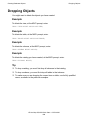
Dropping Objects
Creating Database Objects
Dropping Objects
You might want to delete the objects you have created.
Example
To delete the view, at the MXCI prompt, enter:
DROP VIEW MYCAT.MYSCH.MYVIEW;
Example
To delete the table, at the MXCI prompt, enter:
DROP TABLE MYCAT.MYSCH.MYTABLE;
Example
To delete the schema, at the MXCI prompt, enter:
DROP SCHEMA MYCAT.MYSCH;
Example
To delete the catalog you have created, at the MXCI prompt, enter:
DROP CATALOG MYCAT;
Tip
•
•
•
To drop a catalog, you must first drop all schemas in that catalog.
To drop a schema, you must first drop all tables in that schema.
To make sure you are dropping the correct view or table, use its fully qualified
name, as shown in the previous examples.
HP NonStop SQL/MX Quick Start—523724-002
9 -4
Index
A
E
Ambiguous table names
correlation name 5-2
table name 5-2
AND operator 3-3
Arithmetic operators 2-4
AS clause 2-4
Audited tables 8-2
AVG function 4-5
EMPLOYEE table 1-2
EMPNUM 9-2
Ending a transaction 8-2
Enter key 2-3
EXECUTE statement 7-2
B
G
BEGIN WORK statement 8-1
BETWEEN predicate 3-1, 3-5
GROUP BY clause 4-2
Groups of rows 4-1
C
H
Calculated values 2-3
Character data 2-5
Column definitions 2-5
COMMIT WORK statement 8-1, 8-2
Comparison operator 3-1
Computing averages 4-5
Correlation names 5-3
COUNT DISTINCT function 4-4
COUNT function 4-4
Counting rows 4-4
COUNT(*) function 4-4
CREATE 9-1, 9-3
Creating a catalog 9-1
Creating a table 9-2
Creating a view 9-3
HAVING clause 4-5
D
DELETE statement 6-3
Deleting rows 6-3
DEPT table 1-2
DESC keyword 2-7
DISTINCT keyword 2-5
F
FROM clause 2-2
I
IN predicate 3-1
INSERT statement
omitting column names 6-1
WHERE clause 6-2
INVOKE command 2-4
J
Joining tables 5-1
L
LIKE predicate 3-1, 3-2, 3-3
Logical operators
AND 3-3
NOT 3-4, 3-5
OR 3-3
sequence of evaluation 3-4
HP NonStop SQL/MX Quick Start—523724-002
Index -1
M
Index
M
selected 2-2
MXCI
entering command 1-2
starting session 1-1
stopping session 1-2
N
NO DEFAULT 2-5
NOT NULL 2-5
NOT operator 3-1, 3-4
NULL predicate 3-1
Numeric data 2-5
O
ODETAIL table 1-2
OR operator 3-3
ORDER BY 1 4-2
ORDER BY clause 2-6
Ordered groups of rows 4-2
ORDERS table 1-2
P
Parameter
names 7-2
parameter
values 7-2
PARTS table 1-2
Predicates 3-1
PREPARE statement 7-1
Primary key 6-2
Q
Qualifying table names 5-2
R
ROLLBACK WORK statement 8-1, 8-2
Rows
counting 4-4
S
Sample database
DEPT table 1-4
EMPLOYEE table 1-4
installing 1-5
INVENT subvolume 1-2
ODETAIL table 1-3
ORDERS table 1-3
PARTS table 1-3
PERSNL subvolume 1-2
SALES subvolume 1-2
SELECT statement
arithmetic operators 2-4
AS clause 2-4
calculated values 2-3
column names 2-2
DISTINCT rows 2-5
FROM clause 2-2
GROUP BY clause 4-2
HAVING clause 4-5
ORDER BY clause 2-6
predicates 3-1
retrieving data with 2-1
rows
in ascending order 2-7
in descending order 2-7
SELECT * 2-1, 2-2
WHERE clause 2-2
Selected columns 2-2
Selected rows 2-2
Selecting all data 2-1
Set functions
AVG 4-1
COUNT 4-1
COUNT(*) 4-1
MIN 4-1
SUM 4-1
HP NonStop SQL/MX Quick Start—523724-002
Index -2
T
Index
SET list 6-2
SET PARAM command 7-1, 7-2
SET SCHEMA statement 2-2
setmxdb script 1-8
Single quotes 2-3
SQL 1-1
SQLCI 1-1
SQL/MP tables, working with 2-1
SQL/MX conversational interface
(MXCI) 1-1
SQL/MX Release 1.8 1-8
Starting a transaction 8-1
T
Transaction
audited tables 8-2
automatic 8-2
BEGIN WORK statement 8-1
COMMIT WORK statement 8-1
defining 8-1
ending 8-2
ROLLBACK WORK statement 8-1
starting 8-1
U
UPDATE statement 6-2
Updating rows 6-2
UPSHIFT function 2-3, 3-2
W
WHERE clause 2-2
Wild-card characters 3-2
Special Characters
(EXPR) 2-4
HP NonStop SQL/MX Quick Start—523724-002
Index -3
Special Characters
Index
HP NonStop SQL/MX Quick Start—523724-002
Index -4