1
Maintenance
Replacing the Filter-Drier contd.
WARNING
High voltage electricity inside the unit has a risk of electrical shock. Disconnect the
power before opening the back door or servicing the unit.
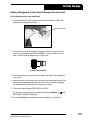
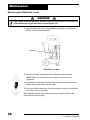
9. Open the back door of the unit’s protective covering by turning the two
screws 1/4 turn counterclockwise.
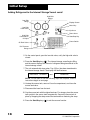
Filter-Drier
Filter-Drier Location
10. Remove the strap, and disconnect the fittings from the filter-drier.
NOTE: Dispose of the filter-drier according to current local area
regulations.
#
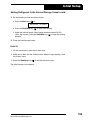
FLOW
11. Install the new filter-drier with the FLOW direction arrow pointing down,
tighten fittings, and secure with the strap.
12. Close and lock the back door of the unit’s plastic covering by turning the
two screws 1/4 turn clockwise.
After replacing the filter-drier, reset the filter-drier capacity. Refer to the
instructions on the next page.
28
© 2006 SPX Corporation