1
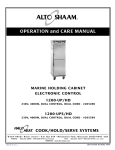
Holding Cabinet
Electronic or Manual Control
1200-UP
Models:
1200-S
1200-UP
1200-S
• INSTALLATION
• OPERATION
• MAINTENANCE
W164 N9221 Water Street • P.O. Box 450 • Menomonee Falls, Wisconsin 53052-0450 USA
PHONE: 262.251.3800 • 800.558.8744 USA / CANADA
FAX: 262.251.7067 • 800.329.8744 U . S . A .
www.alto-shaam.com
PRINTED IN U.S.A.
ONLY
MN-28680 • 09/09
Delivery . . . . . . . . . . . . . . . . . . . . . . . . . . . . . . . . . . . . . . 1
Unpacking . . . . . . . . . . . . . . . . . . . . . . . . . . . . . . . . . . . . 1
Safety Procedures and Precautions . . . . . . . . . . . . . . . . . 2
Sanitation
Sanitation/Food Safety . . . . . . . . . . . . . . . . . . . . . . . 18
Internal Food Product Temperatures . . . . . . . . . . . . . 18
Installation
Installation Requirements . . . . . . . . . . . . . . . .
Clearance Requirements . . . . . . . . . . . . . . . . .
Dimension Drawings, weights & capacities . . .
Options and Accessories . . . . . . . . . . . . . . . . .
Universal Pan Slides/Side Racks and Shelves
Leveling . . . . . . . . . . . . . . . . . . . . . . . . . . . . .
Restraint Requirements - Mobile Equipment . .
Electrical Specifications . . . . . . . . . . . . . . . . .
User Safety Information . . . . . . . . . . . . . . . . .
Before Initial Use . . . . . . . . . . . . . . . . . . . . . .
Heating Characteristics . . . . . . . . . . . . . . . . . .
Service
Thermostat Accuracy. . . . . . . . . . . . . . . . . . . . . . . . . 19
Trouble Shooting - MANUAL CONTROL . . . . . . . . . . . . . . 20
Trouble Shooting - ELECTRONIC CONTROL . . . . . . . . . . . 21
Exterior Service View - 1200-S . . . . . . . . . . . . . . . . 22
Exterior Service View - 1200-UP . . . . . . . . . . . . . . . . 23
Exterior Service Parts List . . . . . . . . . . . . . . . . . . . . . 24
Cable Heating Kits . . . . . . . . . . . . . . . . . . . . . . . . . . 24
Bonnet Assembly View - Manual Control . . . . . . . 25-26
Bonnet Assembly Parts List - Manual Control . . . . . . 27
Bonnet Assembly View - Electronic Control . . . . . . . . 28
Bonnet Assembly Parts List - Electronic Control . . . . 29
.
.
.
.
.
.
.
.
.
.
.
.
.
.
.
.
.
.
.
.
.
.
.
.
.
.
.
.
.
.
.
.
.
.
.
.
.
.
.
.
.
.
.
.
.
.
.
.
.
.
.
.
.
.
.
.
.
.
.
.
.
.
.
.
.
.
3
3
4
5
6
7
7
8
9
9
9
Operating Instructions
Manual Control Operation . . . . . . . . . . . . . . . . . . . . . 10
Electronic Control Identification . . . . . . . . . . . . . . . . . 11
Electronic Control Set-Up . . . . . . . . . . . . . . . . . . . . . 12
Electronic Control Operation . . . . . . . . . . . . . . . . . . . 12
Electronic Holding Cabinet Special Features . . . . . . . 13
Heat Recovery . . . . . . . . . . . . . . . . . . . . . . . . . . . . . 13
HACCP Documentation . . . . . . . . . . . . . . . . . . . . . . . 13
HACCP Documentation w/ Kitchen Management . . . . 13
Dough Proofing Instructions . . . . . . . . . . . . . . . . . . . 13
Electronic Control Timer Programming . . . . . . . . . . . 14
General Holding Guidelines. . . . . . . . . . . . . . . . . . . . 15
Care and Cleaning
Cleaning and Preventative Maintenance
Protecting Stainless Steel Surfaces. . . .
Cleaning Agents . . . . . . . . . . . . . . . . . .
Cleaning Materials . . . . . . . . . . . . . . . .
Clean Daily . . . . . . . . . . . . . . . . . . . . . .
.
.
.
.
.
.
.
.
.
.
.
.
.
.
.
.
.
.
.
.
.
.
.
.
.
.
.
.
.
.
.
.
.
.
.
.
.
.
.
.
.
.
.
.
.
.
.
.
.
.
16
16
16
16
17
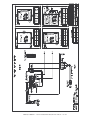
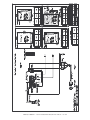
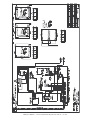
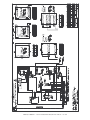
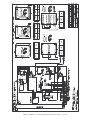
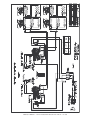
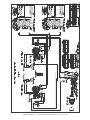
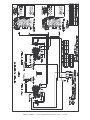
Wire Diagrams
1200-S, 120V - MANUAL . . . . . . . .
1200-S, 208-240V - MANUAL . . . . .
1200-S, 230V - MANUAL . . . . . . . .
1200-S, 120V - ELECTRONIC . . . . .
1200-S, 208-240V - ELECTRONIC . .
1200-S, 230V - ELECTRONIC . . . . .
1200-UP, 120V - MANUAL . . . . . . .
1200-UP, 208-240V - MANUAL . . . .
1200-UP, 230V - MANUAL . . . . . . .
1200-UP, 120V - ELECTRONIC . . . .
1200-UP, 208-240V - ELECTRONIC .
1200-UP, 230V - ELECTRONIC . . . .
.
.
.
.
.
.
.
.
.
.
.
.
.
.
.
.
.
.
.
.
.
.
.
.
.
.
.
.
.
.
.
.
.
.
.
.
.
.
.
.
.
.
.
.
.
.
.
.
.
.
.
.
.
.
.
.
.
.
.
.
.
.
.
.
.
.
.
.
.
.
.
.
.
.
.
.
.
.
.
.
.
.
.
.
.
.
.
.
.
.
.
.
.
.
.
.
.
.
.
.
.
.
.
.
.
.
.
.
.
.
.
.
.
.
.
.
.
.
.
.
.
.
.
.
.
.
.
.
.
.
.
.
.
.
.
.
.
.
.
.
.
.
.
.
.
.
.
.
.
.
.
.
.
.
.
.
.
.
.
.
.
.
.
.
.
.
.
.
.
.
.
.
.
.
.
.
.
.
.
.
30
31
32
33
34
35
36
37
38
39
40
41
Warranty
Transportation Damage and Claims . . . . . . Back Cover
Limited Warranty . . . . . . . . . . . . . . . . . . . . . Back Cover
DELIVERY
U N PA C K I N G
This Alto-Shaam appliance has been
thoroughly tested and inspected to insure only the
highest quality unit is provided. Upon receipt,
check for any possible shipping damage and report
it at once to the delivering carrier. See
Transportation Damage and Claims section
located in this manual.
This appliance, complete with unattached
items and accessories, may have been delivered in
one or more packages. Check to ensure that all
standard items and options have been received
with each model as ordered.
Save all the information and instructions
packed with the appliance. Complete and return
the warranty card to the factory as soon as
possible to assure prompt service in the event of a
warranty parts and labor claim.
This manual must be read and understood by
all people using or installing the equipment
model. Contact the Alto-Shaam service
department if you have any questions concerning
installation, operation, or maintenance.
NOTE: All claims for warranty must include the
full model number and serial number of
the unit.
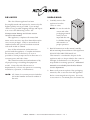
1200-S, 1200-UP •
1. Carefully remove the
appliance from the
carton or crate.
®
NOTE: Do not discard the
carton and other
packaging material
until you have
inspected the unit
for hidden damage
and tested it for
proper operation.
®
2. Read all instructions in this manual carefully
before initiating the installation of this appliance.
DO NOT DISCARD THIS MANUAL.
This manual is considered to be part of the
appliance and is to be provided to the owner or
manager of the business or to the person
responsible for training operators. Additional
manuals are available from the Alto-Shaam
service department.
3. Remove all protective plastic film, packaging
materials, and accessories from the appliance
before connecting electrical power. Store any
accessories in a convenient place for future use.
INSTALLATION / OPERATION / SERVICE MANUAL
-
PG .
1
SAFETY PROCEDURES
AND PRECAUTIONS
Knowledge of proper procedures is essential to the
safe operation of electrically and/or gas energized
equipment. In accordance with generally accepted
product safety labeling guidelines for potential
hazards, the following signal words and symbols
may be used throughout this manual.
DANGER
Used to indicate the presence of a
hazard that WILL cause severe
personal injury, death, or substantial
property damage if the warning
included with this symbol is ignored.
WA R N I N G
Used to indicate the presence of a
hazard that CAN cause personal injury,
possible death, or major property
damage if the warning included with
this symbol is ignored.
1. This appliance is intended to cook, hold or
process foods for the purpose of human
consumption. No other use for this appliance is
authorized or recommended.
2. This appliance is intended for use in commercial
establishments where all operators are familiar
with the purpose, limitations, and associated
hazards of this appliance. Operating
instructions and warnings must be read and
understood by all operators and users.
3. Any troubleshooting guides, component views,
and parts lists included in this manual are for
general reference only and are intended for use
by qualified technical personnel.
4. This manual should be considered a permanent
part of this appliance. This manual and all
supplied instructions, diagrams, schematics,
parts lists, notices, and labels must remain with
the appliance if the item is sold or moved to
another location.
CAUTION
Used to indicate the presence of a
hazard that can or will cause minor or
moderate personal injury or property
damage if the warning included with
this symbol is ignored.
NOTE
For equipment delivered for use
in any location regulated by the
following directive:
DO NOT DISPOSE OF ELECTRICAL
OR ELECTRONIC EQUIPMENT WITH
OTHER MUNICIPAL WASTE.
CAUTION
Used to indicate the presence of a hazard that can
or will cause minor personal injury, property
damage, or a potential unsafe practice if the
warning included with this symbol is ignored.
N O T E : Used to notify personnel of
installation, operation, or
maintenance information that is
important but not hazard related.
1200-S, 1200-UP •
INSTALLATION / OPERATION / SERVICE MANUAL
-
PG .
2
I N S TA L L AT I O N
DANGER
CAUTION
IMPROPER INSTALLATION,
ALTERATION, ADJUSTMENT,
SERVICE, OR MAINTENANCE COULD
RESULT IN SEVERE INJURY, DEATH
OR CAUSE PROPERTY DAMAGE.
READ THE INSTALLATION,
OPERATING AND MAINTENANCE
INSTRUCTIONS THOROUGHLY
BEFORE INSTALLING OR SERVICING
THIS EQUIPMENT.
CAUTION
TO PREVENT PERSONAL INJURY,
METAL PARTS OF THIS EQUIPMENT
BECOME EXTREMELY HOT WHEN IN
OPERATION. TO AVOID BURNS,
ALWAYS USE HAND PROTECTION
WHEN OPERATING THIS APPLIANCE.
DANGER
DO NOT store or use gasoline or other
flammable vapors or liquids in the
vicinity of this or any other appliance.
USE CAUTION WHEN MOVING OR
LEVELING THIS APPLIANCE.
S I T E I N S TA L L AT I O N
The Alto-Shaam cook
and hold oven must be
installed in a location
that will permit the
oven to function for its
intended purpose and
to allow adequate
clearance for
ventilation, proper
cleaning, and
maintenance access.
Emissions testing conducted by Underwriters
Laboratories, Inc. ® was found to be in
compliance with the applicable requirements of
NFPA96: 2004 Edition, Par. 4.1.1.2. U.L
emissions sampling of grease laden vapor
resulted in a total of 0.55 milligrams per cubic
meter with no visible smoke and is considered
representative of all oven models in the line.
Based on these results, hood installation and/or
outside venting should not be a requirement in
most areas. Verify local codes for locations
where more restrictive codes are applicable.
®
1. The oven must be installed on a stable and
level surface.
2. DO NOT install this appliance in any area
where it may be affected by any adverse
conditions such as steam, grease, dripping
water, high temperatures, or any other severely
adverse conditions.
3. DO NOT store or use any flammable liquids or
allow flammable vapors in the vicinity of this
oven or any other appliance.
4. This appliance must be kept free and clear of
any combustible materials.
5. This appliance must be kept free and clear of
any obstructions blocking access for
maintenance or service.
1200-S, 1200-UP •
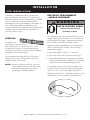
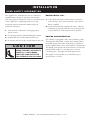
MINIMUM CLEARANCE REQUIREMENTS
3" (76mm)
BACK
1" (25mm)
LEFT SIDE
1" (25mm)
RIGHT SIDE
2" (51mm)
TOP
NOTE
If the appliance has been unplugged for an
extended period of time, the Real Time
Clock may require recharging. Plug the
unit into the proper receptacle for a
minimum of 24 hours.
INSTALLATION / OPERATION / SERVICE MANUAL
-
PG .
3
I N S TA L L AT I O N
Model 1200-UP
Model 1200-S
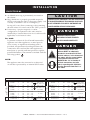
33-13/16"
(859mm)
28-3/16"
(716mm)
28-3/16"
(716mm)
24-9/16"
(624mm)
Electrical
Connection
Reach-In
Shown with
optional bumper
Electrical
Connection
54-11/16" (1388mm)
Shown with
optional bumper
CL
33" (837mm)
Reach-In
76-3/8" (1939mm)
CL
Electrical
Connection
54-11/16" (1388mm)
32-15/16" (837mm)
76-3/8" (1939mm)
33-13/16"
(859mm)
Pass-Through
Option
31-1/2"
(799mm)
I
I
o
o
LOWER CAVITY
UPPER CAVITY
31-1/2"
(799mm)
40-3/8" (1025mm)
43-3/16" (1097mm)*
with 5" (127mm) casters
36-7/16" (926mm)
71-15/16" (1827mm)
68" (1727mm)
74-13/16" (1900mm)*
with 5" (127mm) casters
24-9/16"
(624mm)
*41-1/16" (1043mm) - with optional 3" (76mm) casters
*43-5/16" (1099mm) - with optional 6" (152mm) legs
*73-7/16" (1864mm) - with optional 3" (76mm) casters
*75-3/4" (1924mm) - with optional 6" (152mm) legs
W E I G H T S A N D C A PA C I T I E S
WEIGHT - 1200-S
NET
1200-S/STD
165 lb (75kg)
1200-S/HD
180 lb (82kg)
205 lb (93kg)
225 lb (102kg)
CARTON DIMENSIONS : ( H X W X D)
50" X 35" X 35" (1270mm x 889mm x 889mm)
SHIP
—WITH
PAN SLIDES PROVIDED:
Eight (8)
Eight (8)
Eight (8)
Four (4)
WEIGHT - 1200-UP
NET
PRODUCT\PAN CAPACITY (PER COMPARTMENT)
192 lbs (87kg) MAXIMUM
VOLUME MAXIMUM : 120 QUARTS (152 LITERS )
1200-UP/STD
276 lb (125kg)
1200-UP/HD
301 lb (137kg)
315 lb (142kg)
350 lb (159kg)
CARTON DIMENSIONS : ( H X W X D)
82" X 35" X 35" (2083mm x 889mm x 889mm)
SHIP
1200-S, 1200-UP •
FULL - SIZE PANS:
20" x 12" x 2-1/2"
20" x 12" x 4"
20" x 12" x 6"
ADDT'L PAN SLIDES:
1/ 1:
(530 x 325 x 65mm) up to 16 Pans
(530 x 325 x 100mm) up to 10 Pans
(530 x 325 x 150mm)
FULL - SIZE SHEET PANS:
18" x 26" x 1"
UNIVERSAL PAN SLIDES
—WITH
—WITH
GASTRONORM
- 1-3/4" (44mm)
OPTIONAL SIDE RACKS FOR SHELVES
FULL - SIZE PANS:
Sixteen (16) 20" x 12" x 2-1/2"
Ten (10)
20" x 12" x 4"
Eight (8)
20" x 12" x 6"
INSTALLATION / OPERATION / SERVICE MANUAL
-
up to 16 Pans
CENTERS
GASTRONORM
1/ 1:
(530 x 325 x 65mm)
(530 x 325 x 100mm)
(530 x 325 x 150mm)
PG .
4
I N S TA L L AT I O N
OPTIONS and ACCESSORIES
Electronic Control ( FACTORY
INSTALLATION ONLY )
Computer Software ( ELECTRONIC
HACCP DOCUMENTATION
HACCP
&
CONTROL ONLY )
Door Lock with Key
Handle Kit, Push/Pull ( SET
Legs, 6" (152mm)
INSTALLATION ONLY )
OF FOUR )
Pass-Through Design
Probe, internal product temperature ( ELECTRONIC
Shelf, Chrome Plated Wire, for side racks
Shelf, Stainless Steel Wire, for side racks
Side Rack Model
Universal Angle Pan Slides, Stainless Steel
Water Reservoir, Cover
5010295
5005142
5005142
5010293
5010293
LK-22567
LK-22567
5010294
5010294
55662
PN-2115
CONTROL )
PN-2115
AVAILABLE
AVAILABLE
AVAILABLE
AVAILABLE
SH-23738
SH-23738
5010295
N/A
SH-2733
SH-2733
AVAILABLE
SR-24447
SR-24447
1775
1775
SR-24762
SR-24762
1774
1200-S, 1200-UP •
#9015,
5010295
AVAILABLE
Stacking Hardware
Water Reservoir, Pan
AVAILABLE
55662
Pan Grid, Wire 18" x 26" (457mm x 660mm)
Universal Angle Pan Slides, Chrome
AVAILABLE
REFER TO SPECIFICATION
Bumper, Full Perimeter
Door Assembly, Window ( FACTORY
1200-UP
FOR APPLICABLE PART NUMBERS
KITCHEN MANAGEMENT NETWORKING
Caster Package, 3" (76mm)
1200-S
INSTALLATION / OPERATION / SERVICE MANUAL
1774
-
PG .
5
I N S TA L L AT I O N
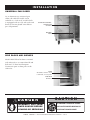
UNIVERSAL PAN SLIDES
As an alternative to universal pan
slides, the 1200-UP model can be
ordered as a “side rack” model which
is equipped with two (2) side racks and
three (3) chrome plated wire shelves
per compartment.
Universal Pan Slides,
chrome plate
SR-24447
Side Rail
16046
SIDE RACKS AND SHELVES
Model 1200-UP that has been converted
with side racks to accommodate full and
half size U.S. Hotel and European
Gastronorm pans or sheet pans on the
side racks.
Shelf
SH-23738, stainless steel
or SH-2733, chrome plate
Side Rack
SR-25271
DANGER
DISCONNECT UNIT FROM
POWER SOURCE BEFORE
CLEANING OR SERVICING.
1200-S, 1200-UP •
CAUTION
TO PREVENT PERSONAL INJURY,
USE CAUTION WHEN MOVING OR
LEVELING THIS APPLIANCE.
INSTALLATION / OPERATION / SERVICE MANUAL
-
PG .
6
I N S TA L L AT I O N
S I T E I N S TA L L AT I O N
A number of adjustments are associated with
initial installation and start-up. It is important
that these adjustments be conducted by a qualified
service technician. Installation and start-up
adjustments are the responsibility of the dealer or
user. These adjustments include but are not
limited to thermostat calibration, door adjustment,
leveling, electrical hook-up and installation of
optional casters or legs.
LEVELING
Level the oven
from side-to-side and front-toback with the use of a spirit level. For ovens
installed with casters, it is important that the
installation surface be level due to the probability
of frequent oven repositioning.
We recommend checking the level of the oven
periodically to make certain the floor has not
shifted nor the oven moved.
NOTE: Failure to properly level this oven can
cause improper function and will result
in the uneven baking with products
consisting of semi-liquid batter.
1200-S, 1200-UP •
RESTRAINT REQUIREMENTS
—MOBILE EQUIPMENT
WA R N I N G
RISK OF ELECTRIC SHOCK.
Appliance must be secured
to building structure.
Any appliance that is not furnished with a power
supply cord but that includes a set of casters must
be installed with a tether. Adequate means must
be provided to limit the movement of this
appliance without depending on or transmitting
stress to the electrical conduit. The following
requirements apply:
1. Maximum height of casters is 6" (152mm).
2. Two of the casters must of be the locking type.
3. Such mobile appliances or appliances on mobile
stands must be installed with the use of a flexible
connector secured to the building structure.
A mounting connector for a restraining device is
located on the lower back flange of the appliance
chassis or on an oven stand, approximately 18"
(457mm) from the floor. A flexible connector is not
supplied by nor is it available from the factory.
INSTALLATION / OPERATION / SERVICE MANUAL
-
PG .
7
I N S TA L L AT I O N
ELECTRICAL
1. An identification tag is permanently mounted on
the cabinet.
2. Plug cabinet into a properly grounded receptacle
ONLY, positioning the unit so the power supply cord
is easily accessible in case of an emergency.
Arcing will occur when connecting or disconnecting
the unit unless all controls are in the “OFF” position.
CAUTION
THIS SECTION IS PROVIDED FOR THE ASSISTANCE
OF QUALIFIED SERVICE TECHNICIANS ONLY AND
IS NOT INTENDED FOR USE BY UNTRAINED OR
UNAUTHORIZED SERVICE PERSONNEL.
3. If necessary, a proper receptacle or outlet
configuration as required for this unit, must be
installed by a licensed electrician in accordance with
applicable, local electrical codes.
DANGER
ENSURE POWER SOURCE
MATCHES VOLTAGE STAMPED
For 230V:
To prevent an electrical shock hazard between the
appliance and other appliances or metal parts in
close vicinity, an equalization-bonding stud is
provided. An equalization bonding lead must be
connected to this stud and the other appliances /
metal parts to provide sufficient protection against
potential difference. The terminal is marked with the
following symbol.
ON APPLIANCE NAMEPLATE.
DANGER
To avoid electrical shock, this
appliance MUST be adequately
grounded in accordance with local
electrical codes or, in the absence of
local codes, with the current edition
of the National Electrical Code
ANSI/NFPA No. 70. In Canada, all
electrical connections are to be
made in according with CSA C22.1,
Canadian Electrical Code Part 1 or
local codes.
NOTE:
The appliance must be connected to an electrical
circuit that is protected by an external GFCI outlet.
208-240 (AGCY)
at 208
at 240
208-240 (AGCY)
at 208
at 240
at 230
at 230
1000W
2000W
1
60
8.3
1
1
1
60
60
60
8.4
7.2
8.4
1
1
1
1
1
60
60
60
50
50
4.2
3.6
4.2
3.9
7.8
1.0
1.0
.75
1.0
2.0
1.5
2.0
.90
1.8
1200-S, 1200-UP •
ELECTRICAL - 1200-UP
NEMA 5-15 P,
15A-125 V PLUG
NEMA 6-15 P ,
15A-250 V PLUG
( USA ONLY )
NO CORD
NO PLUG
CEE 7/7,
220-230 V PLUG
VOLTAGE
12 0
12 0
20 8 - 24 0
1 0 0 0W
200 0 W
23 0
at 120
KW
208 - 240
2 00 0 W
40 0 0W
PHASE CYCLE / HZ AMPS
VOLTAGE
230
ELECTRICAL- 1200-S
at 120
208-240 (AGCY)
at 208
at 240
208-240 (AGCY)
at 208
at 240
PHASE CYCLE / HZ AMPS
KW
1
60
16.0 1.92
1
1
1
60
60
60
16.7
14.4
16.7
1
1
1
60
60
60
at 230 2000W 1
at 230 4000W 1
INSTALLATION / OPERATION / SERVICE MANUAL
9.6
7.2
9.6
50
50
-
PG .
2.0
1.5
2.0
4.0
3.0
4.0
8.0 1.85
16.0 3.67
8
CORD
&
PLUG
NEMA 5-20 P,
20A-125 V PLUG
NEMA 6-15 P ,
15A-250 V PLUG
( USA ONLY )
NO CORD
NO PLUG
CEE 7/7,
220-230 V PLUG
I N S TA L L AT I O N
U S E R S A F E T Y I N F O R M AT I O N
This appliance is intended for use in commercial
establishments where all operators are familiar
with the purpose, limitations, and associated hazards
of this appliance. Operating instructions and
warnings must be read and understood by all
operators and users.
1. Unit must be connected to the appropriate
power source.
2. Use hand protection when handling hot items.
3. Preheat the unit for 30 minutes before use.
4. Be certain only hot foods are placed into the unit.
CAUTION
METAL PARTS OF THIS EQUIPMENT
BECOME EXTREMELY HOT WHEN IN
OPERATION. TO AVOID BURNS,
ALWAYS USE HAND PROTECTION
WHEN OPERATING THIS APPLIANCE.
1200-S, 1200-UP •
BEFORE INITIAL USE:
1. Clean both the interior and exterior of the unit
with a damp, clean cloth and mild soap solution.
Rinse carefully.
2. Clean and install the cabinet side racks. Shelves
should be positioned with the curved end up and
toward the back of the unit (reach-in models).
HEATING CHARACTERISTICS
The cabinet is equipped with a special heating cable.
Through this Halo Heat concept, the heating cable is
mounted against the walls of the unit to provide an
evenly applied heat source controlled by a thermostat.
The design and operational characteristics of the unit
eliminate the need for a moisture pan or a heat
circulating fan. Through even heat application,
the quality of food products is maintained up to
several hours or more.
INSTALLATION / OPERATION / SERVICE MANUAL
-
PG .
9
O P E R AT I O N
MANUAL CONTROL
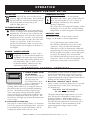
1. PREHEAT AT 200°F (93°C) FOR 30 MINUTES
BEFORE LOADING FOOD.
Push power switch to “ON” position. The power
button will illuminate.
2. Rotate the control knob to 200°F (93°C). The Set
temperature will appear in the Digital Display
S200 and the temperature display light will
illuminate. Press the Temperature Display Button
at any time to display the Actual inside air
temperature A190 .
To toggle between Set and Actual:
Factory default is to display Set temperature in the
Digital Display. To display Actual temperature:
With the control ON press and hold the
Temperature Button for 5 seconds. The control will
show ACT , then show the Actual temperature.
Repeate to toggle to Set point SET .
Press the Temperature Display Button at any time
to display the alternate temperature.
THIS WILL NOT NECESSARILY
BE THE FINAL SETTING.
The proper temperature range for the food being
held will depend on the type and quantity of
product. Whether or not the door vents should be
open or closed will also depend on the type of food
being held. When holding food for prolonged
periods, it is advisable to periodically check the
internal temperature of each item to assure
maintenance of the proper temperature range.
Reset the holding temperature accordingly.
TO TOGGLE BETWEEN FAHRENHEIT
AND CELSIUS
The factory default is Fahrenheit. To change to Celsius:
1. With the control OFF (i.e. temperature setting in the
OFF position), press and hold the Temperature
Display button for 5 seconds.
2. The control will show DEGC for 3 seconds to verify
selection and then show the temperature. (Set Point
or Actual, whichever the user has selected) in ºC.
3. When the inside air temperature reaches the desired
holding temperature, the temperature display light
3. Repeat to toggle to Fahrenheit.
will turn off.
No te : With a p o w e r failure , facto ry te st, e tc., th e co ntro l
4. Load the cabinet with hot food only.
w ill re tain th e ºC o r ºF se tting se le cte d b y th e use r w h e n
The purpose of the holding cabinet is to maintain
p o w e r is re sto re d .
hot food at proper serving temperatures. Only hot
POWER FAILURE
food should be placed into the cabinet. Before
loading the unit with food, use a food thermometer
When power is lost, then resumes, the display will
to make certain all food products are at an internal
flash -AC- for 4 seconds, then display the set holding
temperature range of 140° to 160°F (60° to 71°C).
temperature for 4 seconds and will alternate until
All food not within the proper temperature
acknowledged. To acknowledge, press any key.
range should be heated before loading into the
holding cabinet.
This feature will alert you when there is a power failure,
indicating that food safety may be compromised.
5. Check to make certain the cabinet door is securely
closed, and rotate the control knob to 160°F (71°C).
Digital
Display
Temperature
Display Light
Temperature
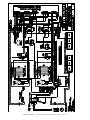
Control Knob
I
o
On/Off Power
Switch
Temperature
Display Button
1200-S, 1200-UP •
INSTALLATION / OPERATION / SERVICE MANUAL
-
PG .
10
O P E R AT I O N
ELECTRONIC CONTROL OPTION
�
�
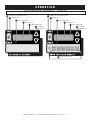
POWER ON INDICATOR LIGHT
�
ON / OFF KEY
�
POWER ON INDICATOR LIGHT
�
ON / OFF KEY
�
HEAT INDICATOR
�
HEAT INDICATOR
�
LED DISPLAY
�
LED DISPLAY
�
LOCK INDICATOR
�
LOCK INDICATOR
�
UP / DOWN
ARROW KEYS
UP / DOWN
ARROW KEYS
1
2
�
1200-S, 1200-UP •
3
4
SHELF TIMER KEYS
INSTALLATION / OPERATION / SERVICE MANUAL
-
PG .
11
5
6
O P E R AT I O N
E L E C T R O N I C C O N T R O L S E T- U P
ON/OFF KEY
Press the ON/OFF key once and the power
indicator light will illuminate. Press and hold
the ON/OFF key until the LED display turns
off (at least three seconds) and power
indicator light goes out.
UP/DOWN ARROW KEY
The UP and DOWN arrow keys are used for a
variety of settings when selecting the holding
temperature. If an arrow key is pressed and
released the display will show the current set
temperature for two seconds. If an arrow key
is held (at least eight seconds), the value will
change at a rapid rate. If the arrow key is
pressed and released in rapid succession, the
set temperature will change by increments of
one degree.
ENABLE / DISABLE BEEPER
A beeper sounds when an error code is
displayed. To choose between beeper on
and beeper off mode, the control must be
off, then press and hold the DOWN arrow
key until either "ON" or "OFF" is shown
in the LED display. Release arrow key
when desired mode is displayed.
FAHRENHEIT/CELSIUS
°F/ °C
With the control off, to choose between
Fahrenheit and Celsius, press and hold the UP
arrow key until either °F or °C is shown in
LED display. Release key when desired
setting is displayed.
The control has a four-digit LED display. When
the display is on, it will show current holding
temperature, as well as diagnostic information.
CONTROL LOCK
The warmer controls can be locked so that no
changes can be made to the set temperature.
To lock the display, press and hold the
ON/OFF key and the Up Arrow key at the
same time. The lock LED will illuminate.
When the lock LED is illuminated, additional
programming will not be functional other than
the key sequence required to unlock the panel.
To unlock the display, press and hold the
ON/OFF key and the Down Arrow key at the
same time. The lock LED will extinguish. The
panel keys will resume normal function.
E L E C T R O N I C C O N T R O L O P E R AT I O N
1. Preheat at 200°F (93°C)
for 30 minutes.
Press the ON key, and set
the temperature to 200°F
(93°) by using the
UP/DOWN arrow keys.
Allow a minimum of 30
minutes preheating time before loading the
holding cabinet with food. Closing the vents on
the inside of the door will speed the preheating
process. The LED heat indicator light will go
“Out” after approximately 30 minutes preheat
time, or when the air temperature inside the unit
reaches the temperature set by the operator. The
Set indicator will light up anytime the temperature
is set or reset.
1
2
3
4
5
6
2. Load with hot food only.
The purpose of the holding cabinet is to maintain
hot food at proper serving temperature. Only hot
food should be placed into the cabinet. Before
loading the cabinet with food, use a food
1200-S, 1200-UP •
thermometer to make certain all products are at
an internal temperature range of 140° to 160°F
(60° to 71°C). Any food product not within the
proper temperature range should be heated before
loading into the holding cabinet.
3. Reset the control to 160°F (71°C).
Check to make certain the cabinet door is securely
closed, and reset to 160°F (71°C) by using the
UP/DOWN keys
THIS WILL NOT NECESSARILY
BE THE FINAL SETTING.
The proper temperature range and OPEN or CLOSED
door vent position will depend on the type and
quantity of product. When holding food for
prolonged periods, it is advisable to periodically
check the internal temperature of each item with a
food thermometer to assure maintenance of the
proper temperature range of 140° to 160°F
(60° to 71°C).
INSTALLATION / OPERATION / SERVICE MANUAL
-
PG .
12
O P E R AT I O N
E L E C T R O N I C H O L D I N G C A B I N E T S P E C I A L F E AT U R E S
HEAT RECOVERY
The patented SureTemp™ heat recovery system in
this unit will immediately compensate for any loss
of heat when the door is opened. In order to
maintain a more consistent cavity temperature, the
control will automatically apply heat to the unit's
interior while the door is open and for a short time
after the door is closed. If the door remains open for
more than three minutes, the solid state electronic
control will sound three rapid beeps every ten
seconds until the door is closed.
HACCP DOCUMENTATION OPTION
Web-based documentation software provides both a
simple and effective method of temperature
recording. The system is designed to interface with
Alto-Shaam electronic cook/hold ovens, hot food
holding cabinets, Combitherm ® combi
oven/steamers, and Quickchillers ™ . All relevant
information is recorded and stored, and is accessible
from the convenience of one or more computer
stations. Stored information is displayed in a
detailed overview for evaluation and printing
as required.
• Records cooking and holding time and temperature
• Pass/fail summary for review or printing
• Automatic data storage accessible in a variety
of formats
• Supports up to 16 appliance addresses on one network
HACCP DOCUMENTATION WITH
KITCHEN MANAGEMENT OPTION
Web-based software incorporates the latest
technology providing the ability to program, control,
monitor, and store all relevant cooking and hot food
holding data through the Internet from a single site
or multiple sites. Automated sampling, record
keeping, and set-point validation meet the
requirements of established HACCP criteria.
Designed to help manage the fully integrated food
service facility.
• HACCP compliant automated logging/database
storage
• Printed HACCP reports
• Data analysis for corrective action
• “Real time” sensor values and alarms
• Alarm notification via e-mail, pager, mobile phone
• Supports up to 16 appliance addresses on one
network
For more information refer to HACCP Spec Sheet #9015.
DOUGH PROOFING INSTRUCTIONS
MANUAL AND ELECTRONIC CABINETS
With the addition of a pan of water, warming cabinets can be used for proofing dough. A water reservoir
pan (#1775) and pan cover (#1774) is available as an option from Alto-Shaam.
1. Remove dough from retarder or refrigerator and allow covered product to set up at room temperature.
2. Set holding thermostat temperature to 95°F (35°C).
3. Pour approximately 2 quarts (c. 2 liters) of hot water into the optional water reservoir pan and place the
pan on the bottom surface of the compartment. The temperature of the water should be 140° to 180°F
(60° to 82°C).
4. Allow the cabinet to preheat for 45 to 60 minutes.
5. Remove covering and place dough in preheated cabinet.
6. Allow dough to remain in the cabinet until it nearly doubles in size.
7. Remove product from cabinet and bake according to product manufacturer's directions. Brush with
eggwash if desired.
NOTE: The above proofing procedure is a suggested guideline only. Due to variation from product to
product, including quality and product weight, close adherence the product manufacturer's
instructions is strongly recommended.
1200-S, 1200-UP •
INSTALLATION / OPERATION / SERVICE MANUAL
-
PG .
13
O P E R AT I O N
ELECTRONIC CONTROL TIMER PROGRAMMING
ON/OFF
POWER
KEY
INDICATOR
LIGHT
LOCK
INDICATOR
LED
DISPLAY
UP/DOWN
ARROWS
HEAT
INDICATOR
LIGHT
1
2
3
4
5
6
SHELF TIMER KEYS
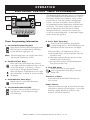
Timer Programming Information
1. Turn On/Off Control Key OFF.
Press the On/Off Key until the display turns
OFF (at least 3 seconds) and On/Off Key's
Power Indicator Light goes out.
Note: The following steps can only be done when
the On/Off Control Key is OFF.
2. Set Shelf Timer Keys.
Press and hold a Shelf Timer Key (at least
3 seconds) until the countdown time is shown
in the LED display. Use the Up or Down
Arrow Key to change the time desired.
Time will display as HH:MM if set for longer
than 60 minutes, or HH:SS if set for less than
60 minutes.
3. Set Additional Timer Keys.
Repeat step 2 for each Shelf Timer Key
to be programmed.
4. Turn On/Off Power Key ON.
Using the timer, press the On/Off key to
turn ON unit. Power Indicator Light
will illuminate.
1200-S, 1200-UP •
The Multiple Shelf Timer Key option is available for
hot food holding units with the electronic control.
These keys monitor food safety by using a timerbased "First-In, First-Out" product management
system. Products should be cooked to HACCP
recommended internal temperature and then held
in the unit. The Timer system allows operator to
select holding times when the unit is loaded.
Multiple timer keys correspond to various pan
locations in the holding unit. As the timers expire,
alarms notify the operator.
5. Press Shelf Timer Key.
Activate the shelf timer by pressing the
corresponding button. Shelf LED display will
illuminate and the count down will begin.
The time r LED’s will illuminate as follows:
a) All expired timers will flash quickly (may be
more than one)
b) The timer with the shortest amount of time
remaining will flash slowly.
c) All other active timers will be illuminated
(may be more than one).
6. Turn OFF alarm.
Alarm will sound as time expires.
Press expired Shelf Timer Key to turn the
alarm OFF.
To Cancel a Timer:
Press and hold desired Shelf Timer Key for
two seconds.
Power Failure:
The Power Indicator Light by On/Off Power Key
will blink to indicate a power failure. To stop the
blinking, simply depress On/Off Key. The
memory will not be impaired.
INSTALLATION / OPERATION / SERVICE MANUAL
-
PG .
14
O P E R AT I O N
GENERAL HOLDING GUIDELINES
Chefs, cooks and other specialized food service
personnel employ varied methods of cooking. Proper
holding temperatures for a specific food product must
be based on the moisture content of the product,
product density, volume, and proper serving
temperatures. Safe holding temperatures must also
be correlated with palatability in determining the
length of holding time for a specific product.
Halo Heat maintains the maximum amount of product
moisture content without the addition of water, water
vapor, or steam. Maintaining maximum natural
product moisture preserves the natural flavor of the
product and provides a more genuine taste. In
addition to product moisture retention, the gentle
properties of Halo Heat maintain a consistent
temperature throughout the cabinet without the
necessity of a heat distribution fan, thereby preventing
further moisture loss due to evaporation or
dehydration.
In an enclosed holding environment, too much
moisture content is a condition which can be relieved.
A product achieving extremely high temperatures in
preparation must be allowed to decrease in
temperature before being placed in a controlled
holding atmosphere. If the product is not allowed to
decrease in temperature, excessive condensation will
form increasing the moisture content on the outside
of the product. To preserve the safety and quality
of freshly cooked foods however, a maximum of 1
to 2 minutes must be the only time period allowed
for the initial heat to be released from the product.
Most Halo Heat holding equipment is provided with
a thermostat control between 60° and 200°F (16° to
93°C). If the unit is equipped with vents, close the
vents for moist holding and open the vents for crisp
holding.
H O L D I N G T E M P E R AT U R E R A N G E
MEAT
FAHRENHEIT
CELSIUS
BEEF ROAST — Rare
130°F
54°C
BEEF ROAST — Med/Well Done
155°F
68°C
BEEF BRISKET
160° — 175°F
71° — 79°C
CORN BEEF
160° — 175°F
71° — 79°C
PASTRAMI
160° — 175°F
71° — 79°C
PRIME RIB — Rare
STEAKS — Broiled/Fried
130°F
54°C
140° — 160°F
60° — 71°C
RIBS — Beef or Pork
160°F
71°C
VEAL
160° — 175°F
71° — 79°C
HAM
160° — 175°F
71° — 79°C
PORK
160° — 175°F
71° — 79°C
LAMB
160° — 175°F
71° — 79°C
CHICKEN — Fried/Baked
160° — 175°F
71° — 79°C
DUCK
160° — 175°F
71° — 79°C
TURKEY
160° — 175°F
71° — 79°C
GENERAL
160° — 175°F
71° — 79°C
FISH — Baked/Fried
160° — 175°F
71° — 79°C
LOBSTER
160° — 175°F
71° — 79°C
SHRIMP — Fried
160° — 175°F
71° — 79°C
120° — 140°F
49° — 60°C
160° — 175°F
71° — 79°C
80° — 100°F
27° — 38°C
EGGS —Fried
150° — 160°F
66° — 71°C
FROZEN ENTREES
160° — 175°F
71° — 79°C
HORS D'OEUVRES
160° — 180°F
71° — 82°C
PASTA
160° — 180°F
71° — 82°C
PIZZA
160° — 180°F
71° — 82°C
POULTRY
FISH/SEAFOOD
BAKED GOODS
BREADS/ROLLS
MISCELLANEOUS
CASSEROLES
DOUGH — Proofing
POTATOES
180°F
82°C
PLATED MEALS
140° — 165°F
60°— 74°C
SAUCES
140° — 200°F
60° — 93°C
SOUP
140° — 200°F
60° — 93°C
VEGETABLES
160° — 175°F
71° — 79°C
THE HOLDING TEMPERATURES LISTED ARE SUGGESTED
GUIDELINES ONLY. ALL FOOD HOLDING SHOULD BE BASED ON
INTERNAL PRODUCT TEMPERATURES . ALWAYS FOLLOW LOCAL
HEALTH ( HYGIENE ) REGULATIONS FOR ALL INTERNAL
TEMPERATURE REQUIREMENTS .
If the unit is equipped with a thermostat indicating a
range of between 1 and 10, use a metal-stemmed
indicating thermometer to measure the internal
temperature of the product(s) being held. Adjust the
thermostat setting to achieve the best overall setting
based on internal product temperature.
1200-S, 1200-UP •
INSTALLATION / OPERATION / SERVICE MANUAL
-
PG .
15
CARE AND CLEANING
CLEANING AND PREVENTIVE MAINTENANCE
PROTECTING STAINLESS STEEL SURFACES
It is important to guard against
corrosion in the care of
stainless steel surfaces.
Harsh, corrosive, or
inappropriate chemicals can
completely destroy the
protective surface layer of stainless steel.
Abrasive pads, steel wool, or metal implements
will abrade surfaces causing damage to this
protective coating and will eventually result in
areas of corrosion. Even water, particularly hard
water that contains high to moderate
concentrations of chloride, will cause oxidation
and pitting that result in rust and corrosion. In
addition, many acidic foods spilled and left to
remain on metal surfaces are contributing factors
that will corrode surfaces.
Proper cleaning agents, materials, and
methods are vital to maintaining the appearance
and life of this appliance. Spilled foods should be
removed and the area wiped as soon as possible
but at the very least, a minimum of once a day.
Always thoroughly rinse surfaces after using a
cleaning agent and wipe standing water as quickly
as possible after rinsing.
CLEANING AGENTS
Use non-abrasive cleaning products designed for
use on stainless steel surfaces. Cleaning agents
must be chloride-free compounds and must not
contain quaternary salts. Never use hydrochloric
acid (muriatic acid) on stainless steel surfaces.
Always use the proper cleaning agent at the
manufacturer's recommended strength.
Contact your local cleaning supplier for
product recommendations.
CLEANING MATERIALS
The cleaning function can usually be accomplished
with the proper cleaning agent and a soft, clean
cloth. When more aggressive methods must be
employed, use a non-abrasive scouring pad on
difficult areas and make certain to scrub with the
visible grain of surface metal to avoid surface
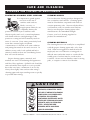
scratches. Never use wire brushes, metal scouring
pads, or scrapers to remove food residue.
BRU
S
IRE
EL PA
STE
DS
NO
W
S
HE
NO
SCR APER
O
S
N
CAUTION
1200-S, 1200-UP •
TO PROTECT STAINLESS STEEL
SURFACES, COMPLETELY AVOID
THE USE OF ABRASIVE CLEANING
COMPOUNDS, CHLORIDE BASED
CLEANERS, OR CLEANERS
CONTAINING QUATERNARY SALTS.
NEVER USE HYDROCHLORIC ACID
(MURIATIC ACID) ON STAINLESS
STEEL. NEVER USE WIRE
BRUSHES, METAL SCOURING
PADS OR SCRAPERS.
INSTALLATION / OPERATION / SERVICE MANUAL
-
PG .
16
CARE AND CLEANING
The cleanliness and appearance of this equipment will contribute considerably to
operating efficiency and savory, appetizing food. Good equipment that is kept clean
works better and lasts longer.
CLEAN THE HOLDING CABINET DAILY:
1. Disconnect unit from power source, and let cool.
2. Remove all detachable items such as shelves,
side racks, and drip pan. Clean these items
separately with a good grease solvent or
commercial detergent. Rinse well and dry.
3. Clean interior metal surfaces of the unit
with a damp, clean cloth and any good
commercial detergent or grease solvent at the
recommended strength.
Spray heavily soiled areas
with a water soluble
degreaser and let stand for
10 minutes, then remove
soil with a plastic scouring
pad. Rinse by wiping with
a Sponge and clean warm
water to remove all residue.
Remove excess water with
sponge and wipe dry with a clean cloth or air
dry. Replace side racks and shelves.
NOTE: Avoid the use of abrasive cleaning,
compounds, chloride based cleaners, or
cleaners containing quaternary salts. Never
use hydrochloric acid (muriatic acid) on
stainless steel.
4. Clean control panel, door vents, door handles,
and door gaskets thoroughly since these areas
harbor food debris. Rinse by wiping with
sponge and clean warm water. Wipe dry with a
clean cloth.
5. Interior can be wiped with a sanitizing solution
after cleaning and rinsing. This solution must
be approved for use on stainless steel food
contact surfaces.
6. To help maintain the protective film coating on
polished stainless steel, clean the exterior of the
unit with a cleaner recommended for stainless
steel surfaces. Spray the cleaning agent on a
clean cloth and wipe with the grain of the
stainless steel.
Always follow appropriate state or local health
(hygiene) regulations regarding all applicable
cleaning and sanitation requirements for
foodservice equipment.
DANGER
AT NO TIME SHOULD THE INTERIOR
OR EXTERIOR BE STEAM CLEANED,
HOSED DOWN, OR FLOODED WITH
WATER OR LIQUID SOLUTION OF
ANY KIND. DO NOT USE WATER JET
TO CLEAN.
DANGER
DISCONNECT UNIT FROM
POWER SOURCE BEFORE
CLEANING OR SERVICING.
SEVERE DAMAGE OR
ELECTRICAL HAZARD
COULD RESULT.
WARRANTY BECOMES VOID IF
APPLIANCE IS FLOODED
1200-S, 1200-UP •
INSTALLATION / OPERATION / SERVICE MANUAL
-
PG .
17
S A N I TAT I O N
Food flavor and aroma are usually so closely
related that it is difficult, if not impossible, to
separate them. There is also an important,
inseparable relationship between cleanliness and
food flavor. Cleanliness, top operating efficiency,
and appearance of equipment contribute
considerably to savory, appetizing foods.
Good equipment that is kept clean, works
better and lasts longer.
The most accurate method of measuring safe
temperatures of both hot and cold foods is by
internal product temperature. A quality
thermometer is an effective tool for this purpose,
and should be routinely used on all products that
require holding at a specific temperature.
Most food imparts its own particular aroma and
many foods also absorb existing odors.
Unfortunately, during this absorption, there is no
distinction between GOOD and BAD odors. The
majority of objectionable flavors and odors
troubling food service operations are caused by
bacteria growth. Sourness, rancidity, mustiness,
stale or other OFF flavors are usually the result of
germ activity.
A comprehensive sanitation program should focus
on the training of staff in basic sanitation
procedures. This includes personal hygiene,
proper handling of raw foods, cooking to a safe
internal product temperature, and the routine
monitoring of internal temperatures from receiving
through service.
The easiest way to insure full, natural food flavor
is through comprehensive cleanliness. This means
good control of both visible soil (dirt) and invisible
soil (germs). A thorough approach to sanitation
will provide essential cleanliness. It will assure an
attractive appearance of equipment, along with
maximum efficiency and utility. More importantly,
a good sanitation program provides one of the key
elements in the prevention of food-borne illnesses.
A controlled holding environment for prepared
foods is just one of the important factors involved
in the prevention of food-borne illnesses.
Temperature monitoring and control during
receiving, storage, preparation, and the service of
foods are of equal importance.
Most food-borne illnesses can be prevented
through proper temperature control and a
comprehensive program of sanitation. Both these
factors are important to build quality service as the
foundation of customer satisfaction. Safe food
handling practices to prevent food-borne illness is
of critical importance to the health and safety of
your customers.
HACCP, an acronym for Hazard Analysis (at)
Critical Control Points, is a quality control
program of operating procedures to assure food
integrity, quality, and safety. Taking steps
necessary to augment food safety practices are
both cost effective and relatively simple. While
HACCP guidelines go far beyond the scope of this
manual, additional information is available by
contacting:
CENTER FOR FOOD SAFETY AND APPLIED
NUTRITION FOOD AND DRUG ADMINISTRATION
1-888-SAFEFOOD
INTERNAL FOOD PRODUCT TEMPERATURES
HOT FOODS
DANGER ZONE
40° TO 140°F
(4° TO 60°C)
CRITICAL ZONE
70° TO 120°F
(21° TO 49°C)
SAFE ZONE
140° TO 165°F
(60° TO 74°C)
COLD FOODS
DANGER ZONE
SAFE ZONE
ABOVE 40°F
(ABOVE 4°C)
36°F TO 40°F
(2°C TO 4°C)
FROZEN FOODS
DANGER ZONE
ABOVE 32°F
(ABOVE 0°C)
CRITICAL ZONE
0° TO 32°F
(-18° TO 0°C)
SAFE ZONE
0°F or below
(-18°C or below)
1200-S, 1200-UP •
INSTALLATION / OPERATION / SERVICE MANUAL
-
PG .
18
SERVICE
T H E R M O S TAT A C C U R A C Y
The electronic thermostat is a precise
instrument and is designed to offer trouble free
service. If you suspect the temperature inside
the holding compartment does not match the
temperature indicated on the digital display,
follow the instructions listed below.
1. Check to make certain the unit voltage
matches the power source. A power source
less than that required to operate the unit
will result in inaccurate temperatures.
2. Verify the temperature inside the holding
compartment with a qualify thermal
indicator.
A. With the exception of the wire shelves,
completely empty the holding
compartment.
B. Make certain the holding cabinet sensor,
located inside the holding compartment
at the left side of the unit, is completely
clean.
C. Suspend the thermal indicator in the
center of the holding compartment.
D. Allow the temperature set on the
electronic thermostat to stabilize for a
minimum of one hour before comparing
the digital display with the reading on
the thermal indicator.
DANGER
DISCONNECT UNIT FROM
POWER SOURCE BEFORE
CLEANING OR SERVICING.
CAUTION
THIS SECTION IS PROVIDED FOR THE ASSISTANCE
OF QUALIFIED SERVICE TECHNICIANS ONLY AND
IS NOT INTENDED FOR USE BY UNTRAINED OR
UNAUTHORIZED SERVICE PERSONNEL.
DO NOT OPEN THE CABINET DOOR(S)
DURING THE TEMPERATURE
STABILIZATION PERIOD.
If the reading on the thermal indicator does not
match the digital display, there may be a
problem with the air sensor. See
troubleshooting guide in this manual; or call
the factory service department for advice.
1200-S, 1200-UP •
INSTALLATION / OPERATION / SERVICE MANUAL
-
PG .
19
SERVICE
MAANNUUAALL CCOO
T R O U B L E S H O O T I N G -- M
NN
TT
RR
OO
LL
Error
Code
E-10
E-11
E-30
Description/Results
Possible Cause
Service Required
Air Sensor Fault (shorted)
Air sensor is shorted.
Inoperative Unit Air sensor defective?
Test air sensor by placing sensor in ice water bath 32°F (0°C) and using an
ohmmeter set on the ohm scale. The reading should be 100 ohms resistance. If it
is more than 2 ohms higher or lower, sensor needs to be replaced. If Ohm reading
is 100, replace display. If Ohm reading is not 100, replace sensor.
Air Sensor Fault (open)
Air sensor is open or connection failure.
Inoperative Unit Air sensor defective? See above for air sensor test.
Unit door closed? Door gasket need replacement? Preheat skipped?
Unit overloaded or holding frozen product? Defective air sensor or probe?
Oven will not reach set temperature
Defective solid state relay? Bad wire connections or open heating cable?
If none of the above, contact Alto-Shaam Service Department.
Under temperature
Unit has exceeded its maximum allowable set temperature by 25 degrees for at
Unit will shut down least 3 minutes. Unit will shut down.
Defective sensor or poor sensor connection?
Defective relay?
Shorted heater element?
If none of the above, contact Alto-Shaam Service Department.
E-31
Over temperature
E-70
Configuration error
E-82
or
E-83
EEPROM Error - Bad Checksum
Contact Alto-Shaam Service Department for help resetting the control.
Inoperative Unit
E-90
Button shorted
E-91
Input failure
Contact Alto-Shaam Service Department.
-AC-
Power Failure
Press any key to acknowledge.
Inoperative Unit
Contact Alto-Shaam Service Department for correct DIP-switch settings.
Stuck button on control panel. Check buttons.
Inoperative Control If control is still inoperative, contact Alto-Shaam Service Department.
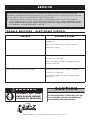
This section is provided for the assistance of qualified technicians only and is not intended for use by
untrained or unauthorized service personnel. If your Alto-Shaam® unit is not operating properly, check the
following before calling your Authorized Alto-Shaam® Service Agent:
☛ Check the power flow to the unit. Plug in outlet? Circuit breaker switch at back of unit turned on?
Do not attempt to repair or service the holding cabinet beyond this point. Contact Alto-Shaam® for the
nearest authorized service agent. Repairs made by any other service agents without prior authorization
by Alto-Shaam® will void the warranty on the unit.
CAUTION
DANGER
DISCONNECT UNIT FROM
POWER SOURCE BEFORE
CLEANING OR SERVICING.
1200-S, 1200-UP •
THIS SECTION IS PROVIDED FOR THE ASSISTANCE
OF QUALIFIED SERVICE TECHNICIANS ONLY AND
IS NOT INTENDED FOR USE BY UNTRAINED OR
UNAUTHORIZED SERVICE PERSONNEL.
INSTALLATION / OPERATION / SERVICE MANUAL
-
PG .
20
SERVICE
This section is provided for the assistance of qualified technicians only and is not intended for use by
untrained or unauthorized service personnel. If your Alto-Shaam® unit is not operating properly, check the
following before calling your Authorized Alto-Shaam® Service Agent:
☛ Check the power flow to the unit. Plug in outlet? Circuit breaker switch at back of unit turned on?
Do not attempt to repair or service the holding cabinet beyond this point. Contact Alto-Shaam® for the
nearest authorized service agent. Repairs made by any other service agents without prior authorization
by Alto-Shaam® will void the warranty on the unit.
TROUBLE SHOOTING - ELECTRONIC CONTROL
TROUBLE
POSSIBLE CAUSE
Control will not turn on.
The unit is not connected to a power source
(plugged in).
The main power switch is in the off position.
Insufficient voltage
Control operates but cannot control temperature.
Defective air sensor or poor sensor connection.
Control is not calibrated.
Defective heating element or damaged heating
element connection.
Control operates but unit does not heat.
Defective air sensor or poor sensor connection.
Control is not calibrated.
Open heating element or poor heating element
connection.
CAUTION
DANGER
DISCONNECT UNIT FROM
POWER SOURCE BEFORE
CLEANING OR SERVICING.
1200-S, 1200-UP •
THIS SECTION IS PROVIDED FOR THE ASSISTANCE
OF QUALIFIED SERVICE TECHNICIANS ONLY AND
IS NOT INTENDED FOR USE BY UNTRAINED OR
UNAUTHORIZED SERVICE PERSONNEL.
INSTALLATION / OPERATION / SERVICE MANUAL
-
PG .
21
SERVICE
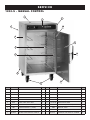
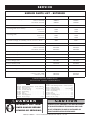
1200-S - MANUAL CONTROL
1
6
7
3
10
4
8
14
9
13
2
11
5
I T E M PA R T N O .
1
DESCRIPTION
Q T Y I T E M PA R T N O .
5008316
BONNET ASSEMBLY, MANUAL
1
5007801
BONNET ASSEMBLY, ELECTRONIC
1
2
1010525
BOTTOM
1
3
16042
CASING, BACK, HEAVY DUTY
1
9
16057
CASING, BACK, STANDARD
1
16041
CASING, SIDE, HEAVY DUTY
16056
5
4007
6
7
4
QTY
CONTROL PANEL OVERLAY, ELEC
1
DOOR ASSEMBY
1
DOOR ASSEMBLY WITH WINDOW
1
HD-27080
DOOR HANDLE
1
10
HG-2015
DOOR HINGE, EACH
2
2
11
GS-23796
DOOR GASKET, EACH
1
CASING, SIDE, STANDARD
2
12
IN-22364
INSULATION (NOT SHOWN)
1
CASTER PACKAGE, 5" (127MM)
1
13
16046
SIDE RAIL, EACH
2
PE-28280
CONTROL PANEL BEZEL
1
14
SR-24762
UNIVERSAL PAN SLIDE, EACH, S/S
2
PE-28451
CONTROL PANEL OVERLAY, MANUAL
1
UNIVERSAL PAN SLIDE, EA, CHROME
2
1200-S, 1200-UP •
PE-28366
DESCRIPTION
8
55018
5005142
SR-24447
INSTALLATION / OPERATION / SERVICE MANUAL
-
PG .
22
SERVICE
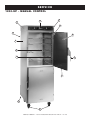
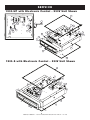
1200-UP - MANUAL CONTROL
7
1
6
10
3
8
4
14
13
9
11
2
5
1200-S, 1200-UP •
INSTALLATION / OPERATION / SERVICE MANUAL
-
PG .
23
SERVICE
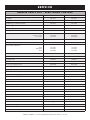
SERVICE PARTS LIST - EXTERIOR
1200-S
1200-UP
5008316
5007801
5008316
5007801
HEAVY DUTY
STANDARD
16042
16057
16032
16054
HEAVY DUTY
STANDARD
16041
16056
16033
16055
PE-28280
PE-28280
PE-28451
PE-28366
PE-28367
PE-27855
5005142
5005142
DESCRIPTION
1. Bonnet Assembly, Spot
2. Bottom ( NOT
MANUAL CONTROL
ELECTRONIC CONTROL
SHOWN )
3. Casing, Back ( NOT
SHOWN )
4. Casing, Side
5. Caster Package, 5" (127mm), 2
6. Control Panel Bezel
7. Control Panel Overlay
RIGID ,
2
1010525
4007
SWIVEL W / BRAKE
MANUAL CONTROL
ELECTRONIC CONTROL
8. Door Assembly
1010525
4007
55018
9. Door Assembly with Window
55018
10. Door Handle
HD-27080
HD-27080
12. Door Gasket, each
GS-23796
GS-23796
16046
16046
11. Door Hinge, each
13. Insulation ( NOT
HG-2015
SHOWN )
IN-22364
14. Side Rail for pan slide, ea.
15. Universal Pan Slide, ea.
HG-2015
STAINLESS STEEL , 230V
CHROME PLATED
IN-22364
SR-24762
SR-24447
SR-24762
SR-24447
CABLE HEATING SERVICE KIT
( O N E K I T P E R C A B I N E T C O M P A RT M E N T )
No. 4878 for all except 4000W cabinets
INCLUDES :
CB-3045
CR-3226
IN-3488
BU-3105
BU-3106
ST-2439
NU-2215
SL-3063
TA-3540
Cable Heating Element . .85 feet (2591cm)
Ring Connector . . . . . . . . . . . . . . . . . . . .4
Insulation Corner . . . . . . .1 foot (30,5cm)
Shoulder Bushing . . . . . . . . . . . . . . . . . .4
Cup Bushing . . . . . . . . . . . . . . . . . . . . . .4
Stud . . . . . . . . . . . . . . . . . . . . . . . . . . . . .4
Hex Nut . . . . . . . . . . . . . . . . . . . . . . . . . .8
Insulating Sleeve . . . . . . . . . . . . . . . . . . .4
Electrical Tape . . . . . . . . . . . . . . . . .1 roll
CB-3045
CR-3226
IN-3488
BU-3105
BU-3106
ST-2439
NU-2215
SL-3063
TA-3540
No. 4881 for 4000W cabinets
Cable Heating Element .210 feet (6401cm)
Ring Connector . . . . . . . . . . . . . . . . . . . .12
Insulation Corner . . . . . . . .1 foot (30,5cm)
Shoulder Bushing . . . . . . . . . . . . . . . . . .12
Cup Bushing . . . . . . . . . . . . . . . . . . . . . .12
Stud . . . . . . . . . . . . . . . . . . . . . . . . . . . . .12
Hex Nut . . . . . . . . . . . . . . . . . . . . . . . . .24
Insulating Sleeve . . . . . . . . . . . . . . . . . .12
Electrical Tape . . . . . . . . . . . . . . . . . .1 roll
CAUTION
DANGER
DISCONNECT UNIT FROM
POWER SOURCE BEFORE
CLEANING OR SERVICING.
1200-S, 1200-UP •
INCLUDES :
THIS SECTION IS PROVIDED FOR THE ASSISTANCE
OF QUALIFIED SERVICE TECHNICIANS ONLY AND
IS NOT INTENDED FOR USE BY UNTRAINED OR
UNAUTHORIZED SERVICE PERSONNEL.
INSTALLATION / OPERATION / SERVICE MANUAL
-
PG .
24
SERVICE
1200-UP with Manual Control - 120V Unit Shown
8
18
1
11
19
3
14
2
12
16
5
4
23
10
21
22
13
9
7
20
15
17
6
1200-UP with Manual Control - 208-240V Unit Shown
8
18
11
1
3
2
10
21
12
14
19
5
22
16
23
13
17
20
9
7
6
1200-S, 1200-UP •
15
INSTALLATION / OPERATION / SERVICE MANUAL
-
PG .
25
SERVICE
1200-UP with Manual Control - 230V Unit Shown
18
1
11
2
19
3
8
14
16
5
21
23
10
22
13
9
7
20
17
15
6
1200-S with Manual Control - 120V Unit Shown
1200-S 208-240V
AND
230V
8
DRAWINGS NOT AVAILABLE AT THIS TIME
1
18
11
14
3
2
16
12
19
5
23
21
10
4
15
13
17
9
20
7
6
1200-S, 1200-UP •
INSTALLATION / OPERATION / SERVICE MANUAL
-
PG .
26
SERVICE
SERVICE PARTS LIST - MANUAL CONTROL
DESCRIPTION
1200-S
1200-UP
2. Bushing, Cord Strain Relief
BU-3964
BU-3964
4. Connector
CR-34559
CR-34559
1. Bonnet Assembly, Spot
5008316
3. Bushing, Snap, 1-1/2"
5008316
BU-3013
BU-3013
5. Control, Manual
CC-34488
CC-34488
7. Control Panel Overlay, Manual
PE-28451
PE-28367
6. Control Panel Bezel
8. Cordset, Manual
PE-28280
120V
208-240V
230V
PE-28280
CD-3232
CD-3551
CD-3922
CD-33824
CD-3551
CD-3922
10. Nut, Hex, M4-0.7, 18-8
NU-22286
NU-22286
12. Plug, Hole 3/8"
PG-25574
PG-25574
9. Gasket, Self Adhesive
11. Plug, Dome, .187" hole
GS-2019
GS-2019
PG-28439
13. Plug, Hole 13/16"
PG-28439
PG-3589
14. Screw, 6-32 x 1-1/4" Round Head
PG-3589
SC-2365
15. Screw, 8-32 x 1/4" Phil Screw
SC-2365
SC-2459
16. Screw, Ground, 10-32 x 1/4" Pan Head
SC-2459
SC-2190
SC-2190
17. Switch, Rocker
SW-34769
SW-34769
19. Terminal Block
BK-3019
BK-3019
18. Tape, .375" wide foam
GS-23622
GS-23622
20. Thermostat Knob, Manual
KN-26568
KN-26568
22. Washer, #10 Nylon
WS-2420
WS-2420
21. Washer, M4 Split Lock S/S 18-8
WS-22300
23. Washer, Star Lock
WS-22300
WS-2467
CAUTION
DANGER
DISCONNECT UNIT FROM
POWER SOURCE BEFORE
CLEANING OR SERVICING.
1200-S, 1200-UP •
WS-2467
THIS SECTION IS PROVIDED FOR THE ASSISTANCE
OF QUALIFIED SERVICE TECHNICIANS ONLY AND
IS NOT INTENDED FOR USE BY UNTRAINED OR
UNAUTHORIZED SERVICE PERSONNEL.
INSTALLATION / OPERATION / SERVICE MANUAL
-
PG .
27
30
29
28
19
21
SERVICE
1200-UP with Electronic Control - 230V Unit Shown
27
5
19
26
13
20
9
17
3
15
23
22
1
29
6
30
28
19
21
32
7
14
31
11
2
25
9
8
24
27
16
12
23
6
4
1200-S with Electronic Control - 230V Unit Shown
7
32
14
31
5007830 9/10/07 - 1200-UP, 230V Ele
11
2
25
27
23
26
10
6
16
3
32
12
2
21
7
11
22
25
15
17
9
8
32
28
31
19
4
13
1
20
30
5007830 9/10/07 - 1200-UP, 230V Elec
14
17
16
12
24
4
1200-S, 1200-UP •
INSTALLATION / OPERATION / SERVICE MANUAL
-
PG .
28
5008307 01/08 - 1200-S, 230V Elec.
SERVICE
SERVICE PARTS LIST - ELECTRONIC CONTROL
DESCRIPTION
1200-S
1200-UP
5007801
5007801
1. Beeper
BP-3567
3. Bushing, Cord Strain Relief
BU-3964
BU-3964
5. Bushing, Hole 1-1/2"
BU-3013
BU-3013
2. Bonnet Assembly
4. Bushing, Hole 1/2"
BU-3006
6. Clip, Canoe
7. Control, Electronic
WITHOUT TIMER
WITH TIMER
8. Control Panel Bezel
BP-3567
9. Control Panel Overlay, Electronic
10. Cordset, Electronic
120V
208-240V
230V
BU-3006
CL-22820
CL-22820
AVAILABLE
CC-34322
CC-34326
CC-34328
PE-28366
PE-27855
PE-28280
PE-28280
CD-3397
CD-3551
CD-3922
CD-3397
CD-3551
CD-3922
12. Gasket, Self Adhesive
GS-2019
GS-2019
14. Nut, Hex #8-32
NU-2296
NU-2296
11. Cover, Hi-Limit Switch
13. Heat Sink
1003936
1003936
1008770
1008770
15. Power Supply Board
BA-33554
BA-33554
17. Relay
RL-33558
RL-33558
16. Plug, Hole 13/16"
18. Reed Switch ( NOT
PG-3589
SHOWN )
19. Screw, Self Tapping 8-32 x 1/2"
20. Screw, 6-32 x 1/2" NC Phil Truss M/S, 18-8 SS
21. Screw, 6-32 x 1-1/4", Round Head
22. Screw, Ground, 10-32 x 1/4" Pan Head
PG-3589
SW-33559
SW-33559
SC-2472
SC-2472
SC-25849
SC-25849
SC-2365
SC-2365
SC-2190
SC-2190
23. Screw, 6-32 x 1/4" Pan Head
SC-22500
SC-22500
25. Screw, Pan Head M4 x 7mm
SC-22271
SC-22271
24. Screw, 8-32 x 1/4" Phillips
26. Sensor ( NOT
SHOWN )
26. Switch, Circuit Breaker
27. Tape, 1/2" Foam
28. Terminal Block
29. Terminal Block, Porcelain
SC-2459
SC-2459
SN-33541
SN-33541
SW-34077
SW-34077
BK-3019
BK-3019
TA-25621
TA-25621
BK-33546
——
30. Terminal Strip
TM-33560
TM-33560
32. Washer, #8 Ext Lock
WS-2333
WS-2333
31. Thermostat, Hi-limit
TT-33476
1200-S, 1200-UP •
INSTALLATION / OPERATION / SERVICE MANUAL
TT-33476
-
PG .
29
1200-S, 1200-UP •
INSTALLATION / OPERATION / SERVICE MANUAL
-
PG .
30
1200-S, 1200-UP •
INSTALLATION / OPERATION / SERVICE MANUAL
-
PG .
31
1200-S, 1200-UP •
INSTALLATION / OPERATION / SERVICE MANUAL
-
PG .
32
1200-S, 1200-UP •
INSTALLATION / OPERATION / SERVICE MANUAL
-
PG .
33
1200-S, 1200-UP •
INSTALLATION / OPERATION / SERVICE MANUAL
-
PG .
34
1200-S, 1200-UP •
INSTALLATION / OPERATION / SERVICE MANUAL
-
PG .
35
1200-S, 1200-UP •
INSTALLATION / OPERATION / SERVICE MANUAL
-
PG .
36
1200-S, 1200-UP •
INSTALLATION / OPERATION / SERVICE MANUAL
-
PG .
37
1200-S, 1200-UP •
INSTALLATION / OPERATION / SERVICE MANUAL
-
PG .
38
1200-S, 1200-UP •
INSTALLATION / OPERATION / SERVICE MANUAL
-
PG .
39
1200-S, 1200-UP •
INSTALLATION / OPERATION / SERVICE MANUAL
-
PG .
40
1200-S, 1200-UP •
INSTALLATION / OPERATION / SERVICE MANUAL
-
PG .
41
T R A N S P O RTAT I O N D A M A G E a n d C L A I M S
All Alto-Shaam equipment is sold F.O.B. shipping point, and when accepted by the carrier, such shipments
become the property of the consignee.
Should damage occur in shipment, it is a matter between the carrier and the consignee. In such cases, the
carrier is assumed to be responsible for the safe delivery of the merchandise, unless negligence can be
established on the part of the shipper.
1. Make an immediate inspection while the equipment is still in the truck or immediately after it is moved to the receiving area.
Do not wait until after the material is moved to a storage area.
2. Do not sign a delivery receipt or a freight bill until you have made a proper count and inspection of all merchandise received.
3. Note all damage to packages directly on the carrier’s delivery receipt.
4. Make certain the driver signs this receipt. If he refuses to sign, make a notation of this refusal on the receipt.
5. If the driver refuses to allow inspection, write the following on the delivery receipt:
Driver refuses to allow inspection of containers for visible damage.
6. Telephone the carrier’s office immediately upon finding damage, and request an inspection. Mail a written confirmation of the time,
date, and the person called.
7. Save any packages and packing material for further inspection by the carrier.
8. Promptly file a written claim with the carrier and attach copies of all supporting paperwork.
We will continue our policy of assisting our customers in collecting claims which have been properly filed and actively pursued.
We cannot, however, file any damage claims for you, assume the responsibility of any claims, or accept deductions in payment
for such claims.
L I M I T E D WA R R A N T Y
Alto-Shaam, Inc. warrants to the original purchaser only that any original part that is found to be defective in material or workmanship will, at
Alto-Shaam's option, subject to provisions hereinafter stated, be replaced with a new or rebuilt part.
The parts warranty period is as follows:
For the refrigeration compressor on Alto-Shaam Quickchillers™, five (5) years from the date of installation.
For the heating element on Halo Heat® cook/hold ovens, as long as the original purchaser owns the oven.
For all other parts, one (1) year from the date of installation or fifteen (15) months from the shipping date, whichever occurs first.
The labor warranty period is one (1) year from the date of installation or fifteen (15) months from the shipping date, whichever occurs first.
Alto-Shaam will bear normal labor charges performed during standard business hours, excluding overtime, holiday rates or any
additional fees.
To be valid, a warranty claim must be asserted during the applicable warranty period. This warranty is not transferable.
THIS WARRANTY DOES NOT APPLY TO:
1. Calibration.
2. Replacement of light bulbs and/or the replacement of display case glass due to damage of any kind.
3. Equipment damage caused by accident, shipping, improper installation or alteration.
4. Equipment used under conditions of abuse, misuse, carelessness or abnormal conditions, including but not limited to, equipment subjected
to harsh or inappropriate chemicals, including but not limited to, compounds containing chloride or quaternary salts, poor water quality, or
equipment with missing or altered serial numbers.
5. Damage incurred as a direct result of poor water quality, inadequate maintenance of steam generators and/or surfaces affected by water
quality. Water quality and required maintenance of steam generating equipment is the responsibility of the owner/operator.
6. Damage caused by use of any cleaning agent other than Alto-Shaam's Combitherm® Cleaner, including but not limited to damage due to
chlorine or other harmful chemicals. Use of Alto-Shaam's Combitherm® Cleaner on Combitherm® ovens is highly recommended.
7. Any losses or damage resulting from malfunction, including loss of product or consequential or incidental damages of any kind.
8. Equipment modified in any manner from original model, substitution of parts other than factory authorized parts, removal of any parts
including legs, or addition of any parts.
This warranty is exclusive and is in lieu of all other warranties, express or implied, including the implied warranties of merchantability and
fitness for a particular purpose. In no event shall Alto-Shaam be liable for loss of use, loss of revenue or profit, or loss of product, or for any
indirect, special, incidental, or consequential damages. No person except an officer of Alto-Shaam, Inc. is authorized to modify this warranty
or to incur on behalf of Alto-Shaam any other obligation or liability in connection with Alto-Shaam equipment.
Effective 02/09
RECORD THE MODEL AND SERIAL NUMBER OF THE APPLIANCE FOR EASY REFERENCE.
ALWAYS REFER TO BOTH MODEL AND SERIAL NUMBER IN ANY CONTACT WITH ALTO-SHAAM REGARDING THIS APPLIANCE.
Model: _______________________________________________Date Installed: __________________________________________________________
Voltage: ______________________________________________ Purchased From: _______________________________________________
Serial Number: _______________________________________ _______________________________________________________________________
W164 N9221 Water Str eet
PHONE:
●
P. O . B o x 4 5 0
●
Menomonee Falls, Wisconsin 53052-0450
●
U.S.A.
262.251.3800 • 800.558-8744 USA/CANADA
FAX: 262.251.7067 • 800.329.8744 U.S.A. ONLY
www.alto-shaam.com
PRINTED IN U.S.A.