1
TK-2180
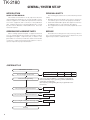
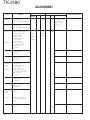
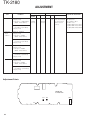
REALIGNMENT
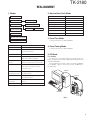
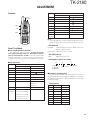
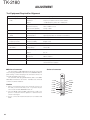
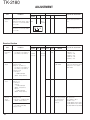
1. Modes
2. How to Enter Each Mode
Mode
User mode
Panel test mode
Panel tuning mode
Data programming mode
PC mode
Firmware
programming mode
PC test mode
PC tuning mode
Clone mode
Operation
User mode
Power ON
Panel test mode
[A] + Power ON
PC mode
Received commands from PC
Panel tuning mode
[Panel test mode] + [S]
Firmware programming mode
[S] + Power ON
Clone mode
[B] + Power ON
Firmware version information
[Side1] + Power ON
Clock adjustment mode
[C] + Power ON
Firmware version information
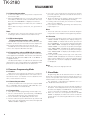
3. Panel Test Mode
Setting method refer to ADJUSTMENT.
Clock adjustment mode
Mode
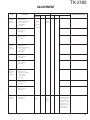
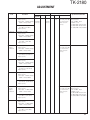
Function
4. Panel Tuning Mode
User mode
For customer uses.
Panel test mode
Used by the dealer to check the funda-
Panel tuning mode
Used by the dealer to tune the radio.
5. PC Mode
PC mode
Uses for communication between the
5-1. Preface
radio and PC (IBM compatible).
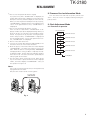
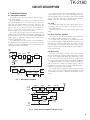
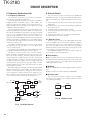
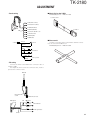
The transceiver is programmed by using a personal computer, programming interface (KPG-36) and programming
software (KPG-92D).
The programming software can be used with an IBM PC
or compatible. Figure 1 shows the setup of an IBM PC for
programming.
Setting method refer to ADJUSTMENT.
mental characteristics.
Data programming
Uses to read and write frequency data
mode
and other features to and from the radio.
PC test mode
Uses to check the radio using the PC.
This feature is included in the FPU.
See panel tuning.
Firmware
IBM-PC
Uses to changing the main program of
programming mode
the flash memory.
Clone mode
Uses to transfer programming data from
KPG-36
one radio to another.
Firmware version
Uses to confirm the internal firmware
information
version.
Clock adjustment mode
Used by dealer to adjust date and time.
MIC
KPG-92D
Fig. 1
3