1
Attaching the Power Drive System
1. Make sure the drive motor assembly on the power
drive system is level with the brake disc.
4. Set the lower toggle switch on the drive motor
assembly to FWD (counterclockwise rotation) or
REV (clockwise rotation).
2. Attach the mounting yoke to the brake disc, and
secure it with one of the wheel nuts. Torque the
wheel nut to the required specification (see the
appropriate electronic service manual).
NOTE: Yoke and driveshaft assemblies may vary
on the power drive system.
DRIVE MOTOR ASSEMBLY
Setting Up and Adjusting the Brake Lathe
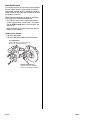
Use Kwik-Way cutting bits, P/N KWY-109109223, and
the holding screws that come with them. These bits are
stamped KW.
TOOL HOLDER
HOLDING SCREW
KWIK-WAY
CUTTING BIT
(KW must
face upward.)
3. Attach the driveshaft on the drive motor assembly
to the mounting yoke, making sure the center line
of the driveshaft is level with the spindle nut on the
wheel hub.
MOUNTING YOKE
DRIVESHAFT
Before you use the brake lathe, inspect the tips of the
cutting bits with a magnifying glass to make sure the
tips are not worn out. Each bit has three tips. If a tip is
worn, rotate the bit, and use a new tip. A worn tip
produces a poor finish and may cause chattering.
This tip is worn
out and should
not be used.
SPINDLE NUT
4 of 6
DRIVE MOTOR
ASSEMBLY
00-088