1
Indoor Air Quality
Model 8552/8554
Q-TRAKTM Plus
IAQ Monitor
TRAKPROTM Data Analysis Software enclosed
Operation and Service Manual
1980417, Revision I
June 2006
Model 8552/8554
Q-TRAKTM Plus
IAQ Monitor
Operation and Service
Manual
June 2006
P/N 1980417, Rev I
SHIP/MAIL TO:
TSI Incorporated
500 Cardigan Road
Shoreview, MN 55126-3996
USA
U.S.
Customer Service:
(800) 874-2811/(651) 490-2811
Fax:
(651) 490-3824
E-mail address:
[email protected]
Website:
http://www.tsi.com
INTERNATIONAL
Customer Service:
(001 651) 490-2811
Fax:
(001 651) 490-3824
Copyright ©
TSI Incorporated / 2000–2006 / All rights reserved.
Address
TSI Incorporated / 500 Cardigan Road / Shoreview, MN 55126 / USA
Fax No.
(651) 490-3824
Limitation of Warranty and Liability (effective July 2000)
Seller warrants the goods sold hereunder, under normal use and service as described in the
operator's manual, shall be free from defects in workmanship and material for twenty-four (24)
months, or the length of time specified in the operator's manual, from the date of shipment to the
customer. This warranty period is inclusive of any statutory warranty. This limited warranty is
subject to the following exclusions:
a. Hot-wire or hot-film sensors used with research anemometers, and certain other components
when indicated in specifications, are warranted for 90 days from the date of shipment.
b. Parts repaired or replaced as a result of repair services are warranted to be free from defects
in workmanship and material, under normal use, for 90 days from the date of shipment.
c. Seller does not provide any warranty on finished goods manufactured by others or on any
fuses, batteries or other consumable materials. Only the original manufacturer's warranty
applies.
d. Unless specifically authorized in a separate writing by Seller, Seller makes no warranty with
respect to, and shall have no liability in connection with, goods which are incorporated into
other products or equipment, or which are modified by any person other than Seller.
The foregoing is IN LIEU OF all other warranties and is subject to the LIMITATIONS stated
herein. NO OTHER EXPRESS OR IMPLIED WARRANTY OF FITNESS FOR
PARTICULAR PURPOSE OR MERCHANTABILITY IS MADE.
TO THE EXTENT PERMITTED BY LAW, THE EXCLUSIVE REMEDY OF THE USER OR
BUYER, AND THE LIMIT OF SELLER'S LIABILITY FOR ANY AND ALL LOSSES,
INJURIES, OR DAMAGES CONCERNING THE GOODS (INCLUDING CLAIMS BASED
ON CONTRACT, NEGLIGENCE, TORT, STRICT LIABILITY OR OTHERWISE) SHALL
BE THE RETURN OF GOODS TO SELLER AND THE REFUND OF THE PURCHASE
PRICE, OR, AT THE OPTION OF SELLER, THE REPAIR OR REPLACEMENT OF THE
GOODS. IN NO EVENT SHALL SELLER BE LIABLE FOR ANY SPECIAL,
CONSEQUENTIAL OR INCIDENTAL DAMAGES. SELLER SHALL NOT BE
RESPONSIBLE FOR INSTALLATION, DISMANTLING OR REINSTALLATION COSTS
OR CHARGES. No Action, regardless of form, may be brought against Seller more than 12
months after a cause of action has accrued. The goods returned under warranty to Seller's
factory shall be at Buyer's risk of loss, and will be returned, if at all, at Seller's risk of loss.
Buyer and all users are deemed to have accepted this LIMITATION OF WARRANTY AND
LIABILITY, which contains the complete and exclusive limited warranty of Seller. This
LIMITATION OF WARRANTY AND LIABILITY may not be amended, modified or its terms
waived, except by writing signed by an Officer of Seller.
Service Policy
Knowing that inoperative or defective instruments are as detrimental to TSI as they are to our
customers, our service policy is designed to give prompt attention to any problems. If any
malfunction is discovered, please contact your nearest sales office or representative, or call TSI's
Customer Service department at (800) 874-2811 (USA) or (001 651) 490-2811 (International).
ii
CONTENTS
1.
UNPACKING AND PARTS IDENTIFICATION ..................................1
Unpacking the Q-TRAKTM Plus IAQ Monitor..........................................1
Optional Accessories ...............................................................................3
2.
SETTING UP...........................................................................................5
Supplying Power to the Q-TRAKTM Plus IAQ Monitor............................5
Installing the Batteries..........................................................................5
Using the AC Adapter ..........................................................................5
Instrument Software and Communications Setup....................................5
Setting up TRAKPROTM Data Analysis Software ..................................6
Connecting the Q-TRAK Plus IAQ Monitor to the Computer ..............6
Setting up the Communications Port....................................................6
Using the Optional Instrument Stand.......................................................7
Using the Optional Probe Stand...............................................................7
Connecting the Optional Portable Printer ................................................8
3.
OPERATION...........................................................................................9
Overview..................................................................................................9
Q-TRAK Plus IAQ Monitor Keypad.........................................................9
Turning the Instrument On.......................................................................9
Survey Mode..........................................................................................10
Units.......................................................................................................11
Sample Mode .........................................................................................11
Recording and Saving a Single Data Point ........................................12
Printing Saved Single Data Points ................................................12
Main Menu.............................................................................................12
Time Constant ....................................................................................13
Log Mode ...........................................................................................13
Log Mode: Display of Real-Time Data........................................13
Log Mode 1: Log Interval............................................................14
Log Mode 2 and 3 .........................................................................16
Programming Log Mode 2 or 3 Using TRAKPRO Data
Analysis Software......................................................................16
Sample Protocol for Log Mode 2 or 3 ..........................................19
Memory Considerations ................................................................22
Auxiliary Sensor ...........................................................................22
Keypad Lockout Switch................................................................23
Setup Menu ........................................................................................24
Time/Date......................................................................................24
Backlight .......................................................................................26
Clear Memory ...............................................................................27
Calibration.....................................................................................28
Printer............................................................................................28
iii
Ventilation Rates................................................................................ 28
% Outside Air ............................................................................... 29
Statistics ............................................................................................. 31
Single Point Statistics ................................................................... 31
Logged Test Statistics................................................................... 31
4.
CALIBRATION AND MAINTENANCE ............................................ 33
Calibrating the CO2 Sensor.................................................................... 33
Calibrating the CO Sensor ..................................................................... 37
Calibrating the Temperature or Relative Humidity Measurement......... 41
Restore Factory Calibration ................................................................... 42
Storage Precautions ............................................................................... 43
5.
AUXILIARY SENSORS ...................................................................... 45
Model 8590 Auxiliary Temperature Sensor Accessory......................... 45
Model 8592 Air Velocity Probe (AVP) Accessory ............................... 46
Basic Applications ............................................................................. 46
Upgrading Your Q-TRAKTM Plus IAQ Monitor and
TRAKPROTM Data Analysis Software ............................................. 47
Using the Telescoping Probe ............................................................. 49
Measuring Air Velocity ..................................................................... 49
Measuring Air Flow Rate or Average Velocity ................................. 50
Q-TRAK Plus LCD Display During AVP Operation.......................... 51
Measuring Average Velocity ............................................................. 52
Measuring Volumetric Flow Rate...................................................... 53
Maintenance....................................................................................... 57
Calibration ......................................................................................... 57
Special Display Messages.................................................................. 57
Storage ............................................................................................... 57
6.
TROUBLESHOOTING ........................................................................ 59
A. SPECIFICATIONS ............................................................................... 61
B. STANDARD VELOCITY VS. ACTUAL VELOCITY
MEASUREMENTS............................................................................... 65
To obtain any of the listed Application Notes, contact TSI at:
U.S. (800) 874-2811/(651) 490-2811, Fax: (651) 490-3824
International (001 651) 490-2811, Fax: (001 651) 490-3824
These Application Notes can also be found under TSI’s web site:
http://www.tsi.com.
iv
Chapter 1
Unpacking and Parts Identification
Unpacking the Q-TRAKTM Plus IAQ Monitor
Carefully unpack the Q-TRAKTM Plus IAQ Monitor from the shipping
container. Use the tables and illustrations below to make certain that there
are no missing components. Contact TSI immediately if anything is missing
or damaged.
1
2
4
5
3
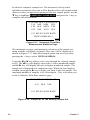
Figure 1-1: Models 8552/8554 Q-TRAK Plus IAQ Monitor
with Calibration Collar and Batteries
Ref
1
Qty
1
Item Description
Q-TRAK Plus IAQ Monitor
2
3
4
5
1
4
1
1
Calibration Collar
Batteries (AA alkaline)
Computer Interface Cable (RS-232)
AC Adapter
115 V, NEMA-5
230 V, Eur., CEE 7/16
230 V, Great Britain
240 V, Australian
Probe Stand (not shown)
6
1
Part/Model
8552 or
8554
801679
N/A
800563
2613033
2613078
800169
2613105
800679
1
1
2
3
Figure 1-2: Calibration Certificate, Operation and
Service Manual, TRAKPROTM Data Analysis Software
Ref
1
2
3
2
Qty.
1
1
1
Item Description
Calibration Certificate
Operation and Service Manual
TRAKPROTM Data Analysis Software
Part/Model
N/A
1980417
N/A
Chapter 1
Optional Accessories
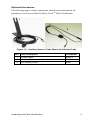
The following pages contain component identification information for
optional accessories available for the Q-TRAKTM Plus IAQ Monitor.
1
3
2
Figure 1-3: Auxiliary Sensor, Probe Stand, Air Velocity Probe
Ref
1
2
3
Item Description
Probe Stand
Auxiliary Temperature Sensor
Air Velocity Probe
Unpacking and Parts Identification
Part/Model
800679
8590
8592
3
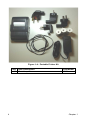
Figure 1-4: Portable Printer Kit
Qty
1
4
Item Description
Portable printer
Part/Model
8930
Chapter 1
Chapter 2
Setting Up
Supplying Power to the Q-TRAKTM Plus IAQ Monitor
The Model 8552/8554 Q-TRAKTM Plus IAQ Monitor may be powered with
four AA alkaline batteries or the optional AC adapter.
Installing the Batteries
Insert four AA-size batteries, as indicated by the diagram located on the
inside of the battery compartment. TSI ships the Q-TRAK Plus monitor
with alkaline batteries. Rechargeable batteries may also be used (battery
charger and batteries are not included and are not available from TSI).
Using the AC Adapter
The AC adapter allows you to power the Q-TRAK Plus monitor from an
AC wall outlet. When using the AC adapter, the batteries (if installed)
will be bypassed. The AC adapter is not a battery charger and will not
charge rechargeable batteries.
The Q-TRAK Plus monitor has an internal, non-user accessible battery
that is used to keep memory intact when power is turned off. Changing
the AA-size batteries or disconnecting the AC adapter will not cause
data to be lost. This battery is designed to last for years. TSI will install
a new battery, if necessary, when the unit is returned to the factory for
service.
!
Caution
The use of an improper AC adapter will cause severe damage
to the instrument.
Instrument Software and Communications Setup
The Q-TRAK Plus IAQ Monitor comes with special software called
TRAKPROTM Data Analysis Software, which is designed to provide you with
maximum flexibility and power when using the Q-TRAK Plus monitor. The
following sections describe how to install the software and set up the
computer.
5
Setting up TRAKPROTM Data Analysis Software
Follow the instructions on the label of the TRAKPRO software to install
the software on your computer. TRAKPRO software contains a very
comprehensive Help Function. This utility provides all the necessary
information to guide you in all aspects of software operation. The
software is shipped on a CD-ROM. It is available on diskette format,
upon special request. Updates are available from the TSI website.
Connecting the Q-TRAK Plus IAQ Monitor to the Computer
Each Q-TRAK Plus monitor comes equipped with an RS-232, 9-pin
serial cable. One end of the cable is a 9-pin D subminiature connector
labeled COMPUTER; the other end is an RJ-45 modular connector that
connects with the Q-TRAK Plus communications port. Serial port
connectors always have pins (male) on the computer side.
1.
Locate an available RS-232 serial port on your computer: for
example, COM1 or COM2.
2.
Connect the RS-232 cable to the available serial port on your
computer.
3.
Connect the RJ-45 connector to the Q-TRAK Plus monitor
communications port.
Setting up the Communications Port
To communicate with the Q-TRAK Plus monitor, the software must be
configured for the proper COM port. The TRAKPRO software can be
manually set to operate on a specific COM port, or it can automatically
find a Q-TRAK Plus monitor that is attached to any COM port. To set up
the COM port, do the following:
6
1.
Turn on the Q-TRAK Plus monitor.
2.
Start the TRAKPRO software.
3.
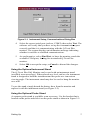
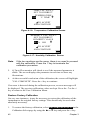
Select Instrument Setup, Communications in the TRAKPRO
software. The following dialog is displayed:
Chapter 2
Figure 2-1: Instrument Setup, Communications Dialog Box
4.
Select the correct serial port (such as, COM2); then select Test. The
software will verify that you have set up the communications port
correctly and that it is communicating with the Q-TRAK Plus
monitor. The system displays an information message indicating
whether it was able to establish communications.
5.
As an alternative, select Find Port, to have the monitor search the
available COM ports, looking for an attached Q-TRAK Plus
monitor.
6.
Select OK to accept the setup, or Cancel to discard the changes.
Using the Optional Instrument Stand
The Q-TRAK Plus IAQ Monitor can be used with an instrument stand
(available as an accessory). When placed on a level surface, the instrument
stand is designed to hold the instrument and the probe at a convenient
viewing angle. The instrument stand may also be used to hang the monitor
on a wall.
To use the stand, simply detach the battery door from the monitor and
replace it with the instrument stand (see Figure 2-2).
Using the Optional Probe Stand
A separate probe stand is available as an accessory. Use the bracket that is
located on the probe and slide it on the probe stand as shown in Figure 2-2.
Setting Up
7
Figure 2-2: Optional Probe and Instrument Stands
Connecting the Optional Portable Printer
To connect the portable printer to the Q-TRAK Plus monitor, do the
following:
1.
Ensure that the Q-TRAK Plus monitor and printer are off.
2.
Locate the printer interface cable and connect the 9-pin end labeled
PRINTER to the printer and the other end to the communications port
on the Q-TRAK Plus monitor.
3.
Turn on the Q-TRAK Plus monitor; then turn on the printer.
Note:
8
Always turn on the Q-TRAK Plus monitor before turning on the
printer. If the printer prints question marks (??????), asterisks
(******), or random characters, reset it by turning it off and
then on again. If necessary, refer to the Portable Printer
Manual.
Chapter 2
Chapter 3
Operation
Overview
The Model 8552/8554 Q-TRAKTM Plus IAQ Monitor measures CO2,
temperature, relative humidity, calculates dew point, wet bulb, and %
outside air, and measures one (1) additional parameter. The Model 8554 will
also measure CO. The instruments have three main modes of operation:
Survey, Sample, and Data Log.
Survey mode: When the Q-TRAK Plus monitor is first turned on, it will
be in the Survey mode. This mode is used to display the real-time
readings of the sensors. The instrument will update the displayed
readings once each second.
Sample mode: The Sample mode is used to capture a 10-second,
averaged reading of all the parameters. These “single sample points”
may be stored in memory and can be displayed later, or downloaded to a
computer using the TRAKPRO software.
Data Log mode: The Data Log mode is used to record readings over a
period of time, and store these readings in the instrument memory. Data
files may be downloaded to a computer for later analysis using the
TRAKPRO software. Q-TRAK Plus has three different data log modes.
Q-TRAK Plus IAQ Monitor Keypad
The Model 8552/8554 Q-TRAK Plus IAQ Monitor is controlled through a
series of menus that are navigated using the arrow keys (S,T,W, X) (see
Figure 3-1). The Enter key () is used to select the desired option, while the
Escape key ( ) is used to go back to the previous menu. Each screen
contains prompting words and symbols. When pressing the keys on the front
panel, the monitor beeps to confirm each key press. The key allows access
to the Main Menu from the Survey mode.
Turning the Instrument On
Use the ON/OFF key to turn the Q-TRAK Plus monitor on and off. The
instrument's power-up sequence consists of a startup screen that displays the
instrument’s model number, serial number, firmware version, available
memory, date and current time. The display will also show various status
messages. The startup sequence lasts for 20 seconds before entering Survey
mode. A reminder may appear when the instrument is due for servicing.
9
Escape key
Enter key
Arrow keys
Power on/off key
Figure 3-1: Q-TRAK Plus IAQ Monitor Keypad and Display
Survey Mode
After the instrument has completed its power-up sequence, the Q-TRAK Plus
monitor will automatically go into the Survey mode.
Note:
It is not unusual for gas sensors to take some time to become
stable. If readings appear unusual at start-up, please allow
about one-half minute for the sensors to stabilize.
In the Survey mode, the Q-TRAK Plus monitor displays all parameters
simultaneously. The values are updated once per second. You may select
any of the parameters to be shown in large font at the top of the display. This
is called the primary parameter. Select the primary parameter by using the S
or T keys to highlight the parameter of interest, then press the key to
display that parameter in large font at the top of the screen. In addition, the
units of some parameters may also be changed. For example, temperature
may be shown in either °F or °C. To adjust the units, scroll to the desired
parameter using the S or T keys, then adjust the units using the W or Xkey
(refer to the units section in this chapter, see Figure 3-2).
10
Chapter 3
2
3
SAMPLE
2.0
75.1
35.1
70.1
805
PPM
°F
%
°F
PPM
CO2
1
CO
TEMP
RH
TEMP 2
5
4
Figure 3-2: Survey Mode Screen (sample)
Ref
1
2
3
4
5
Description
Primary Parameter (CO2 concentration is shown).
Sample mode. Used for capturing single data points.
Remaining parameters.
Status message area.
Battery status.
Units
To change units displayed in the Survey mode use the S or T key to select
the parameter. Press either the W or Xkey and the units of the selected
parameter will change accordingly. The units displayed on the instrument
will be the same units that are stored during the log mode.
Sample Mode
The Sample mode is the default selection in the Survey Mode (the reverse
highlight indicates that it is selected). The Sample mode is used to capture a
single, 10-second averaged data point of all measured parameters.
Operation
11
Recording and Saving a Single Data Point
With SAMPLE selected and the key pressed, the Q-TRAK Plus
monitor begins a countdown. During these 10 seconds, it is taking an
average reading of each parameter. At the end of the averaging period,
the following sample screen is displayed:
SAMPLE # 1
75.1
°F
TEMP 2
805
PPM
CO2
2.0
PPM
CO
75.1
°F
TEMP
35.1
%
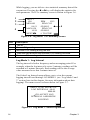
RH
SAVE SAMPLE? YES NO
Figure 3-3: Record Single Data Point
The YES selection is highlighted by default. If you press the ↵ key, the
single data point will be stored in memory. Press the X key to highlight
NO to discard the data point.
Note that the first sample is given the name/number “Sample 1.” The
sample number will automatically increment for each subsequent
sample.
Printing Saved Single Data Points
A hardcopy of the results of the saved test sample can be generated
if the portable printer is attached to the Q-TRAK Plus monitor and
the Printer Output feature is enabled.
Main Menu
The Main Menu can be accessed through the SURVEY MODE by pressing
the key. The Main Menu Mode is the highest level in the menu structure.
It provides a central point where you can select alternate modes of operation.
-MAIN MENUTIME CONSTANT
LOG MODE 1
SETUP
VENTILATION RATES
STATISTICS
Figure 3-4: Main Menu
12
Chapter 3
Time Constant
Highlighting and selecting TIME CONSTANT displays the Time
Constant Menu. This allows you to adjust the dampening time-constant
that will affect the real-time display of parameters, in the Survey mode
only. The values shown in the Survey Mode are updated once per
second; however, the readings shown are averaged over the timeconstant period.
Log Mode
To select a Log Mode, scroll to LOG MODE 1 using the S or T key.
Adjust the mode using theW or X key to select LOG MODE 1, 2, or 3.
Press the key to start logging data. Log Mode 1 is programmed and
initiated by the keypad. Log Mode 2 and Log Mode 3 are programmed
using the TRAKPRO software. Log Mode will only record data that is
visible on the display.
Log Mode: Display of Real-Time Data
To begin a data logging session, select a log mode from the Main
Menu and press the ↵ key. The Q-TRAK Plus monitor will begin
recording logged data into the instrument memory and display the
real-time values (see Figure 3-5).
1
3
4
LOG MODE 1
TEST 1
75.1
°F
TEMP 2
805
PPM
CO2
0.0
PPM
CO
75.1
°F
TEMP
35.1
%
RH
NEXTWX ↵ TO STOP
2
5
Figure 3-5: Log Mode: Statistical Data
Ref
1
2
3
4
5
Description
The Q-TRAK Plus monitor is in Log Mode 1.
The Test ID number is 1. This number is automatically incremented
for each new test.
The real-time values for each parameter are displayed.
Use the W or X key to view the statistics for the current test.
Pressing the key will terminate the current test.
Operation
13
While logging, you are able to view statistical summary data of the
current test. Pressing the W or Xkey will display the statistics for
each parameter. The CO2 summary screen is shown in Figure 3-6.
1
2
3
5
TEST 1
820
MIN:800
06:51
MAX: 950
10:20
NEXTWX
PPM
CO2
PPM CO2
02/04/05
PPM CO2
02/04/05
↵ TO STOP
4
Figure 3-6: Log Mode: CO2 Summary Screen
Ref
1
2
3
4
5
Description
Test ID
Current CO2 reading.
Minimum CO2 reading during the test.
Time and date at which the minimum CO2 reading occurred.
Maximum CO2 reading, with time and date.
Log Mode 1: Log Interval
The log interval is both a frequency and an averaging period. For
example, when the log interval is set to 5 minutes, readings will be
recorded at 5-minute intervals. Each reading will be the average
value measured over that 5-minute interval.
The Select Log Interval menu allows you to view the current
logging interval used during LOG MODE 1 (see “Log Mode 2 and
3” section, later in this chapter, for more information about data
logging). The menu screen is shown below in Figure 3-7.
-SELECT LOG INTERVALLOG INTERVAL 00:01
MM:SS
↵ TO ACCEPT LOG
INTERVAL AND BEGIN
LOGGING
Figure 3-7: Log Mode 1: Select Log Interval
14
Chapter 3
The default values for log intervals are set at 1 second, 1 minute,
5 minutes, 15 minutes and 30 minutes. To select the logging
interval, press either the S or T key until the desired interval is
shown. When the ↵ key is pressed, the program begins the data
logging process.
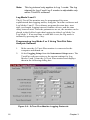
The log interval options for LOG MODE 1 may be programmed
using TRAKPRO software.
1.
Make sure the Q-TRAK Plus monitor is connected to the
computer and turned on.
2.
Select Instrument Setup, Parameters, Logging Intervals,
from the software menu. The current settings in the Q-TRAK
Plus monitor will be retrieved and displayed in the dialog box.
You may program in new values for each of the five log
intervals (within defined limits).
Figure 3-8: Logging Intervals
3.
Select Send to program the Q-TRAK Plus monitor with the new
values.
4.
Disconnect the Q-TRAK Plus monitor from the computer.
Operation
15
Note:
This log interval only applies to Log 1 mode. The log
interval for Log 2 and Log 3 modes is adjustable only
within TRAKPRO software.
Log Mode 2 and 3
The Q-TRAK Plus monitor may be programmed for more
sophisticated data logging modes, using the TRAKPRO software and
Log Modes 2 and 3. The software programs the start date, start
time, test length, logging interval, number of tests, and the time
delay between tests. Once the parameters are set, the monitor can be
placed in the field to begin data logging in either Log Mode 2 or
Log Mode 3. If no start time or start date is set, the log mode is
initiated by pressing the ↵ key.
Programming Log Mode 2 or 3 Using TRAKPRO Data
Analysis Software
1.
Make sure the Q-TRAK Plus monitor is connected to the
computer and turned on.
2.
Select Logging Setup from the Instrument Setup menu. The
TRAKPRO software retrieves the current settings for Log
Modes 2 and 3 from the Q-TRAK Plus monitor and displays
them in the following dialog box.
02/04/2006
02/04/2006
Figure 3-9: Q-TRAK Plus Monitor Logging Protocols
16
Chapter 3
The following table summarizes the information displayed in the
Q-TRAK Plus Logging Protocols dialog box.
Item
Serial Number
Number Tests
Logged
Available
Memory %
Start Date
Start Time
Log Interval
Test Length
Number of
Tests
Time Between
Tests
Percent
Memory
Required
Operation
Description
Displays the serial number of the Q-TRAKTM Plus IAQ
Monitor.
Displays the number of tests currently logged and stored
in the instrument.
Displays the percent of available memory in the Q-TRAK
Plus monitor (data logging only; single point memory is
not included).
Displays the start date for LOG 2 and LOG 3 modes.
Displays the start time for LOG 2 and LOG 3 modes.
Displays the log interval for LOG 2 and LOG 3 modes.
Displays the test length for LOG 2 and LOG 3 modes.
Displays the number of tests for LOG 2 and LOG 3
modes. Selecting more than one test will cause the
instrument to cycle through the logging test more than
once, separated by the “Time Between Tests.”
Displays the time between tests for LOG 2 and LOG 3
modes.
Displays the percent of logger memory required to
perform a LOG 2 or a LOG 3 mode sample. To store the
results of a LOG 2 or LOG 3 mode sample, the Available
Memory must be equal to or greater than the percent
memory required.
17
To program the Q-TRAK Plus monitor for Log Mode 2 or 3,
enter the following:
Item
Start Date
Start Time
Log Interval
Test Length
Number of
Tests
Time between
tests
Description
Enter the date and time to begin the sample:
•
If the start date field is left blank, the date defaults to
the current date. The test starts at the start time.
•
If both of the start date and time fields are left blank,
the test begins as soon as you press the ↵ key in the
appropriate log mode.
Enter the log interval to use for the test.
Enter the length for the sample:
•
The instrument automatically turns off when the last
test is complete at the end of the test length.
•
If the field is left blank, you must manually stop the
sample by pressing the ↵ key in the logging screen.
Enter the number of tests to perform.
Enter the time between tests, if there is more than one
test. If 0 or blank is entered, the next test is started
immediately after the previous test.
While entering values for Log Mode 2 or 3, the “Percent
Memory Required” is dynamically updated to show the
amount of logger memory required to take the programmed
sample. If the protocol defined requires more than 100% of
memory, decrease the amount of memory required by
changing one of the following parameters:
• Increase the logging interval.
• Decrease the length for the test.
• Decrease the number of tests.
The settings for each separate Log mode must not require
more than 100% of the logger memory.
Note:
18
If the percent memory required is greater than
the available memory, the TrakPro software will
not allow you to program Log Mode 2 or 3.
3.
When finished defining parameters for LOG 2 and LOG 3
modes, select Send.
4.
Disconnect the Q-TRAK Plus monitor and cable from the
computer.
5.
The instrument is ready for data logging.
Chapter 3
Sample Protocol for Log Mode 2 or 3
The following steps describe how to program a sample protocol for
Log Mode 2 or 3.
Log Mode 2 sample protocol features:
•
The sample protocol for Log Mode 2 is set to take unattended
readings for one day.
•
Logging takes place on 02/04/2006.
•
The logging sample begins at 8:00 a.m.
•
Logging continues for eight hours.
Log Mode 3 sample protocol features:
•
The sample protocol for Log Mode 3 is set up to take
unattended readings for four days.
•
Logging first takes place on 02/04/2006.
•
The logging sample begins at 8:00 a.m.
•
Logging continues for eight hours.
•
The instrument is off for 16 hours, and then repeats an eighthour test each day for the next three days.
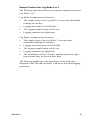
The following graphic gives the appearance of the dialog box
displayed in the TRAKPRO software, with above-described logging
parameters.
Operation
19
02/04/2006
02/04/2006
Figure 3-10: Q-TRAK Plus IAQ Monitor Logging Example
To program this logging example, do the following:
Make sure the Q-TRAK Plus monitor is connected to the
computer and turned on.
2.
Select Logging Setup from the Instrument Setup menu.
TRAKPRO software retrieves the current settings for Log
Modes 2 and 3 from the Q-TRAK Plus monitor and displays
them (as shown in the previous dialog box).
3.
Enter the following for Log Mode 2 and 3:
Setting
LOG 2
LOG 3
Start Date
today's date
today's date
Start Time
five minutes
from now
five minutes
from now
Log interval
01:00
05:00
Test length
00:08:00
00:08:00
Number of tests
1
4
Time between tests
00:00:00
00:16:00
4.
20
1.
Select Send. The logging instrument is programmed for the mode
2 and mode 3 protocols.
Chapter 3
5.
Note in the example that the LOG 2 test requires 4% of the
available memory and LOG 3 requires 4% of the memory. A total
of 100% of the memory is available for use.
6.
Disconnect the Q-TRAK Plus monitor from the computer. Refer to
other sections of this Operation and Service Manual for details on
making measurements using LOG 2 and LOG 3 modes.
After programming the Q-TRAK Plus monitor with the TRAKPROTM
Data Analysis Software, take the monitor to the desired location and
turn it on. From the Main Menu, put the monitor into LOG MODE 2 or
LOG MODE 3 (whatever was programmed) by pressing the W or X
key. Press the ↵ key to initiate the Log Mode. The display will show
the current time and date.
The following will happen, depending upon the protocol:
If….
no start time was set…
Then….
…the Q-TRAK Plus monitor begins
logging immediately after the ↵ key
is pressed.
This happens no matter what is
entered for the start date.
a test start time was set, but no start
date…
…the Q-TRAK Plus monitor begins
at the next specified time,
regardless of the date.
a start time and start date have been
set that are in the future…
…the Q-TRAK Plus monitor will
display the time and date of the
next test and the next test ID.
the test start date and/or time has
passed…
…pressing the ↵ key has no
impact. The program will never
execute (no data will be logged).
no test length is set…
…the Q-TRAK Plus monitor
samples continuously until the ↵
key is pressed or until the memory
is full.
↵ was pressed during sampling…
…the program stops data logging
(unless the keypad is locked out).
When a pre-programmed test
sequence ends…
…the Q-TRAK Plus monitor
automatically returns to the Survey
Mode.
Operation
21
Memory Considerations
The Q-TRAKTM Plus IAQ Monitor has a great deal of memory and
will not normally run out. The instrument contains separate
memory for the single points and for the logged tests (filling up the
memory for one type of data will have no affect on the other type).
The Q-TRAK Plus monitor can store approximately 440 separate
single points; in addition to 48,671 logged data points separated by
as many as 110 tests. That is, the instrument can also store
approximately 811 hours (33 days) of logged tests, when recording
at 1 minute logging intervals (the number of hours of logged tests
may be more or less, depending upon the logging interval).
The total test time should be considered when selecting a logging
interval. Shorter logging intervals use memory more quickly than
longer intervals. The logging interval and the available memory
determine the maximum possible duration of a data logging session.
Maximum logging duration = %memory available x 48,671 x logging interval
To prevent loss of any logged data, it is recommended you
download your data to the computer using the TRAKPRO software
as often as possible.
Auxiliary Sensor
For each of the logging modes the auxiliary sensor parameter is
logged along with the standard parameters as long as the auxiliary
probe is connected to the instrument prior to the start of logging.
If….
the auxiliary sensor is connected
before the start of logging…
Then….
…the Q-TRAK Plus monitor will
record the sensor data during
logging.
the auxiliary sensor is connected
after the start of logging…
…the Q-TRAK Plus monitor will
NOT record the sensor data during
logging.
the auxiliary sensor is disconnected
during logging…
…the Q-TRAK Plus monitor will
display "Invalid Data" for the
sensor for any time while the
sensor is disconnected.
22
Chapter 3
Keypad Lockout Switch
Recording data over extended time periods in Log Mode 1, 2, or 3
often requires leaving the Q-TRAK Plus monitor unattended. To
reduce the risk of having an unauthorized person either
intentionally or inadvertently interrupt the measurements, you can
lock the keypad. When lockout is engaged, no values can be seen
on the display.
The keypad lockout switch is located on the side of the Q-TRAK
Plus monitor between the probe mounting brackets. It is a small
slide switch and is recessed so that a pointed instrument must be
used to move it.
The instrument case is labeled next to the switch with the symbols
"|" and "0." With the switch in the "|" or on (up) position, all keypad
functions will work normally. There are two ways to use the
lockout switch.
If….
…the lockout is engaged prior to the
start of logging (switch is in the "0"
position)…
Then….
…the Q-TRAK Plus monitor will
operate normally until logging
begins.
…the lockout is engaged after the
start of logging.
…the keypad will ignore any key
presses until the switch is placed in
the | position.
Figure 3-11: Keypad Lockout Switch
Operation
23
Setup Menu
The setup menu allows access to a wide range of options for reviewing
data, examining statistics, changing operational parameters, performing
calibration and more.
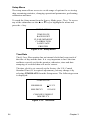
To reach the Setup menu from the Survey Mode press key. To access
any of the submenus use the S or T key to highlight the menu and
press the ↵ key.
-SETUP MENUTIME/DATE
BACKLIGHT
CLEAR MEMORY
CALIBRATION
LANGUAGE
PRINTER
Figure 3-12: Setup Menu
Time/Date
The Q-TRAK Plus monitor has an internal clock that keeps track of
the time of day and the date. It is very important to have the time
and date correctly set for the monitor; otherwise, time and date
stamping of recorded data will not be correct.
The time clock is set correctly at the factory (for U.S. Central
Standard Time). If it requires adjustment, you may change it by
selecting TIME/DATE from the Setup menu. The following screen
is displayed:
-TIME/DATEHH:MM:SS
12:12:31
MM/DD/YY
02/04/05
CHANGE FORMAT
MM/DD/YY
Figure 3-13: Time/Date
24
Chapter 3
When first entering this screen, the first character in the time field
will have a cursor underneath it. Use the S or T key to increment
and/or decrement values. Use the W or Xkey to move to the
required field. When all adjustments are complete, press the ↵ key
to accept the changes and return to the Setup menu.
The Q-TRAK Plus monitor offers three different formats for
displaying the date: U.S., European, and ISO 8601. Press W or X
key to select and highlight CHANGE FORMAT, then press either
the S or T key to cycle through the date formats: MM:DD/YY,
DD:MM:YY, YYYY:MM:DD. Once the desired format is selected,
press the ↵ key to confirm the choice.
Programming Time/Date Using TRAKPRO Data
Analysis Software
The time and date may also be adjusted using the TRAKPRO
software. To program the date and time:
1.
Make sure the Q-TRAK Plus monitor is connected to the
computer and turned on.
2.
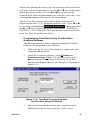
Using the TRAKPRO software, select Parameters,
Instrument Setup, Clock. The software retrieves the
current date and time settings from the Q-TRAK Plus
monitor and displays them in the dialog box displayed in
Figure 3-14.
02/04/2006
12/31/2005
Figure 3-14: Time/Date Programming with
TRAKPRO Data Analysis Software
3.
Operation
The system date and time (from the computer) can be
transferred to the monitor using the “arrow” keys.
25
Alternately, the date and time can be manually entered into
the dialog box.
4.
Select Send to reprogram the Q-TRAK Plus monitor.
Backlight
The BACKLIGHT DELAY option on the Setup menu adjusts how
long the display backlight stays on after any key is pressed. After
the delay has elapsed, the backlight will automatically turn off. To
change the backlight delay, use the S or T key. The options are:
No Backlight, 10 second, 30 seconds, or 10 minutes. Press the ↵
key to select the value and return to the Setup Menu.
-BACKLIGHT DELAY-
NO BACKLIGHT
Figure 3-15: Backlight Screen
Note:
Prolonged use of the backlight may severely reduce
the overall battery life.
The backlight delay may also be adjusted using TRAKPRO
Software.
26
1.
Make sure the Q-TRAK Plus monitor is connected to the
computer and turned on.
2.
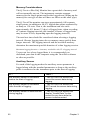
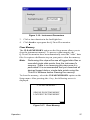
In TRAKPRO Software, select Parameters, Instrument Setup,
Other. The TRAKPRO software retrieves the current settings
from the Q-TRAK Plus monitor and displays them in the dialog
box displayed in Figure 3-16.
Chapter 3
Figure 3-16: Instrument Parameters
3.
Click a time duration in the backlight box.
4.
Click Send to reprogram the Q-TRAK Plus monitor.
Clear Memory
The CLEAR MEMORY option on the Setup menu allows you to
clear the instrument memory. To preserve data integrity, the
Q-TRAK Plus monitor does not automatically erase the “older” data
files. It requires a deliberate step on your part to clear the memory.
Note:
Performing this step will erase all logged data files or
recorded single data points from the instrument's
memory. There is no reversing this step once it is
performed! It is recommended that you download all
desired logged data or single data points using the
TRAKPRO software before clearing the memory.
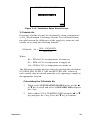
To clear the memory, select the CLEAR MEMORY option on the
Setup menu. After pressing the ↵ key, the following screen is
displayed.
-CLEAR MEMORY-
SINGLE POINT MEMORY
LOGGED TEST MEMORY
Figure 3-17: Clear Memory
Operation
27
The highlighted default selection is Single Point Memory. Pressing
↵ erases all Single Point data. The Logged Test Memory is
unaffected. Logged Test Memory is cleared in a similar manner.
Single Point Memory or Logged Test Memory cannot be cleared
through the TRAKPRO software.
Calibration
See Chapter 4, “Calibration and Maintenance,” later in this manual.
Printer
The PRINTER option allows you to enable or disable the printing
function of the single sample test results. To enable or disable the
printing option, scroll and highlight PRINTER using the S or T
key on the Setup menu and press ↵.
Once in the printer submenu, use either the S or T key to enable
or disable the printer output (see Figure 3-18).
-PRINTERPRINTER DISABLED S T
Figure 3-18: Printer Output Enable/Disable Screen
Ventilation Rates
Ventilation rates can be measured with the Q-TRAK Plus monitor in
terms of % Outside Air. To select one of these options, choose
VENTILATION RATES by using the S or T key while in the Main
Menu and press the ↵ key.
28
Chapter 3
-VENTILATION RATES-
% OUTSIDE AIR
Figure 3-19: Ventilation Rates Select Screen
% Outside Air
Percentage Outside Air may be calculated by using a temperatureor CO2-based method. Percentage Outside Air is calculated from
the ratio between the differences of the supply air, return air, and
outside air by using the following formula:
%Outside Air =
(RA − SA) × 100%
RA − OA
Where:
RA = PPM of CO2 or temperature in return air.
SA = PPM of CO2 or temperature in supply air.
OA = PPM of CO2 or temperature in outside air.
The following variables must be entered to perform the calculation:
OUTSIDE AIR, SUPPLY AIR, and RETURN AIR. Values for
each variable may be entered manually or by capturing a sample at
the appropriate location.
Calculating the %Outside Air
Operation
1.
While in the VENTILATION RATES menu, use the S
or T key to scroll and select %OUTSIDE AIR and press
the ↵ key.
2.
Select either CO2 or TEMPERATURE using the S or T
key and press the ↵ key. Press the T key to continue.
29
-% OUTSIDE AIRCALCULATE % OUTSIDE
AIR USING
CO2
TEMPERATURE
Figure 3-20: % Outside Air Screen
The following examples assume that CO2 was selected as
the measured parameter. The % OUTSIDE AIR info
screen will display.
TO CALCULATE %
OUTSIDE AIR, MAKE
THREE MEASURMENTS:
OUTSIDE AIR
CO2
SUPPLY AIR
CO2
RETURN AIR
CO2
NEXT T
Figure 3-21: % Outside Air Info Screen
3.
Use the S or T key to select an appropriate variable
(OUTSIDE AIR, SUPPLY AIR, or RETURN AIR).
SAMPLE ↵
EDIT X
% OUTSIDE AIR: 0
OUTSIDE
0350
PPM CO2
SUPPLY
0000
PPM CO2
RETURN
0000
PPM C02
CALCULATE
Figure 3-22: Sample or Edit CO2 Parameters
30
4.
Screen selections allow you to press the X or ↵ key to
either edit the value or take a sample.
5.
Repeat steps 2 through 4 until all three variables have a
valid value.
Chapter 3
6.
Use the S or T key to select CALCULATE and press
the ↵ key. The %OUTSIDE AIR value will display at the
top of the screen.
7.
For repeated calculations repeat steps 3 through 6.
8.
To exit press the
Note:
key.
None of the % Outside Air data is stored in
memory. It is recommended that data be
recorded before you exit the screen.
If unrealistic data is entered (e.g. supply CO2
value greater than return CO2), the instrument
will return an error message.
Statistics
The STATISTICS menu allows you to review either Single Point
Statistics or Logged Test Statistics.
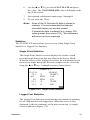
Single Point Statistics
The Single Point Statistics screen displays the results of each
recorded single data point that was taken in the Survey Mode.
When the screen is first displayed, it shows the information for the
most recent single data point. Previous samples can be viewed by
using the S or T key. A sample screen is shown below.
15:13:39
75.1
805
2.0
67.1
35.1
-SAMPLE 302/04/05
°F
TEMP 2
PPM
CO2
PPM
CO
°F
TEMP
%
RH
Figure 3-23: Single Point Statistics
Logged Test Statistics
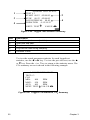
The Logged Test Statistics screen displays the statistical summary
for all valid data for each logged test. When the screen is first
displayed, it shows a summary of the most recent test. A sample
screen is shown in Figure 3-24.
Operation
31
1
3
5
-LOGGED TEST STATSTEST # 3
START 08:23 02/04/05
STOP 08:23 02/04/05
LOG INTERVAL 00:05
DURATION 0:12:30:35
NEXT: TESTv
2
4
VALUE WX
Figure 3-24: Logged Test Statistics Summary
Ref
1
2
3
4
5
Description
Test number (not user adjustable).
Start time and date.
Stop time and date.
Log interval used during sampling.
Duration of test.
To view the actual parameter statistics for each logged test
statistics, use the W or X key. To view the previous test, use the S
or T key. Press the ↵ or key to return to the statistics menu. The
CO2 summary screen is shown in the following example.
-LOGGED TEST STATSTEST # 3
CO2
MIN:
800
PPM
MAX: 950
PPM
AVG:
805
PPM
NEXT: TESTvVALUE WX
Figure 3-25: Logged Test Statistics, CO2 Summary
32
Chapter 3
Chapter 4
Calibration and Maintenance
The Model 8552/8554 Q-TRAKTM Plus IAQ Monitor requires very little
maintenance to keep it performing well.
The Q-TRAK Plus monitor may be calibrated in the field using the
instructions below. Even so, we recommend that you return your Q-TRAK
Plus monitor to TSI for calibration annually. For a nominal fee, we will
quickly clean and recalibrate the unit, update software and firmware, and
return it to you in “as new” working condition along with a Certificate of
Calibration and NIST Traceability. The factory calibration is more precise
than can be accomplished with the procedures below. This “annual checkup”
helps ensure that the Q-TRAK Plus monitor is always in good operating
condition.
Calibrating the CO2 Sensor
TSI recommends calibrating the Q-TRAK Plus monitor CO2 measurement
monthly to help ensure accurate readings.
To calibrate the CO2 sensor, please follow the procedure below. You can
also follow the prompts displayed on the screen while in user calibration
mode. You will need a cylinder of zero CO2 air or nitrogen for the zero
calibration and a cylinder of gas with a known concentration of CO2 for the
span calibration. Contact your local TSI distributor for available CO2
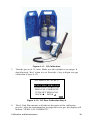
calibration kits (see Figure 4-4).
Note:
If using air for zero calibration, it must be specified to have
less than 10 ppm CO2. Ambient room air cannot be used (see
Appendix A).
The calibration procedure can be aborted at any time by pressing the key.
Any step in the calibration procedure can be repeated by pressing the S key.
1.
To put the Q-TRAK Plus monitor into CO2 calibration mode, press the
S or T keys to select CALIBRATION in the Setup Menu.
2.
Select CO2 by pressing the S or T keys the in the calibration submenu
and press the ↵ key (see Figure 4-1).
33
-SELECT CAL ITEMCO2
CO
TEMPERATURE
HUMIDITY
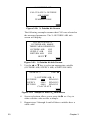
AUX
RESTORE DEFAULTS
Figure 4-1: Calibration Submenu Screen
Locate the calibration collar and slide it over the main probe (see
Figure 4-4).
-C02 ZERO CAL: STEP 1SLIDE CO2 CAL
COLLAR OVER PROBE
ATTACH ZERO GAS
TO CAL COLLAR
NEXT v
Figure 4–2: CO2 Zero Calibration: Step 1 Screen
3.
Install the regulator onto the zero calibration gas cylinder and connect
tubing from the cylinder to the fitting marked GAS IN. Press the ↵ or
T key to continue.
4.
Turn the gas on (0.3 L/min). Make sure the cylinder is not empty. It
should quietly “hiss” when it is on. Press the ↵ or T key to begin zero
gas calibration (see Figure 4-3).
-CO2 ZERO CAL: STEP 2TURN ON ZERO GAS
PRESS ↵ TO BEGIN
ZERO GAS SAMPLE
Figure 4–3: CO2 Zero Calibration: Step 2 Screen
34
Chapter 3
Figure 4–4: CO2 Calibration
5.
The Q-TRAK Plus monitor will indicate the status of the calibration
process. After the instrument has averaged the zero gas, the display will
highlight "ZERO CAL COMPLETE" (see Figure 4-5).
-CO2 ZERO CAL: STEP 3DETECTING ZERO GAS
AVERAGING ZERO GAS
ZERO CAL COMPLETE
TURN OFF ZERO GAS
NEXT v
Figure 4–5: CO2 Zero Calibration: Step 3 Screen
Calibration and Maintenance
35
6.
Once the zero calibration is complete, turn the gas off. Press the ↵ or T
key to continue to the span gas calibration step.
7.
Detach the regulator from the zero gas cylinder and install the regulator
onto the span calibration gas cylinder. Press the ↵ or T key to continue
(Figure 4-6).
-C02 SPAN CAL: STEP 1DISCONNECT ZERO GAS
ATTACH SPAN GAS
TO CAL COLLAR
NEXT v
Figure 4–6: CO2 Span Calibration: Step 1 Screen
8.
Adjust the span value of the calibration gas being used by pressing W,
or X keys to move the cursor to the required field, and either the S or
T keys to increment or decrement the value. Press ↵ to accept the
calibration gas (Figure 4-7).
-CO2 SPAN CAL: STEP 2ADJUST SPAN VALUE
TO CAL GAS VALUE
CO2
1000 PPM
ACCEPT ↵
v
EXIT ↵
Figure 4–7: CO2 Span Calibration: Step 2 Screen
9.
Turn on the span gas (0.3 L/min) and press the ↵ key to begin
calibrating the span (Figure 4-8).
-CO2 SPAN CAL: STEP 3TURN ON SPAN GAS
PRESS ↵ TO BEGIN
SPAN GAS SAMPLE
Figure 4–8: CO2 Span Calibration: Step 3 Screen
36
Chapter 3
10. The Q-TRAK Plus monitor will indicate the status of the calibration
process. The process will end successfully when "SPAN CAL
COMPLETE" message highlights (Figure 4-9).
-CO2 SPAN CAL: STEP 4DETECTING SPAN GAS
AVERAGING SPAN GAS
SPAN CAL COMPLETE
TURN OFF SPAN GAS
BACK S DONE ↵
Figure 4–9: CO2 Span Calibration: Step 4 Screen
11. Turn off the span gas, press the ↵ key to complete CO2 user calibration,
and remove the calibration collar.
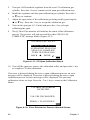
If an error is detected during the zero or span calibration process, an error
message will be displayed. The previous calibration values are kept. Press
the or ↵ key to return to the Calibration Menu.
ERROR DETECTED
OR PROCESS ABORTED
DURING CALIBRATION
VALUES UNCHANGED
Figure 4–10: Error Detected or Process Aborted Screen
Calibrating the CO Sensor
!
Caution
The CO sensor in some models of TSI IAQ monitors may be
adversely affected when exposed to isopropyl alcohol vapors
released from TSI instruments utilizing condensation particle
counting (CPC) technology. For maximum performance, keep
CO sensors away from CPC-based instruments utilizing
isopropyl alcohol.
TSI recommends calibrating the Q-TRAK Plus monitor's CO measurement
monthly to help ensure accurate readings. The CO concentration
measurement is affected by changes in temperature and atmospheric
Calibration and Maintenance
37
pressure. Normal day-to-day variations due to local weather conditions have
little effect. However, changes in altitude can cause more significant errors.
For best accuracy, calibrate the Q-TRAK Plus monitor's CO measurement for
your local conditions or if conditions change.
To calibrate the CO sensor, follow the procedure below. You can also follow
the prompts displayed on the screen while in the user calibration mode. You
will need a cylinder of pure air for the zero calibration and a cylinder of gas
with a known concentration of CO for the span calibration, 35 ppm or
200 ppm is recommended. Contact your local TSI distributor for available
CO calibration kits (Figure 4-11).
Notes: z Calibration with CO gas should always be done in a wellventilated area.
z 100% Nitrogen cannot be used as a zero gas for the CO
sensor.
The calibration procedure can be aborted at any time by pressing the
key.
1.
To put the Q-TRAK Plus monitor into CO calibration mode, press the S
or T keys to select CALIBRATION in the Setup Menu.
2.
Select CO by pressing the S or T keys in the calibration submenu and
press the ↵ key.
Locate the calibration collar and slide it over the main probe (Refer to
Figure 4–11).
38
Chapter 3
Figure 4–11: CO Calibration
3.
Turn the gas on (0.3 L/min). Make sure the cylinder is not empty. It
should quietly “hiss” when it is on. Press the ↵ key to begin zero gas
calibration (Figure 4-12).
-CO ZERO CAL: STEP 3DETECTING ZERO GAS
AVERAGING ZERO GAS
ZERO CAL COMPLETE
TURN OFF ZERO GAS
BACK S DONE ↵
Figure 4–12: CO Zero Calibration Step 4
4.
The Q-Trak Plus monitor will indicate the status of the calibration
process. After the instrument has averaged the zero gas, the display will
indicate "ZERO CAL COMPLETE".
Calibration and Maintenance
39
5.
Turn gas off. Detach the regulator from the zero CO calibration gas
cylinder. Press the ↵ key to continue to the span gas calibration step.
6.
Install the regulator onto the span calibration gas cylinder. Press the ↵
or T key to continue.
7.
Adjust the span value of the calibration gas being used by pressing the
S or T key. Press the ↵ key to accept the calibration gas.
8.
Turn on the span gas (0.3 L/min) and press the ↵ key to begin
calibrating the span.
9.
The Q-TRAK Plus monitor will indicate the status of the calibration
process. The process will end successfully when "SPAN CAL
COMPLETE" message blinks (Figure 4-13).
-CO SPAN CAL: STEP 4DETECTING SPAN GAS
AVERAGING SPAN GAS
SPAN CAL COMPLETE
TURN OFF SPAN GAS
BACK S DONE: ↵
Figure 4–13: CO Span Calibration Step 4
10. Turn off the span gas, remove the calibration collar, and press the ↵ key
to complete CO user calibration.
If an error is detected during the zero or span calibration process, an error
message will be displayed. If an error is detected during the zero or span
calibration process, an error message will be displayed. The previous
calibration values are kept. Press the or ↵ key to return to the Calibration
Menu.
CALIBRATION ERROR
DETECTED
VALUES UNCHANGED
PRESS ↵ TO CONTINUE
Figure 4–14: Error Detected or Process Aborted Screen
40
Chapter 3
Calibrating the Temperature or Relative Humidity Measurement
To perform a temperature or humidity calibration on the Q-TRAK Plus
monitor you will need a reference temperature or humidity device, one that
is more accurate than the Q-TRAK Plus monitor. To obtain the best accuracy,
care must be taken so that both the Q-TRAK Plus probe and the reference
device are able to sense the same air. Also, it’s best to calibrate at a
temperature and humidity that is near the range you typically measure.
Note:
!
User calibration of humidity sensor can only be done in units
of %RH.
Caution
Never submerge the probe or Q-TRAK Plus monitor in water or
any other liquid. The sensor will be damaged.
1.
Locate the Q-TRAK Plus probe and the reference device sensor so that
they sense the same air conditions.
2.
Put the Q-TRAK Plus monitor into calibration mode by selecting either
temperature or humidity in the Calibration Menu by using the S or T
keys and press the ↵ key (refer to Figure 4-15).
-SELECT CAL ITEMCO2
CO
TEMPERATURE
HUMIDITY
AUX
RESTORE DEFAULTS
Figure 4-15: Calibration Submenu Screen
3.
A reminder appears to ensure that the environmental conditions are
stable before continuing with the calibration.
4.
Compare the reading on the Q-TRAK Plus monitor with the reading from
the reference device. If they differ, use the S or T key to adjust the
Q-TRAK Plus display as needed so that the displayed measurement
matches the measurement indicated by the reference device. Press the ↵
key to accept and continue.
Calibration and Maintenance
41
-TEMP CAL: STEP 2SET TO CORRECT
TEMPERATURE
75.1
°F TEMP v
↵ TO ACCEPT
AND CONTINUE
Figure 4–16: Temperature Calibration Screen
-HUMIDITY CAL: STEP 2SET TO CORRECT
HUMIDITY VALUE
35.1 % RH
v
↵ TO ACCEPT
AND CONTINUE
Figure 4–17: Humidity Calibration Screen
Note:
If the two readings are the same, there is no need to proceed
with the calibration. Press the key to terminate the
calibration procedure.
5.
Q-TRAK Plus monitor will check to see if the measured parameter is
stable. The screen displays the parameter in real time to show any
fluctuations.
6.
At the successful conclusion of the calibration, the screen will highlight
"CAL COMPLETE". Press the ↵ key to continue.
If an error is detected during the calibration process, an error message will
be displayed. The previous calibration values are kept. Press the or the ↵
key to return to the User Calibration Menu.
Restore Factory Calibration
On very rare instances, it may be necessary to restore the calibration of the
instrument to the original factory settings. This should only be used when
absolutely necessary.
1.
To restore the factory calibration, select RESTORE DEFAULTS in the
Calibration Select page by using the S or T key and press the ↵ key.
42
Chapter 3
2.
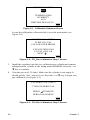
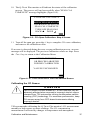
The following warning message appears on the display. Press the T key
to continue or the ↵ key to abort (Figure 4-18).
-RESTORE FACTORY CALIN SOME CASES, IT MAY BE
NECESSARY TO RESTORE
FACTORY CAL VALUES
DO NOT RESTORE
UNLESS REQUIRED!
NEXT T
QUIT:
Figure 4–18: Restore Defaults Screen
3.
Another menu will display a selection of parameters in which to restore
the factory calibration. Use the S or T key to select the desired
parameter and press the ↵ key to continue or to abort (Figure 4-19).
SELECT ITEM
TO RESTORE
CO2
CO
TEMPERATURE
HUMIDITY
AUX
Figure 4–19: Select Item to Restore Screen
4.
The display will indicate that the factory calibration of the desired
parameter has been restored. A reminder that a user calibration should
be performed is also shown. Press either the ↵ or key to return to the
Setup menu.
Storage Precautions
When storing the Q-TRAK Plus monitor for more than 30 days, remove the
batteries. This prevents damage due to battery leakage.
This instrument must be stored in a location where the temperature remains
between –20 and 60°C (-4 and 140°F) and the relative humidity is between
15% and 90%.
Calibration and Maintenance
43
Chapter 5
Auxiliary Sensors
Auxiliary sensors are available for the Q-TRAKTM Plus that enhance the
functionality of the instrument. If you purchased an auxiliary sensor to
measure another parameter, you may attach the sensor at any time during the
Survey mode and the Q-TRAK Plus monitor will display the values instantly.
The auxiliary sensor port is located at the top of the instrument.
To attach an auxiliary sensor to the instrument:
1.
Grasp the connector on the auxiliary sensor.
2.
Align the black release button with the back of the instrument.
3.
Press the connector into place.
Black release button
Figure 5-1: Attaching an Auxiliary Sensor
To detach an auxiliary sensor from the instrument:
1.
Grasp the connector on the auxiliary sensor.
2.
Press the black release button.
3.
Pull the connector away from the instrument.
Model 8590 Auxiliary Temperature Sensor Accessory
The Model 8590 Auxiliary Temperature Sensor accessory allows you to
make and record air temperature measurements. The Auxiliary Temperature
Sensor accessory can be used to conduct temperature sampling and to log a
45
second temperature measurement. All data acquired with this accessory can
be evaluated using TRAKPRO Data Analysis Software.
Model 8592 Air Velocity Probe (AVP) Accessory
The Model 8592 Air Velocity Probe (AVP) accessory allows you to make
and record air velocity and flow rate measurements. The AVP can readily be
used to conduct velocity sampling and to calculate air flow rate using
average velocity and your input duct dimensions. All data acquired can be
evaluated using TRAKPROTM Data Analysis Software. A picture of the AVP
is shown in Figure 5-2.
Orientation
Indicator Arrow
Sensor Window
Telescoping
Probe
Handle
Auxiliary PCB
Probe Cable
Cable Connector
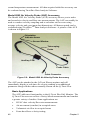
Figure 5-2: Model 8592 Air Velocity Probe Accessory
The AVP can be attached to the Q-TRAK Plus at anytime and will
immediately display a real-time air velocity reading as an additional
parameter along with the others normally shown on the Q-TRAK Plus.
Basic Applications
The AVP adds new functionality to the Q-TRAK Plus IAQ Monitor. The
Q-TRAK Plus user can collect velocity-based measurements and conduct
a greater variety of studies. Some applications are:
•
•
•
•
46
HVAC duct velocity/flow rate measurements
Air movement (comfort) in occupied zones
Volumetric air flow in occupied zones
Fume hood face velocity testing
Chapter 5
•
•
•
•
Clean room studies
Draft measurements
Wind tunnel testing
Filter velocity checks
Upgrading Your Q-TRAKTM Plus IAQ Monitor and TRAKPROTM
Data Analysis Software
Past users of Q-TRAK Plus IAQ Monitor instruments will have to
upgrade their instrument to be compatible with the Model 8592 Air
Velocity Probe accessory. Additionally, for users of TRAKPRO Data
Analysis Software, a new revision must be downloaded from the TSI
website.
TSI provides a simple, automated procedure for you to easily perform
these upgrades. These upgrades can readily be done in the field and do
not require returning your instrument to TSI. When your instrument is
returned to TSI for annual calibration or service, TSI will upgrade the
firmware for you.
!
Caution
•
Instrument firmware and TRAKPRO upgrades are necessary
for compatibility with the Model 8592 Air Velocity Probe
accessory.
•
TSI recommends uploading all logged data from the Q-TRAK
Plus instrument to TRAKPRO for permanent storage before
upgrading the instrument firmware! Not doing so could result
in the loss of logged data.
A product information CD is included with the purchase of a Model
8592 Air Velocity Probe accessory. Briefly, the steps to upgrade the
firmware of your Q-TRAK Plus instrument are:
•
Connect the Q-TRAK serial cable to both the instrument and your
computer.
•
Insert the product CD into your computer’s CD disk drive.
•
Select the “Upgrade Q-TRAK Plus Firmware” menu option.
•
Click Start to commence the upgrade process.
•
When the upgrade process is completed, click Close to exit.
The first step in the upgrade procedure is to connect the Q-TRAK serial
cable to your instrument and your computer just as you would when
using TRAKPRO software.
Auxiliary Sensors
47
After inserting the product CD into your computer’s CD disk drive, the
CD will automatically run and its main menu will be displayed. From
the CD’s main menu, click once on the “Upgrade Q-TRAK Plus
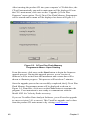
Firmware” menu option. The Q-TRAK Plus Flash Memory Programmer
will be started and its menu will be displayed as shown in Figure 5-3.
Figure 5-3. Q-TRAK Plus Flash Memory
Programmer Menu—Upon Starting
From this menu, click once on the Start button to begin the firmware
upgrade process. During this upgrade process, a new version of
firmware will be written into the instrument and a status bar will be
shown to illustrate progress. This process will last about 7 minutes.
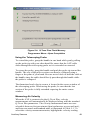
Once the upgrade process has successfully completed, the Q-TRAK Plus
Flash Memory Programmer menu will be displayed as shown in
Figure 5-4. From here, click once on the Close button to terminate the
program. Your instrument is now ready to communicate with the
Model 8592 Air Velocity Probe accessory.
If you use TRAKPRO Data Analysis Software, you will need to upgrade
to a new revision (3.41 or newer). This TRAKPRO upgrade can be done
from the product CD main menu or by visiting www.tsi.com.
48
Chapter 5
Figure 5-4: Q-TRAK Plus Flash Memory
Programmer Menu—Upon Completion
Using the Telescoping Probe
To extend the probe, grasp the handle in one hand while gently pulling
on the probe tip with your other hand. Be aware that the AVP cable
slides through the telescoping probe as it is extended or retracted.
To retract the probe, grasp the handle and push the probe tip toward the
handle. The rest of the probe sections can then be collapsed using a
finger or the palm of your hand. Be sure not to block or hold the cable at
the handle since the cable should freely pass through the handle while
the probe is collapsed.
The thermistor bead velocity sensor is located in the sensor window of
the telescoping probe. When using the probe, be sure that the last
section of the probe is fully extended exposing the entire sensor
window.
Measuring Air Velocity
When the AVP is connected to the Q-TRAK Plus, velocity
measurements will automatically be displayed along with the standard
Q-TRAK Plus parameters. The velocity measurement units are userselectable between feet per minute (fpm) and meters per second (m/s),
and between actual and standard units as illustrated in Table 5-1. To
select the velocity measurement units, highlight the velocity reading
Auxiliary Sensors
49
with the S or T (up/down arrow) key and then change the units
displayed using the W or X (left/right arrow) key.
Table 5-1: Velocity Measurement Units
Velocity
Actual
Measurement Units
Velocity Units
Feet per minute
Meters per second
fpm
m/s
Standard Velocity
Units
sfpm
sm/s
Measurements are made by holding the probe so the sensor window is
positioned in the desired measurement location with the sensor window
perpendicular to the air flow stream. Be sure the sensor window is fully
exposed and the orientation indicator arrow on the probe tip is pointing
downstream. Hold the probe as still as possible while the measurement
is taken.
!
Caution
When positioning the probe for a measurement, be certain the
orientation indicator arrow on the probe tip is pointing
downstream in the direction of the air flow.
Measuring Air Flow Rate or Average Velocity
Volumetric flow rate can be estimated based on an average velocity
measurement across a known area such as a duct. You can input the
cross-sectional dimensions for round, square, or rectangular ducts and
flow rate will be displayed in cfm, m3/h or L/s accordingly. The
measurement units can be changed by simply highlighting the flow
displayed with the S or T key and then changing the units displayed
using the W or X key.
Table 5-2: Flow Rate Measurement Units
Flow Rate
Actual
Measurement Units
Flow Rate Units
Cubic feet per minute
Cubic meters per hour
Liters per second
cfm
m3/h
L/s
Standard
Flow Rate Units
scfm
sm3/h
sL/s
Other applications where average velocity calculations are important
include wind tunnel testing, across a filter face and testing fume hood
face velocities. In addition to calculating the average velocity from a
series of sample points, the minimum and maximum velocities will also
be displayed identifying areas that may require corrective action.
50
Chapter 5
Q-TRAK Plus LCD Display During AVP Operation
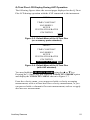
The following figures show the screens/pages displayed on the Q-TRAK
Plus LCD during operation with the AVP connected to the instrument.
-MENUTIME CONSTANT
LOG MODE 1
SETUP
VENTILATION RATES
STATISTICS
Figure 5-5: Default Menu of the Q-TRAK Plus
(no accessory probe attached)
-MENUTIME CONSTANT
LOG MODE 1
SETUP
VENTILATION RATES
STATISTICS
VELOCITY PROBE
Figure 5-6: Default Menu of the Q-TRAK Plus
(with AVP attached)
You may highlight VELOCITY PROBE using the S or T key.
Pressing the ↵ (enter) key will select the VELOCITY PROBE option
and display the VELOCITY MENU shown in Figure 5-7.
From the velocity menu, you can proceed with a velocity averaging
measurement, such as a fume hood face velocity measurement, or you
can proceed with a volumetric flow rate measurement, such as a supply
duct traverse measurement.
Auxiliary Sensors
51
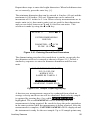
-VELOCITY MENU-
VELOCITY AVERAGING
VOLUMETRIC FLOW RATE
Figure 5-7: Velocity Menu Options
Measuring Average Velocity
VELOCITY AVERAGING may be selected by using the S or T key
and pressing the ↵ key will display the VELOCITY AVERAGING
menu.
-VELOCITY AVERAGING4.25 M/S VEL
SAMPLES TAKEN: 0
CAPTURE SAMPLE ↵
SAMPLING COMPLETED
Figure 5-8: Velocity Averaging Menu
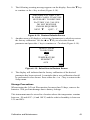
With CAPTURE SAMPLE highlighted, as shown in Figure 5-8, a
sample is acquired using the ↵ key. When all of the desired samples
have been taken, use the T key to select SAMPLING COMPLETED
and press the ↵ key to terminate sampling.
-VELOCITY AVERAGING2.15 M/S MIN VEL
6.30 M/S MAX VEL
4.25 M/S AVG VEL
VIEW SAMPLES ↵
Figure 5-9: Average Velocity Statistics Page
Statistics for the sample set will then be displayed as shown in
Figure 5-9. Pressing the (escape) key will return to the main menu.
52
Chapter 5
Individual sample points can be reviewed by pressing the ↵ key to
select VIEW SAMPLES.
VELOCITY SAMPLE 2 WX
4.21
M/S
VEL
Figure 5-10: Reviewing Individual Samples
from the Velocity Sample Set
Using the W or X key allows you to view individual samples from the
velocity sample set. The W key will display a previous or lowernumbered sample and the X key will display the next or highernumbered sample. The sample set is displayed as a continuous loop.
When the last sample is reached, pressing the X key will take you back
to the first sample. The maximum number of samples is 99. Pressing the
key will return you to average velocity statistics page.
Measuring Volumetric Flow Rate
-MENUTIME CONSTANT
LOG MODE 1
SETUP
VENTILATION RATES
STATISTICS
VELOCITY PROBE
Figure 5-11: Display Menu when the AVP
is Attached to the Q-TRAK Plus
From the main menu, may highlight VELOCITY PROBE using the S
or T key. Pressing the ↵ key will select the VELOCITY PROBE
option and display the VELOCITY MENU shown in Figure 5-12.
Auxiliary Sensors
53
-VELOCITY MENU-
VELOCITY AVERAGING
VOLUMETRIC FLOW RATE
Figure 5-12: Velocity Menu Options
Select VOLUMETRIC FLOW RATE using the S or T key and
press the ↵ key to display the VOLUMETRIC FLOW RATE menu
shown in Figure 5-12.
-VOLUMETRIC FLOW RATESELECT SHAPE
RECTANGULAR
ROUND
Figure 5-13: Selecting the Duct Shape
Highlight the shape of the duct using the S or T key and press the ↵
key to select.
ACCEPT ↵
EDIT WXv
ENTER DIMENSIONS
RECTANGULAR
WIDTH: 010.0 CM
HEIGHT: 010.0 CM
FLOW: SL/S WX
Figure 5-14: Entering Rectangular Duct Dimensions
For square or rectangular ducts, use the W or X key to move to a
specific digit and use the S or T key to increment or decrement the
digit, accordingly. Press the ↵ key when you’ve entered the correct
width dimension.
54
Chapter 5
Repeat these steps to enter the height dimension. When both dimensions
are set correctly, press the enter key [↵].
The minimum dimension that can be entered is 4 inches (10 cm) and the
maximum is 100 inches (300 cm). Dimensions can be entered in
increments of 0.1 inches or 0.1 cm. When velocity measurements are in
metric units (m/s), then metric units (cm) are used for duct dimensions
and you can select between m3/h and L/s for flow rate units. This
selection is made by using the W or X key.
ACCEPT ↵
EDIT WXv
ENTER DIMENSIONS
ROUND
DIAMETER: 010.0 CM
FLOW: SL/S WX
Figure 5-15: Entering Round Duct Dimensions
The dimensioning procedure for round ducts is similar except only the
duct diameter needs to be entered as shown in Figure 5-15. Follow a
similar key sequence to enter the diameter dimension and flow rate
units.
-VOLUMETRIC FLOW RATE382.5 L/S FLOW
4.25 M/S VEL
SAMPLES TAKEN: 2
CAPTURE SAMPLE ↵
SAMPLING COMPLETED
Figure 5-16: Sample Capturing Display
A duct traverse measurement can now be conducted from which an
average velocity and flow rate will be calculated. Each velocity sample
is captured by pressing the ↵ key while CAPTURE SAMPLE is
highlighted. The word SAMPLING will be blinking while the
measurement is being acquired. Be careful to keep the probe motionless
in the same position while the measurement is being acquired. After the
measurement is complete, CAPTURE SAMPLE will be displayed and
the instrument is ready for the next sample. Up to 99 sample points may
Auxiliary Sensors
55
be taken to comprise a sample set. The measured velocity and a
calculated volumetric flow rate will be displayed for each sample taken.
When you have completed acquiring all traverse sample points, use the
T key to highlight SAMPLING COMPLETE and press the ↵ key to
complete the measurement.
-VOLUMETRIC FLOW RATE3.59 M/S MIN VEL
5.20 M/S MAX VEL
4.25 M/S AVG VEL
1.53 M3/H FLOW RATE
VIEW SAMPLES ↵
Figure 5-17: Volumetric Flow Rate
Measurement Statistics Page
The minimum, average, and maximum velocities of the sample set,
along with the calculated volumetric flow rate, will be displayed as
shown in Figure 5-17. Individual sample points can be reviewed by
pressing the ↵ key to select VIEW SAMPLES.
Using the W or X key allows you to step through the velocity sample
set by. The W key will display a previous or lower-numbered sample
and the X key will display the next or higher-numbered sample. The
sample set is displayed as a continuous loop. When the last sample is
reached, pressing the X key will take you back to the first sample. The
maximum number of samples is 99. Pressing the key will return you
to the Volumetric Flow Rate statistics page.
VELOCITY SAMPLE 1 WX
4.21
M/S
VEL
1.91 M3/H FLOW RATE
Figure 5-18: Sample #1 Of The Velocity Sample Set
56
Chapter 5
Maintenance
Periodically inspect the AVP sensor window to ensure that it is clean.
Dust and oil deposits on the sensor will affect measurement accuracy.
The telescoping probe should also be kept clean. Dirt or oil
accumulation will affect the ability to extend and retract the probe. Use
a soft cloth dampened with water to remove accumulation of unwanted
material. Dry the probe with a gentle stream of air or allow to air dry. If
oil or grease is present, a small amount of high-grade isopropyl alcohol
may be applied to clean the AVP.
!
Caution
Be sure the probe is disconnected from the Q-TRAK Plus before
cleaning so the AVP is not powered. Do not use strong
solvents or high-pressure air to clean the probe or sensor—
permanent damage could result.
Calibration
For the highest degree of accuracy, TSI recommends that instruments be
returned to the factory annually for calibration. For a nominal fee, the
probe will be checked and recalibrated to original factory specifications
and returned to you with a new National Institute of Standards and
Technology (NIST) calibration certificate. To have your AVP
recalibrated, please follow TSI’s Returned Material Authorization
(RMA) procedure on our web site at http://rma.tsi.com.
Special Display Messages
In extreme cases, temperature or velocity conditions may exceed the
operating specifications of the AVP potentially inhibiting the AVP from
providing an accurate measurement. If the temperature at the sensor
exceeds the maximum operating limit, the Q-TRAK Plus display will
read TEMP HI. If temperature is below the minimum operating range,
the instrument display will read TEMP LO. If the air velocity exceeds
the upper range of the specification, the Q-TRAK Plus display will read
VEL HI. Under such conditions, the measurement accuracy may be
compromised and the AVP might be damaged.
Storage
It is recommended that the Air Velocity Probe accessory be stored
unattached from the Q-TRAK Plus IAQ Monitor when not in use.
Auxiliary Sensors
57
Chapter 6
Troubleshooting
The table below lists the symptoms, possible causes, and recommended
solutions for the Model 8552/8554 Q-TRAKTM Plus IAQ Monitor.
Symptom
Possible Cause
Corrective Action
No display
Unit not switched on.
Switch unit on.
Low or dead batteries.
Replace the batteries or plug in
the AC adapter.
Dirty battery contacts.
Clean the battery contacts by
rubbing a rubber eraser on each
contact.
Low battery charge.
Replace batteries or use AC
adapter.
Incorrect AC adapter.
Replace with the correct AC
adapter.
Low AC line voltage.
Correct the AC line voltage; use
batteries.
Dirty battery contacts.
Clean the battery contacts.
0% MEM
displays
Memory is full.
Download the logged and single
point memory to a PC using
TRAKPRO software if desired.
Clear memory.
Humidity
reading near
zero or not
believable
Probe exposed to intense
light.
Shade the probe while taking
samples.
No keypad
response
Display/Lockout switch in
lockout position.
Slide lockout switch to normal
position.
FACTORY
SERVICE
reminder is
displayed
Instrument is near the end
of the annual calibration
period.
Press the ↵ key to continue. For
optimum performance, TSI
recommends annual factory
servicing.
"CO CAL"
The CO sensor requires
calibration.
See CO sensor specifications;
approximately page 121 (CO
negative readings).
"CO2 FLT"
There is a fault in the CO2
sensor.
Factory service is required to
correct this fault condition.
LO BAT
message
appears
59
Symptom
Possible Cause
Corrective Action
"TEMP FLT"
There is a fault in the
temperature sensor.
Factory service is required to
correct this fault.
"HUMID
FLT"
There is a fault in the
humidity sensor.
Factory service is required to
correct this fault.
60
Chapter 6
Appendix A
Specifications
Specifications are subject to change without notice.
CO2
Sensor type......................................Non-Dispersive Infrared (NDIR)
Range ..............................................0 to 5000 ppm
Accuracy .........................................±(3% of reading + 50 ppm) at 25°C
(Add uncertainty of ±0.36% of reading
per °C [±0.2% of reading per °F] for
change in temperature.)
Resolution .......................................1 ppm
Temperature Sensor
Type ................................................Thermistor
Range ..............................................0 to 50°C (32 to 122°F)
Accuracy .........................................±0.6°C (1.0°F)
Resolution .......................................0.1°C (0.1°F)
Response time .................................30 seconds (90% of final value, air
velocity at 2 m/s)
Display units ...................................°C or °F (user selectable)
Humidity
Sensor type......................................Thin-film capacitive
Range ..............................................5 to 95% RH
Accuracy .........................................±3% RH (includes ±1% hysteresis.)
Resolution .......................................0.1% RH
Response time .................................20 seconds (for 63% of final value)
CO Sensor
Sensor type......................................Electro-chemical
Range ..............................................0 to 500 ppm
Accuracy .........................................±3% of reading or 3 ppm whichever is
greater [add ±0.5%/°C (0.28%/°F) away
from calibration temperature]
Resolution .......................................1 ppm
Response time .................................<60 seconds to 90% of final value.
61
Power Requirements
Batteries .......................................... Four AA-size alkaline or rechargeable
or
AC adapter ...................................... 6 VDC nominal, 300 mA [Q-TRAK Plus
monitor mates with 5.5 mm OD x
2.1 mm ID plug, center pin positive(+)]
Approximate battery life ................. Up through 20 hours (alkaline).
Physical
External dimensions........................ 107 mm x 183 mm x 38 mm
(4.2 in. x 7.2 in x 1.7 in.)
Probe length .................................... 31.2 mm (12.3 in.)
Probe diameter ................................ 1.8 cm (0.75 in.)
Weight ............................................ 0.59 kg (1.3 pounds) [with batteries]
Display............................................ 128 x 64 Graphics display module with
backlight.
Maintenance Schedule
Factory calibration .......................... Annually
User calibration............................... As needed
Serial Interface
Type ................................................ RS-232
Baud rate......................................... 9600
Data bits .......................................... 8
Stop bits .......................................... 1
Handshaking ................................... None
Data format ..................................... ASCII
62
Appendix A
Model 8592 Air Velocity Probe
Velocity
Range...........................................0 to 4000 fpm (0 to 20 m/s)
Accuracy......................................5% of reading or ±5 fpm (±0.025 m/s),
whichever is greater.
Temperature Range
Operating Range..........................5 to 45°C (41 to 113°F)
Storage Range..............................–20 to 60°C (–4 to 140°F)
Volumetric Flow Rate
Range...........................................up to 275,000 cfm
up to 467,000 m3/h
up to 130,000 L/s
Duct Size
Range...........................................4 to 100 in. in 0.1-in. increments
10 to 300 cm in 0.1-cm increments
Averaging Capability
Limit ............................................Up to 99 sample points
Probe Dimensions
Probe tip diameter........................0.25 in. (0.6 cm)
Probe base diameter.....................0.39 in. (1.0 cm)
Probe length collapsed.................11.5 in. (29 cm)
Probe length extended .................43 in. (109 cm)
Cable Length
Cable length relaxed ....................56 in. (142 cm)
Cable length extended .................100 in. (254 cm)
Data Logging
Data points...................................48,000 (approx. 33 days of logging at
1 minute intervals).
Specifications
63
Appendix B
Standard Velocity vs. Actual Velocity
Measurements
Thermal air velocity sensors are sensitive to changes in both air density and
air velocity. Thermal anemometers, therefore, typically indicate velocities
with reference to a set of standard conditions. For TSI instruments, standard
conditions are defined as 70°F (21.1°C) and 14.7 psia (101.4 kPa). Other
manufacturers may use a different set of standard conditions.
Standard velocity is the velocity the air would be moving if temperature and
pressure were at these standard conditions. It is usually the most useful
measure of air flow because it defines the heat carrying capacity of the air.
Actual velocity is the velocity at which a microscopic particle of dust would
be traveling if it were in the air stream with zero acceleration.
In some instances, actual air velocity may be of interest rather than standard
air velocity. To obtain the actual velocity, multiply the standard velocity by
the density correction factor:
Actual Velocity = (Standard Velocity)
(460 + T)(14.7)
(460 + 70)(P)
where T is ambient temperature in ºF and P is the ambient pressure in psia.
The conversion in metric units is:
Actual Velocity = (Standard Velocity)
(273 + Tm )(101.4)
(273 + 21.1)(Pm )
where Tm is the ambient temperature in ºC and Pm is the ambient pressure in
kPa.
65
TSI Incorporated
500 Cardigan Road, Shoreview, MN 55126 U.S.A.
Web: www.tsi.com
P/N 1980417 Rev. I
Copyright © 2006 by TSI Incorporated
Printed in U.S.A.