1
PowerCommand human
machine interface
HMI320
• Six tactile feel membrane switches dedicated to control
•
•
•
•
for auto, stop, manual, manual start, fault reset and lamp
test/panel lamps.
Two tactile feel membrane switches dedicated to control
of circuit breaker (where applicable).
Allows for complete genset control setup.
Certifications: Suitable for use on gensets that are
designed, manufactured, tested and certified to relevant
UL, NFPA, ISO, IEC, Mil Std. and CE standards.
LCD languages supported: English, Spanish, French,
German, Italian, Greek, Dutch, Portuguese, Finnish,
Norwegian, Danish, Russian, Czech and Chinese
Characters.
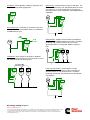
Communications connections include:
Description
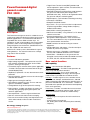
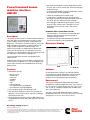
This control system includes an intuitive operator interface
panel that allows for complete genset control as well as
system metering, fault annunciation, configuration and
diagnostics. The interface includes five genset status LED
lamps with both internationally accepted symbols and
English text to comply with customers needs. The
interface also includes an LED backlit LCD display with
tactile feel soft-switches for easy operation and screen
navigation. It is configurable for units of measurement and
has adjustable screen contrast and brightness.
- PC tool interface - This RS-485 communication port
allows the HMI to communicate with a personal
computer running InPower.
- This RS-485 communication port allows the HMI to
communicate with the main control board.
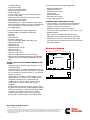
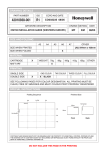
Mechanical drawing
The run/off/auto switch function is integrated into the
interface panel.
All data on the control can be viewed by scrolling through
screens with the navigation keys. The control displays the
current active fault and a time-ordered history of the five
previous faults.
Features:
• LED indicating lamps
- genset running
- remote start
- not in auto
- shutdown
- warning
- auto
- manual and stop
- Circuit breaker open (if equipped)
- Circuit breaker closed (if equipped)
• 320 x 240 pixels graphic LED backlight LCD.
• Four tactile feel membrane switches for LCD defined
operation. The functions of these switches are defined
dynamically on the LCD.
• Seven tactile feel membrane switches dedicated screen
navigation buttons for up, down, left, right, ok, home and
cancel.
Software
InPower (beyond 6.5 version) is a PC-based software
service tool that is designed to directly communicate to
PowerCommand gensets and transfer switches, to
facilitate service and monitoring of these products.
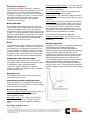
Environment
The control is designed for proper operation without
recalibration in ambient temperatures from -40 ºC (104 ºF)
to +70º C (158 ºF), and for storage from -55 ºC (131 ºF) to
+80 ºC (176 ºF). Control will operate with humidity up to
95%, non-condensing.
The HMI is designed for proper operation in ambient
temperatures from -20 ºC (-4 ºF) to +70 ºC (158 ºF), and for
storage from -30 ºC (-22 ºF) to +80 ºC (176 ºF).
Our energy working for you.™
www.cumminspower.com
©2008 Cummins Power Generation Inc. All rights reserved. Cummins Power Generation and Cummins are registered trademarks of Cummins
Inc. PowerCommand, AmpSentry, InPower and “Our energy working for you.” are trademarks of Cummins Power Generation. Other
company, product, or service names may be trademarks or service marks of others. Specifications are subject to change without notice.
S-1570a (9/08) Page 10 of 11