1
1.10.3 OnCue Home Generator
Management System
The OnCuer Home Generator Management System
allows monitoring and control of your generator set from
a personal computer located in your home or at other
remote locations. OnCue can also be configured to
send email or text message notifications in the event of a
generator set fault. See TP-6796, OnCue Software
Operation Manual, for software instructions.
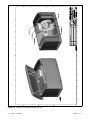
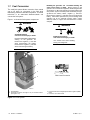
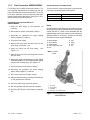
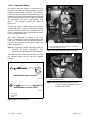
Connect to the Ethernet cable in the customer
connection area of the generator set. See Figure 1-36.
Use an RJ45 inline coupler, provided with the OnCue kit,
to connect the customer’s Ethernet cable to the cable in
the customer connection box.
1
The OnCue system is available separately as a loose kit.
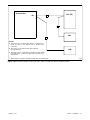
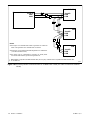
Use category 5E network cable to connect the RDC2
controller to the customer-supplied Ethernet router and
cable or DSL modem. Route the cable with other
low-voltage signal wiring (for example, the RBUS
communication leads or engine start leads to the
transfer switch), in separate conduit from the AC load
leads. If the network cable is longer than 100 meters
(328 ft.), use a repeater or switch.
Recommended: Use a laptop computer to verify the
network connection before connecting to the generator
set.
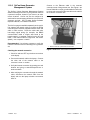
Checking the network connection
GM84094
1. Ethernet cable for optional OnCue connection
Figure 1-36 Network Connection for OnCue
1. Check for and turn OFF any wireless connections
to the laptop.
2. Connect the network cable to the laptop. Connect
the other end of the network cable to the
customer’s router or modem.
3. Verify the Internet connection by opening your web
browser and going to www.kohlerpower.com or
another website.
4. After verifying the connection through the network
cable, disconnect the network cable from the
laptop and turn the laptop wireless connections
back on.
TP-6803 12/11
Section 1 Installation
33