1
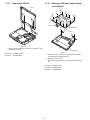
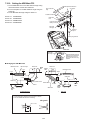
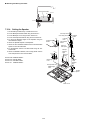
7.1.4.
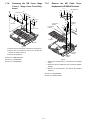
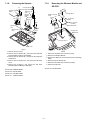
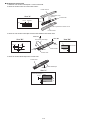
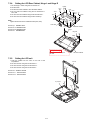
Removing the KB Cover, Hinge
Cover L, Hinge Cover R and Keyboard
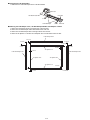
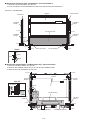
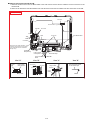
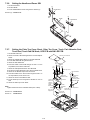
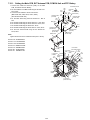
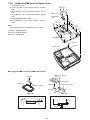
7.1.5.
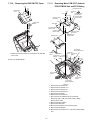
Remove the KB Cable Cover,
Keyboard and PCMCIA Protector
<F>
<F>
<B>
Hinge Cover L
<D>
<B>
<D>
<B>
KB Cable Cover
<F>
<F>
<C>
<C>
<D>
<B>
<F>
<C>
<D> <C>
<G>
KB Cover
<G>
to Connector
(CN933)
to Connector
(CN932)
Hinge Cover R
<G>
PCMCIA
Protector
<G>
<G>
<G>
Keyboard
Keyboard
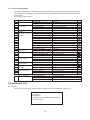
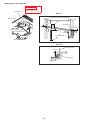
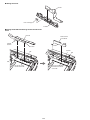
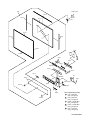
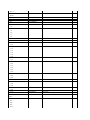
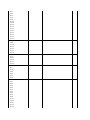
Figure 3
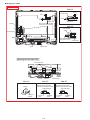
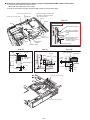
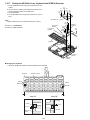
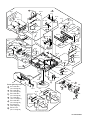
1. Remove the four Screws<B>, and remove the KB Cover.
2. Remove the four Screws<C> and the four Screws<D>,
and remove Hinge Cover L,R.
3. Remove the Keyboard.
Connector
(CN933)
Connector
(CN932)
Screws <B>: DRQT26+D4FZL
Screws <C>: DFHE5054XA
Screws <D>: DFHE5054XA
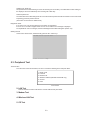
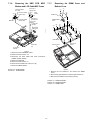
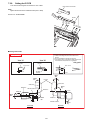
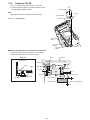
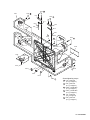
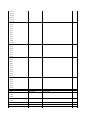
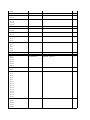
Figure 4
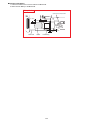
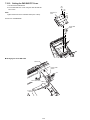
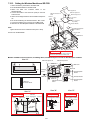
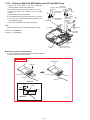
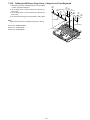
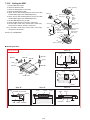
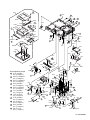
1. Remove the five Screws<F>, and remove the KB Cable
Cover.
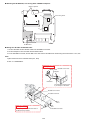
2. Disconnect the two Cables from two Connectors (CN932,
CN933)
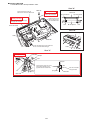
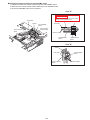
3. Remove the six Screws<G>, and remove the PCMCIA
Protector.
Screws <F>: DRHM0002ZA
Screws <G>: DRQT2+I35FKL
7-2