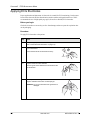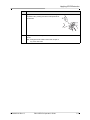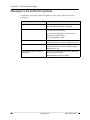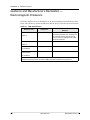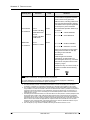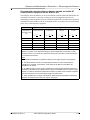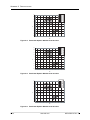
1
and Operator’s Guide June 2009 9650-0350-01 Rev. G An issue date and revision level for this guide appear on the title page. If more than three years have elapsed since this date, contact ZOLL Medical Corporation to determine if additional product information updates are available. ZOLL, AED Pro, AED Plus, CPR-D•padz, stat•padz, pedi•padz, RescueNet, Real CPR Help, See-Thru CPR, “Advancing Resuscitation. Today.” and M Series are registered trademarks of ZOLL Medical Corporation. PowerCharger, Rectilinear Biphasic, and SurePower are trademarks of ZOLL Medical Corporation. All other trademarks and registered trademarks are property of their respective owners. Copyright © 2009 ZOLL Medical Corporation. All rights reserved. Table of Contents Chapter 1 Product Overview Defibrillation ........................................................................................................................ 1-2 Defibrillation Modes .................................................................................................... 1-2 Semiautomatic Mode Defibrillation and CPR Monitoring .................................................... 1-2 Manual Mode Defibrillation ................................................................................................. 1-3 ECG Monitoring .................................................................................................................. 1-3 Audio Recording ................................................................................................................. 1-4 Nonrescue Mode ................................................................................................................ 1-5 Data Transfer .............................................................................................................. 1-5 Device Configuration .................................................................................................. 1-5 Standby State...................................................................................................................... 1-5 Automatic Shutoff................................................................................................................ 1-5 Accessories ........................................................................................................................ 1-6 A-W Accessories ........................................................................................................ 1-7 The Front Panel .................................................................................................................. 1-8 Display Screen .......................................................................................................... 1-10 Chapter 2 Getting Started Installing a Battery Pack ..................................................................................................... 2-2 CHANGE BATTERY Warning .................................................................................... 2-4 Preparing the Unit for Clinical Use...................................................................................... 2-5 Performing a Self-Test ........................................................................................................ 2-6 Automatic Self-Tests ................................................................................................... 2-6 Manual Self-Test ......................................................................................................... 2-6 Preconnecting the Defibrillation Electrodes Cable.............................................................. 2-7 Messages ........................................................................................................................... 2-8 Chapter 3 Semiautomatic Mode Applying Defibrillation Electrode Pads ................................................................................ 3-2 Applying Defibrillation Electrode Pads — Adult CPR-D•padz ..................................... 3-3 Applying Defibrillation Electrode Pads — Adult CPR stat•padz ................................. 3-5 CPR Monitoring with CPR-D•padz and CPR stat•padz .............................................. 3-6 Applying Defibrillation Electrode Pads — Adult stat•padz II ....................................... 3-7 Applying Defibrillation Electrode Pads — Infant/Child pedi•padz II ............................ 3-8 Semiautomatic Defibrillation ............................................................................................... 3-9 Start with CPR Option ............................................................................................... 3-12 Messages in Semiautomatic Mode ........................................................................... 3-12 9650-0350-01 Rev. G ZOLL AED Pro Operator’s Guide i TABLE OF CONTENTS Chapter 4 Manual Mode About Manual Mode............................................................................................................ 4-2 Switching to Manual Mode.................................................................................................. 4-3 Manual Defibrillation ........................................................................................................... 4-4 See-Thru CPR .................................................................................................................... 4-5 Messages in Manual Mode ............................................................................................... 4-10 Chapter 5 ECG Monitoring Mode About ECG Monitoring........................................................................................................ 5-2 ECG Electrode Placement .................................................................................................. 5-3 Applying ECG Electrodes ................................................................................................... 5-4 Monitoring the ECG Rhythm ............................................................................................... 5-6 Monitoring with ECG Electrodes ................................................................................. 5-6 Monitoring with Defibrillation Electrodes ..................................................................... 5-7 Messages in ECG Monitoring Mode ................................................................................... 5-8 Chapter 6 Nonrescue Mode Entering Nonrescue Mode .................................................................................................. 6-2 Data Storage ....................................................................................................................... 6-3 Device History ............................................................................................................. 6-3 Patient Clinical Data ................................................................................................... 6-3 Communicating with an External Device ............................................................................ 6-4 Setting Up Data Communications with an IrDA Connection ....................................... 6-4 Downloading Data to a USB Device ........................................................................... 6-4 Setting the Date and Time .................................................................................................. 6-5 Device Configuration .......................................................................................................... 6-6 ZOLL Administration Software ............................................................................................ 6-6 Installing ZOLL Administration Software ..................................................................... 6-6 RescueNet Code Review Software ............................................................................ 6-7 Messages in Nonrescue Mode ........................................................................................... 6-8 Chapter 7 Troubleshooting and Maintenance General Troubleshooting .................................................................................................... 7-2 ECG Monitoring Troubleshooting........................................................................................ 7-4 Defibrillator Troubleshooting ............................................................................................... 7-5 Cleaning the Unit ................................................................................................................ 7-6 Optional Maintenance for Technical Professionals ............................................................. 7-7 Appendix A Specifications Device Specifications..........................................................................................................A-2 ii www.zoll.com 9650-0350-01 Rev. G Battery Pack Specifications ................................................................................................A-5 Guidance and Manufacturer’s Declaration — Electromagnetic Emissions.........................A-6 Electromagnetic Immunity Declaration (EID) ..............................................................A-7 Rectilinear Biphasic Waveform Characteristics ................................................................A-10 Clinical Trial Results for the M Series Biphasic Waveform ...............................................A-13 Randomized Multicenter Clinical Trial for Defibrillation of Ventricular Fibrillation (VF) and Ventricular Tachycardia (VT) ...................................................................A-13 ECG Analysis Algorithm Accuracy....................................................................................A-15 Appendix B Rechargeable Battery Packs Managing Rechargeable Battery Packs .............................................................................B-2 Recharging and Testing Battery Packs ...............................................................................B-2 Achieving Optimal Performance with Rechargeable Batteries ...........................................B-3 Appendix C Configurable Settings Descriptions of AED Pro Configurable Settings..................................................................C-2 9650-0350-01 Rev. G ZOLL AED Pro Operator’s Guide iii TABLE OF CONTENTS iv www.zoll.com 9650-0350-01 Rev. G Preface The AED Pro® and AED Pro® A-W from ZOLL Medical Corporation is a portable, automated external defibrillator (AED) intended for use by trained rescuers to provide emergency defibrillation and to monitor patient ECG during treatment. This Preface contains the following sections: • • • • “How To Use This Guide” on page vi “Safety Considerations” on page vii “Equipment” on page xi “Intended Use” on page xvi 9650-0350-01 Rev. G ZOLL AED Pro Operator’s Guide v PREFACE How To Use This Guide The AED Pro Operator’s Guide provides information that operators need for the safe and effective use and care of the AED Pro device. Before operating this device, be sure to read and understand all the information contained within. This guide also describes device setup and maintenance procedures. Separate chapters in this document describe use of the device in either semiautomatic or manual mode. Manual Updates ZOLL Medical Corporation provides manual updates to inform customers of changes in device information and use. Customers should carefully review each update to understand its significance, and then file the update in its appropriate section within the manual for subsequent reference. Product documentation is available through the ZOLL website at www.zoll.com. From the Products menu, choose Product Documentation. Related Manuals In addition to this manual, the following ZOLL publications provide information about this product and related products and accessories: REF Title 9650-0054-01 ZOLL Base PowerCharger 4x4 Operator’s Manual 9650-0120-01 ZOLL Base PowerCharger 1x1 Operator’s Manual 9651-0801-01 AED Pro Simulator Operator’s Guide 9650-0535-01 SurePower™ Charger Station Operator’s Guide 9650-0536-01 SurePower Battery Pack Guide Conventions This guide uses the following conventions: Within text, the names and labels for physical buttons and softkeys appear in boldface type (for example, “Press the Shock button or the DISARM softkey”). This guide uses uppercase italics for audible prompts and for text messages displayed on the screen (for example, DON’T TOUCH PATIENT, ANALYZING). WARNING! Warning statements alert you to conditions or actions that can result in personal injury or death. Caution Caution statements alert you to conditions or actions that can result in damage to the unit. vi www.zoll.com 9650-0350-01 Rev. G Safety Considerations Safety Considerations All operators should review these safety considerations before placing the AED Pro unit into service. These operating instructions describe the functions and proper operation of the AED Pro unit. This manual does not substitute for a formal training course. Operators must obtain formal training from an appropriate authority before using this device for patient care. Follow all recommended maintenance instructions. If a problem occurs, obtain service immediately. Do not use the device until it has been inspected by appropriate personnel. Do not disassemble the unit. A shock hazard exists. Refer all problems to authorized service personnel. The AED Pro unit is capable of delivering 200 joules. To completely deactivate the unit, turn it off and remove the battery pack. To manually disarm a charged (or charging) defibrillator, do one of the following: • Turn the unit off for at least 3 seconds. • Press the DISARM softkey (manual mode only). For safety, the AED Pro unit automatically disarms a fully charged defibrillator after 60 seconds in manual mode or 30 seconds in semiautomatic mode if the Shock button is not pressed. General Federal (U.S.A.) law restricts this device to use by or on the order of a physician. Proper operation of the unit and correct electrode placement are critical to obtaining optimal results. Operators must be thoroughly familiar with proper device operation. The use of external defibrillation electrodes or adapter devices from sources other than ZOLL is not recommended. ZOLL Medical Corporation makes no representations or warranties regarding the performance or effectiveness of its products when used with defibrillation electrodes or adapter devices from other sources. Device failures attributable to the use of defibrillation electrodes or adapters not manufactured by ZOLL might void the warranty on the ZOLL equipment. This device is protected against interference from radio frequency emissions typical of the two-way radios and cellular phones (digital and analog) used in emergency service or public safety activities. You should assess the device’s performance in your typical operating environment to determine the likelihood of radio frequency interference (RFI) from high-power sources. Radio frequency interference can cause shifts in the monitor baseline, trace compression, changes to brightness of the display, or transient spikes on the screen. The AED Pro unit might not perform to specifications when stored at the upper or lower extreme limits of storage temperature and then immediately put into use. Do not use or stack the unit with other equipment. If the unit is used or stacked with other electrical equipment, verify proper operation before using it. Do not use or place the unit in service if it beeps while turned off. The use of accessories or cables other than those specified in this manual may result in increased emissions or decreased immunity of the AED Pro. 9650-0350-01 Rev. G ZOLL AED Pro Operator’s Guide vii PREFACE Do not use or place the unit in service if the Ready indicator (at the upper right of the front panel) shows a red “X”. Defibrillation Emergency defibrillation should be performed only by appropriately trained, skilled personnel who are familiar with the operation of the equipment. The prescribing physician should determine what training, such as Advanced Cardiac Life Support (ACLS) or Basic Life Support (BLS) certification, is appropriate for operating this device. ECG analysis A patient must be motionless during ECG analysis. Do not touch the patient during analysis. Cease all patient movement by stretcher or vehicle before beginning ECG analysis in semiautomatic mode. Cardiopulmonary resuscitation (CPR) Before performing CPR, place the patient on a firm surface. Battery care Keep a fully charged spare battery pack with the device at all times. When the unit displays the message CHANGE BATTERY, immediately replace the battery pack with a fully charged one. Regular use of a partially charged battery pack without fully recharging it between uses might permanently reduce the battery’s capacity and result in early failure. Regularly test rechargeable battery packs. A rechargeable battery pack that does not pass its test could fail without warning. Do not disassemble a battery pack or dispose of it in fire. Do not try to recharge a nonrechargeable battery pack. If mistreated, a battery pack might explode. Dispose of battery packs in accordance with federal, state, and local regulations. Battery packs should be shipped to a reclamation facility for recovery of metal and plastic compounds as the proper method of waste management. Operator Safety Do not use the unit near oxygen-rich atmospheres, flammable anesthetics, or other flammable agents (such as gasoline). Do not use the unit within standing water. Before discharging the defibrillator, warn everyone to stand clear of the patient. Do not discharge the defibrillator except as indicated in the instructions. Discharge the defibrillator only when defibrillation pads are properly attached to the patient. Never discharge the unit with the defibrillation pads shorted together or in open air. viii www.zoll.com 9650-0350-01 Rev. G Safety Considerations Electrical shock Before defibrillation, be sure to disconnect from the patient all electromedical equipment that is not defibrillation-protected. Keep defibrillation electrodes away from all other equipment attached to the patient and from metal objects in contact with the patient. During defibrillation, do not touch the bed, the patient, conductive material, or any equipment connected to the patient; a severe shock can result. To avoid hazardous pathways for the defibrillation current, do not allow exposed portions of the patient’s body to touch any metal objects, such as a bed frame. Accessory equipment The use of accessory equipment that does not comply with the equivalent safety requirements of the AED Pro device could reduce the level of safety of the resulting system. When selecting accessory equipment, consider the following: • Use of the accessory in the patient vicinity • Evidence that the safety certification of the accessory has been performed in accordance with the appropriate IEC (EN) 60601-1 and/or IEC (EN) 60601-1-1 harmonized national standards. Patient Safety The AED Pro unit detects ECG electrical signals only and does not detect a pulse (effective circulatory perfusion). Always verify pulse and heart rate by physical assessment of the patient. Never assume that the display of a nonzero heart rate means that the patient has a pulse. ECG rhythm analysis does not warn of patient asystole, which is not a shockable rhythm. Do not connect the AED Pro to a PC or other device (via the USB port) while the unit’s electrodes are still connected to the patient. Check electrical leakage levels before use. Leakage current might be excessive if more than one monitor or other piece of equipment is connected to the patient. Do not use this equipment in the presence of electrosurgery. Defibrillation pads and ECG electrodes Check the expiration date on the electrode packaging. Do not use electrodes that have passed their expiration date. Do not use defibrillation pads or ECG electrodes if the gel is dried or damaged; patient burns or poor quality ECG signals might result from using such electrodes. Poor adherence or air pockets under defibrillation pads can cause arcing, skin burns, or reduced energy delivery. To minimize burning, apply freshly opened and undamaged defibrillation pads to clean and dry skin. Excessive body hair or wet, diaphoretic skin can inhibit electrode pad coupling (contact) with the skin. Clip excess hair and dry any moisture from the area where an electrode pad is to be attached. To prepare for an emergency, keep the defibrillation electrode cable connected to the unit at all times, even when the unit is not in use. Use only high-quality ECG electrodes. ECG electrodes are for monitoring only; you cannot use ECG electrodes for defibrillation. 9650-0350-01 Rev. G ZOLL AED Pro Operator’s Guide ix PREFACE Implanted pacemakers Do not place electrodes directly over an implanted pacemaker. Implanted pacemakers might cause the heart rate meter or ECG rhythm analysis to count the pacemaker rate during incidents of cardiac arrest or other arrhythmia. Carefully observe pacemaker patients. Check the patient’s pulse; do not rely solely on heart rate meters. Patient history and physical examination are important factors in determining the presence of an implanted pacemaker. Cautions Do not sterilize the device or the ECG monitoring cable. Do not immerse any part of the device into water. Do not use ketones (such as MEK or acetone) on the device. Avoid using abrasives (including paper towels) on the display screen and IrDA port. Restarting the Device Certain events require a restart of the AED Pro unit after it shuts off, encounters an error, or becomes inoperative. If such an event occurs, always try to restore device operation as follows before seeking alternative methods of patient monitoring or treatment: 1. Press and hold the On/Off button for 1 second to turn the unit off. 2. After the unit has shut down, wait at least 3 seconds. 3. Press and release the On/Off button to restart the unit. x www.zoll.com 9650-0350-01 Rev. G Equipment Equipment Before unpacking the AED Pro unit, carefully inspect each shipping container for damage. If the container or cushioning material is damaged, keep it until you have checked the contents for completeness, and the unit has been tested for mechanical and electrical integrity. Examine the unit for any signs of damage that might have occurred during shipping. Review the shipping list to ensure that you received all ordered items. If the contents are incomplete, if there is mechanical damage, or if the device does not pass its electrical self-test (as indicated by a red “X” in the Ready indicator after battery installation), contact the ZOLL Technical Service Department or the nearest ZOLL authorized representative. If the shipping container is damaged, notify the carrier also. Symbols Used on the Equipment The following symbols might appear in this document or on the AED Pro unit, battery packs, electrodes, or shipping materials. Symbol Description Dangerous voltage. Attention, consult accompanying documents. Fragile, handle with care. Keep dry. This end up. Temperature limitation. Conformité Européenne Complies with medical device directive 93/42/EEC. Defibrillator-proof type BF equipment. 9650-0350-01 Rev. G ZOLL AED Pro Operator’s Guide xi PREFACE Symbol Description Defibrillator-proof type CF equipment. ,%! 2. 45 $ 2% Contains lead. Recycle or dispose of properly. 2%#9#,% N UR Li- T RE IO N 0B Contains lithium. Recycle or dispose of properly. RECYCLE Li-ION Keep away from open flame and high heat. Do not open, disassemble, or intentionally damage. Do not crush. Nonrechargeable battery. Do not discard in trash. Recycle or dispose of properly. Date of manufacture. Use by. Latex-free. Do not reuse. xii www.zoll.com 9650-0350-01 Rev. G Equipment Symbol Description Do not fold. Not sterile. Nonionizing electromagnetic radiation. Manufacturer. Authorized representative in the European Community. Serial Number. Catalogue number. Consult instructions for use. 9650-0350-01 Rev. G ZOLL AED Pro Operator’s Guide xiii PREFACE FDA Tracking Requirements U.S. Federal Law (21 CFR 821) requires the tracking of defibrillators. Under this law, owners of this device must notify ZOLL Medical Corporation if this product is • received • lost, stolen, or destroyed • donated, resold, or otherwise distributed to a different organization If any such event occurs, contact ZOLL Medical Corporation in writing with the following information: 1. Originator’s organization – Company name, address, contact name, and contact phone number 2. Part number, model number, and serial number of the device 3. Disposition of the device (for example, received, lost, stolen, destroyed, distributed to another organization), new location and/or organization (if known and different from originator’s organization) – company name, address, contact name, and contact phone number 4. Date when the change took effect Please address the information to: ZOLL Medical Corporation Attn: Tracking Coordinator 269 Mill Road Chelmsford, MA 01824-4105 Fax: (978) 421-0025 Tel: (978) 421-9655 Notification of Adverse Events Under the Safe Medical Devices Act (SMDA), health care providers are responsible for reporting to ZOLL Medical Corporation, and possibly to the FDA, the occurrence of certain events. These events, described in 21 CFR Part 803, include device-related death and serious injury or illness. In addition, as part of our Quality Assurance Program, ZOLL Medical Corporation requests to be notified of device failures or malfunctions. This information is required to ensure that ZOLL Medical Corporation provides only the highest quality products. xiv www.zoll.com 9650-0350-01 Rev. G Equipment Contacting Technical Service The AED Pro unit is calibrated at the factory, and does not require periodic recalibration or adjustment. If a unit requires service, contact the ZOLL Technical Service Department. Telephone: 1-800-348-9011 (within the U.S.A. only) 1-978-421-9655 Fax: 1-978-421-0010 When requesting service, please provide the following information to the service representative: • • • • • Unit serial number Description of the problem Department using the equipment and name of the person to contact Purchase order to allow tracking of loan equipment Purchase order for a unit with an expired warranty Returning a unit for service Before sending a unit to the ZOLL Technical Service Department for repair, obtain a service request (SR) number from the service representative. Remove the battery pack from the unit. Pack the unit with its cables in the original containers (if available) or equivalent packaging. Be sure the assigned service request number appears on each package. s For customers In the U.S.A. Return the unit to ZOLL Medical Corporation 269 Mill Road Chelmsford, MA 01824-4105 Attention: Technical Service Department (SR number) Telephone: 1-800-348-9011 In Canada ZOLL Medical Canada Inc. 1750 Sismet Road, Unit #1 Mississauga, Ontario L4W 1R6 Attention: Technical Service Department (SR number) Telephone: 1-866-442-1011 The nearest authorized ZOLL Medical Corporation representative. To locate an authorized service center, contact the International Sales Department at In other locations ZOLL Medical Corporation 269 Mill Road Chelmsford, MA 01824-4105 Telephone: 1-978-421-9655 9650-0350-01 Rev. G ZOLL AED Pro Operator’s Guide xv PREFACE Intended Use The AED Pro unit is intended to defibrillate victims of ventricular fibrillation or pulseless ventricular tachycardia, for ECG monitoring, and for CPR monitoring of patients. The CPR monitoring function provides a metronome designed to encourage rescuers to perform chest compressions at the AHA/ERC recommended rate of 100 compressions per minute. Voice and visual prompts encourage a compression depth of 1.5 to 2 inches (3.8 to 5.0 cm) for adult patients. Indications for Use Use of the device for defibrillation is indicated on victims of cardiac arrest with apparent lack of circulation as indicated by • Unconsciousness • Absence of breathing, and • Absence of pulse and other signs of circulation. When the victim is less than 8 years old or weighs less than 55 lb. (25 kg), use ZOLL pedi•padz® II pediatric defibrillation electrodes. Do not delay therapy to determine the patient’s exact age or weight. The device is also intended for use when ECG monitoring is indicated to evaluate the patient’s heart rate or ECG morphology. Contraindications for Use Defibrillation Never use the AED Pro unit for defibrillation when the patient • Is conscious • Is breathing, or • Has a detectable pulse or other sign of circulation. CPR Monitoring The CPR monitoring function is not intended for use on patients under 8 years of age. Intended Users In semiautomatic mode, the AED Pro unit is intended to be used by rescuers and emergency care personnel who have completed training and certification requirements applicable to the use of a defibrillator where the operator controls delivery of shocks to the patient. In manual mode, the AED Pro unit is intended to be used only by qualified medical personnel trained in Advanced Life Support skills. In ECG monitoring mode, the AED Pro unit is intended to be used by personnel who are qualified by training in the use of the AED Pro device, basic life and/or advanced life support, or other physician-authorized emergency medical training. xvi www.zoll.com 9650-0350-01 Rev. G Defibrillator Precautions Inappropriate defibrillation of a patient (for example, with no malignant arrhythmia) can precipitate ventricular fibrillation, asystole, or other dangerous types of arrhythmia. Without proper application of electrode pads, defibrillation might be ineffective and cause burns, particularly when repeated shocks are necessary. Erythema or hyperemia of the skin under the defibrillation pads often occurs. This reddening effect, often enhanced along the perimeter of the pad, should diminish substantially within 72 hours. Defibrillator output energy The AED Pro unit can deliver as much as 200 joules into a 50 ohm impedance. The energy delivered through the chest wall, however, is determined by the patient’s transthoracic impedance. 9650-0350-01 Rev. G ZOLL AED Pro Operator’s Guide xvii AED PRO OPERATOR ’S GUIDE (This page intentionally left blank.) 9650-0350-01 Rev. G ZOLL AED Pro Operator’s Guide xviii Chapter 1 Product Overview The AED Pro device provides the following clinical modes: • Semiautomatic defibrillation with CPR monitoring • Manual defibrillation • ECG monitoring To guide the operator through rescue protocols, the AED Pro unit issues instructions through text messages displayed on its screen and by voice prompts played through a speaker. This chapter introduces the AED Pro unit, and contains the following sections: • • • • • • • • • • “Defibrillation” on page 1-2 “Semiautomatic Mode Defibrillation and CPR Monitoring” on page 1-2 “Manual Mode Defibrillation” on page 1-3 “ECG Monitoring” on page 1-3 “Audio Recording” on page 1-4 “Nonrescue Mode” on page 1-5 “Standby State” on page 1-5 “Automatic Shutoff” on page 1-5 “Accessories” on page 1-6 “The Front Panel” on page 1-8 9650-0350-01 Rev. G ZOLL AED Pro Operator’s Guide 1–1 CHAPTER 1 PRODUCT OVERVIEW Defibrillation The AED Pro unit uses the ZOLL Rectilinear Biphasic™ waveform and ZOLL single-use defibrillation electrode pads for defibrillation. Escalating energy levels for the first three shocks are preconfigured into the unit for adult and pediatric patients. (The unit selects the appropriate levels by detecting the type of defibrillation electrode pads in use.) After the first three shocks, all subsequent shocks are delivered at the same energy as the third shock. The factory default energy levels in joules are as follows: First shock Second shock Third shock Adult 120 150 200 Pediatric 50 70 85 For more information, refer to Appendix C, “Configurable Settings”. Defibrillation Modes The AED Pro unit can be manufactured to run in one of three defibrillation modes: • Semiautomatic Mode Defibrillation with CPR Monitoring • Manual Mode Defibrillation • Semiautomatic Mode Defibrillation with CPR Monitoring and Manual Mode Override Semiautomatic Mode Defibrillation and CPR Monitoring When the AED Pro unit is configured to run in semiautomatic mode or semiautomatic mode with manual mode override, the unit starts up in semiautomatic mode unless an AED Pro ECG cable is attached to the unit. In semiautomatic mode, the unit analyzes the patient’s ECG through the defibrillation electrode pads attached to the patient. If the unit detects a shockable rhythm, it automatically charges to the appropriate (preconfigured) energy level. Once the defibrillator is fully charged, the Shock button begins flashing. The unit also emits a charge-ready tone, and directs the rescuer to press the Shock button to deliver therapy. In semiautomatic mode, the rescuer must deliver the shock within 30 seconds of full charge, otherwise the defibrillator automatically disarms itself, and the unit resumes ECG analysis. After delivering a shock, the unit continues analyzing the patient’s ECG, guiding the rescuer to perform CPR or to deliver additional shocks, if needed. The unit also provides CPR monitoring if ZOLL CPR-D•padz® or CPR stat•padz® defibrillation electrodes are attached. CPR-D•padz and CPR stat•padz include a sensor to monitor the rescuer’s chest compression rate and depth. The compression data enables the unit to guide the rescuer to perform effective CPR. The unit can be preconfigured to prompt the rescuer to perform a period of CPR before the first ECG analysis cycle begins. For more information, refer to Chapter 3, “Semiautomatic Mode”. 1–2 www.zoll.com 9650-0350-01 Rev. G Manual Mode Defibrillation Manual Mode Defibrillation In manual mode, the rescuer controls each step of defibrillation therapy. The AED Pro unit displays patient ECG data and heart rate on the screen. The rescuer uses this information to determine whether or not the patient has a shockable rhythm. If the AED Pro unit is configured for semiautomatic mode defibrillation with ECG monitoring enabled and manual mode override, and the ECG cable is not attached, the AED Pro unit starts in semiautomatic mode at power up. If the AED Pro unit is configured for manual mode defibrillation, the AED Pro unit runs only in manual mode. When a shock is deemed necessary, the rescuer charges the defibrillator by pressing the CHARGE softkey to charge the unit to the preconfigured energy level. Note: Defibrillation energy levels are preconfigured and cannot be changed during clinical use. Once the defibrillator is fully charged, the Shock button begins flashing. The unit also emits a charge-ready tone, continuously for the first 50 seconds, and then intermittently for the final 10 seconds. The rescuer must deliver the shock within this 60-second period, otherwise the defibrillator automatically disarms itself. To recharge the unit, the rescuer must press the CHARGE softkey again. For more information, refer to Chapter 4, “Manual Mode”. ECG Monitoring The optional ECG monitoring mode provides ECG rhythm and heart rate display, as well as performing background ECG analysis to detect shockable rhythms. If the AED Pro unit detects a shockable rhythm during monitoring, it immediately alerts the rescuer through displayed and voiced prompts; if defibrillation pads are attached, the unit automatically switches to semiautomatic mode. For ECG monitoring, you can use • AED Pro-compatible defibrillation electrode pads • Standard ECG electrodes (with an AED Pro ECG cable) While ECG electrodes (not defibrillation electrode pads) are connected to the unit, the only available mode is ECG monitoring. All ECG monitoring is performed in the lead II configuration. The operator cannot select another lead. For more information, refer to Chapter 5, “ECG Monitoring Mode”. 9650-0350-01 Rev. G ZOLL AED Pro Operator’s Guide 1–3 CHAPTER 1 PRODUCT OVERVIEW Audio Recording When installed and enabled, the Audio Recording Option allows the AED Pro unit to record up to 20 minutes of continuous audio and clinical event data during a rescue. (The AED Pro unit can record and store at least 5.8 hours of clinical event data when the Audio Recording Option is disabled.) The recorded audio data is synchronized to the clinical event data. Note: The AED Pro unit records up to 3 minutes of audio data prior to electrode placement. The AED Pro unit can record and store data for only a single rescue when audio recording is enabled — when the electrode pads are placed on the patient, the unit deletes any stored data (ECG, Audio, and Event data) and begins recording data from the current rescue. When you start the AED Pro unit in Non-rescue Mode, it does not delete stored rescue data. 1–4 www.zoll.com 9650-0350-01 Rev. G Nonrescue Mode Nonrescue Mode The AED Pro unit provides the following functions in nonrescue mode: • Data transfer • Device configuration The following sections briefly describe these functions. For more information, refer to Chapter 6, “Nonrescue Mode”. Data Transfer The AED Pro unit includes nonvolatile memory, which automatically records • Device history • Clinical data Stored information can be transferred to a remote device (such as a computer) through a USB device or an IrDA (infrared wireless) connection. The clinical data format is compatible with ZOLL RescueNet® Code Review software, which can be used to review and analyze the patient data. The unit retains the device history and clinical data even when powered off or when the battery pack is removed. Clinical data is erased only when the device is powered on and electrodes are attached to a new patient. If configured to do so, the unit can store data for more than one patient. Device Configuration The AED Pro unit provides configurable settings that can be used to tailor the device for local rescue protocols and procedures. Using the ZOLL Administration Software on a personal computer, you can view or modify the unit’s configuration. Standby State When the unit is turned off with a good battery installed, the unit enters standby state. While in standby, the unit periodically starts up automatically to perform a self-test, and then returns to standby. The Ready indicator shows the result of the self-test. The frequency of self-tests while the unit is in standby state is a configurable setting. Automatic Shutoff The unit automatically powers off if no patient connection is detected within 10 minutes (configurable). 9650-0350-01 Rev. G ZOLL AED Pro Operator’s Guide 1–5 CHAPTER 1 PRODUCT OVERVIEW Accessories The following related accessories and equipment are available. Item REF Adult CPR-D•padz electrodes 8900-0800-01 Adult CPR stat•padz electrodes 8900-0400 Adult stat•padz® II electrodes 8900-0801-01 Pediatric pedi•padz® II electrodes 8900-0810-01 ECG electrodes: 3 ECG electrodes/pouch (200 pouches / 600 electrodes) 8900-0003 AED Pro ECG cable AAMI IEC Defibrillation analyzer (universal) adapter cable 8000-0838 8000-0839 8000-0804-01 Rechargeable PD 4410 battery pack Standard Smart Smart Ready Disposable sealed lithium manganese dioxide battery pack 8004-0009 8004-0103-01 8004-0104-01 8000-0860-01 AED Pro carry bags Soft carry case Molded vinyl case with spare battery compartment Hard case with foam cut-outs 8000-0810-01 8000-0832-01 8000-0875-32 IrDA adapter for personal computer USB RS-232 1–6 8000-0815 8000-0816 AED Pro simulator 8000-0829-01 See-Thru CPR® simulator 8009-0751-01 AED Pro ZOLL Administration Software (ZAS) CD 9658-0800-01 RescueNet Code® Review Standard software for Windows: installation CD and Getting Started Guide 8000-0608-01 AED Pro Service Manual 9650-0309-01 AED Pro Simulator Manual 9651-0801-01 SurePower Charger Station 8050-0030-01 SurePower Battery Pack 8019-0535-01 www.zoll.com 9650-0350-01 Rev. G Accessories A-W Accessories The following accessories are also available for the AED Pro A-W. Item REF CPR-D•padz one piece defibrillation and CPR System Adult Electrode (Airworthy Certified) 8900-0800-01 Airworthy stat•padz® II Adult Multi-Function Electrodes w/ Ferrite (1 pair) (Airworthy Certified) 8900-0840-30 Airworthy stat•padz® II Adult Multi-Function Electrodes w/ Ferrite (Case of 12) (Airworthy Certified) 8900-0841-30 AED Pro ECG Cable AAMI (Airworthy Certified) 8000-0838 AED Pro A-W non-rechargeable lithium battery pack (Airworthy Certified) 8000-0860-30 ® 9650-0350-01 Rev. G ZOLL AED Pro Operator’s Guide 1–7 CHAPTER 1 PRODUCT OVERVIEW The Front Panel Figure 1-1 shows the front panel of the AED Pro unit. Table 1-1 describes each of the unit’s front panel features. Patient cable connector Display screen Shock button Microphone (optional) On/Off button Ready indicator IrDA port Softkeys Speaker Battery compartment latch Battery compartment cover ZM040001A Figure 1-1. AED Pro Front Panel USB connector (inside battery compartment) ZM050001A Figure 1-2. 1–8 USB Connector www.zoll.com 9650-0350-01 Rev. G The Front Panel Table 1-1. AED Pro Front Panel Features Feature Description Shock button When the defibrillator is fully charged and ready, the Shock button repeatedly flashes. To deliver a shock, press and hold the button. On/Off button To start the unit, press this button and release it within 5 seconds. To start the unit in nonrescue mode, press and hold this button for more than 5 seconds. To turn the unit off and place it in standby state, press and hold this button for 1 second. Ready indicator Shows the status of the unit, based on its last self-test. A green check indicates the unit is ready for use. ZM040010A A red “X” indicates the unit is not ready for use. IrDA port Provides a way to connect the unit to an external device for transferring patient data, unit status information, or configuration information. Speaker Issues voice prompts and alerts. Battery compartment Holds the battery pack. Battery compartment latch Provides access to the battery compartment. Softkeys Directly below the display, two unlabeled buttons control various functions depending on the operating mode. Labels for the softkeys appear at the bottom of the display above each softkey to indicate its function. Patient cable connector Used for plugging in defibrillation electrodes or an AED Pro ECG cable. This connector is a defibrillator-proof type BF patient connection. USB connector Allows you to download patient data to a USB device. Microphone (optional) Allows the AED Pro Unit to record audio rescue data. Only AED Pro units that have been ordered with the Audio Recording Option have a microphone installed. 9650-0350-01 Rev. G ZOLL AED Pro Operator’s Guide 1–9 CHAPTER 1 PRODUCT OVERVIEW Display Screen The display screen shows the following items (depending on the activity in progress): Elapsed time — Shows the total time (in hours, minutes, and seconds) since the unit was turned on. The counter resets to 00:00:00 after 23 hours, 59 minutes, and 59 seconds, or when the unit is turned off. ECG size — Shows the amplitude scale for the displayed ECG in centimeters per millivolt (cm/mV). The device adjusts the scale automatically. Heart rate and heartbeat symbol — (Manual and ECG monitoring modes only) Shows the current heart rate in beats per minute. The symbol flashes with each detected heartbeat. Chest compression depth gauge— Shows the depth of chest compression during CPR when ZOLL CPR-D•padz are connected. The bar extends downward as the depth of compression increases, with scale marks representing 0, 1.5 inches, and 2 inches. Softkey labels — Labels for the softkeys appear at the bottom of the display directly above each softkey to indicate its function. Text prompts and messages — In semiautomatic mode, text prompts guide the rescuer. In all modes, messages alert the operator about problem conditions. ECG rhythm — Displays the patient’s ECG. Shock symbol and number of shocks delivered — Shows the number of shocks delivered since the unit was powered on. Current mode — Displays MANUAL in manual mode, or MONITOR in ECG monitoring mode. No mode label appears in semiautomatic mode. 1–10 www.zoll.com 9650-0350-01 Rev. G The Front Panel Figure 1-3 shows the layout of the screen and the location of the above items. Number of shocks delivered Elapsed time Current mode Shock symbol 1 Heart rate and heartbeat symbol ECG size 00:03:45 MANUAL 142 ECG X0.5 ECG rhythm Chest compression depth gauge (with CPR-D•padz only) 150 J SELECTED Text prompts and messages Left softkey label location Figure 1-3. 9650-0350-01 Rev. G CHARGE Right softkey label location AED Pro Display Screen Elements ZOLL AED Pro Operator’s Guide 1–11 AED PRO OPERATOR ’S GUIDE (This page intentionally left blank.) 9650-0350-01 Rev. G ZOLL AED Pro Operator’s Guide 1-12 Chapter 2 Getting Started This chapter describes some common tasks that you must do to get the AED Pro unit ready to use, and contains the following sections: • • • • • “Installing a Battery Pack” on page 2-2 “Preparing the Unit for Clinical Use” on page 2-5 “Performing a Self-Test” on page 2-6 “Preconnecting the Defibrillation Electrodes Cable” on page 2-7 “Messages” on page 2-8 9650-0350-01 Rev. G ZOLL AED Pro Operator’s Guide 2–1 CHAPTER 2 GETTING STARTED Installing a Battery Pack The AED Pro unit accepts the following types of battery packs: • Rechargeable PD 4410-series battery packs • Disposable sealed lithium manganese dioxide battery packs • SurePower rechargeable lithium ion battery packs When the unit displays the message CHANGE BATTERY, immediately replace the battery with a fully charged battery pack. Before you begin Be sure the unit is turned off. Be sure the battery pack to be installed is fully charged. WARNING! Do not use a rechargeable battery pack if the unit’s standby period will exceed 90 days. Procedure To install or replace a battery pack: Step 1 Action Notes Pull the bottom edge of the battery compartment latch outward. When released, the latch slides upward. ZM040004A 2 Pull the top edge of the latch toward you and then downward. 3 Lift the edge of the battery compartment cover. ZM040004A 2–2 www.zoll.com 9650-0350-01 Rev. G Installing a Battery Pack Step Action Notes 4 Slide out the cover panel. 5 If a battery is installed, remove it from the compartment by pressing the tab on the battery pack. ZM040006A 6 Align the tab of the new battery with the finger access area on the left side of the battery compartment, then place the battery into the compartment. The shape of the battery pack allows it to seat itself properly. ZM040005A 7 Press the edge of the battery pack until it clicks into place. 8 Slide the cover panel back into place, and then lower the edge of the cover. ZM040007A 9 Raise the compartment latch, and tilt the top edge toward the unit. 10 Press the bottom edge of the latch toward the unit to lock the cover in place. ZM040007A 9650-0350-01 Rev. G ZOLL AED Pro Operator’s Guide 2–3 CHAPTER 2 GETTING STARTED Important: If you change the battery while the unit is in clinical use (that is, with a cable connected), the unit automatically powers on in nonrescue mode and then shuts down. Press and release the On/Off button to restart the unit. CHANGE BATTERY Warning When the unit detects a low energy condition, it issues the voice and text prompt CHANGE BATTERY once every minute. Depending on the age and condition of the battery, the remaining operating time of the unit might be extremely limited. The warning message continues until the device shuts down. WARNING! To ensure the availability of adequate power during an emergency, keep a fully charged spare battery pack with the device at all times. Whenever the unit issues the prompt CHANGE BATTERY, immediately replace the used battery pack with a fully charged one to ensure continuous operation and to avoid unexpected device shutdown. After removing a depleted rechargeable battery pack from the unit, recharge the pack as soon as possible. Battery Condition Indications Correction Low energy detected during power-on self-test. Message: CHANGE BATTERY Replace battery pack. Low energy or other self-test failure while the unit is powered off (standby). Ready indicator shows a red “X”. Unit beeps once every minute for 30 minutes. Replace battery pack. Check or replace preconnected electrodes. If the red “X” remains, contact ZOLL Technical Service. 2–4 Low energy detected while the unit is powered on. Message: CHANGE BATTERY Replace battery pack as soon as possible. Dead battery Ready indicator shows a red “X”. Replace battery pack. www.zoll.com If the red “X” remains, contact ZOLL Technical Service. 9650-0350-01 Rev. G Preparing the Unit for Clinical Use Preparing the Unit for Clinical Use The following setup and checkout procedures should be performed before placing the unit into service and after each clinical use. Before you begin You need the following items: • A fully charged battery • Defibrillation electrode pads Procedure To prepare an AED Pro unit for clinical use: Step Action 1 Inspect all external surfaces of the unit to ensure that they are clean (with no fluid spills) and free from structural damage, such as cracks and broken or missing parts. 2 Inspect the patient cable connector to ensure that the pins are not broken, bent, or missing. 3 Inspect all cables. Replace any item that is cut or frayed, or that has bent pins. 4 Install a fully charged battery pack that is appropriate for your application. 5 Ensure that you have an adequate supply of defibrillation and ECG electrodes. 6 Verify that the defibrillation electrodes have not expired and are not close to expiration. 7 Follow the instructions provided with the defibrillation electrodes to preconnect them to the patient cable connector. Note: If electrodes are not preconnected, the unit will fail its next self-test in standby state. 8 Press and release the On/Off button to turn on the unit and initiate a power-on self-test. The message UNIT OK indicates that the battery pack and electrodes are properly installed and that the unit is ready for service. The message UNIT FAILED indicates that the unit is not ready for service. 9 Verify that the unit correctly detects the type of electrodes that are attached (with the message ADULT PADS or PEDIATRIC PADS). 10 Press and hold the On/Off button for 1 second to turn off the unit. 11 Wait 2 minutes. Verify that the Ready indicator displays a green check, and that the unit does not beep. 12 Place the unit into service. While the unit is in service, periodically check the Ready indicator to ensure that it displays a green check and inspect the unit for physical damage. 9650-0350-01 Rev. G ZOLL AED Pro Operator’s Guide 2–5 CHAPTER 2 GETTING STARTED Performing a Self-Test The AED Pro unit performs automatic or manual self-tests to verify its integrity and readiness for emergency use. These tests verify the following: • Battery energy — Verifies that the battery energy is sufficient for at least 2 hours of • • • • • • • continuous monitoring and ten shocks at maximum energy. Defibrillation electrodes connection — Verifies that defibrillation electrodes are properly preconnected to the unit. ECG circuitry — Verifies that the ECG signal acquisition and processing electronics are functional. Defibrillator charge and discharge circuitry — Verifies that the defibrillator electronics are functional and can charge and discharge at 2 joules. Microprocessor hardware and software — Verifies the proper function of the microprocessor electronics and the integrity of the software. CPR circuitry and sensor — Verifies that the CPR monitoring and compression depth detection are functional (when CPR-D•padz or CPR stat•padz are attached). Audio circuitry — Verifies that the audio output circuitry is functional. Display — Verifies that the visual indicators are functional. After the successful completion of the self-test, the Ready indicator displays a green check, indicating that the unit is ready for use. If the Ready indicator displays a red “X” after a self-test, the unit is not ready for use and might be defective. Remove the unit from service and consult the Troubleshooting chapter of this guide. ZM040010A Automatic Self-Tests The unit performs a self-test whenever it is turned on or a battery pack is installed, or at periodic intervals while in standby state. The interval for automatic self-tests in standby state is a configurable setting; the default interval is one day. For more information, refer to Appendix C, “Configurable Settings”. Manual Self-Test You can manually initiate a self-test by pressing and holding the On/Off button for 5 seconds. The unit illuminates the Shock button and issues voice and text messages so that you can verify the visual and auditory output functions. In addition, the screen shows information about the unit’s hardware and software. 00:00:12 VERSIONS B:01.51 H:02.00 L:01.67 C:02.00 P:02.61 UNIT OK USB 2–6 www.zoll.com SET TIME 9650-0350-01 Rev. G Preconnecting the Defibrillation Electrodes Cable Preconnecting the Defibrillation Electrodes Cable WARNING! To prepare for an emergency, keep the defibrillation electrodes cable connected to the unit at all times. ZM040008A WARNING! Do not reuse defibrillation electrodes. The AED Pro unit supports both adult and pediatric electrode pads. The device adjusts defibrillation energy to adult or pediatric levels depending on the type of electrodes connected to it. Always use electrode pads that are appropriate for the patient. WARNING! Do not use adult defibrillation electrode pads or CPR-D•padz on patients under 8 years of age. The electrode packaging allows you to connect the cable to the unit while the pads remain in a sealed envelope. • To prepare for future emergencies, after each use connect a new package of electrodes by plugging the electrode cable into patient cable connector. • To ensure that the electrodes are fresh and ready to use in an emergency, regularly check the electrode expiration date on the preconnected electrode pack. • Replace expired electrodes. • After completing its power-on self-test, the unit issues a voice and text message to indicate the type of electrodes that are connected (ADULT PADS or PEDIATRIC PADS). Verify that the connected electrodes are appropriate for the patient. If necessary, replace the connected electrodes with appropriate ones. If the electrode cable is not properly connected to the unit, the unit issues the voice and text prompt PLUG IN CABLE. If the electrodes are not properly attached to the patient, the unit issues the voice and text prompt CHECK DEFIB PADS or ATTACH DEFIB PADS TO PATIENT’S BARE CHEST. 9650-0350-01 Rev. G ZOLL AED Pro Operator’s Guide 2–7 CHAPTER 2 GETTING STARTED Messages While preparing the AED Pro unit for use, the following messages can be seen and/or heard: Message Description UNIT OK The unit successfully passed its power-on self-test. UNIT FAILED The unit failed its power-on self-test and is not usable for patient care. CHANGE BATTERY The self-test detected a low energy condition that is insufficient for patient care. Replace the battery pack immediately. ADULT PADS The unit detected the specified type of electrode pads and adjusted defibrillation energy settings accordingly. PEDIATRIC PADS 2–8 PLUG IN CABLE The unit started up without an electrode cable plugged in. Plug the cable into the unit. NON-RESCUE MODE The device is operating in nonrescue mode and an IrDA connection is established. POWERING OFF The On/Off button was pressed and held for 1 second to turn the unit off. www.zoll.com 9650-0350-01 Rev. G Chapter 3 Semiautomatic Mode In semiautomatic mode, the unit uses voice prompts and visual indicators to guide the rescuer through a resuscitation sequence that can include defibrillation and/or cardiopulmonary resuscitation (CPR). AED models start up in semiautomatic mode unless an AED Pro ECG cable is connected to the unit. For more information, refer to Chapter 5, “ECG Monitoring Mode”. After guiding the rescuer through patient assessment by issuing voice and text messages, the unit issues the voice and text prompt DON’T TOUCH PATIENT, ANALYZING. The unit then begins analysis of the patient’s ECG to determine whether the rhythm is shockable or not and announces and displays the result (SHOCK ADVISED or NO SHOCK ADVISED). If defibrillation is needed, ECG analysis ends and the unit charges to the preconfigured energy level. When charged, the unit emits a charge-ready tone, repeatedly flashes the Shock button, and issues the voice and text prompt PRESS FLASHING SHOCK BUTTON. After the rescuer presses the button to deliver therapy, the unit resumes analysis and can guide the rescuer through an escalating series of three shocks if necessary. This chapter contains the following sections: • “Applying Defibrillation Electrode Pads” on page 3-2 • “Semiautomatic Defibrillation” on page 3-9 • “Messages in Semiautomatic Mode” on page 3-12 9650-0350-01 Rev. G ZOLL AED Pro Operator’s Guide 3–1 CHAPTER 3 SEMIAUTOMATIC MODE Applying Defibrillation Electrode Pads To deliver defibrillation therapy to a patient, you must use AED Pro-compatible defibrillation electrode pads: • • • • ZOLL CPR-D•padz (adult patients; includes CPR sensor) CPR stat•padz (adult patients; includes CPR sensor) ZOLL stat•padz® II (adult patients) ZOLL pedi•padz® II (pediatric patients) Defibrillation electrode pads connect to the AED Pro unit through the patient cable connector. Preconnect a set of electrode pads so that they are ready for use in an emergency. WARNING! Do not open the sealed electrodes until immediately prior to use. You can also use defibrillation electrode pads for ECG monitoring. Before applying defibrillation electrode pads to the patient, be sure to • Remove all clothing covering the patient’s chest. • Clip or shave any excessive hair to ensure proper adhesion of the pads. • Use alcohol to wash away any oil or dirt at the electrode site. • Dry any moisture at the electrode site. WARNING! Poor adherence or air pockets under the defibrillation electrode pads can lead to arcing, skin burns, or reduced energy delivery. For proper placement of electrodes for defibrillation, refer to the graphics on the electrode packaging. Check the expiration date on the defibrillation electrode packaging. Do not use expired pads. This symbol on the electrode label is accompanied by the expiration date. Note: 3–2 ZOLL electrodes contain no hazardous materials and may be disposed of in general trash unless contaminated with pathogens. Use appropriate precautions when disposing of contaminated electrodes. www.zoll.com 9650-0350-01 Rev. G Applying Defibrillation Electrode Pads Applying Defibrillation Electrode Pads — Adult CPR-D•padz WARNING! ZOLL CPR-D•padz are for adult patients only; do not use them on patients under 8 years of age. To apply CPR-D•padz defibrillation electrodes: Step Action 1 Tear open the electrode package and unfold the electrodes. 2 Using the cross hairs on the CPR sensor to guide you, place the sensor on the middle of the patient’s breastbone, between the nipples. 3 Hold the CPR sensor in place with your right hand, and use your left hand to pull the number 2 tab and peel the protective backing from the electrode. Note: If the patient has an implanted pacemaker or defibrillator in his/her upper right chest, angle the electrode slightly to avoid placing it over the device. Ensure that the CPR sensor remains over the lower half of the breastbone. Press the electrode from the center of the chest outward to push out air from beneath the pad, and to make sure the pad adheres properly to the patient’s skin. 9650-0350-01 Rev. G ZOLL AED Pro Operator’s Guide 3–3 CHAPTER 3 SEMIAUTOMATIC MODE Step 4 Action Hold the CPR sensor in place with your left hand, and use your right hand to pull the number 3 tab and peel the protective backing from the electrode. Press the electrode from the center of the abdomen outward to push out air from beneath the pad, and to make sure the pad adheres properly to the patient’s skin. If the patient is large or there is a need to place the electrode under a breast, you can detach the lower pad at the perforation and extend it for effective positioning. Place the pad slightly to the patient’s left and below the patient’s left breast. 3–4 www.zoll.com 9650-0350-01 Rev. G Applying Defibrillation Electrode Pads Applying Defibrillation Electrode Pads — Adult CPR stat•padz WARNING! ZOLL CPR stat•padz are for adult patients only; do not use them on patients under 8 years of age. To apply CPR stat•padz defibrillation electrodes: Step Action 1 Tear open the electrode package and expose the electrodes. Grasp the square electrode at the bottom (with the attached sensor) and peel from the plastic liner. 2 Place the CPR sensor on the sternum, lining up the cross hairs with the patient’s nipple line and center of the sternum. Place the electrode in the mid clavicular line below the patient’s right clavicle as shown in the diagram. Avoid any contact between the nipple and gel treatment area. 3 Gently roll the electrode onto the chest, pushing any air out from beneath the electrode. Note: 4 Grasp the round electrode at the bottom and peel it from the plastic liner. Apply the electrode so it lines up with the bottom of the pectoral muscle on a male patient, as shown in the diagram. For female patients, place the electrode under the breast. Note: 9650-0350-01 Rev. G If the patient has an implanted pacemaker or defibrillator in his/her upper right chest, angle the electrode slightly to avoid placing it over the device. Ensure that the CPR sensor remains over the lower half of the breastbone. A more lateral placement increases the likelihood that more of the heart musculature will be within the current. ZOLL AED Pro Operator’s Guide 3–5 CHAPTER 3 SEMIAUTOMATIC MODE CPR Monitoring with CPR-D•padz and CPR stat•padz ZOLL CPR-D•padz and CPR stat•padz electrodes include a sensor that detects the rate and depth of chest compressions. When the electrodes are properly positioned on the patient, the sensor lies between the rescuer’s hands and the patient’s lower sternum. While the rescuer performs chest compressions, the sensor detects the rate and depth and sends the information to the AED Pro unit. If the unit does not detect chest compressions during a CPR period, it periodically issues the voice and text prompt CONTINUE CPR (if configured to do so). ZOLL CPR-D•padz and CPR stat•padz electrodes can be connected to other ZOLL defibrillators, and defibrillation can be administered through other ZOLL defibrillators. The CPR function, however, does not operate with any device other than the ZOLL AED Pro or the ZOLL AED Plus®. Chest compression rate With CPR-D•padz and CPR stat•padz, the unit provides a metronome function to encourage rescuers to perform chest compressions at the AHA/ERC recommended rate of 100 compressions per minute. When CPR is indicated, the metronome begins to beep after detecting the first few chest compressions. The metronome continues (at rates described below) until a few seconds after the rescuer halts compressions or until the recommended CPR period ends (2 minutes for AHA and ERC protocols). The metronome beeps 100 times per minute to encourage the rescuer to increase the rate of chest compressions to achieve the recommended rate of 100 cpm. During the CPR period, if the rescuer stops chest compressions, the metronome stops within a few seconds. If chest compressions resume, the metronome starts again. The metronome is disabled whenever CPR should not be performed (for example, during ECG analyses and defibrillation shock sequences). Chest compression depth With CPR-D•padz and CPR stat•padz, the unit provides visual indicators and voice prompts to encourage a chest compression depth of 1.5 to 2 inches (3.8 to 5.0 cm) for adult patients. The screen displays a gauge, which shows the depth of chest compressions. Compression depth is correct when the bar extends downward between the lower two lines, which represent 1.5 and 2 inches (3.8 to 5.0 cm). When the detected compression depth is consistently less than 1.5 inches (3.8 cm), the unit issues the voice and text prompt PUSH HARDER. If the rescuer responds by increasing compression depth to 1.5 inches (3.8 cm) or more, the unit issues the voice and text message GOOD COMPRESSIONS. 3–6 www.zoll.com 9650-0350-01 Rev. G Applying Defibrillation Electrode Pads Applying Defibrillation Electrode Pads — Adult stat•padz II WARNING! ZOLL stat•padz II electrodes are for adult patients only; do not use them on patients under 8 years of age. To apply stat•padz II defibrillation electrode pads: Step Action 1 Tear open the electrode package and unfold the inner package to expose the electrodes. 2 Remove the square electrode from its backing material, and place it on the patient’s upper right chest as shown. 3 Place your hand on the electrode edge. Using your other hand, gently roll the electrode onto the patient’s chest, pushing out air from beneath the electrode as you go. 4 Remove the round electrode from its backing material, and place it on the patient’s lower left chest as shown. For female patients, place the electrode under the patient’s left breast. 5 Place your hand on the electrode’s edge. Using your other hand, roll the electrode onto the patient’s skin, pushing out air from beneath the electrode as you go. 6 Follow the AED Pro prompts. 9650-0350-01 Rev. G ZOLL AED Pro Operator’s Guide 3–7 CHAPTER 3 SEMIAUTOMATIC MODE Applying Defibrillation Electrode Pads — Infant/Child pedi•padz II WARNING! ZOLL pedi•padz II electrodes are for pediatric patients only; these pads provide defibrillation energy levels that might be inadequate for adult patients. Procedure To apply pedi•padz II defibrillation electrode pads: Step 3–8 Action 1 Tear open the electrode package and unfold the inner package to expose the electrodes. 2 Remove the round electrode from its backing material. 3 Position the electrode on the patient’s chest as shown. Place your hand on the electrode edge. Using your other hand, gently roll the electrode onto the patient’s chest, pushing out air from beneath the electrode as you go. 4 Roll the patient onto his/her chest. 5 Remove the square electrode from its backing material. 6 Position the electrode on the patient’s back as shown. Place your hand on the electrode’s edge. Using your other hand, roll the electrode onto the patient’s skin, pushing out air from beneath the electrode as you go. 7 Roll the patient onto his/her back, and follow the AED Pro prompts. www.zoll.com 9650-0350-01 Rev. G Semiautomatic Defibrillation Semiautomatic Defibrillation In semiautomatic mode, the AED Pro unit analyzes the patient’s ECG rhythm to determine whether it is shockable or not. If a shock is needed, follow the text and voice prompts to defibrillate the patient. WARNING! During ECG analysis, do not touch or move the patient. If conveying the patient in a vehicle or stretcher, cease all patient movement. After an ECG analysis resulting in delivery of a shock, or after any no-shock-advised result, the unit initiates a period of CPR. Note: If the AED Pro unit is configured to use a two or three shock sequence, the unit initiates a period of CPR after two episodes of ECG analysis and shock (two shock sequence) or three successive episodes of ECG analysis and shock (three shock sequence), or after a no-shock-advised result. In semiautomatic mode, the screen shows the shock count, elapsed time, ECG size, ECG rhythm, and text messages. If CPR-D•padz or CPR stat•padz are attached to the patient, the screen includes a chest compression gauge that shows the depth of each chest compression as detected by the CPR sensor. 1 02:04:45 ECG X1.5 GOOD COMPRESSIONS The rhythm recognition detector continues analyzing the ECG after detecting a shockable rhythm and the defibrillator is charged and ready but will not bring the unit into a state where defibrillation is prohibited. 9650-0350-01 Rev. G ZOLL AED Pro Operator’s Guide 3–9 CHAPTER 3 SEMIAUTOMATIC MODE Before you begin Be sure the defibrillation cable is plugged into the unit. Procedure To defibrillate the patient in semiautomatic mode: Step 1 Action Result Press and release the On/Off button to turn on the unit. On successful completion of the power-on self-test, the unit issues the voice and text message: UNIT OK and then indicates the type of attached electrodes. If the defibrillation pads are not attached to the patient, the unit issues the voice and text prompt: ATTACH DEFIB PADS TO PATIENT’S BARE CHEST 2 If prompted, apply defibrillation electrode pads to the patient. (Refer to “Applying Defibrillation Electrode Pads” on page 3-2.) When the pads are properly attached to the patient, the unit issues the voice and text message: DON’T TOUCH PATIENT, ANALYZING and then begins ECG analysis. 3 Allow the unit to analyze the patient’s ECG. The unit determines whether or not the patient has a shockable rhythm and then displays and voices its recommendation: SHOCK ADVISED or NO SHOCK ADVISED 4 After ECG analysis, which message appears? — If SHOCK ADVISED, continue with step 5. If a shock is needed, the defibrillator automatically begins charging. 5 — If NO SHOCK ADVISED, go to step 8. If a shock is not needed, the unit prompts you to perform CPR. Wait for the defibrillator to charge. When fully charged, the unit emits a charge-ready tone, repeatedly flashes the Shock button, and issues the voice and text prompts: DON’T TOUCH PATIENT PRESS FLASHING SHOCK BUTTON 3–10 www.zoll.com 9650-0350-01 Rev. G Semiautomatic Defibrillation Step Action Result WARNING! You have 30 seconds to perform the following step, otherwise the defibrillator automatically disarms itself. (During the final 10 seconds, the charge-ready tone sounds intermittently to indicate that time is expiring.) Before discharging the defibrillator, warn everyone to STAND CLEAR. Verify that no one is touching the patient, the bed rails, or any other potential pathway for electrical current. 6 Press and hold the Shock button until treatment is delivered. ZM040011A 7 Does the unit resume ECG analysis? — If NO, continue with step 8. — If YES, return to step 3. 8 Follow the prompts to perform CPR, until directed to stop. The unit delivers the shock and updates the shock count. Depending on the number of shocks that have been delivered, the unit either resumes ECG analysis or prompts you to perform CPR. When the unit resumes ECG analysis, it displays the message: DON’T TOUCH PATIENT, ANALYZING The unit displays the message: START CPR At the end of the defined CPR period, the unit displays the message: STOP CPR Note: If CPR-D•padz or CPR stat•padz are attached, the unit also monitors the rate and depth of chest compressions and can issue these related voice and text prompts: (CPR-D•padz or CPR stat•padz only) After the first few chest compressions, the metronome begins beeping. Try to time each compression with the metronome beep. Check the on-screen gauge to ensure that the compression depth is adequate. • PUSH HARDER • GOOD COMPRESSIONS In addition, if the unit does not detect chest compressions, it issues the following voice and text prompt every 15 seconds: • CONTINUE CPR 9 9650-0350-01 Rev. G When the unit resumes ECG analysis, return to step 3. During ECG analysis, keep the patient motionless, and do not touch the patient. ZOLL AED Pro Operator’s Guide 3–11 CHAPTER 3 SEMIAUTOMATIC MODE Start with CPR Option Your AED Pro unit may be configured to start a rescue with a CPR period of 30 to 180 seconds that begins after you power on the AED Pro unit. You can end this initial CPR period at any time by pressing the Analyze softkey. When you press the Analyze softkey, the AED Pro unit immediately begins analyzing the patient’s ECG rhythm if the electrode pads are attached correctly. The Analyze softkey appears only during the initial CPR period and does not appear during any subsequent CPR periods unless it is configured to do so and/or the subsequent CPR intervals are set to Extended. Messages in Semiautomatic Mode During semiautomatic mode, the unit can issue the following voice prompts and text messages. The unit issues each voice prompt only once, but the equivalent message remains on the screen until you take action, time expires, or the device status changes. Message Description UNIT OK The unit successfully passed the power-on self-test. UNIT FAILED The unit failed the power-on self-test and is not usable for patient care. CHANGE BATTERY The self-test detected a low energy condition that is insufficient for patient care. Replace the battery pack immediately. ADULT PADS The unit detected the specified type of electrode pads and adjusted defibrillation energy settings accordingly. PEDIATRIC PADS PLUG IN CABLE The unit started up without an electrode cable plugged in. Plug the cable into the unit. ATTACH DEFIB PADS TO PATIENT’S BARE CHEST The unit does not detect attachment of the defibrillation electrode pads to the patient. Check the cable for damage. Make sure that the pads are properly applied to the patient. If this message continues, check the electrode sites to ensure that they are clean, dry, and free of excess hair. Check the expiration date on the electrode package. 3–12 CHECK PATIENT Check the patient for responsiveness or consciousness by gently shaking the patient and shouting “Are you all right?” CHECK PULSE Check the patient for a pulse or other signs of circulation, such as normal breathing, movement, or coughing. START CPR Indicates the beginning of a CPR period. Begin CPR. STOP CPR Indicates the end of the CPR period. Discontinue CPR. DON’T TOUCH PATIENT, ANALYZING Indicates the beginning of an ECG analysis period. Make sure everyone stands clear of the patient. Keep the patient motionless during ECG analysis. NO SHOCK ADVISED ECG analysis did not detect a shockable rhythm. SHOCK ADVISED ECG analysis detected a shockable rhythm that requires therapy. www.zoll.com 9650-0350-01 Rev. G Semiautomatic Defibrillation Message Description DON’T TOUCH PATIENT The unit is analyzing the patient’s ECG, charging the defibrillator, or holding a charge. Do not touch the patient. PRESS FLASHING SHOCK BUTTON After detecting a shockable rhythm, the unit is charged to the preselected energy level. Within 30 seconds, press the Shock button to deliver a shock to the patient. RELEASE SHOCK BUTTON The Shock button was depressed too soon. Wait until the unit issues the prompt PRESS FLASHING SHOCK BUTTON. CHECK DEFIB PADS The defibrillation electrode pads became disconnected. Check the pads to ensure that they are properly applied to the patient, and verify that the cable is undamaged and plugged into the unit. RELEASE LEFT SOFTKEY or A softkey was pressed for more than 10 seconds. Release the softkey. RELEASE RIGHT SOFTKEY ANALYSIS HALTED. KEEP PATIENT STILL. ECG rhythm analysis halted due to excessive ECG signal artifact. Stop CPR, and keep the patient as motionless as possible. SHOCK DELIVERED A shock was delivered to the patient. NO SHOCK DELIVERED No shock was delivered to the patient because the rescuer failed to press the Shock button, or an error condition was detected. STAY CALM Relax as much as possible and focus on the rescue effort. CALL FOR HELP Activate the local emergency medical services (EMS) system or ask a bystander to do it for you. OPEN AIRWAY Place the patient in the supine position and perform a head tilt, chin lift, or jaw thrust to open the patient’s airway. CHECK BREATHING Look, listen, or feel for signs of breathing or airflow from the patient’s lungs. GIVE TWO BREATHS If the patient is not breathing, give two rescue breaths. CONTINUE CPR (Optional prompt) Perform CPR until directed to stop. PUSH HARDER (With CPR-D•padz and CPR stat•padz only) Apply more force so that chest compressions are at least 1.5 inches (3.8 cm) deep. Observe the compression indicator on the display screen. GOOD COMPRESSIONS (With CPR-D•padz and CPR stat•padz only) The unit detected proper chest compression depth during CPR. 9650-0350-01 Rev. G ZOLL AED Pro Operator’s Guide 3–13 CHAPTER 3 SEMIAUTOMATIC MODE 3–14 www.zoll.com 9650-0350-01 Rev. G Chapter 4 Manual Mode In manual mode, the AED Pro unit displays the patient’s ECG, while the rescuer evaluates the rhythm to determine if a shock is needed. The rescuer can charge the unit to a preselected energy level. Once the defibrillator is fully charged, the rescuer presses the Shock button to deliver therapy. Note: Manual mode is not available on AED-only models. This chapter contain s the following sections: • • • • • “About Manual Mode” on page 4-2 “Switching to Manual Mode” on page 4-3 “Manual Defibrillation” on page 4-4 “See-Thru CPR” on page 4-5 “Messages in Manual Mode” on page 4-10 9650-0350-01 Rev. G ZOLL AED Pro Operator’s Guide 4–1 CHAPTER 4 MANUAL MODE About Manual Mode In manual mode, you must evaluate the patient’s rhythm to determine whether or not it is shockable. If a shock is required, you manually charge the defibrillator to the preselected energy level. Once the defibrillator is fully charged, the Shock button begins flashing. The unit also emits a charge-ready tone to indicate that the defibrillator is ready to deliver a shock. The tone is continuous for the first 50 seconds and then sounds intermittently for 10 seconds more. Press the Shock button to deliver therapy. If you do not deliver a shock within this 60-second period, the defibrillator automatically disarms itself. To recharge the defibrillator, you must press the CHARGE softkey again. WARNING! During shock delivery, do not touch the patient or any other equipment connected to the patient. A severe shock can result. To avoid unwanted pathways for defibrillation current, do not allow exposed portions of the patient’s body to touch metal objects, such as a bed frame. In manual mode, the screen shows the shock count, elapsed time, mode (MANUAL), heart rate, heartbeat symbol, ECG size, ECG rhythm, text messages, and the label CHARGE or DISARM above the left softkey. 1 00:03:45 MANUAL 142 ECG X1.5 150 J SELECTED CHARGE 4–2 www.zoll.com 9650-0350-01 Rev. G Switching to Manual Mode Switching to Manual Mode When the unit is operating in semiautomatic mode, you can override the automated functions and switch to manual operation. Changing modes does not affect the preselected energy level. Before you begin Be sure the defibrillation electrode pads are properly attached to the patient and are plugged into the unit. (For more information, refer to Chapter 3.) Procedure To override semiautomatic mode and begin manual mode: Step Action Result 1 Press and hold both (unlabeled) softkeys simultaneously for at least 3 seconds. The MANUAL and SEMI-AUTO softkey labels appear. 2 To change to manual mode, press the MANUAL softkey. The unit changes to manual mode, and displays the CHARGE softkey label. Or to remain in semiautomatic mode, press the SEMI-AUTO softkey. Note: If you do not press either softkey within 10 seconds, the unit reverts to semiautomatic mode. To return to semiautomatic mode after manual override, turn the unit off and then back on again. 9650-0350-01 Rev. G ZOLL AED Pro Operator’s Guide 4–3 CHAPTER 4 MANUAL MODE Manual Defibrillation With manual defibrillation, you must evaluate the ECG rhythm to determine whether or not it is shockable. If a shock is needed, you manually charge the defibrillator and then deliver a shock to the patient. Before you begin Prepare the patient as described in “Applying Defibrillation Electrode Pads” on page 3-2. Procedure To manually defibrillate the patient: Step 1 Action Result Press the CHARGE softkey to begin charging the defibrillator. The unit displays the message: If you need to disarm the defibrillator before it reaches full charge, press the DISARM softkey. DON’T TOUCH PATIENT, CHARGING The CHARGE softkey label changes to DISARM. The charge-ready tone indicates that the defibrillator is charged and ready. The Shock button flashes repeatedly. WARNING! You have 60 seconds to perform the following step, otherwise the defibrillator automatically disarms itself. (During the final 10 seconds, the charge-ready tone sounds intermittently to indicate that time is expiring.) Before discharging the defibrillator, warn everyone to STAND CLEAR. Verify that no one is touching the patient, the bed rails, or any other potential pathway for electrical current. 2 Press and hold the Shock button until treatment is delivered. The unit delivers the shock to the patient. The unit updates the shock count and shows the energy level for the next shock: XXX J SELECTED ZM040011A Or to disarm the defibrillator, press the DISARM softkey. 3 Continue evaluating the patient. If additional shocks are needed, repeat this procedure. 4–4 www.zoll.com 9650-0350-01 Rev. G See-Thru CPR See-Thru CPR See-Thru CPR® enables the rescuer to see a close approximation of the patient’s underlying ECG rhythm while performing CPR. See-Thru CPR is an optional feature that must be configured using the ZOLL Administration Software. Chest compressions introduce CPR artifact into the ECG signal. See-Thru CPR uses a filter that relies on the correlation between CPR compressions, as detected by the ZOLL CPR-D•padz or CPR stat•padz electrodes, and the CPR artifact to remove much, but not all, of the artifact from the ECG signal. Under some conditions, residual noise after filtering can obscure the ECG rhythm, requiring the rescuer to stop CPR to assess the ECG. For example, in the case of asystole or low amplitude PEA, the residual artifact seen after filtering may look like fine ventricular fibrillation. Because the filtered ECG signal may contain residual chest compression and/or filtering artifacts, a rescuer should always follow the standard protocol of stopping CPR to assess the patient’s ECG rhythm before determining treatment. Using See-Thru CPR To use See-Thru CPR: • The AED Pro unit must be operating in Manual Mode. • CPR-D•padz or CPR stat•padz electrodes must be attached to the unit. • The AED Pro unit must be configured to use See-Thru CPR (using the ZOLL Administration Software). When a rescue begins, an AED Pro unit that has been configured to use See-Thru CPR automatically starts filtering the CPR artifact after detecting the first 3 to 6 chest compressions. The filtered ECG is displayed along with the CPR FLTR message on the top left of the LCD screen. See-Thru CPR filtering continues as long as the CPR-D•padz or CPR stat•padz electrodes detect compressions. When no compressions are detected, filtering stops, unfiltered ECG signals are displayed, and the unit removes the CPR FLTR message from the LCD screen. When compressions resume, filtering automatically restarts after 3 to 6 chest compressions. WARNINGS • The See-Thru CPR filter works only when the AED Pro defibrillator is operating in Manual Mode. • The See-Thru CPR filter does not remove all CPR artifact. Always stop CPR to verify the patient’s ECG rhythm before making treatment decisions. • The See-Thru CPR filter does not operate during ECG rhythm analyses. Always stop chest compressions during ECG rhythm analyses to avoid incorrect results caused by the presence of CPR artifact. 9650-0350-01 Rev. G ZOLL AED Pro Operator’s Guide 4–5 CHAPTER 4 MANUAL MODE Examples The following examples show the effects of See-Thru CPR filtering on ECG signals contaminated with CPR artifact. Each example includes: • ECG signal with CPR artifact. • ECG signal after the See-Thru-CPR filter has removed CPR artifact. • Indication of the period during which See-Thru CPR is active. • CPR signal to show when CPR activity occurred. Figure 1 shows a patient in Fine VF. It is difficult for a rescuer to discern this rhythm during CPR compressions. When the CPR filter turns on, the Fine VF rhythm becomes more obvious. FineVF Raw ECG Raw ECG • | Filter ON Filtered ECG Filtered ECG CPR 0:00 CPR 0:12 FineVF Raw ECG Raw ECG • | Filter OFF • | Filter ON Filtered ECG Filtered ECG CPR 0:12 CPR 0:24 FineVF Raw ECG Raw ECG • | Filter OFF Filtered ECG Filtered ECG CPR CPR 0:24 0:36 12.5 mm/sec, 5 mm/mV Figure 1. 4–6 www.zoll.com 9650-0350-01 Rev. G See-Thru CPR Figure 2 shows a patient in VF, which during compressions, is slightly more difficult to discern. When viewing this ECG, it is possible to view the underlying rhythm as the filter is able to reject all of the CPR artifact. CoarseVF Raw ECG Raw ECG Filtered ECG Filtered ECG CPR 0:00 CPR 0:12 CoarseVF Raw ECG Raw ECG • | Filter ON Filtered ECG Filtered ECG CPR 0:12 CPR 0:24 CoarseVF Raw ECG Raw ECG • | Filter OFF Filtered ECG Filtered ECG CPR CPR 0:24 0:36 12.5 mm/sec, 5 mm/mV Figure 2. 9650-0350-01 Rev. G ZOLL AED Pro Operator’s Guide 4–7 CHAPTER 4 MANUAL MODE Figure 3 shows a patient in PEA, which could easily be mistaken for Fine VF because enough of the compression artifact leaks through to distort this signal. When the CPR filter turns on, the PEA is still not obvious because of the left over ripples from the CPR signal. About 14 seconds into this chart, the rhythm changes to asystole, which could easily be mistaken for coarse VF. When the CPR filter turns on, the CPR compression ripples are still obvious, making the rhythm look like Fine VF. Asystole Raw ECG Raw ECG • | Filter ON Filtered ECG Filtered ECG CPR 0:00 CPR 0:12 Asystole Raw ECG Raw ECG • | Filter OFF • | Filter ON Filtered ECG Filtered ECG CPR 0:12 CPR 0:24 Asystole Raw ECG Raw ECG • | Filter OFF Filtered ECG Filtered ECG CPR CPR 0:24 0:36 12.5 mm/sec, 5 mm/mV Figure 3. 4–8 www.zoll.com 9650-0350-01 Rev. G See-Thru CPR Figure 4 shows a patient with an organized rhythm where See-Thru CPR effectively filters out artifact created by CPR. SinusRhythm Raw ECG Raw ECG • | Filter ON Filtered ECG Filtered ECG CPR 0:00 CPR 0:12 SinusRhythm Raw ECG Raw ECG • | Filter OFF • | Filter ON Filtered ECG Filtered ECG CPR 0:12 CPR 0:24 SinusRhythm Raw ECG Raw ECG • | Filter OFF Filtered ECG Filtered ECG CPR CPR 0:24 0:36 12.5 mm/sec, 5 mm/mV Figure 4. 9650-0350-01 Rev. G ZOLL AED Pro Operator’s Guide 4–9 CHAPTER 4 MANUAL MODE Messages in Manual Mode During manual mode, the following messages can be displayed: Message Description PLUG IN CABLE The unit started up without an electrode cable plugged in. Plug the cable into the unit. CHECK DEFIB PADS The defibrillation electrode pads became disconnected. Check the pads to ensure that they are properly applied to the patient, and verify that the cable is undamaged and plugged into the unit. CHECK PATIENT Evaluate the status of the patient. The unit detected either a shockable rhythm or a low heart rate. DON’T TOUCH PATIENT, CHARGING The defibrillator is charging. Do not touch the patient. RELEASE SHOCK BUTTON The Shock button was pressed while the unit was charging. Do not press the Shock button until the unit emits the charge-ready tone, and the button begins flashing. RELEASE LEFT SOFTKEY or RELEASE RIGHT SOFTKEY 4–10 A softkey was pressed for more than 10 seconds; the unit automatically switched to semiautomatic mode. Release the softkey. www.zoll.com 9650-0350-01 Rev. G Chapter 5 ECG Monitoring Mode You can use the AED Pro unit for short-term monitoring of the patient’s electrocardiogram (ECG). The AED Pro unit monitors lead II only. Rescue protocol voice prompts are disabled in ECG monitoring mode. This chapter contains the following sections: • • • • • “About ECG Monitoring” on page 5-2 “ECG Electrode Placement” on page 5-3 “Applying ECG Electrodes” on page 5-4 “Monitoring the ECG Rhythm” on page 5-6 “Messages in ECG Monitoring Mode” on page 5-8 9650-0350-01 Rev. G ZOLL AED Pro Operator’s Guide 5–1 CHAPTER 5 ECG MONITORING MODE About ECG Monitoring For ECG monitoring, you can use • Standard ECG electrodes (with an AED Pro ECG cable) • AED Pro-compatible defibrillation electrode pads The AED Pro ECG cable is an applied type CF defibrillator-proof device. In ECG monitoring mode, the screen shows the shock count, elapsed time, mode (MONITOR), heart rate, heartbeat symbol, ECG size, ECG rhythm, and text messages. If defibrillation electrode pads are in use, the label SEMI-AUTO appears above the right softkey. 1 00:24:18 MONITOR 34 ECG X1.0 CHECK PATIENT SEMI-AUTO WARNING! An implanted pacemaker might cause the heart rate meter or ECG rhythm analysis to count the pacemaker rate during incidents of cardiac arrest or other arrhythmia. Carefully observe pacemaker patients. Check the patient’s pulse; do not rely solely on the heart rate meter. Patient history and physical examination are important in determining the presence of an implanted pacemaker. 5–2 www.zoll.com 9650-0350-01 Rev. G ECG Electrode Placement ECG Electrode Placement Before applying ECG electrodes, be sure to • Remove all clothing covering the patient’s chest. • Clip or shave any excessive hair to ensure proper adhesion of the electrodes. • Use alcohol to wash away any oil or dirt at the electrode site. • Dry any moisture at the electrode site. Some skin abrasion is necessary to remove the top layer of dead skin cells and expose moist living cells for better electrical contact. Proper skin preparation reduces baseline wander and noise and provides a noise-free signal more quickly after electrode application. Place ECG electrodes on the patient’s chest as shown in Table 5-1. Table 5-1. ECG Electrode Labeling and Placement IECa Label AHAb Label Placement R (red) RA (white) Patient’s right midclavicular line, directly below clavicle. L (yellow) F (green) LA (black) LL (red) Patient’s left midclavicular line, directly below clavicle. 3-lead configuration (IEC) R L F ZM048004A Between sixth and seventh intercostal space on the patient’s left midclavicular line. 3-lead configuration (AHA) RA LA LL ZM048003A a. International Electrotechnical Commission b. American Heart Association 9650-0350-01 Rev. G ZOLL AED Pro Operator’s Guide 5–3 CHAPTER 5 ECG MONITORING MODE Applying ECG Electrodes Proper application and placement of electrodes is essential for ECG monitoring. Good contact between the electrode and the skin minimizes motion artifact and signal interference. ZOLL recommends the use of high-quality Ag/AgCl (silver/silver chloride) ECG electrodes. Before you begin Check the electrodes to ensure they are free from damage and are not past the expiration date on the packaging. Procedure To apply ECG electrodes to the patient: Step Action 1 Identify the appropriate sites for electrode placement (refer to “ECG Electrode Placement” on page 5-3). 2 Clean and abrade the patient’s skin to remove the outer layer of dead tissue. Ensure that the skin at the electrode site is dry. ZM040030A 3 Snap the leads onto each electrode. Check for good contact between the electrode and the lead termination. ZM040031A 4 Peel the protective backing from the ECG electrode. Keep the adhesive surface free of electrolyte gel. WARNING! Do not use electrodes if the gel is dried or damaged. ZM040032A 5–4 www.zoll.com 9650-0350-01 Rev. G Applying ECG Electrodes Step 5 Action Apply the adhesive side of each ECG electrode firmly to the patient’s skin, pressing around the entire perimeter of the electrode. ZM040030A 6 Plug the ECG cable into the patient cable connector on the unit. Note: Arrange the ECG cable so that it does not pull on any of the electrodes. 9650-0350-01 Rev. G ZOLL AED Pro Operator’s Guide 5–5 CHAPTER 5 ECG MONITORING MODE Monitoring the ECG Rhythm You can monitor a patient’s ECG using standard ECG electrodes or defibrillation electrode pads. Monitoring with ECG Electrodes When it detects an AED Pro ECG cable at startup, the unit enters ECG monitoring mode (if monitoring mode is enabled) and displays the patient’s ECG rhythm and heart rate. Procedure To start and operate the unit in ECG monitoring mode: Step Action Result 1 Be sure the AED Pro ECG cable is plugged into the unit, the electrodes are snapped onto the cable, and the electrodes are attached to the patient. 2 Press and release the On/Off button to turn on the unit. The unit starts up and the screen displays MONITOR as the current mode. 3 Allow the unit to monitor the patient’s ECG. If it detects a shockable rhythm while monitoring, the unit issues the voice and text prompts: CHECK PATIENT PLUG IN DEFIB CABLE The latter message remains on screen until defibrillation pads are attached. If the detected heart rate is lower than the configured minimum heart rate limit, the unit issues the voice and text prompt: CHECK PATIENT This message remains on screen as long as the patient’s heart rate is below the limit. 4 If prompted, check the patient. If prompted to plug in defibrillation cable, replace the ECG electrodes and cable with defibrillation electrode pads. 5–6 www.zoll.com If it detects defibrillation pads, the unit changes to semiautomatic mode. For more information, refer to Chapter 3, “Semiautomatic Mode”. 9650-0350-01 Rev. G Monitoring the ECG Rhythm Monitoring with Defibrillation Electrodes With defibrillation electrodes in use, you can change from semiautomatic mode to ECG monitoring mode. If the unit detects a shockable rhythm while in ECG monitoring mode and defibrillation electrodes are in use, the unit prompts you to check the patient and then changes to semiautomatic mode. For more information, refer to Chapter 3, “Semiautomatic Mode”. Before you begin Attach defibrillation electrode pads to the patient (refer to Chapter 3.) Procedure To change from semiautomatic to ECG monitoring mode: Step 1 Action Result Press and hold the left (unlabeled) softkey for at least 5 seconds. The unit displays MONITOR as the current mode, and the SEMI-AUTO softkey label appears. 1 00:24:18 MONITOR 34 ECG X1.0 CHECK PATIENT SEMI-AUTO 2 Monitor the patient’s ECG. 3 To manually return to semiautomatic mode, press and release the SEMI-AUTO softkey. 9650-0350-01 Rev. G If it detects a shockable rhythm while monitoring, the unit prompts you to check the patient and changes to semiautomatic mode. ZOLL AED Pro Operator’s Guide 5–7 CHAPTER 5 ECG MONITORING MODE Messages in ECG Monitoring Mode The following voice prompts and text messages can occur while using the unit for ECG monitoring: Message Description CHECK PATIENT ECG monitoring detected a shockable rhythm or low heart rate. Evaluate the status of the patient. PLUG IN DEFIB CABLE The unit detected a shockable rhythm while monitoring the patient with ECG electrodes. An ECG cable was plugged in, but the unit is not configured for ECG monitoring. Plug in the defibrillation cable. CHECK ECG ELECTRODES Ensure that the ECG electrodes are properly attached to the patient and that the cable is plugged into the unit. CHECK DEFIB PADS Ensure that the defibrillation electrode pads are properly attached to the patient and that the cable is plugged into the unit. ATTACH DEFIB PADS TO PATIENT’S BARE CHEST The unit does not detect attachment of the defibrillation electrode pads to the patient. Attach defibrillation pads to the patient. 5–8 www.zoll.com 9650-0350-01 Rev. G Chapter 6 Nonrescue Mode For the AED Pro device, Nonrescue Mode includes: • Managing device history and clinical data • Configuring the device The unit includes nonvolatile memory for storing device status and clinical event information. You can retrieve stored data using a personal computer or personal digital assistant with ZOLL RescueNet Code Review software through a USB device or an IrDA connection with the AED Pro unit. You can configure an AED Pro device using a personal computer with ZOLL Administration Software (ZAS) through an IrDA connection with the unit. This chapter contains the following sections: • “Entering Nonrescue Mode” on page 6-2 • “Data Storage” on page 6-3 • “Communicating with an External Device” on page 6-4 • “Setting the Date and Time” on page 6-5 • “Device Configuration” on page 6-6 • “ZOLL Administration Software” on page 6-6 • “Messages in Nonrescue Mode” on page 6-8 9650-0350-01 Rev. G ZOLL AED Pro Operator’s Guide 6–1 CHAPTER 6 NONRESCUE MODE Entering Nonrescue Mode To place the AED Pro unit in Nonrescue Mode: Step 1 Action Result If the unit is on, press and hold the On/Off button for 1 second to turn off the unit. The unit powers off. Wait until the message POWERING OFF disappears. 2 Press and hold the On/Off button for at least 5 seconds. The unit issues the voice and text message: UNIT OK 00:00:12 VERSIONS B:01.51 H:02.00 L:01.67 C:02.00 P:02.61 UNIT OK USB SET TIME If using an IrDA connection, make sure the connection is established before starting the AED Pro unit. Refer to “Setting Up Data Communications with an IrDA Connection” on page 6-4. 6–2 www.zoll.com 9650-0350-01 Rev. G Data Storage Data Storage The AED Pro unit stores device history and patient clinical data in nonvolatile memory. The unit retains the device history and clinical data even when powered off or when the battery pack is removed. Clinical data is erased only when the device is powered on and electrodes are attached to a new patient. If configured to do so, the unit can store data for more than one patient. Device History The AED Pro unit keeps a log of its status information, including: • Unit model name • Device serial number • Hardware revision number • • • • • • • • Application software and boot code revision numbers Language file version number Total shocks delivered Battery life status (percentage of charge remaining) Ready indicator status Elapsed time since installation of the battery Date and results of last self-test Error log To view device history, use ZOLL Administration Software. Patient Clinical Data During clinical mode, the device stores the following, with date and time notation: • Electrode attachment • Electrode type (CPR-D•padz, CPR stat•padz, stat•padz II, or pedi•padz II defibrillation pads, or AED Pro ECG cable) • Results of ECG analysis • Continuous ECG data • • • • • Number of shocks delivered Energy delivered Patient impedance Voice prompts CPR data (depth and rate of chest compressions) To view and analyze patient clinical data, use ZOLL RescueNet Code Review software. 9650-0350-01 Rev. G ZOLL AED Pro Operator’s Guide 6–3 CHAPTER 6 NONRESCUE MODE Communicating with an External Device For many nonrescue operations (such as data transfer or device configuration), the AED Pro unit must establish a connection with an external device. Setting Up Data Communications with an IrDA Connection You can transfer data from an AED Pro unit to an external device through an IrDA (infrared wireless) connection. The AED Pro unit has an IrDA port on its right side, near the Ready indicator. The external device (such as a personal computer or personal digital assistant) must have an IrDA port as well. For IrDA adapters, refer to “Accessories” on page 1-6. For best transmission results, the IrDA ports must be facing each other, with a clear 10- to 18-inch line-of-sight between devices. Start the ZOLL Administration Software or RescueNet Code Review software on the computer. Press and hold the On/Off button on the AED Pro unit for at least 5 seconds to enter nonrescue mode (see page 6-2). The AED Pro unit establishes contact with the computer within 5 seconds and issues the voice and text message COMMUNICATIONS ESTABLISHED; otherwise, it shuts down. Downloading Data to a USB Device You can also download patient data to a portable USB device for use with RescueNet Code Review software. Press and hold the On/Off button on the AED Pro unit for at least 5 seconds to enter nonrescue mode (see page 6-2). Attach a USB device to the port inside the battery compartment, then press the USB softkey. The unit issues the voice and text message USB DEVICE CONNECTED. Press the New softkey to download all new patient data since the last download. Press the All softkey to download all patient data on the unit. The unit issues the voice and text message DOWNLOADING DATA. 00:00:38 VERSIONS B:01.51 H:02.00 L:01.67 C:02.00 NEW P:02.61 ALL If there is no USB device attached, or if the unit fails to establish a connection with the USB device, the unit issues the command INSERT USB DEVICE. 6–4 www.zoll.com 9650-0350-01 Rev. G Setting the Date and Time WARNING! Do not connect the AED Pro to a PC or other device (via the USB port) while the unit’s electrodes are still connected to the patient. When the AED Pro has finished downloading data, it issues the prompt DATA DOWNLOAD COMPLETE and then immediately powers off. To ensure that the unit has finished writing to the device, wait 5 seconds or until the unit powers off before removing the device from the unit. You can now plug your USB device into a PC for use with the RescueNet Code Review software. Note: While in Nonrescue Mode, the AED Pro allows you to download data to a USB device at any time, with or without an IrDA connection established. While in the USB menu, if no softkeys are pressed and there is no IrDA connection established, the unit powers off after 30 seconds. Setting the Date and Time To set the current date and time in the AED Pro, make sure that you are in Nonrescue Mode by holding down the On/Off button for 5 seconds (see page 6-2). Press the SET TIME softkey. The unit then prompts you to set the year, month, day, hour, minute, and second. To advance to each subsequent screen, press the softkey. • SET YEAR: Press the + softkey to advance to the desired year, using numbers 2000 through • • • • • 2037. Press the softkey to advance to the next screen. SET MONTH: Press the + softkey to advance to the desired month, using numbers 01 through 12. SET DAY: Press the + softkey to advance to the desired day, using numbers 01 through 31. SET HOUR: The AED Pro has a 24-hour clock. Press the + softkey to advance to the desired hour, using numbers 01 through 24. SET MINUTE: Press the + softkey to advance to the desired minute, using numbers 00 through 59. SET SECOND: Press the + softkey to advance to the desired second, using numbers 00 through 59. Note: You cannot go backwards when scrolling through the numbers. If you go past the number you want, keep pressing the + softkey until it resets to the desired number. The unit then displays the selected date and time.To save changes, press the softkey. The text message SAVING DATA appears. To cancel changes and revert to the previously set date and time, press the X softkey. 9650-0350-01 Rev. G ZOLL AED Pro Operator’s Guide 6–5 CHAPTER 6 NONRESCUE MODE 00:00:26 VERSIONS B:01.51 H:02.00 L:01.67 C:02.00 P:02.61 2007-06-25, 18:02:02 X While in the SET TIME menu, if no softkeys are presssed and there is no IrDA connection established, the unit powers off after 30 seconds. Device Configuration The AED Pro unit provides configurable settings to suit the needs of your organization and its medical protocols. Before putting the unit into service for the first time, the administrator should inspect the factory settings and make any required adjustments. Operators cannot adjust these settings while the unit is in clinical use. For more information, refer to Appendix C, “Configurable Settings.” ZOLL Administration Software ZOLL Administration Software (ZAS) helps you perform software maintenance tasks when the AED Pro unit is communicating with a personal computer. Using ZAS, you can transfer data from the AED Pro unit to a computer. From the computer, you can transmit the data to a network or print the data to a local printer. For instructions on using ZAS, refer to its online help. Installing ZOLL Administration Software To install ZOLL Administration Software, insert the ZOLL Administration Software CD into a CD-ROM drive on the computer. The installation program starts automatically. If the installation program does not start, do the following: 1. From the Windows Start menu, select Run. 2. In the Open field, type x:setup.exe (where x is the letter of the CD-ROM drive that contains the ZAS CD). 3. Click OK. Follow the on-screen instructions to complete the installation. 6–6 www.zoll.com 9650-0350-01 Rev. G ZOLL Administration Software RescueNet Code Review Software To analyze incident information transferred from the AED Pro unit to a personal computer, use RescueNet Code Review software. With this software, you can • Transfer patient data from the AED Pro unit to a personal computer • Access and review patient case data • Add or modify patient information • View an animated ECG • Annotate the ECG • Print ECG stripcharts and case reports For more information, refer to the RescueNet Code Review User’s Guide. 9650-0350-01 Rev. G ZOLL AED Pro Operator’s Guide 6–7 CHAPTER 6 NONRESCUE MODE Messages in Nonrescue Mode The unit can display the following messages when exchanging data: Message Description COMMUNICATIONS ESTABLISHED The unit successfully contacted an external IrDA device. DATA DOWNLOAD COMPLETE Data transfer was successful. DATA DOWNLOAD FAILED Data transfer halted because the external device detected an error or the operator canceled transmission through the communication program. Check the communications package or utility on the external device for the source of the error. 6–8 NON-RESCUE MODE The unit is operating in nonrescue mode and connected to an external IrDA device. USB DEVICE CONNECTED The unit recognizes that an external USB device has been connected. USB DEVICE FULL The attached USB device is full, and cannot receive data. INSERT USB DEVICE Prompts you to insert a USB device into the USB port located inside the battery compartment. NO DATA There is no new patient data to download to the USB device. www.zoll.com 9650-0350-01 Rev. G Chapter 7 Troubleshooting and Maintenance To ensure that the AED Pro unit is functioning properly and is ready for use in an emergency, general maintenance procedures should be performed before putting the unit into service and after each clinical use. This chapter contains the following sections: • • • • • “General Troubleshooting” on page 7-2 “ECG Monitoring Troubleshooting” on page 7-4 “Defibrillator Troubleshooting” on page 7-5 “Cleaning the Unit” on page 7-6 “Optional Maintenance for Technical Professionals” on page 7-7 If trouble persists after consulting this chapter, contact the appropriate technical personnel or ZOLL Technical Service Department. 9650-0350-01 Rev. G ZOLL AED Pro Operator’s Guide 7–1 CHAPTER 7 TROUBLESHOOTING AND MAINTENANCE General Troubleshooting Table 7-1 lists general issues with the unit and their associated corrective action. Table 7-1. General Issues Symptom Corrective Action Unit beeps or displays a red “X” while turned off. Turn the unit on. Follow the prompts to resolve the problem. If the unit continues to fail, take it out of service, and contact ZOLL Technical Service. Ready indicator shows a red “X” while the Turn the unit off and then on again. Follow the prompts device is powered on. to resolve the problem. If the unit continues to fail, take it out of service, and contact ZOLL Technical Service. Power-on self-test failed. Follow the prompts to resolve the problem. If the unit continues to fail, take it out of service, and contact ZOLL Technical Service. Unexpected shutdown in clinical mode. Note: In clinical mode, the unit automatically powers off if it does not detect a patient connection within 10 minutes (configurable). Turn the unit on. Follow the prompts to resolve the problem. If the unit continues to fail, take it out of service, and contact ZOLL Technical Service. Unexpected shutdown in nonrescue mode. Note: The unit automatically powers off if an established IrDA connection is lost. Press and hold the On/Off button for at least 5 seconds. Follow the prompts to resolve the problem. If the unit still is not ready for use, take it out of service. Contact ZOLL Technical Service. Message: CHANGE BATTERY Replace the battery pack with a fully charged battery pack as soon as possible. Message: PLUG IN CABLE Ensure that the electrode cable is properly connected to the unit. Remove the cable and check for bent or broken pins. Replace the electrode cable. Message: RELEASE SHOCK BUTTON 7–2 Release the Shock button. Wait until the unit issues the prompt PRESS FLASHING SHOCK BUTTON before pressing the button. www.zoll.com 9650-0350-01 Rev. G General Troubleshooting Table 7-1. General Issues (continued) Symptom Corrective Action Message: PLUG IN DEFIB CABLE Note: This prompt appears if an ECG cable is connected, but the unit is not configured for ECG monitoring. Check the cable, and replace if necessary. Message: RELEASE LEFT SOFTKEY A softkey was pressed for more than 10 seconds; the unit automatically switched to semiautomatic mode. or Release the softkey. RELEASE RIGHT SOFTKEY 9650-0350-01 Rev. G ZOLL AED Pro Operator’s Guide 7–3 CHAPTER 7 TROUBLESHOOTING AND MAINTENANCE ECG Monitoring Troubleshooting Table 7-2 lists common issues with ECG monitoring and their associated corrective action. Table 7-2. ECG Monitoring Issues Symptom Corrective Action Messages: CHECK ECG ELECTRODES ATTACH ECG ELECTRODES Ensure that the ECG cable is connected to each electrode and to the unit. Ensure that the ECG electrodes are making good contact with the patient and are not dried out. Replace the ECG electrodes. Replace the ECG cable. Noisy ECG, artifact, or wandering baseline. Turn off nearby two-way radios and cell phones. Before attaching electrodes, properly prepare the patient’s skin (refer to “Applying ECG Electrodes” on page 5-4). Check for proper adhesion of the electrodes to the patient. Arrange the cable and leads so that they do not pull on the electrodes or swing excessively. Poor ECG signal level. Replace the ECG electrodes, and change their position on the patient. Irregular heart rate. Observe the patient’s ECG. Verify that the irregular heart rate is not caused by noise, low amplitude R waves, extra-systoles, or arrhythmias. Replace the ECG electrodes, and change their position on the patient. 7–4 Message: PLUG IN DEFIB CABLE ECG analysis detected a shockable rhythm. ECG data recording stops. If the unit is turned off and then turned on again within 10 seconds, ECG recording is interrupted. Replace the ECG electrodes and cable with defibrillation pads to deliver therapy. www.zoll.com 9650-0350-01 Rev. G Defibrillator Troubleshooting Defibrillator Troubleshooting Table 7-3 lists common issues with defibrillation and their associated corrective action. Table 7-3. Defibrillator Issues Symptom Corrective Action Defibrillator does not charge. The patient’s ECG rhythm is not shockable because it is not either ventricular fibrillation (VF) or wide complex ventricular tachycardia (VT), or is VF with amplitude less than 100 V (semiautomatic mode only). Verify the rhythm. Confirm that the defibrillation cable is plugged in and the pads are attached to the patient. Install a fully charged battery pack. Defibrillator takes more than 15 seconds to charge. Install a fully charged battery pack. Energy does not discharge when the Shock button is pressed. A fully charged defibrillator automatically disarms itself after 60 seconds in manual mode or 30 seconds in semiautomatic mode. Charge the defibrillator again, and deliver the shock while the charge-ready tone sounds. The Shock button was pressed before the unit was fully charged. Wait for the charge-ready tone and a flashing Shock button before pressing and holding the Shock button. No apparent energy delivery to patient. Under certain circumstances, a patient might not display a physical reaction when energy is delivered. Replace the electrodes if they are dried out or expired. Ensure that the electrodes are making proper contact with the patient’s skin. Test the defibrillator. (Refer to “Optional Maintenance for Technical Professionals” on page 7-7.) If the message CHECK DEFIB PADS appears, check and correct the attachment or position of the electrodes. Message: CHECK DEFIB PADS Ensure that the defibrillation electrode pads are making proper skin contact and that patient does not have excessive hair beneath electrodes. If message persists, change the defibrillation cable. Message: ANALYSIS HALTED. KEEP PATIENT STILL. Check for proper application and adhesion of the defibrillation electrode pads. Message: DEFIB MAINTENANCE REQUIRED Contact ZOLL Technical Service. 9650-0350-01 Rev. G Ensure that no one is touching the patient and that the patient is motionless during ECG analysis. ZOLL AED Pro Operator’s Guide 7–5 CHAPTER 7 TROUBLESHOOTING AND MAINTENANCE Cleaning the Unit After each use, clean and disinfect the unit and ECG cables with a soft, damp cloth using any of the following cleaning agents: • Soap and water • Chlorine bleach solution (30 milliliters per liter of water) • 90% isopropyl alcohol The AED Pro unit and its accessories are chemically resistant to most common cleaning solutions and noncaustic detergents. Refer to the “Cautions” on page x. 7–6 www.zoll.com 9650-0350-01 Rev. G Optional Maintenance for Technical Professionals Optional Maintenance for Technical Professionals The AED Pro is calibrated at the factory and requires no testing other than the self-tests it performs. Qualified professionals who want to perform additional tests can use the following procedure. Required equipment • AED Pro simulator (or equivalent) Before you begin Be sure the unit and the simulator/tester are turned off. Procedure To test the unit: Step Action 1 Connect the AED Pro simulator to the unit’s patient cable connector. 2 Power on the simulator and the AED Pro unit. 3 Verify that all of the following occur: • The Ready indicator initially displays a red “X”, which changes to a green check within 10 seconds after the unit is turned on. • The unit issues the voice and text message UNIT OK within 10 seconds (if configured). • The screen displays the shock count and the elapsed time. 4 Set the simulator to send a VF rhythm to the AED Pro unit. 5 After the sequence of patient assessment prompts, verify that the unit does the following: • • • • • Issues the voice and text prompt DON’T TOUCH PATIENT, ANALYZING. Analyzes the ECG rhythm. Issues the voice and text message SHOCK ADVISED. Charges the defibrillator. Issues the voice and text prompts DON’T TOUCH PATIENT and PRESS FLASHING SHOCK BUTTON. 6 Verify that the AED Pro unit sounds the charge-ready tone and that the Shock button flashes repeatedly. 7 Press the Shock button. Verify that the simulator indicates that a shock was delivered and that the unit updates the displayed shock count. Note: The simulator can verify the unit’s ability to deliver energy but cannot verify that the correct energy was delivered. To verify the level of delivered energy, use a defibrillator analyzer and universal adapter cable in place of the simulator. 8 Immediately after shock delivery, change the simulator to send a normal sinus rhythm (NSR) to the AED Pro unit. 9 Verify that the AED Pro unit performs a new rhythm analysis, resulting in the message NO SHOCK ADVISED, followed by the voice and text prompt: START CPR 9650-0350-01 Rev. G ZOLL AED Pro Operator’s Guide 7–7 CHAPTER 7 TROUBLESHOOTING AND MAINTENANCE Step Action 10 Activate the simulator’s CPR function. 11 Verify that the metronome begins to beep. Verify that the AED Pro unit issues the following voice and text prompts within 60 seconds (unless CPR monitoring is disabled on the unit): PUSH HARDER GOOD COMPRESSIONS Verify that the chest compression gauge functions properly. 12 After approximately 2 minutes of CPR, verify that the unit issues the voice and text prompt STOP CPR. 13 Verify that the AED Pro unit begins a new ECG analysis. 14 Turn off the AED Pro unit and the simulator. 15 Verify that the Ready indicator displays a green check before disconnecting the simulator and attaching defibrillation electrode pads. For instructions on placing the unit back into service, refer to “Preparing the Unit for Clinical Use” on page 2-5. 7–8 www.zoll.com 9650-0350-01 Rev. G Appendix A Specifications This appendix describes the specifications for the AED Pro unit and contains the following sections: • • • • • • “Device Specifications” on page A-2 “Battery Pack Specifications” on page A-5 “Guidance and Manufacturer’s Declaration — Electromagnetic Emissions” on page A-6 “Rectilinear Biphasic Waveform Characteristics” on page A-10 “Clinical Trial Results for the M Series Biphasic Waveform” on page A-13 “ECG Analysis Algorithm Accuracy” on page A-15 9650-0350-01 Rev. G ZOLL AED Pro Operator’s Guide A–1 APPENDIX A SPECIFICATIONS Device Specifications General Size (height • width • length) 3 in • 9.24 in • 9.4 in 7.62 cm • 23.47 cm • 23.88 cm Weight 5.19 lb. (2.35 kg) without battery pack 5.97 lb. (2.70 kg) with nonrechargeable battery pack Power Battery pack Device classification Class II and internally powered per EN 60601-1 Design standards Meets applicable requirements of UL 2601, AAMI DF80, IEC 60601-2-4, EN 60601-1, IEC 60601-1-2 Patient safety All patient connections are electrically isolated. Environmental Temperature Operating: 0°C to 50°C Storage and shipping: –30°C to 70°C Humidity 10% to 95% relative humidity, noncondensing Vibration MIL-STD-810F, Integrity Test for Helicopters Shock IEC 60068-2-27; 100G Altitude Height: –300 to 15,000 ft; –91 to 4573 m Pressure: 768 to 429 mmHg; 1024 to 572 millibars Particle and water ingress IEC 60529, IP 55 Drop test 1.5 m per IEC 68-2-32 Defibrillator Waveform ZOLL Rectilinear Biphasic waveform Energy selection Configurable preset energy levels for adult and pediatric patients in three-shock stacks. Charge time Less than 10 seconds with a new, fully charged battery; with depleted battery packs, the charge time is longer. For the fifteenth discharge at maximum energy (200 joules), the charge time is less than 10 seconds. A–2 Charge hold time Semiautomatic mode: 30 seconds Manual mode: 60 seconds Energy display Display screen shows selected energy level (manual mode only). Charge controls Semiautomatic mode: Automated Manual mode: Softkey www.zoll.com 9650-0350-01 Rev. G Device Specifications Defibrillation electrode pads ZOLL single-use, pre-gelled electrode pads: Built-in defibrillator self-test Verifies proper charging and discharging of the defibrillator. Defibrillation advisory Evaluates electrode attachment and patient ECG to determine if defibrillation is needed. • • • • CPR-D•padz (includes CPR sensor) CPR stat•padz (includes CPR sensor) Adult stat•padz II Pediatric pedi•padz II Shockable arrhythmia: • Ventricular fibrillation (VF) with amplitude greater than 100 V • Wide-complex ventricular tachycardia (VT) Adult: greater than 150 beats per minute Pediatric: greater than 200 beats per minute Valid patient impedance range 10 to 300 CPR Monitoring Compression depth 0.75 to 3 inches ±0.25 inches 1.9 to 7.6 cm ±0.6 cm Compression rate 50 to 150 compressions per minute ECG Monitoring Input protection Fully defibrillation-protected Bandwidth 1.4 to 22 Hz with defibrillation electrode cable 1.4 to 22 Hz (default) with AED Pro ECG cable; 0.7 to 30 Hz as a configurable option ECG lead Lead II ECG amplitude range ±5 mV Heart rate range 30 to 300 beats per minute Heart rate accuracy ±5 beats per minute Heart rate resolution 1 beat per minute Heart rate alert • Configurable low heart rate limit in the range 30 to 100 beats per minute • Off Heart rate alarm Voice and text prompt indicates activated/deactivated status. Tachycardia: 250 bpm Bradycardia: 30 bpm - 100 bpm, user selectable Tall T-wave rejection 9 mm 0.9 mV 9650-0350-01 Rev. G ZOLL AED Pro Operator’s Guide A–3 APPENDIX A SPECIFICATIONS Heart rate averaging The AED Pro averages the interval between the last 5 detected beats. On startup, the AED Pro averages the rate between detected beats once two beats are detected, until a full 5 beats have been received. The rate is updated every beat. After this condition is met, the meter is updated every beat with an average of the last 5 beats. If a period of time greater than 5 seconds elapses without a beat detected, the heart rate meter reports a rate of 0 bpm, which is repeated every 5 seconds. Accuracy and response time to irregular rhythm Averaging over 5 R-R intervals, per AAMI EC 13:2002 (R2007): Response time to change in heart rate 80 to 120 bpm: 4 seconds 80 to 40 bpm: 4 seconds Time to alarm for tachycardia (Figure B1) 206 bpm (1 mV): 7.88 seconds 206 bpm (halved amplitude): 8.72 seconds 206 bpm (doubled amplitude): 8.15 seconds • • • • Ventricular Bigeminy (Figure A1) - 40 bpm Slow alternating ventricular bigeminy (Figure A2) - 55-65 bpm Rapid alternating ventricular bigeminy (Figure A3) - 59-60 bpm Bidirectional systoles (Figure A4) - 59-60 bpm (Figure B2) 195 bpm (2 mV): 7.94 seconds 195 bpm (halved amplitude): 7.10 seconds 195 bpm (doubled amplitude): 7.97 seconds Data Recording and Storage Type Nonvolatile memory Capacity 5.8 hours of ECG data and CPR data 20 minutes of audio recording and ECG data if Audio Recording Option is enabled Display Screen A–4 Display type Liquid crystal display (LCD) High resolution, 320 pixels by 240 pixels Viewable area (height • width) 2.27 in • 3.02 in 5.76 cm • 7.68 cm Sweep speed 25 mm/s ±5% Viewing time 2.96 seconds (if CPR gauge displayed) 3.2 seconds (without CPR gauge) www.zoll.com 9650-0350-01 Rev. G Battery Pack Specifications Battery Pack Specifications Rechargeable Sealed Lead Acid Type Sealed lead acid Weight 1 kg 2.2 lb. Nominal voltage 10 V Recharge time 4 hours or less with: ZOLL Base PowerCharger 4x4 ZOLL Base PowerCharger 1x1 ZOLL SurePower Charger Station Operating time For a new, fully charged battery pack at 20°C: 170 defibrillator discharges at maximum energy (200 joules) or 6 hours of continuous ECG monitoring. The CHANGE BATTERY warning appears after 115 maximum-energy discharges. Standby life 3 months before recharge or retest Disposable Sealed Lithium Manganese Dioxide Type Disposable sealed lithium manganese dioxide Weight 0.4 kg 0.9 lb. Nominal voltage 12 V Operating time For a new, fully charged battery pack at 20°C: 300 defibrillator discharges at maximum energy (200 joules) or 15 hours of continuous ECG monitoring. The CHANGE BATTERY warning appears after 200 maximumenergy discharges. Standby life 5 years Type Rechargeable lithium ion Weight 0.77 kg 1.7 lb. Nominal voltage 10.8 V Recharge time 4 hours or less with SurePower Charger Station Operating time For a new, fully charged battery pack at 20°C: 400 defibrillator discharges at maximum energy (200 joules) or 19 hours of continuous ECG monitoring. Rechargeable Lithium Ion (SurePower Battery Pack) The CHANGE BATTERY warning appears after 300 maximumenergy discharges. Standby life 9650-0350-01 Rev. G 3 months before recharge or retest. ZOLL AED Pro Operator’s Guide A–5 APPENDIX A SPECIFICATIONS Guidance and Manufacturer’s Declaration — Electromagnetic Emissions The ZOLL AED Pro device is intended for use in the electromagnetic environment specified below. The customer or operator should ensure that the device is used in such an environment. Table A-1. EMC Specifications Emissions Test RF emissions Compliance Group 1 CISPR 11 RF emissions Electromagnetic Environment – Guidance The ZOLL AED Pro unit uses RF energy for its internal function only. Therefore, its RF emissions are very low and are not likely to cause any interference in nearby electronic equipment. Class B CISPR 11 Harmonic emission Not applicable IEC 61000-3-2 Voltage fluctuations/ flicker emission Not applicable IEC 61000-3-3 Medical electrical equipment needs special precautions regarding EMC and needs to be installed and put into service according to EMC information provided in this document. A–6 www.zoll.com 9650-0350-01 Rev. G Guidance and Manufacturer’s Declaration — Electromagnetic Emissions Electromagnetic Immunity Declaration (EID) The ZOLL AED Pro device is intended for use in the electromagnetic environment specified below. The customer or operator should ensure that the device is used in such an environment. IEC 60601 Test Level Compliance Level Electromagnetic Environment – Guidance ±6 kV contact ±6 kV contact ±8 kV air ±8 kV air Floors should be wood, concrete, or ceramic tile. If floors are covered with synthetic material, the relative humidity should be at least 30%. Electrical fast transient/burst ±2 kV for power supply lines Not applicable IEC 61000-4-4 ±1 kV for input/output lines ±1 kV I/O Surge ±1 kV differential mode Not applicable IEC 61000-4-5 ±2 kV for common mode Not applicable Voltage dips, short interruptions, and voltage variations on power supply input lines <5% Ut (>95% dip in Ut) for 0.5 cycle Not applicable 40% Ut (60% dip in Ut) for 5 cycles Not applicable 70% Ut (30% dip in Ut) for 25 cycles Not applicable IEC 61000-4-11 <5% Ut (>95% dip in Ut) for 5 seconds Not applicable Immunity Test Electrostatic discharge (ESD) IEC 61000-4-2 Note: Ut is the ac mains voltage prior to application of the test level. Power frequency (50/60 Hz) magnetic field 3 A/m 3 A/m IEC 61000-4-8 9650-0350-01 Rev. G ZOLL AED Pro Operator’s Guide Power frequency magnetic fields should be at levels characteristic of a typical location in a typical commercial or hospital environment. A–7 APPENDIX A SPECIFICATIONS Immunity Test IEC 60601 Test Level Compliance Level Electromagnetic Environment – Guidance Portable and mobile RF communications equipment should be used no closer to any part of the AED Pro device, including cables, than the recommended separation distance calculated from the equation applicable to the frequency of the transmitter. Conducted RF IEC 61000-4-6 Radiated RF IEC 61000-4-3 3 Vrms 150 kHz to 80 MHz outside ISM bands a 3 Vrms 10 Vrms 150 kHz to 80 MHz in ISM bands a 10 Vrms 10 V/m 80 MHz to 2.5 GHz 10 V/m Recommended separation distance (d) in meters b: d = 1.17 P outside ISM bands d = 1.20 P within ISM bands d = 1.20 P 80 MHz to 800 MHz d = 2.30 P 800 MHz to 2.5 GHz where P is the maximum output power rating of the transmitter in watts (W) according to the transmitter manufacturer. Field strengths from fixed RF transmitters, as determined by an electromagnetic site survey c, should be less than the compliance level in each frequency range d. Interference may occur in the vicinity of equipment marked with the following symbol: Notes (1) At 80 MHz and 800 MHz, the higher frequency range applies. (2) These guidelines may not apply in all situations. Electromagnetic propagation is affected by absorption and reflection from structures, objects, and people. a. The ISM (industrial, scientific, and medical) bands between 150 kHz and 80 MHz are 6.765 MHz to 6.795 MHz; 13.553 MHz to 13.567 MHz; 26.957 MHz to 27.283 MHz; and 40.66 MHz to 40.70 MHz. b. The compliance levels in the ISM frequency bands between 150 kHz and 80 MHz and in the frequency range 80 MHz to 2.5 GHz are intended to decrease the likelihood that mobile or portable communications equipment could cause interference if it is inadvertently brought into patient areas. For this reason, an additional factor of 10/3 is used in calculating the recommended separation distance for transmitters in these frequency ranges. c. Field strengths from fixed transmitters, such as base stations for radio (cellular or cordless) telephones and land mobile radios, amateur radio, AM and FM radio broadcast and TV broadcast cannot be predicted theoretically with accuracy. To assess the electromagnetic environment due to fixed RF transmitters, an electromagnetic site survey should be considered. If the measured field strength in the location in which the AED Pro unit is used exceeds the applicable RF compliance level above, the AED Pro unit should be observed to verify normal operation. If abnormal performance is observed, additional measures may be necessary, such as reorienting or relocating the AED Pro unit. d. Over the frequency range 150 kHz to 80 MHz, field strengths should be less than 10 V/m. A–8 www.zoll.com 9650-0350-01 Rev. G Guidance and Manufacturer’s Declaration — Electromagnetic Emissions Recommended separation distances between portable and mobile RF communications equipment and the AED Pro unit The AED Pro unit is intended for use in an environment in which radiated RF disturbances are controlled. The customer or operator can help prevent electromagnetic interference by maintaining a minimum distance between portable and mobile RF communications equipment (transmitters) and the AED Pro unit as recommended below, according to the maximum output power of the communications equipment. Separation distance in meters (m) according to frequency of transmitter Rated maximum output power of transmitter in watts (W) 0.01 150 kHz to 80 MHz outside ISM bands ] P d =[ 3.5 3 150 kHz to 80 MHz in ISM bands ] d = [ 12 10 P 80 MHz to 800 MHz ] d = [ 12 10 P 800 MHz to 2.5 GHz d =[ 23 ] 10 P 0.17 0.12 0.12 0.23 0.1 0.37 0.38 0.38 0.73 1 1.17 1.20 1.20 2.3 10 3.69 3.79 3.79 7.27 100 11.70 12.00 12.00 23.00 For transmitters rated at a maximum output power not listed above, the recommended separation distance d in meters can be determined using the equation applicable to the frequency of the transmitter, where P is the maximum output power rating of the transmitter in watts according to the transmitter manufacturer. Notes (1) At 80 MHz and 800 MHz, the separation distance for the higher frequency range applies. (2) The ISM (industrial, scientific, and medical) bands between 150 kHz and 80 MHz are 6.765 MHz to 6.795 MHz; 13.553 MHz to 13.567 MHz; 26.957 MHz to 27.283 MHz; and 40.66 MHz to 40.70 MHz. (3) An additional factor of 10/3 is used in calculating the recommended separation distance for transmitters in the ISM frequency bands between 150 kHz and 80 MHz and in the frequency range 80 MHz to 2.5 GHz to decrease the likelihood that mobile or portable communications equipment could cause interference if it is inadvertently brought into patient areas. (4) These guidelines may not apply in all situations. Electromagnetic propagation is affected by absorption and reflection from structures, objects, and people. 9650-0350-01 Rev. G ZOLL AED Pro Operator’s Guide A–9 APPENDIX A SPECIFICATIONS Rectilinear Biphasic Waveform Characteristics The following table shows the characteristics of the Rectilinear Biphasic waveform when discharged into 25 ohm, 50 ohm, 100 ohm, and 125 ohm loads at the maximum energy setting of 200 joules. Table A-2. Rectilinear Biphasic Waveform Characteristics 200 J discharged into 25 50 100 125 First phase Maximum initial current 32 A 26 A 21 A 17 A Average current 28 A 22 A 16 A 13 A Duration 6 ms 6 ms 6 ms 6 ms 200 s 200 s 200 s 200 s Initial current 33 A 19 A 12 A 11 A Average current 21 A 14 A 11 A 10 A Interphase duration (between first and second phases) Second phase Duration Table A-3. 4 ms 4 ms 4 ms 4 ms Delivered Energy at Each Defibrillator Setting into a Range of Loads Selected Energy Load 50 J 70 J 85 J 120 J 150 J 200 J 25 40 J 61 J 66 J 95 J 111 J 146 J 50 51 J 80 J 85 J 124 J 144 J 183 J 75 64 J 89 J 111 J 148 J 172 J 204 J 100 62 J 86 J 108 J 147 J 171 J 201 J 125 63 J 89 J 110 J 137 J 160 J 184 J 150 67 J 93 J 116 J 127 J 148 J 168 J 61 J 86 J 107 J 119 J 138 J 155 J ±15% ±15% ±15% ±15% ±15% ±15% 175 Accuracy The AED Pro Rectilinear Biphasic waveform employs the same first and second phase timing, similar first and second phase currents/voltages, and essentially the same mechanisms for controlling defibrillation waveshape as the ZOLL M Series®. The ZOLL M Series and AED Pro defibrillation waveforms are considered substantially equivalent. Figures A-1 through A-6 show the Rectilinear Biphasic waveforms that are produced when the AED Pro defibrillator is discharged into loads of 25, 50, 75, 100, 125, 150, and 175 ohms at each energy setting (200, 150, 120, 85, 70, and 50 joules). The vertical axis shows the current in amperes (A); the horizontal axis shows the duration in milliseconds (ms). A–10 www.zoll.com 9650-0350-01 Rev. G Rectilinear Biphasic Waveform Characteristics 25Ω 35 50Ω 30 75Ω 100Ω 25 125Ω 20 150Ω 175Ω 15 10 5 A 0 -5 -10 -15 -20 -25 -30 0 2 4 6 8 10 12 14 16 18 20 ms Figure A-1. Rectilinear Biphasic Waveforms at 200 Joules 25Ω 30 50Ω 75Ω 25 100Ω 125Ω 20 150Ω 15 175Ω 10 5 A 0 -5 -10 -15 -20 -25 0 2 4 6 8 10 12 14 16 18 20 ms Figure A-2. Rectilinear Biphasic Waveforms at 150 Joules 25Ω 30 50Ω 75Ω 25 100Ω 125Ω 20 150Ω 175Ω 15 10 5 A 0 -5 -10 -15 -20 0 2 4 6 8 10 12 14 16 18 20 ms Figure A-3. 9650-0350-01 Rev. G Rectilinear Biphasic Waveforms at 120 Joules ZOLL AED Pro Operator’s Guide A–11 APPENDIX A SPECIFICATIONS 25Ω 25 50Ω 75Ω 20 100Ω 125Ω 15 150Ω 175Ω 10 5 A 0 -5 -10 -15 -20 0 2 4 6 8 10 12 14 16 18 20 ms Figure A-4. Rectilinear Biphasic Waveforms at 85 Joules 25Ω 25 50Ω 75Ω 20 100Ω 125Ω 15 150Ω 175Ω 10 5 A 0 -5 -10 -15 -20 0 2 4 6 8 10 12 14 16 18 20 ms Figure A-5. Rectilinear Biphasic Waveforms at 70 Joules 20 25Ω 15 100Ω 50Ω 75Ω 125Ω 150Ω 10 175Ω 5 A 0 -5 -10 -15 0 2 4 6 8 10 12 14 16 18 20 ms Figure A-6. A–12 Rectilinear Biphasic Waveforms at 50 Joules www.zoll.com 9650-0350-01 Rev. G Clinical Trial Results for the M Series Biphasic Waveform Clinical Trial Results for the M Series Biphasic Waveform The efficacy of the ZOLL Rectilinear Biphasic waveform has been clinically verified during a study of defibrillation of Ventricular Fibrillation (VF) and Ventricular Tachycardia (VT). A feasibility study was performed initially for defibrillation of VF/VT (n=20) on two separate groups of patients to ensure waveform safety and energy selection. Subsequently, a separate, multicenter, randomized clinical trial was performed to verify the waveform’s efficacy. A description of this study is provided below. The study was performed using ZOLL defibrillation systems consisting of ZOLL defibrillators, the ZOLL Rectilinear Biphasic waveform, and ZOLL defibrillation pads. Randomized Multicenter Clinical Trial for Defibrillation of Ventricular Fibrillation (VF) and Ventricular Tachycardia (VT) Overview: The defibrillation efficacy of the ZOLL Rectilinear Biphasic waveform was compared to a monophasic damped sine waveform in a prospective, randomized, multicenter study of patients undergoing ventricular defibrillation for VF/VT during electrophysiological studies, ICD implants, and test. A total of 194 patients were enrolled in the study. Ten patients who did not satisfy all protocol criteria were excluded from the analysis, leaving a study population of 184. Objectives: The primary goal of this study was to compare the first shock efficacy of the 120 J Rectilinear Biphasic waveform with a 200 J monophasic waveform. The secondary goal was to compare all shock (three consecutive 120, 150, and 170 joules) efficacy of the Rectilinear Biphasic waveform with that of a monophasic waveform (three consecutive 200, 300, and 360 joules). A significance level of p=0.05 or less was considered statistically significant using Fischer’s Exact test. Also, differences between the two waveforms were considered statistically significant when the customary 95% or AHA-recommended 90% 1 confidence interval between the two waveforms was greater than 0%. Results: The study population of 184 patients had a mean age of 63±14 years. Of these, 143 patients were male. 98 patients were in the biphasic group (ventricular fibrillation/flutter, n=80; ventricular tachycardia, n=18) and 86 patients were in the monophasic group (ventricular fibrillation/flutter, n=76; ventricular tachycardia, n=10). There were no adverse events or injuries related to the study. The first shock, first induction efficacy of biphasic shocks at 120 J was 99% versus 93% for monophasic shocks at 200 J (p=0.0517, 95% confidence interval of the difference of –2.7% to 16.5% and 90% confidence interval of the difference of –1.01% to 15.3%). First shock efficacy p-value Monophasic Biphasic 93% 99% 0.0517 95% confidence interval –2.7% to 16.5% 90% confidence interval –1.01% to 15.3% 1. Kerber RE, et al., “Automated External Defibrillators for Public Access Defibrillation: Recommendations for Specifying and Reporting Arrhythmia Analysis Algorithm Performance, Incorporating New Waveforms, and Enhancing Safety,” Circ J Am Heart Assoc. 1997;95:1677-1682. “… the task force suggests that to demonstrate superiority of an alternative waveform over standard waveforms, the upper boundary of the 90% confidence interval of the difference between standard and alternative waveforms must be <0% (ie, alternative is greater than standard).” 9650-0350-01 Rev. G ZOLL AED Pro Operator’s Guide A–13 APPENDIX A SPECIFICATIONS Successful defibrillation with Rectilinear Biphasic shocks was achieved with 58% less delivered current than with monophasic shocks (14±1 amperes versus 33±7 amperes, p=0.0001). The difference in efficacy between the Rectilinear Biphasic and the monophasic shocks was greater in patients with high transthoracic impedance (greater than 90 ohms). The first shock, first induction efficacy of biphasic shocks was 100% versus 63% for monophasic shocks for patients with high impedance (p=0.02, 95% confidence interval of the difference of –0.0217% to 0.759% and 90% confidence interval of the difference of 0.037% to 0.706%). First shock efficacy (high impedance patients) p-value Monophasic Biphasic 63% 100% 0.02 95% confidence interval –0.0217% to 0.759% 90% confidence interval 0.037% to 0.706% A single patient required a second biphasic shock at 150 joules to achieve 100% efficacy versus six patients for whom monophasic shocks of up to 360 joules were required for 100% total defibrillation efficacy. Conclusion: The data demonstrate the equivalent efficacy of low energy Rectilinear Biphasic shocks compared to standard high energy monophasic shocks for transthoracic defibrillation for all patients at the 95% confidence level. The data also demonstrate the superior efficacy of low energy Rectilinear Biphasic shocks compared to standard high energy monophasic shocks in patients with high transthoracic impedance at the 90% confidence level. There were no unsafe outcomes or adverse events due to the use of Rectilinear Biphasic waveform. A–14 www.zoll.com 9650-0350-01 Rev. G ECG Analysis Algorithm Accuracy ECG Analysis Algorithm Accuracy Sensitivity and specificity are expressions of ECG analysis algorithm performance when compared to ECG interpretation by a clinician or expert. Sensitivity refers to the algorithm’s ability to correctly identify shockable rhythms (as a percentage of the total number of shockable rhythms). Specificity refers to the algorithm’s ability to correctly identify nonshockable rhythms (as a percentage of the total number of nonshockable rhythms). The data in Table A-4 and Table A-5 summarize the accuracy of the ECG analysis algorithm as tested against the ZOLL ECG rhythm database. The algorithm sequence takes approximately 9 seconds and proceeds as follows: • Divides the ECG rhythm into 3-second segments • Filters and measures noise, artifact, and baseline wander • Measures baseline content (“waviness” at the correct frequencies – frequency domain analysis) of signal • Measures QRS rate, width, and variability • Measures amplitude and temporal regularity (autocorrelation) of peaks and troughs • Determines if multiple 3-second segments are shockable and then prompts the operator to treat the patient Table A-4. Clinical Performance Results (Adult Patients) Sample Size Rhythms Performance Goals Observed Performance 90% One-sided Lower Confidence Limit Shockable 466 Coarse VF 403 >90% 96.28% 94.33% 63 >75% 100.0% 95.36% Rapid VT Sensitivity Nonshockable 2305 Specificity NSR 1659 >99% 100.0% 99.82% 604 >95% 100.0% 99.51% Asystole 42 >95% 100.0% 93.12% Intermediate 68 Fine VF 50 Report only 92.00% 82.62% Other VT 18 Report only 88.89% 68.97% AF, SB, SVT, heart block, idioventricular, PVCs 9650-0350-01 Rev. G ZOLL AED Pro Operator’s Guide A–15 APPENDIX A SPECIFICATIONS Table A-5. Clinical Performance Results (Pediatric Patients) Rhythms Sample Size (9 second records) Shockable (49 patients) Performance Goals Observed Performance 90% One-sided Lower Confidence Limit Sensitivity Coarse VF 42 >90% 100% (42/42) 93.1% Rapid VT 82 >75% 93.9% (77/82) 87.6% Nonshockable (155 patients) NSR SVTa, heart block, AF, SB, idioventricular, PVCs Asystole Specificity 208 >99% 100% (208/208) 98.6% 348 >95% 99.4% (346/348) 98.2% 29 >95% 100% (29/29) 90.2% Intermediate (16 patients) Fine VF 0 Report only — — Other VT 40 Report only 90% (36/40) 78.6% a. 161 of the 348 abnormal rhythm records were SVT (72 patients). The SVT heart rates ranged from 152 to 302 beats per minute. Arrhythmia performance is reported according to the article, Kerber RE, Becker LB, Bourland JD, Cummins RO, Hallstrom AP, Michos MB, Nichol G, Ornato JP, Thies WH, White RD, Zuckerman BD. “Automated External Defibrillators for Public Access Defibrillation: Recommendations for Specifying and Reporting Arrhythmia Analysis Algorithm Performance, Incorporating New Waveforms, and Enhancing Safety,” Circ J Am Heart Assoc. 1997;95:1677-1682. References Young KD, Lewis RJ. “What is confidence? Part 2: Detailed definition and determination of confidence intervals”. Ann Emerg Med. September 1997;30:311-318. Beyer WH. Percentage Points, F-Distribution Table. CRC Standard Mathematical Tables. 28th ed. Boca Raton, Fla: CRC Press; 1981:573. A–16 www.zoll.com 9650-0350-01 Rev. G Appendix B Rechargeable Battery Packs This appendix provides information about using rechargeable battery packs with the AED Pro unit and contains the following sections: • “Managing Rechargeable Battery Packs” on page B-2 • “Recharging and Testing Battery Packs” on page B-2 • “Achieving Optimal Performance with Rechargeable Batteries” on page B-3 For specifications, refer to “Battery Pack Specifications” on page A-5. 9650-0350-01 Rev. G ZOLL AED Pro Operator’s Guide B–1 APPENDIX B RECHARGEABLE BATTERY PACKS Managing Rechargeable Battery Packs Rechargeable battery packs require a full recharge after each use. Avoid using a battery pack that is not fully recharged. WARNING! Regular use of a partially charged battery pack without a full recharge between uses results in permanently reduced capacity and early failure of the battery pack. Many factors contribute to the loss of battery capacity, including the frequency of use, the number of battery packs available for operations, and the pattern of discharging and recharging battery packs. Because of this, ZOLL recommends that operators schedule a preventive routine for replacing and discarding used battery packs. Base your replacement schedule for rechargeable battery packs on anticipated use patterns, battery pack testing results, and experience with the device in actual operation. When stored and not in use, a battery pack can lose 2% to 3% of its energy per month. ZOLL recommends purchasing new batteries every eighteen months or sooner. Recharging and Testing Battery Packs ZOLL battery packs are designed to be charged in ZOLL chargers. ZOLL recommends that you always have a ZOLL auxiliary battery charger available for charging spare battery packs and for routine testing of battery packs. WARNING! Test battery packs regularly. A battery that does not pass its test might shut down unexpectedly. For information on using battery chargers, refer to the ZOLL Base PowerCharger manuals listed in “Related Manuals” on page vi. B–2 www.zoll.com 9650-0350-01 Rev. G Achieving Optimal Performance with Rechargeable Batteries Achieving Optimal Performance with Rechargeable Batteries To ensure the longest life from rechargeable battery packs, follow these general practices: DO carry a fully charged spare battery pack at all times. DO charge battery packs completely. Whenever a battery pack exchange is required, install a fully charged battery pack. Use of partially charged battery packs might result in very short run time and unexpected shutdown. If you use a partially charged battery pack, fully charge that battery pack before using it again. Repeated use after partial charging quickly diminishes the battery pack’s capacity, thereby shortening its life. If you must frequently use partially charged battery packs, your organization should assess whether enough battery packs are available to fully support typical rescue activity. DO implement a means of indicating the charge status of battery packs. It is important to visually distinguish battery packs that are charged from those that are not. Establish a system for visually indicating whether a battery pack requires charging or is charged and ready for use. ZOLL can provide battery pack status labels for this purpose, or you can use labels or methods of your own. DO change the battery pack as soon as the message CHANGE BATTERY appears. The battery warning ultimately leads to shutdown of the unit. As a battery ages, its remaining operating time between the warning and shutdown progressively diminishes. Older battery packs might provide very little run time after the warning and might fail unexpectedly. Always replace a battery with a fully charged battery as soon as the battery warning appears. DO test rechargeable battery packs regularly. Your organization must determine and implement an appropriate testing schedule for rechargeable battery packs. Conformance to this schedule is crucial for identifying battery packs that have reached end-of-life and should be removed from use. Battery packs subjected to repeated short discharge-and-charge cycles might lose capacity quickly, and so should be tested more frequently. DO exchange battery packs regularly. Exchange battery packs once every shift or once every day, depending on their use. DO exercise or test battery packs every 90 days (or sooner as they age). 9650-0350-01 Rev. G ZOLL AED Pro Operator’s Guide B–3 APPENDIX B RECHARGEABLE BATTERY PACKS DO NOT store battery packs in a discharged or depleted state. When you remove a rechargeable battery from the unit, immediately place it in a charger or test well. Idle battery packs lose some of their charge and might suffer damage to charge capacity if left in a discharged state. DO NOT assume that a shift check of the unit verifies adequate battery pack run time. Test the unit daily to verify its readiness for use. This test, however, does not verify adequate charge state or capacity of the battery pack and might leave the unit with inadequate run time. If the message CHANGE BATTERY appears during testing, replace the battery pack immediately. If the removed battery pack is rechargeable, recharge it immediately. DO NOT charge battery packs at temperature extremes. Charge battery packs at or near normal room temperature (15°C to 35°C or 59°F to 95°F). DO NOT remove a partially charged battery pack from the battery charger. Always fully charge a battery pack before returning it to use. If you must use a partially charged battery pack, be sure to fully charge the pack before its next use. B–4 www.zoll.com 9650-0350-01 Rev. G Appendix C Configurable Settings This appendix describes the configurable settings for the AED Pro unit. To configure the AED Pro device, use ZOLL Administration Software (ZAS) installed on a Windows-based personal computer. After you establish an IrDA connection between the computer and the AED Pro unit, you can modify the configuration settings on the unit or load a saved configuration and send it to the unit. 9650-0350-01 Rev. G ZOLL AED Pro Operator’s Guide C–1 CONFIGURABLE SETTINGS Descriptions of AED Pro Configurable Settings Configurable Option Possible Values General Settings Self-test Interval Sets the period of time between automated self-tests in standby state. Line Frequency Selects the AC power frequency to be filtered during ECG monitoring. Power Down Delay Sets the time interval after which the unit powers off if no patient connection is detected. Audio Volume Sets the volume level for voice messages and tones. Number of Patient Records Sets the number of patients for whom information will be stored in nonvolatile flash memory. Audio Recording Enabled Enables the use of the Audio Recording Option (requires the installation of an internal microphone when the AED Pro unit is manufactured). • • • • • • • 1 day — default 2 days 3 days 4 days 5 days 6 days 7 days • 60 Hz — default • 50 Hz • • • • • 5 minutes 10 minutes — default 15 minutes 20 minutes 30 minutes • High — default • Medium • Low • • • • 1 2 3 4 — default • Disabled — default • Enabled Note: You must set the Number of Patient Records to 1 before you can enable the Audio Recording Option. Monthly Test When checked (On), the unit performs a monthly full-energy self-test (120 joules). Daylight Savings Allows the AED Pro’s 24-hour clock to automatically adjust for Daylight Savings Time. Number of Shocks Sets the number of shocks in the shock sequence to 1, 2, or 3 shocks. C–2 www.zoll.com • On — default • Off • • • • • Manual — default US Pre-2007 US EU EU Southern Hemisphere • 1 Shock — default • 2 Shocks • 3 Shocks 9650-0350-01 Rev. G Descriptions of AED Pro Configurable Settings Configurable Option Possible Values Shock Energy Level and Charging Adult First Shock Energy Sets the energy level in joules for the first shock for an adult patient. Adult Second Shock Energy Note: This value cannot be less than the value selected for the first adult shock. Adult Third Shock Energy Note: This value cannot be less than the value selected for the second adult shock. Pediatric First Shock Energy Sets the energy level in joules for the first shock for a pediatric patient. Pediatric Second Shock Energy Note: This value cannot be less than the value selected for the first pediatric shock. Pediatric Third Shock Energy Note: This value cannot be less than the value selected for the second pediatric shock. Enable Lay Rescuer When this option is checked (On), the unit issues the following voice and text prompts after completion of the power-on self-test and entry into clinical mode: • 120 J — default • 150 J • 200 J • 120 J • 150 J — default • 200 J • 120 J • 150 J • 200 J — default • 50 J — default • 70 J • 85 J • 50 J • 70 J — default • 85 J • 50 J • 70 J • 85 J — default • Off — default • On STAY CALM CALL FOR HELP CHECK PATIENT Jump to Analysis When this option is checked (On), the unit immediately begins ECG analysis when pads are attached to the patient, except during CPR periods. • On — default • Off Note: The Start with CPR option, if also checked (On), overrides this setting. Unit OK When this option is checked (On), the unit issues the message Unit OK after a successful power-on self-test. 9650-0350-01 Rev. G • On — default • Off ZOLL AED Pro Operator’s Guide C–3 CONFIGURABLE SETTINGS Configurable Option Possible Values Clinical Protocol Voice Prompts Breathing Allows you to select a check breathing prompt, based on the guidelines you want to follow. When disabled (Off), these prompts are not issued. Breathing Prompt Delay Sets the period over which the unit issues the check breathing prompts. Responsiveness/Patient Selects the wording for this prompt. Responsiveness/Patient Prompt Delay Sets the duration before the next prompt or disables this prompt. Circulation/Pulse Selects the wording for this and related prompts. Circulation/Pulse Prompt Delay Sets the duration before the next prompt or disables this prompt. Press Treatment/Shock Selects the wording for this and related prompts. • OFF • Open Airway, Check Breathing, Give Two Breaths (AHA 2000) • Open Airway, Check Breathing (ERC) • Give Two Breaths (AHA 2005) — default • • • • • • 2 seconds 4 seconds 6 seconds — default 9 seconds 15 seconds 20 seconds • OFF — default • Check Responsiveness • Check Patient • • • • 2 seconds 4 seconds — default 6 seconds 8 seconds • OFF — default • Check Circulation • Check Pulse • • • • • • 2 seconds 5 seconds 7 seconds 10 seconds — default 15 seconds 20 seconds • Press Flashing Treatment Button • Press Flashing Shock Button — default CPR CPR Monitoring When this option is checked (On) and CPR-D•padz or CPR stat•padz are attached, the unit performs CPR monitoring and prompts the rescuer. No-Shock CPR Period Sets the duration of the CPR period following a no-shock result for the first analysis in a stack. When you select Extended, the device remains in the CPR state indefinitely and displays the ANALYZE softkey. You must press the ANALYZE softkey to move to analysis. C–4 www.zoll.com • On — default • Off • • • • • • • 30 seconds 60 seconds 90 seconds 120 seconds — default 150 seconds 180 seconds Extended 9650-0350-01 Rev. G Descriptions of AED Pro Configurable Settings Configurable Option Possible Values Cycle through CPR • On — default • Off When this option is checked (On) and pads are detached from the patient for more than two and one-half minutes, the unit prompts the rescuer to perform CPR. Post-Shock CPR Period Sets the duration of the CPR period following the delivery of one or more shocks. When you select Extended, the device remains in the CPR state indefinitely and displays the ANALYZE softkey. You must press the ANALYZE softkey to move to analysis. Start with CPR (Semiautomatic Mode only) When this option is checked (On), before beginning ECG analysis, the unit prompts the rescuer to check the patient’s pulse and perform a period of CPR if no pulse is detected. Start with CPR Period Sets the duration of the CPR period associated with the Start with CPR option. When you select Extended, the device remains in the CPR state indefinately and displays the ANALYZE softkey. You must press the ANALYZE softkey to move to analysis Analyze Key Enables or disables the ANALYZE softkey during the Post Shock and Post No Shock CPR periods. If the ANALYZE softkey is enabled, it appears during both the Post Shock and Post No Shock CPR periods. • • • • • • • 30 seconds 60 seconds 90 seconds 120 seconds — default 150 seconds 180 seconds Extended • On • Off — default • • • • • • • 30 seconds 60 seconds 90 seconds 120 seconds — default 150 seconds 180 seconds Extended • On • Off — default CPR Prompts Start with CPR Period Start CPR At the beginning of the first CPR period, if Start with CPR Period is enabled, the AED Pro issues one of the voice and text prompts shown in the Possible Values column. 9650-0350-01 Rev. G • Open Airway, Check Breathing, Check Pulse, If no Pulse Start CPR • Open Airway, Check Breathing, Check Circulation, If No Circulation Start CPR • Start CPR — default • Start Compressions • If no Pulse, Start Compressions • If no Circulation, Start Compressions ZOLL AED Pro Operator’s Guide C–5 CONFIGURABLE SETTINGS Configurable Option Possible Values Continue CPR When you select one of the prompts in the Possible Values column, that prompt will be repeated once every 15 seconds during the CPR period if compression stops while in the CPR state When this option is set to Off, no prompts will be issued. OFF — default If no Circulation, Continue CPR If no Pulse, Continue CPR Continue CPR Continue Compressions If no Pulse, Continue Compressions • If no Circulation, Continue Compressions • • • • • • Post Shock CPR Period Start CPR At the beginning of the CPR period, after the ECG analysis, the AED Pro issues one of the voice and text prompts shown in the Possible Values column. Continue CPR When you select one of the prompts in the Possible Values column, that prompt will be repeated once every 15 seconds during the CPR period if compression stops while in the CPR state. When this option is set to Off, no prompts will be issued. • Open Airway, Check Breathing, Check Pulse, If no Pulse Start CPR • Open Airway, Check Breathing, Check Circulation, If No Circulation Start CPR • Start CPR — default • Start Compressions • If no Pulse, Start Compressions • If no Circulation, Start Compressions OFF — default If no Circulation, Continue CPR If no Pulse, Continue CPR Continue CPR Continue Compressions If no Pulse, Continue Compressions • If no Circulation, Continue Compressions • • • • • • Post No Shock CPR Period Start CPR At the beginning of the CPR period after the ECG analysis, the AED Pro issues one of the voice and text prompts shown in the Possible Values column. C–6 www.zoll.com • Open Airway, Check Breathing, Check Pulse, If no Pulse Start CPR • Open Airway, Check Breathing, Check Circulation, If No Circulation Start CPR • Start CPR — default • Start Compressions • If no Pulse, Start Compressions • If no Circulation, Start Compressions 9650-0350-01 Rev. G Descriptions of AED Pro Configurable Settings Configurable Option Continue CPR When you select one of the prompts in the Possible Values column, that prompt will be repeated once every 15 seconds during the CPR period if compression stops while in the CPR state. When this option is set to Off, no prompts will be issued. Possible Values OFF — default If no Circulation, Continue CPR If no Pulse, Continue CPR Continue CPR Continue Compressions If no Pulse, Continue Compressions • If no Circulation, Continue Compressions • • • • • • Audio and Text Prompts Start CPR Allows you to select whether you want to both hear and view the START CPR prompt , or view it only. Push Harder Allows you to select whether you want to both hear and view the Push Harder prompt , or view it only. Good Compressions Allows you to select whether you want to both hear and view the Good Compressions prompt , or view it only. Continue CPR Allows you to select whether you want to both hear and view the Continue CPR prompt , or view it only. Stop CPR Allows you to select whether you want to both hear and view the Stop CPR prompt , or view it only. • Audio and Text — default • Text only • Audio and Text — default • Text only • OFF • Audio and Text — default • Text only • OFF • Audio and Text — default • Text only • Audio and Text — default • Text only ECG Display ECG Waveform When this option is checked (On), the unit displays the patient’s ECG rhythm. Monitor BW Filter Cutoff Selects the bandwidth filter to be used during ECG monitoring. ECG Analysis During CPR When this option is checked (On), background ECG analysis begins after the start of a CPR period. If a shockable rhythm is detected during a 12-second period in which CPR is not performed, the unit prompts the rescuer to stop CPR and stand clear. It then initiates ECG analysis. • On — default • Off • 1.35 – 22 Hz — default • 0.7 – 30 Hz • Off — default • On When this option is not checked (Off), the unit does not perform ECG analysis during CPR periods. 9650-0350-01 Rev. G ZOLL AED Pro Operator’s Guide C–7 CONFIGURABLE SETTINGS Configurable Option Possible Values Use Analysis After • 0 seconds — default • 15 seconds • 30 seconds • 45 seconds • 60 seconds • 120 seconds • 180 seconds When the ECG Analysis During CPR option is checked (On), this option specifies the number of seconds to delay background ECG analysis after a no-shock or post-shock CPR period begins. See-Thru CPR When this option is checked (On), See-Thru CPR is enabled for the AED Pro (see page 4-5 for information on using See-Thru CPR.). Archive ECG AF Data When this option is checked (On), the See-Thru CPR adaptive filter information will be saved. • On • Off — default • On • Off — default Monitoring ECG Monitoring Modes When this option is checked (On), the unit switches to ECG monitoring mode when an ECG cable is attached or when the left softkey is pressed and held for at least 5 seconds in semiautomatic mode. • On — default • Off When this option is not checked (Off), the unit does not support ECG monitoring mode. If an ECG cable is attached, the unit prompts the rescuer to plug in a defibrillation cable. Display Heart Rate When this option is checked (On), the unit displays the patient heart rate in manual mode. Low Heart Rate Limit In manual or ECG monitoring mode, the unit issues the prompt CHECK PATIENT if the patient heart rate falls below this number of beats per minute. • On — default • Off • • • • • • • • • • • • • 0 30 — default 35 45 50 55 60 65 75 80 85 90 100 Patient Impedance Archive Patient Impedance Enables or disables the archiving of patient impedance data. C–8 www.zoll.com • On — default • Off 9650-0350-01 Rev. G