1
Troubleshooting and Maintenance
!
!
Caution: Temperature Extremes.
Exposing the AED to extreme environmental conditions outside of its
operating parameters may compromise the ability of the AED to
function properly. The Rescue Ready® daily self-test verifies the
impact of extreme environmental conditions on the AED. If the daily
self-test determines environmental conditions outside of the AED’s
operating parameters, the Rescue Ready indicator could change to
red (not Rescue Ready) and the AED may issue a “SERVICE REQUIRED”
alert to prompt the user to move the AED to environmental
conditions within the acceptable operating parameters at once. See
Chapter 6, Technical Data, for acceptable environmental conditions
and Rescue Ready status indicator on page 3-1 for information about
the Rescue Ready indicator.
Caution: Not Rescue Ready.
Issues other than extreme environmental conditions can cause the
AED to become not Rescue Ready. For more information, see Rescue
Ready status indicator on page 3-1.
Scheduled maintenance
Note: Powerheart G3 AEDs perform weekly partial energy and
monthly full energy charges of the high voltage circuitry as part of
their extensive self testing regimens. Consequently, Cardiac Science
does not recommend that users perform any additional energy tests.
Perform the following tests per the schedule indicated:
Daily maintenance
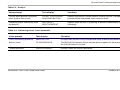
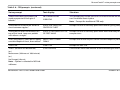
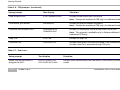
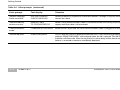
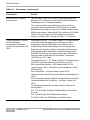
Check the Status Indicator to ensure that it is GREEN. When the
indicator is GREEN, the AED is ready for a rescue. If the indicator is
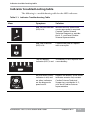
RED, refer to the troubleshooting table on page 5-3.
Monthly maintenance
Perform the following procedure each month (28 days):
5-4
1.
Open the AED lid.
2.
Wait for the AED to indicate status: Observe the change of the
STATUS INDICATOR to RED. After approximately 5 seconds,
verify that the STATUS INDICATOR returns to GREEN.
70-00914-01 E
Powerheart® AED G3 Plus 9390A and 9390E