1
Note: rarely an oxygen sensor wiring harness will have more than 4 wires. In this case, the sensor is possibly a "wide band"
oxygen sensor. The EFIE has been reported to work with 5-wire wide band sensors.
Once you have determined which is the sensor's signal wire, you want to get it located up close to the computer. If you used
a manual, or wiring diagram, you probably have already located the wire at the computer's wiring harness. If you had to
figure out the wires at the sensor itself, then try to find the same wire at the computer's wiring harness. It should be the same
colors, but test it with an ohm meter to be sure. Sometimes they use the same colors for different things. Even if it's a pain
now, it's worth it to get the signal wire located up by the computer. This makes cutting into it and hooking up the EFIE
much easier.
2. Locate 12 volt power and ground
You need to ensure that you have switched power, not power directly from the battery. You don't want the EFIE running
100% of the time. It's not that the unit couldn't run 100% of the time, it probably could. But it would slowly drain your
battery.
Most of the fuel efficiency devices need switched power as well, and you can often piggy back onto them. Note that the
EFIE draws negligible power. You can attach it to any circuit. The best choice for a voltage source is a fuel efficiency
device, such as a Hydrogen generator. That way the EFIE only activates when the fuel efficiency device is turned on. Note
that when power is shut off to the EFIE, or the EFIE's switch is turned off, the original connection between the oxygen
sensor and the computer is re-established. If connecting to your fuel saver's power is inconvenient or inappropriate, just use
any circuit that is accessory key switched. Your electrical diagram can come in handy here, and if you don't find another
device to attach to, you can usually find a spare circuit in the fuse box (you may have to add a fuse). One installer used the
oxygen sensor's heater power for his EFIE's power, and this is perfectly acceptable.
Ground can be the vehicle body, engine block or ground from another device, including the ground for the oxygen sensor
itself. Just make sure that whatever you choose to use for ground has a negligible resistance (less than 10 ohms) when tested
against the negative battery terminal of your car.
3. Mount the EFIE
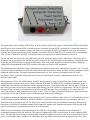
You can use the mounting ears to screw down the EFIE to a suitable location on the vehicle body or firewall. Some people
like to mount the device inside the passenger compartment of the car. There are some considerations about where you mount
your EFIE that should also be reviewed:
1. The EFIE is not waterproof. If you mount it under the hood, you will have to take care to cover it if you need to steam
or spray clean your engine. If this is something you regularly do, you may want to mount the EFIE in the passenger
compartment where it will be protected.
2. If you live in a cold climate, where temperatures are expected to be below freezing a significant number of days per
year, you will want to ensure that the EFIE is mounted where it will be warmed, either by the engine, or inside the
passenger compartment. Below freezing temperatures cause the EFIE to come up to it's voltage offset very slowly
unless it is physically warmed. This is because it doesn't generate much heat of it's own. In most cases this can be
accomplished by mounting your EFIE in the upper rear of the engine compartment, close to the firewall, which will
allow it to benefit from trapped engine heat. Newer EFIEs now come with jumpers that if set will cause the EFIE to
generate more heat. These were intended for use in very cold climates. Find J1 and J2 on your circuit board. Set the
following jumpers for increasing amounts of heat: J1, J2, J1 and J2.
4. Attach the wires
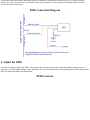
The EFIE multi-conductor wire has 6 colors: red, black, white, green, blue and brown. Connect the red to your power
source. Connect the black to ground. Connect the green wire to the oxygen sensor. Connect the white wire to the computer.
For Dual EFIE units, the brown wire goes to the 2nd oxygen sensor, and the blue wire goes to the 2nd sensor's computer
line. Hopefully you've been able to locate all these wires up by the computer in an easily accessible location. But if so, be
sure not to cut them too close to the computer so that you have plenty of slack to work with them.