1
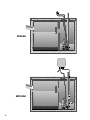
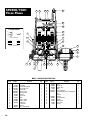
Pump Servicing Read the following instructions carefully before replacing any parts. Reasonable care and safe methods should be practiced. Check local codes and requirements before installation. Only a competent electrician should make the installations. Tools Required General shop tools include socket wrenches and a bearing puller. An ohmmeter is required to thoroughly check motor and wiring. For proper automatic operation, make sure the pump power cord is plugged into the pig gyback receptacle on the float switch cord. Before removing the pump from its installation for repairs, check first to see if the trouble is caused by: 1.Miswiring of the pump into the terminal block. 2.Miswiring of the float level controls into the panel. 3. Miswiring inside the control panel. 4. Trip circuit breaker. If the breaker is manually reset and then trips off again, the problem could be: a.short circuit in motor or control panel b.water in the motor housing c.insufficient amp capacity of wiring or breakers d.improper panel wiring 5. Tripped overload. If overload is manually reset and then trips off again, the problem could be: a.pump or piping is clogged b.pump motor or bearings may be defective c.start capacitor in motor may have failed d.pump may be miswired to terminal block e.head is lower than rating, pumping too much liquid 6.Air locked pump. Disconnect piping at union and run until all air bubbles are expelled. 7. Wrong impeller rotation. Rotation should be counter clockwise when looking at the impeller. Correct improper rotation on three phase pumps by reversing any two line leads. No rotation check is necessary on single phase pumps. 8.Closed discharge gate valve. 9. Plugged impeller or pipeline. 10.Discharge head may be too high. Check elevation against design point of pump. 11.Floats not hanging free in the sump. 12.Malfunctioning floats. Disconnect power supply. Checking Power Cord To be sure wires are not burned off or broken in cord, use ohm meter for check. Set ohmmeter scale pointer to R x 1 scale and attach one meter lead to white cord wire and one meter lead to black cord wire, then place a screwdriver blade across terminals of plug. If cord is OK, meter needle will go to zero and stay there. If meter needle does not move, this will indicate an open wire and cord must be replaced. Motor Warning: Be certain power to pump is off! Disconnect pump power cord from terminals in control panels (manual pump models) and power source (automatic models) and remove pump from sump. 1.Clean any dirt or trash from the outside of the pump before dismantling. If the unit is being operated by float or diaphragm switch, unplug the pump from the piggyback receptacle and plug the pump directly into the power source. If the pump starts each time it is plugged directly into the receptacle and does not start each time when plugged into the piggy back switch with the float raised or the diaphragm switch pressed into the start position, replace the complete piggy back switch assembly and retest with new assembly. 2.If motor does not run when tested as described above, the capacitor and/or stator must be checked. Disconnect from power supply. Remove plug (#6) from top of housing and pour oil into container, preferably clear, so that oil can be observed. 3.If oil is clear, it will indicate motor is not burned and there has been no water leak into the motor. If oil is cloudy, it will indicate water in motor, or, if oil is black, it will indicate a burned stator. 4.After draining oil, carefully loosen the power cord assembly (#22) from the motor housing (#2). With power cord loose, remove the four wire nuts and screws (#4) and carefully lift off the motor housing (#2) exposing the capacitor (#28) (1ø only) and the motor assembly. 3