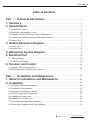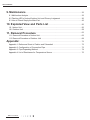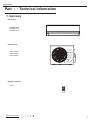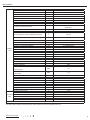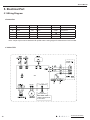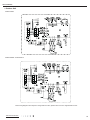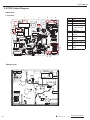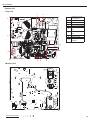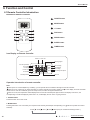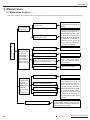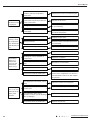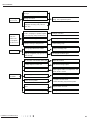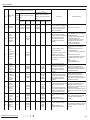
1
Service Manual MODEL: ACZEM4H4R09/ACZCI4H4R09 ACZEM4C4R12/ACZCI4C4R12 ACZEM4H4R12/ACZCI4H4R12 (Refrigerant R410A) GREE ELECTRIC APPLIANCES,INC.OF ZHUHAI Service Manual Table of Contents Part Ⅰ : Technical Information. ........................................................................ 1 1. Summary......................................................................................................................... 1 2. Specifications............................................................................................................. 2 2.1 Specification Sheet.............................................................................................................. 2 2.2 Operation Characteristic Curve........................................................................................... 6 2.3 Capacity Variation Ratio According to Temperature............................................................ 6 2.4 Cooling and Heating Data Sheet in Rated Frequency........................................................ 7 2.5 Noise Curve......................................................................................................................... 7 3. Outline Dimension Diagram. ......................................................................... 8 3.1 Indoor Unit........................................................................................................................... 8 3.2 Outdoor Unit........................................................................................................................ 8 4. Refrigerant System Diagram......................................................................... 9 5. Electrical Part........................................................................................................... 10 5.1 Wiring Diagram.................................................................................................................. 10 5.2 PCB Printed Diagram........................................................................................................ 12 6. Function and Control......................................................................................... 14 6.1 Remote Controller Introduction ........................................................................................ 14 6.2 Brief Description of Modes and Functions......................................................................... 17 Part Ⅱ : Installation and Maintenance .................................................... 23 7. Notes for Installation and Maintenance............................................ 23 8. Installation................................................................................................................... 25 8.1 Installation Dimension Diagram......................................................................................... 25 8.2 Installation Parts-checking ............................................................................................... 27 8.3 Selection of Installation Location....................................................................................... 27 8.4 Electric Connection Requirement . ................................................................................... 27 8.5 Installation of Indoor Unit................................................................................................... 27 8.6 Installation of Outdoor Unit................................................................................................ 30 8.7 Vacuum Pumping and Leak Detection.............................................................................. 31 8.8 Check after Installation and Test Operation...................................................................... 31 Table of Contents Service Manual 9. Maintenance. ................................................................................................................ 32 9.1 Malfunction Analysis............................................................................................................. 32 9.2 Flashing LED of Indoor/Outdoor Unit and Primary Judgement............................................ 36 9.3 How to Check Simply the Main Part..................................................................................... 43 10. Exploded View and Parts List.................................................................... 56 10.1 Indoor Unit.......................................................................................................................... 56 10.2 Outdoor Unit....................................................................................................................... 59 11. Removal Procedure............................................................................................. 63 11.1 Removal Procedure of Indoor Unit..................................................................................... 63 11.2 Removal Procedure of Outdoor Unit.................................................................................. 68 Appendix:.............................................................................................................................. 73 Appendix 1: Reference Sheet of Celsius and Fahrenheit.......................................................... 73 Appendix 2: Configuration of Connection Pipe........................................................................... 73 Appendix 3: Pipe Expanding Method......................................................................................... 74 Appendix 4: List of Resistance for Temperature Sensor............................................................ 75 Table of Contents Service Manual Part Ⅰ : Technical Information 1. Summary Indoor Unit: ACZEM4H4R09 ACZEM4C4R12 ACZEM4H4R12 Outdoor Unit: ACZCI4H4R09 ACZCI4C4R12 ACZCI4H4R12 Remote Controller: YX1FF Technical Information 1 Service Manual 2. Specifications 2.1 Specification Sheet Model Product Code Rated Voltage Power Rated Frequency Supply Phases Power Supply Mode Cooling Capacity (Min~Max) Heating Capacity (Min~Max) Cooling Power Input (Min~Max) Heating Power Input (Min~Max) Cooling Current Input Heating Current Input Btu/h Btu/h W W A A ACZEM4H4R09/ACZCI4H4R09 CB162008200_L14385 208/230 60 1 Outdoor 9000(5000~11300) 9550(5300~12000) 950(375~1300) 800(300~1350) 4.0 3.5 Rated Input W 1800 Rated Current A 9.0 Air Flow Volume (SH/H/M/L/SL) CMF 306/277/253/218/- Dehumidifying Volume Pint/h 1.69 V~ Hz EER (Btu/h)/W 9.47 COP SEER HSPF (Btu/h)/W 11.94 15 8.5 m2 12-18 Application Area Indoor Unit Model ACZEM4H4R09 Indoor Unit Product Code CB162N08200_L14385 Fan Type Cross-flow Fan Diameter Length (DXL) inch 3 5/8X25 2/5 Cooling Speed (SH/H/M/L/SL) r/min 1260/1100/950/750/- Heating Speed (SH/H/M/L/SL) r/min 1320/1200/1100/950/- Fan Motor Power Output W 20 Fan Motor RLA A 0.20 Fan Motor Capacitor μF Evaporator Form Indoor Unit Evaporator Pipe Diameter inch Evaporator Row-fin Gap inch 2-1/18 Evaporator Coil Length (LXDXW) inch 25 2/5 X 1X 10 1/2 W A dB (A) dB (A) inch inch MP24AA 2 3.15 43/40/37/34/53/50/47/44/33 1/4X10 5/6X7 36X10X14 inch lb lb 36 1/7X10 1/6X14 4/7 19.8 26.5 Swing Motor Model Swing Motor Power Output Fuse Current Sound Pressure Level (SH/H/M/L/SL) Sound Power Level (SH/H/M/L/SL) Dimension (WXHXD) Dimension of Carton Box (LXWXH) Dimension of Package (LXWXH) Net Weight Gross Weight 2 1 Aluminum Fin-copper Tube Φ2/7 Technical Information Service Manual Outdoor Unit Model Outdoor Unit Product Code ACZCI4H4R09 CB145W04400_L14385 Compressor Manufacturer ZHUHAI LANDA COMPRESSOR CO.,LTD Compressor Model Compressor Oil Compressor Type Compressor LRA. Compressor RLA Compressor Power Input QXA-A091zE190A(GREE) FVC 68D or RB 68EP Rotary / 7.30 942 1NT11L-6233HPC115/95U1 A A W Compressor Overload Protector Throttling Method Set Temperature Range F KSD115OC Capillary 61~86 F 64~109 F 19~75 O Cooling Operation Ambient Temperature Range O Heating Operation Ambient Temperature Range O Condenser Form Condenser Pipe Diameter Condenser Rows-fin Gap Condenser Coil Length (LXDXW) Outdoor Fan Motor Speed Fan Motor Power Output Unit Fan Motor RLA Fan Motor Capacitor Outdoor Unit Air Flow Volume Fan Type Fan Diameter Defrosting Method Climate Type Isolation Moisture Protection Permissible Excessive Operating Pressure for the Discharge Side Permissible Excessive Operating Pressure for the Suction Side Sound Pressure Level (H/M/L) Sound Power Level (H/M/L) Dimension (WXHXD) Dimension of Carton Box (LXWXH) Dimension of Package (LXWXH) Net Weight Gross Weight Refrigerant Refrigerant Charge Connection Pipe Length Connection Pipe Gas Additional Charge Connection Outer Diameter Liquid Pipe Outer Diameter Gas Pipe Pipe Max Distance Height Max Distance Length Note: The connection pipe applies metric diameter. inch inch inch rpm W A μF CFM inch Aluminum Fin-copper Tube Φ2/7 1-1/18 25 1/2X3/4X20 4/5 880 21 0.25 2 942 Axial-flow Φ14 3/5 Automatic Defrosting T1 I IP24 MPa 4.3 MPa 2.5 dB(A) dB(A) inch inch inch lb lb 52/-/62/-/28X21 2/3X12 1/2 30 1/3X13 5/7X23 1/3 30 1/2X13 5/6X23 8/9 61.7 66.2 R410A 26.1 24.6 0.2 1/4 3/8 32.8 49.2 oz ft oz/ft. inch inch ft ft The above data is subject to change without notice. Please refer to the nameplate of the unit. Technical Information 3 Service Manual Model Product Code Rated Voltage Power Rated Frequency Supply Phases Power Supply Mode Cooling Capacity (Min~Max) Heating Capacity (Min~Max) Cooling Power Input (Min~Max) Heating Power Input (Min~Max) Cooling Current Input Heating Current Input Btu/h Btu/h W W A A ACZEM4C4R12/ACZCI4C4R12 CB162008700_L17107 208/230 60 1 Outdoor 12000(5300~12500) / 1300(550~1350) / 6.0 / ACZEM4H4R12/ACZCI4H4R12 CB162008100_L14385 208/230 60 1 Outdoor 12000(5300~12500) 13000(5500~13500) 1300(550~1350) 1250(500~1500) 6.0 5.5 Rated Input W 1800 1800 Rated Current A 9.0 9.0 Air Flow Volume (SH/H/M/L/SL) CMF 335/277/253/218/- 335/277/253/218/- Dehumidifying Volume Pint/h 2.96 2.96 EER (Btu/h)/W 9.23 9.23 COP SEER HSPF (Btu/h)/W / 15 / 10.04 15 8.5 m2 16-24 16-24 Application Area V~ Hz Indoor Unit Model Indoor Unit Product Code Fan Type Cross-flow inch Φ3 5/8X25 2/5 Φ3 5/8X25 2/5 r/min 1330/1100/950/750/- 1330/1100/950/750/- Heating Speed (SH/H/M/L/SL) r/min / 1350/1170/1050/950/- W 20 20 Fan Motor RLA A 0.20 0.20 Fan Motor Capacitor μF 1 1 Aluminum Fin-copper Tube Aluminum Fin-copper Tube Evaporator Pipe Diameter inch Φ2/7 Φ2/7 Evaporator Row-fin Gap inch 2-1/18 2-1/18 Evaporator Coil Length (LXDXW) inch 25 2/5 X1X10 1/2 25 2/5 X 1X10 1/2 MP24AA MP24AA Swing Motor Model Swing Motor Power Output W 2 2 Fuse Current A 3.15 3.15 Sound Pressure Level (SH/H/M/L/SL) dB (A) 44/42/39/36/- 44/42/39/36/- Sound Power Level (SH/H/M/L/SL) dB (A) 54/52/49/46/- 54/52/49/46/- inch 33 1/4X10 5/6X7 33 1/4X10 5/6X7 Dimension (WXHXD) 4 Cross-flow Fan Diameter Length (DXL) Evaporator Form Unit ACZEM4H4R12 CB162N08100_L14385 Cooling Speed (SH/H/M/L/SL) Fan Motor Power Output Indoor ACZEM4C4R12 CB162N08700_L17107 Dimension of Carton Box (LXWXH) inch 36X10X14 36X10X14 Dimension of Package (LXWXH) inch 36 1/7X10 1/6X14 4/7 36 1/7X10 1/6X14 4/7 Net Weight lb 20.9 20.9 Gross Weight lb 25.4 27.6 Technical Information Service Manual Outdoor Unit Model Outdoor Unit Product Code ACZCI4C4R12 ACZCI4H4R12 CB145W04500_L17107 CB145W04600_L14385 ZHUHAI LANDA COMPRESSOR ZHUHAI LANDA COMPRESSOR Compressor Manufacturer CO.,LTD QXA-A091zE190A(GREE) FVC 68D or RB 68EP Rotary / 7.30 942 1NT11L-6233HPC115/95U1 CO.,LTD QXA-A091zE190A(GREE) FVC 68D or RB 68EP Rotary / 7.30 942 1NT11L-6233HPC115/95U1 F KSD115OC Capillary 61~86 KSD115OC Capillary 61~86 F 64~109 64~109 F / 19~75 Aluminum Fin-copper Tube Φ2/7 2-1/18 25 1/2X1 1/2X20 4/5 880 21 0.25 2 942 Axial-flow Φ14 3/5 / T1 I IP24 Aluminum Fin-copper Tube Φ2/7 2-1/18 25 1/2X1 1/2X20 4/5 880 21 0.25 2 942 Axial-flow Φ14 3/5 Automatic Defrosting T1 I IP24 MPa 4.3 4.3 Pressure for the Suction Side MPa 2.5 2.5 Sound Pressure Level (H/M/L) Sound Power Level (H/M/L) Dimension (WXHXD) Dimension of Carton Box (LXWXH) Dimension of Package (LXWXH) Net Weight Gross Weight Refrigerant Refrigerant Charge Connection Pipe Length Connection Pipe Gas Additional dB(A) dB(A) inch inch inch lb lb oz ft 53/-/63/-/28X21 2/3X12 1/2 30 1/3X13 5/7X23 1/3 30 1/2X13 5/6X23 8/9 65 69.5 R410A 35.3 24.6 53/-/63/-/28X21 2/3X12 1/2 30 1/3X13 5/7X23 1/3 30 1/2X13 5/6X23 8/9 66.2 70.6 R410A 35.3 24.6 oz/ft. 0.2 0.2 inch inch ft ft 1/4 3/8 32.8 65.6 1/4 3/8 32.8 65.6 Compressor Model Compressor Oil Compressor Type Compressor LRA. Compressor RLA Compressor Power Input A A W Compressor Overload Protector Throttling Method Set Temperature Range Cooling Operation Ambient Temperature Range Heating Operation Ambient Temperature Range Condenser Form Condenser Pipe Diameter Condenser Rows-fin Gap Condenser Coil Length (LXDXW) Outdoor Fan Motor Speed Unit Fan Motor Power Output Fan Motor RLA Fan Motor Capacitor Outdoor Unit Air Flow Volume Fan Type Fan Diameter Defrosting Method Climate Type Isolation Moisture Protection Permissible Excessive Operating Pressure for the Discharge Side Permissible Excessive Operating Connection Charge Outer Diameter Liquid Pipe Pipe Outer Diameter Gas Pipe Max Distance Height Max Distance Length Note: The connection pipe applies metric diameter. O O O inch inch inch rpm W A μF CFM inch The above data is subject to change without notice. Please refer to the nameplate of the unit. Technical Information 5 Service Manual 2.2 Operation Characteristic Curve Cooling •Conditions Indoor DB 80F/WB 67F Outdoor : DB 95F/WB75F Indoor air flow : Turbo Pipe length : 24.6 ft. 13.5 12.0 10.5 15.0 13.5 12.0 Current (A) 15.0 Current (A) Heating 9.0 7.5 6.0 10.5 •Conditions Indoor : DB 70F/WB 60F Outdoor : DB 47F/WB 43F Indoor air flow : Turbo Pipe length :24.6 ft. 9.0 7.5 6.0 4.5 4.5 3.0 1.5 3.0 1.5 0 0 10 20 30 40 50 60 70 80 0 0 90 10 20 Compressor speed (rps) 30 40 50 60 70 80 90 100 110 120 Compressor speed (rps) 2.3 Capacity Variation Ratio According to Temperature Heating 110 120 100 100 90 80 Capacity ratio(%) Capacity ratio(%) Cooling 80 70 Condition Indoor:DB 80°F WB67 °F Indoor air flow: Super High Pipe length:24.6ft 60 95 100 105 Outdoor temp. (°F) 6 110 40 Condition Indoor:DB 70°F WB60 °F Indoor air flow: Super High Pipe length:24.6ft 20 50 90 60 115 0 5 10 15 20 25 30 35 40 45 50 Outdoor temp. (°F) Technical Information Service Manual 2.4 Cooling and Heating Data Sheet in Rated Frequency Cooling Pressure of gas pipe Rated cooling condition(°F) Fan speed connecting indoor and temperature of heat Model (DB/WB) Indoor Outdoor Inlet and outlet pipe outdoor unit P (MPa) 80/67 95/75 ACZEM4H4R09/ACZCI4H4R09 27/19 35/24 ACZEM4C4R12/ACZCI4C4R12 ACZEM4H4R12/ACZCI4H4R12 of indoor exchanger T1 (°F) T2 (°F) unit Fan speed Compressor of outdoor frequency (Hz) unit 0.9 to 1.1 54 to 57 158 to 104 Super High High 56 0.9 to 1.1 54 to 57 158 to 104 Super High High 79 Heating Rated heating Pressure of gas pipe Inlet and outlet pipe condition(°F) connecting indoor and temperature of heat outdoor unit P (MPa) exchanger T1 (°F) T2 (°F) Model (DB/WB) Indoor Outdoor Fan speed of indoor unit Compressor frequency outdoor unit (Hz) Fan speed of 70/60 47/43 ACZEM4H4R09/ACZCI4H4R09 2.5 to 2.7 158 to 95 36 to 39 Super High High 58 70/60 47/43 ACZEM4H4R12/ACZCI4H4R12 2.5 to 2.7 158 to 95 36 to 39 Super High High 75 Instruction: T1: Inlet and outlet pipe temperature of evaporator T2: Inlet and outlet pipe temperature of condenser P: Pressure at the side of big valve Connection pipe length: 24.6ft. 2.5 Noise Curve Indoor side noise Outdoor side noise 60 60 40 Noice/dB(A) Noice/dB(A) 50 30 20 50 40 30 10 20 0 low Middle High Super High Indoor Fan Motor Rotating Speed ACZEM4H4R09 Technical Information ACZEM4C4R12 ACZEM4H4R12 0 20 40 60 80 100 Compressor frequency/Hz ACZCI4H4R09 ACZCI4C4R12 ACZCI4H4R12 7 Service Manual 3. Outline Dimension Diagram 3.1 Indoor Unit 33 1/4 10 5/6 7 6 3/4 21 1/3 5 2 1/6 2 1/6 21/4 Unit: inch 4 7/8 3.2 Outdoor Unit 25 8/9 21 2/3 10 4/5 28 12 1/2 11 4/5 18 1/2 Unit: inch 8 Technical Information Service Manual 4. Refrigerant System Diagram Cooling only type Outdoor unit Indoor unit Gas pipe side Valve Discharge Heat exchanger (evaporator) Suction Accumlator Compressor Heat exchanger (condenser) Liquid pipe side Valve Capillary Strainer COOLING Cooling and heating type Outdoor unit Indoor unit Gas pipe side Valve 4-Way valve Discharge Heat exchanger (evaporator) Suction Accumlator Compressor Heat exchanger (condenser) Liquid pipe side Valve Strainer Capillary Strainer COOLING HEATING Refrigerant pipe diameter Liquid : 1/4” Gas : 3/8” Technical Information 9 Service Manual 5. Electrical Part 5.1 Wiring Diagram ●Instruction Symbol Symbol Color Symbol Symbol Color Symbol Name WH White GN Green CAP Jumper cap YE Yellow BN Brown COMP Compressor RD Red BU Blue Yellow/Green BK Black / / Violet OG Orange / / YEGN VT Grounding wire Note: Jumper cap is used to determine fan speed and the swing angle of horizontal lover for this model. ● Indoor Unit © © AP2 PGF PG CON-MANUAL WIRED CONTROLLER WIRED CONTROLLER IS OPTIONAL 10 Technical Information Service Manual ● Outdoor Unit ACZCI4C4R12 ACZCI4H4R09 ACZCI4H4R12 These wiring diagrams are subject to change without notice; please refer to the one supplied with the unit. Technical Information 11 Service Manual 5.2 PCB Printed Diagram Indoor Unit ● Top view 4 5 6 7 8 3 1 2 3 4 Live wire interface Fuse Neutral wire interface PG motor interface Communication port 5 of neutral wire and 6 live wire Auto button Up & down swing 2 1 7 8 9 10 9 11 interface PG feedback interface Display interface Ambient temperature sensor Tube temperature sensor 11 10 ● Bottom view 12 Technical Information Service Manual Outdoor Unit ● Top view 4 5 1 3 2 3 4 5 6 7 8 9 2 10 Compressor UVW three phases Reactor interface 2 Reactor interface 1 Fan interface 4-way valve interface Power supply neutral wire Power supply neutral wire Communication wire Overload input Temperature sensor interface 6 7 1 10 9 8 ● Bottom view Technical Information 13 Service Manual 6. Function and Control 6.1 Remote Controller Introduction Buttons on Remote Controller ON/OFF button T-ON AUTO COOL DRY FAN HEAT T-OFF MODE button SWING SLEEP LOCK SPEED +/- botton ON/OFF _ MODE FAN button + FAN SWING SLEEP TIMER SWING button SLEEP button TIMER button Icon Display on Remote Controller Timer on Timer off Sending signal For auto operation For cooling For drying For fan only For heating AUTO COOL DRY FAN HEAT T-ON T-OFF SWING SLEEP LOCK SPEED Set temperature For air swing For sleeping For locking For setting fan speed Set time Operation introduction of remote controller Note: When power is connected(stand by condition), you can operate the air conditioner through the remote controller. When unit is on, each time you press the button on remote controller, the sending signal icon on the display of remote controller will blink once. If the air conditioner gives out a beep sound, it means the signal has been sent. When unit is off, set temperature will be displayed on the remote controller(If the light of indoor unit display is turned on, the corresponding icon will be displayed); When unit is on, it will display the icon of the on-going function. 1. ON/OFF Button Press this button to turn unit on/off. 2. MODE Button Pressing this button once can select your required mode circularly as below(the corresponding icon selected): AUTO 14 COOL DRY FAN will be lit up after the mode is HEAT (Only for models with heating function.) Technical Information Service Manual When selecting auto mode,air conditoner will operate automatically according to ambient temperature.Set temperature can't be When selecting auto mode, air conditioner will operate automatically according to ex-factory setting. Set temperature can't be adjusted and won't be displayed either.Press FAN button to adjust fan speed. adjusted and won't be displayed either. Press FAN button to adjust fan speed. (This function is not available in this air conditioner.) When selecting cool mode,air conditioner will operate under cool mode.Then press + or - button to adjust set temperature.Press When selecting cool mode, air conditioner will operate under cool mode. Then press + or -- button to adjust set temperature. Press FAN button to adjust fan speed. FAN button to adjust fan speed. When selecting dry mode,air conditioner will operate at low fan speed under dry mode..In dry mode,fan speed can't be adjusted. When selecting dry mode, air conditioner will operate at low fan speed under dry mode. In dry mode, fan speed can't be adjusted. When selection fan mode,air conditioner will operate in fan mode only.Then press FAN button to adjust fan speed. When selecting fan mode, air conditioner will operate in fan mode only. Then press FAN button to adjust fan speed. When selecting heat mode,air conditoner will operate under heat mode.Then press + or - button to adujst set temperature.Press When selecting heat mode, air conditioner will operate under heat mode. Then press + or -- button to adjust set temperature. Press FAN button to adjust fan speed.(Cooling only unit can't receive heating mode signal.If set HEAT mode by remote controller,press FAN button to adjust fan speed. ON/OFF button can't turn on the air conditioner.) 3. +/- button Pressing + or - button once will increase or decrease set temperature by 1 °F(°C). Hold + or -- button for 2s, set temperature on remote controller will change quickly. Release the button after your required set temperature is reached. When setting Timer On, Timer Off or Clock, press + or -- button to adjust the time (See TIMER Button for setting details). 4. FAN Button Pressing this button can select fan speed circularly as: AUTO, SPEED 1( ), SPEED 2( ), SPEED 3( ), SPEED 4( ) AUTO Note: Under Auto speed,air conditoner will select proper fan speed automatically according to ambient temperatrue. Fan speed can’t be adjusted under DRY mode. 5. SWING Button Press this button to turn on up&down air swing. 6. SLEEP Button Under Cool,Heat mode press this button to turn on sleep function.Press this button to cancel Sleep function.Under Fan,Dry and Auto mode,this function is unavailable 7. TIMER Button When unit is on, press this button to set Timer Off. T-OFF and H icon will be blinking. Within 5s, press + or - button to adjust the time for Timer Off. Pressing + or - button once will increase or decrease the time by 0.5h . Hold + or -- button for 2s,time will change quickly. Release the button after your required set time is reached. Then press TIMER button to con rm it. T-OFF and H icon will stop blinking. When unit is off, press this button to set Timer On. T-ON and H icon will be blinking. Within 5s, press + or - button to adjust the time for Timer On. Pressing + or - button once will increase or decrease the time by 0.5h. Hold + or - button for 2s, time will change quickly. Release the button after your required set time is reached. Then press TIMER button to con rm it. T-ON and H icon will stop blinking. Cancel Timer On/Off: If Timer function is set up, press TIMER button once to review the remaining time. Within 5s, press TIMER button again to cancel this function. Note: Range of time setting is: 0.5~24h The interval between two motions can't exceed 5s, otherwise the remote controller will exit setting status. Simple operation rst 1. After putting power, press "ON/OFF" buttoncontroller on remote toair turn on the air conditioner. 1.After putting through through the power “ ” button on remote to controller turn on the conditioner. 2. Press “"MODE" button to to select select your yourrequired requiredoperation mode: AUTO, COOL, FAN, HEAT. 2.Press ” button mode: AUTO,DRY, COOL, DRY, FAN. 3.Press underunder AUTO mode) 3. Press “+” "+" or or “-” "-" button button to to set set your your required required temperature.(temperature temperature. (Temperaturecan’t can’tadjusted be adjusted auto mode). 4. Press “"FAN" ”button youryour required fan fan speed: auto, low, medium high notch, speed.third notch, fourth notch (fourthnotch is same buttontotoset select required speed: auto, rst notch,and second 4.Press asPress third notch for this air conditioner.) 5. "SWING" button to select fan blowing angle. Technical Information 15 Service Manual Replacement of Batteries in Remote Controller 1. Press the back side of remote controller on the spot marked with , and then push out the cover of battery box along the arrow direction. 2. Replace two No.7 (AAA 1.5V) dry batteries and make sure the positions of + and -polar are correct. 3. Reinstall the cover of battery box. battery reinstall Note: During operation, point the signal sender of the remote controller at the receiving window of the indoor unit; The distance between signal sender and receiving window should be within 8m. There should be no obstacle between them. Signal may be interfered easily in the room where there is uorescent lamp or wireless telephone; Remote controller should be close to indoor unit during operation. Replace new batteries of the same model when replacement is required. If you don't use remote controller for a long time, please take out the batteries. If the display on remote controller is fuzzy or if there's no display, please replace batteries. 16 remove cover of battery box Technical Information Service Manual 6.2 Brief Description of Modes and Functions (1) Cooling Mode ① Working conditions and process of cooling When Tamb.≥Tpreset, the unit will enter cooling operation, in which case the indoor fan, the outdoor fan and the compressor will work and the indoor fan will run at preset speed. When Tamb.≤Tpreset -3.6°F, the compressor will stop, the outdoor fan will stop with a time lag of 30s, and the indoor fan will run at preset speed. When Tpreset -3.6°F< Tamb.< Tpreset , the unit will remain at its previous state. Under this mode, the four-way valve will be de-energized and temperature can be set within a range from 61~to 86°F. If the compressor is shut down for some reason, the indoor fan and the swing device will operate at original state. ② Protection ◆ Antifreeze protection Under cooling and dehumidifying mode, 6 minutes after the compressor is started: If T evap≤35.6°F, the compressor will operate at reduced frequency. If T evap≤30.2°F is detected for durative 3 minutes, the compressor will stop, and after 30 seconds, the outdoor fan will stop; and under cooling mode, the indoor fan and the swing motor will remain at the original state. If T evap. ≥42.8°F and the compressor has remained at OFF for at least 3 minutes, the compressor will resume its original operation state. ◆ Total current up and frequency down protection When total current Itotal≤5.5A, increase frequency is allowed; when total current Itotal≥6A, increasing frequency is prohibited; when tota current Itotal≥7A, the unit operates by decreasing frequency. When total current Itotal≥9A, the compressor stops operation, and indoor fan will stop operation after 30s. (2) Dehumidifying Mode ① Working conditions and process of dehumidifying If Tamb>Tpreset, the unit will enter cooling and dehumidifying mode, in which case the compressor and the outdoor fan will operate and the indoor fan will run at low speed. If Tpreset -3.6°F≤Tamb≤Tpreset, the compressor remains at its original operation state. If Tamb.< Tpreset -3.6°F, the compressor will stop, the outdoor fan will stop with a time lag of 30s, and the indoor fan will operate at low speed. ② Protection Protection is the same as that under the cooling mode. (3) Heating Mode ① Working conditions and process of heating If Tamb.≤Tpreset +3.6°F, the unit enters heating mode, in which case the four-way valve, the compressor and the outdoor fan will operate simultaneously, and the indoor fan will run at preset speed in the condition of preset cold air prevention. If T amb.≥Tpreset +9°F, the compressor will stop, the outdoor fan will stop with a time lag of 30s, and the indoor fan will stop after 60-second blow at low speed. If Tpreset +3.6°F<T amb.< Tpreset +9°F, the unit will maintain its original operating status. Under this mode, the four-way valve is energized and temperature can be set within a range of 61 ~ 86°F. The operating symbol, the heating symbol and preset temperature are revealed on the display. ② Condition and process of defrost When duration of successive heating operation is more than 45 minutes, or accumulated heating time more than 90 minutes, and one of the following conditions is reached, the unit will enter the defrost mode after 3 minutes. a. When Toutdoor amb.≥41°F, Toutdoor tube≤28.4°F; b. When 28.4°F≤Toutdoor amb. < 41°F, Toutdoor tube≤21.2°F; c. When 23°F≤Toutdoor amb. < 28.4°F, Toutdoor tube≤14°F; d. When 14°F≤Toutdoor amb. < 23°F, Toutdoor tube≤(Toutdoor amb.-10.8)°F; e. When Toutdoor amb. < 14°F, Toutdoor tube≤(Toutdoor amb.-7.2)°F; In this case, the compressor and indoor fan stop, while the outdoor fan and 4-way valve stop after 30s; after another 30s, the compressor starts with the operation frequency of 70Hz. When the compressor has operated for 8min or Toutdoor tube≥50°F, the compressor stops and the 4-way valve starts after 30s; after another 60s, the compressor and outdoor fan resumes operation,and the indoor fan operates according to the condition of cold air prevention. ③ Protection ◆ Cold air prevention The unit is started under heating mode (the compressor is ON): ① In the case of T indoor amb. <75.2°F: if T tube≤104°F and the indoor fan is at stop state, the indoor fan will begin to run at low speed with a time lag of 2 minutes. Within 2 minutes, if T tube>104°F, the indoor fan also will run at low speed; and after 1-minute operation at low speed, the indoor fan will be converted to operation at preset speed. Within 1-minute low speed operation or 2-minute non-operation, if T tube>107.6°F, the fan will run at present speed. ② In the case of T indoor amb. ≥75.2°F: if T tube≤107.6°F, the indoor fan will run at low speed, and after one minute, the indoor fan will be converted to preset speed. Within one-minute low speed operation, if T tube>107.6°F, the indoor fan will be converted to preset speed. Note: T indoor amb. indicated in ① and ② refers to, under initially heating mode, the indoor ambient temperature before the command to start the compressor is performed according to the program, or after the unit is withdrawn from defrost, the indoor ambient temperature before the defrost symbol is cleared. ◆ Total current up and frequency down protection When total current Itotal≤6A, increase frequency is allowed; when total current Itotal≥7A, increasing frequency is prohibited; when tota current Itotal≥8A, the unit operates by decreasing frequency. When total current Itotal≥9A, the compressor stops operation, and indoor fan will stop operation after 30s. Technical Information 17 Service Manual (5)Auto Changeover Mode In this mode,the system selects the operation mode (cooling and fan) automatically according to the ambient temperature.The display shows the actual operation mode and setting temperature. There will be 30s delay for mode conversion.The protection function is the same as that of other modes. 1.When Tamb.≥77°F,the cooling mode is selected. 2.For cooling only unit:when Tamb.<71.6°F,the unit runs in fan mode. 3.When 71.6°F<Tindoor amb.<77°F,upon initial startup,the unit will enter auto mode and run in automatic fan mode.if the other mode changes to auto mode,the previous operation mode will remain. (6)Auto fan speed Mode In auto fan mode,the rotational speed of the fan for indoor unit is decided by the differential temperature between ambient temperature and set temperature.In dry mode,the automatic fan speed is forced to be low. Models ACZEM4H4R09 ACZEM4C4R12 ACZEM4H4R12 Mode Turbo Cooling Heating Cooling Heating 1260 1320 1330 1350 High fan Medium Low fan speed fan speed speed 1100 950 750 1200 1100 950 1100 950 750 1170 1050 950 (7)Lover Mode After energization,the swing motor will open the horizontal louver to be open and then be close completely.And the air outlet is close. In heating mode,if the swing function is not set,the horizontal louver will rotate to maximum in clockwise direction.Then it will and D. there are 7 states for the L A B C D Sleeping mode is available only in cooling and heating modes; Cooling mode: at the base of initial set temperature by remote controller, the set temperature will increase automatically according to people’s coziness within several hours after setting sleep function. Heating mode: at the base of initial set temperature by remote controller, the set temperature will decrease automatically according to people’s coziness within several hours after setting sleep function. setting time is reached. 18 Technical Information Service Manual e timer function is set in the last control before it is de-energized, the system last control and the setting time is reached before the unit is de-energized, the unit will run according to the previous running mode after it is energized again. But the timer function will terminate. The clock will not be memorized. In cooling and heating mode (not available in auto, dehumidify, fan mode), press the Turbo button, the fan speed displayed super high speed in the remote controller and the indoor fan rotates at super high speed. (12)Health Function When the indoor fan motor is running, the Health function is set by pressing remote controller (If there is no Health button on the remote controller, the health function opening is defaulted). (13)I Feel Function If the remote controller receives the I Feel order, the controller will work at the ambient temperature value which is sent by remote controller (Except the defrosting and anti-cool wind, which still adopts the sampling value of AC itself ambient temperature sensor), the remote controller will send ambient temperature value to controller every 10mins. After 11mins, if the controller hasn’t received the ambient temperature value from the remote controller for long time, then it will run according to the current ambient temperature of AC. If the function has not been set, the ambient temperature will adopt the sensor sampling value of AC itself. If power off happens, this function will not be memorized. Troubleshooting of Temperature Sensor (1) Indoor Temperature Sensor Detect malfunctions of temperature sensor any time. (2) Indoor Pipe Temperature Sensor detect the temperature sensor malfunction. In other times, the temperature sensor malfunction will be detected. (3) Protection of Temperature Sensor 1. When short-circuit occurs to the temperature sensor for 5s: The temperature sensor overheats. In this case, the complete unit will stop for protection. At the same time, the temperature protection and temperature sensor malfunction will be shown. 2. When break-circuit occurs to the temperature sensor for 5s: The unit will stop and the temperature sensor malfunction will be displayed. Frequency Control Frequency Initial Setting<Outline>When starting the compressor, or when conditions are varied due to the change of the room, the frequency must be initialized accordingto the D value of the indoor unit and the Q value of the indoor unit.Q value: Indoor unit output D Signal) 1.P controlCalculate D value in each sampling time (20 seconds), and adjust the frequency according to its difference from the frequencypreviously calculated. D value. When the D value is small lower the frequency. When the D value is large increase the frequency. 3.Frequency management when other controls are functioningWhen frequency is drooping;Frequency management is carried out only when the frequency droops.For limiting lower limitFrequency management is carried out only when the frequency rises. 4.Upper and lower limit of frequency by PI controlThe frequency upper and lower limits are set depending on indoor unit.When low noise commands come from the indoor unit or when outdoor unit low noise or quiet commands come from indoor unit, theupper limit frequency must be lowered than the usual setting. 3-minutes Standby Prohibit to turn ON the compressor for 3 minutes after turning it off.(except when defrosting) Compressor Protection Function Technical Information When turning the compressor from OFF to ON, the upper limit of frequency must be set as follows. (The function must not be used 19 when the frequency droops.For limiting lower limitFrequency management is carried out only when the frequency rises. 4.Upper and lower limit of frequency by PI controlThe frequency upper and lower limits are set depending on indoor unit.When low noise commands come from the indoor unit or when outdoor unit low noise or quiet commands come from indoor unit, theupper limit Service Manual frequency must be lowered than the usual setting. 3-minutes Standby Prohibit to turn ON the compressor for 3 minutes after turning it off.(except when defrosting) Compressor Protection Function When turning the compressor from OFF to ON, the upper limit of frequency must be set as follows. (The function must not be used when defrosting.) Frequency FCG 3 88 FCG 2 FCG 1 64 48 TCG1 TCG2 240 360 TCG3 180 FCG3 FCG2 FCG1 TCG 1sec TCG 2sec TCG 3sec Time Discharge Pipe Control Outline The discharge pipe temperature is used as the compressor’s internal temperature. If the discharge pipe temperature rises above a certain level, the operating frequency upper limit is set to keep this temperature from going up further. Detail Divide the Zone Stop zone Drooping zone Keep zone Up zone Heat exchanger thermistor temperature Reset zone Management within the Zones Zone Stop zone Drooping zone Keep zone Return / Reset zone Control contents When the temperature reaches the stop zone, stop the compressor and correct abnormality. Start the timer, and the frequency will be drooping. Keep the upper limit of frequency. Cancel the upper limit of frequency. Input Current Control Outline Detect an input current by the CT during the compressor is running, and set the frequency upper limit from such input current. In case of heat pump model, this control is the upper limit control function of the frequency which takes priority of the lower limit of four way valve activating compensation. Detail The frequency control will be made within the following zones. 2 Hz drooping 1.0second after rushing in the drooping zone After 2.5 seconds Compressor stops 1 Stop zone 2 Drooping zone Keep zone 3 Reset zone When a “stop current” continues for 2.5 seconds after rushing on the stop zone, the compressor operation stops. If a “drooping current” is continues for 1.0 second after rushing on the drooping zone, the frequency will be 2 Hz drooping. Repeating the above drooping continues until the current rushes on the drooping zone without change. In the keep zone, the frequency limit will remain. In the return / reset zone, the frequency limit will be cancelled. Limitation of current drooping and stop value according to the outdoor air temperature 1. In case the operation mode is cooling 20 * The current droops when outdoor air temperature becomes higher than a certain level (model by model). Technical Information If a “drooping current” is continues for 1.0 second after rushing on the drooping zone, the frequency will be 2 Hz drooping. Repeating the above drooping continues until the current rushes on the drooping zone without change. In theManual keep zone, the frequency limit will remain. Service In the return / reset zone, the frequency limit will be cancelled. Limitation of current drooping and stop value according to the outdoor air temperature 1. In case the operation mode is cooling * The current droops when outdoor air temperature becomes higher than a certain level (model by model). 2. In case the operation mode is heating * The current droops when outdoor air temperature becomes higher than a certain level (model by model). Freeze-up Protection Control Outline During cooling operation, the signals being sent from the indoor unit allow the operating frequency limitation and then prevent freezing of the indoor heat exchanger. (The signal from the indoor unit must be divided into the zones as the followings.) Detail 1.Conditions for Start Controlling Judge the controlling start with the indoor heat exchanger temperature after 2 sec from operation start. 2.Control in Each Zone Heat exchanger thermistor temperature A B C Return/Reset zone Up zone Keep zone Drooping zone D Stop zone E Heating Peak-cut Control Outline Heat Pump Only During heating operation, the signals being sent from the indoor unit allow the operating frequency limitation and prevent abnormal high pressure. (The signal from the indoor unit must be divided as follows.) Detail 1.Conditions for Start Controlling Judge the controlling start with the indoor heat exchanger temperature after 2 sec. from operation start. 2.Control in Each Zone The heat exchange intermediate temperature of indoor unit controls the following. Stop zone Drooping zone Keep zone Up zone Heat exchanger thermistor temperature Reset zone Defrost Control Outline Heat Pump Only Defrosting is carried out by the cooling cycle (reverse cycle). The defrosting time or outdoor heat exchanger temperature must be more Detail 1.Conditions for Starting Defrost The starting conditions must be made with the outdoor air temperature and heat exchanger temperature. Under the conditions that the system is in heating operation, 6 minutes after the compressor is started and more than 44 minutes of accumulated time pass since the start of the operation or ending the defrosting. 2.Conditions for Canceling Defrost The judgment must be made with heat exchanger temperature. (39°F~72°F) Frequency PI control 0Hz 60sec. Technical Information 50sec. 600sec. 50sec. 21 system is in heating operation, 6 minutes after the compressor is started and more than 44 minutes of accumulated time pass since the start of the operation or ending the defrosting. 2.Conditions for Canceling Defrost Service Manual The judgment must be made with heat exchanger temperature. (39°F~72°F) PI control Frequency 0Hz 60sec. 50sec. Compressor 600sec. 50sec. ON OFF Four way valve ON OFF 5sec. Fan 5sec. ON OFF Electronic expansion valve opening 450pps 350pps 450pps Initial opening Fan Control Outline Fan control is carried out according to the following priority. 1. Fan ON control for electric component cooling fan 2. Fan control when defrosting 3. Fan OFF delay when stopped 4. ON/OFF control in cooling operation 5. Tap control when drooping function is working 6. Fan control in forced operation 7. Fan control in indoor/outdoor unit silent operation 8. Fan control in powerful mode 9. Fan control in normal operation Detail Fan OFF Control when Stopped * Fan OFF delay for 60 seconds must be made when the compressor is stopped. Tap Control in indoor/outdoor unit silent operation 1. When Cooling Operation When the outdoor air temperature is lower than 99°F, the fan tap must be set to L. 2. When Heating Operation When the outdoor air temperature is higher than 39°F, the fan tap must be turned to L (only for heat pump model). Refrigerant Recycling Function (applicable when changing installation location or in maintenance) (1) Enter refrigerant recycling function Within 5min after energizing (unit ON or OFF status is ok), continuously press LIGHT button for 3 times within 3s to enter refrigerant recycling mode; Fo is displayed and refrigerant recycling function is started. At this moment, the maintenance people closes liquid valve. After 5min, stick the thimble of maintenance valve with a tool. If there is no refrigerant spraying out, close the gas valve immediately and then turn off the unit to remove the connection pipe. (2) Exit refrigerant recycling function After entering refrigerant recycling mode, when receive any remote control signal or enter refrigerant recycling mode for 25min, the unit will exit refrigerant recycling mode automatically If the unit is in standby mode before refrigerant recycling, it will be still in standby mode after finishing refrigerant recycling; if the unit is in ON status before refrigerant recycling, it will still run in original operation mode. Compulsive Defrosting Function (1) Start up compulsory defrosting function Under ON status, set heating mode with remote controller and adjust the temperature to 16oC. Press “+, -, +, -, +,-” button successively within 5s and the complete unit will enter into compulsory defrosting status. Meanwhile, heating indicator on indoor unit will ON 10s and OFF 0.5s successively. (Note: If complete unit has malfunction or stops operation due to protection, compulsory defrosting function can be started up after malfunction or protection is resumed. (2) Exit compulsory defrosting mode After compulsory defrosting is started up, the complete unit will exit defrosting operation according to the actual defrosting result, and the complete unit will resume normal heating operation. 22 Technical Information Service Manual Part Ⅱ : Installation and Maintenance 7. Notes for Installation and Maintenance Safety Precautions: Important! Please read the safety precautions carefully before installation and maintenance. The following contents are very important for installation and maintenance. Please follow the instructions below. ●The installation or maintenance must accord with the instructions. ●Comply with all national electrical codes and local electrical codes. ●Pay attention to the warnings and cautions in this manual. ●All installation and maintenance shall be performed by distributor or qualified person. ●All electric work must be performed by a licensed technician according to local regulations and the instructions given in this manual. ●Be caution during installation and maintenance. Prohibit incorrect operation to prevent electric shock, casualty and other accidents. Warnings Electrical Safety Precautions: 1. Cut off the power supply of air conditioner before checking and maintenance. 2. The air condition must apply specialized circuit and prohibit share the same circuit with other appliances. 3. The air conditioner should be installed in suitable location and ensure the power plug is touchable. 4. Make sure each wiring terminal is connected firmly during installation and maintenance. 5. Have the unit adequately grounded. The grounding wire can’t be used for other purposes. 6. Must apply protective accessories such as protective boards, cable-cross loop and wire clip. 7. The live wire, neutral wire and grounding wire of power supply must be corresponding to the live wire, neutral wire and grounding wire of the air conditioner. 8. The power cord and power connection wires can’t be pressed by hard objects. 9. If power cord or connection wire is broken, it must be replaced by a qualified person. Installation and Maintenance 10. If the power cord or connection wire is not long enough, please get the specialized power cord or connection wire from the manufacture or distributor. Prohibit prolong the wire by yourself. 11. For the air conditioner without plug, an air switch must be installed in the circuit. The air switch should be all-pole parting and the contact parting distance should be more than 0.12inch. 12. Make sure all wires and pipes are connected properly and the valves are opened before energizing. 13. Check if there is electric leakage on the unit body. If yes, please eliminate the electric leakage. 14. Replace the fuse with a new one of the same specification if it is burnt down; don’t replace it with a cooper wire or conducting wire. 15. If the unit is to be installed in a humid place, the circuit breaker must be installed. Installation Safety Precautions: 1. Select the installation location according to the requirement of this manual.(See the requirements in installation part) 2. Handle unit transportation with care; the unit should not be carried by only one person if it is more than 40.09lbs. 3. When installing the indoor unit and outdoor unit, a sufficient fixing bolt must be installed; make sure the installation support is firm. 4. Ware safety belt if the height of working is above 6.56ft. 5. Use equipped components or appointed components during installation. 6. Make sure no foreign objects are left in the unit after finishing installation. Refrigerant Safety Precautions: 1. Avoid contact between refrigerant and fire as it generates poisonous gas; Prohibit prolong the connection pipe by welding. 2. Apply specified refrigerant only. Never have it mixed with any other refrigerant. Never have air remain in the refrigerant line as it may lead to rupture or other hazards. 3. Make sure no refrigerant gas is leaking out when installation is completed. 4. If there is refrigerant leakage, please take sufficient measure to minimize the density of refrigerant. 5. Never touch the refrigerant piping or compressor without wearing glove to avoid scald or frostbite. Improper installation may lead to fire hazard, explosion, electric shock or injury. 23 Service Manual Main Tools for Installation and Maintenance 1. Level meter, measuring tape 2. Screw driver 3. Impact drill, drill head, electric drill 24 4. Electroprobe 5. Universal meter 6. Torque wrench, open-end wrench, inner hexagon spanner 7. Electronic leakage detector 8. Vacuum pump 9. Pressure meter 10. Pipe pliers, pipe cutter 11. Pipe expander, pipe bender 12. Soldering appliance, refrigerant container Installation and Maintenance Service Manual 8. Installation Space to the ceiling At least 5 8/9 inch 8.1 Installation Dimension Diagram Space to the wall Space to the wall At least 5 8/9 inch At least 98 3/7 Space to the floor Space to the obstruction 19 2/3 Above Sp ac et ot he ob str At uc lea tio n st 11 8 At least 5 8/9 inch Air inlet side e ov 5 11 11 4/5 Above 4/ Ab Space to the wall Space to the wall 19 2/3 Above e ov 78 5 3/ Ab Unit: inch Air outlet side Installation and Maintenance 25 Service Manual Installation procedures Start installation Preparation before installation Read the requirements for electric connection select installation location Select indoor unit installation location Prepare tools Select outdoor unit installation location Install the support of outdoor unit (select it according to the actual situation) Install wall-mounting frame, drill wall holes Connect pipes of indoor unit and drainage pipe Fix outdoor unit Connect wires of indoor unit Install drainage joint of outdoor unit (only for cooling and heating unit) Bind up pipes and hang the indoor unit Make the bound pipes pass through the wall hole and then connect outdoor unit Connect pipes of outdoor unit Connect wires of outdoor unit Neaten the pipes Vacuum pumping and leakage detection Check after installation and test operation Finish installation Note: this flow is only for reference; please find the more detailed installation steps in this section. 26 Installation and Maintenance Service Manual 8.2 Installation Parts-checking No. 1 2 Name Indoor unit Outdoor unit No. 8 9 3 Connection pipe 10 4 Drainage pipe Wall-mounting frame Connecting cable(power cord) Wall pipe 11 5 6 7 12 13 Name Sealing gum Wrapping tape Support of outdoor unit Fixing screw Drainage plug(cooling and heating unit) Owner’s manual, remote controller Note: 1.Please contact the local agent for installation. 2.Don't use unqualified power cord. 8.3 Selection of Installation Location 1. Basic Requirement: Installing the unit in the following places may cause malfunction. If it is unavoidable, please consult the local dealer: (1) The place with strong heat sources, vapors, flammable or explosive gas, or volatile objects spread in the air. (2) The place with high-frequency devices (such as welding machine, medical equipment). (3) The place near coast area. (4) The place with oil or fumes in the air. (5) The place with sulfureted gas. (6) Other places with special circumstances. 2. Indoor Unit: (1) There should be no obstruction near air inlet and air outlet. (2) Select a location where the condensation water can be dispersed easily and won't affect other people. (3) Select a location which is convenient to connect the outdoor unit and near the power socket. (4) Select a location which is out of reach for children. (5) The location should be able to withstand the weight of indoor unit and won't increase noise and vibration. (6) The appliance must be installed 98 3/7 inch above floor. (7) Don't install the indoor unit right above the electric appliance. (8) The appliance shall not be installed in the laundry. 3. Outdoor Unit: (1) Select a location where the noise and outflow air emitted by the outdoor unit will not affect neighborhood. (2) The location should be well ventilated and dry, in which the outdoor unit won't be exposed directly to sunlight or strong wind. (3) The location should be able to withstand the weight of outdoor unit. (4) Make sure that the installation follows the requirement of installation dimension diagram. (5) Select a location which is out of reach for children and far away from animals or plants.If it is unavoidable, please add fence for safety purpose. Installation and Maintenance 8.4 Electric Connection Requirement 1. Safety Precaution (1) Must follow the electric safety regulations when installing the unit. (2) According to the local safety regulations, use qualified power supply circuit and air switch. (3) Make sure the power supply matches with the requirement of air conditioner. Unstable power supply or incorrect wiring may result in electric shock,fire hazard or malfunction. Please install proper power supply cables before using the air conditioner. Air-conditioner Air switch capacity ACZEM4H4R09/ACZCI4H4R09 10A ACZEM4C4R12/ACZCI4C4R12 16A ACZEM4H4R12/ACZCI4H4R12 (4) Properly connect the live wire, neutral wire and grounding wire of power socket. (5) Be sure to cut off the power supply before proceeding any work related to electricity and safety. (6) Do not put through the power before finishing installation. (7) For appliances with type Y attachment,the instructions shall contain the substance of thefollowing.If the supply cord is damaged,it must be replaced by the manufacturer,its service agent or similarly qualified persons in order to avoid a hazard. (8) The temperature of refrigerant circuit will be high, please keep the interconnection cable away from the copper tube. 2. Grounding Requirement: (1) The air conditioner is first class electric appliance. It must be properly grounding with specialized grounding device by a professional. Please make sure it is always grounded effectively, otherwise it may cause electric shock. (2) The yellow-green wire in air conditioner is grounding wire, which can't be used for other purposes. (3) The grounding resistance should comply with national electric safety regulations. (4) The appliance must be positioned so that the plug is accessible. (5) An all-pole disconnection switch having a contact separation of at least 1/8 inch in all poles should be connected in fixed wiring. (6) Including an air switch with suitable capacity, please note the following table. Air switch should be included magnet buckle and heating buckle function, it can protect the circuitshort and overload. (Caution: please do not use the fuse only for protect the circuit) 8.5 Installation of Indoor Unit 1. Choosing Installation Iocation Recommend the installation location to the client and then confirm it with the client. 2. Install Wall-mounting Frame (1) Hang the wall-mounting frame on the wall; adjust it in horizontal position with the level meter and then point out the screw fixing holes on the wall. (2) Drill the screw fixing holes on the wall with impact drill (the specification of drill head should be the same as the plastic expansion particle) and then fill the plastic expansion particles 27 Service Manual in the holes. (3) Fix the wall-mounting frame on the wall with tapping screws (ST4.2X25TA) and then check if the frame is firmly installed by pulling the frame. If the plastic expansion particle is loose, please drill another fixing hole nearby. 3. Install Wall-mounting Frame (1) Choose the position of piping hole according to the direction of outlet pipe. The position of piping hole should be a little lower than the wall-mounted frame.(As show in Fig.1) Wall Wall Space to the wall above 5 8/9 inch Space to the wall above 5 8/9 inch Fig.1 2 1/6 5. Connect the Pipe of Indoor Unit (1) Aim the pipe joint at the corresponding bellmouth.(As show in Fig.5) (2) Pretightening the union nut with hand. (3) Adjust the torque force by referring to the following sheet. Place the open-end wrench on the pipe joint and place the torque wrench on the union nut. Tighten the union nut with torque wrench.(As show in Fig.6) (4) Wrap the indoor pipe and joint of connection pipe with insulating pipe, and then wrap it with tape.(As show in Fig.7) Open-end wrench Union nut Pipe joint Union nut 2 1/6 Pipe Fig.5 Outdoor Insulating pipe Fig.7 Refer to the following table for wrench moment of force: Hex nut diameter(inch) Φ1/4 Φ3/8 Φ1/2 Φ5/8 Φ3/4 2 1/6inch 5-10° Fig.6 Indoor pipe (2) Open a piping hole with the diameter of 2 1/6 inch on the selected outlet pipe position.In order to drain smoothly, slant the piping hole on the wall slightly downward to the outdoor side with the gradient of 5-10°.(As show in Fig.2) Indoor Pipe Torque wrench Fig.2 Note: (1) Pay attention to dust prevention and take relevant safety measures when opening the hole. (2) The plastic expansion particles are not provided and should be bought locally. 4. Outlet Pipe (1) The pipe can be led out in the direction of right, rear right, left or rear left.(As show in Fig.3) (2) When selecting leading out the pipe from left or right, please cut off the corresponding hole on the bottom case.(As show in Fig.4) Tightening torque(ft·Ibf) 11.10~14.75 22.82~29.50 33.19~40.56 44.24~47.94 51.32~55.31 6. Install Drain Hose (1) Connect the drain hose to the outlet pipe of indoor unit.(As show in Fig.8) (2) Bind the joint with tape.(As show in Fig.9) Drain hose Outlet pipe Fig.8 Outlet pipe Drain hose Tape Fig.9 Note: Left Fig.3 Left Rear right Right Cut off the hole 28 Right Rear left (1) Add insulating pipe in the indoor drain hose in order to prevent condensation. (2) The plastic expansion particles are not provided. (As show in Fig.10) Drain hose Fig.4 Insulating pipe Fig.10 Installation and Maintenance Service Manual 7. Connect Wire of Indoor Unit 8. Bind up Pipe (1) Open the panel, remove the screw on the wiring cover and then take down the cover.(As show in Fig.11) (1) Bind up the connection pipe, power cord and drain hose with the band.(As show in Fig.14) (2) Reserve a certain length of drain hose and power cord for installation when binding them. When binding to a certain degree, separate the indoor power and then separate the drain hose.(As show in Fig.15) (3) Bind them evenly. (4) The liquid pipe and gas pipe should be bound separately at the end. Panel Screw Fig.11 Wiring cover (2) Fix the wire crossing board on connection wire sleeve at the bottom case; let the connection wire sleeve go through the wire crossing hole at the back of indoor unit, and then pull it out from the front.(As show in Fig.12) Indoor and outdoor power cord Indoor unit Gas pipe Fig.14 Liquid pipe Band Drain hose connection wire sleeve Fig.12 (3) Remove the wire clip; connect the power connection wire to the wiring terminal according to the color; tighten the screw and then fix the power connection wire with wire clip.(As show in Fig.13) 2 3 blue black brown yellowgreen outdoor unit connection Fig.13 (4) Put wiring cover back and then tighten the screw. (5) Close the panel. Note: (1) All wires of indoor unit and outdoor unit should be connected by a professional. (2) If the length of power connection wire is insufficient, please contact the supplier for a new one. Avoid extending the wire by yourself. (3) For the air conditioner with plug, the plug should be reachable after finishing installation. (4) For the air conditioner without plug, an air switch must be installed in the line. The air switch should be all-pole parting and the contact parting distance should be more than 1/8inch. Installation and Maintenance Drain hose Band Fig.15 Indoor power cord Note: (1) The power cord and control wire can't be crossed or winding. (2) The drain hose should be bound at the bottom. Wring Cover N(1) Connection pipe 9. Hang the Indoor Unit (1) Put the bound pipes in the wall pipe and then make them pass through the wall hole. (2) Hang the indoor unit on the wall-mounting frame. (3) Stuff the gap between pipes and wall hole with sealing gum. (4) Fix the wall pipe.(As show in Fig.16) (5) Check if the indoor unit is installed firmly and closed to the wall.(As show in Fig.17) Indoor Wall pipe Outdoor Fig.17 Sealing gum Upper hook Fig.16 Lower hook of wall-mounting frame Note: Do not bend the drain hose too excessively in order to prevent blocking. 29 Service Manual Refer to the following table for wrench moment of force: 8.6 Installation of Outdoor Unit 1. Fix the Support of Outdoor Unit(select it according to the actual installation situation) Hex nut diameter(inch) Φ1/4 Φ3/8 Φ1/2 Φ5/8 Φ3/4 (1) Select installation location according to the house structure. (2) Fix the support of outdoor unit on the selected location with expansion screws. Note: (1) Take sufficient protective measures when installing the outdoor unit. (2) Make sure the support can withstand at least four times the unit weight. (3) The outdoor unit should be installed at least 1 1/6inch above the floor in order to install drain joint.(As show in Fig.18) (4) For the unit with cooling capacity of 2300W~5000W, 6 expansion screws are needed; for the unit with cooling capacity of 6000W~8000W, 8 expansion screws are needed; for the unit with cooling capacity of 10000W~16000W, 10 expansion screws are needed. Tightening torque(ft·Ibf) 11.10~14.75 22.82~29.50 33.19~40.56 44.24~47.94 51.32~55.31 5. Connect Outdoor Electric Wire 1. Remove the handle of outdoor right side plate. 2. Put the power connection wire and power cord through the wire hole. 3. Take off the wire clamp. Connect the power connection wire and power cord to the terminal and then fix them. Wiring should be coherent with the indoor unit. 4. Fix the power connection wire and power cord with wire clamp. 5. Ensure if the wires have been fixed well. 6. Reinstall the handle Handle Drain vent Chassis Outdoor drain joint Drain hose at least 1 1/6inch above the floor 287'22581,7 Fig.18 Fig.19 2. Install Drain Joint(Only for cooling and heating unit) (1) Connect the outdoor drain joint into the hole on the chassis. (2) Connect the drain hose into the drain vent. (As show in Fig.19) 3. Fix Outdoor Unit (1) Place the outdoor unit on the support. (2) Fix the foot holes of outdoor unit with bolts. (As show in Fig.20) Foot holes Handle screw Foot holes Fig.21 Fig.20 4. Connect Indoor and Outdoor Pipes (1) Remove the screw on the right handle of outdoor unit and then remove the handle.(As show in Fig.21) (2) Remove the screw cap of valve and aim the pipe joint at the bellmouth of pipe.(As show in Fig.22) Liquid pipe Liquid valve 1 / / * / / power wire power connection wire 1 ,1'22581,7 Fig.23 Note: ●Incorrect wiring may cause malfunction of spare part. ●After the wire has been fixed, ensure there is free space between the connection and fixing places on the lead wire. Schematic diagram being reference only, please refer to real product for authentic information. 6. Neaten the Pipes (1) The pipes should be placed along the wall, bent reasonably and hidden possibly. Min. semidiameter of bending the pipe is 4 inch. (2) If the outdoor unit is higher than the wall hole, you must set a U-shaped curve in the pipe before pipe goes into the room, in order to prevent rain from getting into the room.(As show in Fig.24) The drain hos can't raise upwards Pipe joint gas pipe Wall gas valve Union nut Fig.25 Fig.22 (3) Pretightening the union nut with hand. (4) Tighten the union nut with torque wrench . 30 Fig.24 U-shaped curve Drain hose Installation and Maintenance Service Manual Note: (1) The through-wall height of drain hose shouldn't be higher than the outlet pipe hole of indoor unit.(As show in Fig.25) (2) Slant the drain hose slightly downwards. The drain hose can't be curved, raised and fluctuant, etc.(As show in Fig.26) (3) The water outlet can't be placed in water in order to drain smoothly.(As show in Fig.27) 8.8 Check after Installation and Test Operation The drain hose can't be fluctuant The drain hose can't be fluctuant 2. Leakage Detection (1) With leakage detector: Check if there is leakage with leakage detector. (2) With soap water: If leakage detector is not available, please use soap water for leakage detection. Apply soap water at the suspected position and keep the soap water for more than 3min. If there are air bubbles coming out of this position, there's a leakage. 1. Check after Installation Check according to the following requirement after finishing installation. The water outlet can't be placed in water The water outlet can't be fluctuant Fig.27 Fig.26 NO. 1 2 8.7 Vacuum Pumping and Leak Detection 1. Use Vacuum Pump (1) Remove the valve caps on the liquid valve and gas valve and the nut of refrigerant charging vent. (2) Connect the charging hose of piezometer to the refrigerant charging vent of gas valve and then connect the other charging hose to the vacuum pump. (3) Open the piezometer completely and operate for 10-15min to check if the pressure of piezometer remains in -0.1MPa. (4) Close the vacuum pump and maintain this status for 1-2min to check if the pressure of piezometer remains in -0.1MPa. If the pressure decreases, there may be leakage. (5) Remove the piezometer, open the valve core of liquid valve and gas valve completely with inner hexagon spanner. (6) Tighten the screw caps of valves and refrigerant charging vent.(As show in Fig.28) Liquid valve Piezometer Lo Hi Gas valve Refrigerant charging vent Valve cap Nut of refrigerant Charging vent Vacuum pump Inner hexagon spanner Fig.28 Installation and Maintenance Close Open 3 4 Items to be checked Has the unit been installed firmly? Have you done the refrigerant leakage test? Is heat insulation of pipeline sufficient? Is water drained well? Is the voltage of power supply according to the 5 voltage marked on the nameplate? Is electric wiring and 6 pipeline installed correctly? Is the unit grounded 7 securely? Does the power cord 8 follow the specification? Is there any obstruction 9 in air inlet and air outlet? The dust and sundries caused 10 during installation are removed? The gas valve and liquid 11 valve of connection pipe are open completely? Possible malfunction The unit may drop, shake or emit noise. It may cause insufficient cooling (heating) capacity. It may cause condensation and water dripping. It may cause condensation and water dripping. It may cause malfunction or damage the parts. It may cause malfunction or damage the parts. It may cause electric leakage. It may cause malfunction or damage the parts. It may cause insufficient cooling (heating). It may cause malfunction or damaging the parts. It may cause insufficient cooling (heating) capacity. 2. Test Operation (1) Preparation of test operation ● The client approves the air conditioner installation. ● Specify the important notes for air conditioner to the client. (2) Method of test operation ● Put through the power, press ON/OFF button on the remote controller to start operation. ● Press MODE button to select AUTO, COOL, DRY, FAN and HEAT to check whether the operation is normal or not. ● If the ambient temperature is lower than 60.8°F, the air conditioner can’t start cooling. 31 Service Manual 9. Maintenance 9.1 Malfunction Analysis Note: When replacing the controller, be sure to insert the wire jumper into the new controller, otherwise the unit will display C5 The breaker trips at once when it is set to “ON”. Air conditioner can not start up Trip of breaker or blow of fuse The air condition -er does not react after it is powered(the buzzer does not sound and the remote star-tup hasno response) The breaker trips in few minutes when it is set to “ON”. No power Check power supply circuit. Fuse of controller burnt out Change controller fuse The transformer connection is loose or has bad contact or the transformer has malfunction. Fasten the wiring; measure the output voltage of the transformer , if it is incorrect, change the transformer. Controller is broken Check remote controller Remote controller malfunction Receiver loose or poor connection Receiver is broken Power voltage is too low 32 to ground to see if there is any leakage. The circuit or the part of the air conditioner has malfunction. They heat and break the insulation and lead to short circuit or creepage. Measure the insulation resistance or eliminate the malfunction one by one. If the breaker itself has malfunction, then replace the breaker. Remote controller is short of power The remote controller does not receive signals (after it is powered, the buzzer will sound, unless it has malfunction) Measure insulation resistance Change batteries First, press the manual switch button AUTO,if there is no response,check based on the above methods. If it runs normally after pressing the button, check again whether the installation position and the connection wire of the reception head is correct. If it is correct,then replace the receiver or the remote controller. Check the voltage. If it is lower than 10% of the rated voltage, check the cause, improve the power supply condition and add the stabilized voltage power supply. Installation and Maintenance Service Manual Improper set of temperature Adjust set temperature If cooling (heating) load is proper Check the forecasted load of cooling (heating) The refrigerant has leakage or is insufficient Malfunction of refrigerant flow Leakage between the high pressure and the low pressure in- frigerant as required Replace the compressor side the compressor Malfunction of four-way valve Local block of capillary Poor COOL(HEAT) operation Check and fill the leakage, then vacuumize it and supplement the re- Blockage of cooling system Replace the four-way valve Replace the capillary Judge whether the system is blocked by observing the condensation of evaporator and the pressure value of the high pressure manometer and take measures to deal with the system. Heat insulation for the connection pipes of the indoor unit and the outdoor unit is bad. Make sure that heat insulation for the thick and thin pipes is good. Heat insulation must also be provided for the joint andthe exposed part of the copper pipe . Block of outdoor heat exchanger Clean the dust accumulated on the surface of the heat exchanger. Air filter were blocked Clean the filter Fan speed was set too slow Air circulation is insufficient Fan rotation speed becomes low To set the fan speed to high or middle speed Capacitor damage Replace the capacitor Motor damage Replace the motor The installation position of the Good ventilation must be provided for the outdoor unit is not appropriate. installation position of the outdoor unit. The outdoor temperature is too high. Properly install the rainproof plate or the sunproof plate. If the maximum cool air still can not meet the requirement, it is suggested to replace the air conditioner. The air tightness is not enough. People come in and out too frequently. There are heating devices indoors. Installation and Maintenance Keep certain air tightness indoors, try not to use electricalappliance with large quantity of heat 33 Service Manual The indoor fan motor is burned or breaks or has the heat protector malfunction. Replace the fan motor or the defective part. The fan does not The built-in heat protector of the motor breaks frequently because the Replace the fan motor run when it is set to supply air. motor is abnormal. Wrong connection The fan capacitor has open circuit or is damaged. Make the correction connection based on the circuit drawing. Replace the fan capacitor of the same type and same specification. In the cooling and The outdoor fan motor is damaged. Replace the fan motor heating mode, the compressor Wrong connection Make the correct connection based on the circuit drawing The outdoor fan capacitor is damaged. Replace the fan capacitor runs, but the outdoor fan does not run. Malfunction of compressor Replace the compressor Breakage of running capacitor of In the cooling and heating mode, the outdoor fan runs, but the compressor does not run. compressor The voltage is too low or too high. Wrong wire connection The protector itself has malfunction. The refrigerant is not enough or is too much. The compressor is too hot and leads to the action of the protector. Manostat is recommended. Connect the circuit diagram correctly Use the multimeter to check whether the contact of the compressor is on when it is not overheated. If it is not on, then replace the protector Adjust the volume of the refrigerant The capillary is blocked and the temperature rises. Replace the capillary The compressor does not run Replace the compressor smoothly or is stuck. The air discharge valve is damaged The protector itself has malfunction. 34 Replace the capacitor Replace the protector Installation and Maintenance Service Manual The torque of the swing motor is not enough The swing fan does not run. Wrong connection First, check whether the connection is wrong. If no, replace the parts The controller is damaged(IC2003 is damaged, the swing relay can not close, etc) Controller malfunction (IC2003 broken, creepage of parallel capaci- Change controller In cool, heat mode, the tor of relay loop, relay is broken etc.) outdoor unit and compres- Wire loose or wrong connection Correctly wire according to the drawing Improper setting of temperature Adjust setting temp. Drainage pipe blocked or broken Change drainage pipe Wrap of refrigerant pipe joint is not Re-wrap and make it tight. sor will not run. Water leakage close enough. Fan of indoor unit contacts other parts Foreign object in indoor unit Compressor shakes too much Adjust fan location Take out the foreign object Adjust support washer of compressor, and tighten loosen screws Abnormal sound and shake Touch of pipeline of outdoor unit Separate the touching pipeline. Touch of inner plates 1. Tighten connect screw. 2. Stick absorbing clay between plates. Louver of outdoor unit touched outer Installation and Maintenance case. Adjust location of louver. Abnormal sound inside compressor Change compressor 35 Service Manual 9.2 Flashing LED of Indoor/Outdoor Unit and Primary Judgement Display Method of Indoor Unit Indicator Display (during NO. Malfunction Name Dual-8 blinking, ON 0.5s and OFF Code 0.5s) Display 1 2 3 4 Antifreezing protection In defect of refrigerant High discharge temperature protection of compressor 5 Overcurrent protection 6 Communication Malfunction 7 High temperature resistant protection 8 EEPROM malfunction 9 Limit/ decrease frequency due to high temperature of module 10 36 High pressure protection of system Malfunction protection of jumper cap E1 E2 Display Method of Outdoor Unit Indicator has 3 kinds of display status and during blinking, ON 0.5s and OFF A/C status Possible Causes 0.5s Operation Cool Heating Yellow Red Green Indicator Indicator Indicator Indicator Indicator Indicator During cooling and drying operation, except indoor fan operates, all loads stop operation. During heating operation, the complete unit stops. OFF 3s and blink once OFF 3S and blink twice During cooling and drying operation, compressor and outdoor fan stop while indoor fan operates. OFF 1S and blink 3 times OFF 1S and blink 9 times F0 Possible reasons: 1. Refrigerant was superabundant; 2. Poor heat exchange (including and bad radiating environment ); Ambient temperature is too high. 1. Poor air-return in indoor unit; 2. Fan speed is abnormal; 3. Evaporator is dirty. 1.In defect of refrigerant; The Dual-8 Code Display will 2.Indoor evaporator temperature show F0 and the complete unit sensor works abnormally; stops. 3.The unit has been plugged up somewhere. E4 OFF 3S and blink 4 times OFF 1S and blink 7 times During cooling and drying operation, compressor and outdoor fan stop while indoor fan operates. During heating operation, all loads stop. Please refer to the malfunction analysis (discharge protection, overload). E5 OFF 3S and blink 5 times OFF 1S and blink 5 times During cooling and drying operation, compressor and outdoor fan stop while indoor fan operates. During heating operation, all loads stop. 1. Supply voltage is unstable; 2. Supply voltage is too low and load is too high; 3. Evaporator is dirty. E6 OFF 3S and blink 6 times Always ON During cooling operation, compressor stops while indoor fan motor operates. During heating operation, the complete unit stops. Refer to the corresponding malfunction analysis. E8 OFF 3S and blink 8 times OFF 1S and blink 6 times During cooling operation: compressor will stop while indoor fan will operate. During heating operation, the complete unit stops. Refer to the malfunction analysis (overload, high temperature resistant). OFF 3S OFF 1S and blink and blink 15 times 11 times EE OFF 3S OFF 3S and blink and blink 6 times 6 times EU C5 OFF 3S and blink 15 times During cooling and drying operation, compressor will stop Replace outdoor control panel AP1 while indoor fan will operate; During heating operation, the complete unit will stop All loads operate normally, while operation frequency for compressor is decreased Wireless remote receiver and button are effective, but can not dispose the related command Discharging after the complete unit is de-energized for 20mins, check whether the thermal grease on IPM Module of outdoor control the radiator is inserted tightly. If its no use, please replace control panel AP1. 1. No jumper cap insert on mainboard. 2. Incorrect insert of jumper cap. 3. Jumper cap damaged. 4. Abnormal detecting circuit of mainboard. Installation and Maintenance Service Manual Display Method of Indoor Unit Indicator Display (during NO. Malfunction Name Dual-8 blinking, ON 0.5s and OFF Code 0.5s) Display Operation Cool Heating Display Method of Outdoor Unit Indicator has 3 kinds of display status and during blinking, ON 0.5s and OFF 0.5s Yellow Red A/C status Possible Causes Green Indicator Indicator Indicator Indicator Indicator Indicator 11 Gathering refrigerant 12 Indoor ambient temperature sensor is open/short circuited Fo F1 OFF 3S OFF 3S and blink and blink 1 times 1 times When the outdoor unit receive signal of Gathering refrigerant ,the system will be forced to Nominal cooling mode run under cooling mode for gathering refrigerant OFF 1S and blink 17 times During cooling and drying operation, indoor unit operates while other loads will stop; during heating operation, the complete unit will stop operation. OFF 3S and blink once AC stops operation once reaches the setting temperature. Cooling, drying: Indoor evaporator 13 temperature sensor is open/short F2 OFF 3S and blink twice internal fan motor stops operation while other loads stop operation; heating: AC stop operation circuited 14 15 Outdoor ambient temperature sensor is open/short circuited Outdoor condenser temperature sensor is open/short circuited 16 Outdoor discharge temperature sensor is open/short circuited 17 Limit/ decrease frequency due to overload 18 Decrease frequency due to overcurrent F3 OFF 3S and blink 3 times F4 OFF 3S and blink 4 times OFF 1S and blink 6 times OFF 1S and blink 5 times During cooling and drying operating, compressor stops while indoor fan operates; During heating operation, the complete unit will stop operation During cooling and drying operation, compressor stops while indoor fan will operate; During heating operation, the complete unit will stop operation. 1. Loosening or bad contact of indoor ambient temp. sensor and mainboard terminal. 2. Components in mainboard fell down leads short circuit. 3. Indoor ambient temp. sensor damaged.(check with sensor resistance value chart) 4. Mainboard damaged. 1. Loosening or bad contact of Indoor evaporator temp. sensor and mainboard terminal. 2. Components on the mainboard fall down leads short circuit. 3. Indoor evaporator temp. sensor damaged.(check temp. sensor value chart for testing) 4. Mainboard damaged. Outdoor temperature sensor hasnt been connected well or is damaged. Please check it by referring to the resistance table for temperature sensor) Outdoor temperature sensor hasnt been connected well or is damaged. Please check it by referring to the resistance table for temperature sensor) F5 OFF 3S and blink 5 times OFF 1S and blink 7 times During cooling and drying operation, compressor will sop after operating for about 3 mins, while indoor fan will operate; During heating operation, the complete unit will stop after operating for about 3 mins. F6 OFF 3S and blink for 6 times OFF 1S and blink 3 times All loads operate normally, while operation frequency for compressor is decreased Refer to the malfunction analysis (overload, high temperature resistant) F8 OFF 3S and blink 8 times OFF 1S and blink once All loads operate normally, while operation frequency for compressor is decreased The input supply voltage is too low; System pressure is too high and overload Installation and Maintenance 1.Outdoor temperature sensor hasnt been connected well or is damaged. Please check it by referring to the resistance table for temperature sensor) 2.The head of temperature sensor hasnt been inserted into the copper tube 37 Service Manual Display Method of Indoor Unit NO. 19 20 21 Malfunction Name F9 Limit/ decrease frequency due to antifreezing FH 22 Voltage of DC bus-bar is too low 23 Compressor Min frequence in test state 24 Compressor rated frequence in test state 25 Compressor maximum frequence in test state 38 Indicator Display (during Dual-8 blinking, ON 0.5s and OFF Code 0.5s) Display Operation Cool Heating Yellow Red Green Indicator Indicator Indicator Indicator Indicator Indicator Decrease frequency due to high air discharge Voltage for DC bus-bar is too high Display Method of Outdoor Unit Indicator has 3 kinds of display status and during blinking, ON 0.5s and OFF 0.5s PH A/C status OFF 3S and blink 9 times OFF 1S and blink twice All loads operate normally, while operation frequency for compressor is decreased OFF 3S OFF 3S and blink and blink 2 times 2 times OFF 1S and blink 4 times All loads operate normally, while operation frequency for compressor is decreased OFF 3S and blink 11 times OFF 3S and blink 21 times PL Possible Causes Overload or temperature is too high; Malfunction of electric expansion valve (EKV) Poor air-return in indoor unit or fan speed is too low OFF 1S and blink 13 times 1. Measure the voltage of position L and N on wiring board (XT), if the During cooling and drying voltage is higher than 265VAC, turn operation, compressor will stop on the unit after the supply voltage is increased to the normal range. while indoor fan will operate; 2.If the AC input is normal, During heating operation, the measure the voltage of electrolytic complete unit will stop capacitor C on control panel (AP1), operation. if its normal, theres malfunction for the circuit, please replace the control panel (AP1) OFF 1S and blink 12 times 1. Measure the voltage of position L and N on wiring board (XT), if the voltage is higher than 150VAC, turn on the unit after the supply During cooling and drying voltage is increased to the normal operation, compressor will stop range. while indoor fan will operate; During heating operation, the 2.If the AC input is normal, measure the voltage of electrolytic complete unit will stop capacitor C on control panel (AP1), if its normal, theres malfunction for the circuit, please replace the control panel (AP1) P0 (during blinking, ON 0.25s and OFF 0.25s) (during blinking, ON 0.25s and OFF 0.25s) Showing during min. cooling or min. heating test P1 (during blinking, ON 0.25s and OFF 0.25s) (during blinking, ON 0.25s and OFF 0.25s) Showing during nominal cooling or nominal heating test P2 (during blinking, ON 0.25s and OFF 0.25s) (during blinking, ON 0.25s and OFF 0.25s) Showing during max. cooling or max. heating test Installation and Maintenance Service Manual Display Method of Indoor Unit Indicator Display (during NO. Malfunction Name Dual-8 blinking, ON 0.5s and OFF Code 0.5s) Display Compressor 26 intermediate frequence in P3 test state Display Method of Outdoor Unit Indicator has 3 kinds of display status and during blinking, ON 0.5s and OFF 0.5s 27 (during blinking, ON 0.25s and OFF 0.25s) (during blinking, ON 0.25s and OFF 0.25s) P5 Refer to the malfunction operation, compressor will stop analysis (IPM protection, loss while indoor fan will operate; of synchronism protection and During heating operation, the overcurrent protection of phase complete unit will stop current for compressor. operation. OFF 3S and blink 15 times During cooling and drying Charging malfunction of capacitor PU OFF 3S and blink 17 times Malfunction 29 of module temperature Showing during middle cooling or middle heating test During cooling and drying current for compressor 28 Possible Causes Operation Cool Heating Yellow Red Green Indicator Indicator Indicator Indicator Indicator Indicator Overcurrent protection of phase A/C status P7 OFF 3S and blink 18 times sensor circuit operation, compressor will stop Refer to the part three—charging while indoor fan will operate; malfunction analysis of capacitor During heating operation, the complete unit will stop During cooling and drying operation, compressor will stop while indoor fan will operate; Replace outdoor control panel AP1 During heating operation, the complete unit will stop After the complete unit is de- Module high 30 temperature protection OFF 3S P8 and blink 19 times During cooling operation, compressor will stop while indoor fan will operate; During heating operation, the complete unit will stop energized for 20mins, check whether the thermal grease on IPM Module of outdoor control panel radiator is inserted tightly. If its no use, please replace control panel AP1. Decrease frequency 31 due to high temperature resistant during H0 OFF 3S and blink 10 times All loads operate normally, while operation frequency for compressor is decreased Refer to the malfunction analysis (overload, high temperature During cooling and drying operation, compressor will stop while indoor fan will operate; During heating operation, the complete unit will stop operation. 1. Wiring terminal OVC-COMP is loosened. In normal state, the resistance for this terminal should be less than 1ohm. 2.Refer to the malfunction analysis ( discharge protection, overload) resistant) heating operation Static 32 33 dedusting protection Overload protection for compressor OFF 3S H2 H3 Installation and Maintenance and blink twice OFF 3S OFF 1S and blink and blink 3 times 8 times 39 Service Manual Display Method of Indoor Unit NO. Malfunction Name Indicator Display (during Dual-8 blinking, ON 0.5s and OFF Code 0.5s) Display 34 35 36 System is abnormal IPM protection Module temperature Display Method of Outdoor Unit Indicator has 3 kinds of display status and during blinking, ON 0.5s and OFF 0.5s A/C status Possible Causes Operation Cool Heating Yellow Red Green Indicator Indicator Indicator Indicator Indicator Indicator During cooling and drying operation, compressor will stop OFF 3S OFF 1S and blink and blink 4 times 6 times H4 H5 OFF 3S OFF 1S and blink and blink 5 times 4 times H5 OFF 3S OFF 1S and blink and blink 5 times 10 times is too high while indoor fan will operate; During heating operation, the Refer to the malfunction analysis (overload, high temperature resistant) complete unit will stop operation. During cooling and drying Refer to the malfunction operation, compressor will stop analysis (IPM protection, loss while indoor fan will operate; of synchronism protection and During heating operation, the overcurrent protection of phase complete unit will stop current for compressor. operation. 1. Bad contact of DC motor feedback terminal. Internal motor 37 38 (fan motor) do not operate Desynchronizing of H6 PFC protection Outdoor DC fan motor H7 7 times OFF 3S OFF 1S and blink and blink 6 times 14 times HC OFF 1S and blink 14 times 2. Bad contact of DC motor control end. 3. Fan motor is stalling. 4. Motor malfunction. 5. Malfunction of mainboard rev detecting circuit. Refer to the malfunction analysis (IPM protection, loss of synchronism protection and overcurrent protection of phase current for compressor. Refer to the malfunction analysis DC fan motor malfunction or Outdoor DC fan motor malfunction lead to compressor system blocked or the connector stop operation, loosed L3 OFF 3S and blink 23 times 41 power protection L9 OFF 3S and blink 20 times OFF 1S and blink 9 times compressor stop operation and Outdoor fan motor will stop To protect the electronical 30s latter , 3 minutes latter components when detect high fan motor and compressor will power restart 42 Indoor unit and outdoor unit doesn't match LP OFF 3S and blink 19 times OFF 1S and blink 16 times compressor and Outdoor fan motor can’t work 40 malfunction 43 40 During cooling and drying operation, compressor will stop while indoor fan will operate; During heating operation, the complete unit will stop operation. During cooling and drying operation, compressor will stop while indoor fan will operate; During heating operation, the complete unit will stop operation. OFF 3S and blink compressor 39 Internal fan motor, external fan motor, compressor and electric heater stop operation,guide louver stops at present location. OFF 3S and blink 11 times Failure startup LC OFF 3S and blink 11 times Indoor unit and outdoor unit doesn't match During cooling and drying operation, compressor will stop while indoor fan will operate; Refer to the malfunction analysis During heating operation, the complete unit will stop operation. Installation and Maintenance Service Manual Display Method of Indoor Unit NO. Malfunction Name Indicator Display (during Dual-8 blinking, ON 0.5s and OFF Code 0.5s) Display Operation Cool Heating Display Method of Outdoor Unit Indicator has 3 kinds of display status and during blinking, ON 0.5s and OFF 0.5s Yellow Red A/C status Possible Causes Green Indicator Indicator Indicator Indicator Indicator Indicator Malfunction of 44 phase current detection During cooling and drying U1 circuit for compressor 45 Malfunction of voltage dropping for DC bus-bar OFF 3S and blink operation, compressor will stop while indoor fan will operate; Replace outdoor control panel AP1 13 times During heating operation, the complete unit will stop During cooling and drying operation, compressor will stop while indoor fan will operate; Supply voltage is unstable OFF 3S and blink 20 times U3 During heating operation, the complete unit will stop During cooling and drying operation, the compressor will Theres circuit malfunction on stop while indoor fan will outdoor units control panel AP1, operate; please replace the outdoor units During heating operating, control panel AP1. the complete unit will stop operation. Malfunction 46 of complete units current OFF 3S and blink 13 times U5 detection 1.Supply voltage is lower than 47 The four-way valve is If this malfunction occurs during OFF 3S and blink 20 times U7 abnormal AC175V; 2.Wiring terminal 4V is loosened or heating operation, the complete broken; unit will stop operation. 3.4V is damaged, please replace 4V. 48 49 Zerocrossing malfunction of outdoor unit U9 During cooling operation, compressor will stop while indoor fan will operate; during heating,the complete unit will stop operation. OFF 3S and blink 18 times Frequency limiting OFF 1S and blink 13 times (power) 50 Compressor running 51 The temperature for turning on the unit is reached Replace outdoor control panel AP1 OFF 1S and blink once OFF 1S and blink 8 times Frequency 52 limiting (module temperature) Installation and Maintenance OFF 1S and blink 11 times 41 Service Manual NO. Malfunction Name Display Method of Indoor Unit Indicator Display (during Dual-8 blinking, ON 0.5s and OFF Code 0.5s) Display Method of Outdoor Unit Indicator has 3 kinds of display status and during blinking, ON 0.5s and OFF 0.5s Heating Yellow Red Display Operation Cool Indicator Indicator Indicator Indicator Indicator 53 54 42 Possible Causes Green Indicator OFF 0.5S and blink once Normal communication Defrosting A/C status OFF 3S and blink once (during OFF 1S blinking, and blink ON 10s twice and OFF 0.5s) Defrosting will occur in heating mode. Compressor will operate while indoor fan will stop operation. Its the normal state Installation and Maintenance Service Manual 9.3 How to Check Simply the Main Part Confirm the malfunction type according to the malfunction indicator of indoor/outdoor unit and malfunction sheet (usually the sheet will be stuck on the electric box cover or top cover of the unit). As long as there is a malfunction, the indicator of the outdoor controller board will display the corresponding malfunction directly; Some malfunctions will be displayed on the indoor unit directly and some malfunctions will be seen on the remote controller by pressing light button for 4 times in 3 seconds. In the below malfunction diagnosis process, “Y” means “Yes”, “N” means “No”; In the below malfunction diagnosis process, controller board AP1 is for outdoor controller board; Before proceeding malfunction check, make sure the electrolytic capacitor safety, it may cause electric shock or break the controller board! Installation and Maintenance 43 Service Manual 1.Malfunction of Temperature Sensor F1,F2 Troubleshooting for F1,F2 malfunction Is the wiring terminal between the temperature sensor and the controller loosened or poorly contacted? yes Insert the temperature sensor tightly no no Is there short circuit due to trip-over of the parts? Is malfunction eliminated yes Make the parts upright no no Is the temperature sensor normal according to the Resistance Table? Is malfunction eliminated yes no Replace it with a temperature sensor with the same model yes no Is malfunction removed yes Replace the mainboard with the same model. yes End 44 Installation and Maintenance Service Manual 2. Malfunction of Blocked Protection of IDU Fan Motor H6 Troubleshooting for H6 malfunction Stir the blade with a tool to see whether the blade rotates smoothly yes no Tighten the screw; reassemble the blade, motor and shaft bearing rubber base sub-assy to make sure there is no foreign object between them Is malfunction eliminated no Is the control terminal of PG motor connected tightly ? yes no Insert the control terminal of PG motor tightly yes Is malfunction eliminated no Stir the blade by hand to see whether the blade rotate s smoothly yes no Reinstall the blade and motor correctly yes no Turn on the unit again ; measure whether the output voltage on control terminal for PG motor is more than 50V within 1 min after the louvers are opened yes Measure the voltage of this foot to neutral wire on the mainboard Is malfunction eliminated yes yes yes Is the motor started up no no Replace PG motor no Is malfunction eliminated yes Replace the mainboard with the same model. End Installation and Maintenance 45 Service Manual 3. Malfunction of Protection of Jumper Cap C5 Troubleshooting for C5 malfunction Is there jumper cap on the mainboard? no Appearance of the jumper cap Assemble the jumper cap with the same model yes Is malfunction eliminated no Is the jumper cap inserted correctly and tightly ? no Insert the jumper cap tightly yes no Is malfunction eliminated yes Replace the jumper cap with the same model yes Is malfunction eliminated yes no Replace the mainboard with the same model. End 46 Installation and Maintenance Service Manual 4. Communication malfunction E6 Start Cut off power, check if the wire between indoor unit and outdoor unit, and the wire inside electric box are connected correctly Connected correctly? Reconnect the wire according to wiring diagram No Malfunction is eliminated No Yes Is there incorrect match between the mainboard and the display panel or between the indoor and outdoor mainboards? No Match them according to the requirement Malfunction is eliminated Yes No Yes Communication wire connection is broken? Yes No Replace the wire Malfunction is eliminated Yes No Replace indoor mainboard Yes Malfunction is eliminated No Replace outdoor mainboard Yes End Installation and Maintenance 47 Service Manual 5. Malfunction of Zero-crossing Inspection Circuit Malfunction of the IDU Fan Motor U8 Troubleshooting for U8 malfunction Re-energize1 minute after de-erergization U8 is still displayed No The unit returns to normal. Conclusion:U8 is displayed due to instant energization afte deenergization while the capacitor discharges slowly. Yes The zero-cross detection circuit of the mainboard is defined abnormal.Replace the mainboard with the same model End 48 Installation and Maintenance Service Manual 6. IPM protection, desynchronizing malfunction, phase current of compressor is overcurrent (outdoor unit malfunction) Main detection point: ●If control board AP1 and compressor COMP is well connected? If they are loosened? If the connection sequence is correct? ●Is voltage input in the normal range (Test the voltage between L, N of wiring board XT by DC voltage meter)? ●If coil resistance of compressor is normal? Is compressor coil insulating to copper pipe well? ●If the work load of unit is heavy? If radiating of unit is well? If the refrigerant charging is appropriate? Malfunction diagnosis process: Installation and Maintenance 49 Service Manual Energize and switch on IPM protection occurs after the machine has run for a period of time? Use AC voltmeter to measure the voltage between terminal L and N on the wiring board XT) Y If the voltage between terminal L and N on wiring board XT is within 210VAC~250VAC? Check the supply voltage and restore it to 210VAC~250VAC N Y Restart the unit. Before protection occurs,use DC voltmeter to measure the voltage between the two ends of electrolytic capacitor on control panel AP1 (test3) Voltage between the two ends of celectrolytic capacitor (test3) is higher than 250V Y If the unit can work normally? N Y N Please confirm: 1. If the indoor and outdoor heat exchangers are dirty? If they are obstructed by other objects which affect the heat exchange of indoor and outdoor unit. 2. If the indoor and outdoor fans are working normally? 3. If the environment temperature is too high, resulting in that the system pressure is too high and exceeds the permissible range? 4. If the charge volume of refrigerant is too much, resulting in that the system pressure is too high? 5. Other conditions resulting in that the system pressure becomes too high. Stop the unit and disconnect the power supply. Then, check the connection of capacitor C2 according to Electrical Wiring Diagram. The connection of capacitor C2 is loose. N Stop the unit and disconnect the power supply. Wait 20 minutes, or use DC voltmeter to measure the voltage between the two ends of capacitor C2, until the voltage is lower than 20V Remove the wires on the two ends of capacitor C2. Then, use capacitance meter to measure the capacitor C2. Verify as per the Parameters Sheet. If capacitor C2 is failed? Replace the control panel AP1 If there is any abnormality described above? Use ohmmeter to measure the resistance between the two terminals of compressor COMP and copper tube. Y Y N Replace the control panel AP1 If the unit can work normally? Y N Connect the control panel AP1 and compressor COMP correctly according to the Electrical Wiring Diagram. Then, energize and start the unit. If the unit can work normally? Use ohmmeter to measure the resistance between the three terminals on compressor COMP, and compare the measurements with the compressor resistance on Service Manual. ᴎ㒘ৃҹℷᐌᎹ Take corrective actions according to Technical Service Manual, and then energize and start the unit. Y N Y If the unit can work normallv? N Replace the capacitor C2. Then, energize and start the unit. Y N Refer to the Electrical Wiring Diagram and check if the connection between AP1 and COMP is loose and if the connection order is correct. If the connection between AP1 and COMP is unsecure or the connectionorder is wrong? Reconnect the capacitor C2 according to Electrical Wiring Diagram. Then, Restart the unit. Y If the resistance is normal? N Y Replace the compressor COMP N Resistance higher than 500M? N Replace the control panel AP1 END 50 Installation and Maintenance Service Manual 7. Diagnosis for high temperature, overload protection (check outdoor unit in cooling mode and check indoor unit in heating mode) Main detection point: ●If the outdoor ambient temperature is in normal range; ●If the indoor and outdoor fan is running normally; ●If the radiating environment inside and outside the unit is well (including if the fan speed is too low)? ●If the tube temperature sensor of indoor and outdoor unit is normal? Malfunction diagnosis process: High temperature, overload protection If the outdoor ambient temperature is higher than 53 ºC in cooling mode?/if the ambient temperature of indoor and outdoor unit is too high? Y Normal protection, please use it after improving ambient temperature of indoor and outdoor unit N If the radiating of outdoor and indoor unit is well? Y Improve the radiating environment of the unit N If the indoor and outdoor fan work well? N 1. Check if fan terminal OFAN is connected well 2. Test if the motors of indoor and outdoor unit are broken Y check if the tube temp sensor is normal according to the resistance sheet(check outdoor tube temp in cooling mode, check indoor tube temp sensor in heating mode) Y Replace fan capacitor C1 Is the tube temp sensor normal? De-energize the unit and wait for 20min Replace the control board(replace the outdoor control board in cooling mode, replace the indoor control board in heating mode) Replace outdoor fan N Replace the tube temperature sensor End Installation and Maintenance 51 Service Manual 8. Diagnosis for failure start up malfunction (outdoor unit malfunction) Main detection point: ●If the compressor wiring is correct? ●If the stop time of compressor is enough? ●If the compressor is damaged? ●If the refrigerant charging is too much? Malfunction diagnosis process: Energize the unit and start it If the stop time of compressor is more than 3min? If the stop time is not enough and the high and low pressure of system is not balance , please start it after 3min N Y If the compressor wire COMP(UVW) is well connected and connection sequence is correct Improve the connection situation of control board AP1 and compressor COMP, connect it with wiring diagram N Y Does the unit start up normally? If the refrigerant charging is too much? N Y Charge the refrigerant according to service manual Does the unit start up normally? Y N Replace control board AP1 If malfunction is removed? N Replace the compressor End 52 Installation and Maintenance Service Manual 9. Diagnosis for compressor synchronism (outdoor unit malfunction) Main detection point: ●If the system pressure is over-high? ●If the working voltage is over-low? Malfunction diagnosis process: Synchronism after energize the unit and start it Synchronism occurred during operation N If the stop time of compressor is more than 3min Check if the fan terminal OFAN is connected well Replace fan capacitor C1 Y Improve the radiating of unit (clean heat exchanger and increase ventilation) Replace outdoor fan N Start to run until the power resume normal voltage If the outdoor fan works normally? N Y Y If the compressor wire COMP(UVW) is well connected, the connection sequence forwards to clockwise direction? N Y Connect wire well Replace control board AP1 Y Remove malfunction? N Replace compressor If the radiating of unit is well? N If the input voltage of unit is normal? Y If the refrigerant is too much? Charge the refrigerant with service manual Y N Replace control board AP1 Remove malfunction? End N Y Replace compressor End Installation and Maintenance 53 Service Manual 10. Diagnosis for overload and discharge malfunction (outdoor unit malfunction) Main detection point: ●If the electron expansion valve is connected well? Is the expansion valve damaged? ●If the refrigerant is leakage? ●If the overload protector is damaged? ●If the discharge temp sensor is damaged? Malfunction diagnosis process: After the u nit de-energized for 20min If the overload protector SAT is well connected? N Y Under ambient temperature, test the resistance of overload protector with ohmic meter, the resistance value<10000 Y N If the wiring terminal FA of electron expansion is well connected? N Connect the wire well according to wiring disgram Y Check if the coil of electron expansion is installed on the valve normally Replace overload protector SAT Check if the expansion valve is blocked Remove malfunction? Y N Check refrigerant, if there is leakage, please refer to specification Remove malfunction? Y N check if the discharge temp sensor is normal according to the resistance sheet N Replace discharge temp sensor Y Replace control board End 54 Installation and Maintenance Service Manual 11. Communication malfunction Main detection point: ●Check if the connection wire and the built-in wiring of indoor and outdoor unit is connected well and no damaged; ●If the communication circuit of indoor mainboard is damaged? If the communication circuit of outdoor mainboard (AP1) is damaged? Malfunction diagnosis process: Start If the unit is operating normally before malfunction N Y Check connection wire of indoor and outdoor unit with circuit diagram Check if the controller connection wire inside indoor and outdoor electric box is loose Connection correct? Y N N N Connectwire of indoor and outdoor unit according to circuit diagram Connect wire of indoor and outdoor unit according to circuit diagram If the connection wire is normal? Y Check communication circuit of outdoor unit If the malfunction is removed? N Y If the malfunction is removed ? Replace outdoor mainboard (AP1) Problem of communication circuit N If the malfunction is removed? Replace indoor mainboard Y Y Installation and Maintenance End Y 55 Service Manual 10. Exploded View and Parts List 10.1 Indoor Unit 39 38 40 14 15 13 12 16 11 17 10 9 5 6 7 8 18 4 19 3 2 1 26 25 24 23 22 21 20 27 29 28 30 31 37 32 36 35 33 34 56 Installation and Maintenance Service Manual No. Description Product Code 1 Front Panel Sub-Assy 2 3 4 Part Code ACZEM4H4R09 Qty CB162N08200_L14385 20012558_L14385 1 Filter Sub-Assy 1112220403 2 Front Case Sub-assy 2001213931 1 Guide Louver 10512157 1 5 Axile Bush 10542036 1 6 Rear Grill 01472013 1 7 Air Louver 2 8 Helicoid Tongue 10512165 1 26112163C 1 9 Left Axile Bush 10512037 1 10 Rear Case assy 2220210309 1 11 Ring of Bearing 26152022 1 12 O-Gasket sub-assy of Bearing 7651205102 1 13 Cross Flow Fan 10352017 1 14 Evaporator Support 24212091 1 15 Evaporator Assy 01002424 1 16 Motor Press Plate 26112161 1 17 Wall Mounting Frame 01252021 1 18 Drainage Hose 0523001401 1 19 Fan Motor 1501208905 1 20 Connecting pipe clamp 26112164 1 21 Rubber Plug (Water Tray) 76712012 1 22 Cable Cross Plate 02122039 1 23 Stepping Motor 1521212901 1 24 Crank 10582070 1 25 Screw Cover 24252016 1 26 Air Louver 1 10512164 1 27 Electric Box 2011216702 1 28 Magnetic Ring 49010104 1 29 Terminal Board 42011233 1 30 Electric Box Cover2 2012207504 1 31 Main Board 30148875 1 32 Capacitor CBB61 33 Jumper 34 35 33010002 1 4202300106 1 Shield Cover of Electric Box 01412036 1 Shield Cover of Electric Box Sub-assy 01592073 1 36 Lower Shield Sub-assy of Electric Box 01592072 1 37 Electric Box Assy 10000200510 1 38 Display Board 30565026 1 39 Temperature Sensor 390000453/390000599 1/1 40 Remote Controller 30510092_L14385 1 Above data is subject to change without notice. Installation and Maintenance 57 Service Manual No. Description Product Code Part Code ACZEM4C4R12 ACZEM4H4R12 Qty CB162N08700_L17107 CB162N08100_L14385 20012830_L17107 20012830_L14385 1 1 Front Panel Sub-Assy 2 Filter Sub-Assy 1112220403 1112220403 2 3 Front Case Sub-assy 2001213931 2001213931 1 4 Guide Louver 10512157 10512157 1 5 Axile Bush 10542036 10542036 1 6 Rear Grill 01472013 01472013 1 7 Air Louver 2 10512165 10512165 1 8 Helicoid Tongue 26112163C 26112163C 1 9 Left Axile Bush 10512037 10512037 1 10 Rear Case assy 2220210309 2220210309 1 11 Ring of Bearing 26152022 26152022 1 12 O-Gasket sub-assy of Bearing 7651205102 7651205102 1 13 Cross Flow Fan 10352017 10352017 1 14 Evaporator Support 24212091 24212091 1 15 Evaporator Assy 0100242201 0100242201 1 16 Motor Press Plate 26112161 26112161 1 17 Wall Mounting Frame 01252021 01252021 1 18 Drainage Hose 0523001401 0523001401 1 19 Fan Motor 1501208905 1501208905 1 20 Connecting pipe clamp 26112164 26112164 1 21 Rubber Plug (Water Tray) 76712012 76712012 1 22 Cable Cross Plate 02122039 02122039 1 23 Stepping Motor 1521212901 1521212901 1 24 Crank 10582070 10582070 1 25 Screw Cover 24252016 24252016 1 26 Air Louver 1 10512164 10512164 1 27 Electric Box 2011216702 2011216702 1 28 Magnetic Ring 49010104 49010104 1 29 Terminal Board 42011233 42011233 1 30 Electric Box Cover2 2012207504 2012207504 1 31 Main Board 30138000243 30148875 1 32 Capacitor CBB61 33 Jumper 34 33010002 33010002 1 4202300107 4202300107 1 Shield Cover of Electric Box 01412036 01412036 1 35 Shield Cover of Electric Box Sub-assy 01592073 01592073 1 36 Lower Shield Sub-assy of Electric Box 01592072 01592072 1 37 Electric Box Assy 10000201033 10000200511 1 38 Display Board 30565073 30565026 1 39 Temperature Sensor 390000453/390000599 390000453/390000599 1/1 40 Remote Controller 30510092_L17107 30510092_L14385 1 Above data is subject to change without notice. 58 Installation and Maintenance Service Manual 10.2 Outdoor Unit ACZCI4C4R12 17 26 25 24 23 22 21 20 19 16 18 15 14 13 12 1 Installation and Maintenance 2 3 4 5 6 7 8 9 10 11 59 Service Manual No. Description Product Code 1 Front Grill 2 Cabinet 3 Axial Flow Fan Sub-Assy 4 5 6 7 8 Compressor and Fittings Part Code ACZCI4C4R12 Qty CB145W04500_L17107 01473051 1 0143304401P 1 1033300901 1 Fan Motor 1501307301 1 Chassis Sub-assy 02803265P 1 Compressor Gasket 76710302 3 Compressor Overload Proctector(External) 00183032 1 00103896G 1 9 Discharge Tube 03833586 1 10 Cut off Valve Assy 07133841 1 11 Cut off Valve Assy 07133960 1 12 Valve Support 01713089 1 13 Handle 14 Right Side Plate Sub-Assy 15 26233044 1 0130318001 1 Electric Heater(Compressor) 76612814 0 16 Condenser Assy 01163944 1 17 Top Cover Sub-Assy 01253071 1 18 Clapboard 01233088 1 19 Motor Support 01703122 1 20 Left Side Plate 20053001 1 21 Reactor 43130184 1 22 Capacitor CBB61 33010034 1 23 Temperature Sensor 3900030805 1 24 Main Board 30138000230 1 25 Electric Box Sub-Assy 01403000177 1 26 Electric Box Assy 014031000168 1 Above data is subject to change without notice. 60 Installation and Maintenance Service Manual ACZCI4H4R09 ACZCI4H4R12 5 6 7 8 9 10 11 12 13 14 15 4 3 2 1 16 19 24 23 Installation and Maintenance 22 21 18 17 20 61 Service Manual No. Description Product Code 1 Front Grill 2 Cabinet 3 4 5 Part Code ACZCI4H4R09 ACZCI4H4R12 CB145W04400_L14385 CB145W04600_L14385 Qty 01473051 01473051 1 0143304401P 0143304401P 1 Axial Flow Fan Sub-Assy 1033300901 1033300901 1 Fan Motor 1501307301 1501307301 1 Left Side Plate 20053001 20053001 1 6 Motor Support 0170312201 01703122 1 7 Clapboard 01233088 01233088 1 8 Compressor and Fittings 00103896G 00103896G 1 9 Compressor Overload Proctector(External) 00183032 00183032 1 10 Electric Heater(Compressor) 76612814 76612814 0 11 4-Way Valve Assy 03073299 03073152 1 12 Top Cover Sub-Assy 13 Right Side Plate Sub-Assy 14 Condenser Assy 15 16 17 Drainage Joint 18 Cut off Valve Assy 19 Chassis Sub-assy 20 Capacitor CBB61 21 Temperature Sensor 22 23 24 01253071 01253071 1 0130318001 0130318001 1 01103000205 01163946 1 Handle 26233044 26233044 1 Valve Support 01713089 01713089 1 06123024 06123024 1 07133962 07133963 1 02803264P 02803264P 1 33010034 33010034 1 3900030805 3900030805 1 Main Board 30138000229 30138000228 1 Electric Box Sub-Assy 01403000194 01403000195 1 Electric Box Assy 01403000192 01403000193 1 Above data is subject to change without notice. 62 Installation and Maintenance Service Manual 11. Removal Procedure 11.1 Removal Procedure of Indoor Unit Caution: discharge the refrigerant completely before removal. Procedure Steps 1. Remove filter a Open the panel. Panel b Loosen the clasp shown in the fig and then pull the left filter and right filer outwards to remove them. Clasp left filter and right filer 2. Remove horizontal louver Push out the axile bush on horizontal louver. Bend the horizontal louver with hand and then separate the horizontal louver from the crankshaft of step motor to remove it. Horizontal louver Location of step motor Axile bush Installation and Maintenance 63 Service Manual Procedure Steps 3. Remove panel Open the front panel; separate the panel rotation shaft from the groove fixing the front panel and then removes the front panel. Panel Front panel Note: The display of some models is fixed on the panel; unscrew the screws fixing the display on the panel before removing the panel. Panel rotation Groove 4. Remove electric box cover Remove the screws on the electric box cover to remove the electric box cover. Electric box cover Screws Screws 5. Remove front case sub-assy Remove the screws fixing front case. a Note: 1.Open the screw caps before removing the screws around the air outlet. 2.The quantity of screws fixing the front case sub-assy is different for different models. Front case sub-assy Screw caps Left clasp b Loosen the clasps at left, middle and right sides of front case. Life the front case sub-assy upwards to remove it. c Remove screws fixing the finger guard Middle clasp Front case sub-assy Right clasp grille and then remove the finger guard grille Finger guard grille 64 Installation and Maintenance Service Manual Procedure Steps 6. Remove vertical louver Loosen the connection clasps between vertical louver and bottom case to remove vertical louver. Bottom case Vertical louver Clasps 7. Remove electric box assy a Loosen the connection clasps between shield cover of electric box sub-assy and electric box, and then remove the shield cover of electric box sub-assy. Shield cover of electric box sub-assy b Cut off the tieline which binding the temperature sensor and grounding wire on the evaporator, and then pull out the indoor tube temperature sensor from the evaporator. Remove the screws at the connection place between grounding wire and evaporator. Pull out the wiring terminal of motor and wiring terminal of step motor from the mainboard. Electric box Temperature sensor Grounding wire Evaporator Note: 1.Location of tube temperature sensor and tieline on the evaporator is different for different models. 2.When pulling out the wiring terminal, pay attention to loose the clasp and don’t pull it so hard. Clasps Wiring terminal of motor Location of grounding wire screw Wiring terminal of step motor Installation and Maintenance 65 Service Manual Procedure Steps c Remove two screws fixing display. Note: The display of some models is fixed on the panel; unscrew the screws fixing the display on the panel before removing the panel. Screws Display Screws d Remove the screw fixing electric box assy and then remove the electric box assy. 8. Remove evaporator assy Connection pipe clamp Screws a At the back of the unit, remove the screw fixing connection pipe clamp and then remove the connection pipe clamp. b Remove 3 screws fixing evaporator assy. Evaporator assy Screws c 66 Adjust the position of connection pipe on evaporator slightly and then lift the evaporator upwards to remove it. Connection pipe Installation and Maintenance Service Manual Procedure Steps 9. Remove stepping motor Step motor Screws Remove the screw fixing step motor and then remove the step motor. 10. Remove motor and cross flow blade a Remove the screws fixing motor clamp and then remove the motor clamp. Motor clamp Cross flow b Remove the screws at the connection place of cross flow blade and motor; lift the motor and cross flow blade upwards to remove them. Motor Screws c Remove the bearing holder sub-assy. Bottom case Holder sub-assy Installation and Maintenance 67 Service Manual 11.2 Removal Procedure of Outdoor Unit Warning: Be sure to wait for a minimum of 20 minutes after turning off all power supplies and discharge the refrigerant completely before removal. Steps Procedure Points 1. Remove the handle The stop valve cover has 6 hooks. 1 Loosen the screw of the Handle. Pull down the handle and remove Handle it. 2. Remove the top panel Top panel 1 Loosen the 3 screws (front, right, left) and lift the top panel. 68 Installation and Maintenance Service Manual Steps Procedure Points 3.Remove grille and front panel 1 Loosen one screw and remove the discharge grille. Grille 2 Lift the front panel and remove it while pushing the right side panel inwards. Loosen the 5 screws of the front panel. Front panel. 4.Remove right side plate Right side plate 1 Remove the 5 screws from the edge between right-side board and condenser and from valve. Lift to remove the right side plate. 5.Remove the fan motor and Axial fan 1 Remove the screws of the fan by wrench and then remove the axial flow fan and fan motor. Installation and Maintenance The screw has reverse winding. Fan motor Remove the propeller . Axial flow fan fan. 69 Service Manual Steps 2 Procedure Points M4×16 Remove the 4 tapping screws fixing the motor. Pull out the lead-out wire and remove the motor. Remove the 2 tapping screws fixing the motor support. Lift to remove the motor support. Fan motor fixing frane DC fan motor Fan motor 6.Remove the electric box Electric box 1 Re move the 2 screws fixing the cover of electric box. Lift to remove the cover. Remove the screws fixing the electric box subassembly. Loosen the wire and disconnect the termina Lift to remove the electric box subassembly. 7.Remove the partition plate 1 Loosen the 2 screws. The partition plate is fixed to the bottom frame with a hook. 2 The partition plate has a hook on the lower side. Lift and pull the partition plate to remove. Partition plate 70 Installation and Maintenance Service Manual Steps Procedure Points 8.Remove the sound blanket Since the piping ports on 1 Lift and remove the the sound blanket are sound blanket (top). torn easily, remove the blanket carefully. 2 Untie the strings and open the sound blanket. 3 Lift and remove the sound blanket (body) as it is opened. 4 Pull the sound blanket Since the piping ports on (inner) out. the sound blanket are torn easily, remove the blanket carefully. Sound blanket Provide a protective sheet or 9.Remove four way valve coil a steel plate so that the brazing flame cannot 1 influence peripheries. Loosen the screw of the four way valve coil. Be careful so as not to break the pipes by pressing it excessively by pliers when withdrawing it. Caution Be careful about the four way valve, pipes and so on, which were heated up by a gas Magnet Coil brazing machine, so as not to get burnt your hands. Installation and Maintenance 71 Service Manual Steps Procedure Points 10.Remove compressor 1 Solder off the welding spot of capillary and valve and outlet pipe of condenser. 2 Remove the 2 screws fixing the gas valve. Solder off the weld spot connecting gas valve and air return pipe and remove the gas valve. (Note: it is necessary to warp the gas valve when soldering off the welding spot.) Remove the 2 screws fixing liquid valve. Solder off the welding spot connecting liquid valve and remove the liquid valve. 3 4-way Valve Assy Solder off the pipe connected with the compressor. Capillary Sub-Assy 4 72 Remove the 3 footing screws of the compressor and remove the compressor. Compressor Installation and Maintenance Service Manual Appendix: Appendix 1: Reference Sheet of Celsius and Fahrenheit Conversion formula for Fahrenheit degree and Celsius degree: Tf=Tcx1.8+32 Set temperature Fahrenheit display Fahrenheit Celsius(℃) temperature (℉) (℉) 61 60.8 16 62/63 62.6 17 64/65 64.4 18 66/67 66.2 19 68 68 20 Fahrenheit display Fahrenheit Celsius(℃) temperature (℉) (℉) 69/70 69.8 21 71/72 71.6 22 73/74 73.4 23 75/76 75.2 24 77 77 25 Fahrenheit display temperature (℉) 78/79 80/81 82/83 84/85 86 Fahrenheit display Fahrenheit Celsius(℃) temperature (℉) (℉) 55/56 55.4 13 57/58 57.2 14 59/60 59 15 61/62 60.8 16 63 62.6 17 64/65 64.4 18 66/67 66.2 19 68/69 68 20 70/71 69.8 21 72 71.6 22 73/74 73.4 23 75/76 75.2 24 77/78 77 25 Fahrenheit display Fahrenheit Celsius(℃) temperature (℉) (℉) 79/80 78.8 26 81 80.6 27 82/83 82.4 28 84/85 84.2 29 86/87 86 30 88/89 87.8 31 90 89.6 32 91/92 91.4 33 93/94 93.2 34 95/96 95 35 97/98 96.8 36 99 98.6 37 Fahrenheit Celsius(℃) (℉) 78.8 80.6 82.4 84.2 86 26 27 28 29 30 Ambient temperature Fahrenheit display Fahrenheit Celsius(℃) temperature (℉) (℉) 32/33 32 0 34/35 33.8 1 36 35.6 2 37/38 37.4 3 39/40 39.2 4 41/42 41 5 43/44 42.8 6 45 44.6 7 46/47 46.4 8 48/49 48.2 9 50/51 50 10 52/53 51.8 11 54 53.6 12 Appendix 2: Configuration of Connection Pipe 1.Standard length of connection pipe ● 5m, 7.5m, 8m. 2.Min. length of connection pipe is 3m. 3.Max. length of connection pipe and max. high difference. 4.The additional refrigerant oil and refrigerant charging required after prolonging connection pipe ● After the length of connection pipe is prolonged for 10m at the basis of standard length, you should add 5ml of refrigerant oil for each additional 5m of connection pipe. ● The calculation method of additional refrigerant charging amount (on the basis of liquid pipe): Max length of connection pipe 5000 Btu/h(1465 W) 49.21ft 7000 Btu/h(2051 W) 49.21ft 9000 Btu/h(2637 W) 49.21ft 12000 Btu/h(3516 W) 65.61ft 18000 Btu/h(5274 W) 82.02ft 24000 Btu/h(7032 W) 82.02ft 28000 Btu/h(8204 W) 98.43ft 36000 Btu/h(10548 W) 98.43ft 42000 Btu/h(12306 W) 98.43ft 48000 Btu/h(14064 W) 98.43ft Cooling capacity Max height difference 16.40ft 16.40ft 32.81ft 32.81ft 32.81ft 32.81ft 32.81ft 65.61ft 65.61ft 65.61ft ● When the length of connection pipe is above 5m, add refrigerant according to the prolonged length of liquid pipe. The additional refrigerant charging amount per meter is different according to the diameter of liquid pipe. See the following sheet. ● Additional refrigerant charging amount = prolonged length of liquid pipe X additional refrigerant charging amount per meter Additional refrigerant charging amount for R22, R407C, R410A and R134a Diameter of connection pipe Outdoor unit throttle Liquid pipe(inch) Gas pipe(inch) Cooling only(g/m) Cooling and heating(g/m) Ф0.24 Ф0.37 or Ф0.47 15 20 Ф0.24 or Ф0.37 Ф0.63 or Ф0.75 15 20 Ф0.47 Ф0.75 or ФФ0.87 30 120 Ф0.63 Ф1.00 or Ф1.25 60 120 Ф0.75 / 250 250 Ф0.87 / 350 350 Installation and Maintenance 73 Service Manual Appendix 3: Pipe Expanding Method Pipe Note: Improper pipe expanding is the main cause of refrigerant leakage.Please expand the pipe according to the following steps: Pipe cutter Leaning A:Cut the pip ● Confirm the pipe length according to the distance of indoor unit and outdoor unit. ● Cut the required pipe with pipe cutter. B:Remove the burrs ● Remove the burrs with shaper and prevent the burrs from getting into the pipe. Uneven Burr Pipe Shaper Downwards C:Put on suitable insulating pipe D:Put on the union nut Union pipe ● Remove the union nut on the indoor connection pipe and outdoor valve; install the union nut on the pipe. Pipe E:Expand the port ● Expand the port with expander. Note: Expander Hard mold ● "A" is different according to the diameter, please refer to the sheet below: Outer diameter(inch) Ф0.24 (1/4") Ф0.37 (3/8”) Ф0.47 (1/2”) Ф0.63 (5/8”) A(inch) Max 0.054 0.063 0.071 0.095 Pipe Min 0.028 0.039 0.039 0.087 F:Inspection ● Check the quality of expanding port. If there is any blemish, expand the port again according to the steps above. Smooth surface Improper expanding leaning damaged surface crack uneven thickness The length is equal 74 Installation and Maintenance Service Manual Appendix 4: List of Resistance for Temperature Sensor Resistance Table of Ambient Temperature Sensor for Indoor and Outdoor (15K) Temp(oF) Resistance(kΩ) Temp(oF) Resistance(kΩ) Temp(oF) Resistance(kΩ) Temp(oF) Resistance(kΩ) -2.2 138.1 68 18.75 138.2 3.848 208.4 1.071 -0.4 128.6 69.8 17.93 140 3.711 210.2 1.039 1.4 3.2 121.6 71.6 17.14 141.8 3.579 212 1.009 115 73.4 16.39 143.6 3.454 213.8 0.98 5 108.7 75.2 15.68 145.4 3.333 215.6 0.952 6.8 102.9 77 15 147.2 3.217 217.4 0.925 8.6 97.4 78.8 14.36 149 3.105 219.2 0.898 10.4 92.22 80.6 13.74 150.8 2.998 221 0.873 12.2 87.35 82.4 13.16 152.6 2.896 222.8 0.848 14 82.75 84.2 12.6 154.4 2.797 224.6 0.825 15.8 78.43 86 12.07 156.2 2.702 226.4 0.802 17.6 74.35 87.8 11.57 158 2.611 228.2 0.779 19.4 70.5 89.6 11.09 159.8 2.523 230 0.758 21.2 66.88 91.4 10.63 161.6 2.439 231.8 0.737 23 63.46 93.2 10.2 163.4 2.358 233.6 0.717 24.8 60.23 95 9.779 165.2 2.28 235.4 0.697 26.6 57.18 96.8 9.382 167 2.206 237.2 0.678 28.4 54.31 98.6 9.003 168.8 2.133 239 0.66 30.2 51.59 100.4 8.642 170.6 2.064 240.8 0.642 32 49.02 102.2 8.297 172.4 1.997 242.6 0.625 33.8 46.6 104 7.967 174.2 1.933 244.4 0.608 35.6 44.31 105.8 7.653 176 1.871 246.2 0.592 37.4 42.14 107.6 7.352 177.8 1.811 248 0.577 39.2 40.09 109.4 7.065 179.6 1.754 249.8 0.561 41 38.15 111.2 6.791 181.4 1.699 251.6 0.547 42.8 36.32 113 6.529 183.2 1.645 253.4 0.532 44.6 34.58 114.8 6.278 185 1.594 255.2 0.519 46.4 32.94 116.6 6.038 186.8 1.544 257 0.505 48.2 31.38 118.4 5.809 188.6 1.497 258.8 0.492 50 29.9 120.2 5.589 190.4 1.451 260.6 0.48 51.8 28.51 122 5.379 192.2 1.408 262.4 0.467 53.6 27.18 123.8 5.197 194 1.363 264.2 0.456 55.4 25.92 125.6 4.986 195.8 1.322 266 0.444 57.2 24.73 127.4 4.802 197.6 1.282 267.8 0.433 59 23.6 129.2 4.625 199.4 1.244 269.6 0.422 60.8 22.53 131 4.456 201.2 1.207 271.4 0.412 62.6 21.51 132.8 4.294 203 1.171 273.2 0.401 64.4 20.54 134.6 4.139 204.8 1.136 275 0.391 66.2 19.63 136.4 3.99 206.6 1.103 276.8 0.382 Installation and Maintenance 75 Service Manual Resistance Table of Tube Temperature Sensors for Indoor and Outdoor (20K) Temp(oF) Resistance(kΩ) 76 Temp(oF) Resistance(kΩ) Temp(oF) Resistance(kΩ) Temp(oF) Resistance(kΩ) -2.2 181.4 68 25.01 138.2 5.13 208.4 1.427 -0.4 171.4 69.8 23.9 140 4.948 210.2 1.386 1.4 162.1 71.6 22.85 141.8 4.773 212 1.346 3.2 153.3 73.4 21.85 143.6 4.605 213.8 1.307 5 145 75.2 20.9 145.4 4.443 215.6 1.269 6.8 137.2 77 20 147.2 4.289 217.4 1.233 8.6 129.9 78.8 19.14 149 4.14 219.2 1.198 10.4 123 80.6 18.13 150.8 3.998 221 1.164 12.2 116.5 82.4 17.55 152.6 3.861 222.8 1.131 14 110.3 84.2 16.8 154.4 3.729 224.6 1.099 15.8 104.6 86 16.1 156.2 3.603 226.4 1.069 17.6 99.13 87.8 15.43 158 3.481 228.2 1.039 19.4 94 89.6 14.79 159.8 3.364 230 1.01 21.2 89.17 91.4 14.18 161.6 3.252 231.8 0.983 23 84.61 93.2 13.59 163.4 3.144 233.6 0.956 24.8 80.31 95 13.04 165.2 3.04 235.4 0.93 26.6 76.24 96.8 12.51 167 2.94 237.2 0.904 28.4 72.41 98.6 12 168.8 2.844 239 0.88 30.2 68.79 100.4 11.52 170.6 2.752 240.8 0.856 32 65.37 102.2 11.06 172.4 2.663 242.6 0.833 33.8 62.13 104 10.62 174.2 2.577 244.4 0.811 35.6 59.08 105.8 10.2 176 2.495 246.2 0.77 37.4 56.19 107.6 9.803 177.8 2.415 248 0.769 39.2 53.46 109.4 9.42 179.6 2.339 249.8 0.746 41 50.87 111.2 9.054 181.4 2.265 251.6 0.729 42.8 48.42 113 8.705 183.2 2.194 253.4 0.71 44.6 46.11 114.8 8.37 185 2.125 255.2 0.692 46.4 43.92 116.6 8.051 186.8 2.059 257 0.674 48.2 41.84 118.4 7.745 188.6 1.996 258.8 0.658 50 39.87 120.2 7.453 190.4 1.934 260.6 0.64 51.8 38.01 122 7.173 192.2 1.875 262.4 0.623 53.6 36.24 123.8 6.905 194 1.818 264.2 0.607 55.4 34.57 125.6 6.648 195.8 1.736 266 0.592 57.2 32.98 127.4 6.403 197.6 1.71 267.8 0.577 59 31.47 129.2 6.167 199.4 1.658 269.6 0.563 60.8 30.04 131 5.942 201.2 1.609 271.4 0.549 62.6 28.68 132.8 5.726 203 1.561 273.2 0.535 64.4 27.39 134.6 5.519 204.8 1.515 275 0.521 66.2 26.17 136.4 5.32 206.6 1.47 276.8 0.509 Installation and Maintenance Service Manual Resistance Table of Discharge Temperature Sensor for Outdoor(50K) Temp(oF) Resistance(kΩ) Temp(oF) Resistance(kΩ) Temp(oF) Resistance(kΩ) Temp(oF) Resistance(kΩ) -20.2 853.5 50 98 120.2 18.34 190.4 4.75 -18.4 799.8 51.8 93.42 122 17.65 192.2 4.61 -16.6 750 53.6 -14.8 703.8 55.4 89.07 123.8 16.99 194 4.47 84.95 125.6 16.36 195.8 4.33 -13 660.8 57.2 81.05 127.4 15.75 197.6 4.20 -11.2 620.8 59 77.35 129.2 15.17 199.4 4.08 -9.4 580.6 60.8 73.83 131 14.62 201.2 3.96 -7.6 548.9 62.6 70.5 132.8 14.09 203 3.84 -5.8 516.6 64.4 67.34 134.6 13.58 204.8 3.73 -4 486.5 66.2 64.33 136.4 13.09 206.6 3.62 -2.2 458.3 68 61.48 138.2 12.62 208.4 3.51 -0.4 432 69.8 58.77 140 12.17 210.2 3.41 1.4 407.4 71.6 56.19 141.8 11.74 212 3.32 3.2 384.5 73.4 53.74 143.6 11.32 213.8 3.22 5 362.9 75.2 51.41 145.4 10.93 215.6 3.13 6.8 342.8 77 49.19 147.2 10.54 217.4 3.04 8.6 323.9 78.8 47.08 149 10.18 219.2 2.96 10.4 306.2 80.6 45.07 150.8 9.83 221 2.87 12.2 289.6 82.4 43.16 152.6 9.49 222.8 2.79 14 274 84.2 41.34 154.4 9.17 224.6 2.72 15.8 259.3 86 39.61 156.2 8.85 226.4 2.64 17.6 245.6 87.8 37.96 158 8.56 228.2 2.57 19.4 232.6 89.6 36.38 159.8 8.27 230 2.50 21.2 220.5 91.4 34.88 161.6 7.99 231.8 2.43 23 209 93.2 33.45 163.4 7.73 233.6 2.37 24.8 198.3 95 32.09 165.2 7.47 235.4 2.30 26.6 199.1 96.8 30.79 167 7.22 237.2 2.24 28.4 178.5 98.6 29.54 168.8 7.00 239 2.18 30.2 169.5 100.4 28.36 170.6 6.76 240.8 2.12 32 161 102.2 27.23 172.4 6.54 242.6 2.07 33.8 153 104 26.15 174.2 6.33 244.4 2.02 35.6 145.4 105.8 25.11 176 6.13 246.2 1.96 37.4 138.3 107.6 24.13 177.8 5.93 248 1.91 39.2 131.5 109.4 23.19 179.6 5.75 249.8 1.86 41 125.1 111.2 22.29 181.4 5.57 251.6 1.82 42.8 119.1 113 21.43 183.2 5.39 253.4 1.77 44.6 113.4 114.8 20.6 185 5.22 255.2 1.73 46.4 108 116.6 19.81 186.8 5.06 257 1.68 48.2 102.8 118.4 19.06 188.6 4.90 258.8 1.64 Installation and Maintenance 77 JF00302266