1
TK-2212L
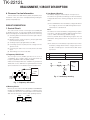
REALIGNMENT
IBM-PC
KPG-22 or KPG-22A or KPG-22A + KCT-53U
Illustration is KPG-22.
Gray
Gray/Black
1.5D-XV Lead wire
1.5D-XV Shield wire
KPG-100D
+
–
+
–
} SP
} MIC
Tuning cable
(E30-3216-05)
RF Power meter
or SSG
PC
PC
PC
D-SUB
(25-pin)
D-SUB
(9-pin)
USB
KCT-53U
KPG-22
KPG-22A
KPG-22A
Transceiver
Transceiver
Transceiver
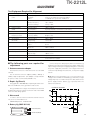
Fig. 1
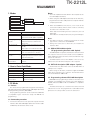
4. Clone Mode
4-1. Outline
"Clone Mode" copies the transceiver data to another
transceiver.
The dealer can copy the transceiver data to another
transceiver even without the use of a personal computer.
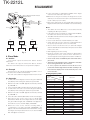
4-2. Example
The transceiver can copy the programming data to one or
more transceivers via RF communication.
The clone source and clone target/s must be in Clone mode.
4-3. Operation
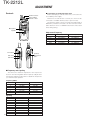
1. To switch the clone target/s to Clone mode, press and hold
the [<B] key while turning the transceiver power ON.
2. Wait for 2 seconds. “CLONE” appears on the LCD, followed
by “FRQTBL 1”.
3. Select a channel table number using the [Selector] knob.
4. To switch the clone source to Clone mode, press and hold
the [<B] key while turning the transceiver power ON.
5. Wait for 2 seconds. “CLONE” appears on the LCD, followed
by “FRQTBL 1”.
6. Select the same channel table number as the clone target/s.
7. Press the [S] key on the clone source to begin data
transmission. When the clone target starts to receive data,
the green LED will light and “CLONING” will appear on
the LCD. The source unit will display “MASTER”.
8. When the clone source finishes sending data, a
“confirmation” tone will sound and “COMPLETE” will
appear on the LCD. If data transmission failed while cloning,
the Target unit will produced an error tone and “CLONE
NG” will appear on the LCD.
4
9. If the cloning fails, no data will be available in the Target
unit when it is returned to User mode.
10.When the cloning is successful, the Target unit's "Scan"
and "Key lock" functions will return to their default values
(Scan = OFF, Key lock = OFF).
11.The source will remain in clone mode after cloning. The
target unit will return to user mode after a successful cloning.
Notes:
• The dealer can clone data to two or more transceivers by
repeating the above procedures.
• If the transceivers Clone Mode is configured as "Disabled",
the transceiver cannot enter Clone mode.
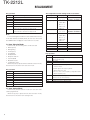
• The table shown below will cover the frequency tables used
for wireless cloning.
• Clone mode cannot be entered in battery low state.
• A unit cannot be a "Source Unit" if it is unprogrammed. If
the [S] key is pressed, an "error" tone will sound.
• Once a unit is set to be the Source, it cannot be a target
after the data has been transmitted. This protects the data
in the Source unit.
• MSK signaling is used in cloning.
• Electronic interface may cause a failure in data transfer
during Wireless Clone, such as when waveforms or
electromagnetics are being performed at the workbench.
• Clone mode can be used ONLY by the authorized service
personnel.
• The Clone mode setting must be configured as "Disable"
before being delivered to the end-user.
• To clone, replace the antenna from both the source
transceiver and the target transceiver with a dummy load.
• The transmit output power is automatically set to Low
in Clone mode.
Cloning Frequency Table
Operating Frequency
Clone
(MHz)
Frequency Table
1
2
3
4
5
6
7
8
9
10
11
12
13
14
15
16
17
18
19
20
136~174
136.000
138.000
140.000
142.000
144.000
146.000
148.000
150.000
152.000
154.000
156.000
158.000
160.000
162.000
164.000
166.000
168.000
170.000
172.000
174.000