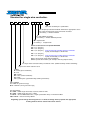
1
9
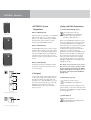
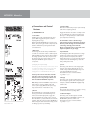
11 Display
Read-out: The numeric display indicates the
currently selected system configuration.
0 Mute
1 Top only
2 Half Stack DJ
3 Half Stack Band
4 Full Stack DJ
5 Full Stack Band
6 Dual Stack DJ
7 Dual Stack Band
1 mid/high unit Full-range mode
1 mid/high unit, 1 Sub A
1 mid/high unit, 1 Sub A
1 mid/high unit, 1 Sub A+ Sub B
1 mid/high unit, 1 Sub A+ Sub B
2 mid/high units, 2 Sub A+ Sub B
2 mid/high units, 2 Sub A + Sub B
L Locked
U Unlocked
buttons are disabled
buttons are enabled
14 Subwoofer Level
Operation: When the knob is set to the 12 o’clock
position, the subwoofer’s and the mid/high unit’s
respective volumes are matched, ensuring bass and
mid/high ranges are rendered in balanced musical
proportion. If desired, twist the Subwoofer Level
knob to the left to decrease and to the right to
increase the subwoofer’s level by up to 6 dB.
Tip: If necessary or desired, use the Subwoofer Level
knob to boost or cut bass frequencies below 100 Hz
rather than resorting to the mixer’s master EQ.
15 Rigging Points
Attach the ACTOR DX rigging frame here to fly the
mid/high unit from a truss or similar suspension
device.
4
5
6
1
7
11
12
8
2
13
9
3
10
9
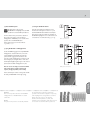
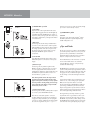
12 Up/Down Buttons
Use these buttons to select system configurations.
14
Operation: To enable the buttons, press Up and
Down simultaneously and hold for about one to two
seconds. The letter U (for unlocked) appears briefly
in the display. Now you can press Up and/or Down
to select the desired setup (see the table above). The
buttons are automatically disabled soon thereafter.
The letter L (locked) appears briefly in the display.
ACTOR ADX 112 A control features
11
13 Top Level
Operation: Use this knob to determine the volume of
the mid/high unit. The standard setting is 0 dB at
the 12 o’clock position. This means the level is
neither boosted nor cut.
13
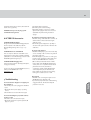
More about limiter LEDs
A dedicated LED indicates the limiter status for the
mid/high-range signal path and the subwoofer
circuit, respectively.
What do the lights mean?
The green LED indicates that the given input is
receiving a signal. As long as the LED lights up
green, the system is operating at low-to-medium
levels, with plenty of headroom available for the
power amps. Yellow indicates that the system is
being pushed close to its threshold. The yellow LED
may flash at regular intervals, but it may not
illuminate continuously. If it does this, back off the
volume on your mixer.
If the LED constantly lights up red, there is a
problem in the power amp and the system will shut
down. In this case, have a qualified service
technician check the device.
9
9
14
Control features of the ACTOR DX system controller
English
12