1
EA Manual
Page 13
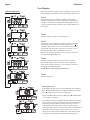
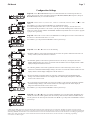
7 Day or 7/Volume (Gallons) selected in Configuration Settings Step 4CS
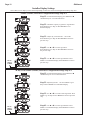
Step 1I
Step 2I
Step 1I - To enter Installer Display press NEXT and ▲
simultaneously for 5 seconds and release.
Step 2I - Use ▲ or ▼ to set the current day of the week.
Default = 2 (Monday)
1 = SUNDAY
2 = MONDAY
3 = TUESDAY
4 = WEDNESDAY
5 = THURSDAY
6 = FRIDAY
7 = SATURDAY
Press NEXT to go to Step 3I. Press REGEN to exit
Installer Display.
EXIT TO
DISPLAY
SCREENS
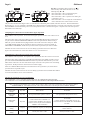
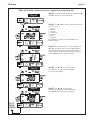
Step 3I
Step 3I - Scroll through days 1 to 7 using NEXT. Use
▲ or ▼ to turn regen on or off for each individual day
(regen indicator on means regeneration will happen).
After completing the 7th day, press NEXT to go to Step
4I. Press REGEN to go to previous display.
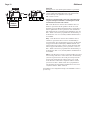
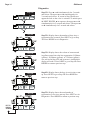
Step 4I
Step 4I - Use ▲ or ▼ to set the regen hour.
Press NEXT to go to Step 5I. Press REGEN
to go to previous display.
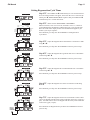
Step 5I
Step 5I - Use ▲ or ▼ to set the regen
minutes. Press NEXT to exit Installer Display.
Press REGEN to return to previous display.