1
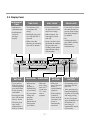
3-2. Display Panel
REMAINING
TIME
�Indication of
remaining time
�Self diagnosis
and error
message
display
DELAY START
BUTTON
TIME SAVE
HALF LOAD
CHILD LOCK
�This function is for
saving time and
energy.
�In case of small load,
use upper or lower rack
only to save energy.
�With each press, time
save ON and OFF is
repeated.
�With each press, can
select upper or lower
rack only.
�Used to lock or unlock
the control buttons to
prevent all the setting
from being changed
by children.
�When select this
function, the operating
time will be shorten.
�In case you don’t select
this button, the machine
always works vario
washing, which operate
upper and lower spray
arm alternately.
PROGRAM
RINSE/SANI
START/PAUSE
BUTTON
�If you want to
�When power �With each
�With each
delay the start of
is on,
press, rinse+,
press, Start and
selected program,
program is
Pause is
rinse+ & 77。
press this button
automatically
repeated during
C sani rinse,
before pressing
set to normal.
operation.
77。C sani
start button.
rinse is
�If you want to
�If the machine
repeated.
�Pressing the delay
change the
remains in
time will increase
program,
Pause mode for
time by 1 hour.
press the
10 minutes, the
button
and
set
power is
�The delay start
the program
automatically
time can be
you
want
to.
turned off.
adjusted from 1
hour to 19 hours.
-7-
�For
locking/unlocking,
press Half Load and
Rinse button
simultaneously.
POWER SWITCH
BUTTON
�For operating, press
this button first for
power on.
�After operating, this
button automatically
switches off for safety
and energy saving.
�In case of irregular
surge disturbances to
the machine, the
power may be
automatically turned
off for safety.