1
Chapter 5
Troubleshooting
5. The flash program on the diskette will re-program the BIOS into the NetServer.
6. When the flash programming is completed, power down the HP NetServer.
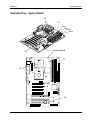
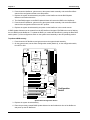
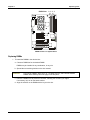
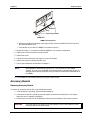
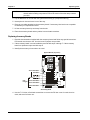
7. Gain access to the system board assembly and set the Clear Configuration switch (Switch 4)
from ON to OFF
8. Replace the system board assembly in the NetServer and replace all covers.
9. Power on the NetServer in the normal manner.
Password Problems
This section describes some common password problems.
Resetting Lost Passwords
If you have forgotten the User or Administrator password, you can reset each one. The User password can
be reset if you know the Administrator password, but the Administrator password can only be reset by a
switch on the system board.
User Password
If you have forgotten the User password, but the Administrator password is known, perform the following
steps:
1. Restart the NetServer.
2. During the boot process, press [F2] to start the Setup program.
3. Enter the Administrator password and then access the Security menu of the Setup Utility.
4. Scroll to the "User Password is" field and press Enter.
5. Enter the Administrator password as the old password and press Enter.
This will replace the old, forgotten password.
6. Enter the new password in the "Enter new password: [
NOTE
]" field and press Enter.
Entering nothing or "blank" in the "Enter new password" field followed by entering
nothing or "blank" in the "Re-enter new password" field will turn off the password
setting, changing it to "Not Set."
7. Enter the new password again in the "Re-enter new password: [
]" field and press Enter.
8. Press Esc and scroll to the Exit menu and save the changes to save the new password.
Administrator Password
You can only reset a forgotten Administrator password by using the configuration switch on the system
board. If you have forgotten the Administrator password, your NetServer will function normally, but you will
not be able to access the Setup Utility or complete the boot process, if you reboot the NetServer. To reset
the Administrator password, refer to the following procedure.
1. Turn off power to the HP NetServer.
2. Remove the cover.
47