1
7.4.4
8
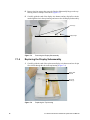
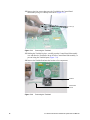
Carefully disconnect the 40-pin flex circuit that connects the Main PCBA
Subassembly to the Dock Interface PCBA (located under the Main PCBA).
9
Remove the Main PCBA Subassembly.
Replacing the Main PCBA Subassembly
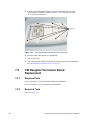
1
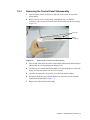
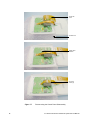
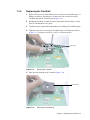
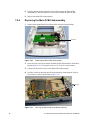
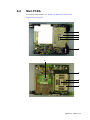
Set the replacement Main PCBA Subassembly onto the bottom housing
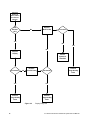
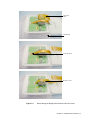
40 Pin flex
Figure 7.20
Replacing the Main PCBA Subassembly
2
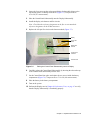
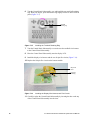
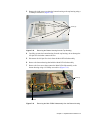
Secure the four screws that connect the Main PCBA Subassembly to the bottom
housing (Figure 7.21). Torque the screws to 3.6 in./lb. (0.4 newton meter).
3
Connect the 40-pin flex circuit to the Main PCBA Subassembly.
4
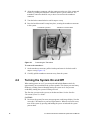
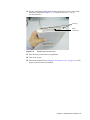
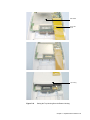
Carefully set the top housing onto the bottom housing, connecting the 100-pin
flex circuit as it moves into position (Figure 7.22).
Screws (4)
Figure 7.21
62
Securing the Main PCBA to the Bottom Housing
C1.99 PLUS and ELITE Ultrasound System Service Manual