1
Profit from the advantages of networking
Versatile documentation and
networking capabilities
The standard disk drive makes it easy for
you to integrate results into documentation – simply save the screen contents as
a BMP or WMF file and import them into
your word processing system. To process
trace data, save them as an ASCII file (CSV
format), which not only documents trace
data but also the main instrument settings.
Make use of the advantages offered by
networking
The option R&S FSU-B16 opens up versatile networking capabilities:
◆ Link to standard network
(Ethernet 10/100BaseT)
◆ Running under Windows NT, the R&S
FSU can be configured for network
operation. Applications like data output to a central network printer or
saving results on a central server can
easily be implemented. The R&S FSU
can thus be optimally matched to a
given work environment.
◆ You can import screen contents
straight into your documentation programs by Word for Windows or an
MS Excel macro and so immediately
create data sheets for your products
or documents for quality assurance.
Remote control by Ethernet is even simpler:
◆ PCAnywhere software:
PCAnywhere allows mouse operation
of the R&S FSU after assigning it a
TCP/IP address. All elements of the R&S
FSU screen are represented by a soft
front panel function; the complete R&S
FSU screen shows on the remote PC.
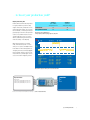
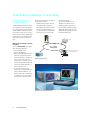
Server
Printer
FSU remotely controlled
PC with PCAnywhere
R&S FSU
R&S FSU in networked operation
R&S FSU remotely controlled with PCAnywhere
10
Spectrum Analyzer R&S FSU
◆ Special RSIB interface
This links your application to the
TCP/IP protocol and acts like an
IEC/IEEE-bus driver. The RSIB interface is available for Windows and the
UNIX world. The R&S FSU can be programmed via this interface just like on
the familiar IEC/IEEE bus.