1
Camera
To open the Camera application, tap Camera
on the Home screen.
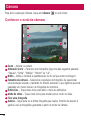
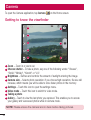
Getting to know the viewfinder
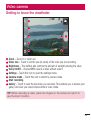
Z oom – Zoom in or zoom out.
Cheese shutter – To take a photo, say one of the following words: "Cheese",
"Smile","Whisky", "Kimchi" or "LG".
Brightness – Defines and controls the amount of sunlight entering the image.
Camera size – Selects photo resolution. If you choose high resolution, file size will
increase, which means you will be able to store fewer photos in the memory.
Settings – Touch this icon to open the settings menu.
Video mode – Touch this icon to switch to video mode.
Taking a photo
Gallery – Touch to view the last photo you captured. This enables you to access
your gallery and view saved photos while in camera mode.
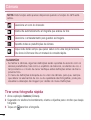
NOTE: Please ensure the camera lens is clean before taking pictures.
54