1
522
GB
• OWNER’S MANUAL
F
• MANUEL D’INSTALLATION
D
• BEDIENUNGSANLEITUNG
E
• MANUAL DEL USUARIO
I
• MANUALE DELLE ISTRUZIONI
P
• MANUAL DO PROPRIETÁRIO
S
• BRUKSANVISNING
2
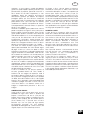
REAR PANEL CONNECTIONS (fig. 1)
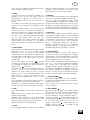
FRONT PANEL CONTROLS (fig. 2)
3
GB
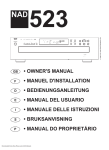
NAD 522 COMPACT DISC PLAYER
A NOTE ON INSTALLATION
Install the Compact Disc player on a level, vibrationfree surface. (Severe vibration, or operation in a
tilted position, may cause the player to mis-track.)
The player may be stacked with other stereo
components, as long as there is adequate
ventilation around it.
If the player is placed in close proximity to a radio
tuner (AM or FM), a VCR, or a television set, the
operation of its digital circuits may produce static
that would interfere with reception of weak
broadcast signals. If this occurs, move the CD
player away from other devices or switch it off when
viewing or listening to broadcasts.
PLAYING COMPACT DISCS
A SIMPLE APPROACH
1. Connect a stereo cable from the L (left) and R
(right) Line Output jacks to the corresponding CD
inputs on your amplifier.
2. Plug in the AC power cord.
3. Press the green POWER button to turn on the
player.
4. Press OPEN to open the disc drawer.
5. Place a CD, label side up, in the tray’s circular
recess. Be certain that the disc is centered within
the recess.
6. Press PLAY/PAUSE. The drawer closes
automatically, and the disc begins to play.
7. At any time you may press SKIP
or
to
select different tracks on the disc.
8. Press PLAY/PAUSE if you want to stop play
temporarily while keeping the pickup at its
current position on the disc. Press PLAY/PAUSE
again when you want to resume playback. Press
STOP if you want to end play and re-set the
pickup to the beginning of the disc.
REAR PANEL CONNECTIONS (fig.1)
1. LINE OUTPUT.
Connect a cable from these jacks to your amplifier.
Plug one end of a stereo audio cable into the L
(upper) and R (lower) output jacks. Connect the
other end of the cable to your stereo amplifier’s CD
input, or to any other ‘line-level’ input jacks (such as
the AUXiliary inputs). Do NOT connect this cable to
the amplifier’s PHONO input jacks.
2. AC LINE CORD.
Connect this power cord to an AC mains wall outlet
or to an AC convenience outlet at the rear of your
amplifier.
FRONT PANEL CONTROLS (fig.2)
1. POWER ON/OFF.
Press this green button to switch on the power to
the disc player. Press again and release to switch
the power off.
2. DISC DRAWER.
To play a disc, press the OPEN button to open the
4
disc drawer. Place the CD within the large circular
recess in the drawer, with its transparent playing
surface facing down. The label must face UP.
CD-3 discs (3-inch CD ‘singles’) can be played
without the aid of an adapter. Place the disc in the
drawer, centered in the smaller circular recess, with
its label facing UP.
NOTE: This player was not designed to
accommodate a ‘damping disc’ placed on a CD,
nor two CDs stacked together. It plays audio CDs,
but not discs identified as CD-V, DVD, CD-I, CDROM, or PHOTO CD.
3. DISPLAY.
The display provides information about playback
status and about the laser pickup’s location on the
disc. The displayed track/time information is
obtained by reading inaudible ‘sub-codes’ in the
disc.
Track number Each disc is segmented into
numbered tracks when the recording is made;
typically each numbered track will correspond to a
different song, symphonic movement, etc. These
track numbers are identified on the CD package
and are encoded in the disc by its manufacturer.
In some CDs, at the manufacturer’s option, tracks
may be sub-divided into sections identified by Index
numbers. This player does not display Index
numbers.
Time Normally this display shows the time elapsed
since the beginning of the current track. Using the
TIME button you can switch the display to show the
playing time remaining to the end of the disc.
When you load a different disc and use the OPEN
button to close the disc drawer, the display shows
the number of tracks and the total playing time of all
the tracks on the disc.
Status A right-pointing arrowhead
, located
near the left edge of the time display, glows during
PLAY. Two vertical bars
indicate that the player
is in PAUSE. In STOP mode the display reverts to
showing the number of tracks and total playing time
of the disc.
‘no disc’ glows in the display when no disc is
present or when you load a disc that cannot be
read (because it is dirty or is upside-down).
REPEAT ONE glows in the upper-left corner during
repeat-play of a single track. REPEAT ALL glows
during repeat-play of the entire program or disc.
REMAIN glows in the top centre area of the display
if you have pressed the TIME button to show the
remaining time in the track, disc.
Remote receiver. An infrared sensor, located the
right-hand portion of the display window, receives
commands from the remote control. There must be
a clear line-of-sight path from the remote control to
GB
this window; if that path is obstructed, the remote
control may not work.
4. OPEN.
Press this button to open the disc drawer, and
press it again to close the drawer. If this button is
pressed while a disc is being played, the playback
will stop, the pickup will re-set to the beginning of
the disc, and the drawer will open.
When the disc drawer is open, the drawer-closing
mechanism can also be activated by pressing PLAY
or by gently pushing the drawer inward.
CAUTION: The disc drawer is opened and closed
by an internal motor. Do not close the drawer by
hand with the power off.
When the drawer closes, the player scans the disc’s
‘table of contents’ and displays the number of
tracks and total playing time on the disc. If you
press PLAY to close the drawer this display is
skipped, and play commences immediately at
Track 1.
5. PLAY/PAUSE.
This dual-function button alternates between
starting and stopping playback. Press to start play
or to resume play after Pause. During play, press
this button to stop playback temporarily, keeping
the laser at its current position on the disc.
The PLAY mode is identified by a right-pointing
arrowhead
in the display. In the PAUSE mode
is identified by two vertical bars
.
To resume playback at the exact point where it
stopped, press PLAY/PAUSE again. If you don’t
want to resume play at the same point, you may
use the SKIP and SCAN controls to cue the pickup
to a different starting point before pressing PLAY
again.
6. TIME.
The TIME button has two modes, as follows:
TIME: the elapsed time since the beginning of the
current track, in minutes and seconds. (This is the
‘default’ setting, selected automatically when the
player is turned on.)
REMAIN (track number blank): the total playing time
that remains until the end of the disc and the total
number of remaining tracks (including the current
track). During program play the remaining time in
the program is shown.
7. STOP.
This button stops play, cancels any repeat-play
cycle, and re-sets the pickup to the beginning of
the disc. The display reverts to showing the number
of tracks and total playing time on the disc.
8. REPEAT.
This button engages an endless-repeat cycle.
Press the Repeat button once to select the
REPEAT ONE mode, in which only the current track
is repeated over and over again. Pressing the
Repeat button once again selects the REPEAT ALL
mode, in which the entire disc is played from
beginning to end, over and over again. Press the
Repeat button a third time to cancel the repeat
cycle and return to normal operation.
9. RANDOM.
Pressing RANDOM will play all the tracks on the CD
in a random order. Press RANDOM either from the
Stop or the Play mode and the 522 will play the
tracks on the CD in random order until all the tracks
have been played.
Press RANDOM button again to cancel Random
play and return the 522 to the normal Play mode.
When the 522 is in Random mode ‘RANDOM’ will
be shown in the Display Panel.
10. SCAN BACK
The SCAN
button causes the optical pickup to
scan backward through the recording at high
speed. This button works only while the player is in
PLAY or PAUSE. After a STOP command, or after
loading a new disc, you must press PLAY before
the scan circuit will work.
If the scan is initiated while the player is in PAUSE
the scan is silent, approximately 15-20 times faster
than playing speed. If the scan is initiated during
PLAY it is much slower (approximately three times
playing speed), and the music will be heard in
fragmentary form at reduced volume as the player
scans through it. Use this ‘audible scan’ to cue the
player precisely to the spot where you want to
resume play.
If you scan back to the beginning of the disc while
playing Track 1, the player automatically reverts to
normal playback.
11. SCAN FORWARD
The SCAN
button causes the optical pickup to
scan rapidly forward through the music. The
behavior of this function is similar to SCAN
.
If you scan forward to the end of the disc while
playing the final track, the scan will stop and the
Time display will show the table of contents. (There
is no ‘wrap-around’ mode.)
12. SKIP BACK
The SKIP
button causes the laser to jump
backward to the beginning of each numbered track
on the disc. The first press skips back to the
beginning of the current track. Press SKIP
twice to skip back to the previous track.
Continuous pressure will cause the player to skip
tracks repeatedly, concluding at the beginning of
the disc (Track 1).
Pressing SKIP
once during play causes the
pickup to jump back to the beginning of the current
5
GB
track and play it again. To access the previous track
while in Play you must tap SKIP
twice in rapid
succession, once to reach the beginning of the
current track and again to jump to the previous
track.
13. SKIP FORWARD
During play, pressing SKIP
will jump the laser
to the beginning of the next track and resume play
there. Thus, to sample each song on a disc, press
PLAY and then tap SKIP
after you’ve heard a
few seconds of each track.
REMOTE CONTROL
A wireless remote control is provided with your
compact disc player, enabling you to operate
playback functions from the comfort of your chair or
from virtually anywhere in the room.
For reliable operation there should be a clear lineof-sight path from the remote control to the front of
the CD player. If the player does not respond to
remote commands, it may be that this line-of-sight
path is obstructed by clothing, paper, or
furnishings.
Numeric keypad Most of the buttons on the remote
control handset have the same effect as the
corresponding buttons on the front panel of the
disc player. In addition the handset is equipped with
a direct-entry numeric keypad, which causes the
player to jump directly to the beginning of a
numbered track and commence play. Thus to play
Track 5, simply press 5. To play Track 23 press +10,
+10, 3.
Installing and replacing batteries
The remote control requires two 1.5-volt AAA-size
(i.e. UM-4 or IEC RO3) cells. Alkaline cells are
recommended, to obtain maximum operating life.
To open the battery compartment, place your
fingertip in the recess on the rear of the remote
control , push against the flexible edge of the
battery cover and lift the cover upwards. Install
fresh cells, orienting them as shown on the diagram
within the compartment. The coil springs should
contact the (-) end of each cell. Push the battery
compartment cover back and press gently until it
latches.
In some cases, poor operation may be caused by
corrosion or fingerprint oil on the battery contacts.
Remove both cells, rub the metal contacts at both
ends of each cell with a clean cloth or a pencil
eraser, and re-install the cells, being careful to orient
them correctly.
MAINTENANCE
At periodic intervals, open the disc drawer and wipe
with a damp cloth to remove any loose dust.
6
HANDLING COMPACT DISCS
Handle Compact Discs with care. The playback of
a disc will not be impaired by small dust particles, a
few light fingerprints, or slight scratches. But large
scratches, or a thick layer of oily fingerprints, can
prevent the player from tracking the disc.
(Incidentally, although the tracking laser ‘plays’ the
disc through its clear side, the actual data surface
is embedded directly beneath the label, protected
only by a very thin coating of lacquer. So a scratch
that cuts through the label may damage the disc
more than a similar scratch on the transparent
‘playing’ surface. Thus you should treat both
surfaces of the disc with care.)
Severe scratches or fingerprints may cause the
player to mis-track (skipping ahead, or repeating
the same passage). Less severe damage may
produce very brief bursts of high-frequency noise.
The tracking and error-correction circuits of this
NAD CD player are unusually sophisticated,
providing secure tracking of flawed discs that are
unplayable on some other players. Nevertheless,
the discs should not be abused or handled
carelessly.
For best results, grasp the disc only by its edges.
Another safe method is to put a finger in the center
hole, using the thumb at the edge to hold the disc
steady.
Each disc should be kept in its protective storage
case when not in use. To open the standard Philipstype plastic CD case, grasp the top and bottom of
the case with the fingers and thumb of the left
hand; then grasp the left and right edges of the
case with the fingers and thumb of the right hand,
and pull the case open with the right thumb.
The disc is held in place within the case by an
expansion hub in its center hole. To remove the
disc, press the hub with a finger to release the disc,
then lift it out by gripping its edges between the
fingers and thumb. To replace the disc in the case,
simply align its center hole with the hub and press
the disc onto the hub.
CLEANING DISCS
Soiled discs may be cleaned by wiping with a soft
cloth, either dry or moistened with water. Do NOT
use conventional LP record-cleaning products
(cleaning solutions, sprays, treated cloths, or antistatic preparations), nor any kind of chemical
solvent (alcohol, benzene, et al). A severely soiled
disc may be washed in a warm-water spray,
possibly with a small amount of a mild kitchen
detergent added, and then wiped dry with a clean,
soft towel.
When cleaning the disc, use only RADIAL strokes
(from center to edge). Never use a circular wiping
motion like that used for cleaning ordinary LP
records, because in wiping the disc there is a risk of
scratching it. A radial scratch will do the least harm
GB
because it affects only a small portion of each
circular data track, which can be fully compensated
by the player’s error-correction circuits. But a
circular scratch that follows a data track may
damage such a long continuous segment of data
that it cannot be corrected.
ABOUT THE LASER
The Compact Disc player uses a solid-state
semiconductor diode laser, mounted on a tracking
servo mechanism, to play the disc. The laser
illuminates the track of microscopic pits
representing the digital data bits, while photodiodes detect the reflected illumination from the
disc and convert it into an electronic signal which is
then decoded to recover the musical waveform in
each stereo channel.
You cannot see the laser operating, because it
operates at wavelength of 7800 Angstroms, which
is in the infrared and thus invisible to the human
eye.
The Compact Disc player is completely safe for
children to use. The laser operates at very low
power and is concealed within the player
mechanism. Even when the player is disassembled,
the laser remains sealed within an optical system
that causes its light to focus only 1 millimeter from
the lens and then diverge rapidly, reducing its
intensity to negligible levels.
7
F
LECTEUR DE COMPACT DISC NAD 522
INSTRUCTIONS CONCERNANT
L’INSTALLATION ET LE FONCTIONNEMENT
UN MOT SUR L’INSTALLATION
Poser le lecteur de Compact Disc sur une surface
parfaitement horizontale et exempte de vibrations.
(D’importantes vibrations ou un fonctionnement en
position inclinée sont susceptibles d’entraîner des
sauts de pistes). Le lecteur peut être empilé avec
d’autres modules d’une chaîne stéréo, à condition qu’il
y ait une bonne ventilation tout autour.
Si le lecteur est placé très près d’un tuner radio (AM ou
FM), d’un magnétoscope ou d’un poste de télévision,
l’électricité statique générée par ses circuits
numériques pourra affecter la réception des signaux
d’émissions faibles. Si cela se produit, éloigner le
lecteur CD des autres dispositifs, ou mettez le hors
tension lors de la réception d’émissions.
LECTURE DES COMPACT DISC
UNE APPROCHE SIMPLE
1. Connectez un câble stéréo entre les jacks de “Sortie
Ligne” [LINE OUTPUT] “gauche” [L] et “droite” [D] et
les entrées CD correspondantes de votre
amplificateur.
2. Branchez le cordon d’alimentation secteur.
3. Appuyez
sur
le
bouton-poussoir
vert
“d’alimentation” [POWER] pour mettre le lecteur
sous tension.
4. Appuyez sur “Ouverture” [OPEN] pour ouvrir le tiroir
à disques.
5. Posez un CD, étiquette vers le haut, dans le
logement circulaire du plateau. Faites attention de
bien centrer le disque dans le logement.
6. Appuyez sur “Lecture/Pause” [PLAY/PAUSE]. Le
tiroir se ferme automatiquement et le disque
commence à passer.
7. Il est possible, à tout moment, d’appuyer sur Saut
avant ou arrière [SKIP
ou
] pour
sélectionner différentes pistes sur le disque.
8. Appuyez sur “Lecture/Pause [PLAY/PAUSE] pour
arrêter provisoirement la lecture, tout en maintenant
la tête de lecture à sa position actuelle sur le disque.
(Appuyez à nouveau sur “Lecture/Pause”
[PLAY/PAUSE] pour reprendre la lecture au même
endroit). Appuyez sur “Arrêt” [STOP] pour arrêter la
lecture et remettre la tête de lecture au début du
disque.
LIAISONS SUR LE PANNEAU ARRIERE (fig.1)
1. LINE OUTPUT (Sortie Ligne)
Connectez un câble entre ces jacks et votre
amplificateur. Branchez l’une des extrémités d’un câble
audio stéréo sur les jacks de sortie Gauche (en haut) et
Droit (en bas). Connectez l’autre extrémité du câble sur
l’entrée CD de votre amplificateur stéréo, ou à toute
autre jack de “niveau ligne” (entrées AUX par exemple).
NE PAS connecter ce câble aux jacks d’entrée PHONO
de l’amplificateur
2. CORDON ALIMENTATION SECTEUR.
8
Branchez ce cordon à une prise murale secteur ou à
une prise commutée à l’arrière de votre amplificateur.
COMMANDES DE LA FACE PARLANTE (fig.2)
1. MARCHE/ARRET [POWER ON/OFF]
Appuyez sur ce bouton-poussoir vert pour mettre sous
tension le lecteur de Compact Disc. Pour couper
l’alimentation du lecteur, réappuyez sur ce boutonpoussoir puis relâchez le.
2. TIROIR A DISQUES.
Pour passer un disque, ouvrez le tiroir à disques en
appuyant sur le bouton “d’Ouverture” [OPEN]. Placez
le CD dans le grand logement circulaire du tiroir, sa
surface de lecture transparente vers le bas. L’étiquette
doit être sur la face SUPERIEURE.
Il est possible de passer les disques CD-3 (CD
“singles” de 3 pouces) sans avoir à utiliser un
adaptateur. Placez le disque dans le tiroir en le centrant
dans le petit logement circulaire, l’étiquette sur la face
SUPERIEURE.
NOTA: Ce lecteur n’a pas été conçu pour être utilisé
avec un “disque d’amortissement” placé sur un CD, ni
avec deux CD l’un sur l’autre. Il est capable de lire les
CD audio, mais pas les disques identifiés comme des
CD-V, DVD, CD-I, CD-ROM ou PHOTO CD.
3. AFFICHAGE
L’affichage fournit des informations concernant l’état
de lecture et la position de la tête de lecture laser sur le
disque. Les informations de piste/temps affichées sont
obtenues par la lecture d’informations inaudibles
appelées “sous-codes” enregistrées sur le disque.
Numéro de Piste [Track number]. Lors de sa
fabrication, chaque disque est divisé en pistes
numérotées: en principe, chaque piste numérotée
correspondra à une chanson ou à un mouvement
symphonique différents, etc... Ces numéros de piste,
codés sur le disque par le fabricant, sont identifiés sur
l’emballage du CD.
Sur certains CD, à la discrétion du fabricant, les pistes
peuvent être subdivisées en sections identifiées par
des indices. Ce lecteur de Compact Disc n’affiche pas
les indices.
Temps [Time]. En principe, cet affichage indique le
temps écoulé, en minutes et en secondes, depuis le
début de la piste actuelle. En appuyant sur le bouton
“Temps” [TIME], il est possible d’afficher le temps
restant jusqu’à la fin du disque.
Lorsque vous chargez un disque différent et que vous
utilisez le bouton “d’Ouverture” [OPEN] pour fermer le
tiroir à disque, l’affichage indique le nombre de pistes
sur le disque et le temps total de lecture de l’ensemble
de ces pistes.
Etat [Status]. Une flèche vers la droite
, située près
du bord gauche de l’affichage du temps, s’allume en
mode “Lecture” [PLAY]. Deux barres verticales
F
indiquent que le lecteur est en mode PAUSE. En mode
“Arrêté” [STOP], l’affichage revient à l’indication du
nombre de pistes et du temps total de lecture du
disque.
“no disc” s’allume sur l’affichage si aucun disque ne se
trouve dans le tiroir, ou bien si le disque chargé dans le
tiroir est illisible (sale ou inséré à l’envers).
“Répétition 1” [REPEAT ONE] s’allume dans le coin
supérieur gauche de l’affichage pendant la lecture à
répétition d’une seule piste. “Répétition toutes”
[REPEAT ALL] s’allume pendant la lecture à répétition
de la totalité d’un programme ou du disque.
“Restant” [REMAIN] s’allume en haut et au centre de
l’affichage si vous avez appuyé sur le bouton “Temps”
[TIME] pour indiquer le temps restant sur la piste ou sur
le disque.
Récepteur de télécommande. Un capteur infrarouge,
situé dans la partie supérieure droite de la fenêtre
d’affichage, reçoit les commandes en provenance de
la télécommande. L’espace entre la télécommande et
le récepteur doit être dégagé de tout obstacle, sinon la
télécommande peut refuser de fonctionner.
4. Ouverture [OPEN].
Appuyez sur ce bouton pour ouvrir le tiroir du disque,
puis appuyez de nouveau pour le refermer. En cas
d’impulsion sur ce bouton lors de la lecture d’un
disque, la lecture s’arrête, la tête de lecture se replace
au début du disque, et le tiroir s’ouvre.
Lorsque le tiroir à disque est ouvert, on peut aussi
activer le mécanisme de fermeture en appuyant sur
PLAY (lecture), ou en poussant doucement le tiroir
dans le sens de la fermeture.
ATTENTION : L’ouverture et la fermeture du tiroir à
disque se font à l’aide d’un moteur interne. Ne fermez
jamais le tiroir manuellement lorsque l’alimentation
électrique est coupée.
Lorsque le tiroir se referme, le lecteur balaye la “table
des matières” du disque et affiche le nombre total de
pistes et le temps total de lecture. Si le tiroir a été fermé
en appuyant sur “Lecture” [PLAY], le lecteur ne réalise
pas cet affichage mais passe directement à la Piste 1,
qu’il lit aussitôt.
5. Lecture/Pause [PLAY/PAUSE].
Ce bouton à deux fonctions permute entre les modes
lecture et pause. Appuyez sur ce bouton pour
démarrer la lecture ou pour reprendre la lecture après
une Pause. Pendant la lecture, appuyez sur ce bouton
pour arrêter temporairement la lecture, tout en
maintenant la tête de lecture à l’endroit où elle se trouve
sur la surface du disque.
Le mode “Lecture” [PLAY] est indiqué par une flèche
vers la droite
sur l’affichage. Le mode PAUSE est
indiqué par deux barres verticales
.
Pour reprendre la lecture à l’endroit exact où se trouvait
la tête au moment de la pause, appuyez à nouveau sur
“Lecture/Pause” [PLAY/PAUSE]. Si vous ne souhaitez
pas reprendre la lecture au même endroit, il vous est
possible d’utiliser des commandes de “Saut” [SKIP] et
de “Balayage” [SCAN] pour placer la tête de lecture à
un endroit différent, avant d’appuyer à nouveau sur le
bouton PLAY.
6. Temps [TIME].
Le bouton “Temps” [TIME] fait basculer l’affichage du
temps entre deux modes, qui sont les suivants :
“Temps” [TIME]. temps écoulé depuis le début de la
piste en cours, en minutes et en secondes. (Il s’agit du
“mode par défaut”, sélectionné automatiquement
lorsque le lecteur est mis sous tension).
“Restant” [REMAIN] (aucun numéro de piste ne
s’affiche): temps total de lecture restant jusqu’à la fin du
disque, en minutes et en secondes et nombre total de
pistes restant à lire (y compris la piste en cours de
lecture). Pour une lecture en mode programmé,
l’affichage indique le temps restant à jouer dans le
programme.
7. Arrêt [STOP].
Ce bouton-poussoir arrête la lecture, annule tout cycle
de répétition-lecture, et réinitialise la tête de lecture au
début du disque. L’afficheur revient à l’affichage du
nombre de pistes et du temps total de lecture sur le
disque.
8. Répétition [REPEAT].
Ce bouton active un cycle de répétition sans fin. Un seule
impulsion sur le bouton de “Répétition” [REPEAT] active le
mode de “Répétition 1” [REPEAT ONE], dans lequel seule
la piste en cours est répétée continuellement. Une
deuxième impulsion sur “Répétition” [REPEAT] active le
mode de “Répétition toutes” [REPEAT ALL], dans lequel
c’est l’ensemble du disque en cours qui est repassé en
continu, du début à la fin. Une troisième impulsion sur
“Répétition” [REPEAT] annule le mode de répétition et
rétablit le fonctionnement normal.
9. “Lecture aléatoire” [RANDOM].
Le fait d’appuyer sur le bouton de “Lecture aléatoire”
[RANDOM] provoque la lecture de toutes les pistes du CD
dans un ordre aléatoire. Il suffit d’appuyer sur “Lecture
aléatoire” [RANDOM], en mode “Arrêt” [STOP] ou en mode
de “Lecture” [PLAY] pour que le 522 se mette à lire les
pistes du CD dans un ordre aléatoire, et ce jusqu’à ce que
toutes les pistes aient été lues.
Appuyez à nouveau sur “Lecture aléatoire” [RANDOM]
pour annuler la lecture “Aléatoire” et pour remettre le 522
en mode de “Lecture” normale.
Lorsque le 522 est en mode “Aléatoire”, le mot “RANDOM”
est indiqué sur l’affichage.
10. Recherche arrière [SCAN
]
Le bouton de “Recherche arrière” [SCAN
] oblige la
tête de lecture optique à lire l’enregistrement en arrière
à grande vitesse. Ce bouton ne fonctionne que lorsque
le lecteur est en mode “Lecture” [PLAY] ou PAUSE.
Après une commande “d’Arrêt” [STOP], ou après avoir
chargé un nouveau disque, il est nécessaire d’appuyer
9
F
sur “Lecture” [PLAY] avant que le circuit de recherche
ne puisse fonctionner.
Si la recherche est activée alors que le lecteur est en
mode PAUSE, la recherche se fait dans le silence, à
une vitesse 15 à 20 fois supérieure à la vitesse de
lecture normale. Si la recherche est activée alors que le
lecteur est en mode de “Lecture” [PLAY], elle est
beaucoup plus lente (elle est d’environ trois fois la
vitesse de lecture normale) et la musique s’entend
sous une forme fragmentée et à un volume réduit, au
fur et à mesure que le lecteur effectue la recherche
rapide. Utilisez cette “recherche audible” pour
positionner la tête de façon précise, à l’endroit où vous
souhaitez reprendre la lecture.
Si vous effectuez une recherche arrière jusqu’au début
du disque pendant la lecture de la Piste 1, le lecteur
revient automatiquement en mode de lecture normale.
11. Recherche avant [SCAN
]
Le bouton de “Recherche avant” [SCAN
] oblige la
tête de lecture optique à lire l’enregistrement en avant
à grande vitesse. Le comportement de cette fonction
est similaire à celui de la “Recherche arrière” [SCAN
].
Si vous effectuez une recherche avant jusqu’à la fin du
disque pendant la lecture de la dernière piste, la
recherche s’arrête et l’affichage du temps indique la
table des matières. (Aucun mode de “rebouclage”
n’est prévu).
12. Saut en arrière [SKIP
].
Le bouton de “Saut en arrière” [SKIP
] fait sauter la
tête de lecture en arrière jusqu’au début de chaque
piste numérotée du disque. La première impulsion sur
ce bouton fait revenir la tête au début de la piste en
cours de lecture. Il faut donc appuyer deux fois sur
[SKIP
] pour revenir au début de la piste
précédente. Une pression continue sur ce bouton fait
sauter successivement les pistes, pour ramener la tête
de lecture au début du disque (Piste 1).
Le fait d’appuyer une fois sur [SKIP
] pendant la
lecture ramène la tête de lecture au début de la piste
en cours, puis la lecture recommence à partir de ce
point. Pour accéder au début de la piste précédente,
afin de la réécouter, il faut donc appuyer rapidement
deux fois sur [SKIP
], la première fois pour revenir
au début de la piste en cours et la deuxième pour
sauter jusqu’au début de la précédente.
13. Saut en avant [SKIP
].
Pendant la lecture, une pression sur SAUT
fera
sauter le laser en avant jusqu’au début de la piste
suivante, où la lecture reprendra aussitôt. De cette
façon, pour écouter un échantillon de chaque chanson
sur un disque, il suffit d’appuyer sur “Lecture” [PLAY],
puis d’appuyer sur [SKIP
] après avoir écouté
quelques secondes de chaque piste.
TELECOMMANDE
Une télécommande sans fil est fournie avec votre
10
lecteur de Compact Disc, vous permettant de
commander les fonctions de lecture depuis votre
fauteuil ou depuis à peu près n’importe quel endroit de
la pièce.
Pour que le fonctionnement soit fiable, aucun obstacle
ne doit se trouver entre la télécommande et l’avant du
lecteur de CD. Si le lecteur ne réagit pas aux
commandes à distance, vérifiez l’absence
d’obstructions comme des vêtements, du papier ou
des meubles.
Clavier numérique. La plupart des boutons de la
télécommande ont la même action que les boutons
correspondants sur la face avant du lecteur. La
télécommande comporte aussi un clavier numérique
de sélection directe, grâce auquel il est possible de
faire sauter la tête de lecture directement au début
d’une piste numérotée, endroit à partir duquel la lecture
commencera aussitôt. Par exemple, pour écouter la
Piste 5, il suffit d’appuyer sur le “5”. Pour écouter la
Piste 23, appuyez sur “+10, +10, 3”.
Mise en place et remplacement des piles.
La télécommande fonctionne avec deux piles de 1,5
volts, type AAA (c’est à dire des piles de référence UM4 ou IEC RO3). Il est conseillé d’utiliser des piles
alcalines pour une longévité maximale.
Pour ouvrir le compartiment des piles, posez le doigt
sur le léger creux à l’arrière de la télécommande,
appliquez une pression contre le bord souple du
couvercle des piles puis tirez le couvercle vers le haut.
Insérez des pilles neuves, en les orientant
conformément au croquis se trouvant à l’intérieur du
compartiment. Les ressorts hélicoïdaux doivent
toucher l’extrémité négative (-) de chaque pile.
Repoussez le couvercle du compartiment des piles et
appuyez doucement jusqu’à ce qu’il s’enclenche.
Dans certains cas, un mauvais fonctionnement peut
être dû à une légère corrosion ou à des traces grasses
laissées par les doigts sur les contacts des piles.
Retirez les deux piles, frottez les contacts métalliques
aux deux extrémités de chaque pile avec un chiffon
propre ou une gomme à crayon, puis réinsérez les piles
en faisant attention de bien les orienter conformément
au croquis se trouvant à l’intérieur du compartiment
des piles.
ENTRETIEN
Ouvrez périodiquement le tiroir à disques et l’essuyez
avec un chiffon humide pour éliminer toute poussière
libre.
MANIPULATION DES COMPACT DISC
Manipulez les Compact Disc avec précaution. La
lecture d’un disque ne sera pas affectée par de petites
particules de poussière, par quelques légères traces de
doigts ou de petites rayures. Mais les rayures
profondes ou une épaisse couche de traces de doigts
grasses peuvent empêcher le lecteur de suivre les
pistes du disque. (A propos, bien que le laser de suivi
F
de la piste “lise” le disque à travers son côté
transparent, la surface des données proprement dite
est imprimée juste en dessous de l’étiquette, et n’est
protégée que d’une mince couche de laque. Cela veut
dire qu’une rayure qui traverse l’étiquette peut
détériorer le disque de manière plus sérieuse qu’une
rayure similaire située sur la surface “de lecture”
transparente. Vous devez donc manipuler les deux
faces du disque avec précaution).
Des rayures profondes ou d’importantes traces de
doigts peuvent provoquer un mauvais suivi de la piste
par le lecteur (ce qui se manifeste par des sauts en
avant, ou une lecture répétée de la même partie). Une
détérioration moins importante peut provoquer de très
courtes occurrences de bruit haute fréquence. Les
circuits de suivi de piste et de correction d’erreurs sont,
sur ce lecteur CD NAD, d’une sophistication peu
courante, et assurent un suivi des pistes précis sur des
disques défectueux que d’autres lecteurs sont
incapables de lire. Cependant il faut toujours respecter
les Compact Disc et ne jamais les manipuler sans faire
attention.
Le meilleur moyen de tenir ces disques est de les
prendre uniquement par les bords. Une autre méthode
sûre consiste à passer un doigt dans le trou central, et
à utiliser le pouce pour maintenir le bord du disque.
Lorsqu’il n’est pas utilisé, chaque disque doit être
conservé dans son boîtier de stockage en plastique.
Pour ouvrir un boîtier de CD standard en plastique, de
type Philips, tenez le haut et le bas du boîtier entre le
pouce et les doigts de la main gauche, puis prenez les
bords droit et gauche avec les doigts et le pouce de la
main droite ; ouvrez alors le boîtier en tirant avec le
pouce de la main droite.
Le disque est maintenu en place dans son boîtier par
un moyeu élastique en son centre. Pour sortir le
disque, appuyez sur le moyeu avec un doigt pour le
dégager, puis retirez le en tenant ses bords entre le
pouce et les doigts. Pour remettre le disque dans le
boîtier, il suffit d’aligner son trou central avec le moyeu,
et d’appuyer sur le disque pour l’engager sur ce
dernier.
tours traditionnels, car tout essuyage comporte un
risque de rayure. Une rayure radiale sera la moins
préjudiciable, puisqu’elle n’affectera qu’une petite
partie de chaque piste circulaire, entièrement corrigible
par les circuits de correction d’erreurs incorporés dans
le lecteur. Par contre, une rayure circulaire qui suit une
piste de données peut détériorer un segment de
données long et continu, au point de rendre la
correction impossible.
AU SUJET DU LASER
Le lecteur de Compact Disc utilise un laser à diodes
semi-conductrices, monté sur un servomécanisme de
suivi de piste pour la lecture du disque. Le laser éclaire
la piste de trous microscopiques représentant les bits
de données numériques, alors que des diodes
photosensibles détectent la lumière réfléchie du disque
et la convertissent en un signal électronique ; ce signal
est ensuite décodé pour récupérer la forme d’onde
musicale de chaque voie stéréophonique.
Il est impossible de voir fonctionner le laser, car il
fonctionne sur une longueur d’onde de 7800
Angströms, ce qui correspond aux infrarouges
invisibles à l’oeil humain.
Le lecteur de Compact Disc est totalement sûr, et peut
être utilisé par des enfants. Le laser fonctionne avec
une puissance très faible, de plus il est caché à
l’intérieur du mécanisme du lecteur. Même lorsque le
lecteur est démonté, le laser reste scellé dans un
dispositif optique qui oblige sa lumière à se focaliser à
une distance de seulement 1 mm de la lentille, puis à
diverger très rapidement de manière à diminuer son
intensité à un niveau négligeable.
NETTOYAGE DES DISQUES
Pour nettoyer les disques sales, il suffit de les essuyer
avec un chiffon doux sec ou humecté d’eau. NE PAS
utiliser de produit destiné au nettoyage des disques
33-tours traditionnels (solutions de nettoyage,
pulvérisateurs, chiffons traités ou préparations
antistatiques), ni un quelconque solvant chimique
(alcool, benzène, etc ...). Un disque très sale pourra
être nettoyé sous une douchette d’eau tiède, avec une
petite quantité de liquide vaisselle, puis essuyé avec
une serviette propre et douce.
Lors du nettoyage du disque, n’appliquez que des
mouvements RADIAUX (depuis le centre vers le bord).
N’appliquez jamais un mouvement d’essuyage
circulaire comme pour le nettoyage des disques 33-
11
D
NAD 522 COMPACT DISC PLAYER
INSTALLATIONS- UND
BEDIENUNGSANLEITUNG
HINWEIS ZUR INSTALLATION
Stellen Sie den Compact Disc Spieler auf eine ebene,
vibrationsfreie Fläche. (Kräftige Vibrationen oder der
Betrieb in einer schrägen Lage führen zu einer
ungenauen Spurführung des Spielers). Der Spieler
kann mit anderen Stereogeräten gestapelt werden,
solange Sie dafür sorgen, daß er genügend Ventilation
hat.
Wenn der Spieler in nächster Nähe zu einem
Radiotuner (MW oder UKW), einem Videorecorder
oder einem Fernsehgerät aufgestellt wurde, dann kann
der Betrieb seiner digitalen Schaltung eine statische
Aufladung erzeugen, die unter Umständen den
Empfang schwacher Sendesignale stören kann.
Sollten Sie dies feststellen, dann entfernen Sie den CDSpieler aus der Umgebung dieser Geräte oder schalten
Sie ihn aus, wenn Sie Sendung sehen oder hören
wollen.
ABSPIELEN VON COMPACT DISCS
EINFACHE BEDIENUNG
1. Schließen Sie das Stereoausgangskabel L (links)
und R (rechts) an die entsprechende
Eingangsbuchse Ihres Verstärkers an.
2. Schließen Sie das Stromkabel an.
3. Drücken Sie den grünen POWER Knopf um den
Spieler einzuschalten.
4. Drücken Sie OPEN Taste, um die Schublade des
Spielers zu öffnen.
5. Legen Sie eine CD mit dem Label nach oben in die
runde Vertiefung ein. Stellen Sie sicher, daß die CD
in der Mitte dieser Vertiefung liegt.
6. Drücken Sie PLAY/PAUSE. Die Schublade schließt
sich und die CD beginnt mit dem Abspielen.
7. Sie können zu jeder Zeit die SKIP
oder
Taste drücken und somit verschiedene Aufnahmen
wählen.
8. Drücken Sie PLAY/PAUSE erneut, wenn Sie das
Abspielen für eine kurze Zeit unterbrechen möchten,
jedoch den Abtaster in der letzten gespielten
Position halten wollen. Drücken Sie nochmals
PLAY/PAUSE, wenn Sie mit dem Abspielen
fortfahren möchten. Drücken Sie auf die STOP
Taste, wenn Sie das Abspielen beenden möchten
und Sie den Abtaster in seine Anfangsstellung
zurückführen möchten.
ANSCHLÜSSE AN DER GERÄTERÜCKWAND (abb.1)
1. AUSGANGSBUCHSEN
Verbinden Sie die Ausgangsbuchsen mit Hilfe eines
Kabels mit den entsprechenden Eingangsbuchsen
Ihres Verstärkers. Verbinden Sie das eine Ende des
Stereokabel mit der L (oberen) und R (unteren) Buchse
Ihres CD Spielers. Verbinden Sie dann das andere
Ende des Kabels mit den entsprechenden CDEingangsbuchsen Ihres Verstärkers oder einer anderen
Eingangsbuchse (wie zum Beispiel der AUXiliary
12
Eingangsbuchse). Verbinden Sie das Kabel UNTER
KEINEN
UMSTÄNDEN
mit
der
PHONO
Eingangsbuchse.
2. WECHSELSTROMKABEL
Stecken Sie dieses Stromkabel in eine WechselstromSteckdose oder falls vorhanden in die
Stromkabelvorrichtung an der Rückseite Ihres
Verstärkers.
STEUERUNGSKNÖPFE AN DER
GERÄTEVORDERSEITE (abb.2)
1. EIN/AUS
Drücken Sie diesen grünen Knopf, um den CD-Spieler
einzuschalten. Drücken Sie ihn erneut, so daß der
Knopf ausrastet und das Gerät ist ausgeschaltet.
2. CD SCHUBLADE
Um eine CD abzuspielen, drücken Sie den OPEN
Knopf um die CD Schublade zu öffnen. Legen Sie die
CD mit der transparenten Spieloberfläche nach unten
zeigend in die runde Vertiefung der Schublade. Die
beschriftete Seite der CD muß nach OBEN sichtbar
liegen.
CD-3 CDs (3-Inch CD Singles) können ohne die Hilfe
eines Adapters gespielt werden. Legen Sie die CD in
die Schublade in die mittlere kleinere Vertiefung mit der
beschrifteten Seite der CD nach OBEN.
HINWEIS: Dieser CD-Spieler ist nicht dazu geeignet
eine “Auflagescheibe” auf der CD oder zwei
aufeinander liegende CD zu laden. Dieses Gerät ist nur
zum Abspielen von Audio-CDs geeignet und nicht für
CDs wie CD-V, DVD, CD-I, CD-ROM oder PHOTOCDs.
3. ANZEIGE
Die Anzeige liefert Information über den Abspielstatus
und über die Position des Abtastlasers auf der CD. Die
angezeigte Titel-/Spieldauerinformation wird durch eine
nicht hörbare “Subkodierung” auf der CD bereitgestellt.
Titelzahlangabe. Jede CD erhält während der
Herstellung eine numerierte Unterteilung der einzelnen
Titel. Jeder numerierte einzelne Titel korrespondiert mit
einem verschiedenen Musiktitel, Symphonieteil usw.
Eine Erläuterung der einzelnen Titelnummern erhalten
Sie auf der Kassette der CD. Sie sind auch auf der CD
durch Kode verschlüsselt.
Je nach Wahl des Herstellers können solche Titel
wiederum in einzelne Abschnitte mit verschiedener
Abschnittsnumerierung unterteilt sein. Dieser CDSpieler kann solche Abschnittsnummern nicht
anzeigen.
Spieldauer. Normalerweise zeigt der CD-Spieler die
bereits abgelaufene Spieldauer des derzeitig gespielten
Musiktitels an. Durch die Verwendung des TIME
Knopfes können Sie die Anzeige umschalten, so daß
Sie Ihnen die noch verbleibende Spieldauer der
D
gesamten CD anzeigt.
Wenn Sie eine andere CD einlegen und Sie den OPEN
Knopf verwenden, um die Schublade einzufahren,
dann zeigt die Anzeige Ihnen die Anzahl der einzelnen
Musiktitel und die Gesamtspieldauer aller Titel auf der
CD an.
Status. Der nach rechts zeigende Pfeil
in der
linken Ecke der Anzeige leuchtet während PLAY auf.
Zwei vertikale Linien
zeigen Ihnen an, daß der
Spieler sich zur Zeit im PAUSE Modus befindet. Im
STOP Modus wechselt die Anzeige auf Ihre
ursprüngliche Information zurück und zeigt Ihnen die
Anzahl der Musiktitel und die Gesamtspieldauer aller
Titel auf der CD an.
“no disc” leuchtet auf der Anzeige auf, wenn zur Zeit
keine CD geladen ist oder wenn Sie eine CD geladen
haben, die nicht gelesen werden kann (weil sie
entweder verschmutzt oder falsch herum in die
Schublade gelegt wurde).
REPEAT ONE leuchtet in der oberen linken Ecke der
Anzeige auf, wenn ein einzelner Musiktitel erneut
gespielt wird. REPEAT ALL leuchtet auf, wenn das
gesamte Repertoire oder die gesamte CD wiederholt
gespielt wird.
Die Anzeige REMAIN leuchtet im oberen
Anzeigebereich auf, wenn Sie den TIME Knopf
gedrückt haben, um die noch abzuspielende Titeloder CD-Dauer festzustellen.
Fernbedienungssensor. Das Gerät verfügt über einen
Fernbedienungssensor auf der rechten Seite des
Anzeigefensters, der Ausführungsbefehle von der
Fernbedienung empfängt. Die Sendebahn zwischen
Ihrer Fernbedienung und dem Anzeigefenster muß frei
liegen, wenn sich etwas dazwischen befindet, wird die
Fernbedienung nicht einwandfrei funktionieren.
4. OPEN.
Wenn Sie den Knopf betätigen, öffnet sich die CDSchublade, durch nochmaliges Drücken schließt sich
die Schublade wieder. Wenn Sie diesen Knopf
während des Abspielens einer CD drücken, dann wird
die Wiedergabe unterbrochen, der Abtastlaser kehrt in
seine Ursprungsstellung zurück und die Schublade
öffnet sich.
Die geöffnete CD-Schublade kann auch geschlossen
werden, indem Sie die PLAY Taste drücken oder indem
Sie die Schublade sanft mit der Hand zustoßen.
ACHTUNG: Die CD-Schublade wird durch einen
internen Motor geöffnet und geschlossen. Versuchen
Sie nicht die Schublade mit der Hand zu schließen,
wenn das Gerät ohne Stromversorgung d.h.
ausgeschaltet ist.
Wenn sich die Schublade schließt, dann liest der
eingebaute Scanner das “Inhaltsverzeichnis” der CD
und zeigt die Anzahl der Musiktitel und die gesamte
Spieldauer der CD an. Wenn Sie die Schublade mittels
der PLAY Taste schließen, dann wird diese Anzeige
übersprungen und der Titel Nr. 1 wird angezeigt.
5. PLAY/PAUSE.
Diese Funktionstaste wechselt zwischen zwei
Funktionen Spielbeginn und Spielunterbrechung.
Drücken Sie diese Taste um mit dem Abspiel zu
beginnen oder mit dem Abspiel fortzufahren, nachdem
Sie es pausierten. Wenn Sie diese Taste während des
Abspielens drücken, dann wird das Abspielen
kurzfristig unterbrochen und der Abtastlaser verharrt
auf der letzen Abspielposition.
Sie erkennen den PLAY Modus durch einen nach
rechts zeigenden Pfeil
in der Anzeige. Im PAUSE
Modus erkennen Sie zwei vertikale Linien
.
Wenn Sie mit dem Abspiel der CD ab der letzten,
angehaltenen Position fortfahren möchten, drücken Sie
erneut die PLAY/PAUSE Taste. Sollten Sie nicht von
der letzten Position fortfahren wollen, dann können Sie
die SKIP und SCAN Tasten benutzen, um den
Abtastlaser zu einer neuen Startposition zu lenken,
bevor wiederum die PLAY Taste zu drücken.
6. TIME.
Die TIME Taste hat zwei Betriebsarten, sie sind wie
folgt:
SPIELDAUER. Die bereits abgelaufene Spieldauer seit
dem Beginn des jeweilig angezeigten Musiktitels wird in
Minuten und Sekunden angezeigt. (Dies ist die
“Werkseinstellung”, die automatisch in Kraft tritt wenn
der CD-Spieler eingeschaltet wird.)
REMAIN (die Titelnummer wird nicht angezeigt): Die
insgesamt verbleibende Spieldauer bis zum Ende der
CD und die Gesamtzahl der verbleibenden Musiktitel
(einschließlich des zur Zeit gespielten Titels) wird
angezeigt. Bei programmiertem Abspielen wird die
verbleibende Spieldauer des Auswahlprogramms
angezeigt.
7. STOP.
Diese Taste unterbricht das Abspielen, hebt den
Wiederholungszyklus auf und führt den Abtastlaser
zum Anfang der CD zurück. Die Anzeige zeigt nun
wieder die Gesamtanzahl aller Titel und die gesamte
Spieldauer der CD an.
8. REPEAT.
Diese Taste schaltet das Gerät in einen endlosen
Wiederholungskreislauf. Wenn Sie die REPEAT Taste
einmal drücken, dann wählen Sie den REPEAT ONE
Modus, in der nur der zur Zeit gespielte Titel endlos
wiederholt wird. Durch das nochmalige Drücken der
REPEAT Taste wählen Sie den REPEAT ALL Modus
wobei Sie die endlose Wiederholung der gesamten CD
von Anfang bis Ende wählen. Wenn Sie die REPEAT
Taste ein drittes Mal drücken, wird der
Wiederholungszyklus unterbrochen und das Gerät
kehrt zu seiner normalen Betriebsweise zurück.
9. RANDOM.
Wenn Sie die Taste RANDOM drücken, dann werden
13
D
die einzelnen Musiktitel in beliebiger, zufälliger
Reihenfolge abgespielt. Wenn Sie die Taste RANDOM
entweder in der STOP oder PLAY Betriebsart drücken,
dann wird das 522 Gerät alle Musiktitel einer CD in rein
zufälliger Weise abspielen bis alle Titel gespielt worden
sind.
Durch nochmaliges Drücken der RANDOM Taste kehrt
das 522 Gerät in die normale Wiedergabebetriebsart
zurück.
Wenn sich das 522 Gerät im RANDOM Modus
befindet, dann wird auf der Anzeige RANDOM
angezeigt.
10. SCAN Zurück
Die SCAN Taste ermöglicht Ihnen den Abtastlaser in
hoher Geschwindigkeit schrittweise durch eine
Aufnahme zurückzuführen. Diese Taste funktioniert nur
wenn sich das Gerät entweder im PLAY oder PAUSE
Modus befindet. Nach der Ausführung des STOP
Befehls oder nach dem Laden einer neuen CD müssen
Sie erneut die PLAY Taste drücken, so daß die ScanSchaltung betrieben werden kann.
Wenn Sie die Scan-Funktion ausführen, wenn der Spieler
sich im Pause Modus befindet, dann arbeitet die Funktion
ohne ein hörbares Resultat. Sie ist dann circa 15 - 20 Mal
schneller als Abspielgeschwindigkeit. Wenn die ScanFunktion während PLAY ausgeführt wird, dann ist sie viel
langsamer (ungefähr dreimal die Abspielgeschwindigkeit
und Sie hören Musikfetzen in geringerer Lautstärke,
während der Abspieler sie durchfährt. Benutzen Sie diese
“hörbare Scan-Funktion” um den Abspieler genauestens
auf den Punkt zu bringen, wo Sie mit dem Abspielen
beginnen möchten.
Sollten Sie während des Abspielens von Titel 1 diese
Scan-Back Funktion ausführen, dann wird der CDSpieler automatisch in die normale Wiedergabe
zurückschalten.
11. SCAN Vorwärts
.
Die SCAN Taste ermöglicht Ihnen den Abtastlaser in
hoher Geschwindigkeit schrittweise durch eine
Aufnahme zu laufen. Diese Funktion arbeitet ähnlich
wie die bereits beschriebene SCAN
Funktion.
Wenn Sie beim letzten Titel der CD die Scan Vorwärts
Taste benutzen, dann wird die Scan Funktion
unterbrochen und die Anzeige zeigt Ihnen den Inhalt
der CD an. (Es gibt hier keine Funktion, die mit der
erneuten Wiedergabe der CD vom Anfang fortfahren
würde.)
12. SKIP Zurück
Diese
Taste veranlaßt den Abtastlaser zum Anfang
eines jedes numerierten Musiktitels auf der CD zurück
zu springen. Das einmalige Drücken führt den Laser
zum Beginn des zur Zeit gespielten Titels zurück. Das
zweimalige Drücken führt den Laser zum Beginn des
davor liegenden Titels zurück. Durch angehaltenes
Drücken wird der Spieler von Titel zu Titel springen bis
14
er zum Beginn der CD (Titel 1) gelangt.
Wenn Sie SKIP
einmal drücken fährt der Laser
zum Beginn des zur Zeit gespielten Titels zurück und
beginnt erneut mit der Wiedergabe dieses Titels. Um
den davor liegenden Titel zu erreichen, wenn Sie sich
im PLAY Modus befinden müssen sie die SKIP
Taste in schneller Weise zweimal betätigen, einmal um zum Beginn des augenblicklichen Titels zu
gelangen und nochmals um zum davor liegenden Titel
zu gelangen.
13. SKIP Vorwärts
Wenn Sie während des Abspielens die SKIP Vorwärts
Taste drücken, dann springt der Laser zum
Anfang des nächsten Musiktitels und beginnt mit seiner
Wiedergabe. Sie können daher jeden einzelnen
Musiktitel probieren wenn Sie zunächst die PLAY Taste
und dann die SKIP Vorwärts
Taste betätigen,
nachdem Sie sich jeden Titel für einige Sekunden
angehört haben.
FERNBEDIENUNG
Sie erhalten mit Ihrem CD-Spieler eine kabellose
Fernbedienung, die es Ihnen gestattet im Komfort Ihres
Sessels und von überall im Raum die Wiedergabefunktion
auszuführen.
Um das ungestörte Funktionieren Ihrer Fernbedienung zu
garantieren sollten Sie keinerlei “Sichtsperren” zwischen der
geradlinigen Sendebahn von der Fernbedienung zum CDSpieler haben. Wenn der CD-Spieler auf die Auslösung der
Fernbedienung nicht reagiert, kann es sein, daß vielleicht
Kleidung, Papier oder ein Möbelstück in seiner Sendebahn
liegen.
Numerische Tastatur. Die meisten Tasten auf Ihrer
Fernbedienung haben die gleiche Funktion wie die
entsprechenden Tasten an der Vorderseite des CDSpielers. Ihre Fernbedienung hat eine zusätzliche
numerische Tastatur, die es Ihnen gestattet durch die
Eingabe einer Zahl direkt zum Beginn eines gewählten
Titels zu springen und mit seiner Wiedergabe zu beginnen.
Wenn Sie daher Titel Nr. 5 hören wollen, drücken Sie
einfach die Nummer 5. Zur Wiedergabe von Titel Nummer
23 drücken +10, +10, 3.
Installation und Austausch der Batterien
Ihre Fernbedienung benutzt zwei 1.5-Volt AAA-Größe (d.h.
UM-4 oder IEC RO3) Batterien. Zur längsten Betriebsdauer
empfehlen wir Alkaline Batterien.
Um das Batteriegehäuse zu öffnen, legen Sie Ihren Finger
auf die Mulde auf der Rückseite der Fernbedienung,
drücken Sie auf die flexible Kante des
Batteriegehäusedeckels und heben Sie den Deckel ab.
Installieren Sie die neuen Batterien und legen Sie sie
entsprechend des im Gehäuse abgebildeten Diagramms
ein. Die Batteriefedern sollten die jeweiligen Enden der
Batterien (-) berühren. Legen Sie den Deckel des
Batteriegehäuses auf und drücken Sie Ihn sanft zu bis er
einrastet.
D
Manchmal kann es zu einer verminderten Funktion der
Fernbedienung kommen, weil die Batterienkontakte
entweder verrostet sind oder ölige Fingerabdrücke die
Kontaktfähigkeit vermindert haben. In diesem Falle,
nehmen Sie beide Batterien heraus und säubern Sie mit
einem Tuch oder einem Radiergummi beide
Batterienkontaktseiten, legen Sie die Batterien zurück und
achten Sie darauf sie in der richtigen Ausrichtung
einzusetzen.
WARTUNG
Sie sollten in periodischen Intervallen, die CD-Schublade
öffnen und sie mit einem feuchten Tuch wischen, um so
losen Staub zu entfernen.
DIE RICHTIGE BEHANDLUNG VON CDs
Behandeln Sie CDs mit äußerster Sorgfalt. Die Wiedergabe
von CDs kann durch kleine Staubteilchen, einige
Fingerabdrücke oder leichtes Verkratzen nicht gestört
werden. Jedoch grobe Kratzspuren oder sehr fettige
Fingerabdrücke verhindern das richtige Abtasten der CD.
(Obwohl der Abtastlaser die CD von der transparenten
Seite “spielt”, befindet sich die Datenoberfläche direkt unter
der Beschriftung und ist nur durch eine sehr dünne
Lackschicht geschützt. Ein Kratzer auf der beschrifteten
Seite, der durch die Beschriftung geht, kann die CD mehr
beschädigen als ein gleichwertiger Kratzer auf der
transparenten “Abspiel-”Seite. Sie sollten daher beide
Seiten der CD mit Sorgfalt behandeln).
Grobe Kratzspuren oder Fingerabdrücke irritieren die
Führung des Lasers (er springt vorwärts oder wiederholt
eine gewisse Passage auf der CD). Kleinere
Beschädigungen führen zu plötzlichem Hissen. Die Abtastund Fehlerkorrekturschaltungen dieses NAD CD-Spielers
sind außergewöhnlich gut und liefern eine sicheres
Abtasten von beschädigten CDs, die vielleicht auf anderen
CD-Spielern nicht abgespielt werden können. Jedoch
sollten Sie Ihre CD nicht mutwillig beschädigen oder mit
weniger Sorgfalt behandeln.
Um die besten Hörresultate zu erhalten, halten Sie eine CD
an Ihren Rändern. Ein weitere sichere Methode ist, den
Finger durch das Mittelloch zu stecken und den Rand der
CD mit dem Daumen zu stabilisieren.
Jede CD sollte, wenn Sie nicht abgespielt wird in Ihrer
Schutzhülle aufbewahrt werden. Um eine standardmäßige
Philips CD-Schutzhülle zu öffnen, greifen Sie die Hülle mit
den Fingern und dem Daumen Ihrer linken Hand an beiden
gegenüberliegenden Seiten der Schutzhülle, greifen Sie
dann die Kanten der Hülle mit den Fingern und dem
Daumen Ihrer rechten Hand und öffnen Sie die Schutzhülle
mit Ihrem rechten Daumen.
Die CD wird in der Hülle durch eine spreizbare Aufhängung
für das Mittelloch der CD festgehalten. Lösen Sie die CD
aus der Hülle, indem Sie mit dem Finger auf die spreizbare
Aufhängung drücken und den Rand zwischen den Fingern
und dem Daumen greifen. Um die CD zurückzulegen,
legen Sie das Mittelloch über die Aufhängung und drücken
Sie die CD auf.
DIE REINIGUNG VON CDs
Verschmutzte CDs können mit einem weichen Tuch,
weder trocken oder in Wasser getränkt, gereinigt werden.
BENUTZEN
SIE
KEINE
konventionellen
Schallplattenreinigungsprodukte (Reinigungslösungen,
Sprays, speziell behandelte Tücher oder antistatische
Produkte) oder irgendeine chemische Lösung (Alkohol,
Benzin oder ähnliches). Eine sehr verschmutzte CD kann
mit warmem Wasser mit etwas mildem Spülmittel
gesäubert und dann mit einem sauberen, weichen
Handtuch abgetrocknet werden.
_Wenn Sie eine CD säubern dann reinigen Sie sie nur
mittels RADIALEN (von der Mitte zur Kante) Bewegungen.
Reinigen Sie sie niemals mit kreisförmigen Bewegungen,
wie Sie es zum Beispiel bei einer Schallplatte machen
würden. Sie könnten durch dieses Wischen es riskieren die
CD zu verkratzen. Ein radialer Kratzer ist kaum eine
Beschädigung, da er nur einen kleinen Teil der
kreisförmigen Datenspur beeinflussen kann, die durch die
Fehlerkorrektur des CD-Spielers vollends ausgeglichen
werden kann. Ein kreisförmiger Kratzer kann jedoch ein
längeres kontinuierliches Datensegment beschädigen, das
nicht ausgeglichen werden kann.
ÜBER DEN LASER
Der Compact Disc Spieler benutzt einen festen
Halbleiterdiodenlaser, der auf einem ServoTastmechanismus angebracht ist, um die CD zu spielen.
Der Laser beleuchtet die CD-Spur von mikroskopischen
Vertiefungen, die die digitalen Datenbits repräsentieren,
während Fotodioden die Reflexion der CD registrieren und
in ein elektronisches Signal konvertieren, das dann
dekodiert wird, um die musikalischen Wellenformen jedes
einzelnen Stereokanals wiederzugeben.
Sie können den Laser in seinem Betrieb nicht sehen, da er
auf einer Wellenlänge von 7800 Angstrom arbeitet, das
sich im infraroten Bereich befindet und für das menschliche
Auge nicht sichtbar ist.
Der CD-Spieler ist daher für Kinder völlig sicher. Der Laser
wird mit geringer Spannung betrieben und durch den
Mechanismus des Spielers vollständig verdeckt. Selbst
wenn Sie den Spieler auseinanderbauen bleibt der Laser
innerhalb eines optischen Systems verdeckt, das sein Licht
nur 1 mm von der Linse bündelt und sich dann sehr schnell
verstreut und somit seine Intensität auf einen kaum
nennbaren Wert reduziert.
15
E
TOCADISCOS PARA DISCOS COMPACTOS NAD 522
INSTRUCCIONES PARA INSTALACION Y
FUNCIONAMIENTO
NOTA SOBRE LA INSTALACION
Instale el tocadiscos para Discos Compactos sobre
una superficie nivelada y sin vibración (La vibración
severa, o el funcionamiento en una posición
inclinada, puede hacer que el tocadiscos falle en
captar la pista de sonido). El tocadiscos puede
apilarse con otros componentes estéreo, con tal
que haya una ventilación adecuada alrededor del
mismo.
Si el tocadiscos se pone en gran proximidad a un
sintonizador de radio (AM o FM), una grabadora de
vídeo VCR, o un receptor de televisión, el
funcionamiento de sus circuitos digitales puede
producir estática que interferiría con la recepción de
señales débiles de retransmisión. Si ocurre esto,
separe el tocadiscos de CD de los otros
dispositivos o desconéctelo cuando vea o escuche
retransmisiones.
PARA TOCAR DISCOS COMPACTOS
UN ENFOQUE SENCILLO
1. Conecte un cable estéreo desde los enchufes jack
de Salida de Línea de la L (izquierda) y R (derecha)
a las entradas CD correspondientes de su
amplificador.
2. Enchufe el cordón de alimentación de CA.
3. Pulse el pulsador verde POWER (alimentación
eléctrica) para conectar el tocadiscos.
4. Pulse OPEN (abrir) para abrir el cajón de discos.
5. Ponga un CD, con la etiqueta cara arriba, en el
entrante circular de la bandeja. Asegúrese de que
el disco está centrado en el entrante.
6. Pulse PLAY/PAUSE El cajón se cierra
automáticamente y comienza a escucharse el
disco.
7. En cualquier momento usted puede pulsar SKIP
(salto)
o
para seleccionar pistas diferentes
del disco.
8. Pulse PLAY/PAUSE si desea parar temporalmente
la escucha mientras mantiene el fonocaptor en su
posición actual en el disco. Pulse otra vez
PLAY/PAUSE cuando se desea reanudar la
escucha. Pulse STOP (parada) si desea terminar la
escucha y reajustar el fonocaptor al comienzo del
disco.
CONEXIONES DEL PANEL TRASERO (fig.1)
1. LINE OUTPUT (salida de línea)
Conecte un cable desde estos enchufes jack con
su amplificador. Enchufe un extremo de un cable de
audio estéreo en los jacks de salida de L (superior)
y R (inferior). Conecte el otro extremo del cable a su
entrada CD del amplificador estéreo, o a
cualesquiera otros jacks de entrada de “nivel de
línea” (como las entradas AUXiliares). NO conecte
este cable a los jacks de entrada PHONO del
amplificador.
16
2. CORDON DE LINEA DE CA
Conecte este cordón de alimentación eléctrica a
una toma de pared de la red de CA o a una toma
cómoda de CA en la parte trasera de su
amplificador.
CONTROLES DEL PANEL DELANTERO (fig.2)
1. POWER ON/OFF
(alimentación eléctrica conectada/desconectada)
Pulse este pulsador verde para conectar la
alimentación eléctrica para el tocadiscos. Pulse
otra vez y suelta para desconectarlo.
2. CAJON DE DISCOS
Para escuchar un disco, pulse el pulsador OPEN
para abrir el cajón de discos. Ponga el CD en el
entrante circular grande del cajón, con su superficie
transparente de escucha cara abajo. La etiqueta
debe estar cara ARRIBA.
Se pueden escuchar sin ayuda de un adaptador 3
discos CD (“singles” CD de 3 pulgadas). Ponga el
disco en el cajón, centrado en el entrante circular
más pequeño, con su etiqueta cara ARRIBA.
NOTA: Este tocadiscos no se ha diseñado para un
“disco de caída” puesto en CD, ni dos discos CD
apilados juntos. Sirve para escuchar discos CD de
audio, pero no discos identificados como CD-V,
DVD, CD-1, CD-ROM, ni PHOTO CD.
3. VISUALIZADOR
El visualizador da información sobre el estado de la
escucha y sobre la posición del fonocaptor de láser
en el disco. La información visualizada de
pista/tiempo se obtiene leyendo en el disco
“subcódigos” inaudibles.
Número de pista. Cada disco está segmentado
con pistas numeradas al realizarse la grabación;
Típicamente cada pista numerada corresponderá a
una canción, movimiento sinfónico etc. diferente.
Estos números de pistas se identifican en el
paquete CD y están codificados en el disco por su
fabricante.
En algunos discos CD, a opción del fabricante, las
pistas pueden subdividirse en secciones
identificadas con números de índice. Este
tocadiscos no es para números de índice.
Tiempo. Normalmente esta visualización muestra el
tiempo transcurrido desde el comienzo de la pista
actual. Usando el pulsador TIME (tiempo) usted puede
conectar el visualizador para que muestre el tiempo de
escucha que queda hasta el final del disco.
Cuando usted carga un disco diferente y usa el
pulsador OPEN para cerrar el cajón del disco, el
visualizador muestra el número de pistas y el tiempo
total de escucha de todas las pistas del disco.
Estado. Un
flecha que apunta a la derecha,
situado cerca del borde izquierdo del visualizador
E
de tiempo, está encendido durante PLAY. Dos
barras verticales
indican que el tocadiscos está
en PAUSE. El modo STOP el visualizador vuelve a
mostrar el número de pistas y tiempo total de
escucha del disco.
“no disc” (sin disco) se enciende en el visualizador
cuando no hay disco o cuando usted carga un
disco que no se puede leer (porque está sucio o
está puesto cabeza abajo).
Se enciende REPEAT ONE (repita uno) en la
esquina superior izquierda durante la escucha
repetida de una sola pista. Se enciende REAPEAT
ALL durante la escucha repetida del programa o
disco entero.
Se enciende REMAIN (resto) en el área central
superior del visualizador si usted ha pulsado el
pulsador TIME para mostrar el tiempo restante de
la pista, disco.
Receptor remoto. Un sensor de infrarrojos, situado
en la parte derecha de la ventanilla del visualizador,
recibe órdenes del control remoto. Debe haber un
paso libre de obstáculos de línea de mira desde el
control remoto a esta ventanilla; si tal paso está
obstruido, el control remoto puede que no
funcione.
4. OPEN.
Pulse este pulsador para abrir el cajón de discos, y
púlselo otra vez para cerrarlo. Si se pulsa este
pulsador mientras se está escuchando un disco, la
escucha para, el fonocaptor se reajusta al
comienzo del disco, y el cajón se abre.
Cuando está abierto el cajón de discos, también
puede activarse el mecanismo de cierre de cajón
pulsador PLAY o empujando suavemente el cajón
adentro.
PRECAUCION: El cajón de disco se abre y cierra
mediante un motor interno. No cierre el cajón a
mano con la alimentación eléctrica desconectada.
Cuando se cierra el cajón, el visualizador explora el
“índice de contenido” del disco y visualiza el
número de pistas y el tiempo total de escucha del
disco. Si usted pulsa PLAY para cerrar el cajón se
salta el visualizador, y comienza inmediatamente a
escucharse en la Pista 1.
5. PLAY/PAUSE.
Este pulsador de doble función alterna entre la
iniciación y la parada de la escucha. Pulse para
iniciar la escucha o reanudarla después de Pause.
Durante la escucha, pulse este pulsador para parar
temporalmente la escucha, manteniendo el láser en
su posición actual en el disco.
El modo PLAY se identifica con un
con flecha
apuntando a la derecha en el visualizador En el
modo PAUSE se identifica con dos barras
verticales
.
Para reanudar la escucha en el punto exacto en
que se paró. pulse otra vez PLAY/PAUSE. Si no
desea reanudar la escucha en el mismo punto,
puede usar los controles SKIP (salto) y SCAN
(exploración) para indicar al fonocaptor un punto
diferente de comienzo antes de pulsar otra vez
PLAY.
6. TIME (tiempo)
El pulsador TIME tiene dos modos, que son:
TIME: el tiempo transcurrido desde el comienzo de
la pista actual, en minutos y segundos. (Este es un
ajuste “por defecto” que se selecciona
automáticamente al conectarse el tocadiscos).
REMAIN (número de pista en blanco): el tiempo
total de escucha que queda hasta el final del disco
y el número total de pistas que quedan (incluyendo
la pista actual). Durante la escucha del programa se
muestra el tiempo de programa restante.
7. STOP.
Este pulsador para la escucha del disco, cancela
cualquier ciclo de escucha repetida y coloca el
fonocaptor al comienzo del disco. El visualizador
vuelve a mostrar el número de pistas y tiempo total
de escucha del disco.
8. REPEAT (repetición)
Este pulsador activa un ciclo de repetición sin fin.
Pulse el pulsador Repeat una vez para seleccionar
el modo REPEAT ONE (repetición de una), en que
únicamente se repite una y otra vez la pista actual.
Si se pulsa el pulsador Repeat otra vez se
selecciona el modo REPEAT ALL (repetición de
todo), en que se escucha todo el disco desde el
principio al final, una y otra vez. Pulse el pulsador
Repeat por tercera vez para cancelar el ciclo de
repetición y volver al funcionamiento normal.
9. RANDOM (al azar)
Si se pulsa RANDOM se escucha las pistas del
disco al azar, sin orden. Pulse RANDOM a partir del
modo Stop o Play y el 522 hace que se escuche las
pistas del CD al azar, sin orden, hasta que se hayan
escuchado todas las pistas.
Pulse otra vez el pulsador RANDOM para cancelar
la escucha Random y hacer que el 522 vuelva al
modo normal de Play.
Cuando el 522 está en modo Random en el Panel
Visualizador se muestra “RANDOM”.
10. SCAN BACK (exploración atrás)
El pulsador SCAN hace que el fonocaptor óptico
explore hace atrás a través de la grabación a gran
velocidad. Este pulsador sólo funciona mientras el
tocadiscos está en PLAY o PAUSE. Después de
una orden de STOP o después de cargar un nuevo
disco, usted debe pulsar PLAY antes de que el
circuito de exploración pueda funcionar.
Si se inicia la exploración mientas el tocadiscos
está en PAUSE la exploración es silenciosa, unas
17
E
15-20 veces más rápida que la velocidad de
escucha. Si la exploración se inicia durante PLAY
es mucho más lenta (aproximadamente tres veces
la velocidad de escucha), y la música se oirá en
forma fragmentaria a volumen reducido mientras el
tocadiscos explore el disco. Use esta “exploración
audible” para llevar el tocadiscos exactamente al
punto en que usted desea reanudar la escucha.
Si usted explora hacia atrás hasta el principio del
disco mientras escucha la Pista 1, el tocadiscos
vuelve automáticamente a escucha normal.
11. SCAN FORWARD (exploración adelante)
El pulsador SCAN hace que el fonocaptor óptico
explore rápidamente hacia adelante a través de la
música. El comportamiento de esta función es
similar a SCAN
.
Si usted explora hacia adelante hasta el fin del
disco mientras escucha la pista final, la exploración
se detendrá y el visualizador de Time indicará el
índice de contenido. (No hay modo de “moverse
alrededor”).
12. SKIP BACK (salto atrás)
El pulsador
hace que el láser salte hacia atrás
al principio de cada pista numerada del disco. La
primera pulsación del pulsador hace que se vaya al
comienzo de ala pista actual. Pulse dos veces
para saltar hacia atrás a la pista anterior. La
pulsación continua hará que el tocadiscos salte
repetidamente pistas, concluyendo al principio del
disco (Pista 1).
Si se pulsa SKIP
una vez durante la escucha
se hace que el fonocaptor salte hacia atrás al
comienzo de la pista actual y la repita otra vez. Para
tener acceso a la pista anterior mientras el
tocadiscos está en Play debe usted pulsar
rápidamente dos veces SKIP
en rápida
sucesión, una vez para llegar al comienzo de la
pista actual y otra vez para saltar a la pista anterior.
13. SKIP FORWARD (salto adelante)
Durante la escucha, si se pulsa SKIP FORWARD
se hace saltar el láser al comienzo de la pista
siguiente y allí se reanuda la escucha. Así, para
tener una muestra de cada pista de un disco, pulse
PLAY y luego pulse rápidamente SKIP
después
de que haya escuchado durante unos segundos
cada pista.
CONTROL REMOTO
Se provee un control remoto sin hilos con su
tocadiscos de discos compactos, que le permite
accionar las funciones de escucha desde la
comodidad de su sillón o desde virtualmente
cualquier sitio de la habitación.
Para el funcionamiento fiable del control remoto
debe haber un paso libre de obstáculos de línea de
mira desde el control remoto a la parte delantera
18
del tocadiscos de CD. Si el tocadiscos no responde
a las órdenes del control remoto, puede ser que
este paso de línea de mira esté obstruido con ropa,
papel o mobiliario.
Teclado numérico. La mayoría de los pulsadores
del control remoto tienen el mismo efecto que los
pulsadores correspondientes del panel delantero
del tocadiscos. Además el control remoto está
equipado con un teclado numérico de entrada
directa, que hace que el tocadiscos salte
directamente al comienzo de una pista numerada y
comience a escucharse la música. Así para
escuchar la Pista 5, pulse simplemente 5. Para
escuchar la Pista 23 pulse +10, +10, 3.
Instalación y cambio de pilas.
El control remoto necesita dos pilas de 1,5 voltios
tamaño AAA (esto es, UM-4 o IEC RO3).
Recomendamos pilas alcalinas para obtener una
máxima duración de funcionamiento.
Para abrir el compartimento de pilas, ponga la
punta de su dedo en el entrante situado en la parte
trasera del control remoto, empuje contra el borde
flexible de la cubierta de las pilas y levante la
cubierta. Instale pilas nuevas, orientándolas como
se indica en el diagrama que hay dentro del
compartimento. Los muelles de bobina deben estar
en contacto con el lado (-) de cada pila. Empuje
otra vez la cubierta del compartimento de pilas para
cerrarlo presionando suavemente hasta que
encaje.
En algunos casos, el funcionamiento defectuoso
puede estar causado por corrosión o aceite de
huella dactilares en los contactos de las pilas. Quite
las dos pilas, frote los contactos metálicos en los
dos lados de cada pila con un paño limpio o una
goma de borrar de lápiz, y vuelva a instalar las pilas,
teniendo cuidado de orientarlas cuidadosamente.
MANTENIMIENTO
A intervalos periódicos, abra el cajón de discos y
límpielo con un paño húmedo para quitar cualquier
polvo suelto.
MANEJO DE LOS DISCOS COMPACTOS
Maneje los Discos Compactos con cuidado. La
escucha de un disco no quedará perjudicada por
pequeñas partículas de polvo, unas pocas huellas
dactilares o arañazos ligeros. Pero los arañazos
grandes o una capa gruesa de huellas dactilares
aceitosas, pueden impedir que el tocadiscos siga
correctamente las pistas del disco. (Digamos de
paso que, aunque el láser de seguimiento de pista
“toca” el disco a través de su lado claro, la
superficie efectiva de datos está incorporada
directamente debajo de la etiqueta, protegida
únicamente por un revestimiento muy fino de laca.
Por lo tanto un arañazo que corte a través de la
E
etiqueta puede dañar el disco más que un arañazo
similar en la superficie transparente “de escucha”.
Así debe usted tratar ambas superficies del disco
con cuidado).
Los arañazos o huellas dactilares severos pueden
hacer que el tocadiscos no siga correctamente la
pista (saltando adelante, o repitiendo el mismo
pasaje). Un daño menos severo puede producir
ráfagas brevísimas de ruido de alta frecuencia. Los
circuitos de seguimiento de pista y corrección de
errores de este tocadiscos de discos CD NAD son
inusualmente sofisticados, proporcionando un
seguimiento seguro de las pistas en discos
defectuosos que no pueden escucharse en
algunos otros tocadiscos. No obstante, no deben
tratarse mal ni manejarse sin cuidado los discos.
Para obtener los mejores resultados, tome el disco
únicamente por sus bordes. Otro método seguro
poner un dedo en el orificio central usando el pulgar
sobre el borde para sostener firmemente el disco.
Cada disco ha de mantenerse en su estuche
protector cuando no se use. Para abrir el estuche
CD de plástico normal tipo Philips, tome la parte
superior e inferior del estuche con los dedos y el
índice de la mano izquierda, luego tome los bordes
izquierdo y derecho del estuche con los dedos y el
pulgar de la mano derecha, y tire del estuche
abriéndolo con el pulgar derecho.
El disco se sostiene en posición dentro del estuche
mediante un cubo de expansión situado en su
orificio central. Para quitar el disco, presione el
cubo con un dedo para soltar el disco, luego
levántelo sacando el disco tomándolo por sus
bordes entre los dedos y el pulgar. Para volver a
poner el disco en el estuche, simplemente alinee su
orificio central con el cubo y presione el disco en el
cubo.
circuitos de corrección de errores del tocadiscos.
Pero un arañazo circular que sigue una pista de
datos puede dañar un segmento continuo tan largo
de datos que no se puede corregir.
SOBRE EL LASER
El tocadiscos de Discos Compactos usa un láser
de diodos semiconductores de estado sólido,
montados en un servomecanismo de seguimiento
de pista, para que se escuche el disco. El láser
ilumina la pista de microscópicos fosos que
representan los bits de datos digitales, mientras
que los fotodiodos detectan la iluminación reflejada
desde el disco y la convierten en señal electrónica
que luego se descodifica para recuperar la forma
de onda musical de cada canal estéreo.
Usted no puede ver el láser funcionando, porque
funciona con una longitud de onda de 7800
Angstroms, que está en infrarrojos y por lo tanto es
invisible al ojo humano.
El tocadiscos de Discos Compactos es
completamente seguro y sin peligro para que los
usen los niños. El láser funciona con potencia muy
baja y está escondido dentro del mecanismo del
tocadiscos. Aunque se desensamble el tocadiscos
el láser permanece sellado dentro de un sistema
óptico que hace que su luz enfoque únicamente 1
milímetro desde la lente y luego se disperse
rápidamente,. reduciendo su intensidad a niveles
negligibles.
LIMPIEZA DE DISCOS
Los disco sucios pueden limpiarse con un paño
blando, seco o humedecido con agua. NO use
productos convencionales de limpieza de discos
LP (soluciones de limpieza, rociados, paños
tratados o preparaciones antiestáticas), ni use
clase alguna de disolvente químico (alcohol,
bencina, etc.). Un disco muy sucio se puede lavar
en un rociado de agua templada, posiblemente con
una pequeña cantidad añadida de detergente
suave de cocina, y luego secarse con una toalla
limpia y blanda.
Cuando limpie el disco, use únicamente
movimiento de pasada RADIAL (desde el centro
hacia el borde). No use jamás un movimiento de
limpieza circular como el que se usa para limpiar
discos ordinarios LP, porque al limpiar el disco así
hay riesgo de arañarlo. Un arañazo radial causará
menos daño porque afecta únicamente a una
pequeña porción de cada pista circular de datos,
que puede ser plenamente compensada por los
19
I
RIPRODUTTORE PER COMPACT DISC NAD 522
ISTRUZIONI PER L’INSTALLAZIONE E IL
FUNZIONAMENTO
ALCUNI APPUNTI PER L’INSTALLAZIONE
Collocare il riproduttore per CD su una superficie in
piano, assicurandosi che sia priva di vibrazioni. (Se
il riproduttore viene sottoposto a forti vibrazioni o
viene fatto funzionare non in piano si possono
riscontrare problemi di salto o allineamento
imperfetto rispetto alla pista). Il riproduttore può
essere montato a torre con altri componenti stereo,
a patto che vi sia ventilazione adeguata tutto
intorno.
Se il riproduttore viene collocato molto vicino ad
una radio (AM od FM) o ad un televisore, il
funzionamento dei suoi circuiti digitali può dare
interferenze statiche che pregiudicano la ricezione
di segnali deboli. Se ciò ha luogo, scostare il
riproduttore per CD dagli altri accessori oppure
spegnerlo quando si ascoltano trasmissioni radio o
alla televisione.
RIPRODUZIONE DEI COMPACT DISC
UNA SEMPLICE PANORAMICA
1. Collegare un cavo stereo dai jack di uscita
circuito, sinistro (L) e destro (R) “Line Output” ai
corrispondenti input CD sull’amplificatore.
2. Allacciare il cavo di alimentazione C.A.
3. Premere il pulsante verde “POWER” per
accendere il riproduttore.
4. Premere “OPEN” per aprire il cassetto
portadisco.
5. Infilare un CD (lato etichetta rivolto in alto) nel
recesso circolare del portadisco. Assicurarsi che
il disco sia centrato nel recesso
6. Premere “PLAY/PAUSE”. Il cassettino si chiude
automaticamente; la riproduzione del disco è
immediata.
7. E’ possibile premere in qualsiasi momento SKIP
oppure
per selezionare piste differenti
del disco.
8. Premere “PLAY/PAUSE” se si vuole arrestare
provvisoriamente l’ascolto, mantenendo il pickup nella posizione corrente sul disco. (Premere
“PLAY/PAUSE” un’altra volta quando si desidera
riprendere l’ascolto. Premere STOP se si vuole
terminare l’ascolto e riportare il pick-up all’inizio
del disco.
CONNESSIONI AL PANNELLO POSTERIORE (fig.1)
1. OUTPUT DI LINEA.
Collegare un cavo da questi jack all’amplificatore.
Collegare il cavo audio stereo nei jack di uscita L
[sinistro] (superiore) e R [destro] (inferiore). Collegare
l’altra estremità del cavo all’input CD
dell’amplificatore stereo a qualsiasi altro jack di
input di livello (ad esempio gli input ausiliari). NON
collegare questo cavo ai jack input marcati
“PHONO” dell’amplificatore.
2. CAVO D’ALIMENTAZIONE C.A..
Collegare questo cavo di alimentazione ad una
presa C.A. a muro o presa ausiliaria C.A. sul retro
dell’amplificatore.
COMANDI DEL QUADRO ANTERIORE (fig.2)
1. “POWER ON/OFF” (ACCESO/SPENTO).
Premere questo pulsante verde per portare
l’alimentazione al riproduttore per dischi. Premere
nuovamente e rilasciare per spegnere.
2. CASSETTO PORTADISCO.
Per l’ascolto di un disco, premere il pulsante di
apertura “OPEN” per aprire il cassetto portadisco.
Infilare il CD nel recesso circolare grande del
cassetto, tenendo la faccia trasparente (quella di
riproduzione) rivolta in giú. L’etichetta deve essere
IN ALTO.
I dischi CD-3 (i “singles” da 3 pollici) possono
essere ascoltati direttamente, senza l’impiego di un
adattatore. Infilare il disco nel cassetto, centrandolo
nel recesso circolare piú piccolo e tenendo
l’etichetta rivolta in ALTO.
NOTA: Questo riproduttore non è in grado di
prendere un “disco stabilizzatore” sopra il CD, né
due CD accatastati. Serve per la riproduzione di CD
audio, ma non dei dischi marcati “CD-V”, “DVD”,
“CD-I”, “CD-ROM”, oppure “PHOTO CD”.
3. DISPLAY.
Il display fornisce informazioni in merito alla
condizione d’ascolto del disco e alla posizione del
pick-up laser sul disco. Le informazioni visualizzate
- pista/tempo - sono ottenute leggendo
“sottocodici” inudibili nel disco.
Numero pista. Ciascun disco è suddiviso in un
numero di piste all’atto della sua fabbricazione; in
linea di massima, ciascuna pista numerata
corrisponde ad una canzone o tempo differente di
una sinfonia, ecc. Questi numeri di pista sono
identificati sulla confezione del CD e sono codificati
nel disco dal fabbricante.
Alcuni CD (secondo le preferenze del fabbricante)
hanno piste suddivise in sezioni, identificate da
numeri di indice. Questo riproduttore non visualizza
i numeri di indice.
Ore. Nel modo convenzionale, questo display
riporta in tempo trascorso dall’inizio della pista in
ascolto. Impiegando il pulsante “TIME” si può
ottenere la visualizzazione del tempo restante prima
della fine del disco.
Quando si carica un disco differente e si impiega il
pulsante “OPEN” per chiudere il cassetto
portadisco, il display riporta il numero delle piste e il
tempo totale d’ascolto di tutte le piste del disco.
Condizione. Una freccia rivolta verso destra
20
,
I
vicino al lato sinistro del display si accende durante
l’ascolto “PLAY”. Due lineette verticali
indicano
che il riproduttore è in attesa (“PAUSE”). Nel modo
“STOP”, il display torna ad indicare il numero totale
delle piste e il tempo totale di ascolto del disco.
la scritta “no disc” si accende sul display quando
non vi è un disco o quando si è caricato un disco
che non può essere letto (perché sporco o
capovolto).
“REPEAT ONE” si accende nell’angolo superiore
sinistro durante l’ascolto ripetuto di una singola
pista. “REPEAT ALL” si accende durante l’ascolto
ripetuto dell’intero programma o del disco.
“REMAIN” si accende nell’angolo inferiore sinistro
del display se si è premuto il pulsante “TIME” per
evidenziare il tempo restante per la pista, il disco
oppure il programma.
Telericevitore. Un sensore ad infrarossi (sito sul lato
sinistro della finestrella del display) riceve i comandi
dal telecomando. La retta tra il telecomando e
questa finestrella non deve essere ostruita; se il
percorso è ostruito, il telecomando non sempre
funziona come prescritto.
4. OPEN.
Premere questo pulsante per aprire il cassetto
portadischi; ripremerlo per chiudere il cassetto. Se
il pulsante viene premuto durante l’ascolto di un
disco, il playback allora si arresta: il pick-up ritorna
all’inizio del disco e il cassetto si apre.
Quando il cassetto del disco viene aperto, il
meccanismo di chiusura del cassetto può essere
attivato premendo “PLAY” oppure pressando
delicatamente il cassetto verso l’interno.
ATTENZIONE: Il cassetto portadischi viene aperto e
chiuso tramite un motorino interno. Non chiudere il
cassetto a mano quando il riproduttore è spento.
Quando il cassetto si chiude, il riproduttore legge la
pista dell’indice dei brani incisi sul disco e visualizza
il numero delle piste unitamente alla durata totale
d’ascolto del disco. Se si preme “PLAY” per
chiudere il cassetto, questo display allora viene
tralasciato: l’ascolto inizia immediatamente dalla
pista 1 (Track 1).
5. “PLAY/PAUSE” (ASCOLTO/PAUSA).
Questo pulsante bivalente permette di passare
alternatamente da “avviamento” ed “arresto” del
playback. Premere per iniziare l’ascolto o per
riprenderlo dopo l’impiego del pulsante Pausa.
Durante l’ascolto si può arrestare il playback in
qualsiasi momento premendo questo pulsante: il
laser rimarrà “sospeso” nel punto esatto di
interruzione.
Il modo “PLAY” è identificato da una freccia rivolta
verso destra
sul display. Nel modo “PAUSE”, la
freccia è affiancata da due lineette verticali
.
Per ripristinare l’ascolto partendo esattamente dal
punto di interruzione, premere nuovamente
“PLAY/PAUSE”. Se non si desidera riprendere
l’ascolto nel medesimo punto di interruzione,
impiegare allora i comandi “SKIP” (“salta”) e
“SCAN” (“scansione”) per portare il pick-up ad un
punto differente del disco: premere infine “PLAY”
per l’ascolto.
6. ORE.
Il pulsante “TIME” ha due modi, come segue:
ORE. il tempo trascorso dall’inizio della pista
corrente, espresso in minuti e secondi. (Questa è
l’impostazione
“basilare”,
selezionata
automaticamente quando il riproduttore viene
acceso).
“REMAIN” (numero di pista oscurato) il tempo
d’ascolto restante prima della fine del disco.
Durante l’ascolto programmato viene indicato il
tempo restante del programma.
7. STOP.
Questo pulsante interrompe l’ascolto e cancella
qualsiasi
ciclo
di
riproduzione
ripetuta,
reimpostando il pick-up all’inizio del disco. Il display
ritorna ad evidenziare il numero delle piste e il
tempo totale d’ascolto del disco.
8. RIPETERE.
Questo pulsante inserisce un ciclo di ripetizione
all’infinito. Premere una volta il pulsante “Repeat”
per selezionare il modo di ripetizione “REPEAT
ONE” che permette l’ascolto continuo solo della
pista attuale. Premendo un’altra volta il pulsante di
ripetizione si seleziona il modo “REPEAT ALL”
(ripetere tutto): l’intero disco pertanto viene
riprodotto, dall’inizio alla fine, all’infinito! Premere il
pulsante “REPEAT” una terza volta per cancellare il
ciclo di ripetizione e ritornare al funzionamento
normale.
9. “RANDOM” (CASUALE)
Premendo “RANDOM” si ascoltano tutte le piste del
CD in ordine casuale (randomizzazione). Premere
“RANDOM” dai modi Stop oppure Play: il 522
passerà a riprodurre le piste del CD in ordine
casuale, finché tutte le piste non sono state
ascoltate.
Premere nuovamente il pulsante “RANDOM” per
cancellare la riproduzione casuale e riportare il 522
nel modo normale di riproduzione.
Quando il 522 si trova nel modo casuale, il display
riporta la dicitura “RANDOM PLAY” (riproduzione
casuale).
10. SCAN BACK
Il pulsante “SCAN
” fa sí che il pick-up ottico
effettui la retroscansione della registrazione ad alta
velocità.
Questo pulsante funziona soltanto quando il
21
I
riproduttore si trova nei modi “PLAY” oppure
“PAUSE”. Dopo un comando di arresto con
“STOP”, o dopo avere inserito un nuovo disco,
occorre premere “PLAY” prima che il circuito di
scansione possa funzionare.
Se la scansione viene iniziata quando il riproduttore
è in attesa con “PAUSE”, questa allora è silenziosa
e procede ad una velocità pari a circa 15-20 volte
quella normale di ascolto. Se si inizia la scansione
durante l’ascolto “PLAY”, questa è molto piú lenta
(circa tre volte la velocità d’ascolto) e la musica
verrà udita in forma frammentaria a volume ridotto
mentre il riproduttore procede alla scansione.
Impiegare questa “scansione udibile” per portarsi
perfettamente sul punto di ripristino dell’ascolto.
Se si effettua la retroscansione fino all’inizio del
disco durante l’ascolto della Pista 1, il riproduttore
ritorna automaticamente al playback normale.
11. “SCAN Forward”
Il pulsante “SCAN
” fa sí che il pick-up ottico
effettui rapidamente la scansione in avanti lungo il
brano musicale. Questa funzione si comporta in
modo simile a quanto detto per “SCAN”
.
Se si effettua la scansione in avanti fino alla fine del
disco durante l’ascolto dell’ultima pista, la
scansione si arresterà e il display Time riporterà la
tabella dell’indice. (Non vi è modo di
“riavvolgimento”).
12. SKIP Back
Il pulsante
pulsante fa sí che il laser scatti
all’indietro passando all’inizio di ciascun pista
numerata del disco. Premendolo per la prima volta
si retrocede all’inizio della pista corrente. Premendo
due volte di retrocede alla pista precedente.
Una pressione continua provoca il salto ripetuto
delle piste, fino all’inizio del disco (Pista 1).
Premendo “SKIP
una volta durante l’ascolto, il
pick-up scatta all’indietro tornando all’inizio della
pista in ascolto che viene riprodotta un’altra volta.
Per passare alla pista precedente durante l’ascolto
occorre tasteggiare due volte, e rapidamente,
“SKIP
”: la prima volta per tornare all’inizio della
pista attuale e poi per passare a quella precedente.
13. SKIP Forward
Premendo “SKIP Forward”
durante l’ascolto, il
laser passa all’inizio della pista successiva e
riprende la riproduzione da tale punto. Pertanto, se
si desidera “campionare” ogni brano del disco,
premere “PLAY” e poi tasteggiare “SKIP
” dopo
l’ascolto di un paio di secondi di ciascuna pista.
TELECOMANDO
Il Vs. riproduttore per CD è dotato di un
telecomando senza fili che Vi permette di azionare
tutte le funzioni di playback senza doverVi
scomodare dalla poltrona preferita o da qualsiasi
22
altra parte della stanza.
Per un funzionamento perfetto ricordare che non vi
devono essere ostruzioni tra il telecomando e il
pannello anteriore del riproduttore per CD. Se il
riproduttore non esegue i telecomandi, controllare
che la traiettoria tra il telecomando e il riproduttore
non sia ostruita da abiti, carta, tende, tavolini, ecc.
Tastiera numerica. La maggior parte dei pulsanti
sul telecomando ha lo stesso effetto dei
corrispondenti pulsanti sul pannello anteriore del
riproduttore per dischi. Il telecomando è dotato
inoltre di una tastiera numerica ad azione diretta
che fa scattare il riproduttore all’inizio di una pista
numerata ed iniziare la riproduzione. In altre parole,
per ascoltare la pista 5 basta premere 5. Per
l’ascolto della Pista 23, premere +10. +10, 3.
Installazione e sostituzione delle batterie.
Il telecomando richiede due celle da 1,5 volt,
formato AAA (cioè UM-4 oppure IEC RO3). Si
raccomandano celle alcaline per garantire la
massima durata.
Per aprire lo scomparto portabatterie, appoggiare
le dita nel recesso sul retro del telecomando, quindi
spingere conto il bordo flessibile del copribatteria e
sfilarlo verso l’alto. Installare sempre celle nuove,
orientandole come illustrato nello schema all’interno
dello scomparto. Le molle spiraliformi devono fare
contatto con il negativo (-) delle batterie. Fare
scorrere il coperchietto dello scomparto
portabatterie finché non è scattato.
In alcuni casi, il funzionamento scadente può
essere dovuto a corrosione o ditate di unto sui
contatti della batteria. Staccare entrambe le celle,
sfregare i contatti metallici alle estremità di ciascun
cella impiegando un panno pulito od una gomma,
quindi rimontare le celle facendo attenzione affinché
siano infilate come prescritto.
MANUTENZIONE.
E buona norma aprire il cassetto portadischi, di
tanto in tanto, e pulirlo con un panno inumidito in
modo da eliminare tutta la polvere.
COME MANEGGIARE I COMPACT DISC
Maneggiare i compact disc con la massima
attenzione. Piccoli granelli di polvere, graffietti o
ditate leggere non pregiudicano il playback del
disco. Peraltro graffi grandi o uno strato spesso di
sporcizia/grasso delle mani può impedire
l’inseguimento corretto del disco da parte del
riproduttore. (E diciamo subito che, sebbene il laser
legga il disco dalla parte trasparente, la superficie
con i dati è intrappolata in effetti immediatamente
sotto l’etichetta ed è protetta solo da uno strato
sottilissimo di lacca). Pertanto un graffio che incide
I
l’etichetta può danneggiare il disco molto di piú di
un graffio simile sul piano trasparente d’ascolto.
(Pertanto bisogna trattare entrambe le facce del
disco con la debita attenzione).
Graffi profondi e ditate possono causare il salto di
pista (ovvero passaggio a pista successiva oppure
ripetizione del medesimo punto). Danni meno seri
possono dare brevi emissioni di rumore ad alta
frequenza. I circuiti di inseguimento e correzione
errori di questo riproduttore per CD NAD sono
insolitamente sofisticati e danno un inseguimento
sicuro di dischi meno perfetti che non possono
essere ascoltati su molti altri riproduttori. Ricordare
in ogni modo che i dischi vanno sempre maneggiati
con la massima attenzione.
Per evitare danni, ricordare che il disco va toccato
solo lungo la circonferenza esterna. Un altro modo
sicuro è quello di infilare un dito nel foro centrale,
impiegando il pollice sul bordo per tenere fermo il
disco. I dischi vanno sempre conservati nella
custodia di protezione quando non in uso. Per
aprire il custodia standard per CD in plastica, tipo
Philips, afferrare la parte superiore e quella inferiore
dell’astuccio con la mano sinistra; quindi afferrare i
bordi sinistro e destro con la mano destra ed aprire
la custodia con il pollice della mano destra.
Il disco è tenuto fermo nella custodia dal piccolo
mozzo divaricabile nel foro centrale. Per togliere il
disco, premere il mozzo con un dito, quindi sfilare il
disco afferrandolo lungo la circonferenza esterna tra
le dita. Per riporre il disco nella custodia basta
allineare il foro centrale rispetto al mozzo
divaricabile e premere il disco sul mozzo.
Il riproduttore per Compact Disc impiega laser diodi
semiconduttori a stato solido, montato su un
servomeccanismo di “inseguimento”. Il laser
illumina la pista di fossette microscopiche che
rappresentano i bits digitali; i fotodiodi riflettono
l’illuminazione dal disco e la trasformano in un
segnale elettronico che viene quindi decifrato per
dare la forma d’onda in ciascun canale stereo.
Il funzionamento del laser è invisibile, poiché opera
su una lunghezza d’onda di 7800 Angstrom che si
trova nella gamma infrarossi, invisibile all’occhio.
Il riproduttore per Compact Disc può essere usato
anche dai bambini senza alcun rischio. Il laser
funziona a bassissima potenza ed è celato nel
meccanismo del riproduttore. Il laser rimane
ermetizzato nel sistema ottico che dà la messa a
fuoco del raggio ad un solo millimetro dall’obiettivo
e poi diverge rapidamente riducendo la sua
intensità a livelli trascurabili, anche se il riproduttore
è smontato.
PULIZIA DEI DISCHI
Un disco sporco può essere pulito impiegando un
panno soffice, sia asciutto sia inumidito con un po’
di acqua. NON impiegare prodotti per la pulizia dei
dischi convenzionali LP (liquidi, spray, panni
impregnati o soluzione antistatiche), né utilizzare
solventi chimici (alcool, benzolo, ecc). Un disco
molto sporco può essere lavato con uno spruzzo di
acqua tiepida, impiegando magari una goccia di
detersivo neutro; il disco va poi asciugato con un
panno pulito e soffice.
Quando si pulisce un disco, ripassarlo solo
RADIALMENTE (dal centro verso l’esterno). Non
strofinare mai con movimento circolare, come si fa
per i Long Play comuni, poiché si corre il rischio di
rigare il disco. Un graffietto radiale può essere meno
nocivo, poiché colpisce solo una piccola parte di
ciascuna pista circolare dei dati, e questa
imperfezione viene compensata perfettamente dai
circuiti di correzione degli errori del riproduttore. Ma
un graffio circolare che segue la pista dei dati può
danneggiare un segmento continuo molto lungo di
dati, rendendo impossibile qualsiasi correzione.
PARLIAMO DEL LASER
23
P
LEITOR DE DISCOS COMPACTOS NAD 522
INSTRUÇÕES PARA INSTALAÇÃO E
FUNCIONAMENTO
OBSERVAÇÕES SOBRE A INSTALAÇÃO
Instale o Leitor de Discos Compactos sobre uma
superfície nivelada e sem vibrações. (Fortes vibrações,
ou o funcionamento do aparelho sobre uma posição
inclinada, podem levar o leitor a perder a sequência
em algumas faixas). É possível colocar o leitor sobre
outros componentes estereofónicos, desde que
assegure a existência de ventilação adequada em
redor.
Se o leitor for colocado bastante próximo de um
sintonizador de rádio (AM ou FM), de um
videogravador ou de um aparelho de televisão, o
funcionamento dos seus circuitos digitais pode
provocar estática, o que acabará por interferir com a
recepção de sinais transmissores fracos. Se isto
acontecer, afaste o leitor de CD dos outros
dispositivos, ou então desligue-o quando se encontrar
a ver ou ouvir quaisquer emissões de radiodifusão.
LEITURA DE DISCOS COMPACTOS - UMA
ABORDAGEM SIMPLES
1. Ligue um cabo estereofónico proveniente das
tomadas de Saída de Linha L (de “left”, ou seja,
esquerda) e R (de “right”, ou seja, direita) às
correspondentes entradas de CD (CD input) no seu
amplificador.
2. Ligue o cabo de alimentação AC.
3. Para ligar o leitor de CD, carregue no interruptor
verde POWER.
4. Prima OPEN (ABRIR) para abrir a gaveta do disco.
5. Coloque um CD, com a etiqueta virada para cima,
na reentrância circular da bandeja. Certifique-se de
que o disco fica centrado no interior da reentrância.
6. Prima PLAY/PAUSE (LEITURA/PAUSA). A gaveta
fecha-se automaticamente e o disco começa a
tocar.
7. Em qualquer altura, é possível premir SKIP
(IGNORAR)
ou
para seleccionar faixas
diferentes no disco.
8. Prima PLAY/PAUSE (LEITURA/PAUSA) se desejar
parar temporariamente a leitura do disco, enquanto
mantém a agulha de leitura na sua posição actual.
Prima novamente o botão PLAY/PAUSE
(LEITURA/PAUSA) para voltar a ouvir o disco. Prima
STOP (PARAGEM) se pretender interromper
definitivamente a leitura e tornar a posicionar a
agulha no início do disco.
LIGAÇÕES DO PAINEL TRASEIRO (fig.1)
1. LINE OUTPUT (SAÍDA DE LINHA).
Ligue um cabo proveniente destas tomadas ao seu
amplificador. Uma das extremidades do cabo audio
estereofónico deverá ser ligado às tomadas de saída
L [Esquerda] (cima) e R [Direita] (baixo). A outra
extremidade do cabo deverá ser ligada à entrada de
CD (CD input) do seu amplificador estéreo, ou a
qualquer outra tomada de entrada “de linha de nível”
24
(como as entradas AUXiliares). NÃO ligue este cabo
às tomadas de entrada PHONO (GIRA-DISCOS) do
amplificador.
2. CABO DE ALIMENTAÇÃO CA.
Ligue este cabo de alimentação a uma tomada de
parede CA ou a uma saída de conveniência CA na
parte de trás do seu amplificador.
COMANDOS DO PAINEL DIANTEIRO (fig.2)
1. POWER ON/OFF (POTÊNCIA
LIGAR/DESLIGAR)
Carregue neste interruptor verde para ligar o leitor de
CD. Para desligá-lo, carregue mais uma vez em
POWER. Para desligá-lo, carregue mais uma vez em
POWER.
2. GAVETA DO DISCO.
Para a leitura de um disco, prima o botão OPEN
(ABRIR) para abrir do disco. Coloque o CD dentro da
grande reentrância circular na gaveta, com a
superfície transparente de leitura virada para baixo. A
etiqueta tem de ficar voltada para CIMA.
É possível reproduzir discos CD-3 (“singles” de CD
com 3 polegadas) sem a ajuda de um adaptador.
Coloque o disco na gaveta, centrado na reentrância
circular mais pequena, com a etiqueta virada para
CIMA.
NOTA: Este leitor não foi concebido para suster um
“damping disc” colocado sobre um CD, nem dois CD
um em cima do outro. Reproduz CD audio, mas não
discos identificados como CD-V, CD-I, CD-ROM, ou
CD PHOTO.
3. MOSTRADOR.
O mostrador exibe toda a informação relativa à
situação de leitura, e à posição da agulha de leitura
laser no disco. A informação exibida relativa ao
tempo/faixa é obtida a partir da leitura de “subcódigos” imperceptíveis no disco.
Número da faixa. No momento do seu fabrico, todos
os disco são segmentados em faixas numeradas;
geralmente, cada faixa numerada corresponde a uma
canção ou a um movimento sinfónico diferentes.
Estes números são indicados na capa do CD e são
codificados no disco pelo seu fabricante.
Em alguns CD, e de acordo com uma opção do
fabricante, as faixas podem estar subdivididas em
secções identificadas por números alfabéticos. Este
leitor não mostra números alfabéticos.
Tempo. Normalmente este mostrador exibe o tempo
decorrido desde o início da faixa actual. Através da
utilização do botão TIME (TEMPO) poderá mudar a
informação do mostrador por forma a que este exiba
o tempo de leitura que ainda resta até ao final do
disco.
No momento de audição de um disco diferente e,
P
após a utilização do botão OPEN para fechar a gaveta
do disco, o mostrador indica o número de faixas e o
tempo total de leitura de todas as faixas contidas no
disco.
Estatuto. Uma seta virada para a direita
,
localizada perto do canto esquerdo do mostrador
Time, luzirá durante a LEITURA (PLAY). Duas barras
verticais
indicam que o leitor se encontra em
PAUSA (PAUSE). No modo STOP (PARAGEM), o
mostrador passa a indicar o número de faixas e o
tempo total de leitura do disco.
A palavra “no disc” luzirá no mostrador sempre que
não houver qualquer disco no interior da bandeja ou
quando colocar um disco que não pode ser lido
(porque se encontra sujo ou mal colocado).
A palavra REPEAT ONE (REPETIR 1) luzirá no canto
superior esquerdo durante a repetição da leitura de
uma única faixa. A palavra REPEAT ALL (REPETIR
TODAS) luzirá durante a repetição da leitura do
programa inteiro ou de todo o disco.
A palavra REMAIN (RESTANTE) luzirá no canto
superior centro do mostrador caso tenha pressionado
o botão TIME (TEMPO) para visualizar o tempo
restante até ao final da faixa, disco.
Receptor à distância. Um sensor de infravermelhos,
localizado no lado direito da janela do mostrador,
recebe ordens transmitidas pelo telecomando. Tem
de existir uma linha de mira desimpedida entre o
telecomando e esta janela pois, caso a via se encontre
obstruída, é possível que o telecomando não
funcione.
4. OPEN. (ABRIR)
Prima este botão para abrir a gaveta do disco, e torne
a carregá-lo para fechar a gaveta. Caso carregue
neste botão enquanto um disco estiver a ser
reproduzido, a leitura será interrompida, a agulha
posicionar-se-á de novo no início do disco, e a gaveta
abrir-se-á.
Sempre que a gaveta do disco estiver aberta, é
igualmente possível activar o mecanismo de
fechamento da gaveta premindo o botão PLAY
(LEITURA), ou empurrando a gaveta para dentro, com
cuidado.
ATENÇÃO: A gaveta do disco abre-se e fecha-se por
meio de um motor interno. Não feche a gaveta
manualmente se o aparelho estiver desligado.
Quando a gaveta se fecha, o leitor faz uma pesquisa
do “conteúdo” do disco, e exibe o número de faixas,
bem como o tempo total de leitura do disco. Se
premir o botão PLAY (LEITURA) por forma a fechar a
gaveta, este mostrador apagar-se-á, dando-se
imediatamente inicio à reprodução da Faixa 1.
5. PLAY/PAUSE (LEITURA/PAUSA).
Este botão de dupla função alterna entre o início e a
interrupção temporária da reprodução. Prima o botão
para iniciar a leitura ou para retomar a leitura após
uma Pausa. Durante a leitura, prima este botão para
interromper temporariamente a reprodução, deixando
o laser na sua posição corrente sobre o disco.
O modo PLAY é indicado por meio de uma seta virada
para a direita
no mostrador. No modo PAUSE, a
seta aparece acompanhada por duas barras verticais
.
Para retomar a reprodução no ponto exacto em que
foi interrompida, carregue de novo em PLAY/PAUSE.
Se não pretender retomar a leitura no mesmo ponto,
é possível utilizar os comandos SKIP (IGNORAR) e
SCAN (PESQUISAR) para deslocar a agulha para um
diferente ponto de partida, antes de premir PLAY de
novo.
6. TEMPO.
O botão TIME (TEMPO) possui duas posições, e que
são as seguintes:
TEMPO: o tempo decorrido desde o início da faixa a
ser reproduzida, em minutos e segundos (Trata-se do
ajuste “pré-definido”, seleccionado automaticamente
sempre que o leitor é ligado).
REMAIN (RESTANTE) (número da faixa em branco): o
tempo total de leitura que ainda resta até ao final do
disco, e o número total de faixas restantes (incluindo a
faixa actual). Durante o modo de leitura programada,
é exibido o tempo de programação que ainda resta.
7. STOP (PARAGEM).
Este botão permite interromper a leitura, cancelar
qualquer ciclo de repetição de leitura, e colocar
novamente a agulha de leitura no início do disco. O
mostrador volta a exibir o número de faixas e o tempo
total de leitura do disco.
8. REPEAT (REPETIR).
Este botão inicia um ciclo de repetição infinita.
Carregue uma vez no botão Repeat para seleccionar
o modo REPEAT ONE (REPETIR 1), no qual apenas a
faixa a ser reproduzida é repetida infinitamente. Se
premir, uma segunda vez, o botão Repeat, ficará
seleccionado o modo REPEAT ALL (REPETIR TUDO),
no qual é efectuada a reprodução de todo o disco,
desde o início até ao fim, repetidas vezes até ser
manualmente interrompido. Carregue uma terceira
vez no botão Repeat para cancelar o ciclo de
repetição e regressar ao modo de funcionamento
normal.
9. RANDOM (ALEATÓRIA)
Ao premir RANDOM, o leitor reproduzirá todas as
faixas do CD numa ordem aleatória. Se carregar em
RANDOM a partir do modo Stop ou Play, o 522
reproduzirá as faixas do CD numa ordem aleatória até
todas as faixas serem reproduzidas.
Torne a carregar em RANDOM para cancelar a leitura
Aleatória e regular o seu 522 para o modo normal de
Leitura.
Sempre que o leitor 522 estiver no modo Aleatório,
visualizará as palavras ‘RANDOM’ (ALEATÓRIA) no
25
P
Mostrador.
10. SCAN BACK (PESQUISA PARA TRÁS)
O botão SCAN
leva a agulha óptica a pesquisar
para trás através da gravação, a alta velocidade. Este
botão só funciona se o leitor se encontrar em PLAY ou
PAUSE. Após carregar no botão STOP, ou após
colocar um outro disco no CD, é necessário carregar
de novo em PLAY para o circuito de pesquisa
começar a funcionar.
Se a pesquisa tiver início enquanto o leitor estiver em
PAUSE, a pesquisa far-se-á de um modo silencioso e
será cerca de 15 a 20 vezes mais rápida do que a
velocidade de leitura. Se a pesquisa tiver início
enquanto em PLAY, será muito mais lenta (cerca de
três vezes inferior à velocidade de leitura), e a música
será ouvida de modo fragmentado, com o volume
baixo, à medida que o leitor pesquisa o disco. Utilize
esta “pesquisa audível” para fazer o leitor avançar
precisamente para o ponto onde deseja retomar a
reprodução do disco.
Se pesquisar para trás, para o início do disco, durante
a leitura da Faixa 1, o leitor voltará automaticamente
para o modo de reprodução normal.
pouco de cada canção de um disco, carregue em
PLAY e, de seguida, em SKIP
, após ouvir cada
faixa por alguns segundos.
TELECOMANDO
O seu leitor de CD está equipado com um
telecomando sem fios, que lhe permite controlar as
funções de leitura a partir do conforto da sua cadeira
ou praticamente a partir de qualquer ponto na sala.
Para um funcionamento seguro, tem de existir uma
linha de mira desimpedida do telecomando ao painel
dianteiro do seu leitor de CD. Caso este último não
responda às ordens enviadas pelo telecomando,
pode dar-se o caso desta via se encontrar obstruída
com roupa, papel ou mobiliário.
Teclado numérico. A maioria dos botões no aparelho
do telecomando têm as mesmas funções que os
botões correspondentes no painel dianteiro do leitor
de CD. Além disso, o aparelho está equipado com um
teclado numérico de entrada directa, que permite que
o leitor de CD se posicione directamente no início de
uma faixa numerada e inicie a sua leitura. Assim, para
reproduzir a Faixa 5, basta carregar em 5. Para
reproduzir a Faixa 23, prima +10, +10, 3.
11. SCAN Forward (PESQUISA Para a Frente)
O botão SCAN
leva a agulha óptica a pesquisar
rapidamente para a frente, através das faixas. O
comportamento desta função é semelhante ao do
Scan
.
Se pesquisar para a frente até ao fim do disco,
enquanto se reproduz a última faixa, a pesquisa não
terá qualquer efeito, e o mostrador Time exibirá o
conteúdo do disco. (O modo “wrap-around” é
inexistente.)
12. SKIP Back (SALTAR para trás)
O botão
faz com que o laser salte para trás até
ao início de cada uma das faixas numeradas do disco.
O primeiro toque no botão faz com que a agulha de
leitura salte para o início da faixa actual. Se carregar
duas vezes em
, saltará para a faixa anterior. Se
optar por manter o botão carregado, o leitor ignorará
todas as faixas anteriores, retomando a reprodução
no início do disco. (Faixa 1).
Ao premir uma vez o botão SKIP
durante a
reprodução do disco, faz com que a agulha de leitura
salte para trás para o início da faixa actual, tocando
novamente esta faixa. Para ter acesso à faixa anterior
durante a Leitura, dê dois toques rápidos no botão
SKIP
, o primeiro para se situar no início da faixa
a ser reproduzida e o segundo para saltar para a faixa
anterior.
13. SKIP Forward (SALTAR para a frente)
Durante a leitura, se carregar em SKIP Forward
o
laser saltará para o início da faixa seguinte e retomará
a reprodução neste ponto. Assim, para ouvir um
26
Instalação e substituição das pilhas.
O telecomando só funciona com duas pilhas de 1,5volts e tamanho AAA (ou seja, UM-4 ou IEC RO3).
Recomendam-se pilhas alcalinas para uma duração
máxima de funcionamento.
Para abrir o compartimento das pilhas, coloque a
ponta do dedo na ranhura existente na parte detrás
do telecomando, e empurre novamente a aresta
amovível da tampa do compartimento das pilhas, e
levante a tampa. Instale pilhas novas, posicionandoas de acordo com o desenho gravado no interior do
compartimento. As molas em espiral deverão ficar em
contacto com a extremidade (-) de cada pilha. Puxe a
tampa do compartimento das pilhas para trás, e prima
suavemente até esta prender.
Em alguns casos, um mau funcionamento do
telecomando pode ter a ver com corrosão ou gordura
de dedadas nos contactos das pilhas. Retire as duas
pilhas, limpe os contactos de metal em ambas as
extremidades de cada pilha com um pano limpo ou
uma borracha, e torne a colocá-las, certificando-se de
que as posiciona correctamente.
MANUTENÇÃO.
Com uma certa regularidade, abra a gaveta do disco
e limpe o seu interior com um pano húmido de modo
a remover todo o possível pó acumulado.
MANUSEAMENTO DOS DISCOS COMPACTOS
Manuseie os Discos Compactos com cuidado. A
reprodução de um disco não será prejudicada pela
presença de pequenas partículas de pó, ligeiras
dedadas, ou leves arranhões. No entanto, grandes
P
arranhões, ou uma espessa camada de dedadas
gordurosas, pode impedir a reprodução do disco por
parte do leitor. (A propósito, apesar de o laser “ler” o
disco através do seu lado transparente, os seus
verdadeiros dados de superfície encontram-se
directamente gravados por debaixo da etiqueta,
protegidos apenas por uma finíssima camada de
verniz. Deste modo, um arranhão que corte a etiqueta
pode danificar mais o disco do que um arranhão
semelhante na superfície transparente de “leitura”.
Consequentemente, manuseie ambas as superfícies
do disco com cuidado.)
Arranhões ou dedadas graves podem levar o leitor a
perder a sequência em algumas faixas (saltar para a
frente ou repetir a mesma passagem). Danos não tão
graves podem produzir momentos muito breves de
ruído de alta-frequência. Os circuitos de reprodução e
correcção de erro deste leitor de CD NAD são
invulgarmente sofisticados, proporcionando uma
reprodução segura de discos com falhas que outros
leitores não conseguem ler. Mesmo assim, os discos
deverão ser manuseados e tratados com cuidado.
Para obter um melhor resultado, segure no disco
apenas pela extremidade. Um outro método seguro
de pegar no disco, é colocar um dedo no orifício
existente no centro do disco, utilizando o polegar para
segurar firmemente na extremidade. Cada um dos
discos deverá ser mantido na sua caixa de protecção
respectiva quando não estiver a ser utilizado. Para
abrir a caixa de plástico do CD Philips, do tipo
standard, segure na parte de cima e na parte de baixo
da caixa com os dedos e o polegar da mão esquerda;
seguidamente, agarre as arestas do lado direito e do
lado esquerdo da caixa com os dedos e o polegar da
mão direita, e puxe a abertura da caixa com a ajuda
do dedo polegar da mão direita.
O disco é mantido na sua posição quando se
encontra guardado dentro da caixa, devido à
existência de um espigão de expansão onde é
encaixada a abertura central do disco. Para retirar o
disco, pressione o espigão para baixo com a ajuda de
um dedo, de modo a libertar o disco, e de seguida
levante o disco segurando-o pela extremidade entre
os dedos e o polegar. Para voltar a colocar o disco na
caixa, basta alinhar a sua abertura central com o
espigão e simplesmente pressionar o disco no
espigão.
Ao limpar o disco, efectue apenas movimentos
RADIAIS (do centro para os lados). Nunca execute
movimentos de limpeza circulares, como aqueles que
efectua para limpar discos normais já que, ao
proceder deste modo, corre o risco de riscar o CD.
Um arranhão radial é o que prejudicará menos porque
só afectará uma pequena parte de cada faixa circular
de dados, o que poderá ser totalmente compensado
pelos circuitos de correcção de erro do leitor.
Contudo, um arranhão circular, que siga os dados da
faixa, pode danificar um segmento contínuo de dados
tão longo que não poderá ser corrigido.
SOBRE O LASER
O leitor de Discos Compactos utiliza um laser de
díodo semi-condutor de estado sólido, instalado num
servomecanismo de leitura, para reproduzir o disco. O
laser ilumina a faixa de sinais microscópicos que
representam os bits de dados digitais, enquanto os
díodos fotocondutores detectam a iluminação
reflectida do disco, convertendo-a num sinal
electrónico que é então descodificado, por forma a
recuperar a forma de onda musical em cada um dos
canais stereo.
Não é possível observar o funcionamento do laser
pois este funciona a um comprimento de onda de
7800 Angstroms, ou seja, a infravermelhos e,
portanto, invisível ao olho humano.
O leitor de Discos Compactos oferece todas as
seguranças para ser utilizado por crianças. O laser
funciona a uma potência muito baixa e encontra-se
ocultado no interior do mecanismo do leitor. Mesmo
quando este último é desmontado, o laser permanece
guardado no interior de um sistema óptico que leva a
sua luz a focar apenas 1 milímetro a partir das lentes
e, de seguida, divergir rapidamente, reduzindo a sua
intensidade para níveis ínfimos.
LIMPEZA DOS DISCOS
Limpe os discos sujos com um pano macio, seco ou
embebido em água. NÃO utilize os produtos de
limpeza convencionais de discos (soluções de
limpeza, sprays, panos tratados, ou preparações antiestáticas), nem qualquer tipo de solvente químico
(álcool, benzina, etc.). É possível lavar um disco
bastante sujo com um spray de água quente,
possivelmente misturada com uma pequena
quantidade de detergente de cozinha suave e, de
seguida, limpar com uma toalha limpa e macia.
27
S
NAD 522 CD-SPELARE MED FJÄRRKONTROLL.
BRUKSANVISNING
TÄNK PÅ FÖLJANDE VID INKOPPLING.
NAD 522 bör placeras på en jämn stabil yta. Undvik
att placera apparaten så att den utsätts för direkt
solljus, står nära värmekällor eller utsätts för fukt.
Sörj för att apparaten inte står instängd utan
ventilation.
Precis som all utrustning innehållande digitalteknik,
kan processorn i din CD-spelare störa mottagning
av mycket svaga radio eller TV-signaler. Om så
skulle vara fallet kan prova med att flytta CDspelaren eller stänga av den när du skall titta eller
lyssna på radio och TV.
HUR DU SPELAR CD-SKIVOR
EN SNABBGENOMGÅNG.
1. Anslut signalkabeln som följer med NAD 522 till
utgången märkt LINE OUT på CD-spelaren till
CD-ingången på din förstärkare. Den röda
kontakten skall anslutas till höger (R) och den vita
till vänster (L).
2. Anslut nätsladden till ett vägguttag.
3. Slå på CD-spelaren genom att trycka på
knappen märkt POWER.
4. Tryck på OPEN-knappen så att släden åker ut.
5. Lägg en CD-skiva i det runda facket på släden
med etikettsidan uppåt.
6. Tryck på PLAY-knappen och skivsläden åker in
och avspelningen påbörjas.
7. Tryck på SKIP
och
för att välja andra
spår på skivan.
8. För att göra en paus i avspelningen, tryck på
PLAY/PAUSE. För att fortsätta avspelningen,
tryck på PLAY/PAUSE en gång till. Avspelningen
fortsätter nu från samma punkt på skivan som
när den pausades.
Tryck på STOP för att avbryta avspelningen.
ANSLUTNINGAR PÅ BAKPANELEN. (fig.1)
1. LINE OUTPUT.
Analog signalutgång. Här ansluter du den
medföljande signalkabeln. Andra änden på kabeln
skall anslutas till förstärkaren eller recieverns CD
eller AUX-ingång. Om du inte har varken CD eller
AUXingång kan du ansluta CD-spelaren till alla
andra ingångar utom de som är avsedda för
skivspelare vanligtvis märkta PHONO. Kabeln skall
anslutas med den röda kontakten till höger utgång
(R) och den vita kontakten till vänster utgång (L).
2. NÄTSLADD.
För anslutning till vägguttag. Om apparaten inte
skall användas under en längre tid bör nätsladden
kopplas ur vägguttaget.
KONTROLLER PÅ FRONTPANELEN. (fig.2)
1. POWER.
Med den gröna POWER-knappen sätter du på eller
stänger av CD-spelaren.
28
2. SKIVSLÄDEN.
För att spela CD-skivorna skall de placeras i de
runda facken i skivsläden med etikettsidan uppåt.
De två olika storlekarna på urfasningarna i släden är
till vanliga 5”CD i den stora och till små 3”CDsinglar i den lilla urfasningen.
NAD 522 är bara avsedd för vanliga ljud-CD. CDROM, DVD, CD-Video, CDi och PHOTO-CD
fungerar inte i denna spelare.
Varning! Lägg inga främmande föremål i CDspelaren då det kan skada maskinen. NAD 522 är
inte konstruerad att användas med så kallade
dämpskivor, inte heller skall du lägga två CD-skivor
i släden.
3. DISPLAYFÖNSTRET.
I fönstret får du information om avspelningen och
den aktuella CD-skivan i apparaten.
Information i fönstret läses från skivans icke hörbara
subkoder.
SKIVSPÅR. Varje skiva är uppdelad i olika spår.
Spåren
representerar
typiskt
de
olika
musikstyckena på en skiva eller de olika satserna i
en symfoni. De olika spårens ordning visas i regel
på CD-skivans omslag.
Vissa tillverkare väljer att lägga in spåren i
underavdelningar sk. indexnummer. Denna CDspelare visar inte indexnummer.
TID. Normalt visas förfluten tid för aktuellt spår i
minuter och sekunder i displayen.
Med TIME knappen kan man växla till kvarvarande
tid för hela skivan i minuter och sekunder.
Du väljer tidsvisning genom att trycka på TIMEknappen.
När du laddar en ny skiva och använder OPEN
knappen för att stänga släden, kommer displayen
att visa antalet stycken på skivan samt den totala
speltiden för skivan.
STATUS. I vänstra kanten av tidsdisplayen finns en pil
, som lyser under PLAY. Två vertikala streck
som indikerar pausläge. När spelaren är stoppad
återgår displayen till att visa antalet spår och total tid på
skivan.
“no disc” lyser när det inte finns någon skiva i spelaren
eller när en skiva som inte går att läsa ligger i maskinen
(skivan upp och ner vänd eller smutsig).
REPEAT 1 lyser i övre, vänstra hörnet av displayen vid
repetering av enstaka spår.
REPEAT ALL lyser när man repeterar en hel skiva eller
ett program.
REMAIN lyser högst upp i mitten av displayen, om du
har tryckt på TIME-knappen för att visa återstående tid
i displayen för ett stycke, skiva eller program.
FJÄRRKONTROLLMOTTAGARE. En mottagare för
infraröda signaler sitter placerad på vänster sida i
displayen. Här tas signalerna från fjärrkontrollen
S
emot. Se till att ingenting skymmer detta fönster,
annars fungerar inte fjärrkontrollen.
4. OPEN.
Tryck på OPEN för att manövrera skivsläden. Om
knappen trycks in när en skiva spelas, kommer
avspelningen att avbrytas och skivan matas ut.
OPEN-knappen raderar också alla valda spår ur
minnet.
Om släden är ute kan den även stängas genom att
man trycker PLAY eller genom att försiktigt trycka in
släden.
Observera: Släden öppnas och stängs med en
motor, försök inte att manövrera skivsläden för
hand när spelaren inte är påslagen eller med våld.
När skivan kommit in i spelaren kommer den att
läsas av för att se hur många låtar den innehåller
och hur lång speltid skivan har, spår och
tidsinformationen visas sedan i fönstret. Om släden
stängs med ett tryck på PLAY, visas inte denna
information i fönstret utan spelaren startar direkt på
spår 1.
5. PLAY/PAUSE.
Denna knapp har en dubbel funktion, den används
både till att starta och för att, tillfälligt, stoppa
avspelning. Tryck en gång för att påbörja
avspelning eller för att återuppta avspelning från
pausläge. Under avspelning kan man göra en paus
i avspelningen för att sedan kunna starta från
samma punkt.
När en skiva spelas visas tecknet
i fönstret
samtidigt som aktuellt spår och förfluten tid (minuter
och sekunder) för spåret visas. När du har pausat
spelaren visas
i displayen.
Tryck på PLAY för att starta avspelning av det spår
som visas i fönstret. Om du trycker på PLAY när
släden är ute men med en CD-skiva i, kommer
släden att åka in och avspelning påbörjas från
första spåret. Om PLAY trycks medan en skiva
spelas, kommer pågående spår att tas om från
början.
För att återuppta avlyssning från samma ställe som
du pausade på, tryck på PLAY/PAUSE igen.
Både SKIP och SCAN kan användas i pausläge för
att välja andra spår eller en annan plats på skivan.
6. TIME.
Med TIME-knappen kan du få tidsvisning på två
sätt:
TIME: Förfluten tid för aktuellt spår i minuter och
sekunder. (Normalläge.)
REMAIN: (Inget spårnummer visas.) Kvarvarande
tid för hela skivan i minuter och sekunder och antal
återstående spår (inklusive det aktuella spåret).
Under avspelning visas återstående tid.
7. STOP.
STOP-knappen avbryter avspelning och nollställer
eventuellt repeteringsalternativ och laserpickupen
återgår till skivans startläge. I fönstret visas antal
spår på skivan och skivans totala speltid.
8. REPEAT.
Du kan få NAD 522 att repetera ett stycke eller hela
skivan om du trycker in knappen märkt REPEAT.
Om du trycker på knappen en gång under
avspelning repeterar spelaren det aktuella stycket
tills du trycker STOP. Repeat visas i fönstret. Trycks
knappen in två gånger, repeteras hela skivan eller
ett program oavbrutet. REPEAT blinkar i displayen.
Vill man avbryta trycker du REPEAT en tredje gång.
9. RANDOM.
Trycker man på knappen märkt RANDOM, kommer
CD-spelaren att blanda spåren och spela upp dem
i slumpmässig ordning. Random kan tryckas både
när spelaren är i STOP-läge och medan den spelar
en skiva, då kommer 522 att spela spåren på
skivan i slumpmässig ordning tills alla spår är
spelade. Ytterligare ett tryck på RANDOM
återställer spelaren i normalläge. När spelaren är i
RANDOM-läge står det “RANDOM “ i fönstret.
10. SCAN BAKÅT
Med SCAN-knappen kan du spola tillbaka i
styckena på skivan med medhörning. Knappen
fungerar bara i PLAY eller PAUSE-läge. Efter STOP
eller om du bytt skiva, måste du trycka PLAY innan
SCAN- funktionen kommer att fungera.
Om du spolar i PAUSE-läge kommer sökningen att
ske tyst i 15-20 gånger avspelningshastigheten.
Om sökning sker i PLAY-läge sker sökningen
betydligt saktare, ungefär tre gånger så fort och
musiken hörs fragmentariskt med reducerad volym.
Den hörbara sökningen är användbar när man skall
hitta rätt i musiken. Om du spolar tillbaka till början
på spår 1 kommer vanlig avspelning att påbörjas.
11. SCAN FRAMÅT
Med SCAN-knappen kan du spola FRAMÅT i
styckena på skivan med medhörning. Funktionen är
likadan som för SCAN
.
Om du spolar fram till slutet på skivan kommer
skivan att stanna.
12. SKIP BAKÅT
Med SKIP BAKÅT-knappen kan du hoppa tillbaka
till början på det spåret du spelar eller bakåt till
tidigare spår. Om du håller knappen intryckt
kommer spelaren att söka sig tillbaka till spår ett.
Om du trycker SKIP
en gång under avspelning,
kommer pågående spår att tas om från början. För
att komma till spåret innan måste du trycka två
gånger i följd på SKIP
. Under spelning av ett
program kommer SKIP
att hoppa till det
tidigare spåret i programmet.
29
S
13. SKIP FRAMÅT
Med SKIP FRAMÅT-knappen kan du hoppa till
början på nästa spår. Om du vill höra prov på de
olika spåren på en skiva, tryck på PLAY och hoppa
fram med SKIP
efter det att du lyssnat ett par
sekunder. Under spelning av ett program kommer
SKIP
att hoppa till nästa spår i programmet.
Om du försöker hoppa förbi det sista spåret i
programmet kommer spelaren att avbryta
spelandet och stanna.
FJÄRRKONTROLLEN
Till NAD 522 följer det med en infraröd fjärrkontroll.
Med den kan du bekvämt sköta alla de viktigaste
funktionerna på håll. För att kunna fungera optimalt
bör det vara fri sikt mellan fjärrkontroll och apparat.
Om apparaten inte reagerar på kommandon kan
det vara för att “sikten” är skymd av något.
NUMERISK KNAPPSATS.
De flesta av knapparna på fjärrkontrollen har sin
motsvarighet på fronten av apparaten och fungerar
på samma sätt. En extra funktion på fjärrkontrollen
är den numeriska knappsatsen. Här kan man lätt
slå in numret på önskat spår direkt. För att lyssna
på spår 5, tryck på “5”, vill du lyssna på låt 23, tryck
+10, +10, 3.
BATTERIER
Batterifacket på baksidan av fjärrkontrollen rymmer
två batterier av typ AAA (UM-4 eller IEC R03). Vi
rekommenderar att du använder Alkaliska batterier
för att de har den längsta livstiden och att de inte
läcker.
För att öppna batteriluckan, tryck ner den randiga
delen på baksidan av fjärrkontrollen. Luckan till
batterierna glider då upp och av. Tag ur de gamla
och sätt i nya.
När du byter batterier så försäkra dig om att de
sätts i åt rätt håll så som visas i botten på
batterifacket.
I vissa fall kan dålig funktion bero på att
batterikontakterna är smutsiga eller korroderade.
Rengör då batterierna och prova den igen.
UNDERHÅLL
Då och då kan man öppna släden och torka den
ren från damm.
HANTERING OCH FÖRVARING AV CD-SKIVOR.
CD-skivor bör hanteras med samma försiktighet
som vanliga LP-skivor. Håll CD-skivorna i
centrumhålet och kanten med tumme och
pekfinger och undvik att beröra skivans blanka
avspelningssida.
När en skiva är färdigspelad bör du lägga tillbaka
den i dess fodral.
Skivorna spelas genom att en laserstrålar söker av
30
skivans blanka sida. Denna sida bör ej vara för
smutsig eller repig, då kan spelaren få svårt att läsa
informationen.
NADs CD-spelare har en ovanligt effektiv
spårningsförmåga och god felkorrigering, men för
stora skador eller märken kan orsaka felspårning
eller avbrott i musiken.
RENGÖRING AV CD-SKIVOR.
Alla CD-spelare har svårt att läsa dammiga,
smutsiga och skadade skivor. Små repor och
fingeravtryck kan spelarna oftast klara av att läsa
igenom men större märken kan få avspelningen att
hacka och hoppa eller stanna helt. Om det skulle
hända bör du ta ut skivan och kontrollera om den är
skadad eller smutsig. Rengör en skiva genom att
torka av den med en ren, mjuk trasa från mitten rakt
ut. Torka aldrig runt en skiva. Om skivan skulle vara
hårt smutsad kan den tvättas med en mild
tvållösning. Använd inte lösningsmedel eller medel
avsedda för LP-skivor.
OM SJÄLVA LASERN
En CD-spelare innehåller en halvledardiod laser
monterad i en servostyrd spårningsmekanism.
Lasern belyser spåren i skivan vilka sedan läses av
en fotodiod. Den digitala dataströmmen omvandlas
sedan till en analog vågform i två stereokanaler.
Man kan inte se laserljuset med blotta ögat då den
arbetar på en våglängd av 780 nanometer vilket är
infrarött ljus vilket det mänskliga ögat inte kan se.
En CD-spelar är ofarlig för barn att använda. Lasern
arbetar med väldigt låg effekt och är täckt inne i
spelarens chassi. Även en spelare med locket
avmonterat är ofarlig då lasern fokuserar endast en
millimeter från linsen och sprids sedan och kan inte
skada ögonen.
31