1
2
3
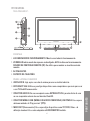
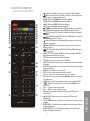
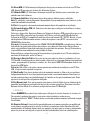
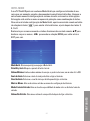
10. CONECTOR HDMI 1 Y 2 DE ENTRADA.
Se utiliza para ligar à um dispositivo3com saída
4
HDMI.
11.CONECTOR USB. Utiliza-se para ligar a um dispositivo externo e reproduzir arquivos
multimídia ou realizar gravações de TDT.
16
17
12
19
14
21
15
23
18
20
22
13
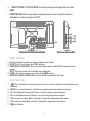
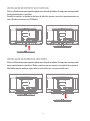
PAINEL TRASEIRO
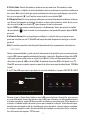
12.AV input. Composite video and stereo analogue audio input.
13.DC IN 12V. It is used to plug the 12V DC adapter.
14.COMPONENT VIDEO INPUT. Here you can connect devices with YPbPr component video
output.
NOTE: This input shares the L+R audio stereo AV input.
15.HDMI 2. It is used to connect to a device with HDMI output.
16.ANCHORS FOR WALL MOUNTING. Use the VESA standard 100 x 100 mm.
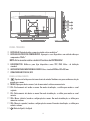
RIGHT SIDE PANEL
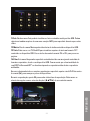
17.
:Press this button to select input source. It is also used to confirm the selection when you use
the menu.
18. MENU: Press to open the menus / exit the current menu and return to the previous menu.
19. CH+: Scroll upwards the menu. In TV mode, is used to switch to the next channel.
20.CH-: Scroll down the menu. In TV mode, is used to change the previous channel.
21. VOL+: increase the volume. Move to the right / change the configuration of the menus.
22.VOL-: lower the volume. Move to the left / change the configuration of the menus.
23. : On / off button.
114