1
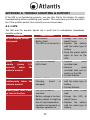
APPENDIX A: TROUBLE SHOOTING & SUPPORT
If the UPS is not functioning properly, you can refer first to this chapter for simple
troubleshooting before contacting your reseller. This could save you time and effort
but if the problem persist, then consult your service provider.
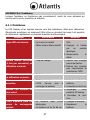
A.1.1 UPS
The LED and the acoustic signals are a profit tool to individualize immediately
possible problems
Situation
Check Items
Solution
No LED display on the
1. Low battery.
1. Charge the UPS at
front panel.
2. Battery fault.
least 8 hours.
3. The UPS is not turned on. 2. Replace the battery
with the same type of
battery.
3. Press the power switch
again to turn on the
UPS.
Alarm
continuously 1. The UPS is overload.
sounds
(every
1/2 2. UPS is fault
seconds)
when
the
mains is normal.
Alarm
sounds 1. Battery defect.
continuously when the 2. Charging
board
mains is normal.
damaged
1. Remove
some
uncritical load.
2. Remove
some
uncritical load and reswitch on the UPS.
3. Contact Atlantis.
1. Replace the battery
is
with the same type of
battery.
2. Contact Atlantis.
When power fails, back- 1. The UPS is close to
1. Remove some critical
up time is shorten.
overload.
load.
2. Battery voltage is too low. 2. Charge the UPS at
3. Battery defect. It might be
least 8 hours.
due to high temperature 3. Replace the battery
operation environment, or
with the same type of
improper operation to
battery.
33