1
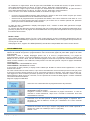
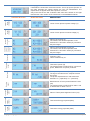
Relay status is shown on the display at page “OUT”, together with the title of the threshold quantity selected
in Th1 Src.
Closing of the relay also determines flashing of the associated led with the selected quantity (when
applicable), providing the selected measurement page is not the one associated with the led, in which case
the led light remains steady.
“S485” Models
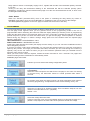
When Th1 Sel=OFF (threshold OFF), there is the option of controlling the relay directly by means of
MODBUS commands to open and close INSTANTLY, regardless of the Th1 Dly and Th1 DD settings.
“Src=REM”(REMOTE) appears on the OUT page to indicate remote access of the relay.
PROGRAMMING
To enter programming mode, press and hold the RIGHT-HAND button (for 4 seconds or more).
The first page which appears when you are granted access to the programming mode is the one of
programmable values. Releasing the button will make the display flashes (to indicate you are in programming
mode) and the pages begin to scroll through slowly (one every 4 seconds), indicating the title and value of the
present set-point. If you do not touch the button when you get the last page, normal operation is restored
without saving any changes. To make a change, simply press one of the buttons when the required page
appears, respectively:
LEFT-HAND button = DECREASES the value;
RIGHT-HAND button = INCREASES the value.
At that point (after pressing the button) the display remains steady so you can check the modification and the
value changes by one unit.
If you have to modify a value quite considerably, you can press and hold the button for more than 2 seconds to
speed up the process. The longer you hold down the button, the faster you can scroll through the numbers (4
speeds). They are all “roll” values so when you get to the maximum permitted value you restarted from the
minimum value, and vice versa.
When you have set the value as required, release the button and wait for over 4 seconds. The pages then
continue scrolling and the modification is automatically saved.
Modifiable pages then follow.
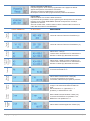
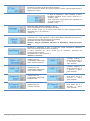
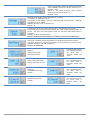
indicates you have entered the setting configuration phase.
A password is only requested if NewPassw is set at a value different from
0 (see below).
Select the correct sequence and wait for the next page. In the case of a missing
or incorrect entry, the instrument returns to normal operation after about 4
seconds.
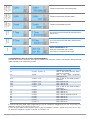
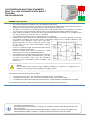
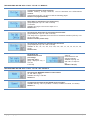
By pressing a key when this page is shown, all value parameters return equal to
the factory programming, except totalizer which will be resetting one by one.
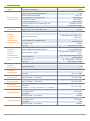
Select the CT value (/5) in Ampères. Range: from 5 to 6000 in steps of 5 or solo
100A for the model with mini C.T. (By7950).
Default = 100
Select the voltage full-scale value.
In direct connection case, it must be settable amoung 87 and 692 at steps of 1 V
(default = 400) equal to the rated value of the phase-to-neutral line voltage.
UG_X_06150_02_IE.docx
18/20