1
4
Instructions for Use
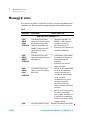
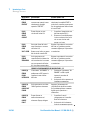
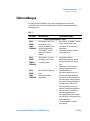
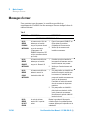
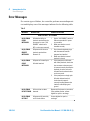
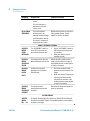
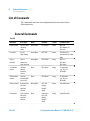
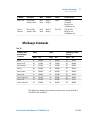
Error Messages
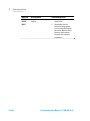
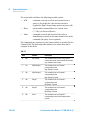
MESSAGE
VOLT/CURR
DESCRIPTION
CORRECTIVE ACTION
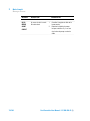
detected on the H.V.
output.
Agilent for repair or exchange.
This error indicates a
malfunction of the H.V.
control circuit.
HV(X) ERROR
ZERO MEAS
The Dual controller’s
microprocessor has
detected that both voltage
and current were missing
from the H.V. output that
should have been active.
Repeat the Dual power on procedure;
if the problem persists, contact
Agilent for repair or exchange.
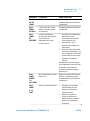
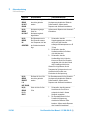
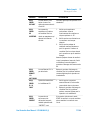
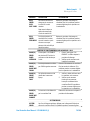
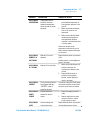
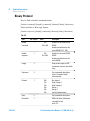
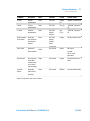
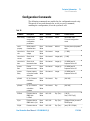
GAUGE 1 OR GAUGE 2 ERRORS
GAUGE(X)
ERROR
PANEL
INTERLOCK
The “HV ENABLE” switch is
set to OFF or the cover has
been removed from the unit.
GAUGE(X)
ERROR
GAUGE NOT
FOUND
The microprocessor does not
detect the Gauge control H/W.
GAUGE(X)
ERROR
GAUGE
FAULT
A malfunction has been
detected in the connected
Eyesys Gauge.
GAUGE(X)
ERROR
GAUGE NOT
CONNECT
The Gauge has been
disconnected from the Dual
controller.
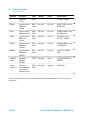
1.
Set the “HV ENABLE” switch to
ON and then repeat the power
on procedure.
2. Make sure that the cover is
installed correctly.
Switch the Dual controller power
supply unit off and then on again. If
the problem persists, contact Agilent
for repair or exchange.
1.
Check the connection cable
between the Dual controller and
Gauge.
2. Make sure that the Gauge works
correctly when disconnected
from the Dual controller. If the
problem persists contact Agilent
for repair or exchange.
Reconnect the Gauge and repeat the
power on procedure.
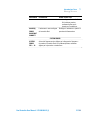
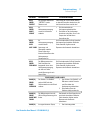
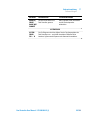
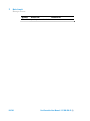
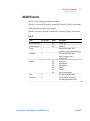
SYSTEM ERRORS
SYSTEM
ERROR
ER 1 ÷ 10
102/194
For Agilent Service diagnostic purpose only. Switch OFF and ON again
the power to the DUAL system, if the problem persists, contact Agilent
for repair or exchange
Dual Controller User Manual / 87-900-094-01 (I)