1
D811589 00100_01
INSTALLATION MANUAL
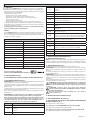
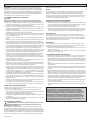
TABLE “A” - PARAMETERS MENU - (.0+)
Logic
min.
max.
Default
Personal
Definition
Description
Set the numerical value of the automatic closing time from 0 to 180 seconds.
RA?
0
180
40
Automatic Closing
Time
MNCLBCJ?W
RGKC
0,1
100
3
Opening delay time
Set the opening delay time for motor 1 relative to motor 2, between 0,1 and 100
seconds. Adjust the time lag so that the minimum distance between the leaves,
when both are moving, is 50 cm.
AJQBCJ?W
RGKC
0,1
100
3
Closing delay time
Impostare il ritardo di chiusura del motore 2 rispetto al motore 1, regolabile da
0,1 a 100 secondi. Adjust the time lag so that the minimum distance between
the leaves, when both are moving, is 50 cm.
AJC?PR
1
180
40
Time-to-clear traffic
light zone
Set the desired time-to-clear for the zone run through by traffic controlled by the
traffic light, in the range 1 to 180 seconds.
+MRRMPOSC
1%
99%
10%
Motor 1 torque
Set the numerical value of the motor 1 torque between 1% and 99%.
This parameter denotes sensitivity to the obstacle (couple=1 maximum sensitivity).
+MRRMPOSC
1%
99%
10%
Motor 2 torque
Set the numerical value of the motor 1 torque between 1% and 99%.
This parameter denotes sensitivity to the obstacle (couple=1 maximum sensitivity).
QJMTQNCCB
0%
99%
20%
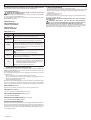
Slow-down speed
Imposta la percentuale della velocità di rallentamento tra 0% e 99% della velocità
normale.
N.B. il valore 0 non effettua il rallentamento dei motori.
BGQRQJMSB
1%
99%
20%
Slow-down space
Set the slow-down percentage between 1% and 99% with respect to the complete manoeuvre.
?NN?PX
1%
99%
50%
Pedestrian opening
Set the partial opening percentage for motor 2.
Zone
Set the zone number between a minimum value of 0 and a maximum value of
129.
The zone number allows you to create groups of automated devices, each of which
answers to the Zone Master. Each zone can have only one Master. The Master of
zone 0 also controls the Masters and Slaves of the other zones.
XMLC
0
129
0
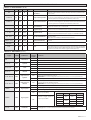
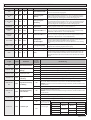
TABLE “B” - LOGIC MENU - (JMEGA)
Logic
Default
RA?
OFF
Automatic Closing
Time
'@JMNCL
OFF
Opening Impulse lock
G@J2!
OFF
Impulse lock TCA
G@JAJMQC
OFF
Impulse lock on closing
P?K@JMUAMN
P?K@JMUAAJ
QRCN
QRCN
OFF
OFF
OFF
OFF
Definition
Ram blow on opening
Ram blow in closing
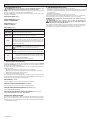
2-step, 4-step logic
Cross out
setting
used
Description
ON
Activates automatic closing
OFF
Excludes automatic closing
ON
The Start impulse has no effect during the opening phase.
OFF
The Start impulse becomes effective during the opening phase.
ON
The Start impulse has no effect during the TCA dwell period.
OFF
The Start impulse becomes effective during the TCA dwell period.
ON
The start impulse has no effect during the closing stage.
OFF
The start impulse is effective during the closing stage.
ON
It pushes for approx. 2 seconds in closing direction before opening. This allows the electric
lock to be released more easily.
IMPORTANT - When no adequate mechanical backstops are installed, do not use this function.
OFF
Excludes the ram blow in closing.
ON
Before closing completely, the gate pushes for approx. 2 seconds as it opens. This allows
the solenoid lock to be released more easily.
IMPORTANT - When no adequate mechanical backstops are installed, do not use this function.
OFF
Excludes the ram blow in closing.
ON
Enables 2-step logic (prevails over “3-step logic”).
OFF
Enables 4-step logic when the 3-step logic is set to OFF.
ON
Enables 2-step logic
(prevails over “3-step
logic”).
Enables 4-step logic
when the 3-step logic
is set to OFF.
3-step logic
OFF
A start impulse has the following effects:
closed
on closing
open
on opening
after stop
NPC?J?P+
OFF
Pre alarm
2 steps
3 steps
opens
opens
closes
4 steps
opens
stop
closes
closes
stop + TCA
stop + TCA
opens
opens
opens
ON
The blinker comes on about 3 seconds before the motor starts.
OFF
The blinker comes on at the same time as the motor starts.
LIBRA-C-LX - 17