1
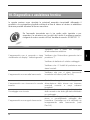
10. Diagnostics and technical assistance
In this section are described the main anomalies that may occur using this product
and the possible solutions to minimise or eliminate machine downtime.
If the problem you are encountering is not described here or should
the solution not solve it, please contact our after-sales service at:
339.02/95781111
Cause
Solution
Make sure the cable is connected to the
power supply.
The equipment does not turn on or the Make sure the main switch is in “I”
display shows the message "battery out position.
of order".
Verify the battery and the relative cable.
Make sure the 2 protection fuses are not
burnt.
The equipment
banknotes.
does
not
Make sure there are no banknotes jammed
accept in the validator (see Par.9.4)
Make sure there are no coins or foreign
The equipment does not accept the bodies stuck in the coin mechanism and
inserted coins.
its hopper.
Make sure some coins have not been
The count does not start.
already inserted and that the count has not
been already carried out.
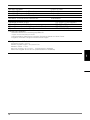
Make sure the Smart Payout hopper is full
and correctly connected to the machine.
The equipment does not dispense Make sure there are no jammed
banknotes.
banknotes. (see Par.9.4)
109