1
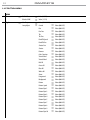
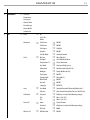
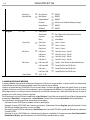
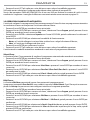
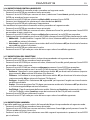
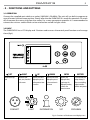
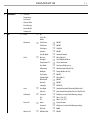
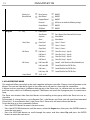
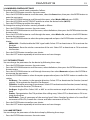
DIAMOND19 27 Calibration Select this function to calibrate and adjust the wheels of the effects in their correct positions: • Press the ENTER button to access the main menu. • Press the UP/DOWN button keys to scroll the menu, select the Set icon, then press the ENTER button to enter the next menu. • Press the UP/DOWN button to scroll through the menu, then select Calibration and press the ENTER button to enter the next menu. • Press the UP/DOWN button to scroll through the menu, then select Password and press ENTER to confirm. • Use the arrow keys to enter the password 050 and press ENTER to confirm. • Once you have entered your password, you can set the values for Pan, Tilt. Press the UP/DOWN button to scroll through the menu, select one of the functions mentioned above and press ENTER to confirm your choice. • Use the arrow buttons to enter the desired value, then press the ENTER button to confirm your choice. • Press the LEFT button repeatedly to exit the menu and save changes. Reload Default Select this function to reset the unit to factory settings: • Press the ENTER button to access the main menu. • Press the UP/DOWN button to scroll the menu, select the Set icon, then press the ENTER button to enter the next menu. • Press the UP/DOWN button to scroll through the menu, select Reload Default and press the ENTER button to enter the next menu. • Press the UP/DOWN button to select the favourite recovery mode Basic Reload/Program Reload/Private Reload/All Reload, then press the ENTER button to confirm. • Press the UP/DOWN button to select ON or OFF, then press the ENTER button to confirm. Temperature C/F Select this function to set the temperature unit measurement shown on the display: • Press the ENTER button to access the main menu. • Press the UP/DOWN to scroll through the menu, select the Set icon, then press the ENTER button to enter the next menu. • Press the UP/DOWN to scroll through the menu, select UI Set, and press the ENTER button to enter the next menu. • Press the UP/DOWN button to scroll through the menu, select Temperature C/F and press ENTER to confirm. • Press the UP/DOWN button to select the unit of measure Celsius/Fahrenheit and press the ENTER button to confirm your choice. • Press the LEFT button repeatedly to exit the menu and save changes.