1
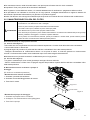
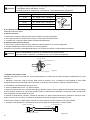
Manuale installatore
Installation manual
LINEA COMMERCIALE
Serie DCBV
MONO DC INVERTER
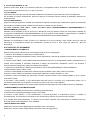
I prodotti elettrici ed elettronici di eventuale scarto dovranno essere disposti con i normali rifiuti domestici, ma
smaltiti a norma di legge RAEE in base alle direttive Europee 2002/96/CE e successive modifiche 2003/108/CE,
informandosi presso il Comune di residenza o presso il rivenditore nel caso in cui il prodotto venga sostituito
con uno analogo.
Possible wasted electrical or electronic devices/products should not be located together with normal
domestic waste, but disposed according to the current WEEE law in compliance with the European
Directive 2002/96/EC and following modifications 2003/108/EC. Please inform yourself at your local
ITALIANO
IT
INDICE
I. DESCRIZIONE ....................................................................................................... 4
II. INFORMAZIONI IMPORTANTI ............................................................................. 5
III. SEZIONE DI UTILIZZO ........................................................................................ 6
III. 1. FILOCOMANDO WRC08 ................................................................................................. 6
III. 2. COMPONENTI DELL’APPARECCHIO E RELATIVI NOMI.............................................. 10
III. 3. OPERAZIONI E PRESTAZIONI DEL CONDIZIONATORE.............................................. 10
III. 4. CONSIGLI PER IL FUNZIONAMENTO ECONOMICO .................................................... 10
III. 5. MANUTENZIONE E PULIZIA DEL FILTRO DELL’ARIA .................................................. 11
III. 6. I SEGUENTI SINTOMI NON SONO MALFUNZIONAMENTI ........................................... 13
III. 7. MALFUNZIONAMENTI..................................................................................................... 14
IV. SEZIONE DI INSTALLAZIONE ............................................................................ 16
IV. 1. PRECAUZIONI ................................................................................................................ 16
IV. 2. INFORMAZIONI PER L’INSTALLAZIONE ....................................................................... 17
IV. 3. ACCESSORI.................................................................................................................... 17
IV. 4. INSTALLAZIONE DELL’UNITÀ INTERNA ....................................................................... 18
IV. 5. PRESTAZIONE DEL VENTILATORE .............................................................................. 21
IV. 6. INSTALLAZIONE DELL’UNITÀ ESTERNA...................................................................... 23
IV. 7. INSTALLAZIONE DEL NUOVO CONDOTTO D’ARIA ..................................................... 28
IV. 8. CABLAGGIO ELETTRICO............................................................................................... 28
IV. 9. PROVA DI FUNZIONAMENTO........................................................................................ 33
3
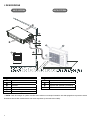
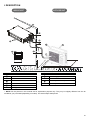
I. DESCRIZIONE
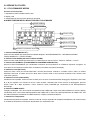
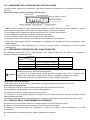
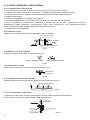
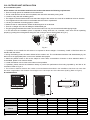
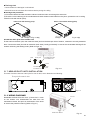
UNITÀ INTERNA
UNITÀ ESTERNA
2
4
3
6
1
9
8
7
5
10
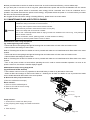
UNITA INTERNA
Uscita aria
Ingresso aria
Filtro aria
Scatola comp. Elettrici
Filocomando
Tubo di drenaggio
UNITA ETESRNA
Tubo di connessione
Ingresso aria
Ingresso aria (laterale e posteriore)
Uscita aria
NOTA: Tutte le immagini in questo manuale sono soltanto un esempio illustrativo utile alla spiegazione e possono essere
lievemente diverse dal condizionatore che avete acquistato (a seconda del modello).
4
II. INFORMAZIONI IMPORTANTI
Leggere interamente questo manuale per un corretto uso del condizionatore. L’uso scorretto della macchina potrebbe
causare danni o ferite.
!
AVVERTIMENTO
Il condizionatore deve essere installato rispettando le norme di cablaggio nazionale per evitare il rischio di pericolo di morte
Affidare al fornitore od a personale qualificato l’installazione.
All’utente non è permesso installare da solo le unità, per evitare perdite d’acqua, scosse elettriche, incendi ecc.
Contattare il fornitore od il centro assistenza più vicino per migliorare le prestazioni, per la riparazione o per la
manutenzione.
Per evitare prestazioni inadeguate o il rischio di perdite d’acqua, scosse elettriche o incendi.
Per evitare scosse elettriche, incendi o ferite, spegnere il condizionatore nel caso d’anomalie come odori strani o incendi e
contattare il fornitore od il centro assistenza il più vicino.
Non lasciare mai che l’unità ed il telecomando si bagnino.
Per evitare scosse elettriche o incendi.
Non stare a lungo a diretto contatto con l’aria fredda. Aria troppo fredda può causare danni alla salute.
Non usare spray infiammabili come spray per capelli o vernici vicino all’unità.
Ciò potrebbe causare incendi.
Mai mettere le mani nello sbocco d’uscita d’aria o sulle alette orizzontali quando queste sono in movimento.
Per evitare il rischio di catturarsi le mani o danneggiare il condizionatore.
!
PERICOLO
Non provare da soli a fornire assistenza alla macchina. Questa unità non ha elementi di utilizzo che devono essere aperti e la
rimozione del coperchio può esporvi a pericolosi voltaggi. Togliere l’alimentazione non basta ad evitare possibili shock elettrici.
!
PERICOLO
Mai mettere le mani o oggetti nello sbocco d'entrata e uscita dell'unità. Questa unità contiene una ventola che gira ad alta velocità. Un
contatto con essa può causare serie lesioni.
!
PERICOLO
Per evitare il rischio di serie scariche elettriche, mai spruzzare o versare acqua o altri liquidi nell'unità.
ATTENZIONE
Ventilare la stanza ogni tanto mentre il condizionatore è in funzione, specialmente se ci sono altre apparecchiature a gas in uso nella
stanza. Non seguire questi consigli può causare una perdita di ossigeno nella stanza.
!
!
ATTENZIONE
Per prevenire una scarica elettrica, spegnere la corrente o staccare la spina prima di iniziare ogni pulizia o altre manutenzioni. Seguire
le indicazioni per la pulizia nel manuale utente.
!
ATTENZIONE
Non usare liquidi o aerosol per la pulizia. Usare un panno soffice e asciutto per pulire l'unità. Per evitare scariche elettriche, mai
provare a pulire l'unità spruzzando acqua su di essa.
!
PRECAUZIONI
Non usare detergenti nell'unità. I solventi possono velocemente distruggere gli elementi dell'unità (vaschetta di scarico e gli elementi
dello scambiatore di calore).
NOTE
Per una prestazione migliore, utilizzare l'unità entro la temperatura operativa e le condizioni d'umidità indicate in questo manuale. Se
l'unità è utilizzata al di fuori di queste indicazioni, questo può causare malfunzionamenti dell'unità o gocciolamento dall'unità interna.
Mantenere la temperatura della stanza a un livello confortevole.
Pulizia del filtro dell'aria
Un filtro dell'aria intasato, riduce la potenza di raffreddamento. Pulirlo ogni due settimane.
Mai aprire porte e finestre oltre ciò che è necessario
Per mantenere fresca o calda l'aria nella stanza, mai aprire porte e finestre oltre ciò che è necessario.
Tende
In raffreddamento, chiudere le tende per evitare la luce solare diretta.
Rendere uniforme la circolazione dell'aria nella stanza
Sistemare la direzione del flusso d'aria per ogni circolazione d’aria della stanza.
5
III. SEZIONE DI UTILIZZO
III. 1. FILOCOMANDO WRC08
Funzioni del filocomando:
1. Impostazione della modalità tramite i tasti.
2. Display LCD
3. Visualizzazione funzione timer del tempo rimanente.
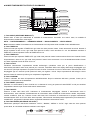
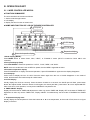
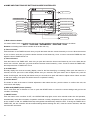
■ NOMI E FUNZIONI DEGLI INDICATORI DEL FILOCOMANDO
3
2
Velocità ventilatore
1
Indicatore modalità
Indicatore funzionamento economico
4
Indicatore LOCK
5
Indicatore CLOCK
6
Indicatore OFF/ON
7
Indicatore temperatura
1. Indicatore MODE (MODALITA’):
Premere il tasto MODE per selezionare la modalità adeguata: "RAFFREDDAMENTO", "DEUMIDIFICAZIONE",
"RISCALDAMENTO" o "VENTILAZIONE".
2. Indicatore FAN SPEED (VELOCITA’ VENTILATORE):
Premere il tasto FAN SPEED per selezionare una delle seguenti velocità "AUTO", "BASSA", "MEDIA", e "ALTA”.
3. Indicatore ECONOMICAL (FUNZIONAMENTO RISPARMIO ENERGETICO):
premere il tasto ECONOMICAL per visualizzare l’indicatore del funzionamento in modalità di risparmio energetico; se
viene premuto nuovamente lo stesso tasto, l’indicatore precedente scomparirà dal display.
4. Indicatore LOCK (BLOCCO):
Premere il tasto LOCK per bloccare/sbloccare i tasti del filocomando. Quando il comando LOCK è attivo, la relativa
indicazione è accesa: in questo caso l’unico tasto attivo è il tasto LOCK. In caso contrario la relativa icona e spenta e tutti
i tasti sono operativi.
5. Indicatore CLOCK (OROLOGIO):
Visualizza l’ora impostata. Premere il tasto CLOCK per 4 secondi: l’indicatore dell’ora lampeggerà, dopodichè usare i tasti
▲ e ▼ per regolare l’ora. Premere di nuovo il tasto CLOCK: l’indicatore dei minuti comincia a lampeggiare, premere
quindi il tasto ▲ o ▼per impostare i minuti. Premere il tasto CONFIRM per confermare la fine dell’impostazione
dell’orologio.
6. Indicatore TIMER ON/OFF:
Il display visualizzerà “ON” nel momento d’impostazione del TIMER ON o dopo la fine dell’impostazione, mentre il display
visualizzerà “OFF” nel momento dell’impostazione del TIMER OFF o dopo la fine dell’imposrtazione del TIMER OFF. Alla
fine dell’impostazione simultanea del TIMER ON/OFF, il display visualizzerà ON/OFF.
7. Indicatore di Temperatura:
Visualizza la temperatura impostata. Premere il tasto ▲ o ▼ per impostare la temperatura desiderata; nel funzionamento
in modalità di ventilazione l’indicatore di temperatura non visualizzerà nulla.
6
■ NOMI E FUNZIONI DEI TASTI DEL FILOCOMANDO
7
Tasto MODE
1
Tasto TIMER ON 2
ECONOMICAL
TIMER ON
M
Tasto TIMER OFF 3
TIMER OFF
Tasto CLOCK
MODE
FAN SPEED
4
Tasto CONFIRM 5
Tasto RESET
CONFIRM
SWING
TEMP
8
Tasto FAN SPEED
9
Tasto ADJUSTMENT
10 Tasto ADJUSTMENT
11
RE P LA CE LO CK
C O OL/
H E ATING
Tasto ON/OFF
Tasto SWING
12
Tasto ECONOMICAL
13
Tasto slezione COOL
ONLY / COLL and HEAT
6
14
Tasto LOCK
1) Tasto MODE (SELEZIONE MODALITA’):
Questo tasto è usato per selezionare la modalità di funzionamento. Premendo una volta il tasto, le modalità di
funzionamento cambieranno come segue:
AUTO → RAFFREDDAMENTO → DEUMIDIFICAZIONE → RISCALDAMENTO → VENTILAZIONE.
Nota: nessuna modalità di riscaldamento se il telecomando verrà impostato sulla modalità di solo raffreddamento.
2) Tasto TIMER ON:
Premere il tasto per regolare il TIMER ON: ogni volta che viene premuto il tasto, l’orario aumenta di 30 minuti. Quando il
tempo impostato è oltre 10 ore, ogni volta viene premuto il tasto, l’orario aumenta di 1 ora. Se desiderate annullare il
TIMER ON, si deve impostare l’orario del TIMER ON su 0.0.
3) Tasto TIMER OFF:
Premere il tasto per impostare TIMER OFF: ogni volta viene premuto il tasto l’orario aumenta di 30 minuti. Quando l’orario
d’impostazione è oltre 10 ore, ogni volta viene premuto il tasto l’orario aumenta di 1 ora. Se desiderate annullare il timer
off, allora impostate l’orario del timer off su 0.0.
4) Tasto CLOCK:
Visualizza normalmente l’impostazione attuale dell'orologio (visualizza 12:00 per la prima elettrificazione o
azzeramento).Quando il tasto viene premuto per 4 secondi, l’indicatore dell’ora sul display dell'orologio lampeggerà ogni
0.5 secondi: quindi per impostare l’ora premere il tasto CLOCK. Premendo di nuovo lo stesso tasto, l’indicatore dei minuti
lampeggerà ogni 0.5 secondi: quindi premere il tasto per regolare i minuti. Dopo l’impostazione dell'orologio si deve
premere il tasto di conferma (Confirm) per completare la regolazione.
5) Tasto CONFIRM:
Il tasto è utilizzato allo stato d’impostazione dell'OROLOGIO. Dopo la selezione dell’orario, premere il tasto per la
conferma, l'ora attuale verrà visualizzata.
6) Tasto RESET (nascosto):
Utilizzare uno stuzzicadenti (o altro di simile con un diametro di 1mm) per premere il tasto RESET e cioè per annullare
l’impostazione attuale e per entrare nello stato di azzeramento.
7) Tasto ON/OFF:
Premere il tasto nello stato OFF: l’indicatore di funzionamento lampeggerà. Quando il telecomando entra in
funzionamento, esso trasmette simultaneamente le informazioni della modalità di funzionamento attuale, temperatura,
velocità ventilatore, timer ecc. Premere il tasto nello stato ON: l’indicatore di funzionamento si spegne trasmettendo
simultaneamente OFF. Se il Timer ON è stato impostato, il filocomando annullerà questa impostazione prima d’entrare in
modalità OFF, spegnendo l’indicatore relativo, dopodichè trasmette le informazioni di OFF.
8) Tasto FAN SPEED (SELEZIONE VELOCITA’):
Selezionare qualunque velocità del ventilatore "'AUTO", "BASSA", "MEDIA" o "ALTA". Ogni volta che viene premuto
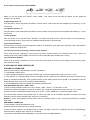
questo tasto, la velocità del ventilatore cambierà come segue:
7
9, 10) Tasti ADJUSTMENT ▲ e▼:
Premere questo tasto ▲(▼) per aumentare (diminuire) la temperatura interna. Premendo continuamente il tasto, la
temperatura aumenta (diminuisce) di 1°C per 0.5 secondi.
11) Tasto SWING:
Premendo questo tasto per la prima volta nella modalità di funzionamento, esso inizierà la funzione d'oscillazione.
Per annullare la funzione d'oscillazione, premere il tasto per la seconda volta (la funzione è disponibile, abbinata con
l'unità implicata).
12) Tasto ECONOMICAL:
Premere il tasto per regolare la modalità di funzionamento risparmio energetico del condizionatore, premere nuovamente
per annullare la modalità. Questa modalità di funzionamento è adatto al tempo di sonno.
13) Tasto selezione COOL ONLY / COOL and HEAT (SOLO RAFFREDDAMENTO/ RAFFREDDAMENTO e
RISCALDAMENTO) (nascosto):
Utilizzare uno stuzzicadenti (o altro di simile con un diametro di 1mm) per premere il tasto per commutare le modalità. Se
è impostata la modalità SOLO RAFFREDDAMENTO e se viene premuto il tasto MODE, il funzionamento in modalità di
riscaldamento si annulla. L’impostazione di deafult è RAFFREDDANTO ed il RISCALDAMENTO.
14) Tasto LOCK (nascosto):
Utilizzare uno stuzzicadenti (o altro di simile con un diametro di 1mm) per premere il tasto LOCK e bloccare i tasti del
filocomando e l’impostazione attuale del condizionare. Premere di nuovo il tasto LOCK per sbloccare i tasti del
filocomando.
■ UTILIZZO DEL FILOCOMANDO
- FUNZIONAMENTO AUTOMATICO
Quando si da tensione al filocomando il LED OPERATION comincia a lampeggiare.
1. Premere il tasto MODE per selezionare la modalità AUTO
2. Impostare la temperatura desiderata usando i tasti di regolazione: l’intervallo di temperatura ammesso è compreso tra
17°C e 30°C.
3. Premere il tasto ON/OF: il LED OPERATION dell’unità interna s’illumina, il condizionatore partirà in modalità AUTO, la
velocità viene impostata in automatico dopodichè il display del filocomando visualizzerà “AUTO”. Per arrestare il
funzionamento del condizionare, premere lo stesso tasto ON/OFF.
4. Il tasto ECO è disponibile in modalità di funzionamento AUTO, RAFFREDDAMENTO / RISCALDAMENTO
/ VENTILAZIONE (COOL / HEAT / FAN)
1) Premere il tasto MODE per selezionare una delle seguenti modalità: COOL, DRY, HEAT e FAN ONLY.
2) Premere il tasto TEMP. per impostare la temperatura desiderata in questo intervallo: 17~30°C.
3) Premere il tasto FAN SPEED per selezionare una delle seguenti velocità: AUTO, BASSA, MEDIA o ALTA. (AUTO,
LOW, MED o HIGH)
4) Premendo il tasto ON/OFF, il LED OPERATION dell’unità interna si accende ed il condizionatore partirà con le
impostazioni selezionate. Per arrestare il funzionamento premere di nuovo il tasto ON/OFF.
Nota: In modalità di ventilazione non sarà possibile impostare la temperatura ed i tasti TEMP ed ECO sono disabilitati.
- FUNZIONAMENTO DI DEUMIDIFICAZIONE
1) Premere il tasto MODE per selazionare la modalità di deumidificazione.
2) Selezionare la temperatura desiderata usando i tasti TEMP.
3) Premere il tasto ON/OFF, il LED OPERATION si accende dopodichè il condizionatore partirà in modalità di
deumidificazione. Per arrestare il funzionamento del condizionatore premere nuovamente il tasto ON/OFF.
4) In modalità DRY (deumidificazione), la velocità non può essere cambiata: essa sarà sempre in modalità AUTO ed i
tasti FAN SPEED ed ECONOMICAL sono disabilitati.
- IMPOSTAZIONE DEL TIMER
TIMER ON: premere il tasto TIMER ON per impostare l’orario di accensione.
TIMER OFF: premere il tasto TIMER OFF per impostare l’orario di spegnimento.
8
Impostazione della funzione TIMER ON
1) Premere il tasto TIMER ON: il filocomando visualizzerà sul display SETTING e gli indicatori HOUR e ON verranno
visualizzati nell’area d’impostazione del timer mostrando che il filocomando è pronto per impostare la funzione TIMER
ON.
2) Premere nuovamente il tasto TIMER ON per regolare l’orario desiderato di accesione usando i tasti ▲ e ▼ della
funzione TIMER ON.
3) Premere continuamente il tasto ▲, per aumentare l’orario del timer di 0.5 ore alla volta fino all’raggiugemento di 10 ore,
dopodichè l’orario comincia ad aumentare di 1 ora alla volta.
4) Dopo 0.5 secondi dalla fine dell’impostazione TIMER ON, il filocomando invia al condizionatore le informazioni di
impostazione.
Impostazione della funzione TIMER OFF
1) Premere il tasto TIMER OFF, il display del filocomando visualizzerà la funzione SETTING e anche le icone HOUR e
OFF veranno visualizzate nell’area d’impostazione del timer mostrando che il filocomando è pronto per entrare
nell’impostazione della funzione TIMER OFF.
2) Premere nuovamente il tasto TIMER OFF per regolare l’orario desiderato di spegnimento del condizionatore.
3) Premere continuamente il tasto ▲, per aumentare l’orario del timer di 0.5 ore alla volta fino all’raggiugemento di 10 ore,
dopodichè l’orario continua ad aumentare con 1 ora alla volta.
4) Dopo 0.5 secondi dalla fine dell’impostazione TIMER OFF, il filocomando invia al condizionatore le informazioni
impostate di spegnimento del condizionatore.
Impostazione simultanea delle funzioni TIMER ON e TIMER OFF
1) Riferirsi al punto 1 ed al punto 2 dell’impostazione TIMER ON.
2) Riferirsi al punto 1 ed al punto 2 dell’impostazione TIMER OFF.
3) Nell’impostazione simultanea delle funzioni TIMER ON e TIMER OFF, se gli orari d’impostazione del TIMER ON e
TIMER OFF sono superiore a 10 ore, l’orario del TIMER OFF è quindi sempre inferiore di 1 ora da qualla del TIMER ON.
4) Dopo 0.5 secondi dalla fine dell’impostazione, il filocomando invia le informazioni del TIMER ONF, confermando la fine
delle impostazioni TIMER OFF e TIMER ON.
Modificazione del Timer
Per modificare l’orario del TIMER ON o TIMER OFF, premere il tasto TIME dopodichè impostare l’orario del TIMER ON e
del TIMER OFF su 0:0 per cancellare il TIMER ON ed il TIMER OFF.
Nota: l’orario del TIMER ON è relativo all’orario standard dell’orologio del filocomando. Dopo l’impostazione del TIMER
ON o TIMER OFF, l’impostazione dell’orologio non può essere modificata.
9
III. 2. COMPONENTI DELL’APPARECCHIO E RELATIVI NOMI
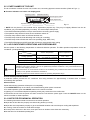
Il condizionatore è composto d’un unità interna, unità esterna, tubazioni di collegamento e di un telecomando. (Riferirsi
alla Fig.3-1)
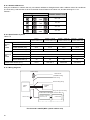
■ Descrizione degli indicatori sul display dell’unità interna
Tasto manuale
Indicatore PRE-DEF
Ricevitore segnale infrarosso
Display tubo digitale
Indicatore operation
Indicatore timer
Indicatore allarme
Fig.3-1
NOTA: Tutte le immagini in questo manuale sono soltanto un esempio illustrativo utile alla spiegazione e possono
essere lievemente diverse dal condizionatore che avete acquistato (a seconda del modello).
• Il LED OPERATION lampeggia una volta per secondo dopo aver connesso l’alimentazione.
• Il LED OPERATION rimarrà spento quando il condizionatore è spento.
• Il LED del TIMER rimarrà acceso quando il Timer On/Off viene impostato.
• Il LED DEF rimarrà acceso durante il funzionamento di sbrinamento ed il raffreddamento.
• Il LED DEF rimarrà spento durante il funzionamento di ventilazione per qualsiasi velocità di funzionamento (ALTA,
MEDIA, BASSA).
• Il LED OPERATION e DEF lampeggiano per 5 volte per secondo durante il funzionamento in fase di massimo
raffreddamento.
III. 3. OPERAZIONI E PRESTAZIONI DEL CONDITIONATORE
Per un'adeguata prestazione e per un funzionamento sicuro, utilizzare l'unità entro le condizioni di temperatura di
operazione indicate nella tabella qui sotto:
Temperatura
Modalità
Raffreddamento
Riscaldamento
Deumidificazione
!
Temperatura esterna
0°C ~ 43°C (3500 W)
-15°C ~ 24°C (5300 W –17600 W)
-15°C ~ 24°C
18°C ~ 43°C
Temperatura interna
17°C ~ 30°C
0°C ~ 30°C
17°C ~ 32°C
1. Se l'unità è utilizzata al di fuori di queste condizioni di temperatura, si possono verificare
malfunzionamenti o gocciolamento dall'unità interna.
2. Il fenomeno è normale perchè, quando all’interno l‘umidità è alta, l’aria si condensa sulla
CAUTELA
superficie del condizionatore formando acqua, perciò è consigliabile chiudere porte e finestre.
3. La prestazione ottimale sarà raggiunta dentro questi intervalli di temperatura
■ Proprietà tre minuti di protezione
L’unità partirà dopo 3 minuti di ritardo fra due ON/OFF continui per protezione del compressore al riavvio.
■ Interruzione di alimentazione
Una possibile interruzione di corrente causerà l’arresto totale del funzionamento dell’unità.
● Il LED OPERATION lampeggerà dopo il ripristino dell’alimentazione.
● Premere il tasto ON/OFF sul telecomando per avviare l’unità.
● Le radiazioni o le onde elettromagnetiche provenienti da vicine cabine di telefonia senza filo potrebbero causare
malfunzionamenti dell’unità.
● Scollegare l’alimentazione e poi ricollegarla di nuovo. Premere il tasto ON/OFF sul telecomando per avviare l’unità.
III. 4. CONSIGLI PER IL FUNZIONAMENTO ECONOMICO
Per garantire un funzionamento economico si consiglia di seguire le istruzioni indicate qui sotto:
■ Regolare correttamente la direzione del flusso d’aria per evitare danni alla salute.
■ Impostare la temperatura interna per raggiungere il comfort e per evitare il super raffreddamento ed il super
riscaldamento.
■ In raffreddamento, chiudere le tende per evitare la radiazione solare diretta.
10
■ Per mantenere fresca o calda l’aria nella stanza, mai aprire porte e finestre oltre ciò che è necessario.
■ Impostare il Timer per il periodo di funzionamento desiderato.
■ Se l’ingresso o l’uscita dell'aria è ostruito, ciò causerà abbassamento di rendimento o spegnimento della macchina.
■ Se prevedete di non utilizzare la macchina per un lungo periodo, scollegate l'alimentazione e togliete le batterie dal
telecomando. Ripristinate l'alimentazione per garantire una partenza regolare.
■ Pulite i filtri almeno una volta ogni due settimane poiché quando sono intasati riducono l'efficienza del condizionatore.
III. 5. MANUTENZIONE E PULIZIA DEL FILTRO
- Non procedere con la pulizia del condizionatore se prima non è stata disinserita la spina di alimentazione.
- Controllare se i cavi elettrici sono rotti o scollegati.
- Usare un panno asciutto per pulire l'unità interna ed il telecomando.
- Se l'unità è molto sporca, utilizzare un panno umido per pulirla.
!
AVVERTENZA
- Non utilizzare mai un panno umido per pulire il telecomando.
- Non usare mai per la pulizia un panno trattato chimicamente e non lasciare mai materiali simili per lungo tempo
sull'unità; potrebbero danneggiare o scolorire la superficie dell'unità.
- Per la pulizia, non usare benzene, diluente, polvere per lucidatura o solventi simili; queste sostanze possono
causare la rottura o la deformazione della superficie di plastica.
■ Manutenzione dopo un lungo periodo di arresto
(es. all'inizio della stagione)
- Rimuovere tutto ciò che potrebbe bloccare le bocchette d’aspirazione e d’uscita d’aria delle unità interna ed esterna.
- Pulire l’unità interna e il filtro d’aria.
Si prega di seguire la procedura di pulizia del filtro dell'aria e reinstallare il filtro nella stessa posizione.
- Collegare l’alimentazione al condizionatore almeno 12 ore prima di usarlo, in modo da garantire un funzionamento
normale. L’indicatore telecomando verrà visualizzato dopo che è stata collegata l'alimentazione.
■ Manutenzione se si pensa di arrestare il condizionatore per un lungo periodo.
(es. alla fine della stagione)
- Far girare il ventilatore per circa mezza giornata per asciugare l'interno dell'unità
- Pulire il condizionatore e il filtro d’aria. Si prega di seguire alla procedura di pulizia del filtro dell'aria e reinstallare il filtro
nella stessa posizione
■. Manutenzione motore ventilatore e pompa di
drenaggio
(Es: Unità con ventilazione posteriore)
- Manutenzione del motore ventilatore:
1. Smontare il pannello del ventilatore.
2. Smontare la meta dell’alloggiamento del motore.
3. Tirare fuori il motore.
Motore
Alloggiamento
Pannello ventilato
Fig. 3-2
- Manutenzione pompa di drenaggio:
1. Smontare la pompa di scarico condensa.
2. Scollegare i cavi d’alimentazione e del galleggiante.
3. Tirare fuori la pompa.
Pompa
Fig. 3-3
11
■ Pulizia del filtro dell’aria
- Il filtro dell’aria può prevenire l’ingresso di polvere o altre particelle. In caso di ostruzione del filtro, l’efficienza di
funzionamento del condizionatore d’aria può diminuire di molto. Perciò il filtro deve essere pulito ogni due settimane
durante periodi di lungo utilizzo.
- Se il condizionatore d’aria è collocato in un posto polveroso, bisogna aumentare la frequenza di pulizia del filtro dell’aria.
- Se è troppo difficile pulire la polvere accumulatasi, si raccomanda di sostituire il filtro con uno nuovo (il filtro d’aria
sostituibile è un accessorio opzionale).
■ Se l’unità ha una ventilazione posteriore, rimuovere il filtro togliendo le due viti di fissaggio e quindi tiratelo dall’unità
verso il basso come indicato nello schema seguente.
Fig. 3-4
■ Se l'unità ha una ventilazione inferiore, tirare il filtro verso la direzione della freccia indica nella figura seguente,
spengendolo leggermente dal suo posto di fissaggio.
Fig. 3-5
- Usare aspirapolvere o acqua per pulire il filtro; se la polvere è in eccesso, usare una spazzola morbida e un detergente
leggero; lasciare poi asciugare in un posto fresco.
- Il lato di ingresso aria deve essere posizionato verso l'alto quando si usa l'aspirapolvere (riferirsi alla Fig. 3-6) mentre
deve essere posizionato verso il basso se si usa l’acqua per il filtro. (Riferirsi alla Fig. 3-7)
Fig. 3-6
Fig. 3-7
- Re-installare correttamente il filtro e chiudere il pannello frontale.
Il funzionamento senza filtri d’aria potrebbe causare malfunzionamento e accumulo della polvere all’interno dell’unità.
!
12
CAUTELA Non far asciugare il filtro dell’aria sotto la luce solare diretta o vicino al fuoco.
III. 6. I SEGUENTI SINTOMI NON SONO MALFUNZIONAMENTI
Sintomo 1: Il condizionatore non parte
■ Il condizionatore non parte subito quando viene premuto il tasto ON/OFF sul telecomando. Se il LED OPERATION si
illumina, ciò significa che il sistema è normale. La funzione di protezione compressore evita che il condizionatore si riavvia
per almeno 3 minuti se viene acceso subito dopo lo spegnimento.
■ Se il LED OPERATION e l’indicatore PRE-DEF si accendono, ciò significa che la modalità di riscaldamento è stata
selezionata. L’unità non parte subito dopo l’accensione perché la funzione di protezione “anti aria fredda” è attiva.
Sintomo 2: Commutazione in modalità di ventilazione durante il funzionamento in modalità di raffreddamento
■ Per prevenire la formazione della brina sull’evaporatore, il sistema cambierà automaticamente il funzionamento in
ventilazione, dopodichè ripristina la modalità di raffreddamento.
■ Quando la temperatura interna cala sotto la temperatura d’impostazione, il compressore si ferma e l’unità interna passa
alla modalità di ventilazione.
Sintomo 3: Nebbia bianca proveniente dall’unità interna
Sintomo 3.1: Unità interna
Quando il tasso d’umidità ambiente è sufficientemente alto durante il funzionamento in modalità di raffreddamento e se
l’interno dell’unità interna è molto sporco ciò causerà una distribuzione non uniforme della temperatura ambiente. Quindi è
necessario contattare il fornitore o il centro assistenza abilitato per pulire l’interno dell’unità interna.
Sintomo 3.2: Unità interna, unità esterna
■ Alla fine del funzionamento di sbrinamento, l’unità passa alla modalità di riscaldamento, dopodichè la sbrina generata
viene scaricata.
Sintomo 4: Rumori dal condizionatore nel funzionamento di raffreddamento
Sintomi 4.1: Unità interna
■ Un rumore continuo e basso tipo “ss” potrebbe essere udito quando il condizionatore è in modalità raffreddamento o
all’arresto dell’unità. Ciò potrebbe avvenire quando la pompa di scarico condensa è in funzione.
■ Un basso rumore potrebbe essere udito: cioè dovuto alla dilatazione della plastica causata dalla variazione della
temperatura.
Sintomo 4.2: Unità interna, unità esterna
■ Un rumore continuo e basso tipo “sibilo” potrebbe essere sentito quando il condizionatore è in operazione. Ciò è
causato dal flusso refrigerante.
■ Un sibilo basso potrebbe essere udito all’avvio o subito dopo l’arresto dell’unità: ciò è dovuto alla variazione o all’arresto
del flusso refrigerante.
Sintomo 4.3: Unità esterna
■ Quando il rumore di funzionamento cambia il tono significa che l’unità cambia frequenza.
Sintomo 5: Polvere proveniente dall’unità interna
■ Quando l’unità è usata per la prima volta dopo un lungo periodo di arresto, ciò significa che la polvere è penetrata
dentro l’unità.
Sintomo 6: L’unità emette odori
L’unità può assorbire gli odori della stanza, quali quelli di apparecchiature, sigarette o simili ed emetterli di nuovo
nell’ambiente.
Sintomo 7: Il ventilatore dell’unità esterna non gira
■ Durante il funzionamento, la velocità del ventilatore è controllata per ottimizzare il funzionamento stesso
dell’apparecchio.
13
III. 7. MALFUNZIONAMENTI
III. 7.1 Errori e cause relativi al condizionatore
Arrestare il funzionamento, staccare l’alimentazione e poi contattare il fornitore od il centro assistenza abilitato se si verifica un
malfunzionamento del tipo qui sotto elencato:
L’indicatore LED OPERATION lampeggia rapidamente (2 volte per secondo); dopo aver scollegato e
ricollegato l’unità, la situazione non cambia.
Fusibile o interruttore protezione circuito intervengono frequentemente.
MALFUNZIONAMENTI
Oggetti o sostanze strani nell’unità.
Telecomando disabilitato o errore interruttore.
Altri condizioni inconsuete.
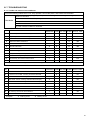
Tabella 7-1: per il modello 3500 W
No
MALFUNZIONAMENTI & PROTEZIONI
LED1
LED2
LED3
LED4
OPERATION TIMER DEF.FAN ALARM
DISPLAY
DIGITAL TUBE
1
Errore sensore temperatura interna
E0
2
Errore sensore temperatura evaporatore
E1
3
Errore comunicazione unità interna – esterna
E2
4
Errore allarme livello acqua
E3
5
Errore EPPROM
E4
6
Errore modulo
E5
7
Errore sensore temperatura esterna
E6
8
Protezione unità esterna da alto voltaggio.
P0
9
Protezione compressore da alta temperatura.
P1
10
Protezione unità esterna da alta intensità.
P2
11
Spegnimento unità con il telecomando
CP
12
Evitare aria fredda e sbrinamento
Spento
Lampeggia a 5Hz
Lampeggia a 1Hz
Tabella 7-2 per i modelli 5300 W - 17600 W
No
LED1
LED2
LED3
LED4
OPERATION TIMER DEF.FAN ALARM
MALFUNZIONAMENTI & PROTEZIONI
DISPLAY
DIGITAL TUBE
1
Conflitto modalità di funzionamento
E0
2
Errore comunicazione unità interna – esterna
E1
3
Errore sensore temperature interna
E2
4
Errore sensore temperature evaporatore (T2)
E3
5
Errore sensore temperature evaporatore (T2B)
E4
6
Errore EPPROM
E7
7
Errore allarme livello acqua
EE
8
Errore unità esterna
Ed
9
Spegnimento unità con il telecomando
CP
10
Evitare aria fredda e sbrinamento
Spento
14
Lampeggia a 5Hz
Lampeggia a 1Hz
Arrestare il funzionamento, staccare l’alimentazione e poi contattare il fornitore od il centro assistenza abilitato se si verifica un
malfunzionamento del tipo qui sotto elencato:
Errore
L’unità non funziona.
Cause possibili
Interruzione alimentazione.
Soluzioni
Attendere il ripristino dell’alimentazione.
Interruttore alimentazione spento.
Accendere l’alimentazione.
Il fusibile di potenza è bruciato.
Sostituire il fusibile.
Batterie del telecomando scariche.
Sostituire le batterie.
L’orario programmato per l’accensione non è giunto. Attendere.
Impostare correttamente la temperatura.
Il flusso aria è normale ma non Impostazione scorretta della temperatura.
raffredda (riscalda) bene.
Protezione dei 3 minuti del compressore attiva.
Attendere.
Quantità refrigerante insufficiente o in eccesso.
Aria nel circuito o quantità refrigerante insufficiente.
Le unità si avviano o si
Compressore difettoso.
fermano frequentemente.
Voltaggio troppo alto o troppo basso.
L’unità non raffredda (riscalda).
Svuotare il circuito e ricaricare
refrigerante di nuovo.
Riparare o sostituire il compressore.
il
Installare un manostato.
Circuito refrigerante ostruito.
Cercare la causa e aggiustare.
Impostazione scorretta della temperatura.
Impostare correttamente la temperatura.
Controllare l’ingresso o l’uscita dell’unità esterna o Rimuovere la sporcizia per una libera
interna ostruiti da sporco.
circolazione di aria.
Controllare se il filtro è sporco.
Pulire il filtro dell’aria.
Se le porte o le finestre sono aperte.
Chiudere le porte o le finestre.
III. 7.2. Errori e cause possibili relativi al telecomando
Prima di chiamare assistenza, si prega di verificare i seguenti punti. (vedere la tabella sotto)
Errore
Causa
Non si riesce a cambiare la
velocità del ventilatore.
Quando è selezionata la modalità AUTO, il
condizionatore seleziona in automatico la velocità
di ventilazione.
Quando è selezionata la modalità DRY, il
condizionatore seleziona automaticamente la
velocità di ventilazione. La velocità del ventilatore
può essere selezionata durante la modalità di
RAFFREDDAMENTO, SOLO VENTILAZIONE e
RISCALDAMENTO.
Soluzioni
Controllare che la modalità indicate sul
display sia AUTO.
Controllare che la modalità indicate sul
display sia DRY.
- Il segnale del telecomando
non viene trasmesso nemmeno
quando il pulsante ON/OFF è
premuto.
- L’indicatore TEMP. non viene
visualizzato
L’indicazione
sul
display
scompare dopo un periodo di
tempo.
Controllare che le batterie del telecomando non
siano scariche.
Il segnale del telecomando non viene
trasmesso, perché manca l’alimentazione
elettrica.
La temperatura non può essere impostata durante
il funzionamento di SOLO VENTILAZIONE.
Controllare che la modalità indicata sul
display sia SOLO VENTILAZIONE.
Il condizionatore d’aria si ferma perché il tempo
programmato è terminato.
Controllare che il funzionamento del timer
sia giunto al termine quando OFF TIMER
compare sul display.
Il LED TIMER ON si spegne
dopo un certo periodo di
tempo.
Quando si raggiunge l’ora impostata del timer per
l’avviamento del condizionatore, esso si avvierà
automaticamente e l’indicatore appropriato si
spegnerà.
Controllare che il funzionamento del timer
sia cominciato quando il LED TIMER ON
si visualizza sul display.
Il
segnalatore
acustico
dell’unità interna non suona
anche quando il pulsante ON /
OFF viene premuto.
Posizionare direttamente il trasmettitore del
segnale del telecomando verso il ricevitore a
infrarossi dell'unità interna, quindi premere di
nuovo il tasto ON/OFF due volte.
Controllare che il trasmettitore del segnale
del telecomando sia indirizzato verso il
ricevitore a infrarossi dell’unità interna
prima di premere il tasto ON/OFF.
15
IV. SEZIONE DI INSTALLAZIONE
IV. 1. PRECAUZIONI
■ Seguire le normative locali, nazionali ed internazionali vigenti.
■ Per una corretta installazione leggere con attenzione questo manuale.
■ Le seguenti precauzioni sono importanti per la sicurezza: è necessario ricordarle.
■ Conservare in un posto sicuro questo manuale per future/ulteriori consultazioni.
!
!
AVVERTIMENTO
Questo simbolo indica pericolo di morte causato da uno scorretto utilizzo.
PRECAUZIONE
Questo simbolo indica il pericolo gravi ferite o di danno ad oggetti inseguito ad un utilizzo scorretto.
L’installatore potrà illustrare all’utente il corretto uso e manutenzione del condizionatore, rimandandolo comunque
all’attenta consultazione del manuale utente/installazione del condizionatore.
!
AVVERTIMENTO
Non installare l’unità da soli.
Un’installazione errata può provocare ferite dovute ad incendi, folgorazioni, cadute dell'unità o perdite d’acqua. Contattare
il fornitore dal quale avete acquistato l'unità o un’ installatore speciale.
L’installazione deve essere conforme alle istruzioni indicate.
L'installazione errata può provocare ferite dovute ad incendi, folgorazioni, cadute dell'unità o perdite d’acqua.
Installare saldamente l'unità su di un supporto che può sopportarne il peso.
Installare su un supporto debole può provocarne il cedimento e quindi ferite dovute alla caduta dell’unità.
Realizzare i collegamenti elettrici rispettando le normative nazionali e gli schemi di cablaggio elettrico di questo
manuale ed assicurarsi di utilizzare un circuito elettrico individuale.
Se la capacità del circuito di alimentazione è insufficiente, potrebbero manifestarsi incendi o scariche elettriche.
Usare i cavi specifici per i cablaggi elettrici ed eseguire i collegamenti correttamente.
Collegamenti errati possono causare incendi.
Controllare che non ci siano perdite di gas refrigerante dopo l’installazione
Assicurarsi di usare le parti fornite e specificate durante l’installazione.
L'uso di pezzi difettosi può provocare ferite dovute ad incendi, folgorazioni ecc.
Fissare saldamente il coperchio che isola la parte elettrica delle unità.
Se le coperture elettriche delle unità non sono fissate saldamente, potrebbero manifestarsi incendi o scariche elettriche
causate da polvere, acqua ecc.
!
ATTENZIONE
Non installare l'unità in luoghi dove possano propagarsi gas infiammabili.
L’unità potrebbe incendiare il gas propagatosi e provocare un’esplosione.
Le unità interne dovrebbero essere installate:
In un luogo dove c’è sufficiente spazio per l’installazione e la manutenzione.
■ In un luogo in cui il flusso d’aria possa raggiungere tutti gli angoli.
■ In un luogo dove le tubazioni e lo scarico condensa possano essere raggiunti facilmente.
■ In un luogo dove non vi siano perdite di gas infiammabili o gas nocivi/corrosivi.
■ In un luogo dove non vi sia l’effetto di elevate tensioni e alte frequenze.
■ In un luogo in cui non vi siano rumore o l’effetto di vibrazioni.
!
CAUTELE
Il posizionamento nei seguenti luoghi può causare malfunzionamenti (se non si può evitare, contattare il fornitore
locale).
■ Luoghi con presenza di olio minerale,
■ Luoghi in cui l’aria possa essere ricca di salsedine, come nelle vicinanze di spiagge.
■ Luoghi con presenza di zolfo.
■ Luoghi in cui ci sono forti variazioni della tensione.
■ Luoghi in cui vi può essere gas naturale-etano, come le cucine.
16
■ Luoghi in cui ci siano fenomeni elettromagnetici legati ad alte frequenze.
■ Luoghi in cui vi siano gas o sostanze infiammabili.
■ Luoghi in cui vi sono acidi o gas alcalini.
■ Altri luoghi per applicazioni speciali.
IV. 2. INFORMAZIONI PER L’INSTALLAZIONE
■ Per una corretta installazione è consigliato leggere questo manuale prima di procedere con l’installazione.
■ Il condizionatore deve essere installato da personale qualificato.
■ Quando si installa l’unità interna o le sue tubazioni, seguire le istruzione di questo manuale.
■ Se il condizionatore è in contatto con parti metalliche dell’edificio, si deve provvedere ad isolare l’unità secondo le
norme vigenti.
■ Attaccare l’alimentazione dopo aver eseguito l’installazione per un controllo completo del condizionatore.
■ Questo manuale può subire modifiche senza preavviso per scopo di miglioramenti.
NOTE PER L’INSTALLAZIONE
■ Selezionare il luogo di installazione.
■ Installare prima l’unità interna.
■ Installare l’unità esterna.
■ Installare le tubazioni di connessione.
■ Collegare il tubo di drenaggio.
■ Fare il cablaggio elettrico.
■ Prova di funzionamento.
IV. 3. ACCESSORI
Controllare che nell'imballo vi siano contenuti gli accessori per l'installazione:
Accessori
Tubazioni & Accessori
Tubazione di drenaggio
Telecomando & supporto (opzionale)
Filocomando & p supporto
Altri
Nome
Qtà.
Profilo
1. Isolamento acustico / isolamento termico
2
2. Nastro legatura
1
3. Spugna sigillatura
1
4. Pipetta di drenaggio
1
5. Anello sigillatura
1
6. Telecomando
1
7. Supporto telecomando
1
8. Vite di montaggio (ST2.9×10-C-H)
2
9. Batterie alkaline (AM4)
1
10. Manuale telecomando
1
---------
11. Filocomando
1
---------
12. Manuale utente
1
---------
13. Manuale installazione
1
---------
Cautele per il telecomando:
■ Non gettare il telecomando.
■ Prima dell’installazione, verificare se il luogo d’installazione
rientra nel campo d’azione del telecomando.
■ Tenere il telecomando lontano dalla TV ed altre
apparecchiature stereo almeno di 1 m.
■ Non installare o posare il telecomando in luoghi direttamente
esposti ai raggi solari o vicino a fonti di calore, come stufe,
termosifoni etc.
■ Accertarsi che il polo positivo ed il polo negativo delle batterie
siano nelle giuste posizioni quando inserite.
AUTO
COOL
TEMP
SET
DRY
CLOCK
HEAT
SET
HOUR
FAN
FAN SP EED
FAN
SPEE
D
MODE
SWIN
G
SWI N
G
RESE T LO CK C/H
AI R D IRECTIO N
Vite montaggio B
ST2.9x10-C-H
CLOC
K
OK
TI ME ON
ECO
TI ME OFF
Supporto telecomando
Telecomando
Fig. 3-1
17
IV. 4. INSTALLAZIONE DELL’UNITÀ INTERNA
IV. 4.1 Installazione del corpo dell’unità
• Usare delle barre d’acciaio per sostenere l’unità interna (Ø10 mm) e 4 bulloni per il fissaggio.
• L’installazione a soffitto varia dal tipo di costruzione, consultare il costruttore per le procedure specifiche.
1) La struttura del soffitto deve garantire una posizione piana dell’unità ed evitare eventuali vibrazioni.
2) Tagliare il trave del tetto.
3) Rinforzare il posto tagliato e consolidare il trave del tetto.
• Terminata l’installazione del corpo principale dell’unità, tirare il tubo e la linea elettrica nel soffitto.
• Prima di procedere con l’installazione, determinare la direzione dei tubi da tirare. Particolarmente nel caso
d’installazione a soffitto, posizionare i tubi refrigerante, i tubi di scarico condensa ed i cavi di collegamento tra unità
interna / esterna nei rispettivi alloggiamenti prima di sospendere la macchina.
• Installazione dei ganci appendente
IV. 4.2 Struttura in legno
Mettere l’asse sopra la trave del tetto, quindi installare le barre di sostegno.
Legname sopra il trave
Trave del soffitto
Soffitto
Bullone vite di sospensione
Fig.4-1
IV. 4.3 Mattoni nuovi in calcestruzzo
Intarsiare o includere i bulloni delle viti (riferirsi alla Fig.4-2).
Parte incastonata a coltello
Parte incastonata a guida
Fig.4-2
IV. 4.4 Nuovi edifici e soffitti
Usare viti tipo Fischer, mattoni forti di terracotta (riferirsi alla Fig.4-3).
Barra d’acciaio
Bullone vite d’incastro
Fig.4-3
IV. 4.5 Struttura d’acciaio del trave del tetto
Installare direttamente ed usare la barra di sostegno in acciaio. (riferirsi alla Fig.4-4)
Bulloni vite appendente
Bulloni di sostegno
Barra in acciaio
di sostegno
Fig.4-4
IV. 4.6 Come appendere l’unità interna
(1) Appendere l’unità interna sui bulloni vite appendenti, stringere il dado sul bullone vite appendente.
(2) Per mezzo di una livella, posizionare l’unità interna orizzontalmente.
D ado v ite
C u sc ino an ti
v ib ra z ion i
R onde lla
B u llone v ite
d i s o s pen s ion e
18
S ta ffa d i s o s tegn o
Fig.4-5
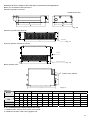
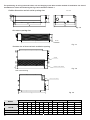
Posizione del foro a soffitto e dell’unità interna e dei bulloni vite appendenti.
Misure per l’installazione dell’unità interna
Dimensione apertura uscita aria.
Unità di misura: mm
Fig. 4-6
Dimensione apertura aria di ritorno
Filtro aria
Fig. 4-7
Posizione apertura ventilazione inferiore
Filtro aria
Scatola comp. elettrici
Fig. 4-8
Misura struttura unità
E
Scatola comp. elettrici
Fig. 4-9
Tabella 4.1
Modelli
3500-5300
7100
Dimensioni unità interna
A
B
C
D
Dimensioni aperture uscita aria
E
F
G
H
Dimensioni aperture aria di ritorno
I
J
K
Misure unità
L
M
920
210
635
570
65
713
35
119
815
200
80
960
350
1140
210
635
570
65
933
35
119
1035
200
80
1180
350
920
270
635
570
65
713
35
179
815
260
20
960
350
9000-10500
1140
270
775
710
65
933
35
179
1035
260
20
1180
490
14000-17600
1200
300
865
800
80
968
40
204
1094
288
45
1240
500
IV. 4.7 Installazione del corpo principale dell’unità
1. Installare il filtro dell’aria come indicato nel manuale.
2. Installare il condotto d’aria sotto la griglia d’aria.
19
IV. 4. 8 Condotti d’aria
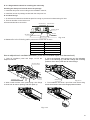
1. Condotti ingresso aria e uscita aria devono essere distanziati per evitare la penetrazione dell’aria d’uscita nel condotto
di ripresa aria.
2. L’unità interna è dotata di un filtro d’aria.
● Installazione dei condotti d’aria.
Legatura condotto uscita aria Legatura condotto ripresa aria
Isolamento
Ripresa aria
Uscita aria
Isolamento
Filtro dell’aria
Apertura di controllo
Fig. 4-10
3. Riferirsi ai seguenti valori sottostante della pressione statica per l’installazione del condotto d’aria.
Modelli (W)
3500 W
5300 W
7100 W
9000 ~ 10500 W
14000 ~ 17600 W
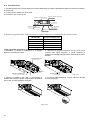
Come aggiustare la direzione di ventilazione d’aria
1. Rimuovere il pannello di ventilazione e la flangia,
tagliare il ponticello lato rotaia.
Pression statique (Pa)
40
70
70
80
100
2. Attaccare la spugna di legatura nel suo posto come
indicato nella figura seguente, e quindi cambiare le
posizioni di montaggio del pannello e della flangia di ritorno
dell'aria.
Flangia ritorno aria
Lato rotaia
Pannello ventilazione
Spugna legatura
3. Quando si installa il filtro aria, si raccomanda di
fissarlo sulla flangia inclinata relativamente all’apertura
ritorno aria, e quindi spingerlo verso l'alto.
4. Al termine dell’installazione, inserire i blocchi del filtro
aria nei fori flangia.
Fig. 4-12
20
Fig. 4-11
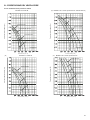
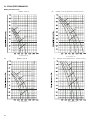
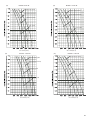
IV. 5 PRESTAZIONE DEL VENTILATORE
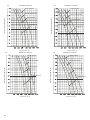
Curve caratteristiche di pressione statica
M O DE LLO 3 500 W
(Pa) M O D E L LO 71 00 W (D im ens io ne: 920 x2 70x 57 0)
S u p p er H igh speed
S u p er V elocità
V elocità alta (riserva)
V elocità m e dia
P ressio n e statica estern a (P a)
P ressio n e statica estern a (P a)
H igh speed(reserve d)
M e dium sp eed
L ow sp eed
V elocità b assa
V olum e aria (m 3 /h)
(Pa)
V olum e aria (m 3 /h)
M O DE LLO 5 300 W
(Pa)
M O D E L LO 71 00 W (D im ens io n e:
S u p er V elocità
P ressio n e statica estern a (P a)
S u p er V elocità
V elocità alta (riserva)
V elocità m e dia
P ressio n e statica estern a (P a)
V elocità alta (riserva)
V elocità m e dia
V elocità b assa
V elocità b assa
V olum e aria (m 3 /h)
V olum e aria (m 3 /h)
21
(Pa)
(Pa)
M O D ELLO 90 00 W
S u per V elocità
Su per V elocità
Velocità bassa
Velocità alta (riserva)
Pressio ne statica esterna (Pa)
Pressio ne statica esterna (Pa)
V elocità alta (riserva)
V elocità m edia
Velocità m edia
Velocità bassa
Volume aria (m 3/h)
(Pa)
M O D ELLO 1 40 00 W
Volume aria (m 3/h)
M O D ELLO 1 05 00 W
(Pa)
M O D ELLO 1 76 00 W
Su per V elocità
Su per V elocità
Velocità alta (riserva)
Velocità alta (riserva)
V elocità bassa
Volum e aria (m 3/h)
22
Pressio ne statica esterna (Pa)
Pressio ne statica esterna (Pa)
Velocità media
Velocità m edia
V elocità bassa
V olum e aria (m 3/h)
IV. 6. INSTALLAZIONE DELL’UNITÀ ESTERNA
IV. 6.1 Luogo di installazione
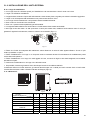
• In un luogo dove c’è sufficiente spazio per l’installazione e la manutenzione e dove il vento non è forte.
• Luoghi con sufficiente ventilazione.
• Il supporto deve sostenere il peso dell’unità esterna e deve essere piano e regolare per evitare le vibrazioni aggiuntive.
• Luoghi in cui l’aria espulsa dall’unità esterna non possa recare danno ai vicini.
• In un luogo dove le tubazioni ed i cavi possano essere installati facilmente.
• Dove lo sbocco d’uscita aria non sia ostruito.
• Dove non vi possono essere perdite di gas infiammabile.
• La lunghezza delle tubazioni tra l’unità interna e l’unità esterna deve essere ammissibile.
• Nei luoghi vicino alla coste o in alta quota dove il vento può essere forte, installare l’unità esterna contro il muro per
garantire il regolare funzionamento; usare un schermo se necessario (Fig.6-1).
Vento forte
O
X
Fig.6-1
• Evitare che l’unità sia sottoposta alla radiazione solare diretta od al calore di altre apparecchiature. Se non si può
evitare, prevedere un riparo.
• Evitare l’installazione in un luogo in cui l’acqua di scarico condensa durante il funzionamento di riscaldamento possa
recare danno alle persone.
• Evitare l’installazione in un luogo che sarà oggetto di neve, accumulo di foglie o altri detriti stagionali; se inevitabile,
prevedere un riparo.
• Posizionare l’unità esterna in un luogo vicino all’unità interna.
• Se possibile, rimuovere gli ostacoli vicini all’unità per favorire la circolazione dell’aria.
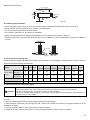
La distanza minima tra l’unità esterna e gli ostacoli descritti sopra non è valida per locali a tenuta d’aria o locali chiusi.
Lasciare libere almeno 2 delle 3 direzioni indicate nel disegno (Fig.6-5).
II. 6. 2 Dimensioni
B
H
F
EC D
H
Fig.6-4
A
Fig.6-2
Fig.6-3
DIMENSIONI (mm)
A
B
C
D
E
F
H
761
530
290
315
270
279
593
842
560
335
360
312
324
695
895
590
333
355
302
313
862
990
624
366
396
340
354
966
990
624
366
396
340
354
966
10500 W
940
600
376
400
340
360
1245
14000 W
17600 W
940
600
376
400
340
360
1245
940
600
376
400
340
360
1245
CAPACITÀ (W)
3500 W
5300 W
7100 W
9000 W
23
Lato uscita aria dell’unità esterna
> 30 cm
(Muro o ostacolo)
Ingresso aria
> 30 cm
N
Ingresso aria
Canale di sostegno
> 220 cm
> 60 cm
P
Uscita aria
M
Fig. 6-5
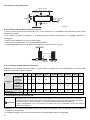
IV. 6.3 Trasporto ed installazione dell’unita’ esterna
• Poiché il centro di gravità di questa unità non è il suo centro fisico, è consigliabile porre attenzione quando viene
spostata e/o sollevata.
• Non utilizzare le griglie di espulsione o di aspirazione per sollevare l’unità esterna; si potrebbero deformare o
danneggiare.
• Non toccare il ventilatore con le mani od altri oggetti.
• Non inclinare l’unità più di 45° e non appoggiarla lateralmente.
• Fissare saldamente l’unità con dei bulloni per evitare che si possa muovere. (Fig.6-6)
m
c
0
6
>
Fissare con bullone
Fig.6-6
IV. 6.4. Installazione delle tubazioni refrigerante
Controllare che il dislivello fra l'unità interna e l'unità esterna, la lunghezza del tubo refrigerante ed il numero delle
piegature rispettino le condizioni seguenti:
Capacità (W)
Se l’unità
esterna è
installata
sopra l’unità
Max dislivello
interna
(m)
Se l’unità
esterna è
installata sotto
l’unità interna
Lunghezza tubazioni
refrigerante (m)
Numero piegature
3500 5300 7100
9000
monofase
9000
trifase
10500
monofase
10500
trifase
14000
monofase
14000
trifase
17600
5
12
12
15
20
20
20
25
30
30
5
9
9
9
12
12
12
20
20
20
10
25
25
25
30
30
30
50
50
50
5
Inferiore a 10
IV. 6.5 Procedura di connessione dei tubi.
!
- Assicurarsi che non vi sia sporcizia od acqua nelle tubazioni prima di provvedere a realizzare le connessioni.
- L’installazione dei tubi di connessione deve essere effettuata prima del fissaggio delle unità interna ed esterna.
CAUTELE - Mantenere i tubi di connessione asciutti e non lasciate l’umidità penetrare durante l’installazione.
- Coprire completamente i tubi di connessione lato liquido e lato gas con dell’isolante termico per evitare la
formazione di condensa.
• Realizzare un foro nella parete (adatto al formato del condotto della parete, 90mm in generale) e quindi installare il
condotto e la sua copertura.
• E’ possibile avvolgere i cavi di comunicazione attorno all’isolante delle tubazioni di refrigerante.
24
• Passare il tubo di connessione legato attraverso il condotto della parete dalla parte esterna; fare attenzione alla
posizione del tubo per non danneggiare la tubazione.
• Connettere i tubi
• Evacuare l'aria con pompa a vuoto.
• Aprire le valvole di arresto dell’unità esterna per connettere il tubo refrigerante con le unità interna e esterna.
• Controllare che non ci siano perdite per mezzo del dispositivo cercafughe o con acqua saponata.
• Coprire la giunta tra le tubazioni e l’unità interna con dell’isolante termico e bloccarlo con del nastro adesivo per
garantire un corretto isolamento termico ed evitare così la formazione di condensa.
!
Coprire le tubazione lato liquido e lato gas e le giunte tra le tubazioni e le unità interna e esterna con dell’isolante
CAUTELA termico per evitare la formazione di condensa.
IV. 6.6 Tubazioni refrigerante
1) Svasatura.
a) Tagliare il tubo refrigerante con un tagliatubi.
9 0°
magro
greggio ronzio
A
Fig. 6-7
b) Inserire il dado refrigerante e flangiare il tubo.
Diametro esterno
Dimensione svasatura A (mm)
Min
8.3
12.0
15.4
18.6
22.9
Ф 6.4
Ф 9.5
Ф 12.7
Ф 15.9
Ф 19.1
Max
8.7
12.4
15.8
19.0
23.3
2) Connettere prima l’unità interna e poi l’unità esterna.
Piegare i tubi con le mani se possibile, evitando di romperli.
Piegare il tubo con il police
Raggio min 100mm
Fig. 6-8
•
•
•
•
L’angolo di curvatura non deve superare i 90°.
Piegare, se possibile, il tubo di connessione nella parte centrale; maggiore è il raggio di piegatura e meglio è.
Non piegare né tendere il tubo più di tre volte.
Lubrificare le superfici del tubo refrigerante e dei dadi di giunzione con olio e tiralo per 3~4 volte con le mani prima di
fissare i dadi.
Fig. 6-9
• Accertarsi d’utilizzare simultaneamente due chiavi per connettere o disconnettere i tubi.
Fig. 6-10
25
!
Una coppia di torsione troppo grande danneggia la lisciatura della flangia e causerà perdite nel sistema.
CAUTELA E’ consigliabile riferirsi alla tabella qui sotto.
Al termine dei lavori di connessione, controllare se ci sono perdite del gas refrigerante.
Diametro esterno
Copia di torsione Nm
Svasatura
Ф 6.4
15 ~ 16 Nm / 153 ~ 163 kgf cm
Ф 9.5
25 ~ 26 Nm / 255 ~ 265 kgf cm
Ф 12.7
35 ~ 36 Nm / 357 ~ 367 kgf cm
Ф 15.9
45 ~ 47 Nm / 459 ~ 480 kgf cm
Ф 19.1
65 ~ 67 Nm / 663 ~ 684 kgf cm
90° ± 4
45
°±
A
2
R 0.4~0.8
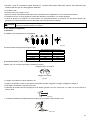
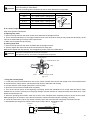
IV. 6.7 Spurgo dell’aria con la pompa a vuoto
Operazione valvola di presa.
a) Valvola di arresto
1. Rimuovere il coperchio della valvole di arresto usando una chiave esagonale
2. Una coppia di torsione eccessiva può rompere il corpo della valvola di arresto.
3. Accertarsi che il coperchio della valvola di arresto sia fissato bene.
b) Chiusura della valvola di arresto
1. Rimuovere il coperchio della valvola e chiudere la valvola stessa con una chiave esagonale.
2. Stringere saldamente la valvola usando una chiave regolabile.
Accertarsi che il coperchio sia saldamente fissato. Per la coppia di torsione si veda la tabella precedente.
!
CAUTELA
Usare un tubo flessibile di carica per la connessione alla porta di servizio.
Dopo aver fissato il coperchio, controllare se non ci sono perdite di refrigerante.
Port a di servizio
Dado manutenzione
Coperchio
Sigello Asta Foro esagonale
Fig.
6-11
Fig.7-9
• Utilizzare una pompa a vuoto
Utilizzare una pompa a vuoto per fare il vuoto nelle tubazioni sia dal lato gas che dal lato líquido, preferibilmente in modo
simultaneo.
1. Allentare e rimuovere i dadi di servizio delle valvole di arresto A e B, e collegare il tubo flessibile di carica della
manipola alla porta di servizio della valvola di arresto A (accertarsi che le valvole A e B siano entrambe chiuse).
2. Connettere il tubo flessibile alla pompa a vuoto.
3. Aprire completamente la leva “Lo” della manopola.
4. Azionare la pompa del vuoto. All’inizio dello spurgo, allentare il dado di servizio della valvola di arresto B per controllare
se l’aria penetra all’interno (il suono della pompa cambia e l’indicatore del decimetro “Compound meter” scende sotto
zero). Dopodichè chiudere il dado di servizio.
5. Quando l’evacuazione è conclusa, chiudere la manopola “Lo” della valvola manometro e arrestare la pompa a vuoto.
Fare il vuoto per oltre 15 minuti, controllare se l’indicatore del tester ha raggiunto 76cmHg (1X10 Pa).
6. Rimuovere il cappuccio delle valvole di arresto A e B per aprire le valvole d’arresto A e B, quindi fissarle.
7. Smontare il tubo flessibile di carica dalla porta di servizio della valvola di arresto A e fissare il dado.
U n ità e ste r na
U n it à int e rn a
A
L a to g a s
C
L a to liq uid o
B
V alvo la d i ar r e sto
26
Fig. 6-12
• Quantità refrigerante addizionale
M a no m e tro
D a do
Tu b o liq uid o Tu b o g a s
P om p a a vu o to
Fig. 6-13
La carica refrigerante si effettua solo dopo la realizzazione del cablaggio elettrico.
La carica refrigerante potrebbe essere effettuata dopo la realizzazione del test di perdita e l’evacuazione dei
tubi.
Durante l’operazione di carica del gas refrigerante, si deve prestare attenzione per evitare il fenomeno di
!
liquefazione
del gas refrigerante perchè la massima carica refrigerante ammissibile non si raggiunge mai.
CAUTELA
Usare il refrigerante R410A per la carica addizionale per evitare il pericolo di esplosione ed incendi.
Aprire lentamente il contenitore del gas refrigerante.
Nell’operazione di carica refrigerante usare guanti e occhiali per proteggere gli occhi.
■ L’unità esterna è caricata con il refrigerante R 410A, non tossico e non infiammabile. La carica addizionale deve essere
calcolata in funzione del diametro e della lunghezza del tubo lato liquido.
D(mm)
R (g)
Nessuna quantità refrigerante addizionale R(g) quando L(m) è inferiore a 5m (solo una linea)
Ф 6.4
-----------
Quantità refrigerante addizionale quando la lunghezza del tubo L(m) è superiore a 5m (solo una linea) 11g/mx(L-5)
Ф 9.5
Ф 12.7
-----------
-----------
30g/mx(L-5)
60g/mx(L-5)
R(g): Quantità refrigerante addizionale
L(m): Lunghezza del tubo refrigerante (una linea)
D(mm): Diametro tubo lato líquido
NOTA: Se il risultato ottenuto per R dalla formula è negativo, nessuna carica addizionale deve essere aggiunta.
IV 6.8. Connessione tubazioni di drenaggio
■ Installazione tubo di drenaggio dell’unità interna
• Un tubo in polietilene (diametro esterno 29-31mm, diametro interno 25mm) può essere utilizzato il drenaggio.
• Le tubazioni scarico condensa devono avere una pendenza verso il basso di almeno 1/50 per evitare l’accumulo
dell’acqua di condensa.
• Prestare attenzione a non applicare una forza eccessiva alle parti di raccordo delle tubazioni. Installare dei supporti ogni
1-1,5m, per evitare che il tubo formi delle onde.
• Nel caso di una tubazione molto lunga, bisogna serrare bene la parte interna di collegamento tra il tubo e l’unità interna
per impedire l’allentamento della tubazione e le perdite dell’acqua condensa.
• Se l'uscita del tubo di drenaggio è sopra la parte di collegamento tra la pompa e l’unità interna, bisogna installare il tubo
di scarico condensa il più verticale possibile per evitare il ritorno dell’acqua condensa quando si arresta il condizionatore.
Il dislivello massimo non deve superare 200mm (solo per le unità con pompa di scarico condensa).
- Installazione del tubo di drenaggio per l'unità con pompa
1-1.5m
Lean over 1/50
1-1.5m
550mm
200mm
- Installazione del tubo di drenaggio per l'unità senza pompa
Lean over 1/50
Fig. 6-14
Fig. 6-15
27
■ Test di drenaggio
- Dopo aver completato il collegamento delle tubazioni scarico condensa, eseguire un test di drenaggio per verificare che
la condensa scorra regolarmente nelle tubazioni e che non ci siano perdite d’acqua dai giunti.
- Nei nuovi edifici, il test di drenaggio dovrebbe essere realizzato prima della pavimentazione del soffitto.
Come procedere:
1) Versare circa 2000ml di acqua dentro l’unità interna attraverso il il tubo per test di drenaggio.
2) Verificare lo scarico della condensa in modalità raffreddamento per le unità con pompa di scarico condensa.
Unità con pompa di scarico condensa
Tubo per test
di drenaggio
Fig. 6.16(a)
■ Installazione della pipetta di drenaggio dell’unità
esterna
Adattare la guarnizione alla pipetta scarico condensa;
inserire la pipetta nel buco sul pannello base dell’unità
esterna, ruotare di 90° per assicurare l’assemblaggio.
Collegare la pipetta con un tubo nel caso in cui la
condensa defluisca dall’unità esterna durante il
funzionamento in riscaldamento (riferirsi alla Fig.6-17).
Unità senza pompa di scarico condensa
Tubo per test
di drenaggio
Fig. 6.16(b)
Guarnizione Pipetta di scarico Foro basamento
dell'unità esterna
Guarnizione
The base pan
of outdoor unit
Pipetta di scarico
Fig. 6-17
IV 7. INSTALLAZIONE DEL NUOVO CONDOTTO DELL’UNITÀ
Questo tipo di canalizzati possiede un raccordo per un nuovo condotto aria, le cui dimensioni sono le seguenti:
R accordo pe r nou vo condo tto di aria
Modelli
3500 - 7100
9000 - 17600
160mm
80mm
125mm
80mm
Fig. 7-1
IV. 8 CABLAGGIO ELETTRICO
IV. 8.1 Connessione del cavo elettrico
Smontare i bulloni dal coperchio (se l’unità esterna non
possiede un coperchio, smontare i bulloni dal pannello di
servizio e trascinarlo nella direzione della freccia per
rimuovere il pannello di protezione) (riferirsi alla Fig.8-1).
■ Connettere i cavi di cablaggio alla morsettiera come
indicato nello schema rispettando i numeri dei morsetti
sulle morsettiere dell’interna e dell’esterna.
■ Re-installare l’unità interna e l’unità esterna.
Coperchio
Pannello protezione
Fig.8-1
28
IV. 8.2 Specifiche dell’alimentazione
Tabella 8-2
3500W
MODELLO
ALIMENTAZIO
NE UNITÀ
INTERNA
ALIMENTAZIO
NE UNITÀ
INTERNA
5300W – 7100W
9000W – 10500W
(Unità esterna monofase) (Unità esterna monofase)
FASE
FREQUENZA E VOLTAGGIO
CAVO ALIMENTAZIONE (mm²)
INTERRUTTORE / FUSIBILE (A)
FASE
FREQUENZA E VOLTAGGIO
3x1.5
15
-----------------
CAVO ALIMENTAZIONE (mm²)
INTERRUTTORE / FUSIBILE (A)
CAVI CONNESSIONE INTERNA / ESTERNA (mm²)
MONOFASE
220-240V~, 50Hz
3x1.0
15
MONOFASE
220-240V~, 50Hz
3x2.5
30
4x1.5
30
10500W – 17600W
(Unità esterna monofase) (Unità esterna trifase)
3x1.0
15
3x1.0
15
3x4.0
380-415V~, 50Hz
5x2.5
40
Cavo schermato a 3 fili 3x0.5
40
Cavo di alimentazione del tipo H07RN-F
IV. 8.3 Impostazione degli indirizzi della rete dei condizionatori
Ogni condizionatore presente in rete ha un solo indirizzo di rete che lo distingue da tutti gli altri. Sulla PCB dell’unità
interna ci sono dei selettori S1 e S2 da posizionare secondo le indicazioni di progetto, il range va da 0 a 63.
Tabella 8-3
Regolazioni interruttore a bascula
S1
S2
Codici indirizzi rete
condizionatore
00 ~ 15
16 ~ 31
32 ~ 47
48 ~ 63
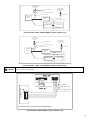
IV. 8.4 Schemi elettrici
Alimentazione
220-240V~ 50Hz
Monofase
Interruttore / Fusibile
Cavo alimentazione
Cavo cablaggio elettrico
Unità Interna
Unità esterna
Cavo di comunicazione
Messa a terra
MONITOR CONTROLLO
CENTRALE (CCM)
COMPUTER
Per il modello: 3500 W (Unità esterna monofase)
29
Alimentazione
220-240V~ 50Hz
Monofase
Interruttore circuito
Alimentazione
220-240V~ 50Hz
Monofase
Cavo alimentazione unità interna
Interruttore circuito
Cavo di comunicazione
Unità Interna
Unità esterna
Ca vo a lim en ta zio n e (esterna)
MONITOR CONTROLLO
CENTRALE (CCM)
COMPUTER
Per i modelli: 5300 - 17600 W (Unità esterna monofase)
Alimentazione
220-240V~ 50Hz
Monofase
Interruttore circuito
Alimentazione
380-415V~ 50Hz
Trifase
Cavo alimentazione unità interna
Interruttore circuito
Cavo di comunicazione
Unità Interna
Unità esterna
Ca vo a lim en ta zio ne (esterna)
MONITOR CONTROLLO
CENTRALE (CCM)
COMPUTER
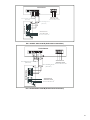
Per i modelli: 10500 –17600 W (Unità esterna trifase)
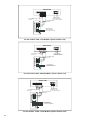
!
CAUTELA
Nel cablaggio elettrico si prega di usare lo schema elettrico corretto per evitare danneggiamenti.
Unità Interna
A lim e ntazio ne
C a vo s ch er m a to d i 3 fili a l C C M
2 20-2 4 0V 5 0H z
(3 x 0 .5 m m2 )
S
N
L
Unità esterna
C avo di 3 fili 3x1.5m m 2
Per il modello: 3500 W (Unità esterna monofase)
30
Unità Interna
A lim e nta zio ne
2 2 0-2 4 0V 5 0H z
C a vo s ch erm a to d i 3 fi l i a l C CM
(3 x0 .5 m m2 )
C a vo d i 3 fi l i 3 x1 .0 m m 2
C a vo s ch erm a to d i 3 fi li
Unità esterna
(3 x0 .5 m m2 )
A lim e nta zio ne
2 2 0-2 4 0V 5 0H z
C a vo d i 3 fi l i 3 x2 .5 m m 2
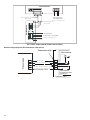
Per i modelli: 5300-7100 W (Unità esterna monofase)
Unità Interna
Alimentazione
220-240V 50Hz
Cavo schermato di 3 fili al CCM
(3x0.5 mm2)
Cavo schermato di 3 fili
Cavo di 3 fili 3x1.0 mm2
Unità esterna
(3x0.5 mm2)
Alimentazione
220-240V 50Hz
Cavo di 3 fili 3x4.0 mm2
Per i modelli 9000-17600 W (Unità esterna monofase)
31
Unità Interna
Unità esterna
C a v o s ch er m a to d i 3 fi l i a l C CM
( 3 x 0 .5 m m2 )
A lim entazione
220 -240V 50H z
C a v o d i 3 fi l i 3 x 1 .0 m m 2
C a v o s ch er m a to d i 3 fi li
( 3 x 0 .5 m m2 )
A lim entazion e
T rifase 380 - 415V 50H z
C a v o d i 5 fi l i 5 x 2 .5 m m2
Per i odelli: 10500-17600 W (Unità esterna trifase)
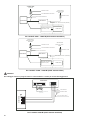
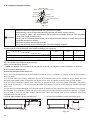
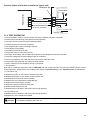
Schema collegamento del filocomando all’unità interna:
Connettore a 5p
Filocomando
Tubo infrarosso
A
B
C
D
E
Cavo schermato a 5 fili
A
B
C
D
E
+5
Operazione
Pannello interruttore
unità interna
Indoor Unit
32
IV. 9 PROVA DI FUNZIONAMENTO
• Il test deve essere eseguito solo dopo aver completato l’installazione.
• Si prega di controllare i seguenti punti prima di eseguire il test.
• Unità interna ed esterna installate correttamente.
• Tubazioni e cavi elettrici collegati correttamente.
• Test di pressione delle tubazioni eseguito.
• Lo scarico condensa funziona regolarmente.
• L’isolamento termico è stato eseguito correttamente.
• La messa a terra è stata installata correttamente.
• La lunghezza delle tubazioni e la carica di refrigerante sono state controllate.
• La tensione di alimentazione corrisponde a quella di progetto per il condizionatore.
• Ingresso ed uscita dell’aria delle unità interne ed esterne non sono ostruite.
• Le valvole lato gas e lato liquido sono aperte.
• Il condizionatore è stato pre-riscaldato dando tensione.
Test di funzionamento
■ Impostare con il telecomando il condizionatore in modalità raffreddamento, e controllare i seguenti punti come indicato
nella parte d’uso di questo manuale. Sei si verifica qualche malfunzionamento, risolverlo servendosi delle indicazioni del
capitolo “MALFUNZIONAMENTI” di questo manuale.
• 1) Unità interna
a) Verificare se accensione e spegnimento dal telecomando avvengono correttamente.
b) Verificare se i tasti del controllo remoto sono tutti operativi.
c) Verificare se i deflettori o le alette si muovono regolarmente.
d) Verificare se la temperatura interna è regolata correttamente.
e) Verificare se gli indicatori sul ricevitore funzionano.
f) Verificare se il tasto manuale funziona correttamente.
g) Verificare se lo scarico condensa avviene con regolarità.
h) Verificare se ci sono vibrazione o rumori strani durante il funzionamento.
j) Verificare se la capacità di riscaldamento è adeguata.
• 2) Unità esterna
a) Verificare la presenza di eventuali rumori o vibrazioni fuori norma.
b) Verificare se ci sono perdite di gas refrigerante.
La funzione di protezione del condizionatore impedisce l’accensione immediata dopo il suo spegnimento. Il
!
CAUTELA condizionatore, dopo l’intervento della protezione, potrà essere riavviato dopo circa 3 minuti dal suo ultimo
spegnimento.
33
ENGLISH
EN
INDEX
I. DESCRIPTION ......................................................................................................... 35
II. IMPORTANT SAFETY INFORMATION .................................................................. 36
III. OPERATION PART ................................................................................................ 37
III.1. WIRE CONTROLLER WRC08 ............................................................................................. 37
III.2. PARTS NAMES OF THE UNIT ............................................................................................ 41
III.3. AIR CONDITIONER OPERATIONS AND PERFORMANCE................................................ 41
III.4. HINTS FOR ECONOMICAL OPERATION ........................................................................... 41
III.5. MAINTENANCE AND AIR FILTER CLEANING ................................................................... 42
III.6. FOLLOWING SYMPTOMS ARE NOT AIR CONDITIONER TROUBLES ............................ 44
III.7. TROUBLESHOOTING .........................................................................................................45
IV. INSTALLATION PART ........................................................................................... 47
IV.1. INSTALLATION PRECAUTION ........................................................................................... 47
IV.2. INSTALLATION INFORMATION ......................................................................................... 47
IV.3. ACCESSORIES ................................................................................................................... 48
IV.4. INDOOR UNIT INSTALLATION........................................................................................... 48
IV.5. FAN PERFORMANCES....................................................................................................... 51
IV.6. OUTDOOR UNIT INSTALLATION....................................................................................... 54
IV.7. NEW AIR DUCT UNITT’S INSTALLATION.......................................................................... 59
IV.8. WIRING DIAGRAMS ........................................................................................................... 59
IV.9. TEST OPERATION.............................................................................................................. 63
34
I. DESCRIPTION
INDOOR UNIT
OUTDOOR UNIT
2
4
3
6
1
9
8
7
5
10
M
INDOOR UNIT
Air outlet
Air inlet
Air filter
Electric control cabinet
Wire controller
Drain pipe
OUTDOOR UNIT
Connecting pipe
Air inlet
Air inlet (side and rear)
Air outley
NOTE: All the pictures in this manual are for explanation purpose only. They may be slightly different from the air
conditioner you purchased (depending on model). The actual shape shall prevail.
35
II. IMPORTANT SAFETY INFORMATION
To prevent injury to the user or other people and property damage, the following instructions must be followed. Incorrect
operation due to ignoring of instructions may cause harm or damage.
The important safety information is listed which must be read carefully.
!
WARNING
The air conditioner must be installed by qualified persons
Ask your dealer for installation of the air conditioner.
Incomplete installation performed by yourself may result in a water leakage, electric shock, and fire.
Ask your dealer for improvement, repair, and maintenance.
Incomplete improvement, repair, and maintenance may result in a water leakage, electric shock, and fire.
In order to avoid electric shock, fire or injury, or if you detect any abnormality such as smell of fire, turn off the power
supply and call your dealer for instructions.
Never let the indoor unit or the remote controller get wet.
It may cause an electric shock or a fire.
It is not good for your health to expose your body to the air flow for a long time.
Never use a flammable spray such as hair spray, lacquer or paint near the unit.
It may cause a fire.
Do not insert fingers, rods or other objects into the air inlet or outlet.
When the fan is rotating at high speed, it will cause injury.
!
DANGER
Do not attempt to service the unit yourself. This unit has no user serviceable components opening and removing the cover will
expose you to dangerous voltage. Turning off the power supply will not prevent potential electric shock.
!
DANGER
Never put hands or objects into the air outlet of indoor and outdoor units. This unit contain a fan running at high speed. Contact with
the moving fan will cause serious injury.
!
DANGER
To avoid the risk of serious electrical shock, never sprinkle or spill water or liquid on the unit.
!
DANGER
Ventilate the room occasionally while the air conditioner is in use, especially if there is also a gas appliance in use in this room.
Failure to follow these directions may result in a loss of oxygen in the room.
!
WARNING
To prevent electric shock, turn off the power or disconnect the power supply plug before beginning any cleaning or other routine
maintenance. Follow the directions for cleaning in the owner's manual.
!
WARNING
Do not use liquid cleaners or aerosol cleaners. Use a soft and dry cloth for cleaning the unit. To avoid electric shock, never attempt to
clean the unit by sprinkling water on it.
!
CAUTION
Do not use caustic household dry cleaners in the unit. Drain cleaners can quickly destroy the unit components (drain pan and heatexchanger coil etc.).
NOTE
For proper performance, operate the unit under the usable operating temperature and humidity conditions indicated in the user’s part
of this manual. If the unit is operated beyond these condition, it may cause malfunctions of the unit or dew dripping from the unit.
Maintain room temperature at a comfortable level.
Clean air filter
A clogged air filter reduce cooling efficiency. Clean it once two weeks.
Never open doors and windows more often than necessary
To keep cool or warm air in the room, never open doors and windows more often than necessary.
Windows curtains
In cooling, close the curtain to avoid direct sunlight.
Get uniform circulation of room air
Adjust airflow direction for ever circulation of room air.
36
III. OPERATION PART
III. 1. WIRE CONTROLLER WRC08
■ FUNCTION SUMMARIZE
The wire controller has functions as follows:
1. Set the mode through buttons.
2. LCD display.
3. Display the timer function of remain time.
■ NAME AND FUNCTION OF LCD ON THE WIRE CONTROLLER
3
2
FAN speed
1
MODE display
Economical operation display
4
LOCK display
5
CLOCK display
6
OFF/ON display
7
Temperature display
1 Mode display (MODE):
Press MODE button to select COOL, DRY, "HEAT", or "FANONLY" mode. (HEAT is invalid for COOL ONLY wire
controller.)
2 Fan speed display (FAN).
Press FAN SPEED to select fan speed from "AUTO", "LOW", "MED", and "HIGH”
NOTE: some air conditioners have no MED fan speed, then the MED is regarded as HIGH.
3 Economical operation display:
Press ECONOMICAL to display economical operation, if press ECONOMICAL again then the display disappears.
4 Lock display:
Press LOCK to display the icon of LOCK. Press the button again then the icon of LOCK disappears. In the mode of
LOCK, all the buttons are invalid except for LOCK button.
5 CLOCK display
Usually display the clock set currently. Press the button CLOCK for 4 seconds, the HOUR part will flash, press button
▲and ▼ to adjust HOUR. Press the button CLOCK again, the minute part flash, press button ▲ or ▼ to adjust MINUTE.
After clock set or clock operation, it must press CONFIRM to complete the set.
6. TIMER ON/OFF display:
Display ON at the state of TIMER ON adjustment or after only set the TIMER ON; Display OFF at the state of TIMER OFF
adjustment or after only set the TIMER OFF; Display ON/OFF if simultaneously set the mode of TIMERON and TIMER
OFF.
7. Temperature display area:
Usually display the set temperature. Press the buttons ▲ or ▼ to set temperature, at the mode of FAN, there is no figure
display in the area.
37
■ NAME AND FUNCTIONS OF BUTTONS ON WIRE CONTROLLER
ON OF BUTTON
mode selection button
timer on button
timer off button
FAN SPEED SELECTION
TIMER ON
TIMER OFF CONFIRM
M
MODE
FAN SPEED SWING
clock button
confirm button
AJUDSTMENT BUTTON
ECONOMICAL
CLOCK
TEMP
AJUDSTMENT BUTTON
SWING BUTTON
REPLAC E LOC K
COOL/
HEATING
ECONOMICAL button
replace button
COOL ONLY/COOL AND
HEATING SELECTION BUTTON
LOCK BUTTON
1) Mode selection button:
It is used to select mode, push the button one time, then the operation modes will change in turn as follows:
AUTO→COOLING→DEHUMIDIFY→HEATING→FAN
Remarks: no heating mode if wire controller is set as the cool only.
2) Timer on button:
Push the button to set TIMER ON, each time you push the button the time moves forward by o.5 hours. When the set time
is over 10 hours, each time you push the button the time moves forward by 1 hour. If want to cancel the TIMER ON, then
adjust the time of TIMER ON as 0.0
3) Timer off button:
Push the button to set TIMER OFF, each time you push the button the time moves forward by o.5 hours. When the set
time is over 10 hours, each time you push the button the time moves forward by 1 hour. If want to cancel the TIMER OFF,
then adjust the time of TIMER OFF as 0.0
4) CLOCK button:
Normally display the clock set currently (display 12:00 for the first electrifying or resetting). When push the button for 4
seconds, the hour part on the clock display flashes every 0.5 seconds, then push button and to adjust hour; push the
button CLOCK again, the minute part flashes every 0.5 seconds, then push and button to adjust minute. When set clock
or alter clock setting, must push the confirm button to complete the setting.
5) Confirm button:
The button is used at the state of CLOCK adjustment. After select the time, push the button to confirm then exit, the
current clock will display
6) REPLACE (RESET) button (hidden):
Use a small stick with a diameter of 1mm to push the RESET button to cancel the current settings and get into the
condition of resetting
7) ON/OFF button:
Push the button at the condition of OFF, the OPERATION lamp lights, as the wire controller enters into ON operation,
simultaneously sends the information of operation mode set currently, temperature, fan speed, timer etc. Push the button
at the condition of ON, the OPERATION lamp extinguishes simultaneously sends the OFF. If having set TIMER ON or
TIMER OFF, the wire controller will cancel these settings before entering into OFF, close the concern indicator, and then
send the OFF information.
38
8) Fan speed selection button (FAN SPEED)
Select any one fan speed from "AUTO", "LOW"," MED" , and "HIGH”. Each time push the button, the fan speed will
change in turn as fellow.
9) Adjustment button ▲:
Push the button, indoor temperature increases. Push the button continuously then the temperature increases by 1°C per
0.5 seconds.
10) Adjustment button ▼:
Push the button, indoor temperature decreases. Push the button continuously then the temperature decreases by 1°C per
0.5 seconds
11) Swing button:
Push this button for the first time when operation, it will start the swing function. Push the button for the second time,
cancel the swing function. (The function is available matched with the concerned unit)
12) Economical buttons:
Push the button to set the economical operation mode for air conditioner, push again then cancel the mode. The operation
mode is suitable for sleeping time.
13) Cool only/cooling and heating selection button (hidden):
Use a small stick with a diameter of 1mm to push the button to switch modes. For COOLING ONLY type, it will be no
heating mode when pressing MODE. The uniform mode is COOLING and HEATING at the factory.
14) LOCK button (hidden):
Use a small stick with the diameter of 1mm to push the LOCK button to lock the current setting, push the button again
then cancel the setting.
■ THE USING OF WIRE CONTROLLER
AUTOMATIC OPERATION
Insert the power supply, operation lamp of indoor unit flashes.
1. Push MODE to select AUTO
2. Set the desired temperature by pushing the button and, usually the temperature range is set from 17 to 30.
3. Push ON/OFF, the operation lamp of indoor unit lights, the air conditioner start operating at the AUTO mode, the fan
speed is controlled automatically, wire controller display screen display AUTO the fan speed is un-adjustable. Push the
button ON/OFF again, then the air conditioner stops operating.
4. The ECONOMICAL button is available at the AUTO operation mode
THE OPERATION OF COOL / HEAT / FAN
1) Push the button MODE to select any one of "COOL", "DRY", "HEAT", or "FAN ONLY" mode
2) Select the desired temperature by pushing the button and, usually the temperature range is set from 17”C to 30”C.
3) Push the button FAN SPEED to select any one of "AUTO", "LOW", "MIDDLE", or "HIGH" fan speed modes.
4) Push the button ON/OFF, the operation lamp on indoor unit lights, the air conditioner operates according to the mode
selected. Push the button ON/OFF again, stop the air conditioner.
Remark: It cannot set temperature at FAN mode, and only operate the step 1,3 and 4. The economical button is invalid at
FAN mode.
DEHUMIDIFY OPERATION
1 Press MODE to select DEHUMIDIFY mode.
2 Select the desired temperature by pressing the button.
3 Push the button ON/OFF, the operation lamp of indoor unit lights, and the air conditioner will start to dehumidifying.
Press the button ON/OFF again, stop the air conditioner.
4 The button FAN SPEED and ECONOMICAL are invalid in the mode DEHUMIDIFY)
39
TIMER SETTING
Button TIMER ON can set the starting time.
Button TIMER OFF can set the stopping time.
Only set the time of TIMER ON
1) Push button TIMER ON, the wire controller display SETTING, the icons of HOUR and ON display on the timer setting
area. The wire controller enter into the setting of timer on.
2) Push button TIMER ON again, and then adjust the time of timer on as your desired.
3) Continuously push the button, the time of timer will increase 0.5 hours per time. After the time of timer reaches to 10
hours, the time will increase 1hour each time.
4) 0.5 seconds later, after finishing the adjustment, the wire controller sends the information of time on, the timer on
setting is completed.
Only set the time of timer off
1) Push button TIMER OFF, the wire controller display SETTING, the icons of HOUR and OFF display on the timer setting
area. The wire controller enters into the setting of timer off.
2) Push button TIMER OFF again, and then adjust the time of timer off as your desired.
3) Continuously push the button, the time of timer will increase 0.5 hours per time. After the time of timer reaches to 10
hours, the time will increase 1hour each time.
4) 0.5 seconds later, after finishing the adjustment, the wire conditioner sends the information of timer off, the timer off
setting is completed.
Set the time of TIMER ON and TIMER OFF simultaneously
1) Refer to step 1 and step 2 of TIMER ON to set the TIMER ON
2) Refer to step 1 and step 2 of TIMER OFF to set the TIMER OFF
3) When set the TIMER ON and TIMER OFF simultaneously, if the set times of TIMER ON and TIMER OFF are all over
10hours, then TIMER OFF is always later 1hour than TIMER ON.
4) 0.5 seconds later, after finishing the adjustment, the wire controller sends the information of timer onf, the timer off and
timer on setting are completed. Alter the timer.
To alter the time of TIMER ON of TIMER OFF, push the timer button to confirm once more. Adjust the time of TIMER ON
and TIMER OFF as 0.0 to cancel the TIMER ON of TIMER OFF:
Remark: the time of TIMER ON is the relative time; it is relative to the standard time of operating wire controller. If having
set ting the TIMER ON or TIMER OFF, then the clock cannot be adjusted.
40
III. 2. PARTS NAMES OF THE UNIT
The air conditioner consists of indoor unit, outdoor unit, connecting pipe and remote controller. (Refer to Fig.3-.1)
■ Function indicators on indoor unit display panel
Temporary button
PRE-DEF indicator
Infrared signal receiver
Display Digital tube
Operation lamp
Timer indicator
Alarm indicator
Fig.3-1
NOTE: All the pictures in this manual are for explanation purpose only. They may be slightly different from the air
conditioner you purchased (depending on model). The actual shape shall prevail.
• The OPERATION lamp flashes once per second when connecting power supply.
• The operation lamp will be off when the air conditioner switch off.
• The timer lamp will be lit when on/off time has been set.
• The DEF lamp will be lit while defrosting and cooling air controlling.
• The DEF lamp will be off while the indoor fan operating (High, MED, Low)
• The OPERATION lamp and DEF lamp flash 5 times per second while high cooling
III. 3. AIR CONDITIONER OPERATIONS AND PERFORMANCE
Use the system in the following temperature for safe and effective operation. The Max operation temperature for the air
conditioner. (Cooling/Heating)
Temperature
Outdoor temperatura
Indoor temperatura
Mode
Cooling operation
Heating operating
Dry operation
!
CAUTION
0°C ~ 43°C (3500 W)
-15°C ~ 43°C (5300 W –17600 W)
-15°C ~ 24°C
18°C ~ 43°C
17°C ~ 30°C
0°C ~ 30°C
17°C ~ 32°C
1. For proper performance, operate the unit under the usable operating temperature and humidity conditions
indicated in this owner's manual. If the unit is operated beyond these conditions, it may cause malfunctions of
the unit or dew dripping from the unit.
2. The phenomenon is normal that the surface of air conditioning may condense water when the relative larger
humidity in room, please close the door and window.
3. Optimum performance will be achieved within the operating temperature range.
■ Three-minute protection feature
A protection feature prevents the air conditioner from being activated for approximately 3 minutes when it restarts
immediately after operation.
■ Power failure
Power failure during operation will stop the unit completely.
● The OPERATION lamp on the indoor unit will start flashing when power is restored.
● To restart operation, push the ON/OFF button on the remote controller.
● Lightning or a car wireless telephone operating nearby may cause the unit to malfunction.
● Disconnect the unit with the power and then connect the unit with the power again. Push the ON/OFF button on the
remote controller to restart operation.
III. 4. HINTS FOR ECONOMICAL OPERATION
The following should be noticed to ensure an economical operation:
■ Adjust the air flow direction properly to avoid winding toward your body.
■ Adjust the room temperature properly to get a comfortable situation and to avoid super cooling and superheat.
■ In cooling, close the curtains to avoid direct sunlight.
■ To keep cool or warm air in the room, never open doors or windows more often than necessary.
■ Set the timer for the desired operating time.
41
■ Never put obstructions near the air outlet or the air inlet. Or it will cause lower efficiency, even a sudden stop.
■ If you don't plan to use the unit for a long time, please disconnect power and remove the batteries from the remote
controller. When the power switch is connected, some energy will be consumed, even if the air conditioner isn't in
operation. So please disconnect the power to save energy. And please switch the power on 12 hours before you restart
the unit to ensure a smooth operation.
■ A clogged air filter will reduce cooling or heating efficiency, please clean it once two weeks.
III. 5. MAINTENANCE AND AIR FILTER CLEANING
- Before you clean the air conditioner, be sure the power supply is off.
- Check if the wiring is not broken off or disconnected.
- Use a dry cloth to wipe the indoor unit and remote controller.
- A wet cloth may be used to clean the indoor unit if it is very dirty.
!
CAUTION
- Never use a damp cloth on the remote controller.
- Do not use a chemically-treated duster for wiping or leave such material on the unit for long, it may damage or
fade the surface of the unit.
- Do not use benzene, thinner, polishing powder, or similar solvents for cleaning.
- These may cause the plastic surface to crack or deform.
■ Maintenance after a long stop period
(eg. at the beginning of the season)
- Check and remove everything that might be blocking inlet and outlet vents of indoor units and outdoor units.
- Clean air filters and casings of indoor units.
Refer to "Cleaning the air filter" for details on how to proceed and make sure to install cleaned air filters back in the same
position.
- Check and remove everything that might be blocking inlet and outlet vents of indoor units and outdoor units.
- Clean air filters and casings of indoor units.
Refer to "Cleaning the air filter" for details on how to proceed and make sure to install cleaned air filters back in the same
position.
- Turn on the power at least 12 hours before operating the unit in order to ensure smoother operation. As soon as he
power is turned on, the remote controller displays appear.
■ Maintenance before a long stop period
(eg. at the end of the season)
- Let the indoor units run in fan only operation for about half a day in order to dry the interior of the units.
- Clean air filters and casings of indoor units. Refer to " Cleaning the air filter" for details on how to proceed and make
sure to install cleaned air filters back in the same position.
■. Motor and drain pump maintenance
(Take rear ventilated as example)
Motor maintain:
1. Remove off the ventilated panel.
2. Remove off a half of motor housing.
3. Take off the motor.
Mofor
Blower housing
Ventilated panel
Fig. 3-2
Pump maintain:
1. Screw off four screws from drain pump.
2. Plug off pump power supply and water level switch
cable.
3. Take off pump.
Pump
42
Fig. 3-3
■ Clean the air filter
- The air filter can prevent the dust or other particulate from going inside. In case of blockage of the filter, the working
efficiency of the air conditioner may greatly decrease.
Therefore, the filter must be cleaned once two weeks during long time usage.
- If the air conditioner is installed in a dust place, clean the air filter frequently.
- If the accumulated dust is too heavy to be cleaned, please replace the filter with a new one (replaceable air filter is an
optional fitting).
a) For your purchasing unit is a rear ventilated one, please remove the filter fixed screws 2 screws and take down the filter
away from the unit.
Fig. 3-4
b) For your purchasing unit is a descensional ventilated one, please push the filter up slightly to let the position retainer
escape away from the flange fixed holes, and take off the filter according to the arrow direction shows in the following
figure.
Fig. 3-5
Vacuum cleaner or pure water may be used to clean the air filter. If the dust accumulation is too heavy, please use soft
brush and mild detergent to clean it and dry out in cool place.
The air-in side should face up when using vacuum cleaner. (Refer to Fig. 3-6)
The air-inside should face down when using water. (Refer to Fig. 3-7)
Fig. 3-6
!
CAUTION
Fig. 3-7
Do not dry out the air filter under direct sunshine or with fire.
- Set the air filter and the especial function filter as they were and close the front panel
43
III. 6. FOLLOWING SYMPTOMS ARE NOT AIR CONDITIONER TROUBLES
Symptom 1: The system does not operate.
■ The air conditioner does not start immediately after the ON/OFF button on the remote controller is pressed. If the
operation lamp lights, the system is in normal condition. To prevent overloading of the compressor motor, the air
conditioner starts 3 minutes after it is turned ON.
■ If the operation lamp and the "PRE-DEF indicator light, it means you choose the heating mode. When just starting, if the
compressor has not started, the indoor unit appears "anti cold wind" protection because of its over low outlet temperature.
Symptom 2: Change into the fan mode during cooling mode
■ In order to prevent the indoor evaporator frosting, the system will change into fan mode automatically, restore to the
cooling mode after soon.
■ When the room temperature drops to the set temperature, the compressor goes off and the indoor unit changes to fan
mode; when the temperature rises up, the compressor starts again. It is the same in the heating mode.
Symptom 3: White mist comes out of a unit
Symptom 3.1: Indoor unit
When humidity is high during cooling operation If the interior of an indoor unit is extremely contaminated, the temperature
distribution inside a room becomes uneven. It is necessary to clean the interior of the indoor unit. Ask your dealer for
details on cleaning the unit. This operation requires a qualified service person.
Symptom 3.2: Indoor unit, outdoor unit
■ When the system is changed over to heating operation after defrost operation moisture generated by defrost becomes
steam and is exhausted.
Symptom 4: Noise of air conditioners cooling
Symptom 4.1: Indoor unit
■ A continuous low "shah" sound is heard when the system is in cooling operation or at a stop. When the drain pump
(optional accessories) is in operation, this noise is heard.
■ A "pishi-pishi" squeaking sound is heard when the system stops after heating operation. Expansion and contraction of
plastic parts caused by temperature change make this noise.
Symptom 4.2: Indoor unit, outdoor unit
■ A continuous low hissing sound is heard when the system is in operation. This is the sound of refrigerant gas flowing
through both indoor and outdoor units.
■ A hissing sound which is heard at the start or immediately after stopping operation or defrost operation. This is the noise
of refrigerant caused by flow stop or flow change.
Symptom 4.3: Outdoor unit
■ When the tone of operating noise changes. This noise is caused by the change of frequency.
Symptom 5: Dust comes out of the unit
■ When the unit is used for the first time in a long time. This is because dust has gotten into the unit.
Symptom 6: The units can give off odours
The unit can absorb the smell of rooms, furniture, cigarettes, etc., and then emit it again.
Symptom 7: The outdoor unit fan does not spin.
■ During operation. The speed of the fan is controlled in order to optimize product operation.
44
III. 7. TROUBLESHOOTING
III. 7.1 Trouble and causes of air conditioner
If one of the following malfunctions occur, stop operation, shut off the power, and contact with the dealer.
Indicator lamps flash rapidly (5Hz), after your disconnecting and connecting the unit again, the
situation is the same.
Fuse or circuit breaker work frequently.
TROUBLES Foreign matter or matter has fallen into the unit.
Remote controller is disabled or the switch is out of order.
Any other unusual condition is observed.
Table 6-1 For the model 3500 W
NO.
MALFUNCTION & PROTECTION DEFINE
LED1
LED2
LED3
LED4
OPERATION TIMER DEF.FAN ALARM
DISPLAY
DIGITAL TUBE
1
Room temperature sensor checking channel is abnormal
E0
2
Pipe temperature sensor checking channel is abnormal
E1
3
In-Outdoor unit COMM. checking channel is abnormal
E2
4
Water level alarm malfunction
E3
5
EPPROM malfunction
E4
6
Module malfunction
E5
7
Outdoor TEMP. sensor checking channel is abnormal
E6
8
Outdoor voltage protection
P0
9
Compressor temperature protection
P1
10
Outdoor current system protection
P2
11
Be closed by the remote control function
CP
12
Avoid cold wind & Defrost
Extinguish
Flashing at 5Hz
Flashing at 1Hz
Table 7-2: For the models 5300 W – 17600 W
NO
LED1
OPERATION
MALFUNCTION & PROTECTION DEFINE
LED2 LED3
LED4
DISPLAY
TIMER DEF.FAN ALARM DIGITAL TUBE
1
Collision mode malfunction
E0
2
In-Outdoor unit COMM. Checking channel is abnormal
E1
3
Room TEMP. sensor checking channel is abnormal
E2
4
Pipe TEMP. Sensor checking channel is abnormal (T2)
E3
5
Pipe TEMP. Sensor checking channel is abnormal (T2B)
E4
6
EPPROM malfunction
E7
7
Water-level alarm malfunction
EE
8
Outdoor malfunction
Ed
9
Be closed by the remote control function
CP
10
Avoid cold fan & Defrost
Extinguish
Flashing at 5Hz
Flashing at 1Hz
45
In any of the following conditions occur, check your unit and resolve corresponding problems referring to given
remediation. If the trouble can’t settled contact the dealer.
Trouble
Unit does not start
Air flowing normally without
cooling (heating) effect
Units start or stop frequently
Low cooling (heating) effect
Cause
Solutions
Power failure.
Wait for the comeback of power
Power switch is off.
Switch on the power
Fuse of power switch may have blown.
Replace the fuse
Batteries in remote controller are exhausted.
Replace the batteries
The time is not start-up time you have set.
Wait for cancel the time set.
Temperature is not set correctly.
Set the temperature properly.
Be in 3 minutes protection of compressor
Wait.
Refrigerant is too little or too much.
Check leakage, and rightly recharge
refrigerant.
Air or no concreting gas in the refrigerating
circuit.
Vacuum and recharge refrigerant.
Compressor is malfunction.
Maintenance or change compressor.
Voltage is too high or too low.
Install manostat.
System circuit is blocked.
Find reasons and solution.
Temperature is not set correctly.
Set the temperature properly. Please
refer to “operation instructions”
Air filter is blocked with dust or dirtiness.
Clean the air filter
Inlet/outlet of indoor/outdoor units are blocked. Clear all blockages
Door or window is opened
Close door and window
III. 7.2. Troubles and causes of remote controller
Before asking for serving or repairing, check the following points. (Refer to the table below)
Trouble
Cause
Solutions
Check whether the MODE indicated on
the display "AUTO
The fan speed can not be
changed.
When the automatic mode is selected, the air
conditioner will automatically change the fan speed.
When dry operation is selected, the air conditioner
automatically change the fan speed. The fan speed
can be selected during "COOL" , "FAN ONLY", and
"HEAT"
The remote controller signal is
not transmitted even when the
ON/OFF button is pushed.
The power supply is off.
Check whether the signal transmitter of
the remote controller is properly directed
to the infrared signal receiver of the indoor
unit.
The TEMP. indicator does not
come on.
The temperature cannot be set during FAN mode.
Check whether the MODE indicated on
the display is FAN ONLY
The indication on the display
disappears after a lapse of
time.
The air conditioner operation will stop up to the set
time
Check whether the timer operation has
come to an end when the TIMER OFF is
indicated on the display.
The TIMER ON indicator goes
off after a lapse of certain time.
Up to the set time, the air conditioner will Check whether the timer operation is
automatically start and the appropriate indicator will started when the TIMER ON is indicated
go off.
on the display.
No receiving tone sounds from
the indoor unit even when the
ON/OFF button is pressed.
Directly transmit the signal transmitter of the remote
controller to the infrared signal receiver of the indoor
unit, and then repeatly push the ON/OFF button
twice.
46
Check whether the MODE indicated on
the display is "DRY"
Check whether the signal transmitter of
the remote controller is properly directed
to the infrared signal receiver of the indoor
unit when the ON/OFF button is pressed.
IV. INSTALLATION PART
IV.1 INSTALLATION PRECAUTION
■ Be sure to be in conformity with the local, national and international laws and regulations.
■ Read "PRECAUTIONS" carefully before installation.
■ The following precautions include important safety items. Observe them and never forget.
■ Keep this manual in a handy place for future reference.
!
!
WARNING Failure to observe a warning may result in death.
CAUTION
Failure to observe a caution may result in injury or damage to the equipment.
After completing the installation, make sure that the unit operates properly during the start-up operation. Please instruct
the customer on how to operate the unit and keep it maintained. Also, inform customers that they should store this
installation manual along with the owner's manual for future reference.
!
WARNING
Be sure only trained and qualified service personnel to install, repair or service the equipment.
Improper installation, repair, and maintenance may result in electric shocks, short-circuit, leaks, fire or other damage to the equipment.
Install according to this installation instructions strictly.
If installation is defective, it will cause water leakage, electrical shock fire.
Install at a strong and firm location which is able to withstand the set' s weight.
If the strength is not enough or installation is not properly done, the set will drop to cause injury.
For electrical work, follow the local national wiring standard, regulation and this installation instructions. An independent
circuit and single outlet must be used.
If electrical circuit capacity is not enough or defect in electrical work, it will cause electrical shock fire.
Use the specified cable and connect tightly and clamp the cable so that no external force will be acted on the terminal.
If connection or fixing is not perfect, it will cause heat-up or fire at the connection.
After completing the installation work, check that the refrigerant does not leak.
Toxic gas may be produced if the refrigerant leaks into the room and comes into contact with a source of fire, such as a fan heater,
stove or cooker.
Use the attached accessories parts and specified parts for installation.
Otherwise, it will cause the set to fall, water leakage, electrical shock fire.
Wiring routing must be properly arranged so that control board cover is fixed properly.
If control board cover is not fixed perfectly, it will cause heat-up at connection point of terminal, fire or electrical shock.
!
CAUTION
Don't install the air conditioner in the following locations:
■ There is petrolatum existing.
■ There is salty air surrounding (near the coast).
■ There is caustic gas (the sulphide, for example) existing in the air (near a hot spring).
■ The Volt vibrates violently (in the factories).
■ In buses or cabinets.
■ In kitchen where it is full of oil gas.
■ There is strong electromagnetic wave existing.
■ There are inflammable materials or gas.
■ Other special conditions.
IV. 2. INSTALLATION INFORMATION
■ To install properly, please read this "installation manual" at first.
■ The air conditioner must be installed by qualified persons.
■ When installing the indoor unit or its tubing, please follow this manual as strictly as possible.
■ If the air conditioner is installed on a metal part of the building, it must be electrically insulated according to the relevant
standards to electrical appliances.
■ When all the installation work is finished, please turn on the power only after a thorough check.
■ Regret for no further announcement if there is any change of this manual caused by product improvement.
47
INSTALLATION ORDER
■ Select the location;
■ Install the indoor unit;
■ Install the outdoor unit;
■ Install the connecting pipe;
■ Connect the drain pipe;
■ Wiring;
■ Test operation.
IV. 3. ACCESSORIES
Please check whether the following fittings are of full scope. If there are some spare fittings, please restore them carefully.
No
Tubing & Fittings
Name
Qty.
1. Soundproof / insulation sheath
2
2. Binding tape
1
3. Seal sponge
1
Drainpipe Fittings (for cooling & 4. Drain joint
heating)
5. Seal ring
Remote controller & Its Frame
(optional )
Wire controller & Its Frame
(Match with wire controller )
Others
Outline
1
1
6. Remote controller
1
7. Frame
1
8. Mounting screw(ST2.9×10-C-H)
2
9. Alkaline dry batteries (AM4)
1
10. Remote controller manual
1
---------
11. Wire controller
1
---------
12. Owner‘s manual
1
---------
13. Installation manual
1
---------
Cautions on remote controller installation:
■ Never throw or beat the controller.
AUTO
■ Before installation, operate the remote controller to
COOL
CLOCK
HEAT
determine its location in a reception range.
■ Keep the remote controller at least 1m apart from the
nearest TV set or stereo equipment. (it is necessary to
prevent image disturbances or noise interferences.)
■ Do not install the remote controller in a place exposed to
direct sunlight or close to a heating source, such as a
stove.
■ Note that the positive and negative poles are right
positions when loading batteries.
TEMP
SET
DRY
SET
HOUR
FAN
FA N S PE ED
FAN
SPEE
D
MODE
SWI N
G
AI R D IR EC TIO N
CLO CK
SWI N
G
OK
TIME ON
ECO
TI ME O FF
RESE T LOCK C/H
Mounting screw B
ST2.9x10-C-H
Remote controller
holder
Remote
controller
Fig.3-1
IV.4. INDOOR UNIT INSTALLATION
IV. 4.1 Install the main body
• Installing φ10 hanging screw bolts. (4 bolts)
• The handling to the ceiling varies from the constructions, consult the construction personnels for the specific
procedures.
1. The size of the ceiling to be handled to keep the ceiling flat. Consolidate the roof beam for possible vibration.
48
2. Cut off the roof beam.
3. Strengthen the place cut off, and consolidate the roof beam.
• Carry out the pipe and line operation in the ceiling after finishing the installation of the main body. While choosing
where to start the operation, determine the direction of the pipes to be drawn out. Especially in case there is a ceiling,
position the refrigerant pipes, drain pipes, indoor & outdoor lines to the connection places before hanging up the machine.
• The installation of hanging screw bolts.
IV. 4.2 Wooden construction
Put the square timber transversely over the roof beam, then install the hanging screw bolts. (Refer to Fig. 4-1)
Timber over the beam
Roof beam
Ceiling
Hanging screw bolts
Fig. 4-1
IV. 4.3 New concrete bricks
Inlaying or embedding the screw bolts. (Refer to Fig. 4-2)
(Slide insertion)
(Blade shape insertion)
Fig. 4-2
IV. 4.4 For Original concrete bricks
Use embedding screw bold, crock and stick harness. (Refer to Fig. 4-3)
Steel bar
Embedding screw bolt
(Pipe hanging and embedding
screw bolt)
Fig. 4-3
IV. 4.5 Steel roof beam structure
Install and use directly the supporting angle steel. (Refer to Fig. 4-4)
Hanging screw bolt
Supporting
angle steel
Hanging bolts
Fig. 4-4
IV. 4. 6 Overhanging the indoor unit
(1) Overhang the indoor unit onto the hanging screw bolts with block.
(2) Position the indoor unit in a flat level by using the level indicator, unless it may cause leakage.
Screw nut
Shockproof cushion
Washer
Hanging
screw bolt
Overhang part
Fig. 4-5
49
The positioning of ceiling hole and indoor unit and hanging screw bolts routine method of installation: the size of
installation for indoor unit following the Fig.4-6-7-8-9 and the Table 4-1
Outline dimension and air outlet opening size
Unit: mm
Fig. 4-6
Air return opening size
Air filter
Fig. 4-7
Position size of descensional ventilation opening
Air filter
Electric control cabinet
Fig. 4-8
Size of mounted lug
Electric control cabinet
Fig. 4-9
Models
3500-5300 W
7100 W
9000-10500 W
14000-17600 W
50
Outline dimension
A
B
C
Air outlet opening size
D
E
F
G
H
Air return opening size
I
J
K
Size of mounted lug
L
M
920
210
635
570
65
713
35
119
815
200
80
960
350
1140
210
635
570
65
933
35
119
1035
200
80
1180
350
920
270
635
570
65
713
35
179
815
260
20
960
350
1140
270
775
710
65
933
35
179
1035
260
20
1180
490
1200
300
865
800
80
968
40
204
1094
288
45
1240
500
IV. 4.7 Diagrammatic sketch for installing the main body
Installing the dust proof net and canvas air passage
1. Install the dust proof net according to the installation manual;
2. Install the canvas air passage underneath the dust proof net.
IV. 4.8 Duct Design
1. Air inlet and air outlet duct should be apart far enough to prevent air outlet entering Air Inlet.
2. There is dust filter on the indoor unit.
● Recommended duct connection.
Canvas tie-in
Canvas tie-in
Isolation booth
Air outlet
Air inlet
Isolation booth
Air dust filter
checking orifice
Fig. 4-10
3. Please refer to the following static pressure to install the air duct.
Models (W)
3500 W
5300 W
7100 W
9000 ~ 10500 W
14000 ~ 17600 W
Static pressure (Pa)
40
70
70
80
100
How to adjust the air ventilated direction? (From rear ventilated adjust it to descensional.)
1. Take off ventilation panel and flange, cut off the
staples at side rail.
2. Stick the attached seal sponge as per the indicating
place in the following fig, and then change the mounting
positions of air return panel and air return flange.
Air return flange
Side rail
Dentilation panel
Seal sponge
3. When install the filter mesh, please plug it into flange
inclined from air return opening, and then push up.
Fig. 4-11
4. The installation has finish, upon filter mesh which fixing
blocks have been insert to the flange positional holes.
Fig. 4-12
51
IV. 5 FAN PERFORMANCES
Static pressure curve
M O D E L 3 50 0 W
(Pa)
M O D E L 7 10 0 W (D im e n sion :92 0 × 27 0 × 5 70 )
S u p p e r H ig h sp e ed
H ig h sp e ed (re se rve d )
S u p p e r H ig h sp eed
M e d ium sp e ed
H ig h sp eed (re se rve d )
L o w sp e ed
M e d ium sp e ed
L o w sp e e d
A ir vo lu m e (m 3 /h )
(Pa)
M O D E L 5 3 00 W
A ir vo lu m e (m 3 /h )
(Pa)
M O D E L 7 10 0 W (D im e n sion :11 40 × 21 0 × 5 7 0 )
S u p p e r H ig h sp eed
H ig h sp e ed (re se rve d )
S u p p er H ig h sp eed
M e d ium sp e ed
H ig h sp eed (re se rve d )
L o w sp e ed
M e d ium sp e ed
L o w sp e ed
A ir vo lu m e (m 3 /h )
52
A ir vo lu m e (m 3 /h )
(Pa)
(Pa)
M O D EL 9 0 0 0 W
M O D EL 1 40 0 0 W
Su p p er H ig h speed
S u p p er H ig h speed
H ig h speed(reserve d)
H igh speed(reserve d)
M e dium sp eed
M e dium sp eed
L ow sp eed
L ow sp eed
Air volum e(m 3 /h)
Air volum e(m 3 /h)
(Pa)
M O D EL 1 0 5 0 0 W
(Pa)
M O D EL 1 7 6 0 0 W
S u p p er H ig h speed
S u p p er H igh spe ed
H ig h speed(reserve d)
H igh speed(reserve d)
M e dium sp eed
M e dium sp eed
L ow sp eed
L ow sp eed
A ir volum e(m 3 /h)
A ir volum e(m 3 /h)
53
IV.6. OUTDOOR UNIT INSTALLATION
IV.6.1 Installation place
■ The outdoor unit should be installed in the location that meets the following requirements:
• There is enough space for installation and maintenance.
• The air outlet and the air inlet are not impeded, and cannot be reached by strong wind.
• It must be a dry and well ventilating place.
• The support is flat and horizontal and can stand the weight of the outdoor unit. And will no additional noise or vibration.
• Your neighbourhood will not feel uncomfortable with the noise or expelled air.
• It is easy to install the connecting pipes or cables.
• Determine the air outlet direction where the discharged air is not blocked.
• There is no danger of fire due to leakage of inflammable gas.
• The piping length between the outdoor unit and the indoor unit may not exceed the allowable piping length.
• In the case that the installation place is exposed to strong wind such as a seaside, make sure the fan operating
properly by putting the unit lengthwise along the wall or using a dust or shield. (Refer to Fig.6-1)
Strong wind
O
X
Fig. 6-1
• If possible, do not install the unit where it is exposed to direct sunlight. If necessary, install a blind that does not
interfere with the airflow.
• During the heating mode, the water drained off the outdoor unit. The condensate should be well drained away by the
drain hole to an appropriate place, so as not to interfere other people.
• Select the position where it will not be subject to snow drifts, accumulation of leaves or other seasonal debris. If
unavoidable, please cover it with a shelter.
• Locate the outdoor unit as close to the indoor unit as possible.
• If possible, please remove the obstacles nearby to prevent the performance from being impeded by too little of air
circulation. Refer to Fig. 6-2.
• The minimum distance between the outdoor unit and obstacles described in the installation chart does not mean that
the same is applicable to the situation of an airtight room. Leave open two of the directions (M,N,P) (Refer to Fig.6-5)
IV.6.2 Dimensions
B
H
F
EC D
H
Fig.6-4
A
Fig.6-2
Fig.6-3
Capacity of models
3500 W
5300 W
7100 W
9000 W
10500 W
14000 W
17600 W
54
A
761
842
895
990
990
940
940
940
B
530
560
590
624
624
600
600
600
C
290
335
333
366
366
376
376
376
D
315
360
355
396
396
400
400
400
E
270
312
302
340
340
340
340
340
F
279
324
313
354
354
360
360
360
H
593
695
862
966
966
1245
1245
1245
Side air outlet outdoor unit
>30cm
(Wall or obstacle)
Air inlet
>30cm
N
Air inlet
>200cm
Maintain channel
>60cm
P
M
Air outlet
Fig. 6-5
IV.6.3 Moving and installation
Since the gravity centre of the unit is not at its physical centre, so please be careful when lifting it with a sling.
Never hold the inlet of the outdoor unit to prevent it from deforming.
Do not touch the fan with hands or other objects.
Do not lean it more than 45°, and do not lay it sidelong.
Make concrete foundation according to the specifications of the outdoor units. (Refer to Fig.6-6 )
Fasten the feet of this unit with bolts firmly to prevent it from collapsing in case of earthquake or strong wind. (Refer to
Fig.6-6)
>60cm
•
•
•
•
•
•
Fix with bolt
Fig.6-6
IV.6.4. Install the connecting pipe
Check whether the height drop between the indoor unit and outdoor unit, the length of refrigerant pipe, and the number of
the bends meet the following requirements:
MODEL
3500 5300 7100
When outdoor
The max height unit is top
drop (m)
When outdoor
unit is bottom
The length of refrigerant pipe (m)
The number of bends
9000
9000
10500
10500
14000
14000
1-phase 3-phase 1-phase 3-phase 1-phase 3-phase
17600
5
12
12
15
20
20
20
25
30
30
5
9
9
9
12
12
12
20
20
20
10
25
25
25
30
30
30
50
50
50
5
Less than 10
IV.6.5 The procedure of connecting pipes
!
CAUTION
Do not let air, dust, or other impurities fall in the pipe system during the time of installation.
The connecting pipe should not be installed until the indoor and outdoor units have been fixed already.
Keep the connecting pipe dry, and do not let moisture in during installation.
Execute heat insulation work completely on both sides of the gas piping and the liquid piping. Otherwise, this can
sometimes result in water leakage.
• Drill a hole in the wall (suitable just for the size of the wall conduit), then set on the fittings such as the wall conduit and
its cover.
• Bind the connecting pipe and the cables together tightly with binding tapes.
• Pass the bound connecting pipe through the wall conduct from outside. Be careful of the pipe allocation to do on
damage to the tubing.
• Connect the pipes. Refer to "How to Connect the pipes" for details.
• Expel the air with a vacuum pump. Refer to "How to expel the air with a vacuum pump" for details.
55
• Open the stop values of the outdoor unit to make the refrigerant pipe connecting the indoor unit with the outdoor unit in
fluent flow.
• Check the leakage. Check all the joints with the leak detector or soap water.
• Cover the joints of the connecting pipe with the soundproof / insulating sheath (fittings), and bind it well with the tapes
to prevent leakage.
!
CAUTION
Be sure to with insulating materials cover all the exposed parts of the flare pipe joints and refrigerant pipe on the
liquid-side and the gas-side. Ensure that there is no gap between them.
Incomplete insulation may cause water condensation.
IV. 6.6 Refrigerant piping
1. Flaring
a) Cut a pipe with a pipe cutter
90°
Oblique Roughness Burr
A
Fig. 6-7
b) Insert a flare nut into a pipe and flare the pipe.
Outer diameter
Flare dimension A (mm)
Min
8.3
12.0
15.4
18.6
22.9
Ф 6.4
Ф 9.5
Ф 12.7
Ф 15.9
Ф 19.1
Max
8.7
12.4
15.8
19.0
23.3
2. Connect the indoor unit at first, then the outdoor unit.
Bend the tubing in proper way. Do not harm to them.
Bend the pipe with thumb
min-radius 100mm
Fig. 6-8
• The bending angle should not exceed 90°.
• Do not bend the pipe more than three times.
• When connecting the flare nut, coat the flare both inside and outside with either oil or ester oil and initially tighten by
hand 3 or 4 turns before tightening firmly.
Fig. 6-9
• Be sure to use both a spanner and torque wrench together when connecting or disconnecting pipes to /from the unit.
Fig. 6-10
56
!
CAUTION
Too large torque will harm the bell mouthing and too small will cause leakage. Please determine the
torque according to Table below.
After the connecting work is finished, be sure to check that there is no gas leak.
Pipe gauge
Tightening torque
Flare shape
Ф 6.4
15 ~ 16 Nm / (153 ~ 163 kgf cm)
Ф 9.5
25 ~ 26 Nm / (255 ~ 265 kgf cm)
Ф 12.7
35 ~ 36 Nm / (357 ~ 367 kgf cm)
Ф 15.9
45 ~ 47 Nm / (459 ~ 480 kgf cm)
Ф 19.1
65 ~ 67 Nm / (663 ~ 684 kgf cm)
90° ± 4
45
°±
A
2
R 0.4~0.8
IV. 6.7 How to expel the air with a vacuum pump
Stop valve operation introduction
a) Opening stop valve
1. Remove the cap and turn the valve counter clock-wise with the hexagon wrench.
2. Turn it until the shaft stops. Do not apply excessive force to the stop valve. Doing so may break the valve body, as the
valve is not a backseat type. Always use the special tool.
3. Make sure to tighten the cap securely.
b) Closing stop valve
1. Remove the cap and turn the valve clockwise with the hexagon wrench.
2. Securely tighten the valve until the shaft contacts the main body seal.
Make sure to tighten the cap securely. For the tightening torque, refer to the table above.
!
CAUTION
Always use a charge hose for service port connection.
After tightening the cap, check that no refrigerant leaks are present.
service por t
mainten ance nu t
cap
sea l
shaft h exago n hole
Fig. 6-11
• Using the vacuum pump
1. Loosen and remove the maintenance nuts of stop valves A and B, and connect the charge hose of the manifold valve
to the service port of stop valve A. (Be sure that stop valves A and B are both closed)
2. Connect the joint of the charge hose with the vacuum pump.
3. Open the Lo-lever of the manifold value completely.
4. Turn on the vacuum pump. At the beginning of pumping, loosen the maintenance nut of stop valve B a little to check
whether the air comes in (the sound of the pump changes, and the indicator of compound meter turns below zero). Then
fasten the maintenance nut.
5. When the pumping has finished, close the Lo-lever of the manifold valve completely and turn off the vacuum pump.
Make pumping for 15 minutes or more and check that the compound meter indicates -76cmHg (-1X10 Pa)
6. Loosen and remove the cap of stop valves A and B to open stop valve A and B completely, then fasten the cap.
7. Disassemble the charge hose from the service port of stop valve A, and fasten the nut.
O utdoo r
unit
A
Ga s side
Liq uid s ide
B
Stop v alve
In doo r
unit
C
D
Fig. 6-12
57
IV. 6.8 Additional Refrigerant Charge
Man ifo ld va lve
Multi-me te r
Pr essure meter
-76 cmHg
Hi-le ve r
Ch arg e hose
L o-le ver
Cha rge h os
Vacuum pu mp
L o-le ve r
Fig. 6-13
!
CAUTION
Refrigerant cannot be charged until field wiring has been completed.
Refrigerant may only be charged after performing the leak test and the vacuum pumping.
When charging a system, care shall be taken that its maximum permissible charge is never exceeded,
in view of the danger of liquid hammer.
Charging with an unsuitable substance may cause explosions and accidents, so always ensure that the
appropriate refrigerant is charged.
Refrigerant containers shall be opened slowly.
Always use protective gloves and protect your eyes when charging refrigerant.
■ The outdoor unit is factory charged with refrigerant R410A. Calculate the added refrigerant according to the diameter
and the length of the liquid side pipe of the outdoor unit/indoor unit connection.
D(mm)
R (g)
No added refrigerant R(g) when L(m) is length less than 5m (one-way)
Added refrigerant when the pipe length L(m) is over 5m (one-way)
Ф 6.4
Ф 9.5
Ф 12.7
-----------
-----------
-----------
11g/mx(L-5)
30g/mx(L-5)
60g/mx(L-5)
R(g): Additional refrigerant to be charged
L(m): The length of the refrigerant pipe (one-way)
D(mm): Liquid side piping diameter
NOTE: If a negative result is gotten for R from the formula at right, no refrigerant needs to be added nor removed.
IV. 6.9. Connect the drain pipe
■ Install the drainpipe of the indoor unit
● You can use a polyethylene tube as the drainpipe (out-dia.29-31mm, in-dia.25mm). It could be bought at local market or
from your dealer.
● To prevent water from flowing backwards into the air conditioner while the air conditioner stops, please lean the
drainpipe down toward outdoor (outlet-side) at a degree of over 1/ 50. And please avoid any bulge or water deposit.
● Do not drag the drainpipe violently when connecting to prevent the body from being pulled. Meanwhile, one support
point should be set every 1~1.5m to prevent the drainpipe from yielding. Or you can tie the drainpipe with the connecting
pipe to fix it.
● In the case of prolonged drainpipe, you had better tighten its indoor part with a protection tube to prevent it from loosing.
● If the outlet of the drainpipe is higher than the body's pump joint, the pipe should be arranged as vertically as possible.
The lift distance must be less than 200mm, otherwise the water will overflow when the air conditioner stops.(Only
available for the unit with pump.)
- The drain pipe installation for the unit without pump.
- The drain pipe installation for the unit with pump.
1-1.5m
Lean over 1/50
1-1.5m
550mm
200mm
Lean over 1/50
Fig. 6-14
Fig. 6-15
58
■ Drainage test
- Check whether the drainpipe is unhindered.
- New built house should have this test done before paving the ceiling.
■ Drainage test procedure:
1) Pour about 2000ml of water the water collector inside the indoor unit through the stow tube.
2) Check the correct draining of the condensate and check whether water leaks from the joints, operate the unit in cooling
mode for units with a drain pump.
Indoor units with draining pump
Tubo per test
di drenaggio
Indoor units without draining pump
Tubo per test
di drenaggio
Fig. 6.16(a)
Fig. 6.16(b)
■ Install the drain joint of the outdoor unit
Fit the seal into the drain joint, then insert the drain joint into the base pan hole of outdoor, rotate 90 to securely assemble
them. Connect the drain joint with an extension drain hose (Locally purchased), in case of the condensate draining off the
outdoor unit during the heating mode. (Refer to Fig.6-17)
Seal
Drain joint
The base pan hole
of outdoor unit
Seal
The base pan
of outdoor unit
Drain
joint
Fig. 6-17
IV. 7. NEW AIR DUCT UNIT’S INSTALLATION
This kind of air duct reserves a duct joint for new air duct, which dimension as following:
D u ct jo in t fo r n e w a ir d u ct
Modelli
9000 - 17600
3500 - 7100
160mm
80mm
125mm
80mm
Fig. 7-1
IV. 8. WIRING DIAGRAMS
C o ve r
Dissemble the bolts from the cover. (If there isn't a cover
on the outdoor unit, disassemble the bolts from the
maintenance board, and pull it in the direction of the arrow
to remove the protection board.) (Refer to Fig.8-1)
P ro te ctio n b o a rd
Fig. 8-1
59
IV. 8.1 Network address set
Every air-conditioner in network has only one network address to distinguish each other. Address code of air-conditioner
in LAN is set by code switches S1 & S2 on the Main Control Board of the indoor unit, and the set range is 0 - 63.
Table 8-1
Toggle switch set
Network address code
S1
S2
00 ~ 15
16 ~ 31
32 ~ 47
48 ~ 63
IV. 8.2 Specification of power
Table 11-2
3500 W
(1-Phase outdoor unit)
MODELS
5300W - 7100 W
9000W – 10500 W
10500 W – 17600W
(1-Phase outdoor unit)
(1-Phase outdoor unit)
(3-Phase outdoor unit)
PHASE
INDOOR
UNIT
POWER
1-PHASE
FREQUENCY AND VOLT
220-240V~, 50Hz
POWER WIRING (mm²)
3x1.5
3x1.0
3x1.0
3x1.0
CIRCUIT BREAKER (A)
15
15
15
15
PHASE
OUTDOOR
UNIT
POWER
1-PHASE
FREQUENCY AND VOLT
220-240V~, 50Hz
380-415V~, 50Hz
POWER WIRING (mm²)
-----------------
3x2.5
3x4.0
5x2.5
CIRCUIT BREAKER (A)
30
30
40
40
4x1.5
3-core shielded
wire 3x0.5
3-core shielded
wire 3x0.5
3-core shielded
wire 3x0.5
INDOOR/OUTDOOR
CONNECTING WIRING (mm²)
The power cord type designation is H07RN-F
IV. 8.3 Wiring diagrams
Power supply
Switch/Fuse
(Available locally)
Power wiring
Power linking wiring
Indoor
Unit
Outdoor
Unit
Strong elec-signal link wiring
Ground wiring
CENTRAL CONTROL
MONITOR(CCM)
COMPUTER
For the model: 3500 W (With 1-phase outdoor unit)
60
Power supply
220-240V~ 50Hz
1-phase
Circuit breaker
Power supply
220-240V~ 50Hz
1-phase
Power wiring (indoor)
Circuit breaker
Communication Bus
Indoor
Unit
Outdoor
Unit
CENTRAL CONTROL
MONITOR(CCM)
Power wiring (outdoor)
COMPUTER
For the models: 5300 -17600 W (With 1-phase outdoor unit)
Power supply
220-240V~ 50Hz
1-phase
Circuit breaker
Power supply
380-415V~ 50Hz
3-phase
Power wiring (indoor)
Circuit breaker
Communication Bus
Indoor
Unit
Outdoor
Unit
CENTRAL CONTROL
MONITOR(CCM)
Power wiring (outdoor)
COMPUTER
For the models: 10500 -17600 W (With 3-phase outdoor unit)
figure, or it may cause damage.
3-core shielded cable to CCM
POWER:
220-240V 50Hz
3-core cable 3x1.5mm
N
S
2
L
CAUTION
OUTDOOR UNIT
!
The wiring diagram of the air-conditioner are shown as follows. When wiring, please choose the corresponding
Air Conditioner Link-circuit (For R410a,Cooling& Heating)
For the model: 3500 W (With 1-phase outdoor unit)
61
INDOOR UNIT
ALARM ON/OFF
X Y E PQ E
Power Supply
3-core shielded cable to CCM
(3x0.5mm 2 )
1-Phase 220 -240V
(3-core cable 3x1.0mm2 )
P Q E
Power Supply
L N
OUTDOOR UNIT
3-core shielded cable
(3x0.5mm2 )
1-Phase 220 -240V
(3-core cable 3x2.5mm2 )
Y/G
For the models: 5300 -7100 W (With 1-phase outdoor unit)
INDOOR UNIT
ALARM ON/OFF X
Y E PQ E
Power Supply
3-core shielded cable to CCM
(3x0.5mm 2 )
1-Phase 220 -240V
(3-core cable 3x1.0mm2 )
OUTDOOR UNIT
3-core shielded cable
(3x0.5mm2 )
Power Supply
1-Phase 220 -240V
(3-core cable 3x4.0mm2 )
For the models: 9000 -17600 W (With 1-phase outdoor unit)
INDOOR UNIT
ALARM ON/OFF X Y E P Q E
OUTDOOR UNIT
3-core shielded cable to CCM
(3x0.5mm 2 )
Power Supply
1-Phase 220 -240V
(3-core cable 3x1.0mm2 )
3-core shielded cable
2
(3x0.5mm )
Power Supply
3-Phase 380 -415V
(3-core cable 5x2.5mm2 )
For the models: 10500 -17600 W (With 3-phase outdoor unit)
62
Connect sketch of the wire controller to indoor unit:
Wire joint, 5p
Wire controller
Infrared pipe
A
B
C
D
E
5-Core Shield Cable,the length
is decided by installation
A
B
C
D
E
+5
RUN
Indoor Unit switch board
Indoor Unit
IV. 9. TEST OPERATION
• The test operation must be carried out after the entire installation has been completed.
• Please confirm the following points before the test operation:
• The indoor unit and outdoor unit are installed properly.
• Tubing and wiring are correctly completed.
• The refrigerant pipe system is leakage-checked.
• The drainage is unimpeded.
• The heating insulation works well.
• The ground wiring is connected correctly.
• The length of the tubing and the added stow capacity of the refrigerant have been recorded.
• The power voltage fits the rated voltage of the air conditioner.
• There is no obstacle at the outlet and inlet of the outdoor and indoor units.
• The gas-side and liquid-side stop valves are both opened.
• The air conditioner is pre-heated by turning on the power.
4. Test operation
■ Set the air conditioner under the mode of "COOLING" with the remote controller, and check the following points. If there
is any malfunction, please resolve it according to the chapter "Troubleshooting" in the "Operation parts' of this Manual".
• 1) The indoor unit
a) Whether the switch on the remote controller works well.
b) Whether the buttons on the remote controller works well.
c) Whether the air flow louver moves normally.
d) Whether the room temperature is adjusted well.
e) Whether the indicator lights normally.
f) Whether the temporary buttons works well.
g) Whether the drainage is normal.
h) Whether there is vibration or abnormal noise during operation.
• 2) The outdoor unit
a) Whether there is vibration or abnormal noise during operation.
b) Whether any of the refrigerant is leaked.
!
A protection feature prevents the air conditioner from being activated for approximately 3 minutes when
CAUTION
it is restarted immediately after shut off.
63
[email protected]
[email protected]
TEKNO POINT
www.teknopoint.com