1
Video Test Pattern Generator
3. Operation
Ø
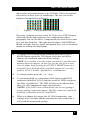
The front panel of the unit is pictured below:
Figure 3 - Front panel
Ø
There are two output connectors on the box that are both active
simultaneously. One VGA (HD15) and one DVI.
Ø
The VGA output is dual purpose. It can output standard RGBHV
VESA signals similar to those that are output by most PC’s, as well
as YPbPr component video output. The output mode of the HD15
connector is determined by a small slide switch.
Ø
There’s an indicator LED next to the slide switch that comes on
when the output resolution is one of the standard HDTV
resolutions AND the slide switch is in YPbPr mode.
Ø
To operate the unit you use 3 push-button switches. One button is
used to walk through all the resolutions and refresh rates that are
available (it is labeled OUTPUT MODE). The other 2 buttons are
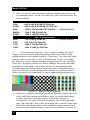
used to change the video pattern being generated - there are 28
patterns (these buttons are labeled + and - ).
Ø
For quick jump to a known resolution (instead of walking through
them one by one using the MODE switch), pressing two buttons
simultaneously jumps to a given resolution/refresh rate. Pressing
the left two buttons gets you to XGA at 60 Hz (and subsequent
pressing of the MODE button will take you up from there).
Pressing the right two buttons gets you to 480p (a standard HDTV
mode). Please note that in these HDTV modes, the DVI is
outputting the proper signal and if the slide switch is in VGA you
are getting RGBHV output and if in YPbPr you get component
video (with sync on Y) and the LED will light to indicate that the
unit is outputting a proper YPbPr output.
7