1
PREPARATION FOR USE
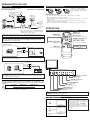
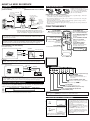
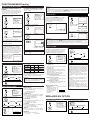
CONNECTIONS
INSTALLING THE BATTERIES
Cables used here are available on the market.
[ANTENNA CONNECTION]
1
[CATV/SATELLITE CONNECTION]
2
Install two AA batteries (supplied)
matching the polarity indicated inside
battery compartment of the remote control.
3
UHF/VHF Rod Antenna
(Not supplied)
CATV Box *
or Satellite Box
OR
OUT
VHF/UHF
RF Cable
IN
From Cable
System
or Satellite
Antenna
OR
VHF
75-ohm
Coaxial Cable
ANT. IN
OR
From Cable
System
UHF
Flat twinlead cable
VHF/UHF
Combiner
RF Cable
[BATTERY PRECAUTIONS]
• Be sure to follow the correct polarity as indicated in the battery compartment.
Reversed batteries may cause damage to the device.
• Do not mix different types of batteries together (e.g. Alkaline and Carbon-Zinc) or old batteries
with fresh ones.
• If the device is not to be used for a long period of time, remove the batteries to prevent
damage or injury from possible battery leakage.
• Do not try to recharge batteries not intended to be recharged; they can overheat and rupture.
OPERATIONS
REMOTE CONTROL AND FRONT PANEL FUNCTION
*Some cable TV systems use scrambled signals and
require a special converter to receive these channels.
Consult your local cable company.
GAME
POWER
POWER button
To turn TV on/off
CAUTION: TO PREVENT ELECTRIC SHOCK, MATCH WIDE BLADE OF PLUG TO
WIDE SLOT AND FULLY INSERT.
1
2
3
4
5
6
7
8
9
0
+100
CH(ANNEL) K / L buttons
To select channels
[EXTERNAL CONNECTION]
GAME button
SLEEP button
DISPLAY
Channel number buttons
Note:
• For your safety and to avoid damages to the unit, unplug the antenna cable from the
ANT. IN jack before moving the unit.
SLEEP
CHANNEL
RETURN
INPUT
SELECT
CH
VOL
DISPLAY button
To display CH No./Audio Status
CHANNEL RETURN button
To return previous screen
INPUT SELECT button
To select TV or external input
VOL
CH
VIDEO1 input (Rear)
MUTE
ex.
MENU
(IN)
(OUT)
MENU button
To view on-screen menu
Rear of this TV
S-Video Cable
MUTE button
VOL(UME) K / L buttons
To adjust volume
(IN)
(OUT)
ANT.IN
L
AUDIO IN
R
Audio Cable
Video Cassette Recorder
S-VIDEO
Note:
● The AUDIO L jack is for mono input. The sound is heard from both speakers. Use this jack for
connecting monaural audio equipment.
VIDEO2 input (Front)
Audio Cable
ex.
(OUT)
(IN)
(OUT)
(IN)
MENU
VIDEO
L
AUDIO
R
VOLUME
POWER
CHANNEL
HEADPHONE
Video Cable
Video Camera
Video Game
VIDEO
L
AUDIO
R
Front of this TV
MENU
VIDEO
L
AUDIO
R
VOLUME
SELECTING AUDIO/VIDEO INPUT
TV channel
VIDEO1 (Rear)
POWER
Infrared Sensor Window
POWER button
To turn TV on/off
CHANNEL ▲/▼ buttons
To select channels
When you use the AUDIO/VIDEO input jacks, select “VIDEO1” or “VIDEO2” mode by hitting [INPUT SELECT] on the remote control. The input mode changes by hitting the button
as following:
INPUT
SELECT
CHANNEL
HEADPHONE
Note:
● The AUDIO L jack is for mono input. The sound is heard from both speakers. Use this jack for
connecting monaural audio equipment.
VOLUME X/ Y buttons
To adjust volume
MENU button
To view on-screen menu
HEADPHONE jack
AUDIO L/R input jacks
VIDEO input jack
VIDEO2 (Front)
• To use the jacks on the rear of the TV, select “VIDEO1”.
• To use the jacks on the front of the TV, select “VIDEO2”.
Note:
● If some digits appear in the corner of the screen when the unit is turned on for the first time, hit
[POWER] without unplugging the power cord.
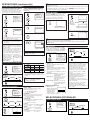
SLEEP TIMER SETTING
1
SLEEP
SLEEP 0
2
SLEEP
repeatedly
SLEEP 10
The time increases by 10 minutes
up to 90.
Notes:
● When you disconnect the unit from the AC
outlet or when you have a power failure, the
sleep time will be lost.
● To cancel the sleep timer, hit [SLEEP]
repeatedly until “SLEEP 0” is displayed.
● The Sleep Timer Setting display will disappear automatically after 10 seconds of the
operation.