1
4-466-339-12(1)
Personal Audio
System
Système audio
personnel
Quick Start Guide
US
Guide de prise en main
FR
Guía de inicio rápido
ES
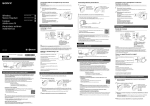
Pairing with 2nd and more BLUETOOTH
devices (Manual pairing)
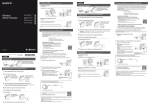
Making a call/Receiving a call
Profile: HSP, HFP
1 Turn on the unit.
Press and hold the PAIRING button for about 2 seconds
2 until
the (BLUETOOTH) indicator (blue) starts flashing
Microphone
fast.
Operate your smartphone to make a call.
Fast flashing (blue)
To terminate a call, press the
Press the
Operate in the same way when an incoming call arrives while you are
listening to the music.
Sistema de
audio personal
steps 2 and 3 of “Pairing with the BLUETOOTH
3 Perform
device for the first time (Auto pairing).”
Connecting with the paired device
1 Turn on the unit.
(BLUETOOTH) indicator (blue) is turned off, press
2 IfthetheINPUT
button once to make the (BLUETOOTH)
indicator (blue) flash.
the BLUETOOTH connection from the BLUETOOTH
3 Make
device.
The BLUETOOTH® word mark and logos are owned by the Bluetooth SIG, Inc.
and any use of such marks by Sony Corporation is under license.
ˎˎ The N Mark is a trademark or registered trademark of NFC Forum, Inc. in the
United States and in other countries.
ˎˎ Android is a trademark of Google Inc.
ˎˎ Other trademarks and trade names are those of their respective owners.
ˎˎ
Français
Manuels fournis
Guide de prise en main (ce document)
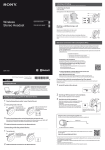
One-touch connection with a smartphone
Vous fournit les instructions pour connecter l’appareil avec des
périphériques BLUETOOTH ainsi que les opérations de base.
By touching the system with a smartphone, the system is turned on
automatically and proceeds to pair and connect via BLUETOOTH.
Guide de référence
Vous fournit les précautions et les spécifications du produit.
NFC
SRS-BTS50
button on the unit.
button on the unit when an incoming call arrives.
© 2013 Sony Corporation Printed in China
English
1
Manuals supplied
NFC (Near Field Communication) is a technology enabling shortrange wireless communication between various devices, such
as smartphones and IC tags. Thanks to the NFC function, data
communication - for example, BLUETOOTH pairing - can be achieved
easily by simply touching NFC compatible devices together (i.e., at
the N-Mark symbol or location designated on each device).
Manuel d’aide
Set the NFC function of the smartphone to on.
URL :
Lisez le Manuel d’aide sur votre ordinateur ou votre smartphone
lorsque vous voulez avoir plus de détails sur l’utilisation de
l’appareil. Le Manuel d’aide contient également un guide de
dépannage qui vous fournit des solutions aux problèmes que vous
pourriez rencontrer.
For details, refer to the operating instructions supplied with the smartphone.
http://rd1.sony.net/help/speaker/srs-bts50/uc/
If your smartphone OS is Android 2.3.3 or later, and less than Android 4.1:
proceed to step 2.
ˎˎ If your smartphone OS is Android 4.1 or later: proceed to step 4.
ˎˎ
Quick Start Guide (this document)
Provides you with instructions on how to connect the unit with
BLUETOOTH devices and basic operations.
Reference Guide
Provides you with precautions and product specifications.
Help Guide
Read the Help Guide on your computer or smartphone, when you
want to know how to use the unit in greater detail. The Help Guide
also contains a troubleshooting guide which provides you with
remedies for the problems you might encounter.
Code en deux dimensions :
2 Download and install the app “NFC Easy Connect.”
“NFC Easy Connect” is a free Android app you can download from
Google Play.
Download the app by searching for “NFC Easy Connect” or access it
by using the following two-dimensional code. Fees may be charged
for downloading the app.
By the two-dimensional code:
Use a two-dimensional code reader app.
Cet appareil est équipé d’une pile rechargeable intégrée au lithium-ion. Chargez
la pile en utilisant l’adaptateur secteur fourni avant d’utiliser l’appareil.
URL:
http://rd1.sony.net/help/speaker/srs-bts50/uc/
Note
Two-dimensional code:
ˎˎ
Chargement de l’appareil
Adaptateur secteur
(fourni)
The App may not be available in some countries and/or regions.
Allumé
(orange)
3 Start the app “NFC Easy Connect” on the smartphone.
4 Touch this unit with the smartphone.
DC IN
Make sure that the application screen is displayed.
Unlock the screen of the smartphone beforehand.
Touch the smartphone on the N marked part of this unit.
Le chargement démarre lorsque l’appareil est branché à une prise
de courant via l’adaptateur secteur, et le témoin CHARGE (orange)
s’allume. Le chargement dure environ 3 heures, puis le témoin s’éteint.
Keep touching the unit with the smartphone until the smartphone reacts.
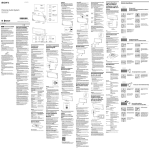
Charging the unit
Pairage et connexion avec le périphérique
BLUETOOTH
This unit has a built-in lithium-ion rechargeable battery. Charge the battery
by using the AC adaptor supplied before you use the unit.
Sélectionnez votre cas parmi les 4 types de pairage ci-dessous.
AC adaptor (supplied)
Lit (orange)
DC IN
Complete the connection by following the instructions on the screen.
When the (BLUETOOTH) indicator (blue) stops flashing and remains
lit, the unit is connected with the device.
To disconnect the unit, touch it with the smartphone again.
Charging starts when the unit is connected to an AC outlet via the
AC adaptor, and the CHARGE indicator (orange) lights up. Charging is
completed in about 3 hours and the indicator goes off.
Pairing and connecting with the BLUETOOTH device
Hint
If you cannot connect the unit, try the following.
Start the app on the smartphone, and move the smartphone slowly over
the N mark of the unit.
ˎˎ If the smartphone is in a case, remove it from the case.
ˎˎ
Pairage avec le périphérique BLUETOOTH
pour la première fois (Auto-pairage)
1
Faites glisser le commutateur POWER/HOLD sur POWER ON/
OFF et maintenez-le jusqu’à ce que le témoin d’alimentation
s’allume en vert pour mettre l’appareil sous tension.
Allumé
(vert)
Clignotement rapide
(bleu)
Select your case from the 4 pairing types, below.
Pairing with the BLUETOOTH device for
the first time (Auto pairing)
1
Slide and hold the POWER/HOLD switch to POWER ON/OFF
until the power indicator lights up in green to turn on this
unit.
Listening and Calling
Operate the unit after making BLUETOOTH connection with your BLUETOOTH
device.
Listening to music
Profile: A2DP, AVRCP
Start playback on the BLUETOOTH device, and adjust the volume.
Set the volume at an appropriate level on the device connected, and
adjust the volume with the VOL +/– buttons on the unit.
Lit
(green)
Fast flashing (blue)
VOL −
VOL +
the pairing procedure on the BLUETOOTH device
2 Perform
to detect this unit.
When the list of detected devices appears on the display of the
BLUETOOTH device, select “SONY:SRS-BTS50.”
If passkey input is required on the display of a BLUETOOTH device,
input “0000.”
the BLUETOOTH connection from the BLUETOOTH
3 Make
device.
The VOL + button has
a tactile dot.
Effectuez la procédure de pairage sur le périphérique
2 BLUETOOTH
pour détecter l’appareil.
Lorsque la liste de périphériques détectés apparaît sur l’écran du
périphérique BLUETOOTH, sélectionnez « SONY:SRS-BTS50 ».
Si un code est demandé sur l’écran d’un périphérique BLUETOOTH,
saisissez « 0000 ».
Vérifiez la connexion BLUETOOTH sur le périphérique
3 BLUETOOTH.
Lorsque l’appareil est connecté au périphérique BLUETOOTH, le
témoin (BLUETOOTH) (bleu) ne clignote plus et s’allume.
Pairage avec un 2e périphérique
BLUETOOTH ou plus (Pairage manuel)
1 Mettez l’appareil sous tension.
Maintenez le bouton PAIRING enfoncé pendant environ 2
2 secondes
jusqu’à ce que le témoin (BLUETOOTH) (bleu)
se mette à clignoter rapidement.
When the unit is connected with the BLUETOOTH device, the
(BLUETOOTH) indicator (blue) stops flashing and lights up.
Clignotement rapide
(bleu)
les étapes 2 et 3 de « Pairage avec le
3 Effectuez
périphérique BLUETOOTH pour la première fois (Autopairage) ».
Connexion au périphérique apparié
1 Mettez l’appareil sous tension.
Si le témoin (BLUETOOTH) (bleu) est éteint, appuyez une
2 fois
sur le bouton INPUT pour faire clignoter le témoin
(BLUETOOTH).
la connexion BLUETOOTH sur le périphérique
3 Vérifiez
BLUETOOTH.
La marque de mot BLUETOOTH® et les logos sont la propriété de Bluetooth
SIG, Inc. et l’utilisation de ces marques par Sony Corporation est effectuée sous
licence.
ˎˎ N Mark est une marque commerciale ou une marque déposée de NFC Forum,
Inc. aux États-Unis et dans d’autres pays.
ˎˎ Android est une marque commerciale de Google Inc.
ˎˎ Les autres marques commerciales et noms commerciaux appartiennent à leurs
propriétaires respectifs.
ˎˎ
Español
indicador (BLUETOOTH) (azul) parpadee.
Establezca la conexión BLUETOOTH desde el dispositivo
3 BLUETOOTH.
Conexión one touch con un teléfono
inteligente
Al tocar el sistema con un teléfono inteligente, el sistema se enciende
automáticamente y comienza el emparejamiento y la conexión vía
BLUETOOTH.
Instructivos incluidos
NFC
Connexion une touche avec un
smartphone
Guía de inicio rápido (este documento)
En mettant le système en contact avec un smartphone, le système se met
automatiquement sous tension puis établit le pairage et se connecte via
BLUETOOTH.
Guía de referencia
1
Si el indicador (BLUETOOTH) (azul) está apagado,
2 presione
el botón INPUT una vez para hacer que el
Proporciona las instrucciones sobre cómo conectar la unidad con
los dispositivos BLUETOOTH y cómo realizar operaciones básicas.
Proporciona las precauciones y especificaciones del producto.
NFC
Guía de Ayuda
NFC (Near Field Communication) est une technologie permettant d’établir
une communication sans fil à courte portée entre divers périphériques,
tels que des smartphones et des étiquettes électroniques. Grâce à la
fonction NFC, la communication de données (le pairage BLUETOOTH
par exemple) peut être réalisée facilement en touchant simplement les
périphériques compatibles avec NFC (c’est-à-dire sur le symbole N-Mark
ou l’emplacement désigné sur chaque périphérique).
Lea la Guía de Ayuda en su computadora o teléfono inteligente
cuando requiera información más detallada sobre cómo usar la
unidad. La Guía de Ayuda también incluye una guía de resolución
de problemas la cual ofrece remedios a los problemas que podría
afrontar.
URL:
Activez la fonction NFC sur le smartphone.
http://rd1.sony.net/help/speaker/srs-bts50/uc/
Pour plus de détails, consultez le manuel d’utilisation fourni avec le
smartphone.
1
NFC (Near Field Communication) es una tecnología que permite la
comunicación de rango corto inalámbrica entre varios dispositivos, como
los teléfonos inteligentes y las etiquetas IC. Gracias a la función NFC, es
posible lograr la comunicación de datos, por ejemplo el emparejamiento
vía BLUETOOTH, de manera fácil con sólo tocar los dispositivos en
conjunto compatibles con NFC (es decir, en el símbolo marcado con una N
o en la ubicación designada en cada dispositivo).
Ajuste la función NFC del teléfono en encendido.
Para más información, consulte las instrucciones de operación
incluidas con su teléfono inteligente.
Si el SO de su teléfono inteligente es Android 2.3.3 o posterior y anterior
a Android 4.1: avance al paso 2.
ˎˎ Si el SO de su teléfono inteligente es Android 4.1 o posterior: avance al
paso 4.
ˎˎ
2 Descargue e instale la aplicación “Conexión fácil NFC”.
“Conexión fácil NFC” es una aplicación Android que puede descargar
desde Google Play.
Descargue la aplicación buscando por “Conexión fácil NFC” u obtenga
acceso usando el siguiente código bidimensional. Se puede cobrar
una tarifa por descargar la aplicación.
Código bidimensional:
Si le SE de votre smartphone est Android 2.3.3 ou une version ultérieure,
et inférieure à Android 4.1 : passez à l’étape 2.
ˎˎ Si le SE de votre smartphone est Android 4.1 ou une version ultérieure :
passez à l’étape 4.
ˎˎ
Mediante el código bidimensional:
Use una aplicación que lea códigos
bidimensionales.
et installez l’application « Connexion NFC
2 Téléchargez
facile ».
« Connexion NFC facile » est une application Android gratuite que
vous pouvez télécharger sur Google Play.
Téléchargez l’application en cherchant « Connexion NFC facile » ou en
utilisant le code en deux dimensions suivant. Le téléchargement de
l’application peut inclure des frais.
Par code en deux dimensions :
Utilisez une application de lecture de code en deux
dimensions.
Cargar la unidad
ˎˎ
Esta unidad tiene una batería recargable de ion-litio incorporada. Cargue
la batería usando el adaptador de CA proporcionado antes de usar la
unidad.
Adaptador de CA
(suministrado)
Il est possible que l’application ne soit pas disponible dans certains pays
et/ou dans certaines régions.
4 Mettez l’appareil en contact avec le smartphone.
Terminez la connexion en suivant les instructions à l’écran.
Encendido
(naranja)
Seleccione su caso de los siguientes 4 tipos de emparejamiento.
Complete la conexión siguiendo las instrucciones en pantalla.
Emparejamiento con el dispositivo
BLUETOOTH por primera vez
(emparejamiento automático)
Cuando el indicador (BLUETOOTH) (azul) deje de parpadear y se
mantenga encendido, la unidad está conectada con el dispositivo.
Para desconectar la unidad, tóquela de nuevo con el teléfono
inteligente.
1
Encendido
(verde)
Démarrez la lecture sur le périphérique BLUETOOTH, et réglez le
volume.
Réglez le volume à un niveau approprié sur le périphérique connecté, et
réglez le volume avec les boutons VOL +/– sur l’appareil.
VOL −
VOL +
Le bouton VOL +
contient un point
tactile.
Passer un appel/Recevoir un appel
Utilice la unidad después de establecer la conexión BLUETOOTH con el
dispositivo BLUETOOTH.
Escuchar música
Perfil: A2DP, AVRCP
Realice el procedimiento de emparejamiento en el
2 dispositivo
BLUETOOTH para detectar esta unidad.
Cuando aparezca la lista de dispositivos detectados en la pantalla del
dispositivo BLUETOOTH, seleccione “SONY:SRS-BTS50”.
Si le exigen ingresar una clave de acceso en la pantalla del
dispositivo BLUETOOTH, ingrese “0000”.
Utilisez l’appareil après avoir établi la connexion BLUETOOTH avec votre
périphérique BLUETOOTH.
Profil : A2DP, AVRCP
Si no puede conectar la unidad, intente lo siguiente.
ˎˎ Inicie la aplicación en el teléfono inteligente y muévalo lentamente sobre
la letra N de la unidad.
ˎˎ Si el teléfono inteligente está en una carcasa, retírela.
Escuchar y llamar
Parpadeo rápido (azul)
Écoute de musique
Consejo
Deslice y sostenga el interruptor POWER/HOLD en la
posición POWER ON/OFF hasta que el indicador de
energía se ilumine para encender esta unidad.
Astuce
Écoute et appel
Desbloquee la pantalla del teléfono inteligente antes.
Toque con el teléfono inteligente la parte marcada con N de esta
unidad.
Emparejar y conectar con el dispositivo
BLUETOOTH
Lorsque le témoin (BLUETOOTH) (bleu) ne clignote plus et reste
allumé, l’appareil est connecté au périphérique.
Pour déconnecter l’appareil, mettez-le à nouveau en contact avec le
smartphone.
Si vous ne pouvez pas connecter l’appareil, essayez la manipulation
suivante.
ˎˎ Lancez l’application sur le smartphone puis déplacez doucement le
smartphone sur la partie marquée d’un N sur l’appareil.
ˎˎ Si le smartphone est dans un étui, retirez-le de l’étui.
4 Toque esta unidad con el teléfono inteligente.
La carga comienza cuando conecta la unidad a una toma de CA
a través del adaptador de CA y se enciende el indicador CHARGE
(naranja). La carga finaliza en aproximadamente 3 hora y el indicador
se apaga.
Vérifiez que l’écran de l’application s’affiche.
Gardez l’appareil en contact avec le smartphone jusqu’à ce que ce dernier
réagisse.
Inicie la aplicación “Conexión fácil NFC” en el teléfono
3 inteligente.
Siga tocando la unidad con el teléfono inteligente hasta que el teléfono
reaccione.
l’application « Connexion NFC facile » sur le
3 Démarrez
smartphone.
Déverrouillez d’abord l’écran du smartphone.
Placez le smartphone sur la partie marquée d’un N sur l’appareil.
Puede que esta aplicación no esté disponible para ser descargada en
algunos países o regiones.
Asegúrese de que aparezca la pantalla de la aplicación.
ENTRADA
CC
Remarque
ˎˎ
Nota
Inicie la reproducción en el dispositivo BLUETOOTH conectado y
ajuste el volumen.
Ajuste el volumen a un nivel adecuado en el dispositivo conectado y
ajuste el volumen con los botones VOL +/– en la unidad.
VOL −
la conexión BLUETOOTH desde el dispositivo
3 Establezca
BLUETOOTH.
VOL +
El botón VOL + tiene
un punto táctil.
Cuando la unidad esté conectada con el dispositivo, el indicador
(BLUETOOTH) (azul) deja de parpadear y se ilumina.
Emparejamiento con un 2do o
más dispositivos BLUETOOTH
(emparejamiento manual)
Realizar una llamada/recibir una llamada
Perfil: HSP, HFP
1 Encienda la unidad.
Presione y mantenga presionado el botón PAIRING por
2 alrededor
de 2 segundo hasta que el indicador azul
Micrófono
(BLUETOOTH) comience a parpadear rápidamente.
Profil : HSP, HFP
Utilice su teléfono inteligente para realizar una llamada.
Para finalizar una llamada, presione el botón
Parpadeo rápido (azul)
Microphone
en la unidad cuando esté recibiendo una
Opere la unidad de la misma manera cuando reciba una llamada mientras
escucha música.
Utilisez votre smartphone pour passer un appel.
Pour mettre fin à un appel, appuyez sur le bouton
Appuyez sur le bouton
se produit.
Presione el botón
llamada.
en la unidad.
los pasos 2 y 3 del “Emparejamiento con el
3 Realice
dispositivo BLUETOOTH por primera vez (Emparejamiento
automático)”.
sur l’appareil.
sur l’appareil lorsqu’un appel entrant
Procédez de la même façon lorsqu’un appel entrant se produit quand vous
écoutez de la musique.
Conectar con el dispositivo emparejado
1
Encienda la unidad.
La marca denominativa BLUETOOTH® y sus logotipos son propiedad de
Bluetooth SIG, Inc. y Sony Corporation los utiliza bajo licencia.
ˎˎ N Mark es una marca comercial o una marca comercial registrada de NFC
Forum, Inc. en los Estados Unidos y en otros países.
ˎˎ Android es una marca comercial de Google Inc.
ˎˎ Las demás marcas y nombres comerciales pertenecen a sus respectivos
propietarios.
ˎˎ