1
Read and understand the entire user guide for the Auria™ Harmony™ Processor before using the processor.
Printed user guides are available upon request.
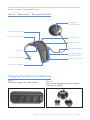
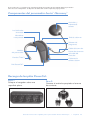
Auria™ Harmony™ Processor Parts
Headpiece
and Color Cap
LED Status Indicator
Built -in Microphone
Volume Dial
Program Switch
Headpiece Cable
Processor
Headpiece Cable
Connection Port
T-Mic™ Microphone
Accent Color Cover
PowerCel™ Battery
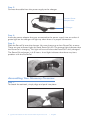
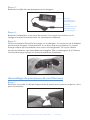
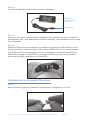
Charging Your PowerCel™ Batteries
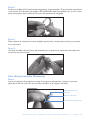
Step 1:
Place the charger on a flat surface.
Step 2:
Connect the appropriate power adapter
to the power supply.
Quick Start Guide for the Auria™ Harmony™ Processor
•
English 3