1
6. Personalizing a
program
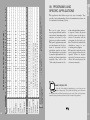
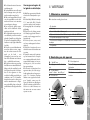
To choose a program, it is particularly useful to consult chapter
VII of this manual (“Programs
and specific applications”).
The program personalisation screen
is not available for all programs!
Regardless of the motivation you
selected in the previous step, a list
containing a select number of
programs appears on the screen.
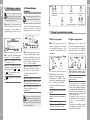
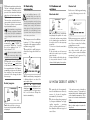
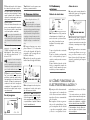
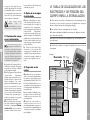
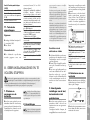
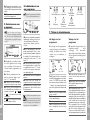
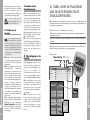
6a Some programs require manual
selection of the muscular group that
you want to stimulate. To select your
desired group, press the selection key.
6d
6e
Fig. 6
5b
Fig. 5
6a 6b 6c 6f
5a 5c
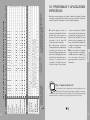
5a To select the desired program,
press the “+”/“–” key for channel 2.
5b Press the “On/Off” key to return
to the previous screen.
5c Press the validation key which,
depending on the program selected,
displays the symbol OK or START
a) START = the stimulation session
starts immediately;
b) OK = a parameter setting screen
displays.
6b The warming-up sequence suggested for some programs is active
by default (an animated rising convection symbol above the heater). If you
prefer to skip this sequence, press
the “+”/“–” key for channel 1.
6c Some programs allow you to
adjust the level of work. To do this,
press the “+”/“–” key for channel 2 ,
until the desired level of work is
displayed.
6d Total programme time in minutes.
6e By pressing the “On/Off” key, you
can return to the previous screen.
6f To confirm your selection and
start the program, press the
validation key.
Current international standards
require that a warning be given
concerning the application of
electrodes to the thorax (increased risk
of cardiac fibrillation).
12
6a
vb f
c
Buttocks
Abdomen and
Lower back
Thighs
j
m
Legs and Feet
e
td
Shoulders and
Arms
English
English
5. Selecting a program
Forearms and Hands Thorax and Back
7. During the stimulation session
Starting a program
Program progression
When the program starts, the
S timulation does really start
when the stimulation energy has
been increased.The examples
reproduced below are sufficient
to understand the general rules.
Compex prompts you to increase
the stimulation energy, a key
factor for the effectiveness of the
stimulation.
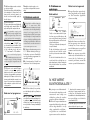
7b
7f
7d
7c
7e
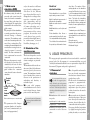
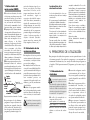
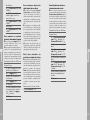
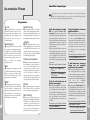
7a The Compex “beeps” and the
symbols of the two channels flash,
changing from “+” to “000”. You must
increase the stimulation by pressing
the “+” of the keys of the relevant
channels, until the desired setting is
reached.
7b Remaining time in minutes and
seconds.
7c The animated rising convection
symbol represented the warming-up
sequence.
7d Session progression scale.
7e By pressing the “On/Off” key, you
can return to the previous screen.
7j
7i
7g
7k
7a
Fig. 7
7h
Fig. 7
7l
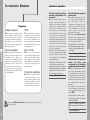
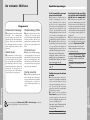
7f Remaining time (in minutes and seconds) before the end of the program.
7g A small animated symbol indicating the motivation to which the
program belongs.
7h Session progression scale:
The progression scale is composed
of three distinct parts: the program
consists of three stimulation sequences,
i.e., warming up (light hatching /left), the
actual work (black area/centre) and
relaxation at the end of the program
(heavier hatching/right).
The progression scale can be also
entirely hatched: the program then
consists of a single stimulation
sequence.
The small cursor located just below the
scale indicates precisely the state of
progression of the program.
13