1
INSTALLATION
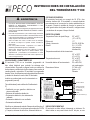
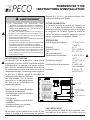
WIRING AND MOUNTING
! 1. To avoid electrical shock or damage to equipment,
disconnect power before installing this thermostat.
▲
2. Position the three switches on back of thermostat, according
to the HVAC system being controlled and the power source.
3. Connect electrical:
• If using a mounting plate: Pull the wires out of the middle
hold of the mounting plate and adjust the plate on the wall
or junction box.
• Loosen screw terminals, insert wires into the appropriate
terminals, then re-tighten screws.
• Cap off all unused wires. All connections must be located in
the outlet box.
the battery compartment (located under the front cover of
thermostat).
5. Place two AA alkaline batteries into the battery compartment
(located under the front cover of thermostat).
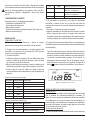
Note: In these instructions, the term “Normal Mode” refers
to the default thermostat display (i.e. when the user is not
performing any operations). The default display shows
current time, current room temperature, day of week,
event, system mode, and program selection. Pressing the
button always takes the thermostat to Normal Mode
FAN ON
Conventional System Terminal Designations:
Terminal
Input/ Output
Description
C
Input
G
Output
Fan
H2
Output
Stage 2 Heat
H1
Output
Stage 1 Heat
C1
Output
Stage 1 Cool
C2
Output
Stage 2 Cool
R
Input
Unswitched Side, 24 VAC
Switched Side, 24 VAC
Heat Pump System Terminal Designations:
Terminal
Input/ Output Description
C
Input
Unswitched Side, 24 VAC
G
Output
Fan
E
Output
Auxillary or Emergency Heat
B/O
Output
Reversing Valve
Y1
Output
Compressor Stage 1, Heat 1 or Cool 1
Y2
Output
Compressor Stage 2, Heat 2 or Cool 2
R
Input
Switched Side, 24 VAC
4. The thermostat mounts to a horizontal or vertical 2x4
junction box with the use of an accessory mounting plate, or
may be mounted directly to the wall:
• Place the 2 wall anchors into the wall.
• Fasten the thermostat with the screws provided through the
2 mounting holes. One mounting hole is accessible through
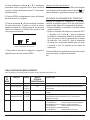
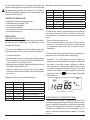
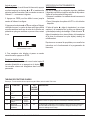
Example of a “Normal Mode” Display
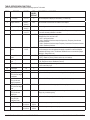
THERMOSTAT CONFIGURATION / SERVICE MENU
The installer must configure the thermostat to match the
installed heating/cooling system. The Service Menu allows the
installer to modify configuration variables that are not normally
accessed by the end user. The configuration variables are
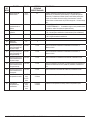
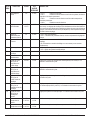
identified by Menu Number, as listed in the “Service Menu
Functions” table.
Accessing the Service Menu
1. From the Normal Mode thermostat display, simultaneously
press the ▲ and ▼ buttons, and hold down for 5 seconds.
This takes you into the Service Menu and menu item number
“1” will be flashing.
2. Push PROG to scroll to the Service Menu item number to
be configured.
3. Push ▲ or ▼ buttons to configure the selected menu
item. The service menu number is always shown in the small
digits; selection values are shown in the larger digits or other
icons as appropriate.
Example of a “Service Menu” Display
© COPYRIGHT 2009 PECO, INC. ALL RIGHTS RESERVED.
P/N 69535 3220-2151 REV 0 PAGE 2