1
TGA300(e).fm Page 3 Tuesday, December 5, 2006 6:58 PM
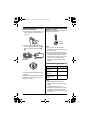
Battery installation
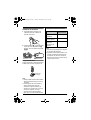
Battery charge
1 Press the notch of the handset cover
Place the handset on the charger for 7
hours before initial use.
firmly, and slide it in the direction of
the arrow.
Charge
contacts
2 Insert the battery (A), and press it
down until it snaps into position (B).
Then close the handset cover (C,
D).
B
A
C
D
Attention:
Note:
L If you want to use the handset
immediately, charge the battery for at
least 15 minutes.
L To ensure that the battery charges
properly, clean the charge contacts of
the handset and charger with a soft,
dry cloth once a month. Clean more
often if the unit is subject to the
exposure of grease, dust, or high
humidity.
Panasonic battery performance
A nickel metal hydride battery that is
recyclable powers the product you have
purchased.
Please call 1-800-8-BATTERY (1-800822-8837) for information on how to
recycle this battery.
Operation
Operating time
While in use
(talking)
Up to 5 hours
While not in use
(standby)
Up to 11 days
While using the
clarity booster
feature
Up to 3 hours
Note:
L The handset can be left on the
charger without any ill effect on the
battery.
L The battery level may not be
displayed correctly after you replace
the battery. In this case, place the
handset on the charger and let charge
for 7 hours.
For assistance, please visit http://www.panasonic.com/help
3