1
TGA300(e).fm Page 4 Tuesday, December 5, 2006 6:58 PM
Registration
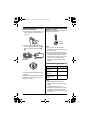
Headset (optional)
Register the handset to a KX-TG3021/
KX-TG3031/KX-TG3032/KX-TG3033
base unit.
Connecting a headset to the handset
allows hands-free phone
conversations. We recommend using a
Panasonic KX-TCA60/KX-TCA86/KXTCA88HA/KX-TCA92/KX-TCA93/KXTCA94/KX-TCA95 headset. See page
2 for ordering information.
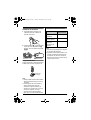
1 Base unit:
KX-TG3021
Press and hold {LOCATOR} until
the IN USE indicator flashes.
KX-TG3031/KX-TG3032/KXTG3033
Press and hold {LOCATOR/
INTERCOM} until the IN USE
indicator flashes.
L After the IN USE indicator starts
flashing, the rest of the procedure
must be completed within 1
minute.
2 Handset:
Press {OK}, then wait until a beep
sounds.
L Headset shown is KX-TCA86.
Note:
L To switch to the handset
speakerphone, press {s}. To return
to the headset, press {C}.
Changing the display
language
1 KX-TG3021
{MENU} i {0}{8}
KX-TG3031/KX-TG3032/KXTG3033
{MENU} i {0}{8}{1}
2 {V}/{^}: Select the desired setting.
3 Press the right soft key to save. i
{OFF}
4
For assistance, please visit http://www.panasonic.com/help