1
7
ES
EN
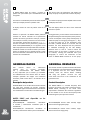
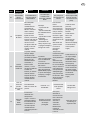
Descripción de cada botón
Botón/Button
ON/OFF
AJUSTE /
MONITOREO
+/-
Keyboard use
Acción
Effect
Permite encender o apagar la operación del
WATER DRIVE sobre la motobomba.
- Mantener presionado por 5 segundos.
- Luz encendida: El WATER DRIVE está en
operación.
- Luz apagada: El WATER DRIVE está apagado.
To set the device in stand by and switch off the pump.
- Keep pressed for 5 seconds.
- Light on= device is operating.
- Light off= device in stand by.
Permite pasar del modo ajuste al modo de
supervision (Monitoreo).
-Mantener presionado por 1 segundo para entrar
al modo de monitoreo.
-Mantener presionado por 5 segundos para entrar
en el modo de ajuste.
-Presione una segunda vez para grabar algún valor
y regresar al modo monitoreo.
Si el led del botón AJUSTE/MONITOREO está
encendido de color verde, al presionar estos
botones podemos visualizar los valores de
operación en tiempo real de la motobomba.
Si está encendido en color rojo, podemos
modificar el valor seleccionado.
It allows to switch from display mode to set mode:
-Press for 1 second to see the value set.
-Press for 5 second to enter into set mode.
-Press a second time to save the value and return to
display mode.
If LED SAVE / DISPLAY green= it allows to scroll
through the parameters.
If LED SAVE / DISPLAY red= it allows to change the
selected parameter value.
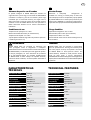
CONFIGURACIÓN INICIAL
PROCEDURE
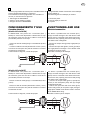
Al energizar el variador WATER DRIVE, después de 2 segundos
mostrará la siguiente pantalla.
Power the WATER DRIVE in 2 seconds it will be displayed
the version of the software and the model of the device.
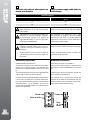
MM
01
Muestra el valor de corriente que usted podrá ajustar.
Presione el botón “+” para aumentar y “–” para disminuir
hasta obtener el valor deseado.Presione el botón AJUSTE/
MONITOREO para grabar el valor deseado y para pasar al
siguiente parámetro.
Displayed the value of current to be set. Press the
+ button to increase the value and - to decrease.
Press the SAVE key to save the value and move to the
next.
6.8
Muestra el valor de la presión del sistema que usted podrá
ajustar. Presione el botón “+” para aumentar y “–” para disminuir
hasta obtener el valor desado. Presione el botón AJUSTE/
MONITOREO para grabar el valor deseado y para pasar al
siguiente parámetro.
Displayed the value of System Pressure to be set. Press
the + button to increase the value and - to decrease.
Press the SAVE key to save the value and move to the
next.
3.0
Muestra el valor de presión de arranque que usted podrá
ajustar. Presione el botón “+” para aumentar y “–” para
disminuir hasta obtener el valor deseado. Presione el
botón AJUSTE/MONITOREO para grabar el valor deseado.
La configuración inicial ha terminado.
Displayed the value of Restart Pressure to be set. Press
the + button to increase the value and - to decrease.
Press the SAVE key to save the value. The installation
procedure is finished.