1
For Windows®
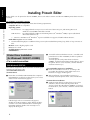
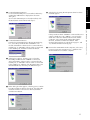
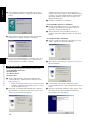
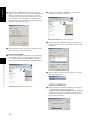
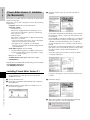
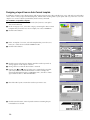
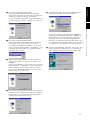
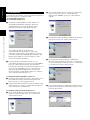
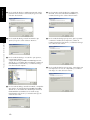
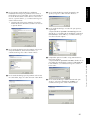
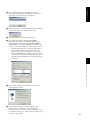
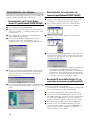
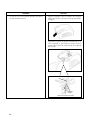
K In the Add Printer Wizard dialog box that allows you
to select the driver, click the Have Disk button.
For a serial connection With Windows® 2000
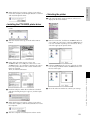
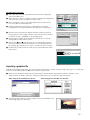
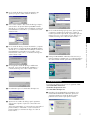
L In the Install From Disk dialog box that appears, click
the Browse button.
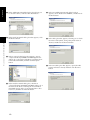
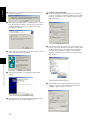
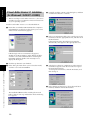
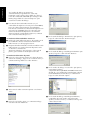
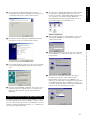
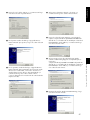
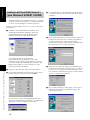
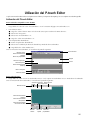
O In the next Add Printer Wizard dialog box that
appears, select “Brother PT-9200DX”, and then click
the Next button.
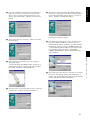
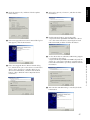
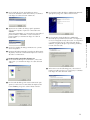
P In the dialog box that appears, allowing you to check
the name of the printer, change the printer name if
desired, and then click the Next button.
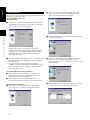
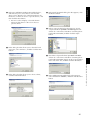
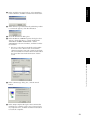
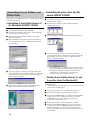
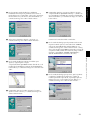
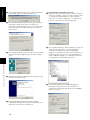
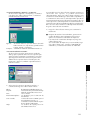
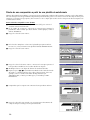
M In the Locate File dialog box that appears, specify
“d:\ptouch\driver\pt9200dx\win2000\ptpro2v.inf”
(where “d:” is the name of the drive containing the Ptouch Editor CD-ROM), and then click the Open
button.
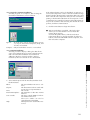
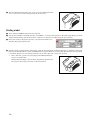
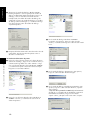
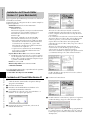
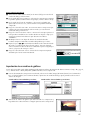
Q In the next dialog box that appears, specify that this
printer will not be shared, and then click the Next
button.
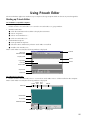
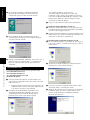
N In the Install From Disk dialog box, check that
“d:\ptouch\driver\pt9200dx\win2000” (where “d:” is
the name of the drive containing the P-touch Editor
CD-ROM) appears in the “Copy manufacturer’s files
from” box, and then click the OK button.
10