1
ENGLISH
OPERATION MANUAL
ENGLISH
OPERATION MANUAL
FUNCTIONS (FRONT)
OPERATION MANUAL
Thank you for buying this JB Systems product. To take full advantage of all
possibilities, please read these operating instructions very carefully.
FEATURES
y
y
y
y
y
y
y
Easy to use 4channel dedicated DMX controller for iColor-4 color mixer
4 different user modes:
o Hold: Instant access of 9 preprogrammed colors.
o Static Chase: 12 different chase patterns with user selectable speed
o Sound Chase: 12 different chase patterns with audio triggering
o Spectrum Mix: 32 different spectrum mix colors, including color fade.
Adjustable speed with fader
Adjustable dimming with fader
Color fade with adjustable fade time
Blackout function
Full on function
BEFORE USE
Check the contents:
Check that the carton contains the following items:
1. CA-32 Colormix controller
2. AC/DC adapter
3. Operating instructions
Some important instructions:
• To prevent fire or shock hazard, do not expose this appliance to rain or moisture.
• In order to prevent electric shock, do not open the cover. If a problem occurs, contact
your dealer.
• Don’t place metal objects or spill liquid inside the unit. Electric shock or malfunction
may result.
• Prevent use in dusty environments, clean the unit regularly.
MAINTENANCE
Clean by wiping with a polished cloth slightly dipped with water. Avoid getting water
inside the unit. Do not use volatile liquids such as benzene or thinner which will
damage the unit.
JB SYSTEMS
1/20
CA-32 COLORMIX
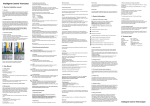
1. HOLD COLORS BUTTONS: Hold button (2) is active, you can use these buttons
to easily select one of the 9 preprogrammed colors.
2. HOLD MODE BUTTON: Used to select the “hold colors” mode, refer to (1) for
more information.
3. CHASE MODE BUTTON: Used select the chase mode. The connected i-Color4
projector will show different preprogrammed chase patterns. These different
patterns can be selected with chase fader(5). There are two different chase modes:
• Static Chase: This is the standard chase mode where you can adjust the
chase speed yourself with the Speed fader(6).
• Sound Chase: You can also use the Sound button(8) to make the chase
patterns work to the rhythm of the music.
4. SPECTRUM MIX MODE BUTTON: In spectrum mix mode the spectrum mix
fader(5) is used to select one of the 32 spectrum mix colors.
5. CHASE/SPECTRUM MIX FADER: The function of this fader depends on the
selected user mode:
• Hold mode: the fader is not used.
• Chase mode: the fader is used to select one of the preprogrammed chase
patterns. Refer to the text on the left side of the fader to make your choice.
• Spectrum mix mode: the fader is used to select one of the 32
preprogrammed spectrum mix colors. Refer to the text on the right side of the
fader to make your choice.
Important remark: There’s also a function called “color fade” which is very
nice for “background lighting” applications. Select this function to fade gently
from one color to another. You can adjust the fade over time with the fade
fader(6).
6. SPEED/FADE SLIDER: The function of this fader also depends on the selected
user mode:
• Hold mode: the fader is not used.
JB SYSTEMS
2/20
CA-32 COLORMIX