1
English
Español
SLEEP
SCENE
7
1
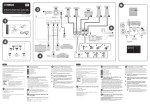
Optimizing the speaker settings automatically (YPAO)
Note the following regarding YPAO measurement
• Test tones are output at high volume and may surprise or frighten
small children.
• Test tone volume cannot be adjusted.
• Keep the room as quiet as possible.
• Stay in a corner of the room behind the listening position so that
you do not become an obstacle between speakers and the YPAO
microphone.
• Do not connect headphones.
Press SETUP.
If “W-1:Out of Phase” appears (
The measurement will start in 10 seconds.
It takes about 3 minutes to measure.
The screen 7 -1 appears on the TV when the measurement finishes.
Follow the procedure below to check the speaker connections.
CD
RADIO
ENHANCER
BASS
7
7
USB
INPUT (q/w)
INPUT
Do not leave the YPAO microphone in a place where it will be exposed to
direct sunlight or high temperature for an extended period of time.
VOLUME (+/-)
VOLUME
1
MUTE
-A)
SETUP
SETUP
OPTION
ENTER
ENTER
RETURN
7 -1
RED
HOME
GREEN
YELLOW
MEMORY
TUNING
Auto Setup
Measurement
Finished
Start
Exit
7 -2
TUNING
Exit
1
2
3
Utilice las teclas de cursor (e/r) para seleccionar “SAVE”
(Save) (pantalla 7 -2) y pulse ENTER.
3
Measurement
Finished
Start
Desconecte el micrófono YPAO de la unidad.
Result
SAVE
No deje el micrófono YPAO en un lugar en el que pueda estar expuesto a la
luz solar directa o a altas temperaturas durante un periodo prolongado de
tiempo.
3 / 2 / 0.1 ch
3.0 / 10.5 m
3.0 / 10.5 m
-3.0 / +10.0 dB
8
Siga el procedimiento descrito a continuación para comprobar las conexiones
del altavoz.
• Si aparece el mensaje de advertencia “W-1:Out of Phase”, consulte “Si
aparece “W-1:Out of Phase”.
2
Auto Setup
3 / 2 / 0.1 ch
-3.0 / +10.0 dB
OK:ENTER
This completes optimization of the speaker settings.
Si aparece “W-1:Out of Phase” (
POP-UP/MENU
PRESET
Result
Pulse SETUP.
• Si aparece un mensaje de error (com E-1) o un mensaje de advertencia
(como W-2), consulte “Mensajes de error” o “Mensajes de advertencia”
en el Manual de Instrucciones.
BLUE
• Permanezca en una esquina de la sala detrás de la posición
de escucha para que no se convierta en un obstáculo entre los
altavoces y el micrófono YPAO.
• No conecte auriculares.
La medición comenzará al cabo de 10 segundos.
La medición tarda unos 3 minutos en realizarse.
La pantalla 7 -1 aparece en el TV cuando acaba la medición.
Cursor keys
Teclas de cursor
DISPLAY
TOP MENU
If the speaker is connected correctly:
Depending on the type of speakers or room environment, this message may
appear even if the speakers are connected correctly.
In this case, ignore the message and proceed to step 2.
Disconnect the YPAO microphone from the unit.
Tenga en cuenta la siguiente medición relativa a YPAO
• Los tonos de prueba se emiten a alto volumen y pueden sorprender
o asustar a los niños pequeños.
• El volumen del tono de prueba no puede ajustarse.
• Mantenga la sala lo más silenciosa posible.
BLUETOOTH
If the speaker is connected incorrectly:
Turn off the unit, reconnect the speaker cable, and then try YPAO measurement
again.
Use the cursor keys (e/r) to select “SAVE” (Save) (screen
7 -2) and press ENTER.
Optimización de los ajustes de los altavoces automáticamente (YPAO)
FM/AM
1 The speaker indicator in the front display will blink for a problem speaker.
2 Check cable connections (+/-) for the problem speaker.
• If the warning message “W-1:Out of Phase” appears, see “If “W-1:Out of
Phase” appears”.
3
STRAIGHT
TV
STRAIGHT
PROGRAM
• If any error message (such as E-1) or warning message (such as W-2)
appears, see “Error messages” or “Warning messages” in the Owner’s
Manual.
2
BD
DVD
7
-A)
1 El indicador del altavoz en el visor delantero parpadeará si existe un
altavoz con problema.
2 Compruebe las conexiones de los cables (+/-) del altavoz con problemas.
Si el altavoz está mal conectado:
Apague la unidad, vuelva a conectar el cable del altavoz y luego realice la
medición YPAO de nuevo.
Si el altavoz está bien conectado:
Dependiendo del tipo de altavoces o el entorno de la sala, puede aparecer
este mensaje, incluso si los altavoces están correctamente conectados.
En este caso, ignore el mensaje y continúe con el paso 2.
Con esto ha finalizado la optimización de los ajustes de los altavoces.
7 -A
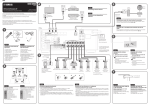
Playing back a BD/DVD
Auto Setup
Now let’s play back a BD/DVD.
We recommend playing back multichannel audio (5.1-channel or more) to feel surround sound produced by the unit.
4
Turn on the BD/DVD player.
Press INPUT (q/w) to show “HDMI 1” in the front display.
“HDMI 1” is selected as the input source. The name of the connected
device, such as “BD Player”, may be displayed with some devices ( 8 ).
5
Start playback on the BD/DVD player.
Start
CHARGE
Result
Exit
ENHANCER STEREO TUNED
SLEEP MUTE
OUT
ECO
3 / 2 / 0.1 ch
3.0 / 10.5 m
-3.0 / +10.0 dB
Press STRAIGHT to show “STRAIGHT” in the front panel
display.
W-1:PHASE
1
2
Problem speaker (blinks)
Altavoz con problemas
(parpadea)
W-1:Out of Phase
Warning message
Mensaje de advertencia
8
This completes the basic setup procedure.
When surround sound is not heard, or no sound is output from a specific speaker,
see “Troubleshooting” in the Owner’s Manual.
3
CHARGE
ENHANCER STEREO TUNED
4
Encienda el reproductor BD/DVD.
Pulse INPUT (q/w) para que aparezca “HDMI 1” en el visor
delantero.
Pulse STRAIGHT para que aparezca “STRAIGHT” en el visor
delantero.
Cuando está activado el modo “STRAIGHT” (decodificación directa),
cada altavoz produce directamente la señal de audio de cada canal (sin
procesamiento de campo sonoro).
Se selecciona “HDMI 1” como fuente de entrada. En algunos dispositivos
puede mostrarse el nombre del dispositivo conectado, como “BD Player”
( 8 ).
5
Inicie la reproducción en el reproductor BD/DVD.
Esto completa el procedimiento de configuración básica.
Pulse VOLUME para ajustar el volumen.
SLEEP MUTE
OUT
ECO
Ahora vamos a reproducir un BD/DVD.
Le recomendamos que reproduzca audio de varios canales (5.1 canales o más) para sentir el sonido surround producido por la unidad.
ADAPTIVE DRC VIRTUAL
OK:ENTER
Press VOLUME to adjust the volume.
Reproducción de un BD/DVD
VOL.
When “STRAIGHT” (straight decode) is enabled, each speaker produces each
channel audio signal directly (without sound field processing).
VOL.
BD Player
ADAPTIVE DRC VIRTUAL
Cuando no se oye el sonido surround o un determinado altavoz no emite sonido,
consulte “Resolución de problemas” en el Manual de Instrucciones.
Name of the connected device
Nombre del dispositivo conectado
Playing back music stored on a
BLUETOOTH device
Basic operations
8
Front display
Visor delantero
Measurement
Finished
Reproducción de música
almacenada en un dispositivo
BLUETOOTH
Operaciones básicas
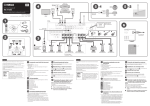
Seleccionar la fuente de entrada registrada y el programa de sonido con un solo toque
Select the registered input source and sound program with one touch
De manera predeterminada, para cada escena se registra la configuración siguiente.
By default, the following settings are registered for each scene.
SCENE
BD
DVD
TV
CD
RADIO
HDMI 1
AUDIO 1
AUDIO 2
TUNER
MOVIE (Sci-Fi)
STRAIGHT
STRAIGHT
STEREO (5ch Stereo)
Compressed Music Enhancer
Off
On
Off
On
SCENE link playback
On
On
Off
Off
Input
Sound program
STRAIGHT: Straight decode mode is
enabled. Unprocessed sounds from
original channels will be played.
ENHANCER: Compressed Music
Enhancer is enabled. Compressed
music stored on a BLUETOOTH device
or USB storage device will be played
with additional depth and breadth.
2
MEMORY
TV
STRAIGHT
CD
RADIO
ENHANCER
BASS
PROGRAM
1
USB
INPUT
VOLUME
Adjust the volume level
BLUETOOTH
MUTE
SETUP
Mute the audio output
2
3
OPTION
ENTER
Select an input source
RETURN
DISPLAY
TOP MENUname
HOMEof the
POP-UP/MENU
The
input source appears
in the front display.
RED
GREEN
YELLOW
BLUE
MEMORY
TUNING
TUNING
PRESET
RADIO
Entrada
HDMI 1
AUDIO 1
AUDIO 2
TUNER
4
MOVIE (Sci-Fi)
STRAIGHT
STRAIGHT
STEREO (5ch Stereo)
Compressed Music Enhancer
Off
On
Off
On
Reproducción mediante
vinculación de SCENE
On
On
Off
Off
Mando a distancia
Dispositivo
BLUETOOTH
2
MEMORY
3
BLUETOOTH
The unit’s model name is
displayed where “-------” is
indicated above.
FM/AM
CD
1
SCENE
BD
DVD
TV
3
------- Yamaha
Turn on/off (standby) the unit
BASS: Extra Bass is enabled.
PROGRAM (e/r): Sound programs
suitable for movies, music and stereo
playback can be selected.
BLUETOOTH device
BLUETOOTH
SLEEP
BD
DVD
Programa de sonido
Remote control
1
Select a sound mode
(sound field effect,
stereo playback, etc.)
SCENE
Press BLUETOOTH to select “Bluetooth” as the input
source.
Hold down MEMORY for more than 3 seconds.
Turn on the BLUETOOTH function on your device,
and select the model name of the unit from the
BLUETOOTH device list on your device.
After pairing has been completed and the unit is connected to the
BLUETOOTH device, “Connected” appears on the front display.
Operate the BLUETOOTH device to play back music.
• Once a BLUETOOTH device has been connected to (paired with) this
unit, step 2 may be skipped the next time you use that device.
• Refer to the Owner’s Manual for details regarding the BLUETOOTH
function.
Seleccionar un modo de sonido
(efecto de campo sonoro,
reproducción estéreo, etc.)
STRAIGHT: se activa el modo de
decodificación directa. Se reproducirán
sonidos no procesados de canales
originales.
ENHANCER: se activa el Compressed
Music Enhancer. La música comprimida
almacenada en un dispositivo
BLUETOOTH o dispositivo de
almacenamiento USB se reproducirá
con una profundidad y una amplitud
mayores.
SCENE
BD
DVD
TV
STRAIGHT
------- Yamaha
Encender y apagar (espera)
la unidad
SLEEP
CD
RADIO
ENHANCER
BASS
El nombre de modelo de la
unidad se muestra donde
arriba pone “-------”.
PROGRAM
1
FM/AM
USB
INPUT
VOLUME
Ajustar el nivel de volumen
BLUETOOTH
MUTE
SETUP
2
3
Silenciar la salida de audio
OPTION
BASS: se activan los graves extra.
PROGRAM (e/r): pueden
seleccionarse programas de sonido
apropiados para películas, música y
reproducción estéreo.
ENTER
Seleccionar una fuente de entrada
RETURN
DISPLAY
TOP MENU
HOMEde la
POP-UP/MENU
El
nombre
fuente de entrada aparece
en el visor delantero.
RED
GREEN
YELLOW
BLUE
MEMORY
TUNING
TUNING
PRESET
4
Pulse BLUETOOTH para seleccionar “Bluetooth” como
fuente de entrada.
Mantenga pulsado MEMORY más de 3 segundos.
Active la función BLUETOOTH en su dispositivo y
seleccione el nombre de modelo de la unidad de la
lista de dispositivos BLUETOOTH de su dispositivo.
Cuando se completa el emparejamiento y la unidad está
conectada al dispositivo BLUETOOTH, la palabra “Connected”
se muestra en el visor delantero.
Accione el dispositivo BLUETOOTH para reproducir
música.
• Una vez que un dispositivo BLUETOOTH se ha conectado a
(emparejado con) esta unidad, puede saltarse el paso 2 la siguiente
vez que lo utilice.
• Consulte el Manual de Instrucciones para obtener información sobre la
función BLUETOOTH.