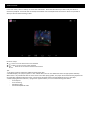
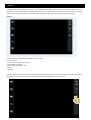
1
5.
6.
7.
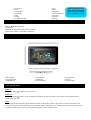
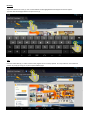
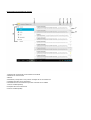
Volver
Incrementar volumen
Nivel de batería
8.
9.
10.
11.
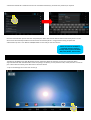
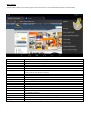
Reloj
Búsqueda Google
Búsqueda por voz
Menú aplicaciones y Widgets
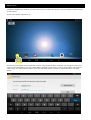
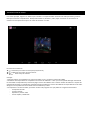
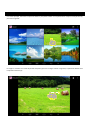
Cambiar el fondo de pantalla
Mantenga pulsado en cualquier lugar de la pantalla del escritorio y un mensaje emergente aparecerá pidiéndole que
seleccione el fondo de pantalla. Elija el fondo de pantalla deseado y confírmelo.
Aplicaciones y widgets en el escritorio
Muévase por la pantalla de derecha o izquierda para ver qué aplicaciones y widgets se han instalado y están colocados
en el escritorio. Para todas las aplicaciones y widgets que están en la ZEUS, pulse el botón de Menú (11).
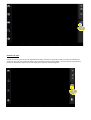
Pestaña
Pulse el botón (2) para ver qué programas o tareas se están ejecutando actualmente en el dispositivo. Puede cambiar
de un programa a otro a través de esta opción, o puede optar por cerrar el programa también
CONFIGURACION GENERAL
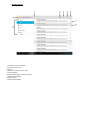
Configure los parámetros de su ZEUS para que se ajuste a sus necesidades. Entre en el menú de configuración y verá una
lista de operaciones.
Redes y Conexiones Inalámbricas
Wi‐Fi
Bluetooth
Uso de datos
Más
Enciende o apaga la red Wi‐Fi.
Active esta función para utilizar la función de Bluetooth.
Presione esta opción para ver el uso de datos de su tableta ZEUS
Presione esta opción para ver más opciones en la configuración de Redes y conexiones
inalámbricas.
Dispositivo
Sonido
Pantalla
Almacenamiento
Batería
Apps
Configure los niveles de volumen y las opciones de sonido
Configure las diferentes opciones de pantalla. (Brillo, fondo de pantalla, apagado automático,
configuración HDMI, etc…)
Compruebe la cantidad de espacio disponible en su tableta ZEUS.
Compruebe qué aplicación está utilizando más batería y compruebe el nivel de batería actual.
Compruebe qué aplicaciones se han descargado, dónde se han guardado y cuáles están
funcionando actualmente.
Personal
Servicios de localización
Seguridad
Idioma y Entrada
Copia de seguridad y Reinicio
Gestione su configuración de localización.
Gestione su información de seguridad a través de esta opción. (Contraseñas, información
de usuario, etc…)
Establezca el idioma del dispositivo y el idioma del teclado a través de esta opción.
Copie los datos de su tableta ZEUS para realizar un reinicio de la unidad.