1
Setting up (continue)
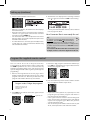
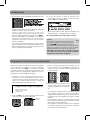
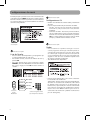
3. Press 1 to start automatic channel search.
• When the scan finishes, the Channel List menu displays
the found channels.
• Reposition the antenna and perform the automatic
channel scan again if you cannot find all available
channels by pressing MENU key.
• The Conver ter Box is also compatible with Smar t
Antennas which can provide improved reception over
standard indoor antennas.
• If a Smart Antenna is connected, press 1 for Quick Scan
or 2 for Full Scan. A full scan with Smart Antenna may
take around 40-50 minutes.
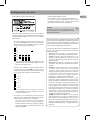
4. The Channel List is displayed once scanning is finished
Press or to select channel and OK to start viewing.
• You may also hide unwanted channels, refer to “Channel
List” on page 8 for details.
Your Converter Box is now ready for use!
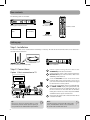
Tip:
To continue to view non-digital TV broadcasts,
if available, press the BOX on your remote to
place the Converter Box in stand-by mode (red
light), then switch your TV to channel 3 or 4 (depending
on which channel the Converter’s CH3/CH4 selector
switch is set to).
You must have the RF coaxial cable connected to your
TV input, in order to watch non-digital TV broadcasts.
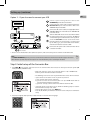
Program the supplied remote control
Yo u c a n c o n t ro l T V s e t s o f a l l m a j o r b r a n d s a f t e r
programming the Converter Box remote control with
the PGM key. RCA T V sets can be controlled directly
without programming. Refer to the steps below and the
separate Program Code leaflet to guide you through the
programming.
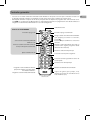
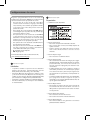
3. Enter the 3-digit program code with the number keys.
Press OK for confirmation. The signal indicator will be
off when the program is done.
1. Refer to the Program Code at the last pages of this
booklet. Look for the brand of your TV set and a 3-digit
program code next to it. There may be more than one
program code available. Choose any one of them.
4. Press the volume keys on this remote control to check if
they can adjust the volume of your TV set.
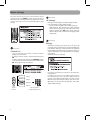
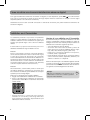
Program codes/Códigos de programa
Admiral 002, 128, 183, 189
Advent 191, 258, 260, 275
Adventura 129
2. Press PGM on the remote control. The signal indicator
on it remains lit.
signal indicator
6
• If you fail to control your TV set, repeat steps 2 to 4 to
program again. Try another program code if there is
more than one for your TV brand.
• If the signal indicator remains lit after blinking four
times, you may have entered the wrong code. Repeat
steps 3 to 4 to program again. Make sure you have
correctly entered the code.
• You can still use your TV remote control to turn on your
TV set, select input source and control the volume.