1
Identification of Controls
First Time Installation
Home Menu
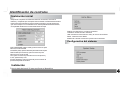
After all connections have been made properly, switch on TV and make
sure the receiver is connected to the Main Power. Press Power Button to
switch receiver on. If you are using the receiver For the first time or
restored to Factory Default, the Main Menu will appear on your TV screen.
FIRST INSTALLATION
OSD LANGUAGE
ENGLISH
COUNTRY
FRANCE
TIME ZONE
GMT+1
LCN
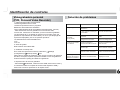
Settings
Television
USB
Radio
Multimedia
Settings:enter system setup
Television:enter Television mode
USB:Display USB information and software upgarde
Radio:enter Radio mode
Multimedia:enter Multimedia play mode
ON
START
OSD LANGUAGE:Press OK key to select Osd language
COUNTRY:Press OK key to select Country.
TIME ZONE:Press OK key to select Time zone
LCN:Press OK key to select lcn ON or OFF
START:Press OK key to start first programs search.
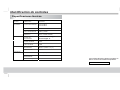
Setup Installation
system setup
System Setup
OSD Language
Country
LCN
Time Zone
System Information
Factory Reset
Press menu key to enter setup installation
4