1
Setting Up the Savi Office WO100 System
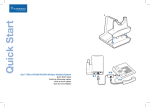
1. Attaching Charge Cradle to Base
Connect the headset charge cradle to the base. Push firmly on the cradle until the cradle snaps
into place.
2. Connecting Base to Desk Phone
2-1. Connect the telephone interface cable to the telephone interface cable jack on the base.
2-2. After disconnecting the handset coil cord from the desk phone, connect the telephone
interface cable to the now open handset port on the desk phone.
2-3. Connect the handset coil cord to the telephone interface cable junction box.
3. Connecting Power Supply to Base
3-1. Connect the base power supply into the power jack on the base.
3-2. Connect the power supply to outlet.
4. Docking and Charging Headset
Gently push the headset into the charge cradle. Charge for at least 20 minutes prior to the first use.
A full charge takes 3 hours.
Charging time
20 min . ....................
Minimum charge
before first use
3 hours ....................
Full charge
5. Checking Configuration
5-1. Set volume on desk phone to mid-range.
5-2. On the base, ensure the configuration switch is set to “A” and the desk phone speaking
volume and desk phone listening volume are both set to 3.
note For most phones, these factory default settings will sound the best.
5-3. With your headset on, press the call control button on headset.
5-4. Remove the handset from desk phone cradle.